

Gemini Omni Flash 1.1 (gemini-omni-1.1-eap) هو نموذج متعدّد الوسائط عالي الأداء مصمّم لإنشاء الفيديوهات وتعديلها والتحكّم فيها بشكل سينمائي وبسرعة عالية.
يحلّ Gemini Omni Flash 1.1 محل الإصدارات السابقة من Gemini Omni Flash بالكامل، ويقدّم جودة إنشاء محسّنة وإمكانات متعدّدة الوسائط أصلية وإمكانات تعديل الفيديوهات التي تحتفظ بالحالة:
- إمكانات متعدّدة الوسائط أصلية: يعالج النموذج النصوص والصور والمقاطع الصوتية والفيديوهات في آنٍ واحد، ما يمنحك نتائج أكثر تماسكًا واتساقًا وقابلة للتحكّم.
- التعديل الحواري: تتيح لك واجهة برمجة التطبيقات Interactions API تحسين فيديوهاتك وتعديلها بشكل متكرّر من خلال محادثة باللغة الطبيعية. صِف التغييرات المطلوبة، وسيُطبّق النموذج التعديل مع الاحتفاظ بأجزاء الفيديو التي تريدها.
- المعرفة بالعالم: يجمع Gemini Omni بين فهم الفيزياء ومعرفة Gemini بالتاريخ والعلوم والسياق الثقافي، ما يربط بين الواقعية الفوتوغرافية وسرد القصص الهادف.
إنشاء فيديو من نص
يمكنكم إنشاء فيديو من طلب نصي. ينشئ النموذج فيديو يتضمّن صوتًا استنادًا إلى الوصف النصي الذي تقدّمونه. للحصول على أفضل النتائج، اكتبوا طلبات تتضمّن تفاصيل مثل وصف المشهد وحركة الكاميرا والإضاءة والمزاج.
Python
import base64
from google import genai

client = genai.Client()

interaction = client.interactions.create(
    model="gemini-omni-1.1-eap",
    input="A marble rolling fast on a chain reaction style track, continuous smooth shot."
)
with open("marble.mp4", "wb") as f:
    f.write(base64.b64decode(interaction.output_video.data))
JavaScript
import { GoogleGenAI } from '@google/genai';
import * as fs from 'fs';
const ai = new GoogleGenAI({});

const interaction = await ai.interactions.create({
  model: 'gemini-omni-1.1-eap',
  input: 'A marble rolling fast on a chain reaction style track, continuous smooth shot.',
});

if (interaction.output_video?.data) {
  fs.writeFileSync('marble.mp4', Buffer.from(interaction.output_video.data, 'base64'));
}
راحة
curl -X POST "https://generativelanguage.googleapis.com/v1beta/interactions?key=$API_KEY" \
-H "Content-Type: application/json" \
-d '{
 "model": "gemini-omni-1.1-eap",
 "input": "A marble rolling fast on a chain reaction style track, continuous smooth shot."
}'
مخطط استجابة REST
حقل الملائمة interaction.output_video خاص بحزمة تطوير البرامج (SDK) فقط.
يمكنكم الحصول على الناتج من الفيديو من مصفوفة steps عند استخدام REST API مباشرةً.
بنية JSON لطلب REST غير المُعالَج:
{
  "steps": [
    { "type": "user_input", "content": [{"type": "text", "text": "..."}] },
    { "type": "thought", "content": [{"text": "...", "type": "thought"}] },
    {
      "type": "model_output",
      "content": [
        {
          "type": "video",
          "mime_type": "video/mp4",
          "data": "AAAAIGZ0eXBpc29t..." // Base64 encoded video data
        }
      ]
    }
  ],
  "id": "v1_...",
  "status": "completed",
  "model": "gemini-omni-1.1-eap",
  "object": "interaction"
}
التحكّم في نسبة العرض إلى الارتفاع
اضبطوا aspect_ratio على "9:16" لإنشاء فيديوهات باتجاه عمودي. الوضع التلقائي هو الشاشة الأفقية (16:9).
Python
import base64
from google import genai

client = genai.Client()

interaction = client.interactions.create(
    model="gemini-omni-1.1-eap",
    input="A futuristic city with neon lights and flying cars, cyberpunk style",
    response_format={
        "type": "video",  # optional
        "aspect_ratio": "9:16"  # Supported values: "9:16", "16:9"
    }
)
with open("example.mp4", "wb") as f:
    f.write(base64.b64decode(interaction.output_video.data))
JavaScript
import { GoogleGenAI } from '@google/genai';
import * as fs from 'fs';
const ai = new GoogleGenAI({});

const interaction = await ai.interactions.create({
  model: 'gemini-omni-1.1-eap',
  input: 'A futuristic city with neon lights and flying cars, cyberpunk style',
  response_format: {
    type: 'video', // optional
    aspect_ratio: '9:16' // Supported values: '9:16', '16:9'
  },
});

if (interaction.output_video?.data) {
  fs.writeFileSync('example.mp4', Buffer.from(interaction.output_video.data, 'base64'));
}
راحة
curl -X POST "https://generativelanguage.googleapis.com/v1beta/interactions?key=$API_KEY" \
-H "Content-Type: application/json" \
-d '{
 "model": "gemini-omni-1.1-eap",
 "input": "A futuristic city with neon lights and flying cars, cyberpunk style",
 "response_format": {
   "type": "video",
   "aspect_ratio": "9:16"
 }
}'
عناصر التحكّم في درجة الدقة
وضع المسودة بدقة 360p
استخدِموا resolution: "360p" في response_format لإنشاء مقاطع معاينة خفيفة الوزن أسرع بمرتَين تقريبًا مع تقليل استهلاك الرموز المميّزة.
Python
interaction = client.interactions.create(
    model="gemini-omni-1.1-eap",
    input="A robotic dog exploring a lush enchanted forest.",
    response_format={
        "type": "video",
        "resolution": "360p",
        "aspect_ratio": "16:9"
    }
)
JavaScript
import { GoogleGenAI } from '@google/genai';
const ai = new GoogleGenAI({});

const interaction = await ai.interactions.create({
  model: 'gemini-omni-1.1-eap',
  input: 'A robotic dog exploring a lush enchanted forest.',
  response_format: {
    type: 'video',
    resolution: '360p',
    aspect_ratio: '16:9',
  },
});
راحة
curl -X POST "https://generativelanguage.googleapis.com/v1beta/interactions?key=$API_KEY" \
  -H "Content-Type: application/json" \
  -d '{
    "model": "gemini-omni-1.1-eap",
    "input": "A robotic dog exploring a lush enchanted forest.",
    "response_format": {
      "type": "video",
      "resolution": "360p",  # Supported values: "360p", "720p", "1080p", "4k"
      "aspect_ratio": "16:9"
    }
  }'
دقة عالية (1080p و4K)
اضبطوا resolution على "1080p" أو "4k" في response_format لإنشاء فيديوهات واضحة وعالية الدقة.
Python
interaction = client.interactions.create(
    model="gemini-omni-1.1-eap",
    input="A cinematic drone shot through misty pine mountains at sunrise.",
    response_format={
        "type": "video",
        "resolution": "1080p",  # Supported values: "360p", "720p", "1080p", "4k"
        "delivery": "uri"
    }
)
JavaScript
import { GoogleGenAI } from '@google/genai';
const ai = new GoogleGenAI({});

const interaction = await ai.interactions.create({
  model: 'gemini-omni-1.1-eap',
  input: 'A cinematic drone shot through misty pine mountains at sunrise.',
  response_format: {
    type: 'video',
    resolution: '1080p', // Supported values: '360p', '720p', '1080p', '4k'
    delivery: 'uri',
  },
});
راحة
curl -X POST "https://generativelanguage.googleapis.com/v1beta/interactions?key=$API_KEY" \
  -H "Content-Type: application/json" \
  -d '{
    "model": "gemini-omni-1.1-eap",
    "input": "A cinematic drone shot through misty pine mountains at sunrise.",
    "response_format": {
      "type": "video",
      "resolution": "1080p",
      "delivery": "uri"
    }
  }'
إنشاء فيديو من صورة
يمكنكم تقديم صور مرجعية مع الطلب النصي. استنادًا إلى الطلب، سيقرّر النموذج كيفية استخدام الصورة، ما يمنحكم لقطات للمنتجات أو رسومات توضيحية أو صورًا فوتوغرافية نابضة بالحياة.
يوضّح المثال التالي كيفية استخدام صورة مرجعية لرسمة سمكة تقفز خارج الماء:
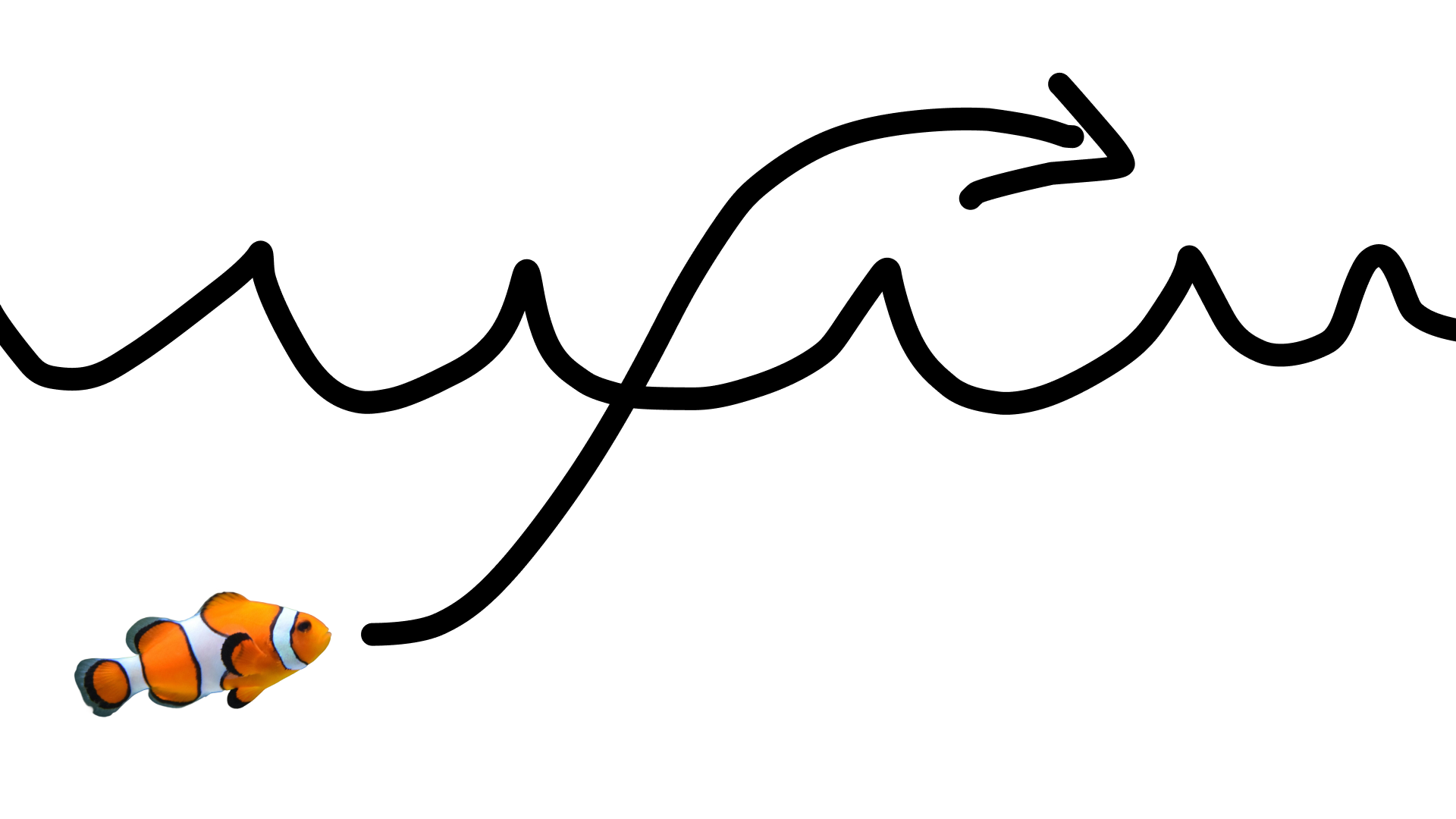
مع الطلب التالي:
turn this into realistic footage, using the drawing only as a guide for movement, do not show the drawing in the final video
Python
import base64
from google import genai

client = genai.Client()

interaction = client.interactions.create(
    model="gemini-omni-1.1-eap",
    input=[
        {"type": "image", "data": base64_image, "mime_type": "image/jpeg"},
        {"type": "text", "text": "turn this into realistic footage, using the drawing only as a guide for movement, do not show the drawing in the final video"}
    ],
)
with open("clownfish.mp4", "wb") as f:
    f.write(base64.b64decode(interaction.output_video.data))
JavaScript
import { GoogleGenAI } from '@google/genai';
import * as fs from 'fs';
const ai = new GoogleGenAI({});

const interaction = await ai.interactions.create({
  model: 'gemini-omni-1.1-eap',
  input: [
    { type: 'image', data: base64Image, mime_type: 'image/jpeg' },
    { type: 'text', text: 'turn this into realistic footage, using the drawing only as a guide for movement, do not show the drawing in the final video' }
  ]
});

if (interaction.output_video?.data) {
  fs.writeFileSync('clownfish.mp4', Buffer.from(interaction.output_video.data, 'base64'));
}
راحة
curl -X POST "https://generativelanguage.googleapis.com/v1beta/interactions?key=$API_KEY" \
-H "Content-Type: application/json" \
-d '{
 "model": "gemini-omni-1.1-eap",
 "input": [
   {"type": "image", "data": "'"$BASE64_IMAGE"'", "mime_type": "image/jpeg"},
   {"type": "text", "text": "turn this into realistic footage, using the drawing only as a guide for movement, do not show the drawing in the final video"}
 ]
}'
معرِّف الموضوع
يمكنكم إنشاء فيديو يتضمّن مواضيع محددة يتم تقديمها كصور مرجعية. على سبيل المثال، يوضّح الرمز التالي كيفية تقديم صورتَين لقطة وخيط لإنشاء فيديو للقطة وهي تلعب بالخيط.
Python
import base64
from google import genai

client = genai.Client()

interaction = client.interactions.create(
    model="gemini-omni-1.1-eap",
    input=[
        {"type": "image", "data": cat_b64, "mime_type": "image/png"},
        {"type": "image", "data": yarn_b64, "mime_type": "image/png"},
        {"type": "text", "text": "A cat playfully batting at a ball of yarn."}
    ],
)
with open("cat.mp4", "wb") as f:
    f.write(base64.b64decode(interaction.output_video.data))
JavaScript
import { GoogleGenAI } from '@google/genai';
import * as fs from 'fs';
const ai = new GoogleGenAI({});

const interaction = await ai.interactions.create({
  model: 'gemini-omni-1.1-eap',
  input: [
    { type: 'image', data: catData, mime_type: 'image/png' },
    { type: 'image', data: yarnData, mime_type: 'image/png' },
    { type: 'text', text: 'A cat playfully batting at a ball of yarn.' }
  ]
});

if (interaction.output_video?.data) {
  fs.writeFileSync('cat.mp4', Buffer.from(interaction.output_video.data, 'base64'));
}
راحة
curl -X POST "https://generativelanguage.googleapis.com/v1beta/interactions?key=$API_KEY" \
-H "Content-Type: application/json" \
-d '{
 "model": "gemini-omni-1.1-eap",
 "input": [
   {"type": "image", "data": "'"$CAT_B64"'", "mime_type": "image/png"},
   {"type": "image", "data": "'"$YARN_B64"'", "mime_type": "image/png"},
   {"type": "text", "text": "A cat playfully batting at a ball of yarn."}
 ]
}'
مَعلمة المهام
يمكنكم اختياريًا ضبط المَعلمة task في video_config ضمن generation_config لتحديد مهمة الإنشاء بشكل صريح. إذا لم يتم ضبطها، يحدّد النموذج تلقائيًا الوضع المناسب استنادًا إلى الطلب والوسائط المُدخَلة.
تشمل قيم task المتاحة ما يلي:
-
text_to_video: ينشئ فيديو من طلب نصي فقط. -
image_to_video: ينشئ فيديو من صورة مصدر واحدة أو اثنتَين (الإطار الأول والإطار الأخير الاختياري). -
reference_to_video: ينشئ فيديو باستخدام الوسائط المقدَّمة كمراجع. -
edit: يعدّل فيديو حاليًا.
extend: يوسّع مقطع فيديو حاليًا.
Python
import base64
from google import genai

client = genai.Client()

interaction = client.interactions.create(
    model="gemini-omni-1.1-eap",
    input=[
        {"type": "image", "data": base64_image, "mime_type": "image/jpeg"},
        {"type": "text", "text": "turn this into realistic footage, using the drawing only as a guide for movement, do not show the drawing in the final video"}
    ],
    generation_config={
        "video_config": {
            "task": "image_to_video"
        }
    },
)
with open("example.mp4", "wb") as f:
    f.write(base64.b64decode(interaction.output_video.data))
JavaScript
import { GoogleGenAI } from "@google/genai";
import * as fs from 'fs';
const ai = new GoogleGenAI({});

const interaction = await ai.interactions.create({
  model: 'gemini-omni-1.1-eap',
  input: [
    { type: 'image', data: base64Image, mime_type: 'image/jpeg' },
    { type: 'text', text: 'turn this into realistic footage, using the drawing only as a guide for movement, do not show the drawing in the final video' }
  ],
  generationConfig: {
    videoConfig: {
      task: 'image_to_video',
    }
  }
});

if (interaction.output_video?.data) {
  fs.writeFileSync('example.mp4', Buffer.from(interaction.output_video.data, 'base64'));
}
راحة
curl -X POST "https://generativelanguage.googleapis.com/v1beta/interactions?key=$API_KEY" \
  -H "Content-Type: application/json" \
  -d '{
    "model": "gemini-omni-1.1-eap",
    "input": [
      {
        "type": "image",
        "data": "'"$BASE64_IMAGE"'",
        "mime_type": "image/jpeg"
      },
      {
        "type": "text",
        "text": "turn this into realistic footage, using the drawing only as a guide for movement, do not show the drawing in the final video"
      }
    ],
    "generation_config": {
      "video_config": {
        "task": "image_to_video"
      }
    }
  }'
الاستيفاء بين الإطارات الرئيسية
يمكنكم إنشاء فيديو متواصل ينتقل بسلاسة بين إطارَي البداية والنهاية. هذا الخيار مثالي لمدارات الكاميرا وتأثيرات التكبير والتصغير وعمليات التقدّم بمرور الوقت والمقاطع المتكرّرة بسلاسة.
قدِّموا كلتا الصورتَين في مصفوفة الإدخال مع وصف للحركة المطلوبة:
Python
import base64
from google import genai

client = genai.Client()

interaction = client.interactions.create(
    model="gemini-omni-1.1-eap",
    input=[
        {"type": "image", "data": start_frame_b64, "mime_type": "image/png"},
        {"type": "image", "data": end_frame_b64, "mime_type": "image/png"},
        {
            "type": "text",
            "text": "Smooth continuous timelapse from sunrise to sunset over a mountain lake."
        }
    ],
    # The task parameter is optional. If omitted, the model automatically infers the mode.
    generation_config={
        "video_config": {
            "task": "image_to_video"
        }
    },
    response_format={"type": "video"}
)
with open("interpolated.mp4", "wb") as f:
    f.write(base64.b64decode(interaction.output_video.data))
JavaScript
import { GoogleGenAI } from '@google/genai';
import * as fs from 'fs';
const ai = new GoogleGenAI({});

const interaction = await ai.interactions.create({
  model: 'gemini-omni-1.1-eap',
  input: [
    { type: 'image', data: startFrameB64, mime_type: 'image/png' },
    { type: 'image', data: endFrameB64, mime_type: 'image/png' },
    {
      type: 'text',
      text: 'Smooth continuous timelapse from sunrise to sunset over a mountain lake.'
    }
  ],
  // The task parameter is optional. If omitted, the model automatically infers the mode.
  generationConfig: {
    videoConfig: {
      task: 'image_to_video',
    },
  },
  response_format: { type: 'video' }
});

if (interaction.output_video?.data) {
  fs.writeFileSync('interpolated.mp4', Buffer.from(interaction.output_video.data, 'base64'));
}
راحة
curl -X POST "https://generativelanguage.googleapis.com/v1beta/interactions?key=$API_KEY" \
  -H "Content-Type: application/json" \
  -d '{
    "model": "gemini-omni-1.1-eap",
    "input": [
      {"type": "image", "data": "'"$START_FRAME_B64"'", "mime_type": "image/png"},
      {"type": "image", "data": "'"$END_FRAME_B64"'", "mime_type": "image/png"},
      {
        "type": "text",
        "text": "Smooth continuous timelapse from sunrise to sunset over a mountain lake."
      }
    ],
    "generation_config": {
      "video_config": {
        "task": "image_to_video"
      }
    },
    "response_format": {"type": "video"}
  }'
تعديل الفيديوهات التي تحتفظ بالحالة
يمكنكم إنشاء فيديو وتعديله بشكل متكرّر باستخدام طلبات المتابعة. يستند كل دور إلى النتيجة السابقة. يتذكّر النموذج سياق الفيديو، ويطبّق التغييرات مع الاحتفاظ بالعناصر التي لم تذكروها. استخدِموا previous_interaction_id لتتبُّع سجلّ المحادثات وحالة الفيديو الذي تم إنشاؤه بدون إعادة تحميل الفيديو السابق.
يوضّح المثال التالي كيفية إنشاء فيديو أول ثم تعديله:
Python
import base64
from google import genai

client = genai.Client()

# Turn 1: Generate initial video
res1 = client.interactions.create(model="gemini-omni-1.1-eap", input="A woman playing violin outdoors.")

# Turn 2: Edit the previous video
res2 = client.interactions.create(
    model="gemini-omni-1.1-eap",
    previous_interaction_id=res1.id,
    input="Make the violin invisible."
)
with open("example.mp4", "wb") as f:
    f.write(base64.b64decode(res2.output_video.data))
JavaScript
import { GoogleGenAI } from '@google/genai';
import * as fs from 'fs';
const ai = new GoogleGenAI({});

// Turn 1: Generate initial video
const res1 = await ai.interactions.create({
  model: 'gemini-omni-1.1-eap',
  input: 'A woman playing violin outdoors.',
});

// Turn 2: Edit the previous video
const res2 = await ai.interactions.create({
  model: 'gemini-omni-1.1-eap',
  previous_interaction_id: res1.id,
  input: 'Make the violin invisible.',
});

if (res2.output_video?.data) {
  fs.writeFileSync('example.mp4', Buffer.from(res2.output_video.data, 'base64'));
}
راحة
curl -X POST "https://generativelanguage.googleapis.com/v1beta/interactions?key=$API_KEY" \
-H "Content-Type: application/json" \
-d '{
 "model": "gemini-omni-1.1-eap",
 "previous_interaction_id": "'"$PREVIOUS_ID"'",
 "input": "Make the violin invisible."
}'
مثال على فيديو أولي:
مثال على فيديو معدَّل:
ينتج عن كل دور في المحادثة فيديو جديد. يفهم النموذج السياق من الأدوار السابقة، ما يتيح لكم إجراء تغييرات تدريجية، مثل تعديل الإضاءة واستبدال الخلفيات، بدون إعادة وصف المشهد بالكامل.
تعديل فيديوهاتكم
يمكنكم تحميل فيديوهاتكم باستخدام واجهة برمجة التطبيقات Files API لتعديلها باستخدام Gemini Omni Flash 1.1.
يوضّح المثال التالي كيفية تعديل الفيديو الأصلي التالي:
Python
import time
import base64
from google import genai

client = genai.Client()

# Upload video using the file API
video_file = client.files.upload(file="Video.mp4")

while video_file.state == "PROCESSING":
    print('Waiting for video to be processed.')
    time.sleep(10)
    video_file = client.files.get(name=video_file.name)

if video_file.state == "FAILED":
  raise ValueError(video_file.state)
print(f'Video processing complete: ' + video_file.uri)

# Edit your video
interaction = client.interactions.create(
    model="gemini-omni-1.1-eap",
    input=[
        {"type": "document", "uri": video_file.uri},
        {"type": "text", "text": "When the person touches the mirror, make the mirror ripple beautifully like liquid, and the person's arm turns into reflective mirror material"}
    ],
)
with open("example.mp4", "wb") as f:
    f.write(base64.b64decode(interaction.output_video.data))
JavaScript
import { GoogleGenAI } from '@google/genai';
import * as fs from 'fs';
const ai = new GoogleGenAI({});

// Upload video using the file API
let videoFile = await ai.files.upload({
  file: 'Video.mp4',
});

while (videoFile.state === 'PROCESSING') {
  console.log('Waiting for video to be processed.');
  await new Promise(r => setTimeout(r, 10000));
  videoFile = await ai.files.get({ name: videoFile.name });
}

if (videoFile.state === 'FAILED') {
  throw new Error(videoFile.state);
}
console.log('Video processing complete: ' + videoFile.uri);

# Edit your video
const interaction = await ai.interactions.create({
  model: 'gemini-omni-1.1-eap',
  input: [
    { type: 'document', uri: videoFile.uri },
    { type: 'text', text: "When the person touches the mirror, make the mirror ripple beautifully like liquid, and the person's arm turns into reflective mirror material" }
  ],
});

if (interaction.output_video?.data) {
  fs.writeFileSync('example.mp4', Buffer.from(interaction.output_video.data, 'base64'));
}
راحة
curl -X POST "https://generativelanguage.googleapis.com/v1beta/interactions?key=$API_KEY" \
  -H "Content-Type: application/json" \
  -d '{
    "model": "gemini-omni-1.1-eap",
    "input": [
      {
        "type": "video",
        "data": "'"$VIDEO_B64"'",
        "mime_type": "video/mp4"
      },
      {
        "type": "text",
        "text": "When the person touches the mirror, make the mirror ripple beautifully like liquid, and the person arm turns into reflective mirror material"
      }
    ]
  }'
مثال على فيديو معدَّل:
توسيع المشهد
يمكنكم توسيع مقاطع الفيديو الحالية باستخدام السياق السابق. يحلّل Gemini Omni Flash 1.1 الحركة السابقة وتكوين المشهد للحفاظ على الاستمرارية وهوية الشخصية والإضاءة البيئية في اللقطة الموسّعة.
Python
import base64
from google import genai

client = genai.Client()

# Extend from a previous interaction ID
# The task parameter is optional. If omitted, the model automatically infers the mode.
extended = client.interactions.create(
    model="gemini-omni-1.1-eap",
    previous_interaction_id=res1.id,
    input="Continue the shot: the woman finishes the violin solo and takes a bow.",
    generation_config={
        "video_config": {
            "task": "extend"
        }
    },
    response_format={"type": "video"}
)
with open("extended.mp4", "wb") as f:
    f.write(base64.b64decode(extended.output_video.data))
JavaScript
import { GoogleGenAI } from '@google/genai';
import * as fs from 'fs';
const ai = new GoogleGenAI({});

// The task parameter is optional. If omitted, the model automatically infers the mode.
const extended = await ai.interactions.create({
  model: 'gemini-omni-1.1-eap',
  previous_interaction_id: res1.id,
  input: 'Continue the shot: the woman finishes the violin solo and takes a bow.',
  generationConfig: {
    videoConfig: {
      task: 'extend',
    },
  },
  response_format: { type: 'video' },
});

if (extended.output_video?.data) {
  fs.writeFileSync('extended.mp4', Buffer.from(extended.output_video.data, 'base64'));
}
راحة
curl -X POST "https://generativelanguage.googleapis.com/v1beta/interactions?key=$API_KEY" \
  -H "Content-Type: application/json" \
  -d '{
    "model": "gemini-omni-1.1-eap",
    "previous_interaction_id": "'"$PREVIOUS_ID"'",
    "input": "Continue the shot: the woman finishes the violin solo and takes a bow.",
    "generation_config": {
      "video_config": {
        "task": "extend"
      }
    },
    "response_format": {
      "type": "video"
    }
  }'
استرداد الفيديوهات باستخدام معرّف موارد موحّد (URI)
استخدِموا المَعلمة delivery="uri" في
response_format لاسترداد الفيديوهات التي تم إنشاؤها والتي يزيد حجمها عن 4 ميغابايت.
يؤدي ذلك إلى عرض معرّف موارد موحّد (URI) مستضاف على Google يمكنكم طلبه بشكل متكرّر إلى أن يصبح الفيديو ACTIVE قبل تنزيله.
Python
import time
from google import genai

client = genai.Client()

# 1. Request video via URI delivery
interaction = client.interactions.create(
    model="gemini-omni-1.1-eap",
    input="A beautiful sunset.",
    response_format={"type": "video", "delivery": "uri"}
)

# 2. Extract file name and poll for ACTIVE state
video_output = interaction.output_video
file_name = video_output.uri.split("/")[-1] # Extract ID

print("Waiting for video processing...")
while True:
    f_info = client.files.get(name=f"files/{file_name}")
    if f_info.state.name == "ACTIVE":
        break
    elif f_info.state.name == "FAILED":
        raise RuntimeError("Generation failed.")
    time.sleep(5)

# 3. Download the final video
video_bytes = client.files.download(file=video_output.uri)
with open("output.mp4", "wb") as f:
    f.write(video_bytes)
JavaScript
import { GoogleGenAI } from '@google/genai';
const ai = new GoogleGenAI({});

// 1. Request video via URI delivery
const interaction = await ai.interactions.create({
  model: 'gemini-omni-1.1-eap',
  input: 'A beautiful sunset.',
  response_format: { type: 'video', delivery: 'uri' },
});

// 2. Extract file name and poll for ACTIVE state
const videoOutput = interaction.output_video;
const fileId = videoOutput.uri.match(/files\/([a-zA-Z0-9]+)/)[1];
const name = `files/${fileId}`;

console.log("Waiting for video processing...");
while (true) {
  const fInfo = await ai.files.get({ name });
  if (fInfo.state.name === 'ACTIVE') break;
  if (fInfo.state.name === 'FAILED') throw new Error("Generation failed.");
  await new Promise(r => setTimeout(r, 5000));
}

// 3. Download the final video
await ai.files.download({
  file: videoOutput,
  downloadPath: 'output.mp4',
});
console.log("Saved video to output.mp4");
راحة
#!/bin/bash

# 1. Initial request to generate the video
RESPONSE=$(curl -s -X POST "https://generativelanguage.googleapis.com/v1beta/interactions?key=$API_KEY" \
-H "Content-Type: application/json" \
-d '{
 "model": "gemini-omni-1.1-eap",
 "input": "A beautiful sunset over a calm ocean.",
 "response_format": {"type": "video", "delivery": "uri"}
}')

# Extract FILE_ID from the URI (e.g., "files/abc-123" -> "abc-123")
FILE_URI=$(echo $RESPONSE | jq -r '.output_video.uri')
FILE_ID=$(echo $FILE_URI | cut -d'/' -f2)

echo "Video requested (ID: $FILE_ID). Waiting for processing..."

# 2. Polling loop
while true; do
 # Get current file status
 STATUS_JSON=$(curl -s -X GET "https://generativelanguage.googleapis.com/v1beta/files/$FILE_ID?key=$API_KEY")
 STATE=$(echo $STATUS_JSON | jq -r '.state')

 if [ "$STATE" == "ACTIVE" ]; then
   echo "Processing complete! Downloading..."
   break
 elif [ "$STATE" == "FAILED" ]; then
   echo "Error: Generation failed."
   exit 1
 else
   echo "Current state: $STATE... (waiting 5s)"
   sleep 5
 fi
done

# 3. Final download
curl -L -X GET "https://generativelanguage.googleapis.com/v1beta/files/$FILE_ID:download?alt=media&key=$API_KEY" \
--output "output.mp4"

echo "Done! Video saved to output.mp4"
بنية JSON لطلب REST غير المُعالَج (معرّف موارد موحّد):
{
  "steps": [
    { "type": "user_input", "content": [{"type": "text", "text": "..."}] },
    { "type": "thought", "content": [{"text": "...", "type": "thought"}] },
    {
      "type": "model_output",
      "content": [
        {
          "type": "video",
          "mime_type": "video/mp4",
          "uri": "https://generativelanguage.googleapis.com/v1beta/files/...:download?alt=media"
        }
      ]
    }
  ],
  "id": "v1_...",
  "status": "completed",
  "model": "gemini-omni-1.1-eap",
  "object": "interaction"
}
أفضل الممارسات
- استخدام طريقة تسليم معرّف الموارد الموحّد للفيديوهات الكبيرة: بالنسبة إلى الفيديوهات التي يزيد حجمها عن 4 ميغابايت (>720p
عند توفّرها)، استخدِموا
delivery="uri"فيresponse_formatلتجنُّب الحدود القصوى لحجم الحمولة. - الأداء المحسّن: اضبطوا
background=falseوstore=falseوstream=falseلإنشاء أحادي أسرع ومتزامن. يُرجى العِلم أنّ ضبطstore=falseيعني أنّه لن يكون من الممكن تعديل الفيديو الذي تم إنشاؤه في الأدوار اللاحقة باستخدامprevious_interaction_id. - دقة الطلب: يمكنكم الاطّلاع على قسم إرشادات الطلبات للحصول على التفاصيل.
القيود
- لا يمكن تحميل الصور التي تتضمّن قاصرين وتعديلها في المنطقة الاقتصادية الأوروبية وسويسرا والمملكة المتحدة.
- لا يتوفّر تحميل الصور التي تتضمّن أشخاصًا معيّنين يمكن التعرّف عليهم وتعديلها.
- لا تتوفّر حاليًا إمكانية تعديل الفيديوهات التي تم تحميلها للمستخدمين في المنطقة الاقتصادية الأوروبية وسويسرا والمملكة المتحدة (تتوفّر إمكانية تعديل الفيديوهات التي ينشئها النموذج).
- لا يمكن تحميل المراجع الصوتية في الإصدار الحالي من واجهة برمجة التطبيقات.
- يقبل مخطط واجهة برمجة التطبيقات المراجع الصوتية التي تصل مدتها إلى 3 ثوانٍ، ولكن لا يعالجها النموذج بشكل صحيح في الوقت الحالي.
- لا يمكن الإشارة إلى فيديوهات متعدّدة أو الاستدلال عليها. قد تؤدي محاولة توجيه طلبات متعدّدة الفيديوهات إلى تدهور أداء النموذج أو ظهور نتائج غير متوقّعة.
- لا يمكن توسيع الفيديوهات أو إجراء الاستيفاء بينها (إنشاء فيديو بين الإطارَين الأول والأخير).
- لا يمكن تعديل الصوت.
- لا يمكن استخدام معدّل النقل المزوَّد.
- لا يمكن استخدام تعليمات النظام ودرجة الحرارة و
top_pوتسلسلات الإيقاف والطلبات السلبية (يمكنكم وضع الطلبات السلبية في الطلب العادي، مثلاً "لا تفعل X"). - لا يمكن استخدام فيديوهات YouTube كمصدر للوسائط.
التفاصيل الفنية
- تتضمّن جميع الفيديوهات التي يتم إنشاؤها علامات مائية من SynthID غير مرئية للمشاهدين ولكن يمكن رصدها آليًا للتحقّق من المصدر.
- تختلف أوقات إنشاء الفيديوهات استنادًا إلى المدة ودرجة الدقة والحِمل الحالي لواجهة برمجة التطبيقات. تستغرق الفيديوهات الأطول والأعلى دقةً وقتًا أطول للإنشاء.
- يتم تطبيق فلاتر أمان المحتوى على كلٍّ من الطلبات المُدخَلة والفيديو الذي تم إنشاؤه (ويعتمد ذلك على منطقتكم). سيتم حظر الطلبات التي تنتهك سياسات الاستخدام.
- اللغة الإنجليزية (EN) متوافقة بالكامل، ولكن لم يتم تقييم اللغات الأخرى، لذا قد تعمل ولكن يمكن أن تختلف النتائج.
دليل كتابة الطلبات المُوجَّهة إلى Gemini Omni Flash
يتضمّن هذا القسم نصائح وأمثلة حول كيفية توجيه الطلبات إلى Gemini Omni Flash بفعالية.
مشهد واحد
سيحاول Omni Flash تلقائيًا إنشاء فيديو يتضمّن بضع لقطات مختلفة. سيحاول النموذج إنشاء سرد مثير للاهتمام استنادًا إلى الطلب.
إذا كنتم بحاجة إلى أن يحتوي الفيديو الناتج على مشهد واحد، يجب أن تطلبوا ذلك:
- في مشهد واحد متواصل
- في لقطة واحدة متواصلة
- بدون قطع المشهد
على سبيل المثال:
Continuous, unbroken handheld shot of a fluffy tabby cat sitting on a sunny windowsill, looking out into a leafy garden. The cat's tail twitches slowly, and its ears rotate slightly toward ambient noises. Sunbeams illuminate dust motes in the air. Sound design: Gentle breeze, distant bird chirps. No dialogue.
إزالة العناصر غير المرغوب فيها
إذا كان الفيديو الذي تم إنشاؤه يتضمّن عناصر غير مرغوب فيها، أدرِجوا طلبات سلبية بسيطة لتجنُّبها:
- بدون حوار
- بدون زينة
- بدون تأثيرات صوتية إضافية
طلبات التعديل
تعمل الطلبات البسيطة بشكل أفضل لتعديل الفيديوهات. قد تؤدي الطلبات الوصفية المفرطة إلى تغييرات غير مقصودة.
في ما يلي المزيد من الأمثلة على طلبات التعديل البسيطة:
- اجعلوا هذا الفيديو رسومًا متحركة
- ضعوا قبعة أنيقة على رأس هذا الشخص
- غيِّروا الإضاءة لتكون أكثر إثارة
- غيِّروا النص على اللافتة ليصبح "Omni Flash"
عند تعديل جانب معيّن من الفيديو، أدرِجوا "Keep everything else the same" للحفاظ على الاتساق المرئي.
في ما يلي بعض الأمثلة لتوضيح كيفية تطبيق هذه التقنية:
- تجنَّبوا ما يلي:
In the video of the man sitting on the sofa, please add a small black cat that runs from the right side of the screen, jumps onto his lap, and then he starts to stroke its head while looking down.- التبسيط:
Add a cat that jumps onto his lap, he begins to pet it.
Keep everything else the same.
- التبسيط:
- تجنَّبوا ما يلي:
Please remove the cell phone that the person is holding in their hand and fill in the background so it looks like they are just holding their hand empty.- التبسيط:
Make the phone invisible. Keep everything else the
same.
- التبسيط:
توجيه الطلبات بشأن الصوت
سيحاول النموذج تلقائيًا إنشاء مقطع صوتي مناسب لفيديو. وقد لا يكون هذا ما تريدونه دائمًا. يمكنكم استخدام الطلب لوصف نوع الصوت المطلوب. هذا مهم بشكل خاص إذا كنتم تريدون إضافة موسيقى إلى الفيديو:
- أدرِجوا موسيقى هادئة في الخلفية
- يتضمّن الفيديو إيقاعًا سريعًا لموسيقى التكنو
- الصوت هو بث إذاعي منخفض الجودة في الخلفية يعرض أغنية
تحديد توقيت الأحداث
يمكنكم توجيه طلبات لحدوث أشياء في أوقات معيّنة في الفيديو، ولا تحتاجون إلى استخدام بنية دقيقة ويمكنكم استخدام اللغة الطبيعية. هذا مفيد بشكل خاص في إنشاء عمليات قطع المشاهد أو الإيقاع أو التسلسلات السريعة. يمكنكم الاطّلاع على ما يلي للحصول على أمثلة:
- بعد 3 ثوانٍ، تدخل امرأة إلى المشهد.
- في الثانية 5، يبدأ الكورس في الصوت في الخلفية.
- كل ثانيتَين، انتقِلوا إلى إطار جديد.
- في تسلسل سريع، غيِّروا المشهد إلى موقع جديد كل نصف ثانية (12 إطارًا بمعدّل 24 إطارًا في الثانية).
يمكنكم أيضًا استخدام بنية الرمز الزمني:
[0-3s] A person is walking
[3-6s] They stop and turn around
[6-10s] They start running
توجيه الطلبات الوصفية
يمكنكم أن تطلبوا من Gemini Omni Flash الانتباه إلى الصفات العامة أو المبادئ العامة لإنشاء الفيديوهات:
- ضعوا في الاعتبار التفاصيل الدقيقة والتعبير والتوقيت لإنشاء مشهد غني جدًا ومفصّل وطبيعي تمامًا.
- كونوا دقيقين للغاية في أوصاف الشخصيات والبيئات. طبِّقوا مبادئ تصميم الأزياء على الشخصيات. كونوا دقيقين للغاية بشأن الأشخاص والعناصر في المشهد.
- أدرِجوا الكثير من التفاصيل المناسبة في عناصر الخلفية لجعل المشهد يبدو واقعيًا وطبيعيًا.
- أنشئوا فيديو سريعًا يعرض
[thing]مختلفًا نادرًا كل ثانية، وموسيقى مبهجة ، وأدرِجوا نصًا لتسمية هذا الشيء.
النص في الفيديوهات
يمكنكم توجيه طلبات لتضمين نص في الفيديو، وسيعرضه Gemini Omni بطريقة صحيحة وقابلة للقراءة. إذا كان الفيديو يتضمّن نصًا يظهر بشكل طبيعي، حتى في عناصر الخلفية، يمكن أن يساعد ذلك في تحديد ما يجب أن يقوله.
- كلمة واحدة على الشاشة في كل مرة: "did, you, know, that, Omni, can, do, awesome, text?" تظهر كل كلمة لمدة ثانية واحدة بنمط متحرك مختلف. بدون حوار.
- هناك لافتة شارع مكتوب عليها: "This is an AI generation by Omni"، وهناك واجهة متجر مكتوب عليها: "All you need AI"، وهناك سيارة تحمل لوحة الأرقام: "OMN111"
استخدام العلامات في الطلبات لضبط أدوار الصور
يمكنكم استخدام العلامات لربط الوسائط التي تم تحميلها بأدوار إنشاء محددة. يتيح لكم ذلك تحديد ما إذا كانت كل صورة هي إطار أولي أو مرجع.
<FIRST_FRAME>: استخدِموا الصورة كإطار بداية للفيديو، لـ مثلاً:<FIRST_FRAME> a woman is walking<IMAGE_REF_N>: استخدِموا الصورة كمرجع، مثلاً:in the style of <IMAGE_REF_0> a woman <IMAGE_REF_1> is walking(يجمع بين مرجع النمط من الصورة الأولى ومرجع الموضوع من الصورة الثانية). تبدأ المراجع من 0.
في ما يلي مثال يتضمّن صورًا مرجعية:
[0-3s] A studio fashion sequence. Starting with woman <IMAGE_REF_0>, she is holding <IMAGE_REF_1>
[3-6s] Then we see the man <IMAGE_REF_2> holding <IMAGE_REF_3>
[6-10s] And finally another woman <IMAGE_REF_4> who is holding <IMAGE_REF_5> while walking.
الخطوات التالية
- ابدأوا رحلتكم مع Gemini Omni Flash من خلال التجربة في الـ Omni Quickstart Colab.
- تعلَّموا كيفية كتابة طلبات أفضل باستخدام مقدّمة في تصميم الطلبات.