

Gemini Omni Flash 1.1 (gemini-omni-1.1-eap) הוא מודל מולטימודאלי עם ביצועים גבוהים, שנועד ליצירה ועריכה של סרטונים במהירות גבוהה ולשליטה קולנועית.
Gemini Omni Flash 1.1 מחליף לחלוטין את הגרסאות הקודמות של Gemini Omni Flash, ומציע איכות יצירה משופרת, מולטי-מודאליות מובנית ויכולות עריכה של סרטונים עם שמירת מצב:
- מולטי-מודאליות מובנית: הוא מעבד טקסט, תמונה, אודיו ווידאו בו-זמנית, ומספק פלט מגובש, עקבי וניתן לשליטה.
- עריכה בממשק שיחה: באמצעות Interactions API, אפשר לשפר ולערוך את הסרטונים באופן איטרטיבי באמצעות שיחה בשפה טבעית. מתארים את השינוי שרוצים לעשות, והמודל מבצע את העריכה תוך שמירה על החלקים בסרטון שרוצים להשאיר.
- ידע על העולם: Gemini Omni משלב בין הבנה של פיזיקה לבין הידע של Gemini בהיסטוריה, במדע ובהקשר תרבותי, ומגשר על הפער בין פוטוריאליזם לבין סיפור משמעותי.
יצירת סרטונים לפי טקסט
יצירת סרטון מפרומפט טקסטואלי. המודל יוצר סרטון עם אודיו על סמך תיאור הטקסט שהזנתם. כדי לקבל את התוצאות הטובות ביותר, כדאי לכתוב הנחיות עם פרטים כמו תיאור הסצנה, תנועת המצלמה, התאורה והאווירה.
Python
import base64
from google import genai

client = genai.Client()

interaction = client.interactions.create(
    model="gemini-omni-1.1-eap",
    input="A marble rolling fast on a chain reaction style track, continuous smooth shot."
)
with open("marble.mp4", "wb") as f:
    f.write(base64.b64decode(interaction.output_video.data))
JavaScript
import { GoogleGenAI } from '@google/genai';
import * as fs from 'fs';
const ai = new GoogleGenAI({});

const interaction = await ai.interactions.create({
  model: 'gemini-omni-1.1-eap',
  input: 'A marble rolling fast on a chain reaction style track, continuous smooth shot.',
});

if (interaction.output_video?.data) {
  fs.writeFileSync('marble.mp4', Buffer.from(interaction.output_video.data, 'base64'));
}
REST
curl -X POST "https://generativelanguage.googleapis.com/v1beta/interactions?key=$API_KEY" \
-H "Content-Type: application/json" \
-d '{
 "model": "gemini-omni-1.1-eap",
 "input": "A marble rolling fast on a chain reaction style track, continuous smooth shot."
}'
סכמת תשובה של REST
שדה הנוחות interaction.output_video הוא SDK בלבד.
כשמשתמשים ישירות ב-API בארכיטקטורת REST, מקבלים את פלט הסרטון ממערך steps.
מבנה JSON גולמי של REST:
{
  "steps": [
    { "type": "user_input", "content": [{"type": "text", "text": "..."}] },
    { "type": "thought", "content": [{"text": "...", "type": "thought"}] },
    {
      "type": "model_output",
      "content": [
        {
          "type": "video",
          "mime_type": "video/mp4",
          "data": "AAAAIGZ0eXBpc29t..." // Base64 encoded video data
        }
      ]
    }
  ],
  "id": "v1_...",
  "status": "completed",
  "model": "gemini-omni-1.1-eap",
  "object": "interaction"
}
שליטה ביחס הגובה-רוחב
כדי ליצור סרטונים בפורמט אנכי, מגדירים את aspect_ratio ל-"9:16". ברירת המחדל היא לרוחב (16:9).
Python
import base64
from google import genai

client = genai.Client()

interaction = client.interactions.create(
    model="gemini-omni-1.1-eap",
    input="A futuristic city with neon lights and flying cars, cyberpunk style",
    response_format={
        "type": "video",  # optional
        "aspect_ratio": "9:16"  # Supported values: "9:16", "16:9"
    }
)
with open("example.mp4", "wb") as f:
    f.write(base64.b64decode(interaction.output_video.data))
JavaScript
import { GoogleGenAI } from '@google/genai';
import * as fs from 'fs';
const ai = new GoogleGenAI({});

const interaction = await ai.interactions.create({
  model: 'gemini-omni-1.1-eap',
  input: 'A futuristic city with neon lights and flying cars, cyberpunk style',
  response_format: {
    type: 'video', // optional
    aspect_ratio: '9:16' // Supported values: '9:16', '16:9'
  },
});

if (interaction.output_video?.data) {
  fs.writeFileSync('example.mp4', Buffer.from(interaction.output_video.data, 'base64'));
}
REST
curl -X POST "https://generativelanguage.googleapis.com/v1beta/interactions?key=$API_KEY" \
-H "Content-Type: application/json" \
-d '{
 "model": "gemini-omni-1.1-eap",
 "input": "A futuristic city with neon lights and flying cars, cyberpunk style",
 "response_format": {
   "type": "video",
   "aspect_ratio": "9:16"
 }
}'
אמצעי בקרה לפתרון בעיות
מצב טיוטה של 360p
אפשר להשתמש ב-resolution: "360p" ב-response_format כדי ליצור קליפים קלים לתצוגה מקדימה בערך פי 2 מהר יותר, עם צריכת טוקנים מופחתת.
Python
interaction = client.interactions.create(
    model="gemini-omni-1.1-eap",
    input="A robotic dog exploring a lush enchanted forest.",
    response_format={
        "type": "video",
        "resolution": "360p",
        "aspect_ratio": "16:9"
    }
)
JavaScript
import { GoogleGenAI } from '@google/genai';
const ai = new GoogleGenAI({});

const interaction = await ai.interactions.create({
  model: 'gemini-omni-1.1-eap',
  input: 'A robotic dog exploring a lush enchanted forest.',
  response_format: {
    type: 'video',
    resolution: '360p',
    aspect_ratio: '16:9',
  },
});
REST
curl -X POST "https://generativelanguage.googleapis.com/v1beta/interactions?key=$API_KEY" \
  -H "Content-Type: application/json" \
  -d '{
    "model": "gemini-omni-1.1-eap",
    "input": "A robotic dog exploring a lush enchanted forest.",
    "response_format": {
      "type": "video",
      "resolution": "360p",  # Supported values: "360p", "720p", "1080p", "4k"
      "aspect_ratio": "16:9"
    }
  }'
רזולוציה גבוהה (1080p ו-4K)
כדי ליצור סרטונים ברזולוציה גבוהה וחדה, מגדירים את resolution ל-"1080p" או ל-"4k" ב-response_format.
Python
interaction = client.interactions.create(
    model="gemini-omni-1.1-eap",
    input="A cinematic drone shot through misty pine mountains at sunrise.",
    response_format={
        "type": "video",
        "resolution": "1080p",  # Supported values: "360p", "720p", "1080p", "4k"
        "delivery": "uri"
    }
)
JavaScript
import { GoogleGenAI } from '@google/genai';
const ai = new GoogleGenAI({});

const interaction = await ai.interactions.create({
  model: 'gemini-omni-1.1-eap',
  input: 'A cinematic drone shot through misty pine mountains at sunrise.',
  response_format: {
    type: 'video',
    resolution: '1080p', // Supported values: '360p', '720p', '1080p', '4k'
    delivery: 'uri',
  },
});
REST
curl -X POST "https://generativelanguage.googleapis.com/v1beta/interactions?key=$API_KEY" \
  -H "Content-Type: application/json" \
  -d '{
    "model": "gemini-omni-1.1-eap",
    "input": "A cinematic drone shot through misty pine mountains at sunrise.",
    "response_format": {
      "type": "video",
      "resolution": "1080p",
      "delivery": "uri"
    }
  }'
יצירת סרטון מתמונה
אתם יכולים לספק תמונות רפרנס עם פרומפט טקסטואלי. בהתאם להנחיה, המודל יחליט איך להשתמש בתמונה – יפיק תמונות מוצר, איורים או תמונות.
בדוגמה הבאה מוצג שימוש בתמונת הפניה של ציור של דג קופץ מהמים:
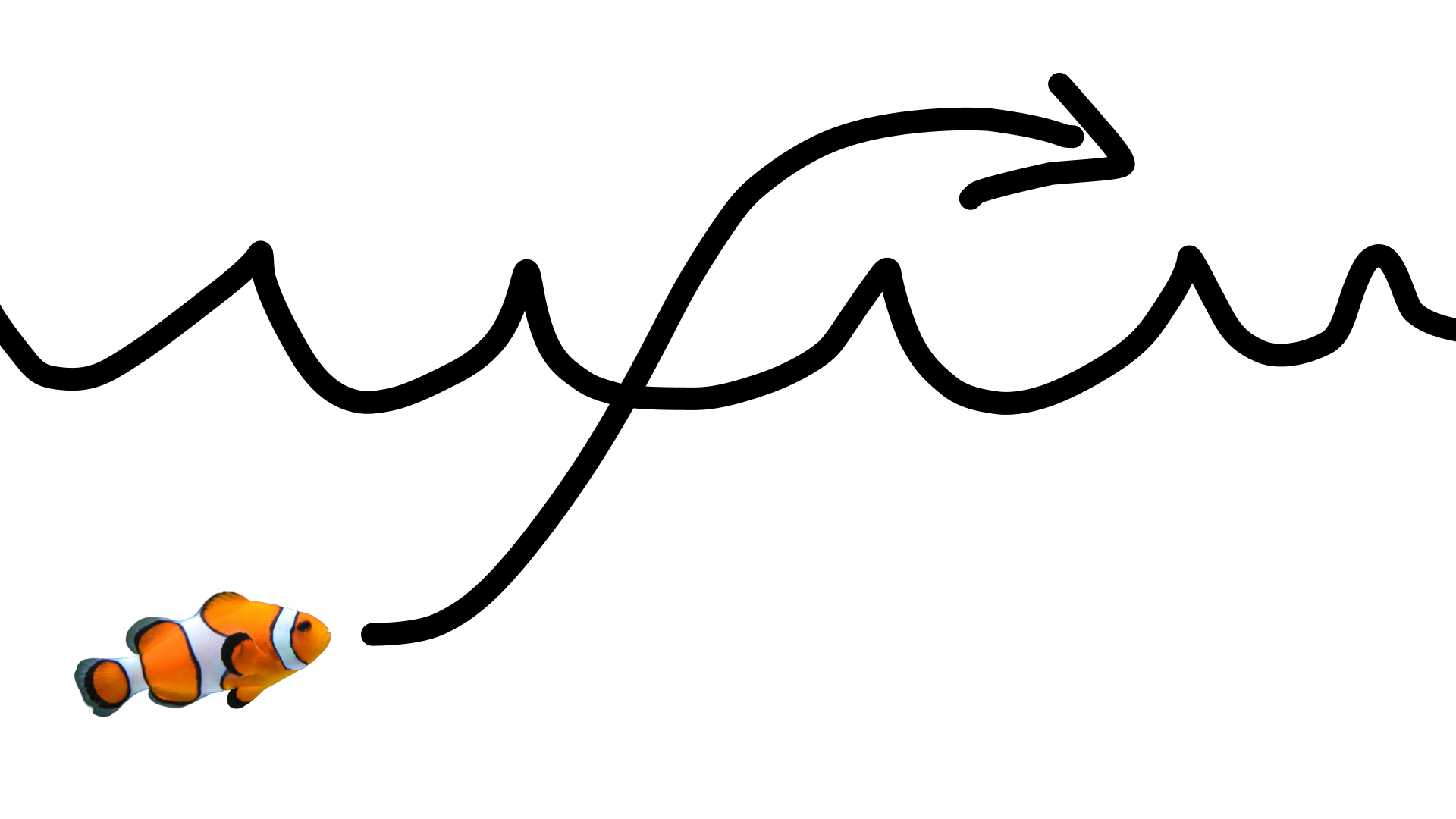
עם ההנחיה הבאה:
turn this into realistic footage, using the drawing only as a guide for movement, do not show the drawing in the final video
Python
import base64
from google import genai

client = genai.Client()

interaction = client.interactions.create(
    model="gemini-omni-1.1-eap",
    input=[
        {"type": "image", "data": base64_image, "mime_type": "image/jpeg"},
        {"type": "text", "text": "turn this into realistic footage, using the drawing only as a guide for movement, do not show the drawing in the final video"}
    ],
)
with open("clownfish.mp4", "wb") as f:
    f.write(base64.b64decode(interaction.output_video.data))
JavaScript
import { GoogleGenAI } from '@google/genai';
import * as fs from 'fs';
const ai = new GoogleGenAI({});

const interaction = await ai.interactions.create({
  model: 'gemini-omni-1.1-eap',
  input: [
    { type: 'image', data: base64Image, mime_type: 'image/jpeg' },
    { type: 'text', text: 'turn this into realistic footage, using the drawing only as a guide for movement, do not show the drawing in the final video' }
  ]
});

if (interaction.output_video?.data) {
  fs.writeFileSync('clownfish.mp4', Buffer.from(interaction.output_video.data, 'base64'));
}
REST
curl -X POST "https://generativelanguage.googleapis.com/v1beta/interactions?key=$API_KEY" \
-H "Content-Type: application/json" \
-d '{
 "model": "gemini-omni-1.1-eap",
 "input": [
   {"type": "image", "data": "'"$BASE64_IMAGE"'", "mime_type": "image/jpeg"},
   {"type": "text", "text": "turn this into realistic footage, using the drawing only as a guide for movement, do not show the drawing in the final video"}
 ]
}'
הפניה לנושא הצילום
אתם יכולים ליצור סרטון שכולל נושאים ספציפיים שסיפקתם כתמונות לדוגמה. לדוגמה, הקוד הבא מראה איך מספקים 2 תמונות של חתול וכדור צמר כדי ליצור סרטון של החתול משחק עם כדור הצמר.
Python
import base64
from google import genai

client = genai.Client()

interaction = client.interactions.create(
    model="gemini-omni-1.1-eap",
    input=[
        {"type": "image", "data": cat_b64, "mime_type": "image/png"},
        {"type": "image", "data": yarn_b64, "mime_type": "image/png"},
        {"type": "text", "text": "A cat playfully batting at a ball of yarn."}
    ],
)
with open("cat.mp4", "wb") as f:
    f.write(base64.b64decode(interaction.output_video.data))
JavaScript
import { GoogleGenAI } from '@google/genai';
import * as fs from 'fs';
const ai = new GoogleGenAI({});

const interaction = await ai.interactions.create({
  model: 'gemini-omni-1.1-eap',
  input: [
    { type: 'image', data: catData, mime_type: 'image/png' },
    { type: 'image', data: yarnData, mime_type: 'image/png' },
    { type: 'text', text: 'A cat playfully batting at a ball of yarn.' }
  ]
});

if (interaction.output_video?.data) {
  fs.writeFileSync('cat.mp4', Buffer.from(interaction.output_video.data, 'base64'));
}
REST
curl -X POST "https://generativelanguage.googleapis.com/v1beta/interactions?key=$API_KEY" \
-H "Content-Type: application/json" \
-d '{
 "model": "gemini-omni-1.1-eap",
 "input": [
   {"type": "image", "data": "'"$CAT_B64"'", "mime_type": "image/png"},
   {"type": "image", "data": "'"$YARN_B64"'", "mime_type": "image/png"},
   {"type": "text", "text": "A cat playfully batting at a ball of yarn."}
 ]
}'
פרמטר Tasks
אפשר גם להגדיר את הפרמטר task ב-video_config בקטע generation_config כדי להגדיר במפורש את משימת היצירה. אם לא מגדירים את המצב, המודל קובע אוטומטית את המצב המתאים על סמך ההנחיה ומדיה הקלט.
הערכים הנתמכים של task כוללים:
text_to_video: יוצר סרטון רק מפרומפט טקסטואלי.-
image_to_video: יצירת סרטון מתמונה אחת או משתי תמונות מקור (מסגרת התחלתית ומסגרת סופית אופציונלית). -
reference_to_video: יצירת סרטון באמצעות מדיה שסופקה כקובצי עזר. -
edit: שינוי של סרטון קיים.
extend: מאריך קליפ קיים.
Python
import base64
from google import genai

client = genai.Client()

interaction = client.interactions.create(
    model="gemini-omni-1.1-eap",
    input=[
        {"type": "image", "data": base64_image, "mime_type": "image/jpeg"},
        {"type": "text", "text": "turn this into realistic footage, using the drawing only as a guide for movement, do not show the drawing in the final video"}
    ],
    generation_config={
        "video_config": {
            "task": "image_to_video"
        }
    },
)
with open("example.mp4", "wb") as f:
    f.write(base64.b64decode(interaction.output_video.data))
JavaScript
import { GoogleGenAI } from "@google/genai";
import * as fs from 'fs';
const ai = new GoogleGenAI({});

const interaction = await ai.interactions.create({
  model: 'gemini-omni-1.1-eap',
  input: [
    { type: 'image', data: base64Image, mime_type: 'image/jpeg' },
    { type: 'text', text: 'turn this into realistic footage, using the drawing only as a guide for movement, do not show the drawing in the final video' }
  ],
  generationConfig: {
    videoConfig: {
      task: 'image_to_video',
    }
  }
});

if (interaction.output_video?.data) {
  fs.writeFileSync('example.mp4', Buffer.from(interaction.output_video.data, 'base64'));
}
REST
curl -X POST "https://generativelanguage.googleapis.com/v1beta/interactions?key=$API_KEY" \
  -H "Content-Type: application/json" \
  -d '{
    "model": "gemini-omni-1.1-eap",
    "input": [
      {
        "type": "image",
        "data": "'"$BASE64_IMAGE"'",
        "mime_type": "image/jpeg"
      },
      {
        "type": "text",
        "text": "turn this into realistic footage, using the drawing only as a guide for movement, do not show the drawing in the final video"
      }
    ],
    "generation_config": {
      "video_config": {
        "task": "image_to_video"
      }
    }
  }'
אינטרפולציה של תמונות מפתח
יצירת סרטון רציף עם מעבר חלק בין פריים פתיחה לפריים סיום. האפשרות הזו מתאימה במיוחד לצילומי מסלול סביב האובייקט, לאפקטים של זום, להתקדמות של צילומי Time-lapse ולסרטונים שחוזרים על עצמם בצורה חלקה.
מספקים את שתי התמונות במערך הקלט יחד עם תיאור של התנועה הרצויה:
Python
import base64
from google import genai

client = genai.Client()

interaction = client.interactions.create(
    model="gemini-omni-1.1-eap",
    input=[
        {"type": "image", "data": start_frame_b64, "mime_type": "image/png"},
        {"type": "image", "data": end_frame_b64, "mime_type": "image/png"},
        {
            "type": "text",
            "text": "Smooth continuous timelapse from sunrise to sunset over a mountain lake."
        }
    ],
    # The task parameter is optional. If omitted, the model automatically infers the mode.
    generation_config={
        "video_config": {
            "task": "image_to_video"
        }
    },
    response_format={"type": "video"}
)
with open("interpolated.mp4", "wb") as f:
    f.write(base64.b64decode(interaction.output_video.data))
JavaScript
import { GoogleGenAI } from '@google/genai';
import * as fs from 'fs';
const ai = new GoogleGenAI({});

const interaction = await ai.interactions.create({
  model: 'gemini-omni-1.1-eap',
  input: [
    { type: 'image', data: startFrameB64, mime_type: 'image/png' },
    { type: 'image', data: endFrameB64, mime_type: 'image/png' },
    {
      type: 'text',
      text: 'Smooth continuous timelapse from sunrise to sunset over a mountain lake.'
    }
  ],
  // The task parameter is optional. If omitted, the model automatically infers the mode.
  generationConfig: {
    videoConfig: {
      task: 'image_to_video',
    },
  },
  response_format: { type: 'video' }
});

if (interaction.output_video?.data) {
  fs.writeFileSync('interpolated.mp4', Buffer.from(interaction.output_video.data, 'base64'));
}
REST
curl -X POST "https://generativelanguage.googleapis.com/v1beta/interactions?key=$API_KEY" \
  -H "Content-Type: application/json" \
  -d '{
    "model": "gemini-omni-1.1-eap",
    "input": [
      {"type": "image", "data": "'"$START_FRAME_B64"'", "mime_type": "image/png"},
      {"type": "image", "data": "'"$END_FRAME_B64"'", "mime_type": "image/png"},
      {
        "type": "text",
        "text": "Smooth continuous timelapse from sunrise to sunset over a mountain lake."
      }
    ],
    "generation_config": {
      "video_config": {
        "task": "image_to_video"
      }
    },
    "response_format": {"type": "video"}
  }'
עריכת סרטונים עם שמירת מצב
ליצור סרטון ולערוך אותו באופן איטרטיבי באמצעות הנחיות המשך. כל תור
מבוסס על התוצאה הקודמת. המודל זוכר את ההקשר של הסרטון, ומחיל את השינויים שלכם תוך שמירה על רכיבים שלא הזכרתם. אפשר להשתמש בלחצן previous_interaction_id כדי לעקוב אחרי היסטוריית השיחות ומצב הסרטון שנוצר בלי להעלות מחדש את הסרטון הקודם.
בדוגמה הבאה אפשר לראות איך יוצרים סרטון ראשון ואז עורכים אותו:
Python
import base64
from google import genai

client = genai.Client()

# Turn 1: Generate initial video
res1 = client.interactions.create(model="gemini-omni-1.1-eap", input="A woman playing violin outdoors.")

# Turn 2: Edit the previous video
res2 = client.interactions.create(
    model="gemini-omni-1.1-eap",
    previous_interaction_id=res1.id,
    input="Make the violin invisible."
)
with open("example.mp4", "wb") as f:
    f.write(base64.b64decode(res2.output_video.data))
JavaScript
import { GoogleGenAI } from '@google/genai';
import * as fs from 'fs';
const ai = new GoogleGenAI({});

// Turn 1: Generate initial video
const res1 = await ai.interactions.create({
  model: 'gemini-omni-1.1-eap',
  input: 'A woman playing violin outdoors.',
});

// Turn 2: Edit the previous video
const res2 = await ai.interactions.create({
  model: 'gemini-omni-1.1-eap',
  previous_interaction_id: res1.id,
  input: 'Make the violin invisible.',
});

if (res2.output_video?.data) {
  fs.writeFileSync('example.mp4', Buffer.from(res2.output_video.data, 'base64'));
}
REST
curl -X POST "https://generativelanguage.googleapis.com/v1beta/interactions?key=$API_KEY" \
-H "Content-Type: application/json" \
-d '{
 "model": "gemini-omni-1.1-eap",
 "previous_interaction_id": "'"$PREVIOUS_ID"'",
 "input": "Make the violin invisible."
}'
דוגמה לסרטון ראשוני:
דוגמה לסרטון ערוך:
כל תור בשיחה יוצר סרטון חדש. המודל מבין את ההקשר מהתורות הקודמות, כך שאפשר לבצע שינויים מצטברים כמו התאמת התאורה והחלפת הרקע, בלי לתאר מחדש את כל הסצנה.
עריכת סרטונים משלכם
מעלים את הסרטונים באמצעות Files API כדי לערוך אותם באמצעות Gemini Omni Flash 1.1.
בדוגמה הבאה אפשר לראות איך עורכים את הסרטון המקורי הבא:
Python
import time
import base64
from google import genai

client = genai.Client()

# Upload video using the file API
video_file = client.files.upload(file="Video.mp4")

while video_file.state == "PROCESSING":
    print('Waiting for video to be processed.')
    time.sleep(10)
    video_file = client.files.get(name=video_file.name)

if video_file.state == "FAILED":
  raise ValueError(video_file.state)
print(f'Video processing complete: ' + video_file.uri)

# Edit your video
interaction = client.interactions.create(
    model="gemini-omni-1.1-eap",
    input=[
        {"type": "document", "uri": video_file.uri},
        {"type": "text", "text": "When the person touches the mirror, make the mirror ripple beautifully like liquid, and the person's arm turns into reflective mirror material"}
    ],
)
with open("example.mp4", "wb") as f:
    f.write(base64.b64decode(interaction.output_video.data))
JavaScript
import { GoogleGenAI } from '@google/genai';
import * as fs from 'fs';
const ai = new GoogleGenAI({});

// Upload video using the file API
let videoFile = await ai.files.upload({
  file: 'Video.mp4',
});

while (videoFile.state === 'PROCESSING') {
  console.log('Waiting for video to be processed.');
  await new Promise(r => setTimeout(r, 10000));
  videoFile = await ai.files.get({ name: videoFile.name });
}

if (videoFile.state === 'FAILED') {
  throw new Error(videoFile.state);
}
console.log('Video processing complete: ' + videoFile.uri);

# Edit your video
const interaction = await ai.interactions.create({
  model: 'gemini-omni-1.1-eap',
  input: [
    { type: 'document', uri: videoFile.uri },
    { type: 'text', text: "When the person touches the mirror, make the mirror ripple beautifully like liquid, and the person's arm turns into reflective mirror material" }
  ],
});

if (interaction.output_video?.data) {
  fs.writeFileSync('example.mp4', Buffer.from(interaction.output_video.data, 'base64'));
}
REST
curl -X POST "https://generativelanguage.googleapis.com/v1beta/interactions?key=$API_KEY" \
  -H "Content-Type: application/json" \
  -d '{
    "model": "gemini-omni-1.1-eap",
    "input": [
      {
        "type": "video",
        "data": "'"$VIDEO_B64"'",
        "mime_type": "video/mp4"
      },
      {
        "type": "text",
        "text": "When the person touches the mirror, make the mirror ripple beautifully like liquid, and the person arm turns into reflective mirror material"
      }
    ]
  }'
דוגמה לסרטון ערוך:
הארכת סצנות
הארכה של קליפים קיימים באמצעות הקשר הקודם. Gemini Omni Flash 1.1 מנתח את התנועה הקודמת ואת קומפוזיציית הסצנה כדי לשמור על רצף, על זהות הדמות ועל התאורה הסביבתית לאורך הצילום המורחב.
Python
import base64
from google import genai

client = genai.Client()

# Extend from a previous interaction ID
# The task parameter is optional. If omitted, the model automatically infers the mode.
extended = client.interactions.create(
    model="gemini-omni-1.1-eap",
    previous_interaction_id=res1.id,
    input="Continue the shot: the woman finishes the violin solo and takes a bow.",
    generation_config={
        "video_config": {
            "task": "extend"
        }
    },
    response_format={"type": "video"}
)
with open("extended.mp4", "wb") as f:
    f.write(base64.b64decode(extended.output_video.data))
JavaScript
import { GoogleGenAI } from '@google/genai';
import * as fs from 'fs';
const ai = new GoogleGenAI({});

// The task parameter is optional. If omitted, the model automatically infers the mode.
const extended = await ai.interactions.create({
  model: 'gemini-omni-1.1-eap',
  previous_interaction_id: res1.id,
  input: 'Continue the shot: the woman finishes the violin solo and takes a bow.',
  generationConfig: {
    videoConfig: {
      task: 'extend',
    },
  },
  response_format: { type: 'video' },
});

if (extended.output_video?.data) {
  fs.writeFileSync('extended.mp4', Buffer.from(extended.output_video.data, 'base64'));
}
REST
curl -X POST "https://generativelanguage.googleapis.com/v1beta/interactions?key=$API_KEY" \
  -H "Content-Type: application/json" \
  -d '{
    "model": "gemini-omni-1.1-eap",
    "previous_interaction_id": "'"$PREVIOUS_ID"'",
    "input": "Continue the shot: the woman finishes the violin solo and takes a bow.",
    "generation_config": {
      "video_config": {
        "task": "extend"
      }
    },
    "response_format": {
      "type": "video"
    }
  }'
אחזור סרטונים באמצעות URI
משתמשים בפרמטר delivery="uri" ב-response_format כדי לאחזר סרטונים שנוצרו בגודל של יותר מ-4MB.
הפעולה הזו מחזירה URI שמתארח ב-Google, שאפשר לשלוח לו בקשות עד שהסרטון ACTIVE לפני ההורדה.
Python
import time
from google import genai

client = genai.Client()

# 1. Request video via URI delivery
interaction = client.interactions.create(
    model="gemini-omni-1.1-eap",
    input="A beautiful sunset.",
    response_format={"type": "video", "delivery": "uri"}
)

# 2. Extract file name and poll for ACTIVE state
video_output = interaction.output_video
file_name = video_output.uri.split("/")[-1] # Extract ID

print("Waiting for video processing...")
while True:
    f_info = client.files.get(name=f"files/{file_name}")
    if f_info.state.name == "ACTIVE":
        break
    elif f_info.state.name == "FAILED":
        raise RuntimeError("Generation failed.")
    time.sleep(5)

# 3. Download the final video
video_bytes = client.files.download(file=video_output.uri)
with open("output.mp4", "wb") as f:
    f.write(video_bytes)
JavaScript
import { GoogleGenAI } from '@google/genai';
const ai = new GoogleGenAI({});

// 1. Request video via URI delivery
const interaction = await ai.interactions.create({
  model: 'gemini-omni-1.1-eap',
  input: 'A beautiful sunset.',
  response_format: { type: 'video', delivery: 'uri' },
});

// 2. Extract file name and poll for ACTIVE state
const videoOutput = interaction.output_video;
const fileId = videoOutput.uri.match(/files\/([a-zA-Z0-9]+)/)[1];
const name = `files/${fileId}`;

console.log("Waiting for video processing...");
while (true) {
  const fInfo = await ai.files.get({ name });
  if (fInfo.state.name === 'ACTIVE') break;
  if (fInfo.state.name === 'FAILED') throw new Error("Generation failed.");
  await new Promise(r => setTimeout(r, 5000));
}

// 3. Download the final video
await ai.files.download({
  file: videoOutput,
  downloadPath: 'output.mp4',
});
console.log("Saved video to output.mp4");
REST
#!/bin/bash

# 1. Initial request to generate the video
RESPONSE=$(curl -s -X POST "https://generativelanguage.googleapis.com/v1beta/interactions?key=$API_KEY" \
-H "Content-Type: application/json" \
-d '{
 "model": "gemini-omni-1.1-eap",
 "input": "A beautiful sunset over a calm ocean.",
 "response_format": {"type": "video", "delivery": "uri"}
}')

# Extract FILE_ID from the URI (e.g., "files/abc-123" -> "abc-123")
FILE_URI=$(echo $RESPONSE | jq -r '.output_video.uri')
FILE_ID=$(echo $FILE_URI | cut -d'/' -f2)

echo "Video requested (ID: $FILE_ID). Waiting for processing..."

# 2. Polling loop
while true; do
 # Get current file status
 STATUS_JSON=$(curl -s -X GET "https://generativelanguage.googleapis.com/v1beta/files/$FILE_ID?key=$API_KEY")
 STATE=$(echo $STATUS_JSON | jq -r '.state')

 if [ "$STATE" == "ACTIVE" ]; then
   echo "Processing complete! Downloading..."
   break
 elif [ "$STATE" == "FAILED" ]; then
   echo "Error: Generation failed."
   exit 1
 else
   echo "Current state: $STATE... (waiting 5s)"
   sleep 5
 fi
done

# 3. Final download
curl -L -X GET "https://generativelanguage.googleapis.com/v1beta/files/$FILE_ID:download?alt=media&key=$API_KEY" \
--output "output.mp4"

echo "Done! Video saved to output.mp4"
מבנה JSON גולמי של REST (URI):
{
  "steps": [
    { "type": "user_input", "content": [{"type": "text", "text": "..."}] },
    { "type": "thought", "content": [{"text": "...", "type": "thought"}] },
    {
      "type": "model_output",
      "content": [
        {
          "type": "video",
          "mime_type": "video/mp4",
          "uri": "https://generativelanguage.googleapis.com/v1beta/files/...:download?alt=media"
        }
      ]
    }
  ],
  "id": "v1_...",
  "status": "completed",
  "model": "gemini-omni-1.1-eap",
  "object": "interaction"
}
שיטות מומלצות
- שימוש בהעברת URI לסרטונים גדולים: לסרטונים בגודל של יותר מ-4MB (>720p
when available), צריך להשתמש ב-
delivery="uri"ב-response_formatכדי להימנע ממגבלות על גודל המטען הייעודי. - ביצועים אופטימליים: הגדרת
background=false,store=falseו-stream=falseליצירה מהירה וסינכרונית של unary. שימו לב: הגדרה שלstore=falseפירושה שלא ניתן יהיה לערוך את הסרטון שנוצר בפעולות הבאות באמצעותprevious_interaction_id. - דיוק ההנחיה: פרטים נוספים זמינים בקטע הנחיות לכתיבת הנחיות.
מגבלות
- העלאה ועריכה של תמונות שמופיעים בהן קטינים אינה נתמכת באזור הכלכלי האירופי, בשווייץ ובבריטניה.
- העלאה ועריכה של תמונות שכוללות אנשים מסוימים שניתן לזהות אינה אפשרית.
- בשלב הזה אי אפשר לערוך סרטונים שהועלו באזור הכלכלי האירופי (EEA), בשווייץ ובבריטניה (אפשר לערוך סרטונים שנוצרו על ידי המודל).
- העלאת הפניות לאודיו לא נתמכת בגרסה הנוכחית של ה-API.
- סכימת ה-API מקבלת הפניות לסרטונים באורך של עד 3 שניות, אבל המודל לא מעבד אותן בצורה נכונה בשלב הזה.
- אי אפשר להפנות לכמה סרטונים או להסיק מסקנות על סמך כמה סרטונים. ניסיון ליצור הנחיות לכמה סרטונים עלול להוביל לירידה בביצועי המודל או לפלטים לא צפויים.
- אין תמיכה בסיומת וידאו ובאינטרפולציה של וידאו (יצירת וידאו בין הפריים הראשון לפריים האחרון).
- אין תמיכה בעריכה קולית.
- אין תמיכה ברוחב פס מוקצה.
- אין תמיכה בהוראות למערכת, בטמפרטורה, ב-
top_p, ברצפי עצירה ובפרומפטים שליליים (אפשר להוסיף את הפרומפטים השליליים לפרומפט הרגיל, לדוגמה: "אל תעשה X"). - אין תמיכה בשימוש בסרטונים מ-YouTube כמקור מדיה.
פרטים טכניים
- כל הסרטונים שנוצרים כוללים סימני מים של SynthID, שהם בלתי נראים לצופים אבל אפשר לזהות אותם באופן פרוגרמטי כדי לאמת את המקור.
- זמני יצירת הסרטונים משתנים בהתאם למשך, לרזולוציה ולעומס הנוכחי על ה-API. יצירת סרטונים ארוכים יותר וברזולוציה גבוהה יותר אורכת יותר זמן.
- פילטרים של בטיחות תוכן מופעלים גם על הנחיות קלט וגם על סרטונים שנוצרו (והם תלויים באזור שלכם). הנחיות שמפירות את מדיניות השימוש ייחסמו.
- יש תמיכה מלאה באנגלית (EN), אבל שפות אחרות לא נבדקו, ולכן יכול להיות שהן יפעלו אבל התוצאות עשויות להיות שונות.
מדריך לכתיבת פרומפטים ל-Gemini Omni Flash
בקטע הזה יש טיפים ודוגמאות שיעזרו לכם לכתוב הנחיות יעילות ל-Gemini Omni Flash.
סצנה אחת
כברירת מחדל, Omni Flash ינסה ליצור סרטון עם כמה צילומים שונים. הוא ינסה ליצור סיפור מעניין על סמך ההנחיה.
אם אתם רוצים שסרטון הפלט יכיל סצנה אחת, אתם צריכים לציין זאת בהנחיה:
- בסצנה רציפה אחת
- בצילום רציף אחד
- אין מעברים בין סצנות
לדוגמה:
Continuous, unbroken handheld shot of a fluffy tabby cat sitting on a sunny windowsill, looking out into a leafy garden. The cat's tail twitches slowly, and its ears rotate slightly toward ambient noises. Sunbeams illuminate dust motes in the air. Sound design: Gentle breeze, distant bird chirps. No dialogue.
הסרת אלמנטים לא רצויים
אם הסרטון שנוצר מכיל דברים שלא רציתם, אפשר להוסיף הנחיות שליליות פשוטות כדי להימנע מהם:
- אין דיאלוג
- ללא קישוטים
- אין אפקטים קוליים נוספים
הנחיות לעריכה
הפרומפטים הפשוטים הם הטובים ביותר לעריכת סרטונים. הנחיות מפורטות מדי עלולות להוביל לשינויים לא רצויים.
הנה עוד דוגמאות להנחיות פשוטות לעריכה:
- הסרטון ייראה כמו אנימה
- תוסיף כובע אופנתי לאדם הזה
- תשנה את התאורה כך שתהיה יותר דרמטית
- שינוי הטקסט בשלט ל-Omni Flash
כשעורכים היבט ספציפי של הסרטון, כדאי להוסיף את התג "Keep everything else the same" כדי לשמור על עקביות חזותית.
ריכזנו כאן כמה דוגמאות שימחישו איך זה עובד.
- יש להימנע מ:
In the video of the man sitting on the sofa, please add a small black cat that runs from the right side of the screen, jumps onto his lap, and then he starts to stroke its head while looking down.- ישר ולעניין:
Add a cat that jumps onto his lap, he begins to pet it.
Keep everything else the same.
- ישר ולעניין:
- יש להימנע מ:
Please remove the cell phone that the person is holding in their hand and fill in the background so it looks like they are just holding their hand empty.- ישר ולעניין:
Make the phone invisible. Keep everything else the
same.
- ישר ולעניין:
הנחיה לאודיו
כברירת מחדל, המודל ינסה ליצור טראק אודיו מתאים לסרטון. יכול להיות שזה לא תמיד מה שאתם רוצים. אתם יכולים להשתמש בהנחיה כדי לתאר את סוג האודיו שאתם רוצים. זה חשוב במיוחד אם אתם רוצים להוסיף מוזיקה לסרטון:
- הוספת מוזיקת רקע רגועה
- הסרטון כולל ביט טכנו קצבי
- האודיו הוא שידור רדיו חלש ומתכתי ברקע, שבו מושמע שיר
אירועי תזמון
אתם יכולים להנחות את המודל לבצע פעולות בשעות ספציפיות בסרטון, בלי שתצטרכו להשתמש בתחביר מדויק, אלא בשפה טבעית. האפשרות הזו שימושית במיוחד כשרוצים ליצור סצנות משלכם, קצב או רצפים מהירים. דוגמאות:
- אחרי 3 שניות, אישה נכנסת לסצנה.
- ב-5 שניות הפזמון מתחיל באודיו ברקע.
- כל 2 שניות מתבצע מעבר לפריים חדש.
- בסצנת ירי מהיר, כל חצי שנייה (12 פריימים ב-24fps) משנים את הסצנה למיקום חדש.
אפשר גם להשתמש בתחביר של קוד זמן:
[0-3s] A person is walking
[3-6s] They stop and turn around
[6-10s] They start running
שיפור פרומפטים בעזרת AI
אתם יכולים לבקש מ-Gemini Omni Flash לשים לב לאיכויות כלליות או לעקרונות כלליים של יצירת סרטונים:
- כדי ליצור סצנה עשירה ומפורטת אבל טבעית לחלוטין, חשוב להתייחס לפרטים הקטנים, להבעה ולתזמון.
- הקפידו על תיאורים מפורטים מאוד של הדמויות והסביבות. יישום עקרונות של עיצוב תלבושות על דמויות. צריך להיות ספציפיים מאוד לגבי האנשים, הפריטים והאובייקטים בסצנה.
- כדי שהסצנה תיראה מציאותית וטבעית, צריך להוסיף הרבה פרטים מתאימים לרכיבי הרקע.
- תכין סרטון מהיר שבו מוצגות
[thing]שונות ונדירות כל שנייה, עם מוזיקה קצבית, ותוסיף טקסט כדי לתת שם לכל דבר.
טקסט בסרטונים
אתם יכולים להנחות את Gemini Omni לכלול טקסט בסרטון, והוא יעשה זאת בצורה נכונה וקריאה. אם בסרטון שלכם יופיע טקסט באופן טבעי, גם ברכיבי הרקע, כדאי להגדיר מה הטקסט צריך להיות.
- מילה אחת בכל פעם במסך: "did, you, know, that, Omni, can, do, awesome, text?" כל מילה מופיעה למשך שנייה אחת בסגנון אנימציה שונה. אין דיאלוג.
- יש תמרור עם הכיתוב: "This is an AI generation by Omni" (התמונה הזו נוצרה על ידי AI באמצעות Omni), יש חזית של חנות עם הכיתוב: "All you need AI" (כל מה שצריך AI), יש מכונית עם לוחית רישוי עם הכיתוב: "OMN111"
שימוש בתגים בהנחיות כדי להגדיר תפקידי תמונה
אתם יכולים להשתמש בתגים כדי לקשר בין מדיה שהועלתה לבין תפקידי יצירה ספציפיים. כך תוכלו לציין אם כל תמונה היא פריים ראשוני או פריים להשוואה.
-
<FIRST_FRAME>: שימוש בתמונה כמסגרת הפתיחה של הסרטון, לדוגמה:<FIRST_FRAME> a woman is walking -
<IMAGE_REF_N>: שימוש בתמונה כהפניה, לדוגמה:in the style of <IMAGE_REF_0> a woman <IMAGE_REF_1> is walking(שילוב של הפניה לסגנון מהתמונה הראשונה והפניה לנושא מהתמונה השנייה). תמונות לדוגמה מתחילות מ-0.
דוגמה עם תמונות רפרנס:
[0-3s] A studio fashion sequence. Starting with woman <IMAGE_REF_0>, she is holding <IMAGE_REF_1>
[3-6s] Then we see the man <IMAGE_REF_2> holding <IMAGE_REF_3>
[6-10s] And finally another woman <IMAGE_REF_4> who is holding <IMAGE_REF_5> while walking.
המאמרים הבאים
- כדי להתחיל לעבוד עם Gemini Omni Flash, אפשר להתנסות ב-Omni Quickstart Colab.
- כדי ללמוד איך לכתוב הנחיות טובות עוד יותר, אפשר לעיין במבוא לעיצוב הנחיות.