

Gemini 3 هوشمندترین خانواده مدلهای ما تا به امروز است که بر پایه استدلال پیشرفته ساخته شده است. این مدل برای جان بخشیدن به هر ایدهای با تسلط بر گردشهای کار عاملگرا، کدنویسی خودکار، و تکالیف پیچیده چندوجهی طراحی شده است. این راهنما ویژگیهای کلیدی خانواده مدل Gemini 3 و نحوه استفاده حداکثری از آن را پوشش میدهد.
مجموعه برنامههای Gemini 3 ما را کاوش کنید تا ببینید این مدل چگونه از پس استدلال پیشرفته، کدنویسی خودکار، و وظایف پیچیده چندوجهی برمیآید.
با چند خط کد شروع کنید:
Python
from google import genai

client = genai.Client()

interaction = client.interactions.create(
    model="gemini-3.1-pro-preview",
    input="Find the race condition in this multi-threaded C++ snippet: [code here]",
)

print(interaction.output_text)
JavaScript
import { GoogleGenAI } from "@google/genai";

const client = new GoogleGenAI({});

async function run() {
  const interaction = await client.interactions.create({
    model: "gemini-3.1-pro-preview",
    input: "Find the race condition in this multi-threaded C++ snippet: [code here]",
  });

  console.log(interaction.output_text);
}

run();
جاوا
import com.google.genai.Client;
import com.google.genai.gaos.models.interactions.CreateModelInteraction;
import com.google.genai.gaos.models.interactions.Interaction;
import com.google.genai.gaos.models.interactions.InteractionsInput;
import com.google.genai.gaos.models.interactions.Model;
import com.google.genai.gaos.models.operations.CreateInteractionRequestBody;

Client client = new Client();

CreateModelInteraction request =
    CreateModelInteraction.builder()
        .model(Model.of("gemini-3.1-pro-preview"))
        .input(
            InteractionsInput.of(
                "Find the race condition in this multi-threaded C++ snippet: [code here]"))
        .build();

Interaction interaction =
    client.interactions.create(CreateInteractionRequestBody.of(request)).interaction().get();

System.out.println(interaction.outputText().orElse(""));
رفتن
package main

import (
    "context"
    "fmt"
    "log"

    "google.golang.org/genai"
    "google.golang.org/genai/interactions/models/interactions"
    "google.golang.org/genai/interactions/models/operations"
)

func main() {
    ctx := context.Background()
    client, err := genai.NewClient(ctx, nil)
    if err != nil {
        log.Fatal(err)
    }

    res, err := client.Interactions.Create(ctx, operations.CreateInteractionRequest{
        Body: operations.NewCreateInteractionRequestBody(interactions.CreateModelInteraction{
            Model: interactions.Model("gemini-3.1-pro-preview"),
            Input: interactions.NewInteractionsInput("Find the race condition in this multi-threaded C++ snippet: [code here]"),
        }),
    })
    if err != nil {
        log.Fatal(err)
    }
    if res.Interaction.OutputText != nil {
        fmt.Println(*res.Interaction.OutputText)
    }
}
REST
curl -X POST "https://generativelanguage.googleapis.com/v1beta/interactions" \
  -H "x-goog-api-key: $GEMINI_API_KEY" \
  -H 'Content-Type: application/json' \
  -d '{
    "model": "gemini-3.1-pro-preview",
    "input": "Find the race condition in this multi-threaded C++ snippet: [code here]"
  }'
با سری Gemini 3 آشنا شوید
Gemini 3.1 Pro برای تکالیف پیچیدهای که به دانش جهانی گسترده و استدلال پیشرفته در حالتهای مختلف نیاز دارند بهترین است.
Gemini 3 Flash جدیدترین مدل سری ۳ ما است که هوشمندی سطح Pro را با سرعت و قیمت Flash ارائه میدهد.
Nano Banana Pro (که با نام Gemini 3 Pro Image نیز شناخته میشود) باکیفیتترین مدل تولید تصویر ما است و Nano Banana 2 (که با نام Gemini 3.1 Flash Image نیز شناخته میشود) معادل با حجم بالا، کارایی بالا، و قیمت پایینتر است.
Gemini 3.1 Flash-Lite مدل کارآمد ما است که برای مدل مقرونبهصرفه و کارهای با حجم بالا ساخته شده است.
درحالحاضر همه مدلهای Gemini 3 در حالت پیشنمایش هستند.
| شناسه مدل | پنجره بافت (درون / بیرون) | تاریخ برش دانش | قیمتگذاری (ورودی / خروجی)* |
|---|---|---|---|
| gemini-3.1-flash-lite | ۱ میلیون / ۶۴ هزار | ژانویه ۲۰۲۵ | ۰٫۲۵ دلار (نوشتار، تصویر، ویدیو)، ۰٫۵۰ دلار (صوت) / ۱٫۵۰ دلار |
| gemini-3.1-flash-image-preview | ۱۲۸ هزار / ۳۲ هزار | ژانویه ۲۰۲۵ | ۰٫۲۵ دلار (ورودی نوشتار) / ۰٫۰۶۷ دلار (برونداد تصویر)** |
| gemini-3.1-pro-preview | ۱ میلیون / ۶۴ هزار | ژانویه ۲۰۲۵ | ۲ دلار / ۱۲ دلار (<۲۰۰ هزار دادهواحد) ۴ دلار / ۱۸ دلار (>۲۰۰ هزار دادهواحد) |
| gemini-3-flash-preview | ۱ میلیون / ۶۴ هزار | ژانویه ۲۰۲۵ | ۰.۵۰ دلار / ۳ دلار |
| gemini-3-pro-image-preview | ۶۵ هزار / ۳۲ هزار | ژانویه ۲۰۲۵ | ۲ دلار (ورودی نوشتار) / ۰٫۱۳۴ دلار (برونداد تصویر)** |
* قیمتگذاری بهازای هر ۱ میلیون دادهواحد است، مگر اینکه خلاف آن ذکر شده باشد. ** قیمتگذاری تصویر براساس وضوح متفاوت است. برای جزئیات، صفحه قیمتگذاری را ببینید.
برای اطلاع از حدود استفاده، قیمتگذاری، و اطلاعات تکمیلی، به صفحه مدلها مراجعه کنید.
ویژگیهای جدید API در Gemini 3
Gemini 3 پارامترهای جدیدی را معرفی میکند که برای دادن کنترل بیشتر به توسعهدهندگان بر تأخیر، هزینه، و دقت چندوجهی طراحی شدهاند.
سطح تفکر
مدلهای سری Gemini 3 بهطور پیشفرض از اندیشیدن پویا برای استدلال کردن درباره پیاموارهها استفاده میکنند. میتوانید از پارامتر thinking_level استفاده کنید که
حداکثر عمق فرایند استدلال داخلی مدل را قبلاز تولید پاسخ کنترل میکند. Gemini 3 این سطوح را بهعنوان سهمیههای نسبی برای تفکر درنظر میگیرد
نه تضمینهای دقیق برای تعداد نشانها.
اگر thinking_level مشخص نشده باشد، Gemini 3 بهطور پیشفرض روی high تنظیم میشود. برای
پاسخهای سریعتر و با تأخیر کمتر در مواقعی که استدلال پیچیده لازم نیست، میتوانید
سطح تفکر مدل را به low محدود کنید.
| سطح اندیشگر | Gemini 3.1 Pro | Gemini 3.1 Flash-Lite | Gemini 3 Flash | شرح |
|---|---|---|---|---|
minimal |
پشتیبانی نمیشود | پشتیبانیشده (پیشفرض) | پشتیبانیشده | برای اکثر پُرسمانها با تنظیم «بدون فکر کردن» مطابقت دارد. این مدل ممکن است برای تکالیف پیچیده کدنویسی بسیار کم فکر کند. تأخیر را برای گپ یا برنامههای با توان عملیاتی بالا به حداقل میرساند. توجه داشته باشید که minimal تضمین نمیکند که فکر کردن خاموش باشد. |
low |
پشتیبانیشده | پشتیبانیشده | پشتیبانیشده | تأخیر و هزینه را به حداقل میرساند. برای پیروی از دستورالعملهای ساده، گپ، یا برنامههای با توان عملیاتی بالا بهترین است. |
medium |
پشتیبانیشده | پشتیبانیشده | پشتیبانیشده | اندیشیدن متوازن برای اکثر تکالیف. |
high |
پشتیبانیشده (پیشفرض، پویا) | پشتیبانیشده (پویا) | پشتیبانیشده (پیشفرض، پویا) | عمق استدلال را به حداکثر میرساند. مدل ممکن است زمان بسیار بیشتری طول بکشد تا به اولین واحد خروجی (غیرفکر کردن) برسد، اما خروجی با دقت بیشتری استدلال خواهد شد. |
Python
from google import genai

client = genai.Client()

interaction = client.interactions.create(
    model="gemini-3.1-pro-preview",
    input="How does AI work?",
    generation_config={"thinking_level": "low"},
)

print(interaction.output_text)
JavaScript
import { GoogleGenAI } from "@google/genai";

const client = new GoogleGenAI({});

const interaction = await client.interactions.create({
    model: "gemini-3.1-pro-preview",
    input: "How does AI work?",
    generation_config: {
      thinking_level: "low",
    },
  });

console.log(interaction.output_text);
جاوا
import com.google.genai.Client;
import com.google.genai.gaos.models.interactions.CreateModelInteraction;
import com.google.genai.gaos.models.interactions.GenerationConfig;
import com.google.genai.gaos.models.interactions.Interaction;
import com.google.genai.gaos.models.interactions.InteractionsInput;
import com.google.genai.gaos.models.interactions.Model;
import com.google.genai.gaos.models.interactions.ThinkingLevel;
import com.google.genai.gaos.models.operations.CreateInteractionRequestBody;

Client client = new Client();

CreateModelInteraction request =
    CreateModelInteraction.builder()
        .model(Model.of("gemini-3.1-pro-preview"))
        .input(InteractionsInput.of("How does AI work?"))
        .generationConfig(
            GenerationConfig.builder()
                .thinkingLevel(ThinkingLevel.LOW)
                .build())
        .build();

Interaction interaction =
    client.interactions.create(CreateInteractionRequestBody.of(request)).interaction().get();

System.out.println(interaction.outputText().orElse(""));
رفتن
package main

import (
    "context"
    "fmt"
    "log"

    "google.golang.org/genai"
    "google.golang.org/genai/interactions/models/interactions"
    "google.golang.org/genai/interactions/models/operations"
)

func main() {
    ctx := context.Background()
    client, err := genai.NewClient(ctx, nil)
    if err != nil {
        log.Fatal(err)
    }

    res, err := client.Interactions.Create(ctx, operations.CreateInteractionRequest{
        Body: operations.NewCreateInteractionRequestBody(interactions.CreateModelInteraction{
            Model: interactions.Model("gemini-3.1-pro-preview"),
            Input: interactions.NewInteractionsInput("How does AI work?"),
            GenerationConfig: &interactions.GenerationConfig{
                ThinkingLevel: interactions.ThinkingLevelLow.ToPointer(),
            },
        }),
    })
    if err != nil {
        log.Fatal(err)
    }
    if res.Interaction.OutputText != nil {
        fmt.Println(*res.Interaction.OutputText)
    }
}
REST
curl -X POST "https://generativelanguage.googleapis.com/v1beta/interactions" \
  -H "x-goog-api-key: $GEMINI_API_KEY" \
  -H 'Content-Type: application/json' \
  -d '{
    "model": "gemini-3.1-pro-preview",
    "input": "How does AI work?",
    "generation_config": {
      "thinking_level": "low"
    }
  }'
دما
برای همه مدلهای Gemini 3، اکیداً توصیه میکنیم پارامتر دما را روی مقدار پیشفرض 1.0 نگه دارید.
درحالیکه مدلهای قبلی اغلب از تنظیم دما برای کنترل خلاقیت دربرابر قطعیت بهره میبردند، قابلیتهای استدلال Gemini 3 برای تنظیمات پیشفرض بهینه شده است. تغییر دما (تنظیم آن روی کمتر از ۱٫۰) ممکن است منجر به رفتار غیرمنتظره، مانند حلقه زدن یا عملکرد تنزلیافته، بهویژه در تکالیف پیچیده ریاضی یا استدلال شود.
امضاهای فکری
مدلهای Gemini 3 از امضاهای فکری برای حفظ زمینه استدلال در سراسر فراخوانیهای API استفاده میکنند. این امضاها نمایشهای رمزگذاریشده از فرایند فکری داخلی مدل هستند.
- حالت حالتدار (توصیهشده): هنگام استفاده از «میانای برنامهسازی کاربردی تعاملات» در حالت حالتدار (ارائه
previous_interaction_id)، سرور بهطور خودکار سابقه مکالمه و امضاهای فکری را مدیریت میکند. - حالت بدون وضعیت: اگر سابقه مکالمه را بهصورت دستی مدیریت میکنید، باید بلوکهای فکری را با امضاهایشان در درخواستهای بعدی برای تأیید اصالت اضافه کنید.
برای اطلاعات دقیق، صفحه امضاهای فکری را ببینید.`
بروندادهای ساختاریافته با ابزارها
مدلهای Gemini 3 به شما امکان میدهند بروندادهای ساختاریافته را با ابزارهای داخلی، ازجمله زمینهسازی با «جستجوی Google»، بافت نشانی وب، اجرای کد، و فراخوانی تابع ترکیب کنید.
Python
from google import genai
from pydantic import BaseModel, Field
from typing import List

class MatchResult(BaseModel):
    winner: str = Field(description="The name of the winner.")
    final_match_score: str = Field(description="The final match score.")
    scorers: List[str] = Field(description="The name of the scorer.")

client = genai.Client()

interaction = client.interactions.create(
    model="gemini-3.1-pro-preview",
    input="Search for all details for the latest Euro.",
    tools=[
        {"type": "google_search"},
        {"type": "url_context"}
    ],
    response_format={
        "type": "text",
        "mime_type": "application/json",
        "schema": MatchResult.model_json_schema()
    },
)

result = MatchResult.model_validate_json(interaction.output_text)
print(result)
JavaScript
import { GoogleGenAI } from "@google/genai";
import * as z from "zod";

const matchJsonSchema = {
  type: "object",
  properties: {
    winner: { type: "string", description: "The name of the winner." },
    final_match_score: { type: "string", description: "The final score." },
    scorers: {
      type: "array",
      items: { type: "string" },
      description: "The name of the scorer."
    }
  },
  required: ["winner", "final_match_score", "scorers"]
};

const matchSchema = z.fromJSONSchema(matchJsonSchema);

const client = new GoogleGenAI({});

async function run() {
  const interaction = await client.interactions.create({
    model: "gemini-3.1-pro-preview",
    input: "Search for all details for the latest Euro.",
    tools: [
      { type: "google_search" },
      { type: "url_context" }
    ],
    response_format: {
        type: "text",
        mime_type: "application/json",
        schema: matchJsonSchema
    },
  });

  const match = matchSchema.parse(JSON.parse(interaction.output_text));
  console.log(match);
}

run();
جاوا
import com.google.genai.Client;
import com.google.genai.gaos.models.interactions.CreateModelInteraction;
import com.google.genai.gaos.models.interactions.CreateModelInteractionResponseFormat;
import com.google.genai.gaos.models.interactions.GoogleSearch;
import com.google.genai.gaos.models.interactions.Interaction;
import com.google.genai.gaos.models.interactions.InteractionsInput;
import com.google.genai.gaos.models.interactions.Model;
import com.google.genai.gaos.models.interactions.ResponseFormat;
import com.google.genai.gaos.models.interactions.TextResponseFormat;
import com.google.genai.gaos.models.interactions.TextResponseFormatMimeType;
import com.google.genai.gaos.models.interactions.URLContext;
import com.google.genai.gaos.models.operations.CreateInteractionRequestBody;
import java.util.Arrays;
import java.util.HashMap;
import java.util.Map;

Client client = new Client();

Map<String, Object> properties = new HashMap<>();
properties.put("winner", Map.of("type", "string", "description", "The name of the winner."));
properties.put(
    "final_match_score", Map.of("type", "string", "description", "The final match score."));
properties.put(
    "scorers",
    Map.of(
        "type", "array",
        "items", Map.of("type", "string"),
        "description", "The name of the scorer."));

Map<String, Object> schema = new HashMap<>();
schema.put("type", "object");
schema.put("properties", properties);
schema.put("required", Arrays.asList("winner", "final_match_score", "scorers"));

CreateModelInteraction request =
    CreateModelInteraction.builder()
        .model(Model.of("gemini-3.1-pro-preview"))
        .input(InteractionsInput.of("Search for all details for the latest Euro."))
        .tools(Arrays.asList(GoogleSearch.builder().build(), URLContext.builder().build()))
        .responseFormat(
            CreateModelInteractionResponseFormat.of(
                ResponseFormat.of(
                    TextResponseFormat.builder()
                        .mimeType(TextResponseFormatMimeType.APPLICATION_JSON)
                        .schema(schema)
                        .build())))
        .build();

Interaction interaction =
    client.interactions.create(CreateInteractionRequestBody.of(request)).interaction().get();

System.out.println(interaction.outputText().orElse(""));
رفتن
package main

import (
    "context"
    "fmt"
    "log"

    "google.golang.org/genai"
    "google.golang.org/genai/interactions/models/interactions"
    "google.golang.org/genai/interactions/models/operations"
)

func main() {
    ctx := context.Background()
    client, err := genai.NewClient(ctx, nil)
    if err != nil {
        log.Fatal(err)
    }

    schema := map[string]any{
        "type": "object",
        "properties": map[string]any{
            "winner": map[string]any{
                "type":        "string",
                "description": "The name of the winner.",
            },
            "final_match_score": map[string]any{
                "type":        "string",
                "description": "The final match score.",
            },
            "scorers": map[string]any{
                "type":        "array",
                "items":       map[string]any{"type": "string"},
                "description": "The name of the scorer.",
            },
        },
        "required": []string{"winner", "final_match_score", "scorers"},
    }

    res, err := client.Interactions.Create(ctx, operations.CreateInteractionRequest{
        Body: operations.NewCreateInteractionRequestBody(interactions.CreateModelInteraction{
            Model: interactions.Model("gemini-3.1-pro-preview"),
            Input: interactions.NewInteractionsInput("Search for all details for the latest Euro."),
            Tools: []interactions.Tool{
                interactions.NewTool(interactions.GoogleSearch{}),
                interactions.NewTool(interactions.URLContext{}),
            },
            ResponseFormat: genai.Ptr(interactions.NewCreateModelInteractionResponseFormat(
                interactions.NewResponseFormat(interactions.TextResponseFormat{
                    MimeType: interactions.TextResponseFormatMimeType("application/json").ToPointer(),
                    Schema:   schema,
                }),
            )),
        }),
    })
    if err != nil {
        log.Fatal(err)
    }
    if res.Interaction.OutputText != nil {
        fmt.Println(*res.Interaction.OutputText)
    }
}
REST
curl -X POST "https://generativelanguage.googleapis.com/v1beta/interactions" \
  -H "x-goog-api-key: $GEMINI_API_KEY" \
  -H 'Content-Type: application/json' \
  -d '{
    "model": "gemini-3.1-pro-preview",
    "input": "Search for all details for the latest Euro.",
    "tools": [
      {"type": "google_search"},
      {"type": "url_context"}
    ],
    "response_format": {
        "type": "text",
        "mime_type": "application/json",
        "schema": {
            "type": "object",
            "properties": {
                "winner": {"type": "string", "description": "The name of the winner."},
                "final_match_score": {"type": "string", "description": "The final score."},
                "scorers": {
                    "type": "array",
                    "items": {"type": "string"},
                    "description": "The name of the scorer."
                }
            },
            "required": ["winner", "final_match_score", "scorers"]
        }
    }
  }'
تولید تصویر
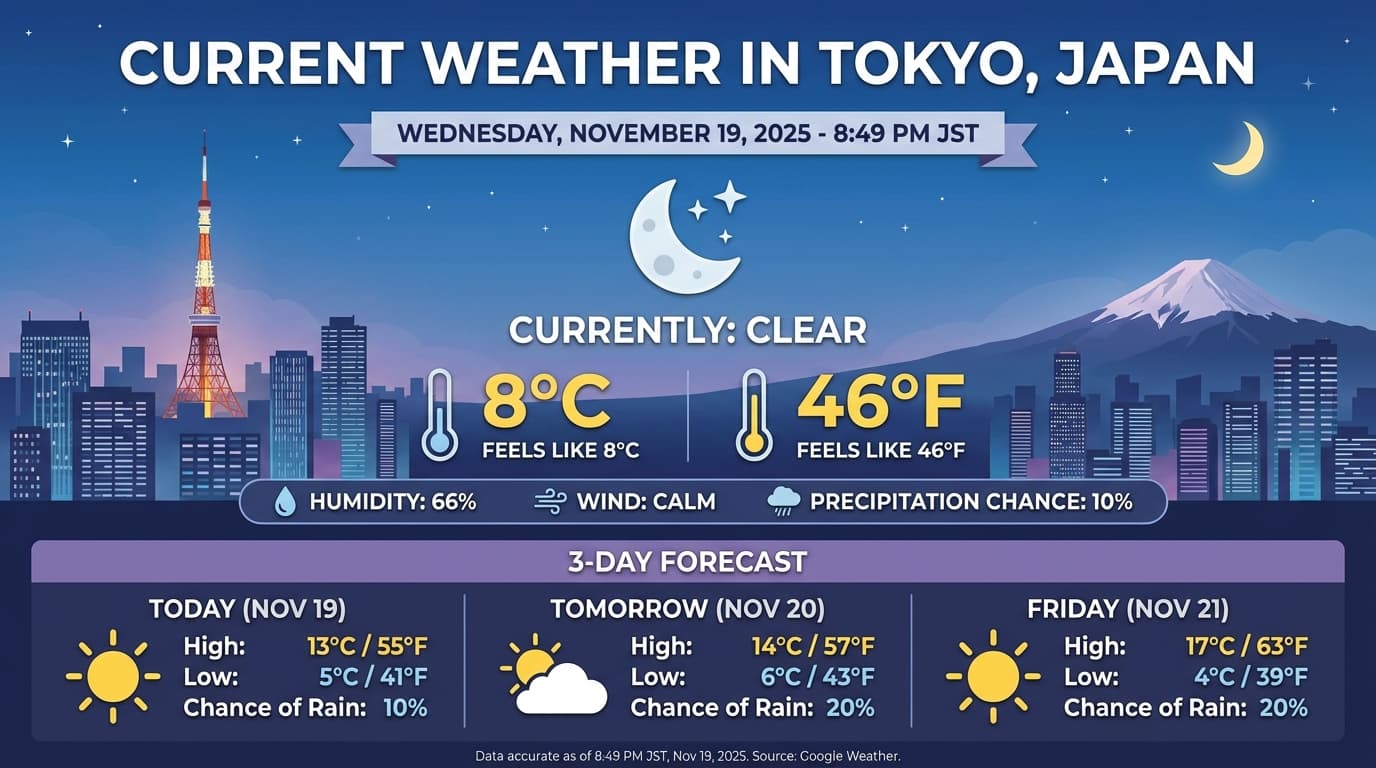
Gemini 3.1 Flash Image و Gemini 3 Pro Image به شما امکان میدهند تصاویر را از پیاموارههای نوشتاری تولید و ویرایش کنید. این مدل از استدلال برای «فکر کردن» درباره پیامواره استفاده میکند و میتواند دادههای بیدرنگ—مثل پیشبینیهای آبوهوا یا نمودارهای سهام—را قبلاز استفاده از جستجوی Google برای زمینهسازی قبلاز تولید تصاویر با کیفیت بالا بازیابی کند.
قابلیتهای جدید و بهبودیافته:
- پرداز کردن نوشتار و 4K: نوشتار و نمودارهای واضح و خوانا با وضوح حداکثر 2K و 4K تولید کنید.
- تولید مبتنی بر واقعیت: از ابزار
google_searchبرای درستیسنجی حقایق و تولید تصاویر براساس اطلاعات دنیای واقعی استفاده کنید. جستجوی زمینهسازی با Google تصویر برای Gemini 3.1 Flash Image دردسترس است. - ویرایش مکالمهای: ویرایش چندنوبتی تصویر با درخواست ساده برای تغییرات (برای نمونه، «پسزمینه را غروب آفتاب کن»). این گردش کار برای حفظ زمینه دیداری بین نوبتها به امضاهای فکری متکی است.
برای جزئیات کامل درباره نسبتهای ابعادی، گردشهای کار ویرایش، و گزینههای پیکربندی، راهنمای تولید تصویر را ببینید.
Python
from google import genai
import base64

client = genai.Client()

interaction = client.interactions.create(
    model="gemini-3-pro-image-preview",
    input="Generate an infographic of the current weather in Tokyo.",
    tools=[{"type": "google_search"}],
    response_format={
        "type": "image",
        "aspect_ratio": "16:9",
        "image_size": "4K"
    }
)

from PIL import Image
import io

generated_image = interaction.output_image
if generated_image:
    image_data = base64.b64decode(generated_image.data)
    image = Image.open(io.BytesIO(image_data))
    image.save('weather_tokyo.png')
    image.show()
JavaScript
import { GoogleGenAI } from "@google/genai";
import * as fs from "node:fs";

const client = new GoogleGenAI({});

async function run() {
  const interaction = await client.interactions.create({
    model: "gemini-3-pro-image-preview",
    input: "Generate a visualization of the current weather in Tokyo.",
    tools: [{ type: "google_search" }],
    response_format: {
      type: "image",
      aspect_ratio: "16:9",
      image_size: "4K"
    }
  });

  const buffer = Buffer.from(interaction.output_image.data, 'base64');

  fs.writeFileSync('weather_tokyo.png', buffer);
}

run();
جاوا
import com.google.genai.Client;
import com.google.genai.gaos.models.interactions.CreateModelInteraction;
import com.google.genai.gaos.models.interactions.CreateModelInteractionResponseFormat;
import com.google.genai.gaos.models.interactions.GoogleSearch;
import com.google.genai.gaos.models.interactions.ImageContent;
import com.google.genai.gaos.models.interactions.ImageResponseFormat;
import com.google.genai.gaos.models.interactions.ImageResponseFormatAspectRatio;
import com.google.genai.gaos.models.interactions.ImageResponseFormatImageSize;
import com.google.genai.gaos.models.interactions.Interaction;
import com.google.genai.gaos.models.interactions.InteractionsInput;
import com.google.genai.gaos.models.interactions.Model;
import com.google.genai.gaos.models.interactions.ResponseFormat;
import com.google.genai.gaos.models.operations.CreateInteractionRequestBody;
import java.nio.file.Files;
import java.nio.file.Paths;
import java.util.Arrays;
import java.util.Base64;
import java.util.Optional;

Client client = new Client();

CreateModelInteraction request =
    CreateModelInteraction.builder()
        .model(Model.of("gemini-3-pro-image-preview"))
        .input(InteractionsInput.of("Generate an infographic of the current weather in Tokyo."))
        .tools(Arrays.asList(GoogleSearch.builder().build()))
        .responseFormat(
            CreateModelInteractionResponseFormat.of(
                ResponseFormat.of(
                    ImageResponseFormat.builder()
                        .aspectRatio(ImageResponseFormatAspectRatio.ONE_HUNDRED_AND_SIXTY_NINE)
                        .imageSize(ImageResponseFormatImageSize.FOUR_K)
                        .build())))
        .build();

Interaction interaction =
    client.interactions.create(CreateInteractionRequestBody.of(request)).interaction().get();

Optional<ImageContent> generatedImage = interaction.outputImage();
if (generatedImage.isPresent() && generatedImage.get().data().isPresent()) {
  byte[] imageBytes = Base64.getDecoder().decode(generatedImage.get().data().get());
  Files.write(Paths.get("weather_tokyo.png"), imageBytes);
}
رفتن
package main

import (
    "context"
    "encoding/base64"
    "log"
    "os"

    "google.golang.org/genai"
    "google.golang.org/genai/interactions/models/interactions"
    "google.golang.org/genai/interactions/models/operations"
)

func main() {
    ctx := context.Background()
    client, err := genai.NewClient(ctx, nil)
    if err != nil {
        log.Fatal(err)
    }

    res, err := client.Interactions.Create(ctx, operations.CreateInteractionRequest{
        Body: operations.NewCreateInteractionRequestBody(interactions.CreateModelInteraction{
            Model: interactions.Model("gemini-3-pro-image-preview"),
            Input: interactions.NewInteractionsInput("Generate an infographic of the current weather in Tokyo."),
            Tools: []interactions.Tool{
                interactions.NewTool(interactions.GoogleSearch{}),
            },
            ResponseFormat: genai.Ptr(interactions.NewCreateModelInteractionResponseFormat(
                interactions.NewResponseFormat(interactions.ImageResponseFormat{
                    AspectRatio: interactions.ImageResponseFormatAspectRatioOneHundredAndSixtyNine.ToPointer(),
                    ImageSize:   interactions.ImageResponseFormatImageSize("4K").ToPointer(),
                }),
            )),
        }),
    })
    if err != nil {
        log.Fatal(err)
    }

    if generatedImage := res.Interaction.GetOutputImage(); generatedImage != nil && generatedImage.Data != nil {
        imageBytes, err := base64.StdEncoding.DecodeString(*generatedImage.Data)
        if err != nil {
            log.Fatal(err)
        }
        if err := os.WriteFile("weather_tokyo.png", imageBytes, 0644); err != nil {
            log.Fatal(err)
        }
    }
}
REST
curl -X POST "https://generativelanguage.googleapis.com/v1beta/interactions" \
  -H "x-goog-api-key: $GEMINI_API_KEY" \
  -H 'Content-Type: application/json' \
  -d '{
    "model": "gemini-3-pro-image-preview",
    "input": "Generate a visualization of the current weather in Tokyo.",
    "tools": [{"type": "google_search"}],
    "response_format": {
        "type": "image",
        "aspect_ratio": "16:9",
        "image_size": "4K"
    }
  }'
پاسخ نمونه
اجرای کد با تصویر
Gemini 3 Flash میتواند دید را بهعنوان یک بررسی فعال درنظر بگیرد، نه فقط یک نگاه ایستا. با ترکیب استدلال با اجرای کد، مدل برنامهای را فرموله میکند، سپس کد پایتون را برای بزرگنمایی، برش، حاشیهنویسی، یا دستکاری تصاویر بهصورت گامبهگام مینویسد و اجرا میکند تا پاسخهایش را بهصورت بصری مستند کند.
موارد استفاده:
- زومپیش و بازرسی: مدل بهطور ضمنی تشخیص میدهد که جزئیات چقدر کوچک است (برای نمونه، خواندن درجه یا شماره سریال از دور) و کدی برای برش دادن و دوباره بررسی کردن ناحیه با وضوح بالاتر مینویسد.
- ریاضیات و رسم نمودار دیداری: این مدل میتواند محاسبات چندمرحلهای را بااستفاده از کد اجرا کند (برای مثال، جمع کردن ردیفهای یک رسید، یا تولید نمودار Matplotlib از دادههای استخراجشده).
- گزارمان تصویر: مدل میتواند برای پاسخ دادن به سؤالات فضایی مثل «این مورد کجا باید برود؟» مستقیماً روی تصاویر فلش، چارگوش محدودکننده، یا گزارشمانهای دیگر بکشد.
برای فعال کردن تفکر تصویری، اجرای کد را بهعنوان ابزار پیکربندی کنید. این مدل درصورت نیاز بهطور خودکار از کد برای دستکاری تصاویر استفاده میکند.
Python
from google import genai
from google.genai import types
import requests
from PIL import Image
import io
import base64

image_path = "https://goo.gle/instrument-img"
image_bytes = requests.get(image_path).content
image = types.Part.from_bytes(data=image_bytes, mime_type="image/jpeg")

client = genai.Client()

interaction = client.interactions.create(
    model="gemini-3-flash-preview",
    input=[
        image,
        "Zoom into the expression pedals and tell me how many pedals are there?"
    ],
    tools=[{"type": "code_execution"}],
)

from IPython.display import display
from PIL import Image
import io

for step in interaction.steps:
    if step.type == "model_output":
        for content_block in step.content:
            if content_block.type == "text":
                print(content_block.text)
            elif content_block.type == "image":
                 display(Image.open(io.BytesIO(base64.b64decode(content_block.data))))
    elif step.type == "code_execution_call":
        print(step.code)
    elif step.type == "code_execution_result":
        print(step.output)
JavaScript
import { GoogleGenAI } from "@google/genai";

const client = new GoogleGenAI({});

async function main() {
  const imageUrl = "https://goo.gle/instrument-img";
  const response = await fetch(imageUrl);
  const imageArrayBuffer = await response.arrayBuffer();
  const base64ImageData = Buffer.from(imageArrayBuffer).toString("base64");

  const interaction = await client.interactions.create({
    model: "gemini-3-flash-preview",
    input: [
      {
        type: "image",
        mime_type: "image/jpeg",
        data: base64ImageData,
      },
      {
        type: "text",
        text: "Zoom into the expression pedals and tell me how many pedals are there?",
      },
    ],
    tools: [{ type: "code_execution" }],
  });

  for (const step of interaction.steps) {
    if (step.type === "model_output") {
      for (const contentBlock of step.content) {
        if (contentBlock.type === "text") {
          console.log("Text:", contentBlock.text);
        }
      }
    } else if (step.type === "code_execution_call") {
      console.log("Code:", step.code);
    } else if (step.type === "code_execution_result") {
      console.log("Output:", step.output);
    }
  }
}

main();
جاوا
import com.google.genai.Client;
import com.google.genai.gaos.models.interactions.CodeExecution;
import com.google.genai.gaos.models.interactions.CodeExecutionCallStep;
import com.google.genai.gaos.models.interactions.CodeExecutionResultStep;
import com.google.genai.gaos.models.interactions.Content;
import com.google.genai.gaos.models.interactions.CreateModelInteraction;
import com.google.genai.gaos.models.interactions.ImageContent;
import com.google.genai.gaos.models.interactions.ImageContentMimeType;
import com.google.genai.gaos.models.interactions.Interaction;
import com.google.genai.gaos.models.interactions.InteractionsInput;
import com.google.genai.gaos.models.interactions.Model;
import com.google.genai.gaos.models.interactions.ModelOutputStep;
import com.google.genai.gaos.models.interactions.Step;
import com.google.genai.gaos.models.interactions.TextContent;
import com.google.genai.gaos.models.operations.CreateInteractionRequestBody;
import java.io.InputStream;
import java.net.URL;
import java.util.Arrays;
import java.util.Base64;
import java.util.Collections;

Client client = new Client();

URL url = new URL("https://goo.gle/instrument-img");
byte[] imageBytes;
try (InputStream is = url.openStream()) {
  imageBytes = is.readAllBytes();
}
String base64ImageData = Base64.getEncoder().encodeToString(imageBytes);

CreateModelInteraction request =
    CreateModelInteraction.builder()
        .model(Model.of("gemini-3-flash-preview"))
        .input(
            InteractionsInput.ofContent(
                Arrays.asList(
                    ImageContent.builder()
                        .mimeType(ImageContentMimeType.IMAGE_JPEG)
                        .data(base64ImageData)
                        .build(),
                    TextContent.builder()
                        .text("Zoom into the expression pedals and tell me how many pedals are there?")
                        .build())))
        .tools(Arrays.asList(CodeExecution.builder().build()))
        .build();

Interaction interaction =
    client.interactions.create(CreateInteractionRequestBody.of(request)).interaction().get();

for (Step step : interaction.steps().orElse(Collections.emptyList())) {
  if (step instanceof ModelOutputStep) {
    ModelOutputStep modelOutput = (ModelOutputStep) step;
    for (Content contentBlock : modelOutput.content().orElse(Collections.emptyList())) {
      if (contentBlock instanceof TextContent) {
        System.out.println("Text: " + ((TextContent) contentBlock).text().orElse(""));
      }
    }
  } else if (step instanceof CodeExecutionCallStep) {
    CodeExecutionCallStep callStep = (CodeExecutionCallStep) step;
    callStep.arguments().flatMap(args -> args.code()).ifPresent(code -> System.out.println("Code: " + code));
  } else if (step instanceof CodeExecutionResultStep) {
    CodeExecutionResultStep resultStep = (CodeExecutionResultStep) step;
    System.out.println("Output: " + resultStep.result().orElse(""));
  }
}
رفتن
package main

import (
    "context"
    "encoding/base64"
    "fmt"
    "io"
    "log"
    "net/http"

    "google.golang.org/genai"
    "google.golang.org/genai/interactions/models/interactions"
    "google.golang.org/genai/interactions/models/operations"
)

func main() {
    ctx := context.Background()
    client, err := genai.NewClient(ctx, nil)
    if err != nil {
        log.Fatal(err)
    }

    httpRes, err := http.Get("https://goo.gle/instrument-img")
    if err != nil {
        log.Fatal(err)
    }
    defer httpRes.Body.Close()
    imageBytes, err := io.ReadAll(httpRes.Body)
    if err != nil {
        log.Fatal(err)
    }
    base64ImageData := base64.StdEncoding.EncodeToString(imageBytes)

    res, err := client.Interactions.Create(ctx, operations.CreateInteractionRequest{
        Body: operations.NewCreateInteractionRequestBody(interactions.CreateModelInteraction{
            Model: interactions.Model("gemini-3-flash-preview"),
            Input: interactions.NewInteractionsInput([]interactions.Content{
                interactions.NewContent(interactions.ImageContent{
                    MimeType: interactions.ImageContentMimeType("image/jpeg").ToPointer(),
                    Data:     genai.Ptr(base64ImageData),
                }),
                interactions.NewContent(interactions.TextContent{
                    Text: "Zoom into the expression pedals and tell me how many pedals are there?",
                }),
            }),
            Tools: []interactions.Tool{
                interactions.NewTool(interactions.CodeExecution{}),
            },
        }),
    })
    if err != nil {
        log.Fatal(err)
    }

    for _, step := range res.Interaction.Steps {
        if modelOutput := step.ModelOutputStep; modelOutput != nil {
            for _, contentBlock := range modelOutput.Content {
                if textContent := contentBlock.TextContent; textContent != nil {
                    fmt.Println("Text:", textContent.Text)
                }
            }
        } else if callStep := step.CodeExecutionCallStep; callStep != nil {
            if callStep.Arguments.Code != nil {
                fmt.Println("Code:", *callStep.Arguments.Code)
            }
        } else if resultStep := step.CodeExecutionResultStep; resultStep != nil {
            fmt.Println("Output:", resultStep.Result)
        }
    }
}
REST
IMG_URL="https://goo.gle/instrument-img"
MODEL="gemini-3-flash-preview"

MIME_TYPE=$(curl -sIL "$IMG_URL" | grep -i '^content-type:' | awk -F ': ' '{print $2}' | sed 's/\r$//' | head -n 1)
if [[ -z "$MIME_TYPE" || ! "$MIME_TYPE" == image/* ]]; then
  MIME_TYPE="image/jpeg"
fi

if [[ "$(uname)" == "Darwin" ]]; then
  IMAGE_B64=$(curl -sL "$IMG_URL" | base64 -b 0)
elif [[ "$(base64 --version 2>&1)" = *"FreeBSD"* ]]; then
  IMAGE_B64=$(curl -sL "$IMG_URL" | base64)
else
  IMAGE_B64=$(curl -sL "$IMG_URL" | base64 -w0)
fi

curl -X POST "https://generativelanguage.googleapis.com/v1beta/interactions" \
    -H "x-goog-api-key: $GEMINI_API_KEY" \
    -H 'Content-Type: application/json' \
    -d '{
      "model": "'$MODEL'",
      "input": [
            {
              "type": "image",
              "mime_type":"'"$MIME_TYPE"'",
              "data": "'"$IMAGE_B64"'"
            },
            {"type": "text", "text": "Zoom into the expression pedals and tell me how many pedals are there?"}
      ],
      "tools": [{"type": "code_execution"}]
    }'
برای جزئیات بیشتر درباره اجرای کد با تصاویر، اجرای کد را ببینید.
پاسخهای عملکرد چندحالته
فراخوانی تابع چندحالته به کاربران امکان میدهد پاسخهای تابع حاوی اشیاء چندحالته داشته باشند که امکان استفاده بهتر از قابلیتهای فراخوانی تابع مدل را فراهم میکند. فراخوانی تابع استاندارد فقط از پاسخهای تابع نوشتاری پشتیبانی میکند:
Python
# This will only work for SDK newer than 2.0.0
from google import genai
import requests
import base64

client = genai.Client()

# 1. Define the tool
get_image_tool = {
    "type": "function",
    "name": "get_image",
    "description": "Retrieves the image file reference for a specific order item.",
    "parameters": {
        "type": "object",
        "properties": {
            "item_name": {
                "type": "string",
                "description": "The name or description of the item ordered (e.g., 'instrument')."
            }
        },
        "required": ["item_name"],
    },
}

# 2. Send the request with tools
interaction_1 = client.interactions.create(
    model="gemini-3-flash-preview",
    input="Show me the instrument I ordered last month.",
    tools=[get_image_tool],
)

# 3. Find the function call step
fc_step = next(s for s in interaction_1.steps if s.type == "function_call")
print(f"Tool Call: {fc_step.name}({fc_step.arguments})")

# Execute tool (fetch image)
image_path = "https://goo.gle/instrument-img"
image_bytes = requests.get(image_path).content
image_b64 = base64.b64encode(image_bytes).decode("utf-8")

# 4. Send multimodal function result back
interaction_2 = client.interactions.create(
    model="gemini-3-flash-preview",
    previous_interaction_id=interaction_1.id,
    input=[{
        "type": "function_result",
        "name": fc_step.name,
        "call_id": fc_step.id,
        "result": [
            {"type": "text", "text": "instrument.jpg"},
            {
                "type": "image",
                "mime_type": "image/jpeg",
                "data": image_b64,
            }
        ]
    }],
    tools=[get_image_tool]
)

print(f"\nFinal model response: {interaction_2.output_text}")
JavaScript
import { GoogleGenAI } from '@google/genai';

const client = new GoogleGenAI({});

const getImageTool = {
    type: 'function',
    name: 'get_image',
    description: 'Retrieves the image file reference for a specific order item.',
    parameters: {
        type: 'object',
        properties: {
            item_name: {
                type: 'string',
                description: "The name or description of the item ordered (e.g., 'instrument').",
            },
        },
        required: ['item_name'],
    },
};

const interaction1 = await client.interactions.create({
    model: 'gemini-3-flash-preview',
    input: 'Use the get_image tool to show me the instrument I ordered last month.',
    tools: [getImageTool],
});

const fcStep = interaction1.steps.find(s => s.type === 'function_call');
console.log(`Tool Call: ${fcStep.name}(${JSON.stringify(fcStep.arguments)})`);

const imageUrl = 'https://goo.gle/instrument-img';
const response = await fetch(imageUrl);
const imageArrayBuffer = await response.arrayBuffer();
const base64ImageData = Buffer.from(imageArrayBuffer).toString('base64');

const interaction2 = await client.interactions.create({
    model: 'gemini-3-flash-preview',
    previous_interaction_id: interaction1.id,
    input: [{
        type: 'function_result',
        name: fcStep.name,
        call_id: fcStep.id,
        result: [
            { type: 'text', text: 'instrument.jpg' },
            {
                type: 'image',
                mime_type: 'image/jpeg',
                data: base64ImageData,
            }
        ]
    }],
    tools: [getImageTool]
});

console.log(`\nFinal model response: ${interaction2.output_text}`);
جاوا
import com.google.genai.Client;
import com.google.genai.gaos.models.interactions.CreateModelInteraction;
import com.google.genai.gaos.models.interactions.Function;
import com.google.genai.gaos.models.interactions.FunctionCallStep;
import com.google.genai.gaos.models.interactions.FunctionResultStep;
import com.google.genai.gaos.models.interactions.FunctionResultStepResultUnion;
import com.google.genai.gaos.models.interactions.FunctionResultSubcontent;
import com.google.genai.gaos.models.interactions.ImageContent;
import com.google.genai.gaos.models.interactions.ImageContentMimeType;
import com.google.genai.gaos.models.interactions.Interaction;
import com.google.genai.gaos.models.interactions.InteractionsInput;
import com.google.genai.gaos.models.interactions.Model;
import com.google.genai.gaos.models.interactions.Step;
import com.google.genai.gaos.models.interactions.TextContent;
import com.google.genai.gaos.models.operations.CreateInteractionRequestBody;
import java.io.InputStream;
import java.net.URL;
import java.util.ArrayList;
import java.util.Arrays;
import java.util.Base64;
import java.util.Collections;
import java.util.HashMap;
import java.util.List;
import java.util.Map;

Client client = new Client();

Map<String, Object> itemProp = new HashMap<>();
itemProp.put("type", "string");
itemProp.put("description", "The name or description of the item ordered (e.g., 'instrument').");

Map<String, Object> properties = new HashMap<>();
properties.put("item_name", itemProp);

Map<String, Object> parameters = new HashMap<>();
parameters.put("type", "object");
parameters.put("properties", properties);
parameters.put("required", Arrays.asList("item_name"));

Function getImageTool =
    Function.builder()
        .name("get_image")
        .description("Retrieves the image file reference for a specific order item.")
        .parameters(parameters)
        .build();

CreateModelInteraction req1 =
    CreateModelInteraction.builder()
        .model(Model.of("gemini-3-flash-preview"))
        .input(
            InteractionsInput.of(
                "Use the get_image tool to show me the instrument I ordered last month."))
        .tools(Arrays.asList(getImageTool))
        .build();

Interaction interaction1 =
    client.interactions.create(CreateInteractionRequestBody.of(req1)).interaction().get();

FunctionCallStep fcStep = null;
for (Step step : interaction1.steps().orElse(Collections.emptyList())) {
  if (step instanceof FunctionCallStep) {
    fcStep = (FunctionCallStep) step;
    break;
  }
}

if (fcStep != null) {
  System.out.println("Tool Call: " + fcStep.name().orElse(""));

  URL url = new URL("https://goo.gle/instrument-img");
  byte[] imageBytes;
  try (InputStream is = url.openStream()) {
    imageBytes = is.readAllBytes();
  }
  String base64ImageData = Base64.getEncoder().encodeToString(imageBytes);

  List<FunctionResultSubcontent> subcontents = new ArrayList<>();
  subcontents.add(TextContent.builder().text("instrument.jpg").build());
  subcontents.add(
      ImageContent.builder()
          .mimeType(ImageContentMimeType.IMAGE_JPEG)
          .data(base64ImageData)
          .build());

  FunctionResultStep funcResult =
      FunctionResultStep.builder()
          .name(fcStep.name().orElse(""))
          .callId(fcStep.id().orElse(""))
          .result(FunctionResultStepResultUnion.of(subcontents))
          .build();

  CreateModelInteraction req2 =
      CreateModelInteraction.builder()
          .model(Model.of("gemini-3-flash-preview"))
          .input(InteractionsInput.ofStep(Arrays.asList(funcResult)))
          .tools(Arrays.asList(getImageTool))
          .previousInteractionId(interaction1.id().orElse(""))
          .build();

  Interaction interaction2 =
      client.interactions.create(CreateInteractionRequestBody.of(req2)).interaction().get();
  System.out.println("Final model response: " + interaction2.outputText().orElse(""));
}
رفتن
package main

import (
    "context"
    "encoding/base64"
    "fmt"
    "io"
    "log"
    "net/http"

    "google.golang.org/genai"
    "google.golang.org/genai/interactions/models/interactions"
    "google.golang.org/genai/interactions/models/operations"
)

func main() {
    ctx := context.Background()
    client, err := genai.NewClient(ctx, nil)
    if err != nil {
        log.Fatal(err)
    }

    getImageTool := interactions.NewTool(interactions.Function{
        Name:        genai.Ptr("get_image"),
        Description: genai.Ptr("Retrieves the image file reference for a specific order item."),
        Parameters: map[string]any{
            "type": "object",
            "properties": map[string]any{
                "item_name": map[string]any{
                    "type":        "string",
                    "description": "The name or description of the item ordered (e.g., 'instrument').",
                },
            },
            "required": []string{"item_name"},
        },
    })

    res1, err := client.Interactions.Create(ctx, operations.CreateInteractionRequest{
        Body: operations.NewCreateInteractionRequestBody(interactions.CreateModelInteraction{
            Model: interactions.Model("gemini-3-flash-preview"),
            Input: interactions.NewInteractionsInput("Use the get_image tool to show me the instrument I ordered last month."),
            Tools: []interactions.Tool{getImageTool},
        }),
    })
    if err != nil {
        log.Fatal(err)
    }

    for _, step := range res1.Interaction.Steps {
        if fcStep := step.FunctionCallStep; fcStep != nil {
            fmt.Println("Tool Call:", fcStep.Name)

            httpRes, err := http.Get("https://goo.gle/instrument-img")
            if err != nil {
                log.Fatal(err)
            }
            defer httpRes.Body.Close()
            imageBytes, err := io.ReadAll(httpRes.Body)
            if err != nil {
                log.Fatal(err)
            }
            base64ImageData := base64.StdEncoding.EncodeToString(imageBytes)

            funcResult := interactions.NewStep(interactions.FunctionResultStep{
                Name:   genai.Ptr(fcStep.Name),
                CallID: fcStep.ID,
                Result: interactions.NewFunctionResultStepResultUnion([]interactions.FunctionResultSubcontent{
                    interactions.NewFunctionResultSubcontent(interactions.TextContent{
                        Text: "instrument.jpg",
                    }),
                    interactions.NewFunctionResultSubcontent(interactions.ImageContent{
                        MimeType: interactions.ImageContentMimeType("image/jpeg").ToPointer(),
                        Data:     genai.Ptr(base64ImageData),
                    }),
                }),
            })

            res2, err := client.Interactions.Create(ctx, operations.CreateInteractionRequest{
                Body: operations.NewCreateInteractionRequestBody(interactions.CreateModelInteraction{
                    Model:                 interactions.Model("gemini-3-flash-preview"),
                    PreviousInteractionID: res1.Interaction.ID,
                    Tools:                 []interactions.Tool{getImageTool},
                    Input:                 interactions.NewInteractionsInput([]interactions.Step{funcResult}),
                }),
            })
            if err != nil {
                log.Fatal(err)
            }
            if res2.Interaction.OutputText != nil {
                fmt.Println("Final model response:", *res2.Interaction.OutputText)
            }
            break
        }
    }
}
REST
IMG_URL="https://goo.gle/instrument-img"

MIME_TYPE=$(curl -sIL "$IMG_URL" | grep -i '^content-type:' | awk -F ': ' '{print $2}' | sed 's/\r$//' | head -n 1)
if [[ -z "$MIME_TYPE" || ! "$MIME_TYPE" == image/* ]]; then
  MIME_TYPE="image/jpeg"
fi

# Check for macOS
if [[ "$(uname)" == "Darwin" ]]; then
  IMAGE_B64=$(curl -sL "$IMG_URL" | base64 -b 0)
elif [[ "$(base64 --version 2>&1)" = *"FreeBSD"* ]]; then
  IMAGE_B64=$(curl -sL "$IMG_URL" | base64)
else
  IMAGE_B64=$(curl -sL "$IMG_URL" | base64 -w0)
fi

# 1. First interaction (triggers function call)
# curl -X POST "https://generativelanguage.googleapis.com/v1beta/interactions" \
#   -H "x-goog-api-key: $GEMINI_API_KEY" \
#   -H 'Content-Type: application/json' \
#   -d '{ "model": "gemini-3-flash-preview", "input": "Show me the instrument I ordered last month.", "tools": [...] }'

# 2. Send multimodal function result back (Replace INTERACTION_ID and CALL_ID)
curl -X POST "https://generativelanguage.googleapis.com/v1beta/interactions" \
  -H "x-goog-api-key: $GEMINI_API_KEY" \
  -H 'Content-Type: application/json' \
  -d '{
    "model": "gemini-3-flash-preview",
    "previous_interaction_id": "INTERACTION_ID",
    "input": [{
      "type": "function_result",
      "name": "get_image",
      "call_id": "CALL_ID",
      "result": [
        { "type": "text", "text": "instrument.jpg" },
        {
          "type": "image",
          "mime_type": "'"$MIME_TYPE"'",
          "data": "'"$IMAGE_B64"'"
        }
      ]
    }]
  }'
ترکیب ابزارهای داخلی و فراخوانی تابع
Gemini 3 امکان استفاده از ابزارهای داخلی (مثل «جستجوی Google»، بافت URL، و موارد دیگر) و ابزارهای سفارشی فراخوانی تابع را در همان فراخوانی API فراهم میکند و امکان گردشهای کار پیچیدهتر را فراهم میکند.
Python
from google import genai
from google.genai import types

client = genai.Client()

getWeather = {
    "type": "function",
    "name": "getWeather",
    "description": "Gets the weather for a requested city.",
    "parameters": {
        "type": "object",
        "properties": {
            "city": {
                "type": "string",
                "description": "The city and state, e.g. Utqiaġvik, Alaska",
            },
        },
        "required": ["city"],
    },
}

interaction = client.interactions.create(
    model="gemini-3-flash-preview",
    input="What is the northernmost city in the United States? What's the weather like there today?",
    tools=[
        {"type": "google_search"},
        getWeather
    ],
)

fc_step = next((s for s in interaction.steps if s.type == "function_call"), None)

if fc_step:
    result = {"response": "Very cold. 22 degrees Fahrenheit."}

    final_interaction = client.interactions.create(
        model="gemini-3-flash-preview",
        input=[
            {"type": "function_result", "name": fc_step.name, "call_id": fc_step.id, "result": result}
        ],
        tools=[
            {"type": "google_search"},
            getWeather
        ],
        previous_interaction_id=interaction.id,
    )

    print(final_interaction.output_text)
JavaScript
import { GoogleGenAI, Type } from '@google/genai';

const client = new GoogleGenAI({});

const getWeatherDeclaration = {
  type: 'function',
  name: 'getWeather',
  description: 'Gets the weather for a requested city.',
  parameters: {
    type: Type.OBJECT,
    properties: {
      city: {
        type: Type.STRING,
        description: 'The city and state, e.g. Utqiaġvik, Alaska',
      },
    },
    required: ['city'],
  },
};

const interaction = await client.interactions.create({
  model: 'gemini-3-flash-preview',
  input: "What is the northernmost city in the United States? What's the weather like there today?",
  tools: [
    { type: "google_search" },
    getWeatherDeclaration
  ],
});

const fcStep = interaction.steps.find(s => s.type === 'function_call');

if (fcStep) {
  const result = { response: "Very cold. 22 degrees Fahrenheit." };

  const finalInteraction = await client.interactions.create({
    model: 'gemini-3-flash-preview',
    input: [
      { type: 'function_result', name: fcStep.name, call_id: fcStep.id, result: result }
    ],
    tools: [
      { type: "google_search" },
      getWeatherDeclaration
    ],
    previous_interaction_id: interaction.id,
  });

  console.log(finalInteraction.output_text);
}
جاوا
import com.google.genai.Client;
import com.google.genai.gaos.models.interactions.CreateModelInteraction;
import com.google.genai.gaos.models.interactions.Function;
import com.google.genai.gaos.models.interactions.FunctionCallStep;
import com.google.genai.gaos.models.interactions.FunctionResultStep;
import com.google.genai.gaos.models.interactions.FunctionResultStepResultUnion;
import com.google.genai.gaos.models.interactions.GoogleSearch;
import com.google.genai.gaos.models.interactions.Interaction;
import com.google.genai.gaos.models.interactions.InteractionsInput;
import com.google.genai.gaos.models.interactions.Model;
import com.google.genai.gaos.models.interactions.Step;
import com.google.genai.gaos.models.operations.CreateInteractionRequestBody;
import java.util.Arrays;
import java.util.Collections;
import java.util.HashMap;
import java.util.Map;

Client client = new Client();

Map<String, Object> cityProp = new HashMap<>();
cityProp.put("type", "string");
cityProp.put("description", "The city and state, e.g. Utqiaġvik, Alaska");

Map<String, Object> properties = new HashMap<>();
properties.put("city", cityProp);

Map<String, Object> parameters = new HashMap<>();
parameters.put("type", "object");
parameters.put("properties", properties);
parameters.put("required", Arrays.asList("city"));

Function getWeather =
    Function.builder()
        .name("getWeather")
        .description("Gets the weather for a requested city.")
        .parameters(parameters)
        .build();

CreateModelInteraction request =
    CreateModelInteraction.builder()
        .model(Model.of("gemini-3-flash-preview"))
        .input(
            InteractionsInput.of(
                "What is the northernmost city in the United States? What's the weather like there today?"))
        .tools(Arrays.asList(GoogleSearch.builder().build(), getWeather))
        .build();

Interaction interaction =
    client.interactions.create(CreateInteractionRequestBody.of(request)).interaction().get();

FunctionCallStep fcStep = null;
for (Step step : interaction.steps().orElse(Collections.emptyList())) {
  if (step instanceof FunctionCallStep) {
    fcStep = (FunctionCallStep) step;
    break;
  }
}

if (fcStep != null) {
  FunctionResultStep funcResult =
      FunctionResultStep.builder()
          .name(fcStep.name().orElse(""))
          .callId(fcStep.id().orElse(""))
          .result(
              FunctionResultStepResultUnion.of(
                  "{\"response\": \"Very cold. 22 degrees Fahrenheit.\"}"))
          .build();

  CreateModelInteraction finalRequest =
      CreateModelInteraction.builder()
          .model(Model.of("gemini-3-flash-preview"))
          .input(InteractionsInput.ofStep(Arrays.asList(funcResult)))
          .tools(Arrays.asList(GoogleSearch.builder().build(), getWeather))
          .previousInteractionId(interaction.id().orElse(""))
          .build();

  Interaction finalInteraction =
      client.interactions.create(CreateInteractionRequestBody.of(finalRequest)).interaction().get();
  System.out.println(finalInteraction.outputText().orElse(""));
}
رفتن
package main

import (
    "context"
    "fmt"
    "log"

    "google.golang.org/genai"
    "google.golang.org/genai/interactions/models/interactions"
    "google.golang.org/genai/interactions/models/operations"
)

func main() {
    ctx := context.Background()
    client, err := genai.NewClient(ctx, nil)
    if err != nil {
        log.Fatal(err)
    }

    getWeather := interactions.NewTool(interactions.Function{
        Name:        genai.Ptr("getWeather"),
        Description: genai.Ptr("Gets the weather for a requested city."),
        Parameters: map[string]any{
            "type": "object",
            "properties": map[string]any{
                "city": map[string]any{
                    "type":        "string",
                    "description": "The city and state, e.g. Utqiaġvik, Alaska",
                },
            },
            "required": []string{"city"},
        },
    })

    tools := []interactions.Tool{
        interactions.NewTool(interactions.GoogleSearch{}),
        getWeather,
    }

    res, err := client.Interactions.Create(ctx, operations.CreateInteractionRequest{
        Body: operations.NewCreateInteractionRequestBody(interactions.CreateModelInteraction{
            Model: interactions.Model("gemini-3-flash-preview"),
            Input: interactions.NewInteractionsInput("What is the northernmost city in the United States? What's the weather like there today?"),
            Tools: tools,
        }),
    })
    if err != nil {
        log.Fatal(err)
    }

    for _, step := range res.Interaction.Steps {
        if fcStep := step.FunctionCallStep; fcStep != nil {
            funcResult := interactions.NewStep(interactions.FunctionResultStep{
                Name:   genai.Ptr(fcStep.Name),
                CallID: fcStep.ID,
                Result: interactions.NewFunctionResultStepResultUnion(`{"response": "Very cold. 22 degrees Fahrenheit."}`),
            })

            finalRes, err := client.Interactions.Create(ctx, operations.CreateInteractionRequest{
                Body: operations.NewCreateInteractionRequestBody(interactions.CreateModelInteraction{
                    Model:                 interactions.Model("gemini-3-flash-preview"),
                    PreviousInteractionID: res.Interaction.ID,
                    Tools:                 tools,
                    Input:                 interactions.NewInteractionsInput([]interactions.Step{funcResult}),
                }),
            })
            if err != nil {
                log.Fatal(err)
            }
            if finalRes.Interaction.OutputText != nil {
                fmt.Println(*finalRes.Interaction.OutputText)
            }
            break
        }
    }
}
انتقال از Gemini 2.5
Gemini 3 توانمندترین خانواده مدلهای ما تا به امروز است و نسبت به Gemini 2.5 بهبود گامبهگام ارائه میدهد. هنگام انتقال، موارد زیر را درنظر بگیرید:
- اندیشگر: اگر قبلاً از مهندسی پیامواره پیچیده (مثل
زنجیره فکر) برای مجبور کردن Gemini 2.5 به استدلال استفاده میکردید، Gemini 3 را با
thinking_level: "high"و پیاموارههای سادهشده امتحان کنید. - تنظیمات دما: اگر کد موجودتان بهطور صریح دما را تنظیم میکند (بهویژه روی مقادیر پایین برای بروندادهای قطعی)، توصیه میکنیم این پارامتر را بردارید و از مقدار پیشفرض ۱٫۰ در Gemini 3 استفاده کنید تا از مشکلات احتمالی حلقه یا افت عملکرد در کارهای پیچیده جلوگیری کنید.
- درک سند و PDF:
اگر برای تجزیه اسناد متراکم به رفتار خاصی متکی بودید،
تنظیم جدید
media_resolution_highرا آزمایش کنید تا از ادامه دقت مطمئن شوید. - مصرف دادهواحد (توکن): انتقال به پیشفرضهای Gemini 3 ممکن است مصرف دادهواحد (توکن) را برای فایلهای PDF افزایش دهد اما مصرف دادهواحد (توکن) را برای ویدیو کاهش دهد. اگر درخواستها اکنون بهدلیل وضوح پیشفرض بالاتر از پنجره بافت فراتر میروند، توصیه میکنیم وضوح رسانه را بهطور صریح کاهش دهید.
- تقسیمبندی تصویر: قابلیتهای تقسیمبندی تصویر (برگرداندن پوششهای سطح پیکسل برای اشیا) در Gemini 3 Pro یا Gemini 3 Flash پشتیبانی نمیشود. برای بارهای کاری که به تقسیمبندی تصویر داخلی نیاز دارند، توصیه میکنیم به استفاده از Gemini 2.5 Flash با خاموش بودن تفکر ادامه دهید.
- استفاده از رایانه: Gemini 3 Pro و Gemini 3 Flash از استفاده از رایانه پشتیبانی میکنند. برخلاف سری ۲.۵، برای دسترسی به ابزار «استفاده از رایانه» نیازی به استفاده از مدل جداگانه ندارید.
- پشتیبانی از ابزار: ترکیب ابزارهای داخلی با فراخوانی تابع اکنون برای مدلهای Gemini 3 پشتیبانی میشود. اکنون از پایه Maps برای مدلهای Gemini 3 نیز پشتیبانی میشود.
سازگاری با OpenAI
برای کاربرانی که از لایه سازگاری OpenAI استفاده میکنند،
پارامترهای استاندارد (reasoning_effort در OpenAI) بهطور خودکار به
معادلهای Gemini (thinking_level) نگاشت میشوند.
روالهای مطلوب پیامواره
Gemini 3 مدل استدلالی است که نحوه پیاموارهنویسی شما را تغییر میدهد.
- دستورالعملهای دقیق: در پیاموارههای ورودی خود مختصر و مفید باشید. Gemini 3 بهترین پاسخ را به دستورالعملهای مستقیم و واضح میدهد. ممکن است تکنیکهای مهندسی پیامواره پرحرف یا بیشازحد پیچیده را که برای مدلهای قدیمیتر استفاده میشود بیشازحد تجزیهوتحلیل کند.
- پرگویی برونداد: بهطور پیشفرض، Gemini 3 کمتر پرگو است و ترجیح میدهد پاسخهای مستقیم و کارآمد ارائه دهد. اگر مورد استفاده شما به شخصیتی مکالمهایتر یا «گپزن» نیاز دارد، باید مدل را بهطور صریح در پیامواره هدایت کنید (برای نمونه، «این را بهعنوان دستیار دوستانه و گپزن توضیح بده»).
- مدیریت زمینهها: هنگام کار با مجموعه دادههای بزرگ (مثلاً کل کتابها، پایههای کد، یا ویدیوهای طولانی)، دستورالعملها یا پرسشهای خاص خود را در انتهای پیامواره، پساز زمینه دادهها، قرار دهید. با شروع کردن پرسشتان با عبارتی مثل «براساس اطلاعات قبلی…»، استدلال مدل را به دادههای ارائهشده متصل کنید.
درباره استراتژیهای طراحی پیامواره در راهنمای مهندسی پیامواره بیشتر بدانید.
پرسشگان
«آستانه دانش» برای Gemini 3 چیست؟ مدلهای Gemini 3 تا ژانویه ۲۰۲۵ اطلاعات دارند. برای اطلاعات جدیدتر، از ابزار جستجوی زمینهای استفاده کنید.
محدودیتهای پنجره زمینهای چیست؟ مدلهای Gemini 3 از پنجره زمینهای ورودی ۱ میلیون دادهواحد (توکن) و حداکثر ۶۴ هزار دادهواحد (توکن) برونداد پشتیبانی میکنند.
آیا سطح رایگانی برای Gemini 3 وجود دارد؟ Gemini 3 Flash
gemini-3-flash-previewدر Gemini API سطح رایگان دارد. میتوانید Gemini 3.1 Pro و 3 Flash را بدون هزینه در Google AI Studio امتحان کنید، اما هیچ سطح رایگانی برایgemini-3.1-pro-previewدر Gemini API دردسترس نیست.آیا کد قدیمی
thinking_budgetمن همچنان کار خواهد کرد؟ بله،thinking_budgetهمچنان برای سازگاری با نسخه قدیمی پشتیبانی میشود، اما توصیه میکنیم برای عملکرد قابلپیشبینیتر بهthinking_levelانتقال دهید. از هر دو در یک درخواست استفاده نکنید.آیا Gemini 3 از Batch API پشتیبانی میکند؟ بله، Gemini 3 از Batch API پشتیبانی میکند.
آیا «ذخیره کردن زمینهای» پشتیبانی میشود؟ بله، ذخیره کردن زمینهای برای Gemini 3 پشتیبانی میشود.
کدام ابزارها در Gemini 3 پشتیبانی میشوند؟ Gemini 3 از جستجوی Google، زمینهسازی با Google Maps، جستجوی فایل، اجرای کد، و زمینه نشانی وب پشتیبانی میکند. همچنین از فراخوانی تابع استاندارد برای ابزارهای سفارشی خودتان و ترکیب با ابزارهای داخلی پشتیبانی میکند.
gemini-3.1-pro-preview-customtoolsچیست؟ اگر ازgemini-3.1-pro-previewاستفاده میکنید و مدل ابزارهای سفارشی شما را نادیده میگیرد و از فرمانهای bash استفاده میکند، مدلgemini-3.1-pro-preview-customtoolsرا امتحان کنید. اطلاعات بیشتر [اینجا][customtools-model].