

يمكن لنماذج Gemini Robotics ER الإشارة إلى الكائنات وتتبُّعها في الفيديو ورصدها باستخدام مربّعات محيطة وإنشاء مسارات الحركة.
للاطّلاع على الرمز الكامل القابل للتنفيذ، راجِع كتاب وصفات الروبوتات.
الإشارة إلى العناصر
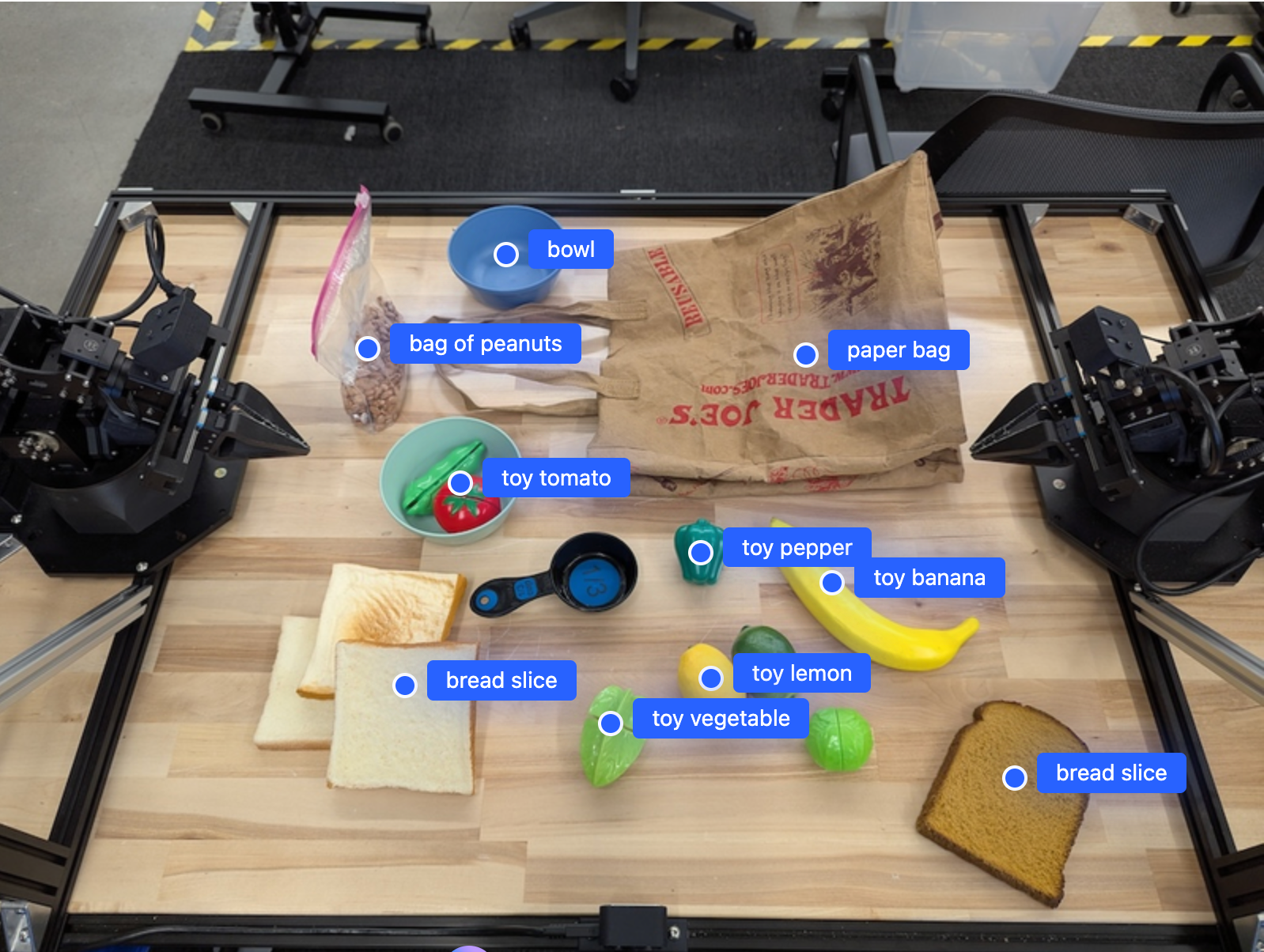
يعثر المثال التالي على عناصر معيّنة في صورة ويعرض إحداثياتها [y, x] العادية:
Python
from google import genai

PROMPT = """
          Point to no more than 10 items in the image. The label returned
          should be an identifying name for the object detected.
          The answer should follow the json format: [{"point": <point>,
          "label": <label1>}, ...]. The points are in [y, x] format
          normalized to 0-1000.
        """
client = genai.Client()

uploaded_file = client.files.upload(file="my-image.png")

image_response = client.interactions.create(
    model="gemini-robotics-er-2-preview",
    input=[
        {
            "type": "image",
            "uri": uploaded_file.uri,
            "mime_type": uploaded_file.mime_type
        },
        {"type": "text", "text": PROMPT}
    ],
    generation_config={"thinking_level": "high"},
)

print(image_response.output_text)
REST
# First, ensure you have the image file locally.
# Encode the image to base64
IMAGE_BASE64=$(base64 -w 0 my-image.png)

curl -X POST \
  "https://generativelanguage.googleapis.com/v1beta/interactions" \
  -H "x-goog-api-key: $GEMINI_API_KEY" \
  -H "Content-Type: application/json" \
  -d '{
    "model": "gemini-robotics-er-2-preview",
    "input": {
      "parts": [
        {
          "inlineData": {
            "mimeType": "image/png",
            "data": "'"${IMAGE_BASE64}"'"
          }
        },
        {
          "text": "Point to no more than 10 items in the image. The label returned should be an identifying name for the object detected. The answer should follow the json format: [{\"point\": [y, x], \"label\": <label1>}, ...]. The points are in [y, x] format normalized to 0-1000."
        }
      ]
    },
    "generation_config": {
      "thinking_config": {
        "thinking_level": "high"
      }
    }
  }'
سيكون الناتج مصفوفة JSON تحتوي على عناصر، كل منها يتضمّن point
(إحداثيات [y, x] عادية) وlabel يحدّد العنصر.
JSON
[
  {"point": [376, 508], "label": "small banana"},
  {"point": [287, 609], "label": "larger banana"},
  {"point": [223, 303], "label": "pink starfruit"},
  {"point": [435, 172], "label": "paper bag"},
  {"point": [270, 786], "label": "green plastic bowl"},
  {"point": [488, 775], "label": "metal measuring cup"},
  {"point": [673, 580], "label": "dark blue bowl"},
  {"point": [471, 353], "label": "light blue bowl"},
  {"point": [492, 497], "label": "bread"},
  {"point": [525, 429], "label": "lime"}
]
في ما يلي مثال على كيفية عرض هذه النقاط:
تتبُّع العناصر في فيديو
يمكن لـ Gemini Robotics ER 2 أيضًا تحليل لقطات الفيديو لتتبُّع العناصر بمرور الوقت. يمكنك الاطّلاع على مدخلات الفيديو للحصول على قائمة بتنسيقات الفيديو المتوافقة.
Python
from google import genai

client = genai.Client()

uploaded_file = client.files.upload(file="my-video.mp4")

prompt = """
          Point to the red ball in every frame where it appears.
          The answer should follow the json format: [{"point": [y, x],
          "label": <label>}, ...]. The points are in [y, x] format
          normalized to 0-1000. Return one entry per frame that contains
          the object.
        """

image_response = client.interactions.create(
  model="gemini-robotics-er-2-preview",
  input=[
    {
        "type": "video",
        "uri": uploaded_file.uri,
        "mime_type": uploaded_file.mime_type
    },
    {"type": "text", "text": prompt}
  ],
)

print(image_response.output_text)
رصد العناصر والمربّعات المحيطة
بالإضافة إلى النقاط، يمكنك أن تطلب من النموذج عرض مربّعات حدود ثنائية الأبعاد، ما يوفّر تفاصيل مكانية أكثر للعناصر التي تم رصدها.
Python
from google import genai

client = genai.Client()

uploaded_file = client.files.upload(file="my-image.png")

prompt = """
          Detect all objects in this image and return bounding boxes.
          The answer should follow the JSON format:
          [{"label": <label>, "y": <y_min>, "x": <x_min>,
            "y2": <y_max>, "x2": <x_max>}, ...]
          where coordinates are normalized to 0-1000.
        """

image_response = client.interactions.create(
  model="gemini-robotics-er-2-preview",
  input=[
    {
        "type": "image",
        "uri": uploaded_file.uri,
        "mime_type": uploaded_file.mime_type
    },
    {"type": "text", "text": prompt}
  ],
)

print(image_response.output_text)
المسارات
يمكن لـ Gemini Robotics ER 2 إنشاء تسلسلات من النقاط التي تحدّد مسارًا، ما يفيد في توجيه حركة الروبوت.
يطلب هذا المثال مسارًا لتحريك قلم أحمر إلى منظّم، بما في ذلك تقدير لنقاط الطريق الوسيطة. تم تقليل حجم الرمز لعرض الطلب فقط.
Python
prompt = """
          Generate a trajectory for the robotic arm to pick up the red pen
          and place it in the organizer. Return a list of waypoints as JSON:
          [{"step": <int>, "point": [y, x], "action": <description>}, ...]
          where coordinates are normalized to 0-1000.
        """
توفير مساحة للكمبيوتر المحمول
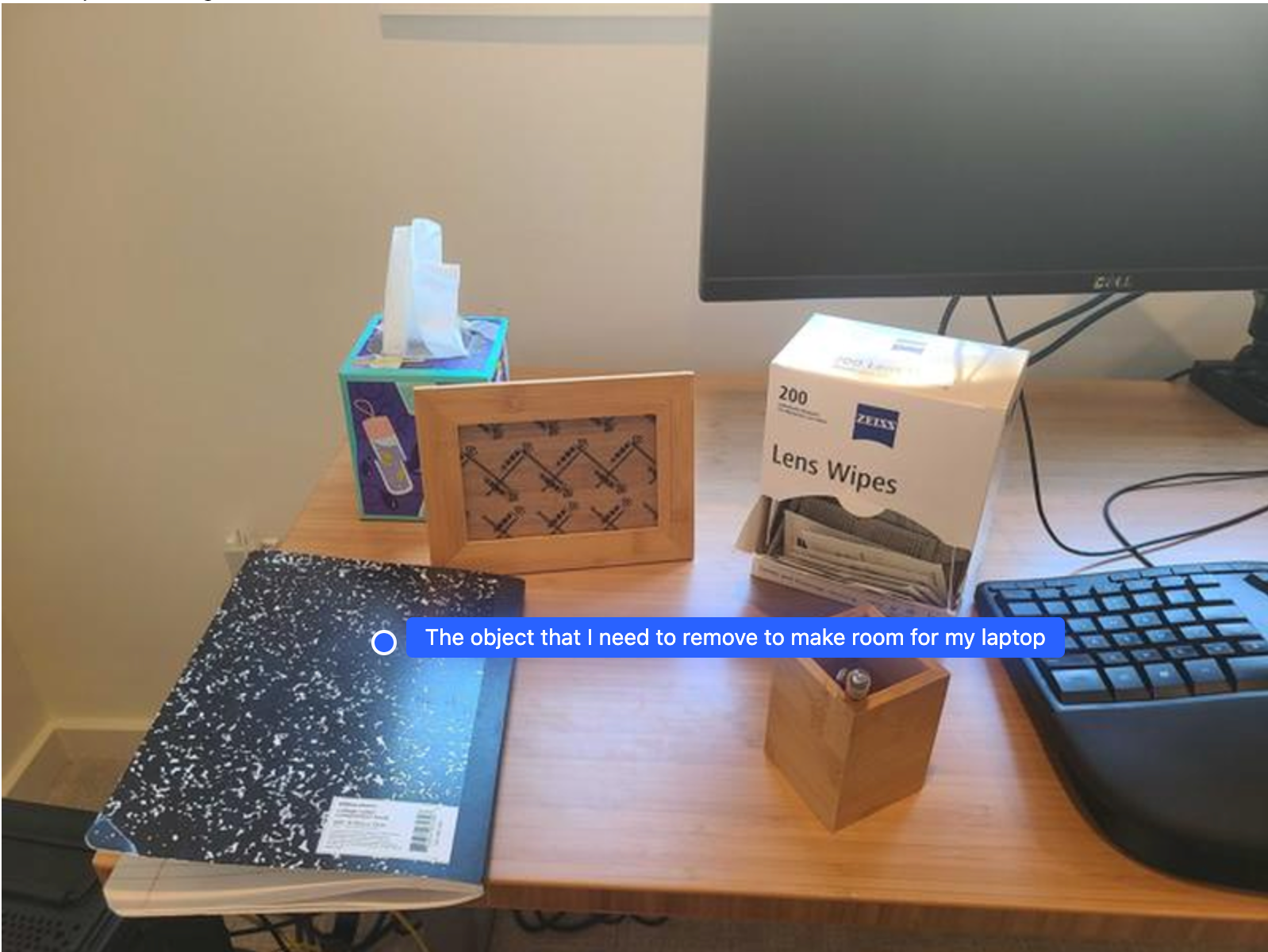
يوضّح هذا المثال كيف يمكن لـ Gemini Robotics ER التفكير في مساحة. يطلب الطلب من النموذج تحديد العنصر الذي يجب نقله لإتاحة مساحة لعنصر آخر.
Python
from google import genai

client = genai.Client()

uploaded_file = client.files.upload(file="path/to/image-with-objects.jpg")

prompt = """
          Point to the object that I need to remove to make room for my laptop
          The answer should follow the JSON format: [{"point": <point>,
          "label": <label1>}, ...]. The points are in [y, x] format normalized to 0-1000.
        """

image_response = client.interactions.create(
  model="gemini-robotics-er-2-preview",
  input=[
    {
        "type": "image",
        "uri": uploaded_file.uri,
        "mime_type": uploaded_file.mime_type
    },
    {"type": "text", "text": prompt}
  ],
)

print(image_response.output_text)
تحتوي الاستجابة على إحداثيات ثنائية الأبعاد للعنصر الذي يجيب عن سؤال المستخدم، وهو في هذه الحالة العنصر الذي يجب تحريكه لإفساح المجال لجهاز كمبيوتر محمول.
[
  {"point": [672, 301], "label": "The object that I need to remove to make room for my laptop"}
]
توضيب وجبة غداء
يمكن للنموذج أيضًا تقديم تعليمات للمهام المتعددة الخطوات والإشارة إلى الكائنات ذات الصلة بكل خطوة. يوضّح هذا المثال كيف يخطّط النموذج لسلسلة من الخطوات لتعبئة حقيبة الغداء.
Python
from google import genai

client = genai.Client()

uploaded_file = client.files.upload(file="path/to/image-of-lunch.jpg")

prompt = """
          Explain how to pack the lunch box and lunch bag. Point to each
          object that you refer to. Each point should be in the format:
          [{"point": [y, x], "label": }], where the coordinates are
          normalized between 0-1000.
        """

image_response = client.interactions.create(
  model="gemini-robotics-er-2-preview",
  input=[
    {
        "type": "image",
        "uri": uploaded_file.uri,
        "mime_type": uploaded_file.mime_type
    },
    {"type": "text", "text": prompt}
  ],
)

print(image_response.output_text)
تتضمّن الاستجابة لهذا الطلب مجموعة من التعليمات المفصَّلة حول كيفية تعبئة حقيبة غداء من الصورة التي تم إدخالها.
الصورة المدخَلة
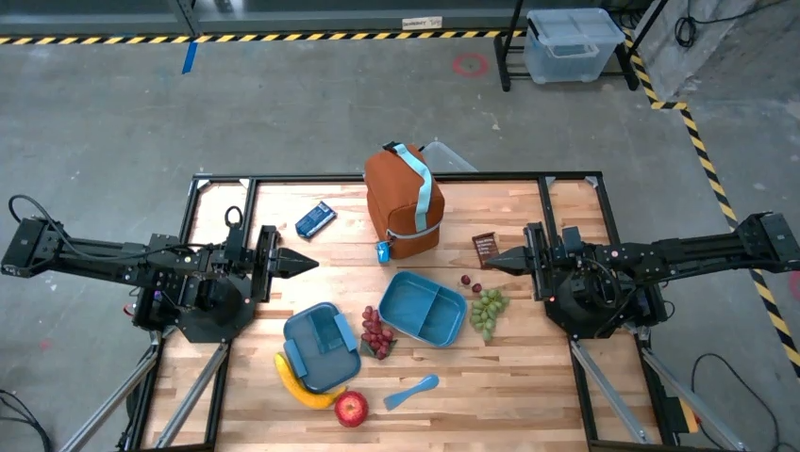
مخرجات النموذج
Based on the image, here is a plan to pack the lunch box and lunch bag:

1.  **Pack the fruit into the lunch box.** Place the [apple](apple), [banana](banana), [red grapes](red grapes), and [green grapes](green grapes) into the [blue lunch box](blue lunch box).
2.  **Add the spoon to the lunch box.** Put the [blue spoon](blue spoon) inside the lunch box as well.
3.  **Close the lunch box.** Secure the lid on the [blue lunch box](blue lunch box).
4.  **Place the lunch box inside the lunch bag.** Put the closed [blue lunch box](blue lunch box) into the [brown lunch bag](brown lunch bag).
5.  **Pack the remaining items into the lunch bag.** Place the [blue snack bar](blue snack bar) and the [brown snack bar](brown snack bar) into the [brown lunch bag](brown lunch bag).

Here is the list of objects and their locations:
*   [{"point": [899, 440], "label": "apple"}]
*   [{"point": [814, 363], "label": "banana"}]
*   [{"point": [727, 470], "label": "red grapes"}]
*   [{"point": [675, 608], "label": "green grapes"}]
*   [{"point": [706, 529], "label": "blue lunch box"}]
*   [{"point": [864, 517], "label": "blue spoon"}]
*   [{"point": [499, 401], "label": "blue snack bar"}]
*   [{"point": [614, 705], "label": "brown snack bar"}]
*   [{"point": [448, 501], "label": "brown lunch bag"}]
الخطوات التالية
- إمكانات بالذكاء الاصطناعي الوكيل: تطبيق الرموز البرمجية، وقياس حالة التطبيق، وإضافة تعليقات توضيحية على الصور.
- تنظيم المهام: مهام طويلة الأمد باستخدام واجهات برمجة تطبيقات مخصّصة للروبوتات
- الروبوتات التي تتضمّن بثًا مباشرًا: بث مباشر ثنائي الاتجاه في الوقت الفعلي (Gemini Robotics ER 2 فقط)
- فهم الفيديو: العثور على اللحظات وتصنيف مستوى التقدّم (الإصدار الثاني من Gemini Robotics فقط)