

Gemini Robotics ER-Modelle können Aufgaben planen und räumliche Zusammenhänge berücksichtigen, um abzuleiten, welche Aktionen ausgeführt und welche Objekte bewegt werden müssen, um ein Ziel zu erreichen. Auf dieser Seite wird ein Beispiel für die Ausführung eines Pick-and-Place Vorgangs über eine benutzerdefinierte Roboter-API gezeigt, um die Aufgabe zu orchestrieren, einen Gegenstand in eine Schale zu legen. In diesem Beispiel wird das Standardmodell Gemini ER 2 verwendet. Ein Streaming Beispiel finden Sie im Leitfaden zu Gemini ER 2 Streaming.
Vollständiger ausführbarer Code ist im Robotics-Kochbuch verfügbar.
Benutzerdefinierte Roboter-API verwenden
In diesem Beispiel wird die Aufgabenorchestrierung mit einer benutzerdefinierten Roboter-API veranschaulicht. Es wird eine Mock-API für einen Pick-and-Place-Vorgang eingeführt. Die Aufgabe besteht darin, einen blauen Block aufzunehmen und in eine orangefarbene Schale zu legen:
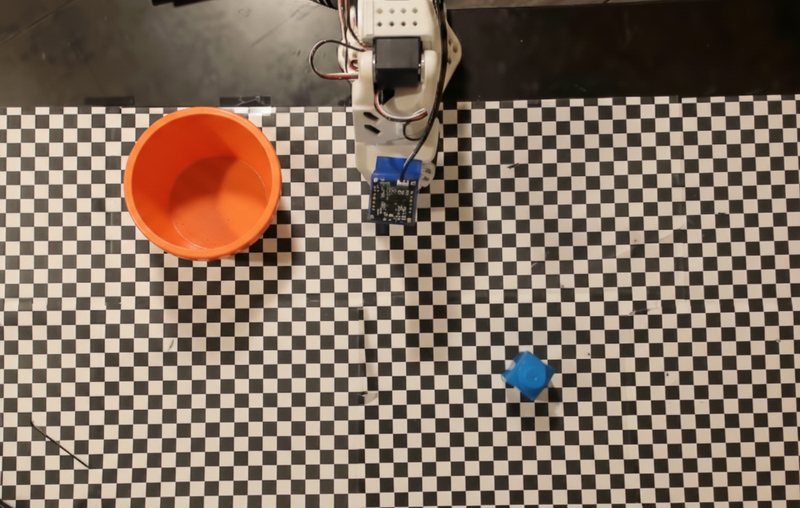
In diesem Beispiel wird die folgende Mock-Roboter-API verwendet:
Python
def move(x, y, high):
  print(f"Mock Robot: Moving to coordinates: {x}, {y}, {'high above table' if high else 'down at table level'}")

def setGripperState(opened):
  print(f"Mock Robot: {'Opening gripper' if opened else 'Closing gripper'}")

robot_origin_y = 300
robot_origin_x = 500

move_function = {
    "type": "function",
    "name": "move",
    "description": "Moves the arm to the given coordinates.",
    "parameters": {
        "type": "object",
        "properties": {
            "x": {"type": "integer", "description": "X coordinate relative to the origin"},
            "y": {"type": "integer", "description": "Y coordinate relative to the origin"},
            "high": {"type": "boolean", "description": "Set to True to lift the robot arm above the scene for avoiding obstacles. Set to False to place the gripper on the surface."}
        },
        "required": ["x", "y", "high"]
    }
}

set_gripper_state_function = {
    "type": "function",
    "name": "setGripperState",
    "description": "Opens or closes the robot's gripper.",
    "parameters": {
        "type": "object",
        "properties": {
            "opened": {"type": "boolean", "description": "True opens the gripper, False closes the gripper."}
        },
        "required": ["opened"]
    }
}
Im folgenden Beispiel werden der Prompt und das Bild mit den Tool-Definitionen an das Modell gesendet. Anschließend wird eine Agenten-Schleife ausgeführt: Nach jeder Antwort des Modells werden alle angeforderten Funktionsaufrufe (move, setGripperState) ausgeführt, die Ergebnisse werden mit previous_interaction_id an das Modell zurückgegeben und der Vorgang wird wiederholt, bis das Modell keine Funktionen mehr aufruft oder das Schrittlimit erreicht ist.
Python
prompt = (
    "You are a robotic arm with six degrees-of-freedom. "
    f"The origin point for calculating the moves is at normalized point y={robot_origin_y}, x={robot_origin_x}. "
    "Use this as the new (0,0) for calculating moves, allowing x and y to be negative.\n\n"
    "Find the blue block and the orange bowl. Calculate their coordinates relative to the origin.\n"
    "Perform a pick and place operation where you pick up the blue block and place it into the orange bowl. "
    "Call the appropriate sequence of functions to complete this operation."
)

# 1. Initial Interaction
interaction = client.interactions.create(
    model=MODEL_ID,
    input=[{"type": "user_input", "content": [
        {"type": "image", "data": img_b64, "mime_type": "image/png"},
        {"type": "text", "text": prompt}
    ]}],
    tools=[move_function, set_gripper_state_function],
    generation_config={"thinking_level": "low"}
)

print("\n--- Executing Orchestrated Plan ---")

max_steps = 15 # Safety limit to prevent infinite loops
step_count = 0

# 2. The Agentic Loop
while step_count < max_steps:
    step_count += 1

    # Check if the model wants to call any functions
    tool_calls = [step for step in interaction.steps if step.type == "function_call"]

    if not tool_calls:
        # If no tools were called, the model is finished with the sequence
        print("Sequence complete.")
        if interaction.output_text:
            print(f"Model Summary: {interaction.output_text}")
        break

    function_results = []

    for step in tool_calls:
        function_name = step.name
        arguments = step.arguments

        # Execute the mock function
        if function_name == "move":
            move(**arguments)
        elif function_name == "setGripperState":
            setGripperState(**arguments)
        else:
            print(f"Unknown function: {function_name}")

        # 3. Create a result object to tell the model the function succeeded
        function_results.append({
            "type": "function_result",
            "name": step.name,
            "call_id": step.id,
            "result": [{"type": "text", "text": '{"status": "success"}'}]
        })

    # 4. Send the results back to the model, passing previous_interaction_id
    # so it remembers the conversation history and generates the NEXT step
    interaction = client.interactions.create(
        model=MODEL_ID,
        previous_interaction_id=interaction.id,
        tools=[move_function, set_gripper_state_function],
        input=function_results
    )
Im Folgenden sehen Sie eine mögliche Ausgabe des Modells basierend auf dem Prompt und der Mock-Roboter-API. Die Ausgabe enthält die Ausgabe der Roboter-Funktionsaufrufe, die das Modell sequenziell ausgeführt hat.
--- Executing Orchestrated Plan ---
Mock Robot: Opening gripper
Mock Robot: Moving to coordinates: 160, 440, high above table
Mock Robot: Moving to coordinates: 160, 440, down at table level
Mock Robot: Closing gripper
Mock Robot: Moving to coordinates: 160, 440, high above table
Mock Robot: Moving to coordinates: -250, 60, high above table
Mock Robot: Moving to coordinates: -250, 60, down at table level
Mock Robot: Opening gripper
Mock Robot: Moving to coordinates: -250, 60, high above table
Sequence complete.
Model Summary: I have completed the task of picking up the blue block and placing it into the orange bowl.
Nächste Schritte
- Robotik mit Streaming: Echtzeit-Streaming mit Funktionsaufrufen (nur Gemini Robotics ER 2)
- Videoanalyse: Aufgabenfortschritt anhand von Videos verfolgen (nur ER 2)
- Räumliches Denken: Beispiele für Zeigen, Tracking und Begrenzungsrahmen