

Les modèles Gemini Robotics ER peuvent planifier des tâches et raisonner sur l'espace en déduisant les actions à entreprendre et les objets à déplacer pour atteindre un objectif. Cette page présente un exemple de pilotage d'une opération de prise et de dépose via une API de robot personnalisée pour orchestrer la tâche consistant à placer un élément dans un bol. Cet exemple utilise le modèle Gemini ER 2 standard. Pour un exemple de streaming , consultez le guide Gemini ER 2 Streaming.
Pour obtenir le code exécutable complet, consultez le livre de recettes sur la robotique.
Utiliser une API de robot personnalisée
Cet exemple illustre l'orchestration des tâches avec une API de robot personnalisée. Il présente une API fictive conçue pour une opération de prise et de dépose. La tâche consiste à prendre un bloc bleu et à le placer dans un bol orange :
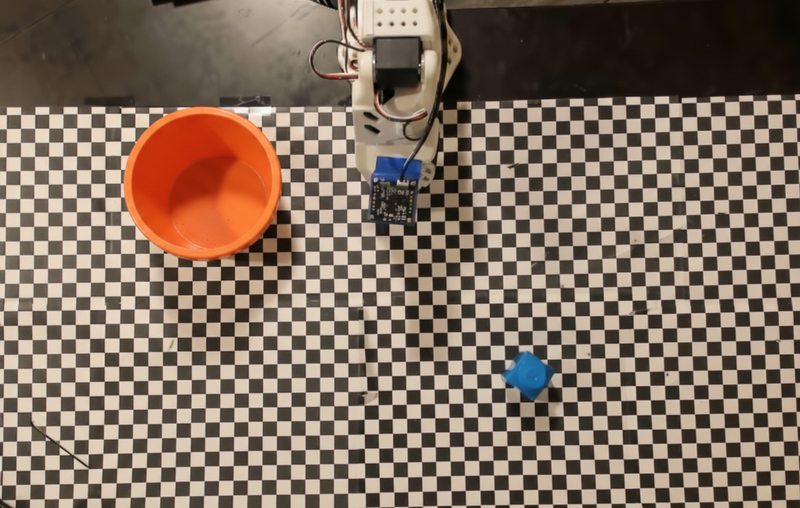
Cet exemple utilise l'API de robot fictive suivante :
Python
def move(x, y, high):
  print(f"Mock Robot: Moving to coordinates: {x}, {y}, {'high above table' if high else 'down at table level'}")

def setGripperState(opened):
  print(f"Mock Robot: {'Opening gripper' if opened else 'Closing gripper'}")

robot_origin_y = 300
robot_origin_x = 500

move_function = {
    "type": "function",
    "name": "move",
    "description": "Moves the arm to the given coordinates.",
    "parameters": {
        "type": "object",
        "properties": {
            "x": {"type": "integer", "description": "X coordinate relative to the origin"},
            "y": {"type": "integer", "description": "Y coordinate relative to the origin"},
            "high": {"type": "boolean", "description": "Set to True to lift the robot arm above the scene for avoiding obstacles. Set to False to place the gripper on the surface."}
        },
        "required": ["x", "y", "high"]
    }
}

set_gripper_state_function = {
    "type": "function",
    "name": "setGripperState",
    "description": "Opens or closes the robot's gripper.",
    "parameters": {
        "type": "object",
        "properties": {
            "opened": {"type": "boolean", "description": "True opens the gripper, False closes the gripper."}
        },
        "required": ["opened"]
    }
}
L'exemple suivant envoie le prompt et l'image au modèle avec les définitions d'outil. Il exécute ensuite une boucle d'agent : après chaque réponse du modèle, il exécute tous les appels de fonction demandés (move, setGripperState), renvoie les résultats au modèle à l'aide de previous_interaction_id et se répète jusqu'à ce que le modèle cesse d'appeler des fonctions ou que la limite d'étapes soit atteinte.
Python
prompt = (
    "You are a robotic arm with six degrees-of-freedom. "
    f"The origin point for calculating the moves is at normalized point y={robot_origin_y}, x={robot_origin_x}. "
    "Use this as the new (0,0) for calculating moves, allowing x and y to be negative.\n\n"
    "Find the blue block and the orange bowl. Calculate their coordinates relative to the origin.\n"
    "Perform a pick and place operation where you pick up the blue block and place it into the orange bowl. "
    "Call the appropriate sequence of functions to complete this operation."
)

# 1. Initial Interaction
interaction = client.interactions.create(
    model=MODEL_ID,
    input=[{"type": "user_input", "content": [
        {"type": "image", "data": img_b64, "mime_type": "image/png"},
        {"type": "text", "text": prompt}
    ]}],
    tools=[move_function, set_gripper_state_function],
    generation_config={"thinking_level": "low"}
)

print("\n--- Executing Orchestrated Plan ---")

max_steps = 15 # Safety limit to prevent infinite loops
step_count = 0

# 2. The Agentic Loop
while step_count < max_steps:
    step_count += 1

    # Check if the model wants to call any functions
    tool_calls = [step for step in interaction.steps if step.type == "function_call"]

    if not tool_calls:
        # If no tools were called, the model is finished with the sequence
        print("Sequence complete.")
        if interaction.output_text:
            print(f"Model Summary: {interaction.output_text}")
        break

    function_results = []

    for step in tool_calls:
        function_name = step.name
        arguments = step.arguments

        # Execute the mock function
        if function_name == "move":
            move(**arguments)
        elif function_name == "setGripperState":
            setGripperState(**arguments)
        else:
            print(f"Unknown function: {function_name}")

        # 3. Create a result object to tell the model the function succeeded
        function_results.append({
            "type": "function_result",
            "name": step.name,
            "call_id": step.id,
            "result": [{"type": "text", "text": '{"status": "success"}'}]
        })

    # 4. Send the results back to the model, passing previous_interaction_id
    # so it remembers the conversation history and generates the NEXT step
    interaction = client.interactions.create(
        model=MODEL_ID,
        previous_interaction_id=interaction.id,
        tools=[move_function, set_gripper_state_function],
        input=function_results
    )
L'exemple suivant montre une sortie possible du modèle en fonction du prompt et de l'API de robot fictive. La sortie inclut la sortie des appels de fonction de robot que le modèle a séquencés.
--- Executing Orchestrated Plan ---
Mock Robot: Opening gripper
Mock Robot: Moving to coordinates: 160, 440, high above table
Mock Robot: Moving to coordinates: 160, 440, down at table level
Mock Robot: Closing gripper
Mock Robot: Moving to coordinates: 160, 440, high above table
Mock Robot: Moving to coordinates: -250, 60, high above table
Mock Robot: Moving to coordinates: -250, 60, down at table level
Mock Robot: Opening gripper
Mock Robot: Moving to coordinates: -250, 60, high above table
Sequence complete.
Model Summary: I have completed the task of picking up the blue block and placing it into the orange bowl.
Étape suivante
- Robotique avec streaming : streaming en temps réel avec appel de fonction (Gemini Robotics ER 2 uniquement)
- Compréhension vidéo : suivi de la progression des tâches à partir de la vidéo (ER 2 uniquement)
- Raisonnement spatial : exemples de pointage, de suivi et de cadre de délimitation