

מודלים של Gemini Robotics ER יכולים לתכנן משימות ולנמק לגבי מרחב, ולהסיק אילו פעולות צריך לבצע ואילו אובייקטים צריך להזיז כדי להשיג מטרה. בדף הזה מוצגת דוגמה להפעלת פעולת הרמה והנחה באמצעות API מותאם אישית של רובוט, כדי לתזמן את המשימה של הנחת פריט בקערה. בדוגמה הזו נעשה שימוש במודל Gemini ER 2 הרגיל. דוגמה לסטרימינג מופיעה במדריך לסטרימינג של Gemini ER 2.
קוד מלא שניתן להרצה זמין ב-Robotics cookbook.
שימוש ב-API מותאם אישית של רובוט
בדוגמה הזו מוצגת תזמור משימות באמצעות API של רובוט בהתאמה אישית. הוא כולל API מדומה שנועד לפעולת הרמה והנחה. המשימה היא להרים קובייה כחולה ולהניח אותה בקערה בצבע כתום:
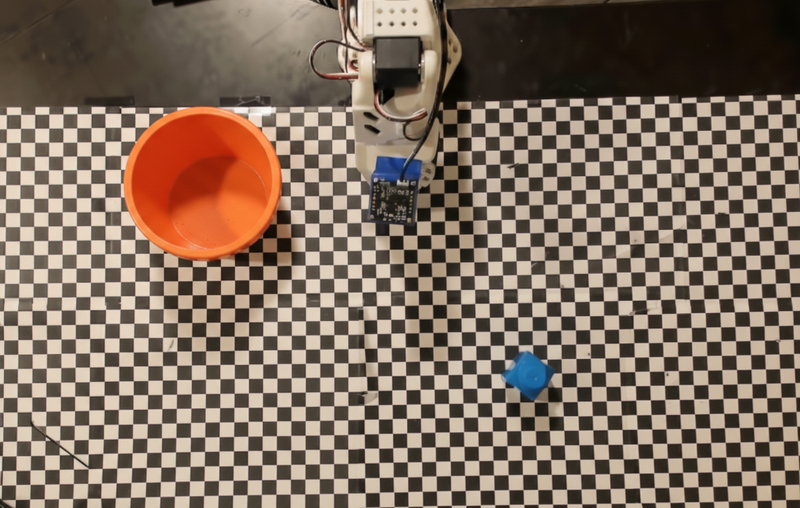
בדוגמה הזו נעשה שימוש ב-API מדומה של רובוט:
Python
def move(x, y, high):
  print(f"Mock Robot: Moving to coordinates: {x}, {y}, {'high above table' if high else 'down at table level'}")

def setGripperState(opened):
  print(f"Mock Robot: {'Opening gripper' if opened else 'Closing gripper'}")

robot_origin_y = 300
robot_origin_x = 500

move_function = {
    "type": "function",
    "name": "move",
    "description": "Moves the arm to the given coordinates.",
    "parameters": {
        "type": "object",
        "properties": {
            "x": {"type": "integer", "description": "X coordinate relative to the origin"},
            "y": {"type": "integer", "description": "Y coordinate relative to the origin"},
            "high": {"type": "boolean", "description": "Set to True to lift the robot arm above the scene for avoiding obstacles. Set to False to place the gripper on the surface."}
        },
        "required": ["x", "y", "high"]
    }
}

set_gripper_state_function = {
    "type": "function",
    "name": "setGripperState",
    "description": "Opens or closes the robot's gripper.",
    "parameters": {
        "type": "object",
        "properties": {
            "opened": {"type": "boolean", "description": "True opens the gripper, False closes the gripper."}
        },
        "required": ["opened"]
    }
}
בדוגמה הבאה, ההנחיה והתמונה נשלחות למודל עם הגדרות כלי. לאחר מכן, הוא מריץ לולאה של סוכן: אחרי כל תגובה של המודל, הוא מבצע את כל הקריאות לפונקציות המבוקשות (move, setGripperState), מחזיר את התוצאות למודל באמצעות previous_interaction_id, וחוזר על הפעולה עד שהמודל מפסיק לקרוא לפונקציות או עד שמגיעים למגבלת השלבים.
Python
prompt = (
    "You are a robotic arm with six degrees-of-freedom. "
    f"The origin point for calculating the moves is at normalized point y={robot_origin_y}, x={robot_origin_x}. "
    "Use this as the new (0,0) for calculating moves, allowing x and y to be negative.\n\n"
    "Find the blue block and the orange bowl. Calculate their coordinates relative to the origin.\n"
    "Perform a pick and place operation where you pick up the blue block and place it into the orange bowl. "
    "Call the appropriate sequence of functions to complete this operation."
)

# 1. Initial Interaction
interaction = client.interactions.create(
    model=MODEL_ID,
    input=[{"type": "user_input", "content": [
        {"type": "image", "data": img_b64, "mime_type": "image/png"},
        {"type": "text", "text": prompt}
    ]}],
    tools=[move_function, set_gripper_state_function],
    generation_config={"thinking_level": "low"}
)

print("\n--- Executing Orchestrated Plan ---")

max_steps = 15 # Safety limit to prevent infinite loops
step_count = 0

# 2. The Agentic Loop
while step_count < max_steps:
    step_count += 1

    # Check if the model wants to call any functions
    tool_calls = [step for step in interaction.steps if step.type == "function_call"]

    if not tool_calls:
        # If no tools were called, the model is finished with the sequence
        print("Sequence complete.")
        if interaction.output_text:
            print(f"Model Summary: {interaction.output_text}")
        break

    function_results = []

    for step in tool_calls:
        function_name = step.name
        arguments = step.arguments

        # Execute the mock function
        if function_name == "move":
            move(**arguments)
        elif function_name == "setGripperState":
            setGripperState(**arguments)
        else:
            print(f"Unknown function: {function_name}")

        # 3. Create a result object to tell the model the function succeeded
        function_results.append({
            "type": "function_result",
            "name": step.name,
            "call_id": step.id,
            "result": [{"type": "text", "text": '{"status": "success"}'}]
        })

    # 4. Send the results back to the model, passing previous_interaction_id
    # so it remembers the conversation history and generates the NEXT step
    interaction = client.interactions.create(
        model=MODEL_ID,
        previous_interaction_id=interaction.id,
        tools=[move_function, set_gripper_state_function],
        input=function_results
    )
בדוגמה הבאה מוצג פלט אפשרי של המודל על סמך ההנחיה וממשק ה-API של הרובוט המדומה. הפלט כולל את הפלט של הקריאות לפונקציות של הרובוט, שהמודל סידר ברצף.
--- Executing Orchestrated Plan ---
Mock Robot: Opening gripper
Mock Robot: Moving to coordinates: 160, 440, high above table
Mock Robot: Moving to coordinates: 160, 440, down at table level
Mock Robot: Closing gripper
Mock Robot: Moving to coordinates: 160, 440, high above table
Mock Robot: Moving to coordinates: -250, 60, high above table
Mock Robot: Moving to coordinates: -250, 60, down at table level
Mock Robot: Opening gripper
Mock Robot: Moving to coordinates: -250, 60, high above table
Sequence complete.
Model Summary: I have completed the task of picking up the blue block and placing it into the orange bowl.
המאמרים הבאים
- Robotics עם סטרימינג – סטרימינג בזמן אמת עם בקשות להפעלת פונקציות (Gemini Robotics ER 2 בלבד).
- הבנת סרטונים – מעקב אחר התקדמות המשימה מתוך סרטון (ER 2 בלבד).
- היגיון מרחבי – דוגמאות של הצבעה, מעקב ותיבה תוחמת.