

Các mô hình Gemini Robotics ER có thể lập kế hoạch cho các tác vụ và suy luận về không gian, suy ra những hành động cần thực hiện và những đối tượng cần di chuyển để hoàn thành mục tiêu. Trang này cho thấy một ví dụ về việc thực hiện thao tác chọn và đặt thông qua một API robot tuỳ chỉnh để điều phối tác vụ đặt một vật phẩm vào bát. Ví dụ này sử dụng mô hình Gemini ER 2 tiêu chuẩn. Để xem ví dụ về truyền phát trực tiếp, hãy xem Hướng dẫn truyền phát trực tiếp Gemini ER 2.
Để xem toàn bộ mã có thể chạy, hãy xem Sổ tay về robot học.
Sử dụng API robot tuỳ chỉnh
Ví dụ này minh hoạ việc điều phối tác vụ bằng một API robot tuỳ chỉnh. API này giới thiệu một API mô phỏng được thiết kế cho hoạt động chọn và đặt. Việc cần làm là nhặt một khối màu xanh dương và đặt vào một chiếc bát màu cam:
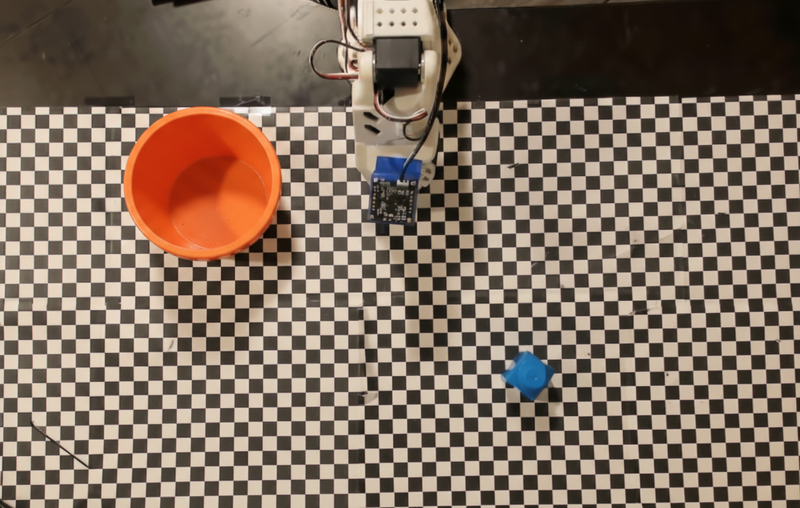
Ví dụ này sử dụng API robot mô phỏng sau:
Python
def move(x, y, high):
  print(f"Mock Robot: Moving to coordinates: {x}, {y}, {'high above table' if high else 'down at table level'}")

def setGripperState(opened):
  print(f"Mock Robot: {'Opening gripper' if opened else 'Closing gripper'}")

robot_origin_y = 300
robot_origin_x = 500

move_function = {
    "type": "function",
    "name": "move",
    "description": "Moves the arm to the given coordinates.",
    "parameters": {
        "type": "object",
        "properties": {
            "x": {"type": "integer", "description": "X coordinate relative to the origin"},
            "y": {"type": "integer", "description": "Y coordinate relative to the origin"},
            "high": {"type": "boolean", "description": "Set to True to lift the robot arm above the scene for avoiding obstacles. Set to False to place the gripper on the surface."}
        },
        "required": ["x", "y", "high"]
    }
}

set_gripper_state_function = {
    "type": "function",
    "name": "setGripperState",
    "description": "Opens or closes the robot's gripper.",
    "parameters": {
        "type": "object",
        "properties": {
            "opened": {"type": "boolean", "description": "True opens the gripper, False closes the gripper."}
        },
        "required": ["opened"]
    }
}
Ví dụ sau đây sẽ gửi câu lệnh và hình ảnh đến mô hình cùng với các định nghĩa về công cụ. Sau đó, nó chạy một vòng lặp tác nhân: sau mỗi câu trả lời của mô hình, nó sẽ thực thi mọi lệnh gọi hàm được yêu cầu (move, setGripperState), trả kết quả về cho mô hình bằng cách sử dụng previous_interaction_id và lặp lại cho đến khi mô hình ngừng gọi hàm hoặc đạt đến giới hạn bước.
Python
prompt = (
    "You are a robotic arm with six degrees-of-freedom. "
    f"The origin point for calculating the moves is at normalized point y={robot_origin_y}, x={robot_origin_x}. "
    "Use this as the new (0,0) for calculating moves, allowing x and y to be negative.\n\n"
    "Find the blue block and the orange bowl. Calculate their coordinates relative to the origin.\n"
    "Perform a pick and place operation where you pick up the blue block and place it into the orange bowl. "
    "Call the appropriate sequence of functions to complete this operation."
)

# 1. Initial Interaction
interaction = client.interactions.create(
    model=MODEL_ID,
    input=[{"type": "user_input", "content": [
        {"type": "image", "data": img_b64, "mime_type": "image/png"},
        {"type": "text", "text": prompt}
    ]}],
    tools=[move_function, set_gripper_state_function],
    generation_config={"thinking_level": "low"}
)

print("\n--- Executing Orchestrated Plan ---")

max_steps = 15 # Safety limit to prevent infinite loops
step_count = 0

# 2. The Agentic Loop
while step_count < max_steps:
    step_count += 1

    # Check if the model wants to call any functions
    tool_calls = [step for step in interaction.steps if step.type == "function_call"]

    if not tool_calls:
        # If no tools were called, the model is finished with the sequence
        print("Sequence complete.")
        if interaction.output_text:
            print(f"Model Summary: {interaction.output_text}")
        break

    function_results = []

    for step in tool_calls:
        function_name = step.name
        arguments = step.arguments

        # Execute the mock function
        if function_name == "move":
            move(**arguments)
        elif function_name == "setGripperState":
            setGripperState(**arguments)
        else:
            print(f"Unknown function: {function_name}")

        # 3. Create a result object to tell the model the function succeeded
        function_results.append({
            "type": "function_result",
            "name": step.name,
            "call_id": step.id,
            "result": [{"type": "text", "text": '{"status": "success"}'}]
        })

    # 4. Send the results back to the model, passing previous_interaction_id
    # so it remembers the conversation history and generates the NEXT step
    interaction = client.interactions.create(
        model=MODEL_ID,
        previous_interaction_id=interaction.id,
        tools=[move_function, set_gripper_state_function],
        input=function_results
    )
Sau đây là kết quả đầu ra có thể có của mô hình dựa trên câu lệnh và API rô-bốt mô phỏng. Đầu ra bao gồm đầu ra của các lệnh gọi hàm robot mà mô hình đã sắp xếp theo trình tự.
--- Executing Orchestrated Plan ---
Mock Robot: Opening gripper
Mock Robot: Moving to coordinates: 160, 440, high above table
Mock Robot: Moving to coordinates: 160, 440, down at table level
Mock Robot: Closing gripper
Mock Robot: Moving to coordinates: 160, 440, high above table
Mock Robot: Moving to coordinates: -250, 60, high above table
Mock Robot: Moving to coordinates: -250, 60, down at table level
Mock Robot: Opening gripper
Mock Robot: Moving to coordinates: -250, 60, high above table
Sequence complete.
Model Summary: I have completed the task of picking up the blue block and placing it into the orange bowl.
Bước tiếp theo
- Robot có tính năng truyền phát trực tiếp – truyền phát trực tiếp theo thời gian thực có tính năng gọi hàm (chỉ Gemini Robotics ER 2).
- Hiểu video – theo dõi tiến trình của tác vụ trong video (chỉ ER 2).
- Lý luận không gian – ví dụ về việc chỉ, theo dõi và hộp giới hạn.