

Các mô hình Gemini Robotics ER có thể chỉ vào các đối tượng, theo dõi các đối tượng đó trong video, phát hiện các đối tượng đó bằng khung hình chữ nhật và tạo quỹ đạo chuyển động.
Để xem toàn bộ mã có thể chạy, hãy xem Sổ tay về robot học.
Chỉ vào các đối tượng
Ví dụ sau đây tìm các đối tượng cụ thể trong một hình ảnh và trả về toạ độ [y, x] được chuẩn hoá của các đối tượng đó:
Python
from google import genai

PROMPT = """
          Point to no more than 10 items in the image. The label returned
          should be an identifying name for the object detected.
          The answer should follow the json format: [{"point": <point>,
          "label": <label1>}, ...]. The points are in [y, x] format
          normalized to 0-1000.
        """
client = genai.Client()

uploaded_file = client.files.upload(file="my-image.png")

image_response = client.interactions.create(
    model="gemini-robotics-er-2-preview",
    input=[
        {
            "type": "image",
            "uri": uploaded_file.uri,
            "mime_type": uploaded_file.mime_type
        },
        {"type": "text", "text": PROMPT}
    ],
    generation_config={"thinking_level": "high"},
)

print(image_response.output_text)
REST
# First, ensure you have the image file locally.
# Encode the image to base64
IMAGE_BASE64=$(base64 -w 0 my-image.png)

curl -X POST \
  "https://generativelanguage.googleapis.com/v1beta/interactions" \
  -H "x-goog-api-key: $GEMINI_API_KEY" \
  -H "Content-Type: application/json" \
  -d '{
    "model": "gemini-robotics-er-2-preview",
    "input": {
      "parts": [
        {
          "inlineData": {
            "mimeType": "image/png",
            "data": "'"${IMAGE_BASE64}"'"
          }
        },
        {
          "text": "Point to no more than 10 items in the image. The label returned should be an identifying name for the object detected. The answer should follow the json format: [{\"point\": [y, x], \"label\": <label1>}, ...]. The points are in [y, x] format normalized to 0-1000."
        }
      ]
    },
    "generation_config": {
      "thinking_config": {
        "thinking_level": "high"
      }
    }
  }'
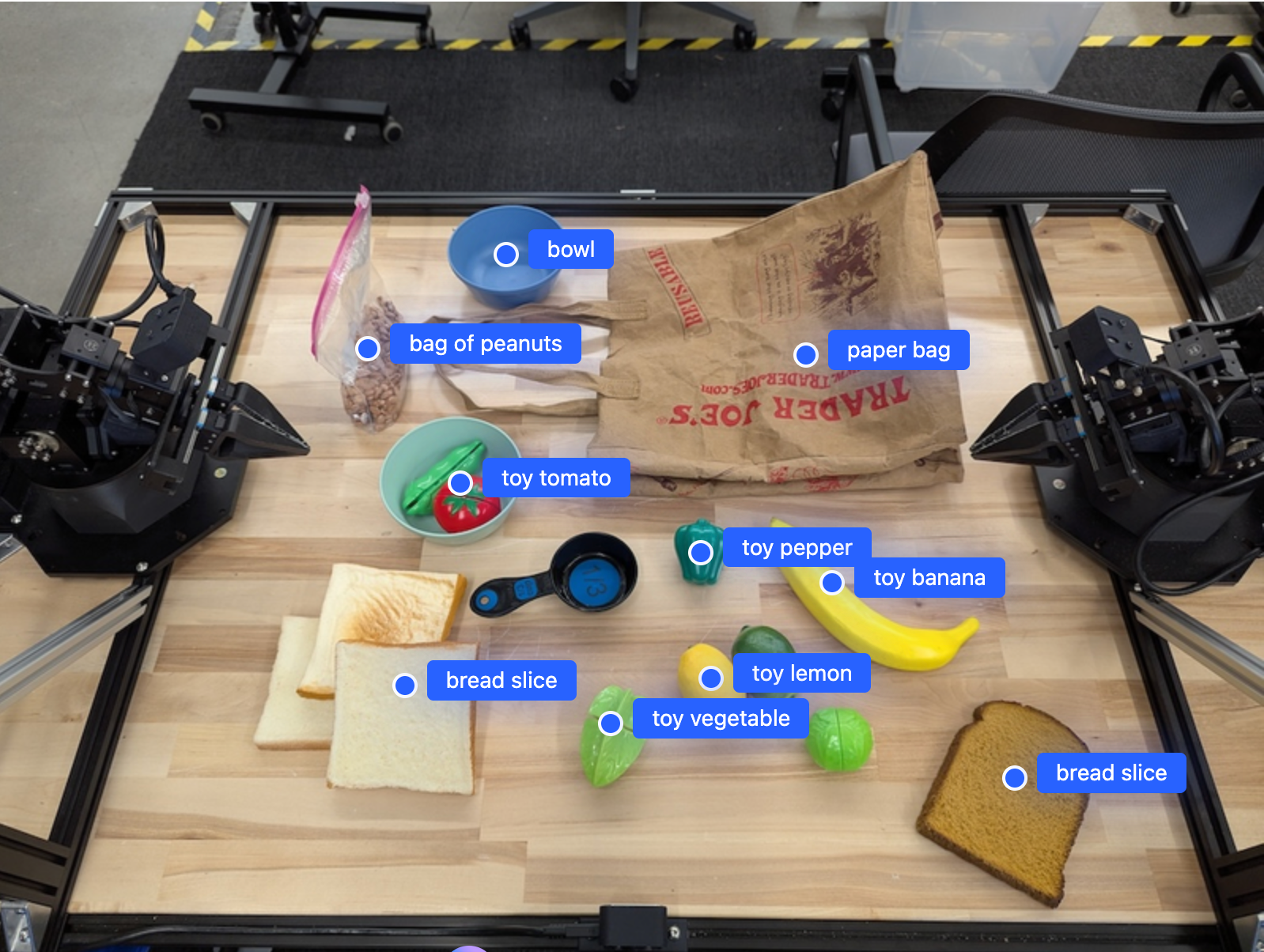
Đầu ra sẽ là một mảng JSON chứa các đối tượng, mỗi đối tượng có một point (toạ độ [y, x] được chuẩn hoá) và một label xác định đối tượng.
JSON
[
  {"point": [376, 508], "label": "small banana"},
  {"point": [287, 609], "label": "larger banana"},
  {"point": [223, 303], "label": "pink starfruit"},
  {"point": [435, 172], "label": "paper bag"},
  {"point": [270, 786], "label": "green plastic bowl"},
  {"point": [488, 775], "label": "metal measuring cup"},
  {"point": [673, 580], "label": "dark blue bowl"},
  {"point": [471, 353], "label": "light blue bowl"},
  {"point": [492, 497], "label": "bread"},
  {"point": [525, 429], "label": "lime"}
]
Hình ảnh sau đây là ví dụ về cách hiển thị các điểm này:
Theo dõi đối tượng trong video
Gemini Robotics ER 2 cũng có thể phân tích các khung hình video để theo dõi các đối tượng theo thời gian. Hãy xem phần Đầu vào video để biết danh sách các định dạng video được hỗ trợ.
Python
from google import genai

client = genai.Client()

uploaded_file = client.files.upload(file="my-video.mp4")

prompt = """
          Point to the red ball in every frame where it appears.
          The answer should follow the json format: [{"point": [y, x],
          "label": <label>}, ...]. The points are in [y, x] format
          normalized to 0-1000. Return one entry per frame that contains
          the object.
        """

image_response = client.interactions.create(
  model="gemini-robotics-er-2-preview",
  input=[
    {
        "type": "video",
        "uri": uploaded_file.uri,
        "mime_type": uploaded_file.mime_type
    },
    {"type": "text", "text": prompt}
  ],
)

print(image_response.output_text)
Phát hiện đối tượng và khung hình chữ nhật
Ngoài các điểm, bạn có thể nhắc mô hình trả về các khung hình chữ nhật 2D, cung cấp thêm thông tin chi tiết về không gian cho các đối tượng được phát hiện.
Python
from google import genai

client = genai.Client()

uploaded_file = client.files.upload(file="my-image.png")

prompt = """
          Detect all objects in this image and return bounding boxes.
          The answer should follow the JSON format:
          [{"label": <label>, "y": <y_min>, "x": <x_min>,
            "y2": <y_max>, "x2": <x_max>}, ...]
          where coordinates are normalized to 0-1000.
        """

image_response = client.interactions.create(
  model="gemini-robotics-er-2-preview",
  input=[
    {
        "type": "image",
        "uri": uploaded_file.uri,
        "mime_type": uploaded_file.mime_type
    },
    {"type": "text", "text": prompt}
  ],
)

print(image_response.output_text)
Quỹ đạo
Gemini Robotics ER 2 có thể tạo ra các chuỗi điểm xác định quỹ đạo, hữu ích cho việc hướng dẫn chuyển động của robot.
Ví dụ này yêu cầu một quỹ đạo để di chuyển bút đỏ đến một ngăn chứa, bao gồm cả ước tính về các điểm tham chiếu trung gian. Mã đã được rút gọn để chỉ hiển thị lời nhắc.
Python
prompt = """
          Generate a trajectory for the robotic arm to pick up the red pen
          and place it in the organizer. Return a list of waypoints as JSON:
          [{"step": <int>, "point": [y, x], "action": <description>}, ...]
          where coordinates are normalized to 0-1000.
        """
Dành chỗ cho máy tính xách tay
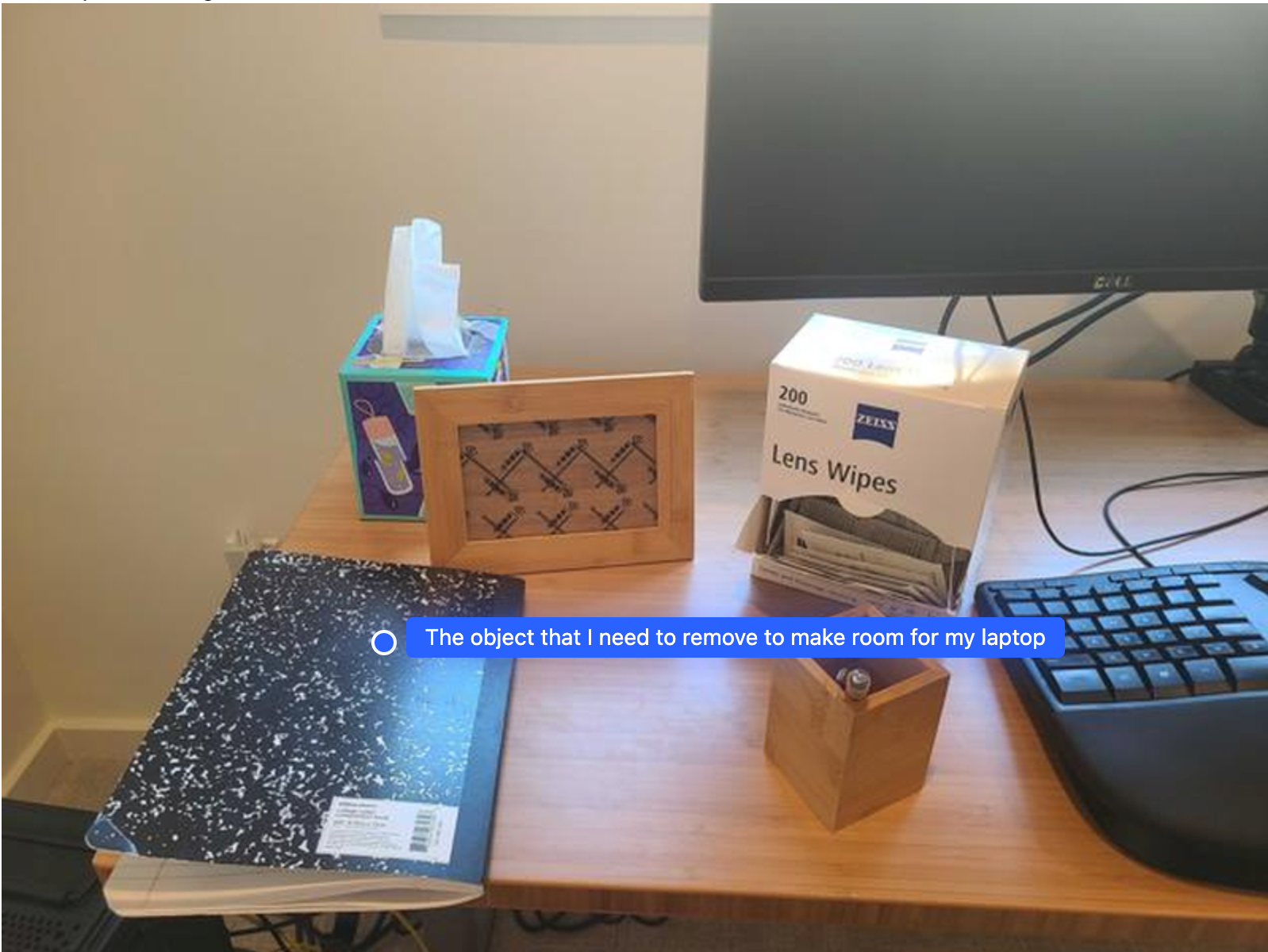
Ví dụ này cho thấy cách Gemini Robotics ER có thể suy luận về một không gian. Câu lệnh yêu cầu mô hình xác định đối tượng nào cần được di chuyển để tạo không gian cho một mục khác.
Python
from google import genai

client = genai.Client()

uploaded_file = client.files.upload(file="path/to/image-with-objects.jpg")

prompt = """
          Point to the object that I need to remove to make room for my laptop
          The answer should follow the JSON format: [{"point": <point>,
          "label": <label1>}, ...]. The points are in [y, x] format normalized to 0-1000.
        """

image_response = client.interactions.create(
  model="gemini-robotics-er-2-preview",
  input=[
    {
        "type": "image",
        "uri": uploaded_file.uri,
        "mime_type": uploaded_file.mime_type
    },
    {"type": "text", "text": prompt}
  ],
)

print(image_response.output_text)
Phản hồi chứa toạ độ 2D của đối tượng trả lời câu hỏi của người dùng, trong trường hợp này là đối tượng cần di chuyển để nhường chỗ cho máy tính xách tay.
[
  {"point": [672, 301], "label": "The object that I need to remove to make room for my laptop"}
]
Chuẩn bị bữa trưa
Mô hình này cũng có thể cung cấp hướng dẫn cho các tác vụ nhiều bước và chỉ đến các đối tượng có liên quan cho từng bước. Ví dụ này cho thấy cách mô hình lên kế hoạch cho một loạt các bước để đóng gói túi đựng bữa trưa.
Python
from google import genai

client = genai.Client()

uploaded_file = client.files.upload(file="path/to/image-of-lunch.jpg")

prompt = """
          Explain how to pack the lunch box and lunch bag. Point to each
          object that you refer to. Each point should be in the format:
          [{"point": [y, x], "label": }], where the coordinates are
          normalized between 0-1000.
        """

image_response = client.interactions.create(
  model="gemini-robotics-er-2-preview",
  input=[
    {
        "type": "image",
        "uri": uploaded_file.uri,
        "mime_type": uploaded_file.mime_type
    },
    {"type": "text", "text": prompt}
  ],
)

print(image_response.output_text)
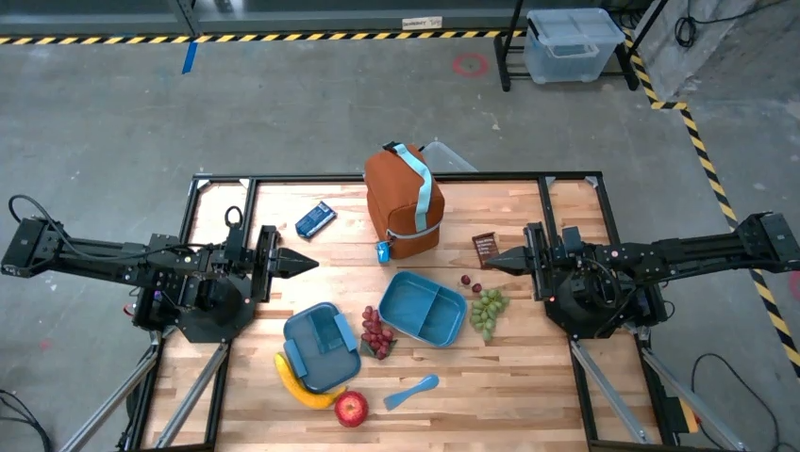
Câu trả lời cho câu lệnh này là một bộ hướng dẫn từng bước về cách đóng gói một túi đựng bữa trưa từ dữ liệu đầu vào là hình ảnh.
Hình ảnh đầu vào
Đầu ra của mô hình
Based on the image, here is a plan to pack the lunch box and lunch bag:

1.  **Pack the fruit into the lunch box.** Place the [apple](apple), [banana](banana), [red grapes](red grapes), and [green grapes](green grapes) into the [blue lunch box](blue lunch box).
2.  **Add the spoon to the lunch box.** Put the [blue spoon](blue spoon) inside the lunch box as well.
3.  **Close the lunch box.** Secure the lid on the [blue lunch box](blue lunch box).
4.  **Place the lunch box inside the lunch bag.** Put the closed [blue lunch box](blue lunch box) into the [brown lunch bag](brown lunch bag).
5.  **Pack the remaining items into the lunch bag.** Place the [blue snack bar](blue snack bar) and the [brown snack bar](brown snack bar) into the [brown lunch bag](brown lunch bag).

Here is the list of objects and their locations:
*   [{"point": [899, 440], "label": "apple"}]
*   [{"point": [814, 363], "label": "banana"}]
*   [{"point": [727, 470], "label": "red grapes"}]
*   [{"point": [675, 608], "label": "green grapes"}]
*   [{"point": [706, 529], "label": "blue lunch box"}]
*   [{"point": [864, 517], "label": "blue spoon"}]
*   [{"point": [499, 401], "label": "blue snack bar"}]
*   [{"point": [614, 705], "label": "brown snack bar"}]
*   [{"point": [448, 501], "label": "brown lunch bag"}]
Bước tiếp theo
- Khả năng của tác nhân AI – thực thi mã, đọc công cụ, chú thích hình ảnh.
- Điều phối tác vụ – các tác vụ có thời hạn dài bằng API robot tuỳ chỉnh.
- Robot học có tính năng truyền trực tuyến — truyền trực tuyến hai chiều theo thời gian thực (chỉ Gemini Robotics ER 2).
- Hiểu video – tìm khoảnh khắc và phân loại tiến trình (chỉ Gemini Robotics ER 2).