
इमेज क्लासिफ़िकेशन, मशीन लर्निंग का एक सामान्य इस्तेमाल है. इससे यह पता चलता है कि कोई इमेज किस चीज़ को दिखाती है. उदाहरण के लिए, हमें यह जानना हो सकता है कि किसी इमेज में किस तरह का जानवर दिख रहा है. किसी इमेज के बारे में अनुमान लगाने के टास्क को इमेज क्लासिफ़िकेशन कहा जाता है. इमेज क्लासिफ़ायर को, अलग-अलग तरह की इमेज पहचानने की ट्रेनिंग दी जाती है. उदाहरण के लिए, किसी मॉडल को तीन अलग-अलग तरह के जानवरों की फ़ोटो पहचानने के लिए ट्रेन किया जा सकता है: खरगोश, हैम्स्टर, और कुत्ते. इमेज क्लासिफ़ायर के बारे में ज़्यादा जानने के लिए, इमेज क्लासिफ़िकेशन का उदाहरण देखें.
Task Library ImageClassifier API का इस्तेमाल करके, अपने कस्टम इमेज क्लासिफ़ायर या पहले से ट्रेन किए गए क्लासिफ़ायर को अपने मोबाइल ऐप्लिकेशन में डिप्लॉय करें.
ImageClassifier API की मुख्य सुविधाएं
इनपुट इमेज को प्रोसेस करना. इसमें इमेज को घुमाना, उसका साइज़ बदलना, और कलर स्पेस बदलना शामिल है.
इनपुट इमेज में दिलचस्पी वाला क्षेत्र.
मैप के लिए स्थान-भाषा का लेबल.
नतीजों को फ़िल्टर करने के लिए स्कोर थ्रेशोल्ड.
टॉप-k क्लासिफ़िकेशन के नतीजे.
लेबल को अनुमति वाली सूची और ब्लॉकलिस्ट में जोड़ना.
इमेज क्लासिफ़ायर के साथ काम करने वाले मॉडल
इन मॉडल में ImageClassifier API का इस्तेमाल किया जा सकता है.
TensorFlow Lite Model Maker for Image Classification की मदद से बनाए गए मॉडल.
TensorFlow Hub पर पहले से ट्रेन किए गए इमेज क्लासिफ़िकेशन मॉडल.
AutoML Vision Edge Image Classification की मदद से बनाए गए मॉडल.
कस्टम मॉडल, जो मॉडल के साथ काम करने की ज़रूरी शर्तों को पूरा करते हों.
Java में अनुमान लगाने की सुविधा इस्तेमाल करना
Android ऐप्लिकेशन में ImageClassifier का इस्तेमाल करने का तरीका जानने के लिए, इमेज क्लासिफ़िकेशन का रेफ़रंस ऐप्लिकेशन देखें.
पहला चरण: Gradle डिपेंडेंसी और अन्य सेटिंग इंपोर्ट करना
.tflite मॉडल फ़ाइल को Android मॉड्यूल की ऐसेट डायरेक्ट्री में कॉपी करें. मॉडल को इसी डायरेक्ट्री में चलाया जाएगा. यह तय करें कि फ़ाइल को कंप्रेस नहीं किया जाना चाहिए. साथ ही, मॉड्यूल की build.gradle फ़ाइल में TensorFlow Lite लाइब्रेरी जोड़ें:
android {
    // Other settings

    // Specify tflite file should not be compressed for the app apk
    aaptOptions {
        noCompress "tflite"
    }
}

dependencies {
    // Other dependencies

    // Import the Task Vision Library dependency
    implementation 'org.tensorflow:tensorflow-lite-task-vision'
    // Import the GPU delegate plugin Library for GPU inference
    implementation 'org.tensorflow:tensorflow-lite-gpu-delegate-plugin'
}
दूसरा चरण: मॉडल का इस्तेमाल करना
// Initialization
ImageClassifierOptions options =
    ImageClassifierOptions.builder()
        .setBaseOptions(BaseOptions.builder().useGpu().build())
        .setMaxResults(1)
        .build();
ImageClassifier imageClassifier =
    ImageClassifier.createFromFileAndOptions(
        context, modelFile, options);

// Run inference
List<Classifications> results = imageClassifier.classify(image);
ImageClassifier को कॉन्फ़िगर करने के ज़्यादा विकल्पों के लिए, सोर्स कोड और javadoc देखें.
iOS में अनुमान लगाने की सुविधा का इस्तेमाल करना
पहला चरण: डिपेंडेंसी इंस्टॉल करना
टास्क लाइब्रेरी को CocoaPods का इस्तेमाल करके इंस्टॉल किया जा सकता है. पक्का करें कि आपके सिस्टम पर CocoaPods इंस्टॉल हो. निर्देशों के लिए, कृपया CocoaPods इंस्टॉल करने से जुड़ी गाइड देखें.
Xcode प्रोजेक्ट में पॉड जोड़ने के बारे में जानकारी पाने के लिए, कृपया CocoaPods गाइड देखें.
Podfile में TensorFlowLiteTaskVision पॉड जोड़ें.
target 'MyAppWithTaskAPI' do
  use_frameworks!
  pod 'TensorFlowLiteTaskVision'
end
पक्का करें कि अनुमान लगाने के लिए इस्तेमाल किया जाने वाला .tflite मॉडल, आपके ऐप्लिकेशन बंडल में मौजूद हो.
दूसरा चरण: मॉडल का इस्तेमाल करना
Swift
// Imports
import TensorFlowLiteTaskVision

// Initialization
guard let modelPath = Bundle.main.path(forResource: "birds_V1",
                                            ofType: "tflite") else { return }

let options = ImageClassifierOptions(modelPath: modelPath)

// Configure any additional options:
// options.classificationOptions.maxResults = 3

let classifier = try ImageClassifier.classifier(options: options)

// Convert the input image to MLImage.
// There are other sources for MLImage. For more details, please see:
// https://developers.google.com/ml-kit/reference/ios/mlimage/api/reference/Classes/GMLImage
guard let image = UIImage (named: "sparrow.jpg"), let mlImage = MLImage(image: image) else { return }

// Run inference
let classificationResults = try classifier.classify(mlImage: mlImage)
Objective-C
// Imports
#import <TensorFlowLiteTaskVision/TensorFlowLiteTaskVision.h>

// Initialization
NSString *modelPath = [[NSBundle mainBundle] pathForResource:@"birds_V1" ofType:@"tflite"];

TFLImageClassifierOptions *options =
    [[TFLImageClassifierOptions alloc] initWithModelPath:modelPath];

// Configure any additional options:
// options.classificationOptions.maxResults = 3;

TFLImageClassifier *classifier = [TFLImageClassifier imageClassifierWithOptions:options
                                                                          error:nil];

// Convert the input image to MLImage.
UIImage *image = [UIImage imageNamed:@"sparrow.jpg"];

// There are other sources for GMLImage. For more details, please see:
// https://developers.google.com/ml-kit/reference/ios/mlimage/api/reference/Classes/GMLImage
GMLImage *gmlImage = [[GMLImage alloc] initWithImage:image];

// Run inference
TFLClassificationResult *classificationResult =
    [classifier classifyWithGMLImage:gmlImage error:nil];
TFLImageClassifier को कॉन्फ़िगर करने के ज़्यादा विकल्पों के लिए, सोर्स कोड देखें.
Python में अनुमान लगाने की सुविधा का इस्तेमाल करना
पहला चरण: pip पैकेज इंस्टॉल करना
pip install tflite-support
दूसरा चरण: मॉडल का इस्तेमाल करना
# Imports
from tflite_support.task import vision
from tflite_support.task import core
from tflite_support.task import processor

# Initialization
base_options = core.BaseOptions(file_name=model_path)
classification_options = processor.ClassificationOptions(max_results=2)
options = vision.ImageClassifierOptions(base_options=base_options, classification_options=classification_options)
classifier = vision.ImageClassifier.create_from_options(options)

# Alternatively, you can create an image classifier in the following manner:
# classifier = vision.ImageClassifier.create_from_file(model_path)

# Run inference
image = vision.TensorImage.create_from_file(image_path)
classification_result = classifier.classify(image)
ImageClassifier को कॉन्फ़िगर करने के ज़्यादा विकल्पों के लिए, सोर्स कोड देखें.
C++ में अनुमान चलाने की सुविधा
// Initialization
ImageClassifierOptions options;
options.mutable_base_options()->mutable_model_file()->set_file_name(model_path);
std::unique_ptr<ImageClassifier> image_classifier = ImageClassifier::CreateFromOptions(options).value();

// Create input frame_buffer from your inputs, `image_data` and `image_dimension`.
// See more information here: tensorflow_lite_support/cc/task/vision/utils/frame_buffer_common_utils.h

std::unique_ptr<FrameBuffer> frame_buffer = CreateFromRgbRawBuffer(
      image_data, image_dimension);

// Run inference
const ClassificationResult result = image_classifier->Classify(*frame_buffer).value();
ImageClassifier को कॉन्फ़िगर करने के ज़्यादा विकल्पों के लिए, सोर्स कोड देखें.
परिणामों के उदाहरण
यहां बर्ड क्लासिफ़ायर के क्लासिफ़िकेशन के नतीजों का एक उदाहरण दिया गया है.
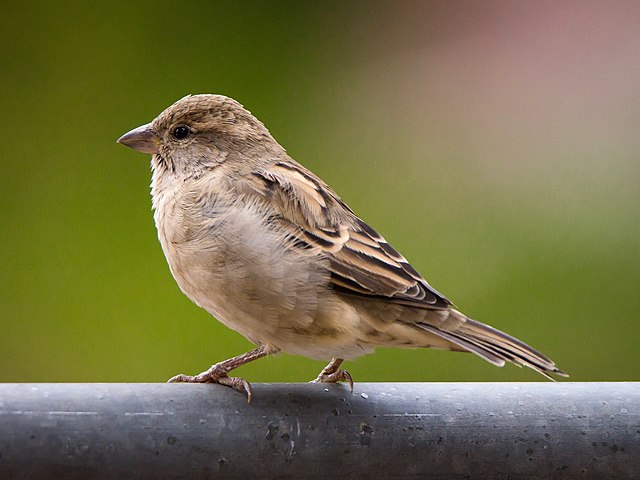
Results:
  Rank #0:
   index       : 671
   score       : 0.91406
   class name  : /m/01bwb9
   display name: Passer domesticus
  Rank #1:
   index       : 670
   score       : 0.00391
   class name  : /m/01bwbt
   display name: Passer montanus
  Rank #2:
   index       : 495
   score       : 0.00391
   class name  : /m/0bwm6m
   display name: Passer italiae
अपने मॉडल और टेस्ट डेटा के साथ, ImageClassifier के लिए, सीएलआई डेमो टूल आज़माएं.
मॉडल के साथ काम करने से जुड़ी ज़रूरी शर्तें
ImageClassifier एपीआई को TFLite मॉडल
मेटाडेटा के साथ TFLite मॉडल की ज़रूरत होती है. TensorFlow Lite Metadata Writer API का इस्तेमाल करके, इमेज क्लासिफ़ायर के लिए मेटाडेटा बनाने के उदाहरण देखें.
इमेज क्लासिफ़ायर के साथ काम करने वाले मॉडल को ये ज़रूरी शर्तें पूरी करनी होंगी:
इनपुट इमेज टेंसर (kTfLiteUInt8/kTfLiteFloat32)
[batch x height x width x channels]साइज़ की इमेज का इनपुट.- बैच इन्फ़रेंस की सुविधा काम नहीं करती (
batchकी वैल्यू 1 होनी चाहिए). - सिर्फ़ आरजीबी इनपुट इस्तेमाल किए जा सकते हैं (
channelsकी वैल्यू 3 होनी चाहिए). - अगर टाइप kTfLiteFloat32 है, तो इनपुट को सामान्य बनाने के लिए, मेटाडेटा में NormalizationOptions अटैच करना ज़रूरी है.
आउटपुट स्कोर टेंसर (kTfLiteUInt8/kTfLiteFloat32)
- जिसमें
Nक्लास और दो या चार डाइमेंशन हों. जैसे,[1 x N]या[1 x 1 x 1 x N] - ज़रूरी नहीं है, लेकिन सुझाए गए लेबल मैप, AssociatedFile-s के तौर पर दिए जाते हैं. इनका टाइप TENSOR_AXIS_LABELS होता है. इनमें हर लाइन में एक लेबल होता है. उदाहरण के तौर पर दिया गया लेबल फ़ाइल देखें.
अगर कोई AssociatedFile मौजूद है, तो उसका इस्तेमाल नतीजों के
labelफ़ील्ड (C++ में इसका नामclass_nameहै) को भरने के लिए किया जाता है.display_nameफ़ील्ड में, AssociatedFile (अगर कोई है) से जानकारी भरी जाती है. इसका स्थान-भाषा,ImageClassifierOptionsकेdisplay_names_localeफ़ील्ड से मेल खाती है.ImageClassifierOptionsका इस्तेमाल, कॉन्टेंट बनाते समय किया जाता है. डिफ़ॉल्ट रूप से, यह "en" यानी अंग्रेज़ी होती है. अगर इनमें से कोई भी जानकारी उपलब्ध नहीं है, तो नतीजों के सिर्फ़indexफ़ील्ड में जानकारी भरी जाएगी.
- जिसमें