
对象检测器可以识别可能存在哪组已知对象,并提供有关其在给定图像或视频串流中所处位置的信息。对象检测器经过训练,可以检测多种类别的对象是否存在以及它们的位置。例如,模型可以接受包含各种水果的图片进行训练,同时接受指定水果类别的标签(例如苹果、香蕉或草莓),以及指定每种对象在图片中出现位置的数据。如需详细了解对象检测器,请参阅对象检测示例。
使用 Task 库 ObjectDetector API 将自定义对象检测器或预训练的对象检测器部署到移动应用中。
ObjectDetector API 的主要功能
输入图像处理,包括旋转、调整大小和颜色空间转换。
标签地图语言区域。
用于过滤结果的分数阈值。
前 k 名检测结果。
标签许可名单和拒绝名单。
支持的对象检测器模型
以下型号保证与 ObjectDetector API 兼容。
由 AutoML Vision Edge 对象检测创建的模型。
符合模型兼容性要求的自定义模型。
在 Java 中运行推理
如需查看如何在 Android 应用中使用 ObjectDetector 的示例,请参阅对象检测参考应用。
第 1 步:导入 Gradle 依赖项和其他设置
将 .tflite 模型文件复制到将运行该模型的 Android 模块的 assets 目录中。指定不应压缩该文件,并将 TensorFlow Lite 库添加到模块的 build.gradle 文件中:
android {
    // Other settings

    // Specify tflite file should not be compressed for the app apk
    aaptOptions {
        noCompress "tflite"
    }
}

dependencies {
    // Other dependencies

    // Import the Task Vision Library dependency
    implementation 'org.tensorflow:tensorflow-lite-task-vision'
    // Import the GPU delegate plugin Library for GPU inference
    implementation 'org.tensorflow:tensorflow-lite-gpu-delegate-plugin'
}
第 2 步:使用模型
// Initialization
ObjectDetectorOptions options =
    ObjectDetectorOptions.builder()
        .setBaseOptions(BaseOptions.builder().useGpu().build())
        .setMaxResults(1)
        .build();
ObjectDetector objectDetector =
    ObjectDetector.createFromFileAndOptions(
        context, modelFile, options);

// Run inference
List<Detection> results = objectDetector.detect(image);
如需了解配置 ObjectDetector 的更多选项,请参阅源代码和 Javadoc。
在 iOS 中运行推理
第 1 步:安装依赖项
Task 库支持使用 CocoaPods 进行安装。确保您的系统上安装了 CocoaPods。如需了解相关说明,请参阅 CocoaPods 安装指南。
如需详细了解如何向 Xcode 项目添加 pod,请参阅 CocoaPods 指南。
在 Podfile 中添加 TensorFlowLiteTaskVision pod。
target 'MyAppWithTaskAPI' do
  use_frameworks!
  pod 'TensorFlowLiteTaskVision'
end
确保您将用于推理的 .tflite 模型存在于应用软件包中。
第 2 步:使用模型
Swift
// Imports
import TensorFlowLiteTaskVision

// Initialization
guard let modelPath = Bundle.main.path(forResource: "ssd_mobilenet_v1",
                                            ofType: "tflite") else { return }

let options = ObjectDetectorOptions(modelPath: modelPath)

// Configure any additional options:
// options.classificationOptions.maxResults = 3

let detector = try ObjectDetector.detector(options: options)

// Convert the input image to MLImage.
// There are other sources for MLImage. For more details, please see:
// https://developers.google.com/ml-kit/reference/ios/mlimage/api/reference/Classes/GMLImage
guard let image = UIImage (named: "cats_and_dogs.jpg"), let mlImage = MLImage(image: image) else { return }

// Run inference
let detectionResult = try detector.detect(mlImage: mlImage)
Objective-C
// Imports
#import <TensorFlowLiteTaskVision/TensorFlowLiteTaskVision.h>

// Initialization
NSString *modelPath = [[NSBundle mainBundle] pathForResource:@"ssd_mobilenet_v1" ofType:@"tflite"];

TFLObjectDetectorOptions *options = [[TFLObjectDetectorOptions alloc] initWithModelPath:modelPath];

// Configure any additional options:
// options.classificationOptions.maxResults = 3;

TFLObjectDetector *detector = [TFLObjectDetector objectDetectorWithOptions:options
                                                                     error:nil];

// Convert the input image to MLImage.
UIImage *image = [UIImage imageNamed:@"dogs.jpg"];

// There are other sources for GMLImage. For more details, please see:
// https://developers.google.com/ml-kit/reference/ios/mlimage/api/reference/Classes/GMLImage
GMLImage *gmlImage = [[GMLImage alloc] initWithImage:image];

// Run inference
TFLDetectionResult *detectionResult = [detector detectWithGMLImage:gmlImage error:nil];
如需了解更多用于配置 TFLObjectDetector 的选项,请参阅源代码。
在 Python 中运行推理
第 1 步:安装 pip 软件包
pip install tflite-support
第 2 步:使用模型
# Imports
from tflite_support.task import vision
from tflite_support.task import core
from tflite_support.task import processor

# Initialization
base_options = core.BaseOptions(file_name=model_path)
detection_options = processor.DetectionOptions(max_results=2)
options = vision.ObjectDetectorOptions(base_options=base_options, detection_options=detection_options)
detector = vision.ObjectDetector.create_from_options(options)

# Alternatively, you can create an object detector in the following manner:
# detector = vision.ObjectDetector.create_from_file(model_path)

# Run inference
image = vision.TensorImage.create_from_file(image_path)
detection_result = detector.detect(image)
如需了解更多用于配置 ObjectDetector 的选项,请参阅源代码。
在 C++ 中运行推理
// Initialization
ObjectDetectorOptions options;
options.mutable_base_options()->mutable_model_file()->set_file_name(model_path);
std::unique_ptr<ObjectDetector> object_detector = ObjectDetector::CreateFromOptions(options).value();

// Create input frame_buffer from your inputs, `image_data` and `image_dimension`.
// See more information here: tensorflow_lite_support/cc/task/vision/utils/frame_buffer_common_utils.h
std::unique_ptr<FrameBuffer> frame_buffer = CreateFromRgbRawBuffer(
      image_data, image_dimension);

// Run inference
const DetectionResult result = object_detector->Detect(*frame_buffer).value();
如需了解更多用于配置 ObjectDetector 的选项,请参阅源代码。
示例结果
以下是 TensorFlow Hub 中 ssd mobilenet v1 的检测结果示例。
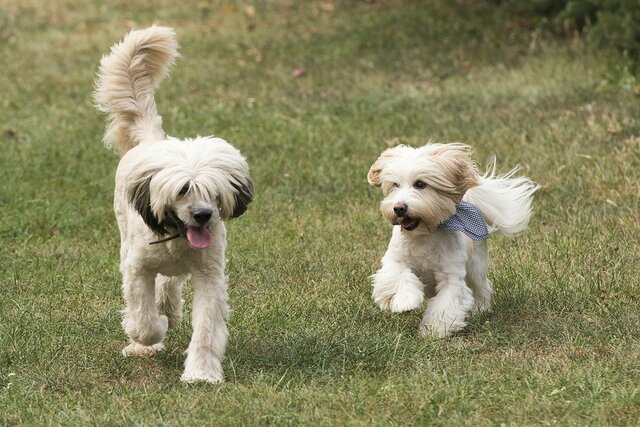
Results:
 Detection #0 (red):
  Box: (x: 355, y: 133, w: 190, h: 206)
  Top-1 class:
   index       : 17
   score       : 0.73828
   class name  : dog
 Detection #1 (green):
  Box: (x: 103, y: 15, w: 138, h: 369)
  Top-1 class:
   index       : 17
   score       : 0.73047
   class name  : dog
将边界框渲染到输入图片上:
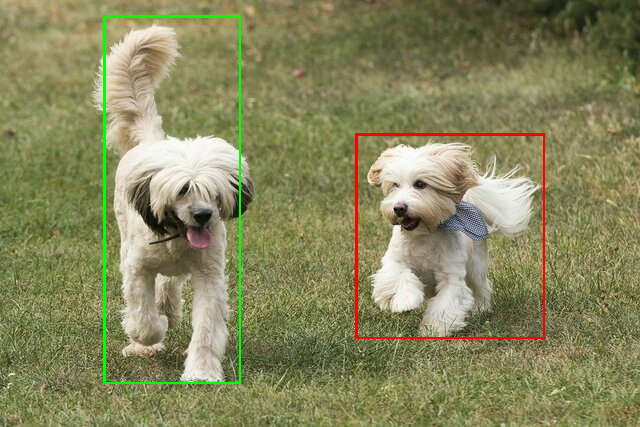
使用您自己的模型和测试数据,试用简单的 ObjectDetector CLI 演示工具。
模型兼容性要求
ObjectDetector API 需要具有强制性 TFLite 模型元数据的 TFLite 模型。请参阅使用 TensorFlow Lite 元数据写入器 API 为对象检测器创建元数据的示例。
兼容的对象检测器模型应满足以下要求:
输入图片张量:(kTfLiteUInt8/kTfLiteFloat32)
- 大小为
[batch x height x width x channels]的图片输入。 - 不支持批量推理(
batch必须为 1)。 - 仅支持 RGB 输入(
channels必须为 3)。 - 如果类型为 kTfLiteFloat32,则必须将 NormalizationOptions 附加到元数据以进行输入归一化。
- 大小为
输出张量必须是
DetectionPostProcess操作的 4 个输出,即:- 位置张量 (kTfLiteFloat32)
- 大小为
[1 x num_results x 4]的张量,内部数组表示边界框,格式为 [上、左、右、下]。 - BoundingBoxProperties 必须附加到元数据,并且必须指定
type=BOUNDARIES和 `coordinate_type=RATIO。 类张量 (kTfLiteFloat32)
大小为
[1 x num_results]的张量,每个值表示一个类的整数索引。可选(但建议使用)标签映射可以作为 AssociatedFile 附加,类型为 TENSOR_VALUE_LABELS,每行包含一个标签。请参阅标签文件示例。 第一个此类 AssociatedFile(如果有)用于填充结果的
class_name字段。display_name字段是从语言区域与创建时使用的ObjectDetectorOptions的display_names_locale字段相匹配的 AssociatedFile(如果有)填充的(默认情况下为“en”,即英语)。如果这些字段均不可用,则只会填充结果的index字段。得分张量 (kTfLiteFloat32)
大小为
[1 x num_results]的张量,每个值表示检测到的对象的分数。检测张量的数量 (kTfLiteFloat32)
整数 num_results,以大小为
[1]的张量表示。