

LiteRT 通过 CompiledModel API 支持 Intel OpenVino,可用于 AOT 和设备端编译。
Python API
设置开发环境
Linux (x86_64):
- Ubuntu 22.04 或 24.04 LTS
- Python 3.10 及更高版本 - 从 python.org 或您的发行版 (
sudo apt install python3 python3-venv) 安装 - Intel NPU 驱动程序 v1.32.1 - 请参阅 Linux NPU 设置
Windows (x86_64):
- Windows 10 或 11
- Python 3.10 及更高版本 - 从 python.org 安装
- Intel NPU 驱动程序 32.0.100.4724+ - 请参阅 Windows NPU 设置
对于从源代码进行构建,还需要使用 Bazelisk 或 hermetic Docker 构建的 Bazel 7.4.1 及更高版本。
支持的 SoC
| 平台 | NPU | 代号 | 操作系统 |
|---|---|---|---|
| Intel Core Ultra Series 2 | NPU4000 | Lunar Lake (LNL) | Linux、Windows |
| Intel Core Ultra Series 3 | NPU5010 | Panther Lake (PTL) | Linux、Windows |
快速入门
1. 安装 NPU 驱动程序
请参阅 Linux NPU 设置或 Windows NPU 设置。如果您只需要 AOT,请跳过此步骤。
只有在 NPU 硬件上执行模型的系统才需要 NPU 驱动程序。纯 AOT build 系统可以跳过此步骤。
注意:
ai-edge-litert-sdk-intel-nightly会根据 PEP 440 版本(例如openvino==2026.2.0.dev20260506)固定匹配的 OpenVINO 每晚 build 轮子,因此 pip 需要--extra-index-url https://storage.openvinotoolkit.org/simple/wheels/nightly才能找到它。在 Linux 上,如果发行版自动检测功能选择了错误的归档,请在pip install之前设置LITERT_OV_OS_ID=ubuntu22或ubuntu24。
2. 创建 Python 虚拟环境
建议将 nightly openvino 轮与任何系统范围的 OpenVINO 安装隔离开。
python -m venv litert_env
# Linux / macOS
source litert_env/bin/activate
# Windows (PowerShell)
.\litert_env\Scripts\Activate.ps1
python -m pip install --upgrade pip
3. 安装 pip 软件包
pip install --pre \
--extra-index-url https://storage.openvinotoolkit.org/simple/wheels/nightly \
ai-edge-litert-nightly ai-edge-litert-sdk-intel-nightly
借助 --extra-index-url,pip 可以从 OpenVINO 的索引中解析固定的 openvino 每晚版 build 轮子,以及 PyPI 上的软件包。
4. 验证安装
python -c "
from ai_edge_litert.aot.vendors.intel_openvino import intel_openvino_backend
import ai_edge_litert_sdk_intel, openvino, os
print('Backend:', intel_openvino_backend.IntelOpenVinoBackend.id())
print('Dispatch:', intel_openvino_backend.get_dispatch_dir())
print('OpenVINO:', openvino.__version__)
print('SDK libs:', sorted(os.listdir(ai_edge_litert_sdk_intel.path_to_sdk_libs())))
print('Available devices:', openvino.Core().available_devices)
"
输出中需要检查的内容:
SDK libs列出libopenvino_intel_npu_compiler.so(Linux) 或openvino_intel_npu_compiler.dll(Windows) - AOT 所需。Available devices包含NPU- 确认 NPU 驱动程序已安装,并且 OpenVINO 可以与设备通信。在仅支持 AOT 的系统(未安装驱动程序)和没有 Intel NPU 硬件的系统上,将不存在NPU。
5. AOT 编译(可选)
- 针对特定的 Intel NPU 目标(PTL 或 LNL)预编译
.tflite,以便运行时跳过编译器插件步骤。 - 不需要实体 NPU 或 NPU 驱动程序,只需要
ai-edge-litert-nightly和ai-edge-litert-sdk-intel-nightly。 - 支持交叉编译:在任何 Linux 或 Windows 主机上进行编译,将生成的
.tflite交付到任一操作系统的目标平台并在该平台上运行。
输出文件名为 <model>_IntelOpenVINO_<SoC>_apply_plugin.tflite。
from ai_edge_litert.aot import aot_compile
from ai_edge_litert.aot.vendors.intel_openvino import target as intel_target

# Compile for a single Intel NPU target (PTL or LNL).
aot_compile.aot_compile(
    "model.tflite",
    output_dir="out",
    target=intel_target.Target(soc_model=intel_target.SocModel.PTL),
)

# Or omit target= to compile for every registered backend/target.
aot_compile.aot_compile("model.tflite", output_dir="out", keep_going=True)
6. 运行 NPU 推理
LiteRT 支持在 Intel NPU 上进行两种推理:
- JIT - 加载原始
.tflite;编译器插件在CompiledModel.from_file()时对 NPU 的支持的运算进行分区和编译。增加了一些首次运行延迟时间(因型号而异)。 - 经过 AOT 编译 - 加载第 4 步生成的
<model>_IntelOpenVINO_<SoC>_apply_plugin.tflite。在加载时间跳过分区和编译步骤。
此代码段同时适用于以下两种情况:
from ai_edge_litert.compiled_model import CompiledModel
from ai_edge_litert.hardware_accelerator import HardwareAccelerator

model = CompiledModel.from_file(
    "model.tflite",  # raw tflite (JIT) or ..._apply_plugin.tflite (AOT)
    hardware_accel=HardwareAccelerator.NPU | HardwareAccelerator.CPU,
)

sig_key = list(model.get_signature_list().keys())[0]
sig_idx = model.get_signature_index(sig_key)
input_buffers = model.create_input_buffers(sig_idx)
output_buffers = model.create_output_buffers(sig_idx)
model.run_by_index(sig_idx, input_buffers, output_buffers)
print("Fully accelerated:", model.is_fully_accelerated())
确认 JIT 确实已运行
如果 JIT 成功,日志将包含(文件扩展名在 Linux 上为 .so,在 Windows 上为 .dll):
INFO: [compiler_plugin.cc:236] Loaded plugin at: .../LiteRtCompilerPlugin_IntelOpenvino.{so,dll}
INFO: [compiler_plugin.cc:690] Partitioned subgraph<0>, selected N ops, from a total of N ops
INFO: [compiled_model.cc:1006] JIT compilation changed model, reserializing...
如果缺少这些行,但仍报告了 Fully accelerated: True,则表示模型是在 XNNPACK CPU 回退上运行的,而不是在 NPU 上运行的 - 请参阅 JIT 问题排查行。
7. 基准
# Dispatch library and the NPU compiler are auto-discovered from the wheel.
litert-benchmark --model=model.tflite --use_npu --num_runs=50
常见标志:
| 标志 | 默认 | 说明 |
|---|---|---|
--model PATH
|
— | .tflite 模型的路径(必需)。 |
--signature KEY |
第一个 | 要运行的签名密钥。 |
--use_cpu / --no_cpu |
在 | 切换 CPU 加速器 / CPU 回退。 |
--use_gpu |
关闭 | 启用 GPU 加速器。 |
--use_npu |
关闭 | 启用 Intel NPU 加速器。 |
--require_full_delegation
|
关闭 | 如果模型未完全分流到所选加速器,则失败。 |
--num_runs N
|
50 | 定时推理迭代次数。 |
--warmup_runs N
|
5 | 测量之前不受时间限制的热身迭代次数。 |
--num_threads N |
1 | CPU 线程数。 |
--result_json PATH
|
— | 写入 JSON 摘要(延迟时间统计信息、吞吐量、加速器列表)。 |
--verbose |
关闭 | 额外的运行时日志记录。 |
高级 / 替换标志 - 仅在指向自定义 build 时需要:--dispatch_library_path、--compiler_plugin_path、--runtime_path。
混合供应商轮子:将 JIT 固定到 Intel OV
注意:当调用
Environment.create()时未指定明确的路径,它会按字母顺序自动发现ai_edge_litert/vendors/下的供应商,并注册找到的第一个供应商。在混合供应商安装中,这可能不是 Intel OV - 显式传递 Intel OV 目录以强制选择正确的目录。
- pip 软件包为每个注册的供应商(
intel_openvino/、google_tensor/、mediatek/、qualcomm/、samsung/)提供编译器插件。 - 如需强制使用 Intel OV 路径(建议在安装了多个供应商 SDK 时使用),请手动传递 Intel OV 目录:
from ai_edge_litert.environment import Environment
from ai_edge_litert.compiled_model import CompiledModel
from ai_edge_litert.hardware_accelerator import HardwareAccelerator
from ai_edge_litert.aot.vendors.intel_openvino import intel_openvino_backend as ov

env = Environment.create(
    compiler_plugin_path=ov.get_compiler_plugin_dir(),   # JIT compiler
    dispatch_library_path=ov.get_dispatch_dir(),          # runtime
)
model = CompiledModel.from_file(
    "model.tflite",
    hardware_accel=HardwareAccelerator.NPU | HardwareAccelerator.CPU,
    environment=env,
)
运行时会加载在指定目录中找到的每个共享库,因此指向 vendors/intel_openvino/compiler/ 只会加载 Intel 插件;同级目录中的 Google Tensor / MediaTek / Qualcomm / Samsung 插件永远不会被触及。
对于 CLI,等效标志如下:
DISPATCH_DIR=$(python3 -c 'from ai_edge_litert.aot.vendors.intel_openvino import intel_openvino_backend as ov; print(ov.get_dispatch_dir())')
COMPILER_DIR=$(python3 -c 'from ai_edge_litert.aot.vendors.intel_openvino import intel_openvino_backend as ov; print(ov.get_compiler_plugin_dir())')

litert-benchmark --model=model.tflite --use_npu \
    --compiler_plugin_path=$COMPILER_DIR \
    --dispatch_library_path=$DISPATCH_DIR
验证 NPU 执行
如需确认模型是否确实在 NPU 上运行,请检查这两个信号:
- 日志包含
Loading shared library:
.../LiteRtDispatch_IntelOpenvino.{so,dll}
- Intel 调度库已加载(在 Linux 上为.so,在 Windows 上为.dll)。 model.is_fully_accelerated()返回True- 每个操作都已分流到所选的加速器。
仅有 is_fully_accelerated() 是不够的:如果调度库从未加载,操作会完全分流到 XNNPACK/CPU,而不是 NPU。
Linux NPU 设置
注意:如果您只需要 AOT,则跳过本部分,因为不需要物理 NPU。
信息:使用 NPU 驱动程序v1.32.1(与 OpenVINO 2026.1 配对)。旧版驱动程序会失败并显示
Level0 pfnCreate2
result: ZE_RESULT_ERROR_UNSUPPORTED_FEATURE
。
# 1. NPU driver (Ubuntu 24.04 use -ubuntu2204 tarball for 22.04).
sudo dpkg --purge --force-remove-reinstreq \
  intel-driver-compiler-npu intel-fw-npu intel-level-zero-npu intel-level-zero-npu-dbgsym || true
wget https://github.com/intel/linux-npu-driver/releases/download/v1.32.1/linux-npu-driver-v1.32.1.20260422-24767473183-ubuntu2404.tar.gz
tar -xf linux-npu-driver-v1.32.1.*.tar.gz
sudo apt update && sudo apt install -y libtbb12
sudo dpkg -i intel-fw-npu_*.deb intel-level-zero-npu_*.deb intel-driver-compiler-npu_*.deb

# 2. Level Zero loader v1.27.0.
wget https://snapshot.ppa.launchpadcontent.net/kobuk-team/intel-graphics/ubuntu/20260324T100000Z/pool/main/l/level-zero-loader/libze1_1.27.0-1~24.04~ppa2_amd64.deb
sudo dpkg -i libze1_*.deb

# 3. Permissions + verify.
sudo gpasswd -a ${USER} render && newgrp render
ls /dev/accel/accel0   # must exist after reboot
然后,运行快速应用中的安装 + 验证代码段。
Windows NPU 设置
注意:如果您只需要 AOT,则跳过本部分,因为不需要物理 NPU。
- 从 Intel 下载中心安装 Intel NPU 驱动程序 (32.0.100.4724+)。
- 验证设备管理器是否在神经处理器下(根据驱动程序显示为
Intel(R) AI Boost或Intel(R) NPU)列出了 NPU 设备。 - 运行快速应用中的安装 + 验证代码段,将
pip替换为python -m pip。
信息:
import ai_edge_litert使用os.add_dll_directory()自动注册 DLL 目录,因此 Python 脚本无需PATH设置。对于非 Python 使用者,请运行setupvars.bat或在PATH前添加<openvino>/libs。
从源代码构建
使用代理?在运行 build 脚本之前导出
http_proxy/https_proxy/no_proxy,这些变量会转发到 Docker 和容器中。
Linux(Docker,密封):
cd LiteRT/docker_build && ./build_wheel_with_docker.sh
Windows(PowerShell,PATH 中的 Bazel):
.\ci\build_pip_package_with_bazel_windows.ps1
输出变量位于 dist/ 中:
ai_edge_litert-*.whl- 运行时轮。ai_edge_litert_sdk_{intel,qualcomm,mediatek,samsung}-*.tar.gz- 供应商 sdist。- Intel sdist 的大小约为 5 KB;NPU 编译器
.so/.dll在pip install时提取,因此同一 sdist 可在 Linux 和 Windows 上运行。
单元测试
bazel test \
  //litert/python/aot/vendors/intel_openvino:intel_openvino_backend_test \
  //litert/c/options:litert_intel_openvino_options_test \
  //litert/cc/options:litert_intel_openvino_options_test \
  //litert/tools/flags/vendors:intel_openvino_flags_test
问题排查
| 问题 | 修复 |
|---|---|
AOT 失败:Device with "NPU" name is not registered |
未提取 NPU 编译器。查看 ai_edge_litert_sdk_intel.path_to_sdk_libs() 列表 libopenvino_intel_npu_compiler.so / .dll。如果为空,请重新安装并授予网络访问权限,或设置 LITERT_OV_OS_ID=ubuntu22/ubuntu24。 |
JIT 在 CPU 上运行,而不是在 NPU 上运行(没有 Partitioned subgraph 日志,没有 Loaded plugin 日志,但仍会打印 Fully accelerated: True) |
未发现编译器插件。确认 ov.get_compiler_plugin_dir() 返回 ai_edge_litert/vendors/intel_openvino/compiler/ 下的路径。如果安装了多个供应商 SDK,请将 compiler_plugin_path=ov.get_compiler_plugin_dir() 显式传递给 Environment.create()(或将 --compiler_plugin_path=... 传递给 litert-benchmark)。 |
JIT 失败:Cannot load library .../openvino/libs/libopenvino_intel_npu_compiler.so (Linux) / openvino_intel_npu_compiler.dll (Windows) |
SDK sdist 在首次 import ai_edge_litert_sdk_intel 时将 NPU 编译器复制到 openvino/libs/。如果跳过了复制(只读 FS,缺少 openvino),请在安装 openvino 后重新安装 ai-edge-litert-sdk-intel,然后在新进程中安装 import ai_edge_litert。 |
Level0 pfnCreate2 result: ZE_RESULT_ERROR_UNSUPPORTED_FEATURE |
将 NPU 驱动程序升级到 v1.32.1 (Linux)。 |
未找到 /dev/accel/accel0 |
sudo dmesg | grep -i vpu 用于调试驱动程序;安装后重新启动。 |
| NPU 权限遭拒 | sudo gpasswd -a ${USER} render && newgrp render。 |
| Windows:设备管理器中未显示 NPU | 从 Intel 下载中心安装 NPU 驱动程序 32.0.100.4724+。 |
Windows:Failed to initialize Dispatch API / 缺少 DLL |
确保先运行 import ai_edge_litert(自动注册 DLL 目录);对于非 Python 调用方,请运行 setupvars.bat 或将 <openvino>/libs 添加到 PATH 的前面。 |
Windows build:LNK2001 fixed_address_empty_string、C2491 dllimport、Python 3.12+ fails |
Protobuf ABI / Python 版本限制 - 请参阅 ci/build_pip_package_with_bazel_windows.ps1;Windows build 需要 Python 3.11。 |
限制
仅支持通过 OpenVINO 调度路径使用 NPU 设备。对于 CPU 推断,请单独使用 HardwareAccelerator.CPU (XNNPACK)。
C++ API
前提条件和 build 设置
构建前提条件:
- Visual Studio 2022 或更高版本(必须安装 C++ 开发工具)。
- git:从 https://git-scm.com/install/ 安装 git。确保
C:\Program Files\Git\bin and C:\Program Files\Git\cmd包含在系统的 PATH 环境变量中,以便 LiteRT/LiteRT-LM 构建进程能够找到 bash.exe 和 git.exe。 - bazelisk:安装 bazelisk 并将其位置包含在系统的
PATH环境变量中:https://bazel.build/install/bazelisk。 - Cmake:从 https://cmake.org/download/ 安装 Cmake 版本 4.3.0 或更高版本,并验证 Cmake 是否包含在系统的 PATH 中。
- Python:确保已安装 Python 3.11 或更高版本,并且 python.exe 位于您的 PATH 中。
- Windows 设置:在 Windows 设置中启用开发者模式。
为 Intel NPU 构建 LiteRT 工具和插件
如需使用 LiteRT 在 Intel NPU 上运行模型,必须使用 LiteRT Intel OpenVINO 编译器插件编译这些模型;此外,任何旨在在 Intel NPU 上执行的已编译模型都必须委托给 LiteRT Intel OpenVINO 调度插件。
LiteRT 调用这些插件的机制如下所示:
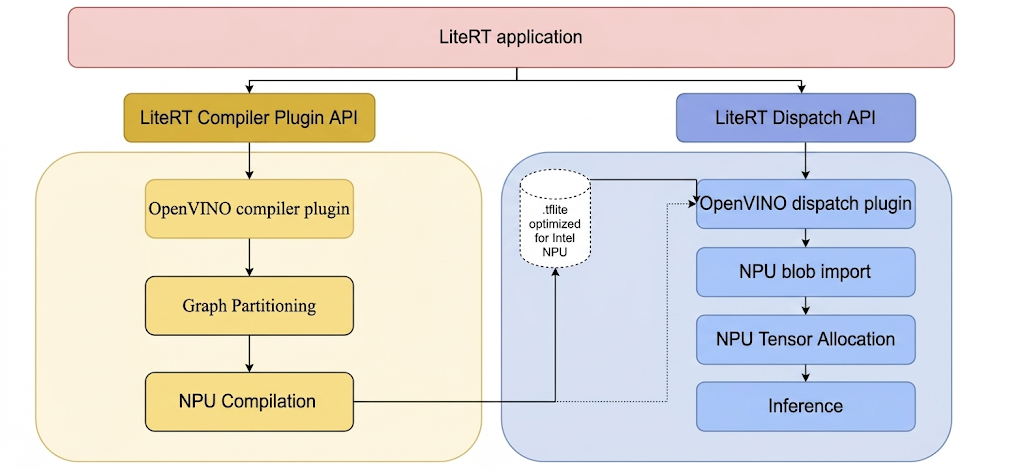
构建 LiteRT 工具和 Intel 插件的步骤。
在从 LiteRT 构建任何可执行文件或库之前,请创建一个本地目录,例如 C:\bzl。构建输出二进制文件将从此目录中收集。构建 Intel OpenVINO 调度插件
# At the top-level directory of LiteRT repository
bazelisk --output_base=C:\bzl build //litert/vendors/intel_openvino/dispatch:LiteRtDispatch --config=windows
或者,您也可以通过在目标上添加 @litert 前缀,从 LiteRT-LM 代码库构建调度插件。以下来自 LiteRT 代码库的所有目标均类似。
# At the top-level directory of LiteRT-LM repository
bazelisk --output_base=C:\bzl build @litert//litert/vendors/intel_openvino/dispatch:LiteRtDispatch --config=windows
构建 Intel OpenVINO 编译器插件
bazelisk --output_base=C:\bzl build //litert/vendors/intel_openvino/compiler:LiteRtCompilerPlugin --config=windows
构建 LiteRT 预先 (AOT) 编译器实用程序 某些 LiteRT 工具需要先对模型进行显式 AOT 编译,然后才能在 Intel NPU 上运行。LiteRT AOT 编译器实用程序的 build 说明:
bazelisk --output_base=C:\bzl build
//litert/tools:apply_plugin_main --config=windows
构建 LiteRT 模型运行程序 LiteRT 模型运行程序可用于在 Intel NPU 上运行模型,无论是未预编译的模型还是 AOT 编译的模型。用于构建模型运行器的指令:
bazelisk --output_base=C:\bzl build //litert/tools:run_model --config=windows
构建 LiteRT 基准模型实用程序 LiteRT 模型基准测试工具可用于对 Intel NPU 上模型的推理性能进行基准测试。如果说明中包含构建基准测试工具的指令:
bazelisk --output_base=C:\bzl build //litert/tools:benchmark_model --config=windows --define=protobuf_allow_msvc=true
构建 LiteRT 数值检查实用程序
bazelisk --output_base=C:\bzl build //litert/tools:npu_numerics_check --config=windows
高级用法:使用自定义的 Intel OpenVINO SDK 进行构建
在编译编译器和调度插件时,LiteRT 构建系统会自动获取预构建的 Intel OpenVINO SDK。
如果您的项目需要特定或自定义版本的 Intel OpenVINO SDK,请在开始构建插件之前完成以下额外的配置步骤:
- 从 https://www.intel.com/content/www/us/en/download/753640/intel-distribution-of-openvino-toolkit.html 下载适用于 Windows 的最新 OpenVINO 版本二进制文件,并将其解压缩到本地磁盘,例如
C:\Intel\intel_openvino。 - 确保此路径下的唯一子目录名为“openvino”,其中包含“runtime”和“include”等子目录。
- 在控制台(命令提示符或 PowerShell)中,前往克隆的 LiteRT 代码库的根目录,然后设置 OPENVINO_NATIVE_DIR 变量(确保末尾没有
\`), for example:set OPENVINO_NATIVE_DIR=C:\Intel\intel_openvino`
自定义模型的 AOT 编译
本部分将准备环境,并针对 LiteRT 对自定义 TFLite、PyTorch 或 JAX 模型执行 AOT 编译。
在 Intel NPU 的模型编译过程中,LiteRT 会根据 LiteRT Intel OpenVINO 编译器插件支持的运算符验证模型图。对于与编译器插件兼容的运算符或子图,LiteRT 会将每个此类子图编译为 DISPATCH_OP,然后替换图中的原始子图。Intel OpenVINO 编译器支持的 opset 中未包含的运算符在图中保持不变。因此,AOT 编译可能会生成完全委托的模型或部分委托的模型。以下是完全委托的 AOT 编译模型的示例:
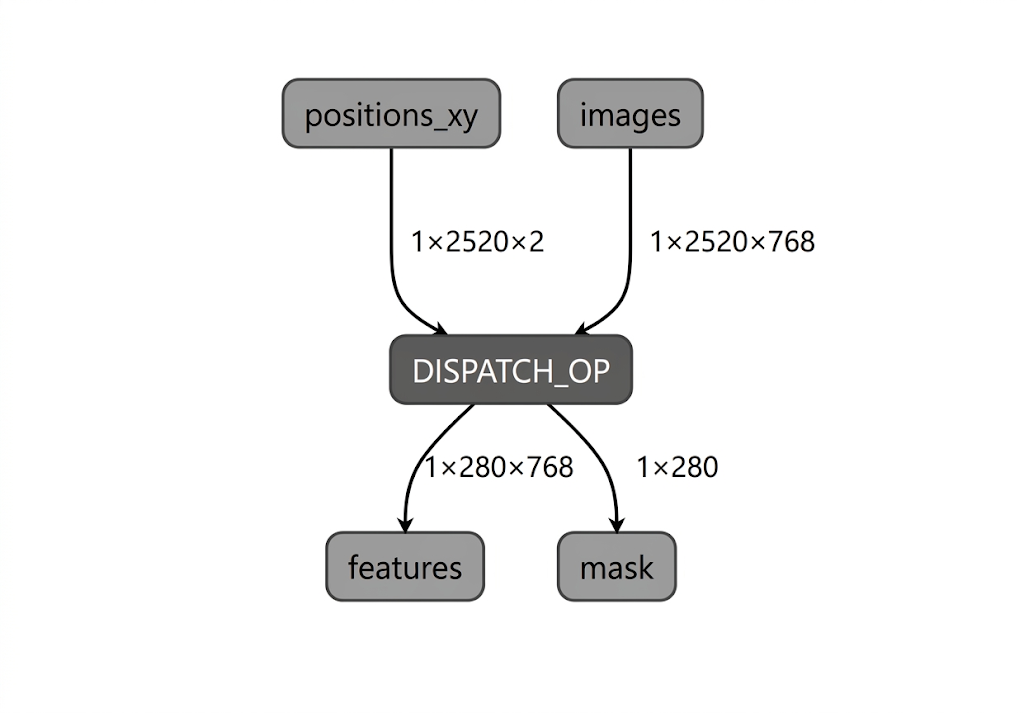
LiteRT apply_plugin_main 实用工具 (apply_plugin_main.exe) 是一种 AOT 编译实用工具,可用于此目的。在 Intel 平台上的实用程序使用示例:
.\apply_plugin_main.exe -cmd apply --model="C:\models\model.tflite" -o C:\models\model_aot.tflite --soc_model=PTL --soc_manufacturer "IntelOpenVINO" --libs C:\litertlibs
请注意,Intel OpenVINO SDK 的二进制分发版中包含的默认底层 NPU 编译器用于 Intel Core Ultra Series 2 及后续 SoC。如果模型要编译为不受支持的列表中的 NPU,则必须明确指定编译器类型(不过对于 Intel Core Ultra 2 及更高版本,这仍然是可选的)。
set IE_NPU_COMPILER_TYPE=PLUGIN
应用中的 JIT 与 AOT 编译
如需在自己的 LiteRT 应用中编译模型,可采用两种方法:我们已介绍过的 AOT 编译和即时 (JIT) 编译。
借助 AOT 编译,模型可在部署之前离线编译,并可保存以供日后使用 - 通常在编译过于消耗资源而无法在设备上运行时使用。您无需在部署模型的同一设备上执行此操作。代码中的 AOT 编译示例:
void AotCompileForOpenVINO() {
  auto run = std::make_unique<ApplyPluginRun>();

  // Full pipeline: partition → compile → embed bytecode in .tflite
  run->cmd = ApplyPluginRun::Cmd::APPLY;

  // Path to directory containing LiteRtComplilerPlugin.dll
  run->lib_search_paths.push_back("/path/to/plugin/dir/");

  // Input model
  run->model.emplace("model.tflite");

  // Intel OpenVINO target
  run->soc_manufacturer.emplace("IntelOpenVINO");
  run->soc_models.push_back("PTL");  // or "LNL"

  // Output stream for the AOT-compiled model
  std::stringstream compiled_output;
  run->outs.push_back(compiled_output);

  // Run AOT compilation
  auto status = ApplyPlugin(std::move(run));
  // compiled_output now contains .tflite with embedded OpenVINO bytecode
}
使用 AOT 编译的模型进行推理的方法:
void RunAotCompiledModel() {
  auto env = litert::Environment::Create({}).value();

  // Load AOT-compiled model, still must specify NPU accelerator
  auto compiled_model = litert::CompiledModel::Create(
      env, "model_aot.tflite", litert::HwAccelerators::kNpu).value();

  auto input_buffers = compiled_model.CreateInputBuffers().value();
  auto output_buffers = compiled_model.CreateOutputBuffers().value();

  input_buffers[0].Write<float>({/* data */});
  compiled_model.Run(input_buffers, output_buffers);
}
另一种方法是在设备上以 JIT 方式编译模型。 它更加灵活:只需要一个与后端无关的模型文件。
// Create environment
auto env = litert::Environment::Create({}).value();

// JIT compile for NPU
auto compiled_model = litert::CompiledModel::Create(
    env, "model.tflite", litert::HwAccelerators::kNpu).value();

// Create I/O buffers
auto input_buffers = compiled_model.CreateInputBuffers().value();
auto output_buffers = compiled_model.CreateOutputBuffers().value();

// Fill inputs
input_buffers[0].Write<float>({/* input data */});

// Run inference
compiled_model.Run(input_buffers, output_buffers);
使用 benchmark_model 进行基准测试
LiteRT benchmark_model 实用程序 (benchmark_model.exe) 专门用于对 NPU 上的 AOT 编译模型进行基准测试,并可用于将性能与 LiteRT 中的 CPU 后端 (XNNPack) 进行比较。在 Intel NPU 上对 AOT 编译的模型进行基准比较的命令示例:
.\benchmark_model.exe --graph=C:\models\model_aot.tflite --use_npu=true --compiler_plugin_library_path=C:\litertlib --dispatch_library_path=C:\litertlib --compiler_cache_path=C:\models
使用 npu_numerics_check 进行准确度检查
npu_numerics_check 实用程序用于针对基准(通常为 CPU 后端,XNNPack)验证 NPU 编译模型的数值准确性。此步骤对于确保向 NPU 的委托不会引入可能影响模型质量的不可接受的数值偏差至关重要。
运行数值检查 该实用程序需要经过 AOT 编译的模型,并将其输出与在 CPU 上运行的原始非委托模型进行比较。
.\npu_numerics_check.exe --npu_model=C:\models\model_aot.tflite --cpu_model=C:\models\model.tflite --dispatch_library_path=C:\litertlib
后续步骤
- 首先,请参阅统一 NPU 指南:使用 LiteRT 进行 NPU 加速
- 按照其中的转化和部署步骤操作,并在适用情况下选择 Qualcomm。
- 对于 LLM,请参阅使用 LiteRT-LM 在 NPU 上执行 LLM。