

इस पेज पर, LiteRT कन्वर्टर का इस्तेमाल करके, TensorFlow मॉडल को LiteRT मॉडल में बदलने का तरीका बताया गया है. LiteRT मॉडल, ऑप्टिमाइज़ किया गया FlatBuffer फ़ॉर्मैट होता है. इसकी पहचान .tflite फ़ाइल एक्सटेंशन से होती है.
कन्वर्ज़न वर्कफ़्लो
नीचे दिए गए डायग्राम में, अपने मॉडल को बदलने के लिए हाई-लेवल वर्कफ़्लो दिखाया गया है:
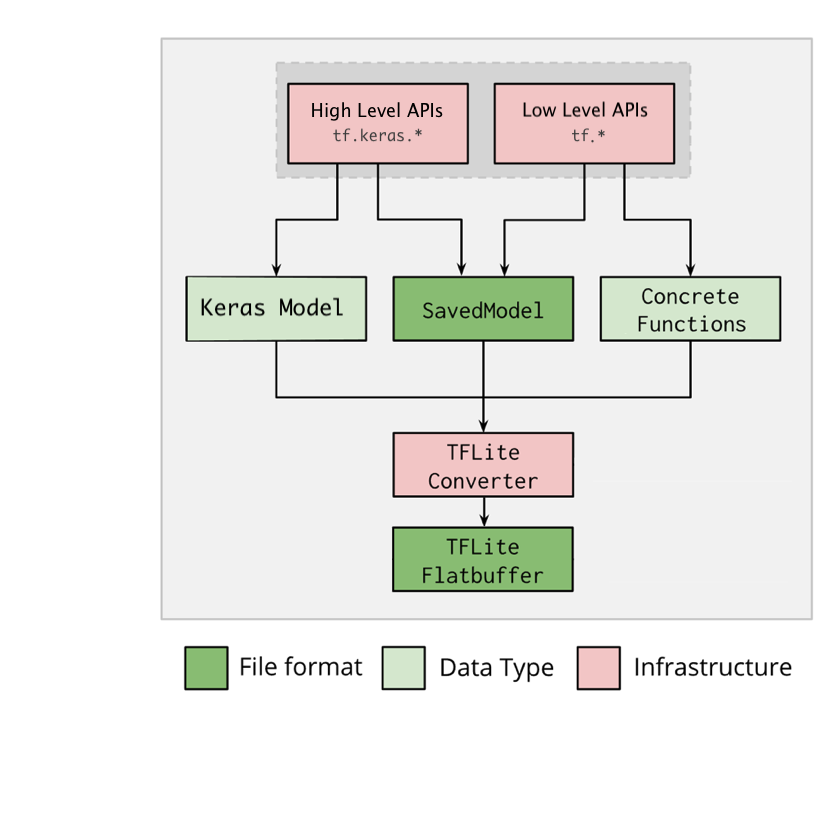
पहली इमेज. कन्वर्टर वर्कफ़्लो.
अपने मॉडल को इनमें से किसी एक विकल्प का इस्तेमाल करके बदला जा सकता है:
- Python API (सुझाया गया): इसकी मदद से, कन्वर्ज़न को डेवलपमेंट पाइपलाइन में इंटिग्रेट किया जा सकता है. साथ ही, ऑप्टिमाइज़ेशन लागू किए जा सकते हैं, मेटाडेटा जोड़ा जा सकता है, और कन्वर्ज़न प्रोसेस को आसान बनाने वाले कई अन्य टास्क किए जा सकते हैं.
- कमांड लाइन: यह सिर्फ़ बेसिक मॉडल कन्वर्ज़न के साथ काम करती है.
Python API
सहायता कोड: LiteRT कनवर्टर एपीआई के बारे में ज़्यादा जानने के लिए, print(help(tf.lite.TFLiteConverter)) चलाएं.
tf.lite.TFLiteConverter का इस्तेमाल करके, TensorFlow मॉडल को बदलें. TensorFlow मॉडल को SavedModel फ़ॉर्मैट में सेव किया जाता है. इसे हाई-लेवल tf.keras.* एपीआई (Keras मॉडल) या लो-लेवल tf.* एपीआई (जिससे कॉन्क्रीट फ़ंक्शन जनरेट किए जाते हैं) का इस्तेमाल करके जनरेट किया जाता है. इसलिए, आपके पास ये तीन विकल्प हैं. इनके उदाहरण अगले कुछ सेक्शन में दिए गए हैं:
tf.lite.TFLiteConverter.from_saved_model()(सुझाया गया): यह SavedModel को बदलता है.tf.lite.TFLiteConverter.from_keras_model(): यह Keras मॉडल को बदलता है.tf.lite.TFLiteConverter.from_concrete_functions(): यह कॉन्क्रीट फ़ंक्शन को बदलता है.
SavedModel को बदलना (सुझाया गया)
यहां दिए गए उदाहरण में, SavedModel को TensorFlow Lite मॉडल में बदलने का तरीका बताया गया है.
import tensorflow as tf

# Convert the model
converter = tf.lite.TFLiteConverter.from_saved_model(saved_model_dir) # path to the SavedModel directory
tflite_model = converter.convert()

# Save the model.
with open('model.tflite', 'wb') as f:
  f.write(tflite_model)
Keras मॉडल को बदलना
यहां दिए गए उदाहरण में, Keras मॉडल को TensorFlow Lite मॉडल में बदलने का तरीका बताया गया है.
import tensorflow as tf

# Create a model using high-level tf.keras.* APIs
model = tf.keras.models.Sequential([
    tf.keras.layers.Dense(units=1, input_shape=[1]),
    tf.keras.layers.Dense(units=16, activation='relu'),
    tf.keras.layers.Dense(units=1)
])
model.compile(optimizer='sgd', loss='mean_squared_error') # compile the model
model.fit(x=[-1, 0, 1], y=[-3, -1, 1], epochs=5) # train the model
# (to generate a SavedModel) tf.saved_model.save(model, "saved_model_keras_dir")

# Convert the model.
converter = tf.lite.TFLiteConverter.from_keras_model(model)
tflite_model = converter.convert()

# Save the model.
with open('model.tflite', 'wb') as f:
  f.write(tflite_model)
कंक्रीट फ़ंक्शन को बदलना
यहां दिए गए उदाहरण में, कंक्रीट फ़ंक्शन को LiteRT मॉडल में बदलने का तरीका बताया गया है.
import tensorflow as tf

# Create a model using low-level tf.* APIs
class Squared(tf.Module):
  @tf.function(input_signature=[tf.TensorSpec(shape=[None], dtype=tf.float32)])
  def __call__(self, x):
    return tf.square(x)
model = Squared()
# (ro run your model) result = Squared(5.0) # This prints "25.0"
# (to generate a SavedModel) tf.saved_model.save(model, "saved_model_tf_dir")
concrete_func = model.__call__.get_concrete_function()

# Convert the model.

converter = tf.lite.TFLiteConverter.from_concrete_functions([concrete_func],
                                                            model)
tflite_model = converter.convert()

# Save the model.
with open('model.tflite', 'wb') as f:
  f.write(tflite_model)
अन्य सुविधाएं
ऑप्टिमाइज़ेशन लागू करें. आम तौर पर इस्तेमाल किया जाने वाला ऑप्टिमाइज़ेशन, पोस्ट ट्रेनिंग क्वांटाइज़ेशन है. इससे मॉडल के इंतज़ार के समय और साइज़ को और कम किया जा सकता है. साथ ही, सटीकता में भी कम से कम कमी आती है.
मेटाडेटा जोड़ें. इससे डिवाइसों पर मॉडल डिप्लॉय करते समय, प्लैटफ़ॉर्म के हिसाब से रैपर कोड बनाना आसान हो जाता है.
कन्वर्ज़न से जुड़ी गड़बड़ियां
यहां कन्वर्ज़न से जुड़ी कुछ आम गड़बड़ियां और उन्हें ठीक करने के तरीके दिए गए हैं:
गड़बड़ी:
Some ops are not supported by the native TFLite runtime, you can
enable TF kernels fallback using TF Select.
समस्या हल करने का तरीका: यह गड़बड़ी इसलिए होती है, क्योंकि आपके मॉडल में ऐसे टीएफ़ ऑप्स हैं जिन्हें TFLite में लागू नहीं किया जा सकता. इस समस्या को हल करने के लिए, TFLite मॉडल में TF op का इस्तेमाल करें. हमारा सुझाव है कि आप ऐसा करें. अगर आपको सिर्फ़ TFLite ऑप्स वाला मॉडल जनरेट करना है, तो GitHub issue #21526 में जाकर, छूटे हुए TFLite ऑप के लिए अनुरोध किया जा सकता है. अगर आपका अनुरोध पहले से नहीं किया गया है, तो टिप्पणी करें. इसके अलावा, TFLite ऑप खुद भी बनाया जा सकता है.
गड़बड़ी:
.. is neither a custom op nor a flex opसमस्या हल करने का तरीका: अगर यह टीएफ़ ऑप:
- TF में काम करता है: यह गड़बड़ी इसलिए होती है, क्योंकि TF ऑप, अनुमति वाली सूची में मौजूद नहीं है. यह सूची, TFLite के साथ काम करने वाले TF ऑप की पूरी सूची होती है. इस समस्या को इस तरह हल किया जा सकता है:
- अनुमति वाली सूची में उन कार्रवाइयों को जोड़ें जो मौजूद नहीं हैं. 2. TF मॉडल को TFLite मॉडल में बदलें और अनुमान लगाएं.
- TF में काम नहीं करता: यह गड़बड़ी इसलिए होती है, क्योंकि TFLite को आपके तय किए गए कस्टम TF ऑपरेटर के बारे में जानकारी नहीं है. इस समस्या को इस तरह हल किया जा सकता है:
- TF ऑप बनाएं.
- TF मॉडल को TFLite मॉडल में बदलें.
- TFLite op बनाएं और इसे TFLite रनटाइम से लिंक करके, इंटरफ़ेस चलाएं.
कमांड लाइन टूल
अगर आपने pip से TensorFlow 2.x इंस्टॉल किया है, तो tflite_convert कमांड का इस्तेमाल करें.
उपलब्ध सभी फ़्लैग देखने के लिए, इस निर्देश का इस्तेमाल करें:
$ tflite_convert --help

`--output_file`. Type: string. Full path of the output file.
`--saved_model_dir`. Type: string. Full path to the SavedModel directory.
`--keras_model_file`. Type: string. Full path to the Keras H5 model file.
`--enable_v1_converter`. Type: bool. (default False) Enables the converter and flags used in TF 1.x instead of TF 2.x.

You are required to provide the `--output_file` flag and either the `--saved_model_dir` or `--keras_model_file` flag.
अगर आपने TensorFlow 2.x
सोर्स डाउनलोड किया है और आपको पैकेज को बनाए और इंस्टॉल किए बिना, उस सोर्स से कनवर्टर चलाना है, तो कमांड में 'tflite_convert' को 'bazel run
tensorflow/lite/python:tflite_convert --' से बदला जा सकता है.
SavedModel को बदलना
tflite_convert \
  --saved_model_dir=/tmp/mobilenet_saved_model \
  --output_file=/tmp/mobilenet.tflite
Keras H5 मॉडल को बदलना
tflite_convert \
  --keras_model_file=/tmp/mobilenet_keras_model.h5 \
  --output_file=/tmp/mobilenet.tflite