

इमेज सेगमेंटेशन करने वाले मॉडल, यह अनुमान लगाते हैं कि किसी इमेज का हर पिक्सल, किसी क्लास से जुड़ा है या नहीं. यह ऑब्जेक्ट का पता लगाने की सुविधा से अलग है. ऑब्जेक्ट का पता लगाने की सुविधा, रेक्टैंगुलर क्षेत्रों में ऑब्जेक्ट का पता लगाती है. साथ ही, यह इमेज क्लासिफ़िकेशन से भी अलग है, जो पूरी इमेज को क्लासिफ़ाई करती है. इमेज सेगमेंटेशन के बारे में ज़्यादा जानने के लिए, इमेज सेगमेंटेशन की खास जानकारी का उदाहरण देखें.
Task Library ImageSegmenter API का इस्तेमाल करके, अपने मोबाइल ऐप्लिकेशन में कस्टम इमेज सेगमेंटेशन मॉडल या पहले से ट्रेन किए गए मॉडल डिप्लॉय करें.
ImageSegmenter API की मुख्य सुविधाएं
इनपुट इमेज को प्रोसेस करना. इसमें इमेज को घुमाना, उसका साइज़ बदलना, और कलर स्पेस बदलना शामिल है.
मैप के लिए स्थान-भाषा का लेबल.
दो तरह के आउटपुट, कैटगरी मास्क और कॉन्फ़िडेंस मास्क.
दिखाने के लिए रंगीन लेबल.
इमेज सेगमेंट करने वाले मॉडल
इन मॉडल में ImageSegmenter API का इस्तेमाल किया जा सकता है.
TensorFlow Hub पर पहले से ट्रेन किए गए इमेज सेगमेंटेशन मॉडल.
कस्टम मॉडल, जो मॉडल के साथ काम करने की ज़रूरी शर्तों को पूरा करते हों.
Java में अनुमान लगाने की सुविधा इस्तेमाल करना
Android ऐप्लिकेशन में ImageSegmenter का इस्तेमाल करने का तरीका जानने के लिए, इमेज सेगमेंटेशन के रेफ़रंस ऐप्लिकेशन देखें.
पहला चरण: Gradle डिपेंडेंसी और अन्य सेटिंग इंपोर्ट करना
.tflite मॉडल फ़ाइल को Android मॉड्यूल की ऐसेट डायरेक्ट्री में कॉपी करें. मॉडल को इसी डायरेक्ट्री में चलाया जाएगा. यह तय करें कि फ़ाइल को कंप्रेस नहीं किया जाना चाहिए. साथ ही, मॉड्यूल की build.gradle फ़ाइल में TensorFlow Lite लाइब्रेरी जोड़ें:
android {
    // Other settings

    // Specify tflite file should not be compressed for the app apk
    aaptOptions {
        noCompress "tflite"
    }
}

dependencies {
    // Other dependencies

    // Import the Task Vision Library dependency
    implementation 'org.tensorflow:tensorflow-lite-task-vision'
    // Import the GPU delegate plugin Library for GPU inference
    implementation 'org.tensorflow:tensorflow-lite-gpu-delegate-plugin'
}
दूसरा चरण: मॉडल का इस्तेमाल करना
// Initialization
ImageSegmenterOptions options =
    ImageSegmenterOptions.builder()
        .setBaseOptions(BaseOptions.builder().useGpu().build())
        .setOutputType(OutputType.CONFIDENCE_MASK)
        .build();
ImageSegmenter imageSegmenter =
    ImageSegmenter.createFromFileAndOptions(context, modelFile, options);

// Run inference
List<Segmentation> results = imageSegmenter.segment(image);
ImageSegmenter को कॉन्फ़िगर करने के ज़्यादा विकल्पों के लिए, सोर्स कोड और javadoc देखें.
iOS में अनुमान लगाने की सुविधा का इस्तेमाल करना
पहला चरण: डिपेंडेंसी इंस्टॉल करना
टास्क लाइब्रेरी को CocoaPods का इस्तेमाल करके इंस्टॉल किया जा सकता है. पक्का करें कि आपके सिस्टम पर CocoaPods इंस्टॉल हो. निर्देशों के लिए, कृपया CocoaPods इंस्टॉल करने से जुड़ी गाइड देखें.
Xcode प्रोजेक्ट में पॉड जोड़ने के बारे में जानकारी पाने के लिए, कृपया CocoaPods गाइड देखें.
Podfile में TensorFlowLiteTaskVision पॉड जोड़ें.
target 'MyAppWithTaskAPI' do
  use_frameworks!
  pod 'TensorFlowLiteTaskVision'
end
पक्का करें कि अनुमान लगाने के लिए इस्तेमाल किया जाने वाला .tflite मॉडल, आपके ऐप्लिकेशन बंडल में मौजूद हो.
दूसरा चरण: मॉडल का इस्तेमाल करना
Swift
// Imports
import TensorFlowLiteTaskVision

// Initialization
guard let modelPath = Bundle.main.path(forResource: "deeplabv3",
                                            ofType: "tflite") else { return }

let options = ImageSegmenterOptions(modelPath: modelPath)

// Configure any additional options:
// options.outputType = OutputType.confidenceMasks

let segmenter = try ImageSegmenter.segmenter(options: options)

// Convert the input image to MLImage.
// There are other sources for MLImage. For more details, please see:
// https://developers.google.com/ml-kit/reference/ios/mlimage/api/reference/Classes/GMLImage
guard let image = UIImage (named: "plane.jpg"), let mlImage = MLImage(image: image) else { return }

// Run inference
let segmentationResult = try segmenter.segment(mlImage: mlImage)
Objective-C
// Imports
#import <TensorFlowLiteTaskVision/TensorFlowLiteTaskVision.h>

// Initialization
NSString *modelPath = [[NSBundle mainBundle] pathForResource:@"deeplabv3" ofType:@"tflite"];

TFLImageSegmenterOptions *options =
    [[TFLImageSegmenterOptions alloc] initWithModelPath:modelPath];

// Configure any additional options:
// options.outputType = TFLOutputTypeConfidenceMasks;

TFLImageSegmenter *segmenter = [TFLImageSegmenter imageSegmenterWithOptions:options
                                                                      error:nil];

// Convert the input image to MLImage.
UIImage *image = [UIImage imageNamed:@"plane.jpg"];

// There are other sources for GMLImage. For more details, please see:
// https://developers.google.com/ml-kit/reference/ios/mlimage/api/reference/Classes/GMLImage
GMLImage *gmlImage = [[GMLImage alloc] initWithImage:image];

// Run inference
TFLSegmentationResult *segmentationResult =
    [segmenter segmentWithGMLImage:gmlImage error:nil];
TFLImageSegmenter को कॉन्फ़िगर करने के ज़्यादा विकल्पों के लिए, सोर्स कोड देखें.
Python में अनुमान लगाने की सुविधा का इस्तेमाल करना
पहला चरण: pip पैकेज इंस्टॉल करना
pip install tflite-support
दूसरा चरण: मॉडल का इस्तेमाल करना
# Imports
from tflite_support.task import vision
from tflite_support.task import core
from tflite_support.task import processor

# Initialization
base_options = core.BaseOptions(file_name=model_path)
segmentation_options = processor.SegmentationOptions(
    output_type=processor.SegmentationOptions.output_type.CATEGORY_MASK)
options = vision.ImageSegmenterOptions(base_options=base_options, segmentation_options=segmentation_options)
segmenter = vision.ImageSegmenter.create_from_options(options)

# Alternatively, you can create an image segmenter in the following manner:
# segmenter = vision.ImageSegmenter.create_from_file(model_path)

# Run inference
image_file = vision.TensorImage.create_from_file(image_path)
segmentation_result = segmenter.segment(image_file)
ImageSegmenter को कॉन्फ़िगर करने के ज़्यादा विकल्पों के लिए, सोर्स कोड देखें.
C++ में अनुमान चलाने की सुविधा
// Initialization
ImageSegmenterOptions options;
options.mutable_base_options()->mutable_model_file()->set_file_name(model_path);
std::unique_ptr<ImageSegmenter> image_segmenter = ImageSegmenter::CreateFromOptions(options).value();

// Create input frame_buffer from your inputs, `image_data` and `image_dimension`.
// See more information here: tensorflow_lite_support/cc/task/vision/utils/frame_buffer_common_utils.h
std::unique_ptr<FrameBuffer> frame_buffer = CreateFromRgbRawBuffer(
      image_data, image_dimension);

// Run inference
const SegmentationResult result = image_segmenter->Segment(*frame_buffer).value();
ImageSegmenter को कॉन्फ़िगर करने के ज़्यादा विकल्पों के लिए, सोर्स कोड देखें.
परिणामों के उदाहरण
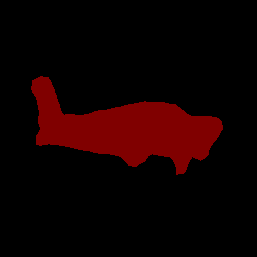
यहां deeplab_v3 के सेगमेंटेशन के नतीजों का उदाहरण दिया गया है. यह TensorFlow Hub पर उपलब्ध एक सामान्य सेगमेंटेशन मॉडल है.
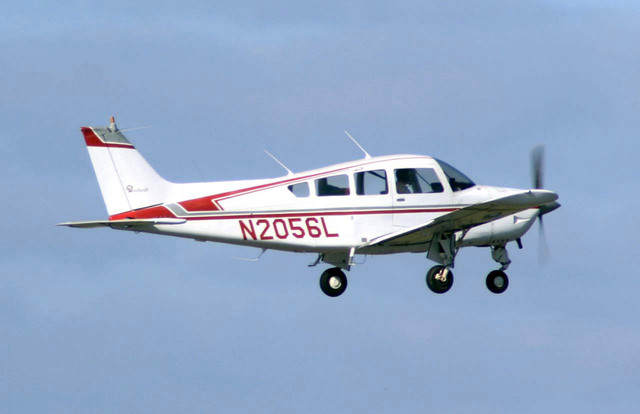
Color Legend:
 (r: 000, g: 000, b: 000):
  index       : 0
  class name  : background
 (r: 128, g: 000, b: 000):
  index       : 1
  class name  : aeroplane

# (omitting multiple lines for conciseness) ...

 (r: 128, g: 192, b: 000):
  index       : 19
  class name  : train
 (r: 000, g: 064, b: 128):
  index       : 20
  class name  : tv
Tip: use a color picker on the output PNG file to inspect the output mask with
this legend.
सेगमेंटेशन कैटगरी मास्क ऐसा दिखना चाहिए:
अपने मॉडल और टेस्ट डेटा के साथ, ImageSegmenter के लिए आसान सीएलआई डेमो टूल आज़माएं.
मॉडल के साथ काम करने से जुड़ी ज़रूरी शर्तें
ImageSegmenter एपीआई को, TFLite मॉडल के मेटाडेटा के साथ TFLite मॉडल की ज़रूरत होती है. TensorFlow Lite Metadata Writer API का इस्तेमाल करके, इमेज सेगमेंटेशन के लिए मेटाडेटा बनाने के उदाहरण देखें.
इनपुट इमेज टेंसर (kTfLiteUInt8/kTfLiteFloat32)
[batch x height x width x channels]साइज़ की इमेज का इनपुट.- बैच इन्फ़रेंस की सुविधा काम नहीं करती (
batchकी वैल्यू 1 होनी चाहिए). - सिर्फ़ आरजीबी इनपुट इस्तेमाल किए जा सकते हैं (
channelsकी वैल्यू 3 होनी चाहिए). - अगर टाइप kTfLiteFloat32 है, तो इनपुट को सामान्य बनाने के लिए, मेटाडेटा में NormalizationOptions अटैच करना ज़रूरी है.
आउटपुट मास्क टेंसर: (kTfLiteUInt8/kTfLiteFloat32)
[batch x mask_height x mask_width x num_classes]साइज़ का टेंसर, जहांbatchकी वैल्यू 1 होनी चाहिए. साथ ही,mask_widthऔरmask_height, मॉडल से जनरेट किए गए सेगमेंटेशन मास्क के डाइमेंशन हैं. इसके अलावा,num_classes, मॉडल के साथ काम करने वाली क्लास की संख्या है.- ज़रूरी नहीं (लेकिन सुझाया गया) लेबल मैप को TENSOR_AXIS_LABELS टाइप की AssociatedFile के तौर पर अटैच किया जा सकता है. इसमें हर लाइन में एक लेबल होता है. अगर कोई AssociatedFile मौजूद है, तो उसका इस्तेमाल नतीजों के
labelफ़ील्ड को भरने के लिए किया जाता है. C++ में इस फ़ील्ड का नामclass_nameहै.display_nameफ़ील्ड में, AssociatedFile से जानकारी भरी जाती है. अगर कोई AssociatedFile मौजूद है, तो उसका स्थान-भाषा कोड,display_names_localeफ़ील्ड के स्थान-भाषा कोड से मेल खाना चाहिए.display_names_localeफ़ील्ड का इस्तेमाल,ImageSegmenterOptionsबनाते समय किया जाता है. इसका डिफ़ॉल्ट मान "en" होता है. इसका मतलब है कि यह अंग्रेज़ी में होता है. अगर इनमें से कोई भी जानकारी उपलब्ध नहीं है, तो नतीजों के सिर्फ़indexफ़ील्ड में जानकारी भरी जाएगी.