

Trang này mô tả cách chuyển đổi mô hình TensorFlow thành mô hình LiteRT (định dạng FlatBuffer được tối ưu hoá do tiện ích .tflite nhận dạng) bằng cách sử dụng trình chuyển đổi LiteRT.
Quy trình chuyển đổi
Sơ đồ bên dưới minh hoạ quy trình tổng thể để chuyển đổi mô hình của bạn:
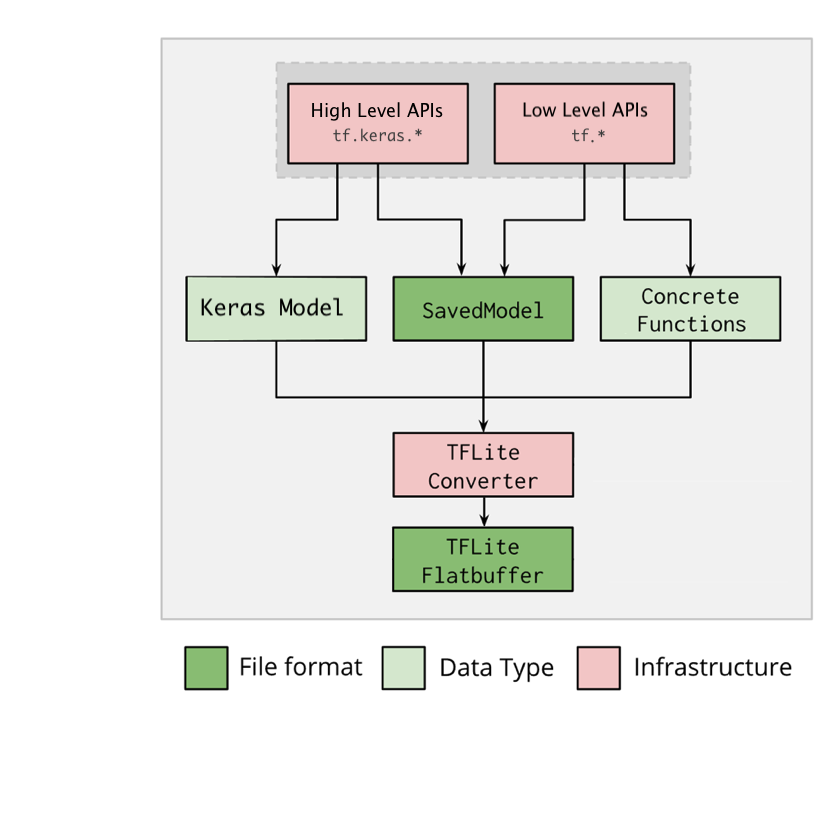
Hình 1. Quy trình làm việc của trình chuyển đổi.
Bạn có thể chuyển đổi mô hình bằng một trong các lựa chọn sau:
- API Python (nên dùng): API này cho phép bạn tích hợp lượt chuyển đổi vào quy trình phát triển, áp dụng các phương pháp tối ưu hoá, thêm siêu dữ liệu và nhiều tác vụ khác giúp đơn giản hoá quy trình chuyển đổi.
- Dòng lệnh: Chỉ hỗ trợ chuyển đổi mô hình cơ bản.
API Python
Mã trợ giúp: Để tìm hiểu thêm về API trình chuyển đổi LiteRT, hãy chạy print(help(tf.lite.TFLiteConverter)).
Chuyển đổi mô hình TensorFlow bằng cách sử dụng tf.lite.TFLiteConverter. Một mô hình TensorFlow được lưu trữ bằng định dạng SavedModel và được tạo bằng các API tf.keras.* cấp cao (mô hình Keras) hoặc các API tf.* cấp thấp (từ đó bạn tạo ra các hàm cụ thể). Do đó, bạn có 3 lựa chọn sau (ví dụ trong vài phần tiếp theo):
tf.lite.TFLiteConverter.from_saved_model()(nên dùng): Chuyển đổi một SavedModel.tf.lite.TFLiteConverter.from_keras_model(): Chuyển đổi một mô hình Keras.tf.lite.TFLiteConverter.from_concrete_functions(): Chuyển đổi các hàm cụ thể.
Chuyển đổi SavedModel (nên dùng)
Ví dụ sau đây cho thấy cách chuyển đổi SavedModel thành một mô hình TensorFlow Lite.
import tensorflow as tf

# Convert the model
converter = tf.lite.TFLiteConverter.from_saved_model(saved_model_dir) # path to the SavedModel directory
tflite_model = converter.convert()

# Save the model.
with open('model.tflite', 'wb') as f:
  f.write(tflite_model)
Chuyển đổi mô hình Keras
Ví dụ sau đây cho thấy cách chuyển đổi một mô hình Keras thành một mô hình TensorFlow Lite.
import tensorflow as tf

# Create a model using high-level tf.keras.* APIs
model = tf.keras.models.Sequential([
    tf.keras.layers.Dense(units=1, input_shape=[1]),
    tf.keras.layers.Dense(units=16, activation='relu'),
    tf.keras.layers.Dense(units=1)
])
model.compile(optimizer='sgd', loss='mean_squared_error') # compile the model
model.fit(x=[-1, 0, 1], y=[-3, -1, 1], epochs=5) # train the model
# (to generate a SavedModel) tf.saved_model.save(model, "saved_model_keras_dir")

# Convert the model.
converter = tf.lite.TFLiteConverter.from_keras_model(model)
tflite_model = converter.convert()

# Save the model.
with open('model.tflite', 'wb') as f:
  f.write(tflite_model)
Chuyển đổi các hàm cụ thể
Ví dụ sau đây cho thấy cách chuyển đổi các hàm cụ thể thành một mô hình LiteRT.
import tensorflow as tf

# Create a model using low-level tf.* APIs
class Squared(tf.Module):
  @tf.function(input_signature=[tf.TensorSpec(shape=[None], dtype=tf.float32)])
  def __call__(self, x):
    return tf.square(x)
model = Squared()
# (ro run your model) result = Squared(5.0) # This prints "25.0"
# (to generate a SavedModel) tf.saved_model.save(model, "saved_model_tf_dir")
concrete_func = model.__call__.get_concrete_function()

# Convert the model.

converter = tf.lite.TFLiteConverter.from_concrete_functions([concrete_func],
                                                            model)
tflite_model = converter.convert()

# Save the model.
with open('model.tflite', 'wb') as f:
  f.write(tflite_model)
Tính năng khác
Áp dụng các phương pháp tối ưu hoá. Một phương pháp tối ưu hoá thường được sử dụng là lượng tử hoá sau huấn luyện. Phương pháp này có thể giảm thêm độ trễ và kích thước mô hình của bạn mà độ chính xác chỉ giảm đi một chút.
Thêm siêu dữ liệu để dễ dàng tạo mã bao bọc dành riêng cho nền tảng khi triển khai các mô hình trên thiết bị.
Lỗi chuyển đổi
Sau đây là các lỗi chuyển đổi thường gặp và giải pháp khắc phục:
Lỗi:
Some ops are not supported by the native TFLite runtime, you can
enable TF kernels fallback using TF Select.
Giải pháp: Lỗi này xảy ra do mô hình của bạn có các thao tác TF không có chế độ triển khai TFLite tương ứng. Bạn có thể giải quyết vấn đề này bằng cách sử dụng TF op trong mô hình TFLite (nên dùng). Nếu chỉ muốn tạo một mô hình bằng các thao tác TFLite, bạn có thể thêm yêu cầu về thao tác TFLite bị thiếu trong GitHub issue #21526 (hãy để lại bình luận nếu yêu cầu của bạn chưa được đề cập) hoặc tự tạo thao tác TFLite.
Lỗi:
.. is neither a custom op nor a flex opGiải pháp: Nếu thao tác này của TF là:
- Được hỗ trợ trong TF: Lỗi này xảy ra do TF op bị thiếu trong danh sách cho phép (danh sách đầy đủ các TF op được TFLite hỗ trợ). Bạn có thể giải quyết vấn đề này như sau:
- Thêm các thao tác còn thiếu vào danh sách cho phép. 2. Chuyển đổi mô hình TF thành mô hình TFLite và chạy quy trình suy luận.
- Không được hỗ trợ trong TF: Lỗi này xảy ra vì TFLite không nhận biết được toán tử TF tuỳ chỉnh do bạn xác định. Bạn có thể giải quyết vấn đề này như sau:
- Tạo TF op.
- Chuyển đổi mô hình TF thành mô hình TFLite.
- Tạo thao tác TFLite và chạy suy luận bằng cách liên kết thao tác này với thời gian chạy TFLite.
Công cụ dòng lệnh
Nếu bạn đã cài đặt TensorFlow 2.x từ pip, hãy dùng lệnh tflite_convert.
Để xem tất cả các cờ hiện có, hãy dùng lệnh sau:
$ tflite_convert --help

`--output_file`. Type: string. Full path of the output file.
`--saved_model_dir`. Type: string. Full path to the SavedModel directory.
`--keras_model_file`. Type: string. Full path to the Keras H5 model file.
`--enable_v1_converter`. Type: bool. (default False) Enables the converter and flags used in TF 1.x instead of TF 2.x.

You are required to provide the `--output_file` flag and either the `--saved_model_dir` or `--keras_model_file` flag.
Nếu đã tải nguồn TensorFlow 2.x xuống và muốn chạy trình chuyển đổi từ nguồn đó mà không cần tạo và cài đặt gói, bạn có thể thay thế "tflite_convert" bằng "bazel run
tensorflow/lite/python:tflite_convert --" trong lệnh.
Chuyển đổi SavedModel
tflite_convert \
  --saved_model_dir=/tmp/mobilenet_saved_model \
  --output_file=/tmp/mobilenet.tflite
Chuyển đổi mô hình Keras H5
tflite_convert \
  --keras_model_file=/tmp/mobilenet_keras_model.h5 \
  --output_file=/tmp/mobilenet.tflite