

このページでは、LiteRT コンバータを使用して TensorFlow モデルを LiteRT モデル(.tflite という固有のファイル拡張子を持つ最適化された FlatBuffer 形式)に変換する方法について説明します。
変換ワークフロー
次の図は、モデルの変換の概要ワークフローを示しています。
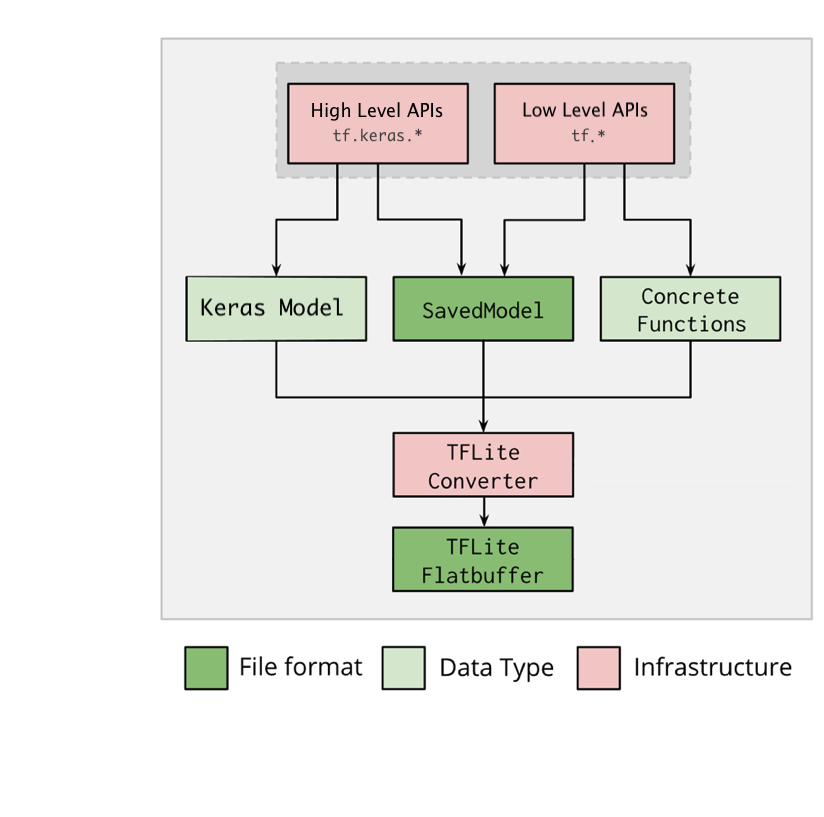
図 1. コンバータのワークフロー。
モデルは次のいずれかの方法で変換できます。
- Python API(推奨): これにより、変換を開発パイプラインに統合し、最適化を適用し、メタデータを追加するなど、変換プロセスを簡素化するさまざまなタスクを実行できます。
- コマンドライン: この方法は、基本的なモデル変換のみをサポートしています。
Python API
ヘルパーコード: LiteRT コンバータ API の詳細について確認するには、print(help(tf.lite.TFLiteConverter)) を実行します。
tf.lite.TFLiteConverter を使用して TensorFlow モデルを変換します。TensorFlow モデルは SavedModel 形式で保存され、高レベルの tf.keras.* API(Keras モデル)または低レベルの tf.* API(ここから具象関数を生成します)を使用して生成されます。そのため、次の 3 種類の方法が考えられます(以下の数セクションに例を示します)。
tf.lite.TFLiteConverter.from_saved_model()(推奨): SavedModel を変換します。tf.lite.TFLiteConverter.from_keras_model(): Keras モデルを変換します。tf.lite.TFLiteConverter.from_concrete_functions(): 具象関数を変換します。
SavedModel を変換する(推奨)
次の例は、SavedModel を TensorFlow Lite モデルに変換する方法を示しています。
import tensorflow as tf

# Convert the model
converter = tf.lite.TFLiteConverter.from_saved_model(saved_model_dir) # path to the SavedModel directory
tflite_model = converter.convert()

# Save the model.
with open('model.tflite', 'wb') as f:
  f.write(tflite_model)
Keras モデルを変換する
次の例は、Keras モデルを TensorFlow Lite モデルに変換する方法を示しています。
import tensorflow as tf

# Create a model using high-level tf.keras.* APIs
model = tf.keras.models.Sequential([
    tf.keras.layers.Dense(units=1, input_shape=[1]),
    tf.keras.layers.Dense(units=16, activation='relu'),
    tf.keras.layers.Dense(units=1)
])
model.compile(optimizer='sgd', loss='mean_squared_error') # compile the model
model.fit(x=[-1, 0, 1], y=[-3, -1, 1], epochs=5) # train the model
# (to generate a SavedModel) tf.saved_model.save(model, "saved_model_keras_dir")

# Convert the model.
converter = tf.lite.TFLiteConverter.from_keras_model(model)
tflite_model = converter.convert()

# Save the model.
with open('model.tflite', 'wb') as f:
  f.write(tflite_model)
具象関数を変換する
次の例は、具象関数を LiteRT モデルに変換する方法を示しています。
import tensorflow as tf

# Create a model using low-level tf.* APIs
class Squared(tf.Module):
  @tf.function(input_signature=[tf.TensorSpec(shape=[None], dtype=tf.float32)])
  def __call__(self, x):
    return tf.square(x)
model = Squared()
# (ro run your model) result = Squared(5.0) # This prints "25.0"
# (to generate a SavedModel) tf.saved_model.save(model, "saved_model_tf_dir")
concrete_func = model.__call__.get_concrete_function()

# Convert the model.

converter = tf.lite.TFLiteConverter.from_concrete_functions([concrete_func],
                                                            model)
tflite_model = converter.convert()

# Save the model.
with open('model.tflite', 'wb') as f:
  f.write(tflite_model)
その他の機能
最適化を適用できます。一般的に使用される最適化は、トレーニング後の量子化です。これにより、精度の低下を最小限に抑えながら、モデルのレイテンシとサイズをさらに低減できます。
メタデータを追加します。これにより、モデルをデバイスにデプロイするときに、プラットフォーム固有のラッパーコードの作成が容易になります。
変換エラー
一般的な変換エラーとその解決方法を以下に示します。
エラー:
Some ops are not supported by the native TFLite runtime, you can
enable TF kernels fallback using TF Select.
解決方法: このエラーは、モデルに TFLite 実装に対応していない TF 演算が含まれているために発生します。このエラーを解決するには、TFLite モデルで TF 演算を使用します(推奨)。TFLite 演算のみを使ってモデルを生成する場合は、不足している TFLite 演算のリクエストを GitHub の問題 #21526 に追加します(この問題について誰も言及していない場合は新たにスレッドを作成します)。自分で TFLite 演算を作成することもできます。
エラー:
.. is neither a custom op nor a flex op解決方法: TF 演算の状況に応じて以下のように対処します。
- TF でサポート済み: このエラーは、許可リスト(TFLite でサポートされている TF 演算の完全なリスト)に対応する TF 演算がないために発生します。次のようにして解決できます。
- TF で未サポート: このエラーは、お客様が定義したカスタム TF 演算子を TFLite が認識していないために発生します。次のようにして解決できます。
- TF 演算を作成する。
- TF モデルを TFLite モデルに変換する。
- TFLite 演算を作成し、それを TFLite ランタイムにリンクして推論を実行する。
コマンドライン ツール
pip から TensorFlow 2.x をインストールした場合は、tflite_convert コマンドを使用します。使用可能なすべてのフラグを表示するには、次のコマンドを使用します。
$ tflite_convert --help

`--output_file`. Type: string. Full path of the output file.
`--saved_model_dir`. Type: string. Full path to the SavedModel directory.
`--keras_model_file`. Type: string. Full path to the Keras H5 model file.
`--enable_v1_converter`. Type: bool. (default False) Enables the converter and flags used in TF 1.x instead of TF 2.x.

You are required to provide the `--output_file` flag and either the `--saved_model_dir` or `--keras_model_file` flag.
TensorFlow 2.x ソースをダウンロード済みで、パッケージをビルドしてインストールせずにそのソースからコンバータを実行する場合は、コマンドの「tflite_convert」を「bazel run
tensorflow/lite/python:tflite_convert --」に置き換えます。
SavedModel の変換
tflite_convert \
  --saved_model_dir=/tmp/mobilenet_saved_model \
  --output_file=/tmp/mobilenet.tflite
Keras H5 モデルの変換
tflite_convert \
  --keras_model_file=/tmp/mobilenet_keras_model.h5 \
  --output_file=/tmp/mobilenet.tflite