

이 페이지에서는 LiteRT 변환기를 사용하여 TensorFlow 모델을 LiteRT 모델 (.tflite 파일 확장자로 식별되는 최적화된 FlatBuffer 형식)로 변환하는 방법을 설명합니다.
변환 워크플로
아래 다이어그램은 모델 변환의 대략적인 워크플로를 보여줍니다.
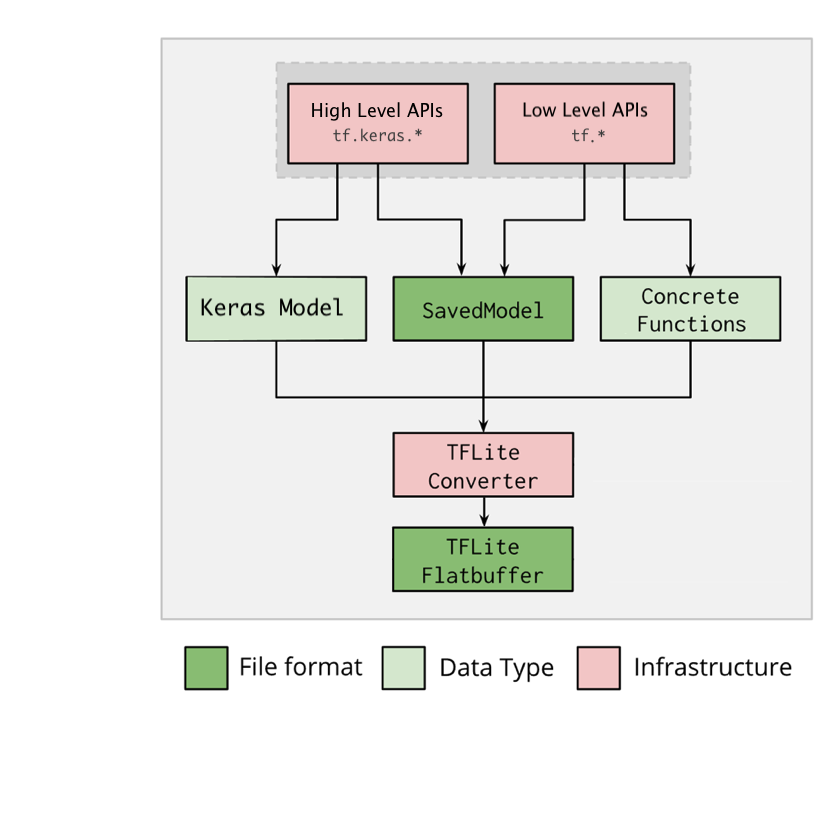
그림 1. 변환기 워크플로
다음 옵션 중 하나를 사용하여 모델을 변환할 수 있습니다.
- Python API (권장): 변환을 개발 파이프라인에 통합하고, 최적화를 적용하고, 메타데이터를 추가하는 등 변환 프로세스를 간소화하는 다양한 작업을 수행할 수 있습니다.
- 명령줄: 기본 모델 변환만 지원합니다.
Python API
도우미 코드: LiteRT 변환기 API에 관해 자세히 알아보려면 print(help(tf.lite.TFLiteConverter))를 실행합니다.
tf.lite.TFLiteConverter를 사용하여 TensorFlow 모델을 변환합니다. TensorFlow 모델은 저장된 모델 형식을 사용하여 저장되며 상위 수준 tf.keras.* API (Keras 모델) 또는 하위 수준 tf.* API (여기서 구체적 함수 생성)를 사용하여 생성됩니다. 따라서 다음 세 가지 옵션이 있습니다. 예는 다음 몇 가지 섹션을 참고하세요.
tf.lite.TFLiteConverter.from_saved_model()(권장): SavedModel을 변환합니다.tf.lite.TFLiteConverter.from_keras_model(): Keras 모델을 변환합니다.tf.lite.TFLiteConverter.from_concrete_functions(): 구체적인 함수를 변환합니다.
저장된 모델 변환 (권장)
다음 예는 SavedModel을 TensorFlow Lite 모델로 변환하는 방법을 보여줍니다.
import tensorflow as tf

# Convert the model
converter = tf.lite.TFLiteConverter.from_saved_model(saved_model_dir) # path to the SavedModel directory
tflite_model = converter.convert()

# Save the model.
with open('model.tflite', 'wb') as f:
  f.write(tflite_model)
Keras 모델 변환
다음 예는 Keras 모델을 TensorFlow Lite 모델로 변환하는 방법을 보여줍니다.
import tensorflow as tf

# Create a model using high-level tf.keras.* APIs
model = tf.keras.models.Sequential([
    tf.keras.layers.Dense(units=1, input_shape=[1]),
    tf.keras.layers.Dense(units=16, activation='relu'),
    tf.keras.layers.Dense(units=1)
])
model.compile(optimizer='sgd', loss='mean_squared_error') # compile the model
model.fit(x=[-1, 0, 1], y=[-3, -1, 1], epochs=5) # train the model
# (to generate a SavedModel) tf.saved_model.save(model, "saved_model_keras_dir")

# Convert the model.
converter = tf.lite.TFLiteConverter.from_keras_model(model)
tflite_model = converter.convert()

# Save the model.
with open('model.tflite', 'wb') as f:
  f.write(tflite_model)
concrete 함수 변환
다음 예는 구체적인 함수를 LiteRT 모델로 변환하는 방법을 보여줍니다.
import tensorflow as tf

# Create a model using low-level tf.* APIs
class Squared(tf.Module):
  @tf.function(input_signature=[tf.TensorSpec(shape=[None], dtype=tf.float32)])
  def __call__(self, x):
    return tf.square(x)
model = Squared()
# (ro run your model) result = Squared(5.0) # This prints "25.0"
# (to generate a SavedModel) tf.saved_model.save(model, "saved_model_tf_dir")
concrete_func = model.__call__.get_concrete_function()

# Convert the model.

converter = tf.lite.TFLiteConverter.from_concrete_functions([concrete_func],
                                                            model)
tflite_model = converter.convert()

# Save the model.
with open('model.tflite', 'wb') as f:
  f.write(tflite_model)
기타 기능
최적화 적용: 일반적으로 사용되는 최적화는 학습 후 양자화로, 정확성을 최소한으로 손실하면서 모델 지연 시간과 크기를 추가로 줄일 수 있습니다.
기기에 모델을 배포할 때 플랫폼별 래퍼 코드를 더 쉽게 만들 수 있는 메타데이터를 추가합니다.
변환 오류
다음은 일반적인 변환 오류와 해결 방법입니다.
오류:
Some ops are not supported by the native TFLite runtime, you can
enable TF kernels fallback using TF Select.
해결 방법: 이 오류는 모델에 TFLite 구현에 대응하지 않는 TF 작업이 있기 때문에 발생합니다. TFLite 모델에서 TF 작업을 사용하여 이 문제를 해결할 수 있습니다 (권장). TFLite 작업만으로 모델을 생성하려면 GitHub 문제 #21526에 누락된 TFLite 작업 요청을 추가하거나 (요청한 적이 있다면 댓글을 남겨야 함) 직접 TFLite 작업을 생성하면 됩니다.
오류:
.. is neither a custom op nor a flex op해결 방법: TF 작업에 따라 다음과 같이 나누어집니다.
- TF에서 지원하는 경우: 이 오류는 TF 작업이 허용 목록 (TFLite에서 지원하는 전체 TF 작업 목록)에서 누락되었기 때문에 발생합니다. 이 문제는 다음과 같이 해결할 수 있습니다.
- TF에서 지원하지 않는 경우: 이 오류는 사용자가 정의한 맞춤 TF 연산자를 TFLite가 인식하지 못하기 때문에 발생합니다. 이 문제는 다음과 같이 해결할 수 있습니다.
- TF 작업을 만듭니다.
- TF 모델을 TFLite 모델로 변환합니다.
- TFLite 작업을 만들고 이를 TFLite 런타임에 연결하여 추론을 실행합니다.
명령줄 도구
pip에서 TensorFlow 2.x를 설치한 경우 tflite_convert 명령어를 사용합니다.
사용 가능한 모든 플래그를 보려면 다음 명령어를 사용하세요.
$ tflite_convert --help

`--output_file`. Type: string. Full path of the output file.
`--saved_model_dir`. Type: string. Full path to the SavedModel directory.
`--keras_model_file`. Type: string. Full path to the Keras H5 model file.
`--enable_v1_converter`. Type: bool. (default False) Enables the converter and flags used in TF 1.x instead of TF 2.x.

You are required to provide the `--output_file` flag and either the `--saved_model_dir` or `--keras_model_file` flag.
TensorFlow 2.x 소스를 다운로드했고 패키지를 빌드하고 설치하지 않고 해당 소스에서 변환기를 실행하려면 명령어에서 'tflite_convert'를 'bazel run
tensorflow/lite/python:tflite_convert --'로 바꾸면 됩니다.
저장된 모델 변환
tflite_convert \
  --saved_model_dir=/tmp/mobilenet_saved_model \
  --output_file=/tmp/mobilenet.tflite
Keras H5 모델 변환
tflite_convert \
  --keras_model_file=/tmp/mobilenet_keras_model.h5 \
  --output_file=/tmp/mobilenet.tflite