

หน้านี้อธิบายวิธีแปลงโมเดล TensorFlow เป็นโมเดล LiteRT (รูปแบบ FlatBuffer ที่ได้รับการเพิ่มประสิทธิภาพซึ่งระบุโดยนามสกุลไฟล์ .tflite) โดยใช้ตัวแปลง LiteRT
เวิร์กโฟลว์ Conversion
แผนภาพด้านล่างแสดงเวิร์กโฟลว์ระดับสูงสำหรับการแปลงโมเดล
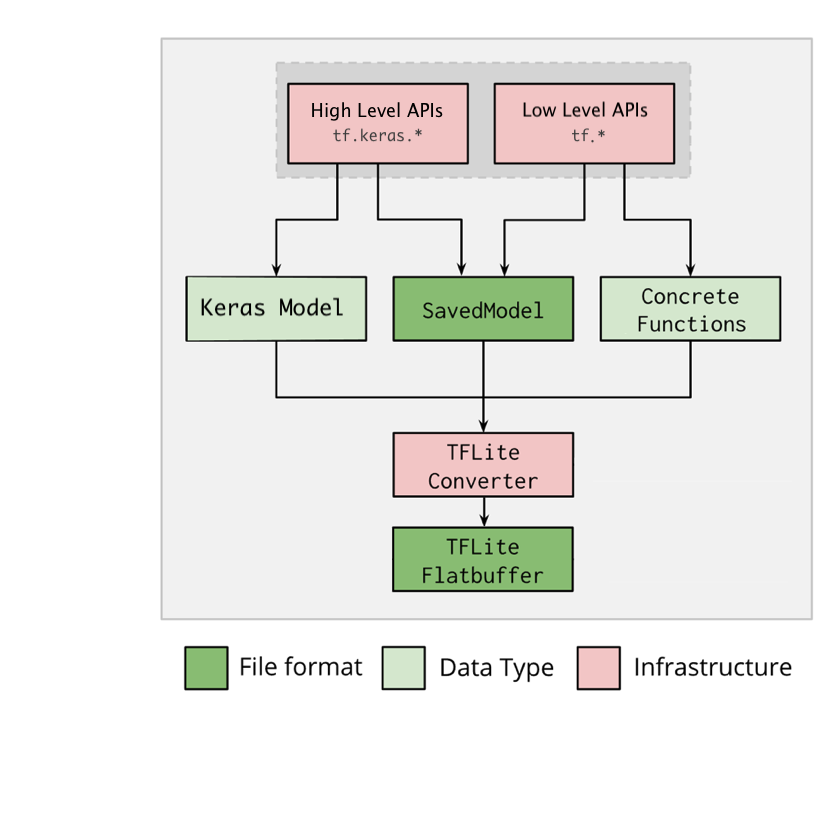
รูปที่ 1 เวิร์กโฟลว์ของเครื่องมือแปลง
คุณแปลงโมเดลได้โดยใช้ตัวเลือกใดตัวเลือกหนึ่งต่อไปนี้
- Python API (แนะนํา): ช่วยให้คุณผสานรวม Conversion เข้ากับไปป์ไลน์การพัฒนา ใช้การเพิ่มประสิทธิภาพ เพิ่ม ข้อมูลเมตา และงานอื่นๆ อีกมากมายที่จะช่วยลดความซับซ้อนของกระบวนการ Conversion
- บรรทัดคำสั่ง: รองรับเฉพาะการแปลงโมเดลพื้นฐาน
Python API
โค้ดตัวช่วย: หากต้องการดูข้อมูลเพิ่มเติมเกี่ยวกับ API ตัวแปลง LiteRT ให้เรียกใช้
print(help(tf.lite.TFLiteConverter))
แปลงโมเดล TensorFlow โดยใช้
tf.lite.TFLiteConverter โมเดล TensorFlow จะจัดเก็บโดยใช้รูปแบบ SavedModel และสร้างขึ้นโดยใช้ tf.keras.* API ระดับสูง (โมเดล Keras) หรือ tf.* API ระดับต่ำ (ซึ่งคุณสร้างฟังก์ชันที่เฉพาะเจาะจง) ด้วยเหตุนี้ คุณจึงมี
ตัวเลือก 3 อย่างต่อไปนี้ (ตัวอย่างอยู่ใน 2-3 ส่วนถัดไป)
tf.lite.TFLiteConverter.from_saved_model()(แนะนํา): แปลงSavedModeltf.lite.TFLiteConverter.from_keras_model(): แปลงโมเดล Kerastf.lite.TFLiteConverter.from_concrete_functions(): แปลงฟังก์ชัน คอนกรีต
แปลง SavedModel (แนะนำ)
ตัวอย่างต่อไปนี้แสดงวิธีแปลง SavedModel เป็นโมเดล TensorFlow Lite
import tensorflow as tf

# Convert the model
converter = tf.lite.TFLiteConverter.from_saved_model(saved_model_dir) # path to the SavedModel directory
tflite_model = converter.convert()

# Save the model.
with open('model.tflite', 'wb') as f:
  f.write(tflite_model)
แปลงโมเดล Keras
ตัวอย่างต่อไปนี้แสดงวิธีแปลงโมเดล Keras เป็นโมเดล TensorFlow Lite
import tensorflow as tf

# Create a model using high-level tf.keras.* APIs
model = tf.keras.models.Sequential([
    tf.keras.layers.Dense(units=1, input_shape=[1]),
    tf.keras.layers.Dense(units=16, activation='relu'),
    tf.keras.layers.Dense(units=1)
])
model.compile(optimizer='sgd', loss='mean_squared_error') # compile the model
model.fit(x=[-1, 0, 1], y=[-3, -1, 1], epochs=5) # train the model
# (to generate a SavedModel) tf.saved_model.save(model, "saved_model_keras_dir")

# Convert the model.
converter = tf.lite.TFLiteConverter.from_keras_model(model)
tflite_model = converter.convert()

# Save the model.
with open('model.tflite', 'wb') as f:
  f.write(tflite_model)
ฟังก์ชันคอนกรีตแปลง
ตัวอย่างต่อไปนี้แสดงวิธีแปลงฟังก์ชัน ที่เฉพาะเจาะจงเป็นโมเดล LiteRT
import tensorflow as tf

# Create a model using low-level tf.* APIs
class Squared(tf.Module):
  @tf.function(input_signature=[tf.TensorSpec(shape=[None], dtype=tf.float32)])
  def __call__(self, x):
    return tf.square(x)
model = Squared()
# (ro run your model) result = Squared(5.0) # This prints "25.0"
# (to generate a SavedModel) tf.saved_model.save(model, "saved_model_tf_dir")
concrete_func = model.__call__.get_concrete_function()

# Convert the model.

converter = tf.lite.TFLiteConverter.from_concrete_functions([concrete_func],
                                                            model)
tflite_model = converter.convert()

# Save the model.
with open('model.tflite', 'wb') as f:
  f.write(tflite_model)
ฟีเจอร์อื่นๆ
ใช้การเพิ่มประสิทธิภาพ การเพิ่มประสิทธิภาพที่ใช้กันโดยทั่วไปคือการหาปริมาณหลังการฝึก ซึ่งจะช่วยลดเวลาในการตอบสนองและขนาดของโมเดลเพิ่มเติมโดยที่ความแม่นยำลดลงน้อยที่สุด
เพิ่มข้อมูลเมตา ซึ่งจะช่วยให้สร้างโค้ด Wrapper เฉพาะแพลตฟอร์มได้ง่ายขึ้นเมื่อติดตั้งใช้งานโมเดลในอุปกรณ์
ข้อผิดพลาดของ Conversion
ข้อผิดพลาดเกี่ยวกับ Conversion ที่พบบ่อยและวิธีแก้ไขมีดังนี้
ข้อผิดพลาด:
Some ops are not supported by the native TFLite runtime, you can
enable TF kernels fallback using TF Select.
วิธีแก้ปัญหา: ข้อผิดพลาดเกิดขึ้นเนื่องจากโมเดลของคุณมี TF Ops ที่ไม่มีการใช้งาน TFLite ที่สอดคล้องกัน คุณแก้ไขปัญหานี้ได้โดยใช้ TF op ในโมเดล TFLite (แนะนํา) หากต้องการสร้างโมเดลที่มีเฉพาะการดำเนินการ TFLite คุณสามารถเพิ่มคำขอสำหรับการดำเนินการ TFLite ที่ขาดหายไปในปัญหา GitHub #21526 (แสดงความคิดเห็นหากยังไม่มีการกล่าวถึงคำขอของคุณ) หรือสร้างการดำเนินการ TFLite ด้วยตนเอง
ข้อผิดพลาด:
.. is neither a custom op nor a flex opวิธีแก้ปัญหา: หากการดำเนินการ TF นี้เป็น
- รองรับใน TF: ข้อผิดพลาดเกิดขึ้นเนื่องจากไม่มี Op ของ TF ในรายการที่อนุญาต (รายการ Op ของ TF ทั้งหมดที่ TFLite รองรับ) คุณแก้ไขปัญหานี้ได้โดยทำดังนี้
- เพิ่มการดำเนินการที่ขาดหายไปลงใน รายการที่อนุญาต 2. แปลงโมเดล TF เป็นโมเดล TFLite และเรียกใช้ การอนุมาน
- ไม่รองรับใน TF: ข้อผิดพลาดเกิดขึ้นเนื่องจาก TFLite ไม่รู้จักตัวดำเนินการ TF ที่กำหนดเองที่คุณกำหนด คุณแก้ไขปัญหานี้ได้โดยทำดังนี้
- สร้างการดำเนินการ TF
- แปลงโมเดล TF เป็นโมเดล TFLite
- สร้าง Op ของ TFLite และเรียกใช้การอนุมานโดยลิงก์กับรันไทม์ของ TFLite
เครื่องมือบรรทัดคำสั่ง
หากติดตั้ง TensorFlow 2.x จาก
pip ให้ใช้คำสั่ง tflite_convert
หากต้องการดูฟีเจอร์ทั้งหมดที่ใช้ได้ ให้ใช้คำสั่งต่อไปนี้
$ tflite_convert --help

`--output_file`. Type: string. Full path of the output file.
`--saved_model_dir`. Type: string. Full path to the SavedModel directory.
`--keras_model_file`. Type: string. Full path to the Keras H5 model file.
`--enable_v1_converter`. Type: bool. (default False) Enables the converter and flags used in TF 1.x instead of TF 2.x.

You are required to provide the `--output_file` flag and either the `--saved_model_dir` or `--keras_model_file` flag.
หากดาวน์โหลดแหล่งที่มาของ TensorFlow 2.x และต้องการเรียกใช้
ตัวแปลงจากแหล่งที่มานั้นโดยไม่ต้องสร้างและติดตั้งแพ็กเกจ คุณ
สามารถแทนที่ "tflite_convert" ด้วย "bazel run
tensorflow/lite/python:tflite_convert --" ในคำสั่งได้
การแปลง SavedModel
tflite_convert \
  --saved_model_dir=/tmp/mobilenet_saved_model \
  --output_file=/tmp/mobilenet.tflite
การแปลงโมเดล Keras H5
tflite_convert \
  --keras_model_file=/tmp/mobilenet_keras_model.h5 \
  --output_file=/tmp/mobilenet.tflite