
本页介绍了如何使用 LiteRT 转换器将 TensorFlow 模型转换为 LiteRT 模型(一种优化的 FlatBuffer 格式,以 .tflite 为文件扩展名)。
转换工作流程
下图展示了转换模型的高级工作流:
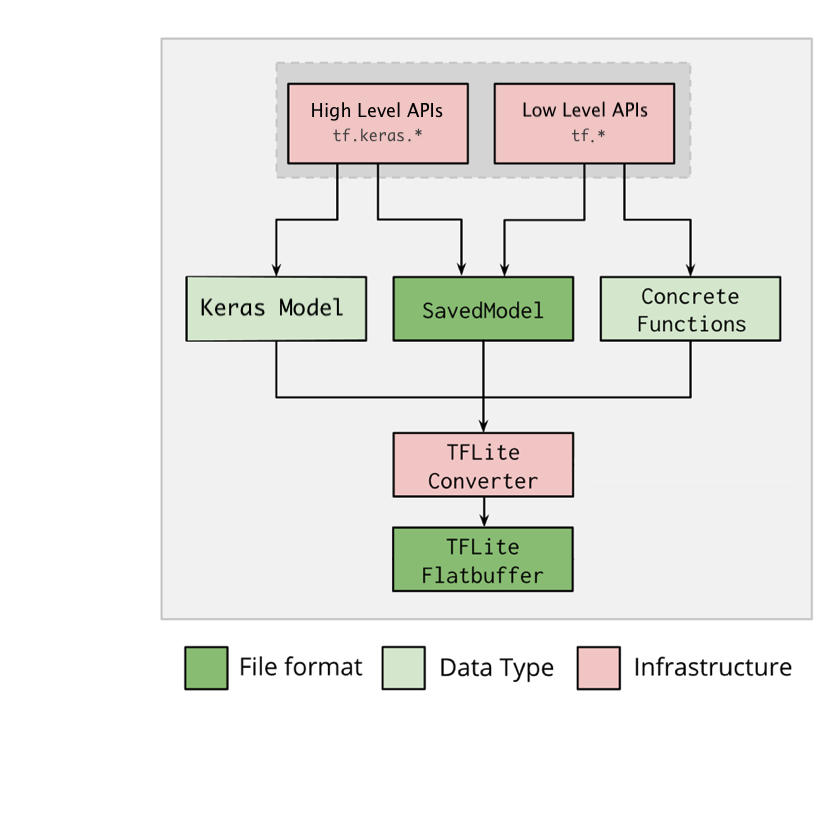
图 1. 转换器工作流程。
您可以使用以下任一选项转换模型:
- Python API(推荐):借助此 API,您可以将转换集成到开发流水线中,应用优化、添加元数据,并执行许多其他任务来简化转换流程。
- 命令行:它仅支持基本模型转换。
Python API
辅助程序代码:如需详细了解 LiteRT 转换器 API,请运行 print(help(tf.lite.TFLiteConverter))。
使用 tf.lite.TFLiteConverter 转换 TensorFlow 模型。TensorFlow 模型是使用 SavedModel 格式存储的,并通过高阶 tf.keras.* API(Keras 模型)或低阶 tf.* API(用于生成具体函数)生成。因此,您有以下三个选项(示例包含在接下来的几节中):
tf.lite.TFLiteConverter.from_saved_model()(推荐):转换 SavedModel。tf.lite.TFLiteConverter.from_keras_model():转换 Keras 模型。tf.lite.TFLiteConverter.from_concrete_functions():转换具体函数。
转换 SavedModel(推荐)
以下示例演示了如何将 SavedModel 转换为 TensorFlow Lite 模型。
import tensorflow as tf

# Convert the model
converter = tf.lite.TFLiteConverter.from_saved_model(saved_model_dir) # path to the SavedModel directory
tflite_model = converter.convert()

# Save the model.
with open('model.tflite', 'wb') as f:
  f.write(tflite_model)
转换 Keras 模型
以下示例演示了如何将 Keras 模型转换为 TensorFlow Lite 模型。
import tensorflow as tf

# Create a model using high-level tf.keras.* APIs
model = tf.keras.models.Sequential([
    tf.keras.layers.Dense(units=1, input_shape=[1]),
    tf.keras.layers.Dense(units=16, activation='relu'),
    tf.keras.layers.Dense(units=1)
])
model.compile(optimizer='sgd', loss='mean_squared_error') # compile the model
model.fit(x=[-1, 0, 1], y=[-3, -1, 1], epochs=5) # train the model
# (to generate a SavedModel) tf.saved_model.save(model, "saved_model_keras_dir")

# Convert the model.
converter = tf.lite.TFLiteConverter.from_keras_model(model)
tflite_model = converter.convert()

# Save the model.
with open('model.tflite', 'wb') as f:
  f.write(tflite_model)
转换具体函数
以下示例演示了如何将具体函数转换为 LiteRT 模型。
import tensorflow as tf

# Create a model using low-level tf.* APIs
class Squared(tf.Module):
  @tf.function(input_signature=[tf.TensorSpec(shape=[None], dtype=tf.float32)])
  def __call__(self, x):
    return tf.square(x)
model = Squared()
# (ro run your model) result = Squared(5.0) # This prints "25.0"
# (to generate a SavedModel) tf.saved_model.save(model, "saved_model_tf_dir")
concrete_func = model.__call__.get_concrete_function()

# Convert the model.

converter = tf.lite.TFLiteConverter.from_concrete_functions([concrete_func],
                                                            model)
tflite_model = converter.convert()

# Save the model.
with open('model.tflite', 'wb') as f:
  f.write(tflite_model)
其他功能
转化错误
下面是常见的转换错误及其解决方案:
错误:
Some ops are not supported by the native TFLite runtime, you can
enable TF kernels fallback using TF Select.
解决方案:之所以出现该错误,是因为模型包含缺少对应的 TFLite 实现的 TF 操作。若要解决该错误,您可以使用 TFLite 模型中的 TF 操作(推荐)。如果您想生成一个仅包含 TFLite 操作的模型,您可以在 GitHub 问题 21526 中针对缺失的 TFLite 操作添加请求(如果未提及您的请求,请发表评论),也可以自行创建 TFLite 操作。
错误:
.. is neither a custom op nor a flex op解决方案:如果该 TF 操作符合以下条件:
- 在 TF 中受支持:之所以出现该错误,是因为许可名单(TFLite 支持的 TF 操作的详尽列表)中缺少相应 TF 操作。您可以通过以下方法解决该错误:
- 在 TF 中不受支持:之所以出现该错误,是因为 TFLite 不知道您定义的自定义 TF 操作符。您可以通过以下方法解决该错误:
- 创建相应 TF 操作。
- 将 TF 模型转换为 TFLite 模型。
- 创建相应 TFLite 操作,然后通过将其关联到 TFLite 运行时来运行推断。
命令行工具
如果您已通过 pip 安装 TensorFlow 2.x,请使用 tflite_convert 命令。如需查看所有可用标志,请使用以下命令:
$ tflite_convert --help

`--output_file`. Type: string. Full path of the output file.
`--saved_model_dir`. Type: string. Full path to the SavedModel directory.
`--keras_model_file`. Type: string. Full path to the Keras H5 model file.
`--enable_v1_converter`. Type: bool. (default False) Enables the converter and flags used in TF 1.x instead of TF 2.x.

You are required to provide the `--output_file` flag and either the `--saved_model_dir` or `--keras_model_file` flag.
如果您已下载 TensorFlow 2.x 源代码,并且想要从该源代码运行转换器,而无需构建和安装软件包,则可以在命令中将“tflite_convert”替换为“bazel run
tensorflow/lite/python:tflite_convert --”。
转换 SavedModel
tflite_convert \
  --saved_model_dir=/tmp/mobilenet_saved_model \
  --output_file=/tmp/mobilenet.tflite
转换 Keras H5 模型
tflite_convert \
  --keras_model_file=/tmp/mobilenet_keras_model.h5 \
  --output_file=/tmp/mobilenet.tflite