
本頁面說明如何使用 LiteRT 轉換工具,將 TensorFlow 模型轉換為 LiteRT 模型 (副檔名為 .tflite 的最佳化 FlatBuffer 格式)。
轉換工作流程
下圖說明轉換模型的高階工作流程:
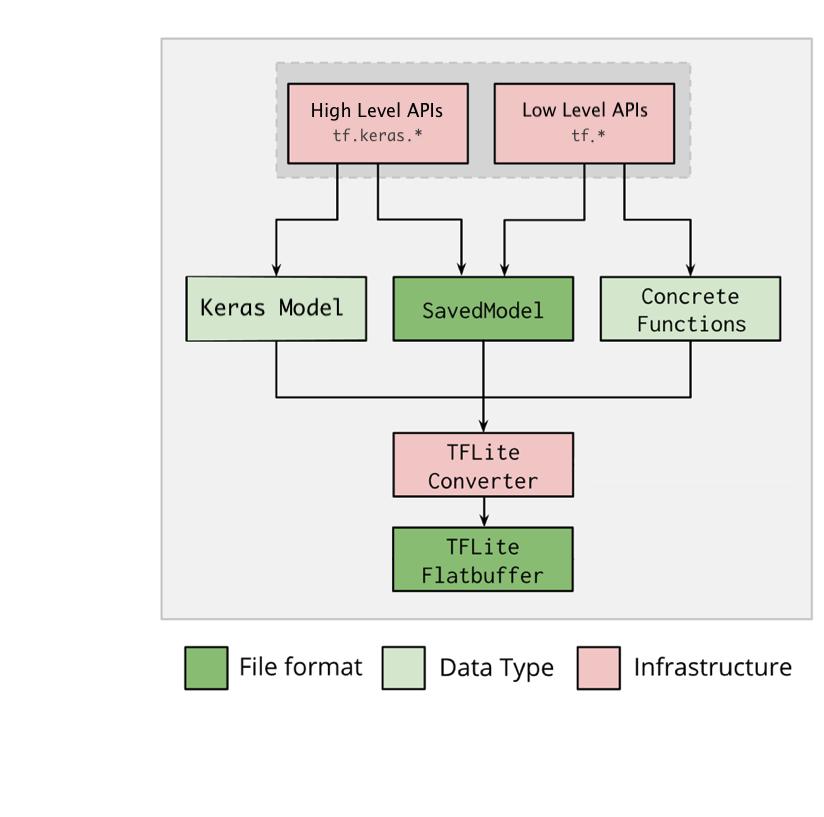
圖 1. 轉換工具工作流程。
你可以使用下列任一選項轉換模型:
- Python API (建議):這個 API 可讓您將轉換作業整合到開發管線、套用最佳化方法、新增中繼資料,以及執行許多其他工作,簡化轉換程序。
- 指令列:僅支援基本模型轉換。
Python API
輔助程式碼:如要進一步瞭解 LiteRT 轉換工具 API,請執行 print(help(tf.lite.TFLiteConverter))。
使用 tf.lite.TFLiteConverter 轉換 TensorFlow 模型。TensorFlow 模型會以 SavedModel 格式儲存,並使用高階 tf.keras.* API (Keras 模型) 或低階 tf.* API (你透過這個 API 產生具體函式) 建立。因此,您有以下三個選項 (後續的幾個小節中會提供範例):
tf.lite.TFLiteConverter.from_saved_model()(建議):轉換 SavedModel。tf.lite.TFLiteConverter.from_keras_model(): 轉換 Keras 模型。tf.lite.TFLiteConverter.from_concrete_functions(): 轉換具體函式。
轉換 SavedModel (建議)
以下範例說明如何將 SavedModel 轉換為 TensorFlow Lite 模型。
import tensorflow as tf

# Convert the model
converter = tf.lite.TFLiteConverter.from_saved_model(saved_model_dir) # path to the SavedModel directory
tflite_model = converter.convert()

# Save the model.
with open('model.tflite', 'wb') as f:
  f.write(tflite_model)
轉換 Keras 模型
以下範例說明如何將 Keras 模型轉換為 TensorFlow Lite 模型。
import tensorflow as tf

# Create a model using high-level tf.keras.* APIs
model = tf.keras.models.Sequential([
    tf.keras.layers.Dense(units=1, input_shape=[1]),
    tf.keras.layers.Dense(units=16, activation='relu'),
    tf.keras.layers.Dense(units=1)
])
model.compile(optimizer='sgd', loss='mean_squared_error') # compile the model
model.fit(x=[-1, 0, 1], y=[-3, -1, 1], epochs=5) # train the model
# (to generate a SavedModel) tf.saved_model.save(model, "saved_model_keras_dir")

# Convert the model.
converter = tf.lite.TFLiteConverter.from_keras_model(model)
tflite_model = converter.convert()

# Save the model.
with open('model.tflite', 'wb') as f:
  f.write(tflite_model)
轉換具體函式
以下範例說明如何將具體函式轉換為 LiteRT 模型。
import tensorflow as tf

# Create a model using low-level tf.* APIs
class Squared(tf.Module):
  @tf.function(input_signature=[tf.TensorSpec(shape=[None], dtype=tf.float32)])
  def __call__(self, x):
    return tf.square(x)
model = Squared()
# (ro run your model) result = Squared(5.0) # This prints "25.0"
# (to generate a SavedModel) tf.saved_model.save(model, "saved_model_tf_dir")
concrete_func = model.__call__.get_concrete_function()

# Convert the model.

converter = tf.lite.TFLiteConverter.from_concrete_functions([concrete_func],
                                                            model)
tflite_model = converter.convert()

# Save the model.
with open('model.tflite', 'wb') as f:
  f.write(tflite_model)
其他功能
轉換錯誤
以下是常見的轉換錯誤及相應的解決方案:
發生錯誤:
Some ops are not supported by the native TFLite runtime, you can
enable TF kernels fallback using TF Select.
解決方案:模型的 TF 運算沒有相應的 TFLite 導入程序時,就會發生這個錯誤。如要解決這個問題,您可以在 TFLite 模型中使用 TF 運算 (建議)。如果只想使用 TFLite 運算來產生模型,您可在 GitHub 問題 21526 下方新增回覆,以索取遺失的 TFLite 運算 (如果還沒有人提到這個問題,請開啟新的會話串),或自行建立 TFLite 運算。
發生錯誤:
.. is neither a custom op nor a flex op解決方案:如果這個 TF 運算:
- 在 TF 中受到支援:許可清單 (TFLite 所支援 TF 運算的完整清單) 中未列入 TF 運算時,就會發生這個錯誤。您可以按照下列方式解決這個問題:
- 在 TF 中未受支援:TFLite 不知道有您定義的自訂 TF 運算子時,就會發生這個錯誤。您可以按照下列方式解決這個問題:
- 建立 TF 運算。
- 將 TF 模型轉換為 TFLite 模型。
- 建立 TFLite 運算,並將其連到 TFLite 執行階段以執行推論。
指令列工具
如果已透過 pip 安裝 TensorFlow 2.x,請使用 tflite_convert 指令。
如要查看所有可用旗標,請使用下列指令:
$ tflite_convert --help

`--output_file`. Type: string. Full path of the output file.
`--saved_model_dir`. Type: string. Full path to the SavedModel directory.
`--keras_model_file`. Type: string. Full path to the Keras H5 model file.
`--enable_v1_converter`. Type: bool. (default False) Enables the converter and flags used in TF 1.x instead of TF 2.x.

You are required to provide the `--output_file` flag and either the `--saved_model_dir` or `--keras_model_file` flag.
如果您已下載 TensorFlow 2.x 來源,並想從該來源執行轉換器,但不想建構及安裝套件,可以在指令中將「tflite_convert」替換為「bazel run
tensorflow/lite/python:tflite_convert --」。
轉換 SavedModel
tflite_convert \
  --saved_model_dir=/tmp/mobilenet_saved_model \
  --output_file=/tmp/mobilenet.tflite
轉換 Keras H5 模型
tflite_convert \
  --keras_model_file=/tmp/mobilenet_keras_model.h5 \
  --output_file=/tmp/mobilenet.tflite