
Live API を使用すると、Gemini と音声と動画によるやり取りを低レイテンシかつリアルタイムで行うことができます。音声、動画、テキストの連続ストリームを処理して、人間のような音声による応答を即座に提供し、ユーザーに自然な会話体験を提供します。
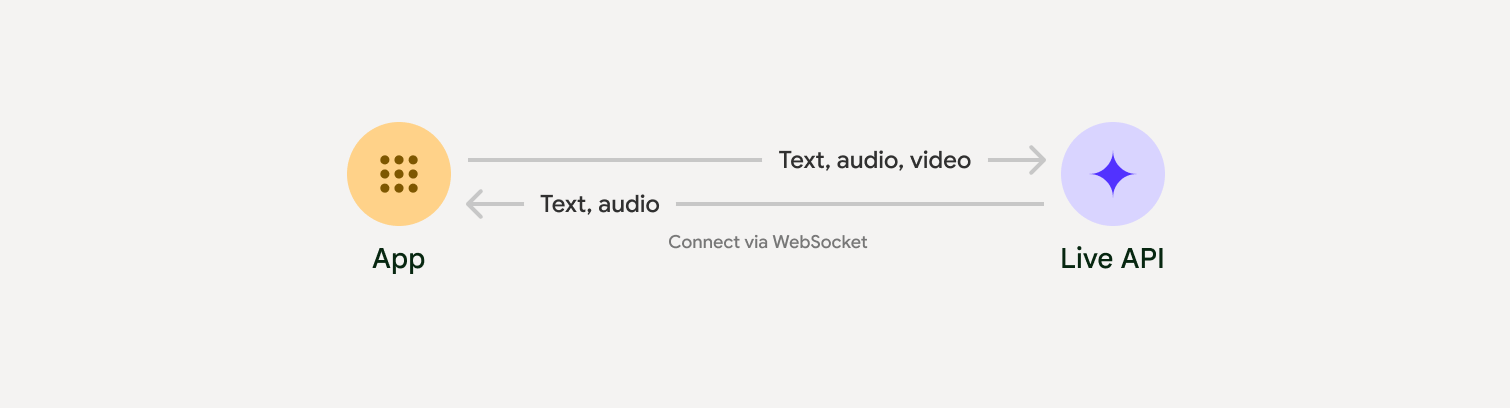
Live API は、音声検出、ツールの使用と関数呼び出し、セッション管理(長時間実行される会話の管理用)、エフェメラル トークン(安全なクライアントサイド認証用)など、包括的な機能セットを提供します。
このページでは、例と基本的なコードサンプルを使用して、すぐに作業を開始できます。
Google AI Studio で Live API を試す
実装アプローチを選択する
Live API と統合する際は、次のいずれかの実装方法を選択する必要があります。
- サーバー間: バックエンドが WebSockets を使用して Live API に接続します。通常、クライアントはストリーム データ(音声、動画、テキスト)をサーバーに送信し、サーバーはそれを Live API に転送します。
- クライアントからサーバーへ: フロントエンド コードが WebSockets を使用して Live API に直接接続し、バックエンドをバイパスしてデータをストリーミングします。
パートナーとの統合
リアルタイムの音声アプリと動画アプリの開発を効率化するには、WebRTC または WebSocket 経由で Gemini Live API をサポートするサードパーティ統合を使用します。
Pipecat by Daily
Gemini Live と Pipecat を使用してリアルタイムの AI チャットボットを作成します。
LiveKit
LiveKit エージェントで Gemini Live API を使用します。
Software Mansion の Fishjam
Fishjam を使用して、ライブ動画と音声のストリーミング アプリケーションを作成します。
Agent Development Kit(ADK)
Agent Development Kit(ADK)を使用して Live API を実装します。
Vision Agents by Stream
Vision エージェントを使用して、リアルタイムの音声と動画の AI アプリケーションを構築します。
Voximplant
Voximplant を使用して、インバウンド通話とアウトバウンド通話を Live API に接続します。
始める
このサーバーサイドの例では、マイクから音声をストリーミングし、返された音声を再生します。クライアント アプリケーションを含む完全なエンドツーエンドの例については、サンプル アプリケーションをご覧ください。
入力音声形式は 16 ビット PCM、16 kHz、モノラル形式である必要があります。受信した音声は 24 kHz のサンプルレートを使用します。
Python
音声ストリーミング用のヘルパーをインストールします。追加のシステムレベルの依存関係(portaudio など)が必要になる場合があります。詳しいインストール手順については、PyAudio のドキュメントをご覧ください。
pip install pyaudioimport asyncio
from google import genai
import pyaudio
client = genai.Client()
# --- pyaudio config ---
FORMAT = pyaudio.paInt16
CHANNELS = 1
SEND_SAMPLE_RATE = 16000
RECEIVE_SAMPLE_RATE = 24000
CHUNK_SIZE = 1024
pya = pyaudio.PyAudio()
# --- Live API config ---
MODEL = "gemini-2.5-flash-native-audio-preview-12-2025"
CONFIG = {
"response_modalities": ["AUDIO"],
"system_instruction": "You are a helpful and friendly AI assistant.",
}
audio_queue_output = asyncio.Queue()
audio_queue_mic = asyncio.Queue(maxsize=5)
audio_stream = None
async def listen_audio():
"""Listens for audio and puts it into the mic audio queue."""
global audio_stream
mic_info = pya.get_default_input_device_info()
audio_stream = await asyncio.to_thread(
pya.open,
format=FORMAT,
channels=CHANNELS,
rate=SEND_SAMPLE_RATE,
input=True,
input_device_index=mic_info["index"],
frames_per_buffer=CHUNK_SIZE,
)
kwargs = {"exception_on_overflow": False} if __debug__ else {}
while True:
data = await asyncio.to_thread(audio_stream.read, CHUNK_SIZE, **kwargs)
await audio_queue_mic.put({"data": data, "mime_type": "audio/pcm"})
async def send_realtime(session):
"""Sends audio from the mic audio queue to the GenAI session."""
while True:
msg = await audio_queue_mic.get()
await session.send_realtime_input(audio=msg)
async def receive_audio(session):
"""Receives responses from GenAI and puts audio data into the speaker audio queue."""
while True:
turn = session.receive()
async for response in turn:
if (response.server_content and response.server_content.model_turn):
for part in response.server_content.model_turn.parts:
if part.inline_data and isinstance(part.inline_data.data, bytes):
audio_queue_output.put_nowait(part.inline_data.data)
# Empty the queue on interruption to stop playback
while not audio_queue_output.empty():
audio_queue_output.get_nowait()
async def play_audio():
"""Plays audio from the speaker audio queue."""
stream = await asyncio.to_thread(
pya.open,
format=FORMAT,
channels=CHANNELS,
rate=RECEIVE_SAMPLE_RATE,
output=True,
)
while True:
bytestream = await audio_queue_output.get()
await asyncio.to_thread(stream.write, bytestream)
async def run():
"""Main function to run the audio loop."""
try:
async with client.aio.live.connect(
model=MODEL, config=CONFIG
) as live_session:
print("Connected to Gemini. Start speaking!")
async with asyncio.TaskGroup() as tg:
tg.create_task(send_realtime(live_session))
tg.create_task(listen_audio())
tg.create_task(receive_audio(live_session))
tg.create_task(play_audio())
except asyncio.CancelledError:
pass
finally:
if audio_stream:
audio_stream.close()
pya.terminate()
print("\nConnection closed.")
if __name__ == "__main__":
try:
asyncio.run(run())
except KeyboardInterrupt:
print("Interrupted by user.")
JavaScript
音声ストリーミング用のヘルパーをインストールします。システムレベルの依存関係が追加で必要になる場合があります(Mac/Windows の場合は sox、Linux の場合は ALSA)。詳細なインストール手順については、スピーカーとマイクのドキュメントをご覧ください。
npm install mic speakerimport { GoogleGenAI, Modality } from '@google/genai';
import mic from 'mic';
import Speaker from 'speaker';
const ai = new GoogleGenAI({});
// WARNING: Do not use API keys in client-side (browser based) applications
// Consider using Ephemeral Tokens instead
// More information at: https://ai.google.dev/gemini-api/docs/ephemeral-tokens
// --- Live API config ---
const model = 'gemini-2.5-flash-native-audio-preview-12-2025';
const config = {
responseModalities: [Modality.AUDIO],
systemInstruction: "You are a helpful and friendly AI assistant.",
};
async function live() {
const responseQueue = [];
const audioQueue = [];
let speaker;
async function waitMessage() {
while (responseQueue.length === 0) {
await new Promise((resolve) => setImmediate(resolve));
}
return responseQueue.shift();
}
function createSpeaker() {
if (speaker) {
process.stdin.unpipe(speaker);
speaker.end();
}
speaker = new Speaker({
channels: 1,
bitDepth: 16,
sampleRate: 24000,
});
speaker.on('error', (err) => console.error('Speaker error:', err));
process.stdin.pipe(speaker);
}
async function messageLoop() {
// Puts incoming messages in the audio queue.
while (true) {
const message = await waitMessage();
if (message.serverContent && message.serverContent.interrupted) {
// Empty the queue on interruption to stop playback
audioQueue.length = 0;
continue;
}
if (message.serverContent && message.serverContent.modelTurn && message.serverContent.modelTurn.parts) {
for (const part of message.serverContent.modelTurn.parts) {
if (part.inlineData && part.inlineData.data) {
audioQueue.push(Buffer.from(part.inlineData.data, 'base64'));
}
}
}
}
}
async function playbackLoop() {
// Plays audio from the audio queue.
while (true) {
if (audioQueue.length === 0) {
if (speaker) {
// Destroy speaker if no more audio to avoid warnings from speaker library
process.stdin.unpipe(speaker);
speaker.end();
speaker = null;
}
await new Promise((resolve) => setImmediate(resolve));
} else {
if (!speaker) createSpeaker();
const chunk = audioQueue.shift();
await new Promise((resolve) => {
speaker.write(chunk, () => resolve());
});
}
}
}
// Start loops
messageLoop();
playbackLoop();
// Connect to Gemini Live API
const session = await ai.live.connect({
model: model,
config: config,
callbacks: {
onopen: () => console.log('Connected to Gemini Live API'),
onmessage: (message) => responseQueue.push(message),
onerror: (e) => console.error('Error:', e.message),
onclose: (e) => console.log('Closed:', e.reason),
},
});
// Setup Microphone for input
const micInstance = mic({
rate: '16000',
bitwidth: '16',
channels: '1',
});
const micInputStream = micInstance.getAudioStream();
micInputStream.on('data', (data) => {
// API expects base64 encoded PCM data
session.sendRealtimeInput({
audio: {
data: data.toString('base64'),
mimeType: "audio/pcm;rate=16000"
}
});
});
micInputStream.on('error', (err) => {
console.error('Microphone error:', err);
});
micInstance.start();
console.log('Microphone started. Speak now...');
}
live().catch(console.error);
アプリケーション例
エンドツーエンドのユースケースで Live API を使用する方法を示す次のサンプル アプリケーションをご覧ください。
- AI Studio の Live 音声スターター アプリ。JavaScript ライブラリを使用して Live API に接続し、マイクとスピーカーを介して双方向の音声をストリーミングします。
- その他の例やスタートガイドについては、パートナー統合をご覧ください。
次のステップ
- 音声検出やネイティブ音声機能など、主な機能と構成については、Live API の機能ガイドをご覧ください。
- ツールの使用ガイドを読んで、Live API をツールや関数呼び出しと統合する方法を確認します。
- 長時間にわたる会話を管理するには、セッション管理ガイドをご覧ください。
- クライアントとサーバー間のアプリケーションで安全な認証を行うには、エフェメラル トークンのガイドをご覧ください。
- 基盤となる WebSockets API について詳しくは、WebSockets API リファレンスをご覧ください。