

Gemini, ses girişini analiz edip metin yanıtları oluşturabilir.
Python
from google import genai
import base64

client = genai.Client()

uploaded_file = client.files.upload(file="path/to/sample.mp3")

interaction = client.interactions.create(
    model="gemini-3.8-flash",
    input=[
        {"type": "text", "text": "Describe this audio clip"},
        {
            "type": "audio",
            "uri": uploaded_file.uri,
            "mime_type": uploaded_file.mime_type
        }
    ]
)
print(interaction.output_text)
JavaScript
import { GoogleGenAI } from "@google/genai";

const client = new GoogleGenAI({});

const uploadedFile = await client.files.upload({
    file: "path/to/sample.mp3",
    config: { mime_type: "audio/mp3" }
});

const interaction = await client.interactions.create({
    model: "gemini-3.8-flash",
    input: [
        {type: "text", text: "Describe this audio clip"},
        {
            type: "audio",
            uri: uploadedFile.uri,
            mime_type: uploadedFile.mimeType
        }
    ]
});
console.log(interaction.output_text);
Java
import com.google.genai.Client;
import com.google.genai.gaos.models.interactions.AudioContent;
import com.google.genai.gaos.models.interactions.AudioContentMimeType;
import com.google.genai.gaos.models.interactions.Content;
import com.google.genai.gaos.models.interactions.CreateModelInteraction;
import com.google.genai.gaos.models.interactions.Interaction;
import com.google.genai.gaos.models.interactions.InteractionsInput;
import com.google.genai.gaos.models.interactions.Model;
import com.google.genai.gaos.models.interactions.TextContent;
import com.google.genai.gaos.models.operations.CreateInteractionRequestBody;
import com.google.genai.types.File;
import com.google.genai.types.UploadFileConfig;
import java.util.Arrays;
import java.util.List;

Client client = new Client();

File uploadedFile =
    client.files.upload(
        "path/to/sample.mp3", UploadFileConfig.builder().mimeType("audio/mp3").build());

Content textContent = TextContent.builder().text("Describe this audio clip").build();
Content audioContent =
    AudioContent.builder()
        .uri(uploadedFile.uri().get())
        .mimeType(AudioContentMimeType.of(uploadedFile.mimeType().get()))
        .build();

List<Content> contents = Arrays.asList(textContent, audioContent);

CreateModelInteraction params =
    CreateModelInteraction.builder()
        .model(Model.of("gemini-3.8-flash"))
        .input(InteractionsInput.ofContent(contents))
        .build();

Interaction interaction =
    client.interactions.create(CreateInteractionRequestBody.of(params)).interaction().get();

System.out.println(interaction.outputText().orElse(""));
Go
package main

import (
    "context"
    "fmt"
    "log"

    "google.golang.org/genai"
    "google.golang.org/genai/interactions/models/interactions"
    "google.golang.org/genai/interactions/models/operations"
)

func main() {
    ctx := context.Background()
    client, err := genai.NewClient(ctx, nil)
    if err != nil {
        log.Fatal(err)
    }

    uploadedFile, err := client.Files.UploadFromPath(ctx, "path/to/sample.mp3", &genai.UploadFileConfig{
        MIMEType: "audio/mp3",
    })
    if err != nil {
        log.Fatal(err)
    }

    contents := []interactions.Content{
        interactions.NewContent(interactions.TextContent{
            Text: "Describe this audio clip",
        }),
        interactions.NewContent(interactions.AudioContent{
            URI:      genai.Ptr(uploadedFile.URI),
            MimeType: interactions.AudioContentMimeType(uploadedFile.MIMEType).ToPointer(),
        }),
    }

    res, err := client.Interactions.Create(ctx, operations.CreateInteractionRequest{
        Body: operations.NewCreateInteractionRequestBody(interactions.CreateModelInteraction{
            Model: interactions.Model("gemini-3.8-flash"),
            Input: interactions.NewInteractionsInput(contents),
        }),
    })
    if err != nil {
        log.Fatal(err)
    }

    if res.Interaction.OutputText != nil {
        fmt.Println(*res.Interaction.OutputText)
    }
}
REST
# First upload the file, then use the URI:
curl -X POST "https://generativelanguage.googleapis.com/v1beta/interactions" \
  -H "x-goog-api-key: $GEMINI_API_KEY" \
  -H 'Content-Type: application/json' \
  -d '{
    "model": "gemini-3.8-flash",
    "input": [
      {"type": "text", "text": "Describe this audio clip"},
      {
        "type": "audio",
        "uri": "YOUR_FILE_URI",
        "mime_type": "audio/mp3"
      }
    ]
  }'
Genel Bakış
Gemini, ses girişini analiz edip anlayabilir ve metin yanıtları oluşturabilir. Bu sayede aşağıdaki gibi kullanım alanları ortaya çıkar:
- Ses içeriğini açıklama, özetleme veya ses içeriğiyle ilgili soruları yanıtlama
- Metne dönüştürme ve çeviri (konuşmadan metne)
- Konuşmacı ayırma (farklı konuşmacıları tanımlama)
- Konuşma ve müzikte duygu algılama
- Zaman damgalarıyla belirli segmentleri analiz etme
Gerçek zamanlı ses ve video etkileşimleri için Live API'ye bakın. Anlık transkripsiyon desteği sunan özel konuşmayı metne dönüştürme modelleri için Google Cloud Speech-to-Text API'yi kullanın.
Konuşmayı metne dönüştürme
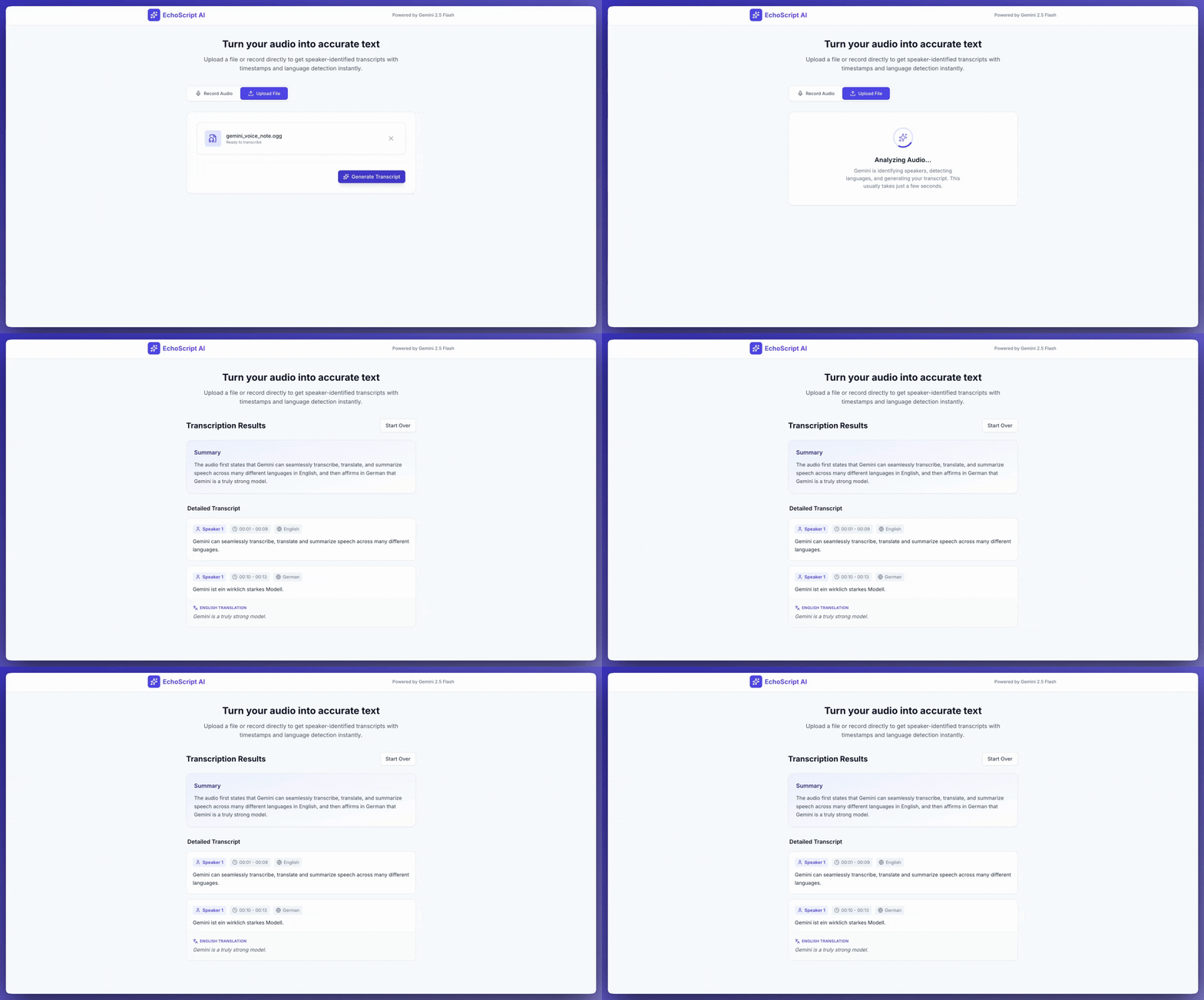
Bu örnekte, yapılandırılmış çıkışlar kullanarak konuşmayı zaman damgaları, konuşmacı ayrımı ve duygu algılama ile nasıl metne dönüştüreceğiniz, çevireceğiniz ve özetleyeceğiniz gösterilmektedir.
Python
from google import genai

client = genai.Client()

YOUTUBE_URL = "https://www.youtube.com/watch?v=ku-N-eS1lgM"

prompt = """
  Process the audio file and generate a detailed transcription.

  Requirements:
  1. Identify distinct speakers (e.g., Speaker 1, Speaker 2).
  2. Provide accurate timestamps for each segment (Format: MM:SS).
  3. Detect the primary language of each segment.
  4. If not English, provide the English translation.
  5. Identify the primary emotion: Happy, Sad, Angry, or Neutral.
  6. Provide a brief summary at the beginning.
"""

response_schema = {
    "type": "object",
    "properties": {
        "summary": {"type": "string"},
        "segments": {
            "type": "array",
            "items": {
                "type": "object",
                "properties": {
                    "speaker": {"type": "string"},
                    "timestamp": {"type": "string"},
                    "content": {"type": "string"},
                    "language": {"type": "string"},
                    "emotion": {
                        "type": "string",
                        "enum": ["happy", "sad", "angry", "neutral"]
                    }
                },
                "required": ["speaker", "timestamp", "content", "emotion"]
            }
        }
    },
    "required": ["summary", "segments"]
}

interaction = client.interactions.create(
    model="gemini-3.8-flash",
    input=[
        {"type": "video", "uri": YOUTUBE_URL, "mime_type": "video/mp4"},
        {"type": "text", "text": prompt}
    ],
    response_format=response_schema,
)

print(interaction.output_text)
JavaScript
import { GoogleGenAI } from "@google/genai";

const client = new GoogleGenAI({});

const YOUTUBE_URL = "https://www.youtube.com/watch?v=ku-N-eS1lgM";

const prompt = `
  Process the audio file and generate a detailed transcription.

  Requirements:
  1. Identify distinct speakers (e.g., Speaker 1, Speaker 2).
  2. Provide accurate timestamps for each segment (Format: MM:SS).
  3. Detect the primary language of each segment.
  4. If not English, provide the English translation.
  5. Identify the primary emotion: Happy, Sad, Angry, or Neutral.
  6. Provide a brief summary at the beginning.
`;

const responseSchema = {
    type: "object",
    properties: {
        summary: { type: "string" },
        segments: {
            type: "array",
            items: {
                type: "object",
                properties: {
                    speaker: { type: "string" },
                    timestamp: { type: "string" },
                    content: { type: "string" },
                    language: { type: "string" },
                    emotion: {
                        type: "string",
                        enum: ["happy", "sad", "angry", "neutral"]
                    }
                },
                required: ["speaker", "timestamp", "content", "emotion"]
            }
        }
    },
    required: ["summary", "segments"]
};

const interaction = await client.interactions.create({
    model: "gemini-3.8-flash",
    input: [
        { type: "video", uri: YOUTUBE_URL, mime_type: "video/mp4" },
        { type: "text", text: prompt }
    ],
    response_format: responseSchema,
});

console.log(JSON.parse(interaction.output_text));
Java
import com.google.genai.Client;
import com.google.genai.gaos.models.interactions.Content;
import com.google.genai.gaos.models.interactions.CreateModelInteraction;
import com.google.genai.gaos.models.interactions.CreateModelInteractionResponseFormat;
import com.google.genai.gaos.models.interactions.Interaction;
import com.google.genai.gaos.models.interactions.InteractionsInput;
import com.google.genai.gaos.models.interactions.Model;
import com.google.genai.gaos.models.interactions.ResponseFormat;
import com.google.genai.gaos.models.interactions.TextContent;
import com.google.genai.gaos.models.interactions.VideoContent;
import com.google.genai.gaos.models.interactions.VideoContentMimeType;
import com.google.genai.gaos.models.operations.CreateInteractionRequestBody;
import java.util.Arrays;
import java.util.List;
import java.util.HashMap;
import java.util.Map;

Client client = new Client();

String youtubeUrl = "https://www.youtube.com/watch?v=ku-N-eS1lgM";

String prompt =
    "Process the audio file and generate a detailed transcription.\n\n"
        + "Requirements:\n"
        + "1. Identify distinct speakers (e.g., Speaker 1, Speaker 2).\n"
        + "2. Provide accurate timestamps for each segment (Format: MM:SS).\n"
        + "3. Detect the primary language of each segment.\n"
        + "4. If not English, provide the English translation.\n"
        + "5. Identify the primary emotion: Happy, Sad, Angry, or Neutral.\n"
        + "6. Provide a brief summary at the beginning.";

Map<String, Object> emotionProp = new HashMap<>();
emotionProp.put("type", "string");
emotionProp.put("enum", Arrays.asList("happy", "sad", "angry", "neutral"));

Map<String, Object> stringType = new HashMap<>();
stringType.put("type", "string");

Map<String, Object> segmentProps = new HashMap<>();
segmentProps.put("speaker", stringType);
segmentProps.put("timestamp", stringType);
segmentProps.put("content", stringType);
segmentProps.put("language", stringType);
segmentProps.put("emotion", emotionProp);

Map<String, Object> segmentItem = new HashMap<>();
segmentItem.put("type", "object");
segmentItem.put("properties", segmentProps);
segmentItem.put("required", Arrays.asList("speaker", "timestamp", "content", "emotion"));

Map<String, Object> segmentsProp = new HashMap<>();
segmentsProp.put("type", "array");
segmentsProp.put("items", segmentItem);

Map<String, Object> properties = new HashMap<>();
properties.put("summary", stringType);
properties.put("segments", segmentsProp);

Map<String, Object> responseSchema = new HashMap<>();
responseSchema.put("type", "object");
responseSchema.put("properties", properties);
responseSchema.put("required", Arrays.asList("summary", "segments"));

Content videoContent =
    VideoContent.builder()
        .uri(youtubeUrl)
        .mimeType(VideoContentMimeType.VIDEO_MP4)
        .build();
Content textContent = TextContent.builder().text(prompt).build();

List<Content> contents = Arrays.asList(videoContent, textContent);

CreateModelInteraction params =
    CreateModelInteraction.builder()
        .model(Model.of("gemini-3.8-flash"))
        .input(InteractionsInput.ofContent(contents))
        .responseFormat(
            CreateModelInteractionResponseFormat.of(ResponseFormat.of(responseSchema)))
        .build();

Interaction interaction =
    client.interactions.create(CreateInteractionRequestBody.of(params)).interaction().get();

System.out.println(interaction.outputText().orElse(""));
Go
package main

import (
    "context"
    "fmt"
    "log"

    "google.golang.org/genai"
    "google.golang.org/genai/interactions/models/interactions"
    "google.golang.org/genai/interactions/models/operations"
)

func main() {
    ctx := context.Background()
    client, err := genai.NewClient(ctx, nil)
    if err != nil {
        log.Fatal(err)
    }

    youtubeURL := "https://www.youtube.com/watch?v=ku-N-eS1lgM"

    prompt := "Process the audio file and generate a detailed transcription.\n\n" +
        "Requirements:\n" +
        "1. Identify distinct speakers (e.g., Speaker 1, Speaker 2).\n" +
        "2. Provide accurate timestamps for each segment (Format: MM:SS).\n" +
        "3. Detect the primary language of each segment.\n" +
        "4. If not English, provide the English translation.\n" +
        "5. Identify the primary emotion: Happy, Sad, Angry, or Neutral.\n" +
        "6. Provide a brief summary at the beginning."

    responseSchema := map[string]any{
        "type": "object",
        "properties": map[string]any{
            "summary": map[string]any{"type": "string"},
            "segments": map[string]any{
                "type": "array",
                "items": map[string]any{
                    "type": "object",
                    "properties": map[string]any{
                        "speaker":   map[string]any{"type": "string"},
                        "timestamp": map[string]any{"type": "string"},
                        "content":   map[string]any{"type": "string"},
                        "language":  map[string]any{"type": "string"},
                        "emotion": map[string]any{
                            "type": "string",
                            "enum": []string{"happy", "sad", "angry", "neutral"},
                        },
                    },
                    "required": []string{"speaker", "timestamp", "content", "emotion"},
                },
            },
        },
        "required": []string{"summary", "segments"},
    }

    contents := []interactions.Content{
        interactions.NewContent(interactions.VideoContent{
            URI:      genai.Ptr(youtubeURL),
            MimeType: interactions.VideoContentMimeTypeVideoMp4.ToPointer(),
        }),
        interactions.NewContent(interactions.TextContent{
            Text: prompt,
        }),
    }

    res, err := client.Interactions.Create(ctx, operations.CreateInteractionRequest{
        Body: operations.NewCreateInteractionRequestBody(interactions.CreateModelInteraction{
            Model: interactions.Model("gemini-3.8-flash"),
            Input: interactions.NewInteractionsInput(contents),
            ResponseFormat: genai.Ptr(interactions.NewCreateModelInteractionResponseFormat(
                interactions.NewResponseFormat(responseSchema),
            )),
        }),
    })
    if err != nil {
        log.Fatal(err)
    }

    if res.Interaction.OutputText != nil {
        fmt.Println(*res.Interaction.OutputText)
    }
}
REST
curl -X POST "https://generativelanguage.googleapis.com/v1beta/interactions" \
  -H "x-goog-api-key: $GEMINI_API_KEY" \
  -H 'Content-Type: application/json' \
  -d '{
    "model": "gemini-3.8-flash",
    "input": [
      {
        "type": "video",
        "uri": "https://www.youtube.com/watch?v=ku-N-eS1lgM",
        "mime_type": "video/mp4"
      },
      {
        "type": "text",
        "text": "Transcribe with speaker diarization and emotion detection."
      }
    ],
    "response_format": {
        "type": "object",
        "properties": {
          "summary": {"type": "string"},
          "segments": {
            "type": "array",
            "items": {
              "type": "object",
              "properties": {
                "speaker": {"type": "string"},
                "timestamp": {"type": "string"},
                "content": {"type": "string"},
                "emotion": {"type": "string", "enum": ["happy", "sad", "angry", "neutral"]}
              }
            }
          }
        }
      }
  }'
Ses girişi
Ses verilerini aşağıdaki şekillerde sağlayabilirsiniz:
- İstek göndermeden önce ses dosyası yükleyin.
- İstekle birlikte satır içi ses verilerini iletin.
Ses dosyası yükleme
20 MB'tan büyük dosyalar için Files API'yi kullanın.
Python
from google import genai

client = genai.Client()

uploaded_file = client.files.upload(file="path/to/sample.mp3")

interaction = client.interactions.create(
    model="gemini-3.8-flash",
    input=[
        {"type": "text", "text": "Describe this audio clip"},
        {
            "type": "audio",
            "uri": uploaded_file.uri,
            "mime_type": uploaded_file.mime_type
        }
    ]
)
print(interaction.output_text)
JavaScript
import { GoogleGenAI } from "@google/genai";

const client = new GoogleGenAI({});

const uploadedFile = await client.files.upload({
    file: "path/to/sample.mp3",
    config: { mimeType: "audio/mp3" }
});

const interaction = await client.interactions.create({
    model: "gemini-3.8-flash",
    input: [
        {type: "text", text: "Describe this audio clip"},
        {
            type: "audio",
            uri: uploadedFile.uri,
            mime_type: uploadedFile.mimeType
        }
    ]
});
console.log(interaction.output_text);
Java
// Upload an audio file using the Files API (recommended for files > 20 MB)
import com.google.genai.Client;
import com.google.genai.gaos.models.interactions.AudioContent;
import com.google.genai.gaos.models.interactions.AudioContentMimeType;
import com.google.genai.gaos.models.interactions.Content;
import com.google.genai.gaos.models.interactions.CreateModelInteraction;
import com.google.genai.gaos.models.interactions.Interaction;
import com.google.genai.gaos.models.interactions.InteractionsInput;
import com.google.genai.gaos.models.interactions.Model;
import com.google.genai.gaos.models.interactions.TextContent;
import com.google.genai.gaos.models.operations.CreateInteractionRequestBody;
import com.google.genai.types.File;
import com.google.genai.types.UploadFileConfig;
import java.util.Arrays;
import java.util.List;

Client client = new Client();

File uploadedFile =
    client.files.upload(
        "path/to/sample.mp3", UploadFileConfig.builder().mimeType("audio/mp3").build());

Content textContent = TextContent.builder().text("Describe this audio clip").build();
Content audioContent =
    AudioContent.builder()
        .uri(uploadedFile.uri().get())
        .mimeType(AudioContentMimeType.of(uploadedFile.mimeType().get()))
        .build();

List<Content> contents = Arrays.asList(textContent, audioContent);

CreateModelInteraction params =
    CreateModelInteraction.builder()
        .model(Model.of("gemini-3.8-flash"))
        .input(InteractionsInput.ofContent(contents))
        .build();

Interaction interaction =
    client.interactions.create(CreateInteractionRequestBody.of(params)).interaction().get();

System.out.println(interaction.outputText().orElse(""));
Go
// Upload an audio file using the Files API (recommended for files > 20 MB)
package main

import (
    "context"
    "fmt"
    "log"

    "google.golang.org/genai"
    "google.golang.org/genai/interactions/models/interactions"
    "google.golang.org/genai/interactions/models/operations"
)

func main() {
    ctx := context.Background()
    client, err := genai.NewClient(ctx, nil)
    if err != nil {
        log.Fatal(err)
    }

    uploadedFile, err := client.Files.UploadFromPath(ctx, "path/to/sample.mp3", &genai.UploadFileConfig{
        MIMEType: "audio/mp3",
    })
    if err != nil {
        log.Fatal(err)
    }

    contents := []interactions.Content{
        interactions.NewContent(interactions.TextContent{
            Text: "Describe this audio clip",
        }),
        interactions.NewContent(interactions.AudioContent{
            URI:      genai.Ptr(uploadedFile.URI),
            MimeType: interactions.AudioContentMimeType(uploadedFile.MIMEType).ToPointer(),
        }),
    }

    res, err := client.Interactions.Create(ctx, operations.CreateInteractionRequest{
        Body: operations.NewCreateInteractionRequestBody(interactions.CreateModelInteraction{
            Model: interactions.Model("gemini-3.8-flash"),
            Input: interactions.NewInteractionsInput(contents),
        }),
    })
    if err != nil {
        log.Fatal(err)
    }

    if res.Interaction.OutputText != nil {
        fmt.Println(*res.Interaction.OutputText)
    }
}
REST
# First upload the file using the Files API, then use the URI:
curl -X POST "https://generativelanguage.googleapis.com/v1beta/interactions" \
  -H "x-goog-api-key: $GEMINI_API_KEY" \
  -H 'Content-Type: application/json' \
  -d '{
    "model": "gemini-3.8-flash",
    "input": [
      {"type": "text", "text": "Describe this audio clip"},
      {
        "type": "audio",
        "uri": "YOUR_FILE_URI",
        "mime_type": "audio/mp3"
      }
    ]
  }'
Ses verilerini satır içi olarak iletme
Toplam istek boyutu 20 MB'tan küçük olan ses dosyaları için:
Python
from google import genai
import base64

client = genai.Client()

with open('path/to/small-sample.mp3', 'rb') as f:
    audio_bytes = f.read()

interaction = client.interactions.create(
    model="gemini-3.8-flash",
    input=[
        {"type": "text", "text": "Describe this audio clip"},
        {
            "type": "audio",
            "data": base64.b64encode(audio_bytes).decode('utf-8'),
            "mime_type": "audio/mp3"
        }
    ]
)
print(interaction.output_text)
JavaScript
import { GoogleGenAI } from "@google/genai";
import * as fs from "node:fs";

const client = new GoogleGenAI({});

const audioData = fs.readFileSync("path/to/small-sample.mp3", {
    encoding: "base64"
});

const interaction = await client.interactions.create({
    model: "gemini-3.8-flash",
    input: [
        {type: "text", text: "Describe this audio clip"},
        {
            type: "audio",
            data: audioData,
            mime_type: "audio/mp3"
        }
    ]
});
console.log(interaction.output_text);
Java
import com.google.genai.Client;
import com.google.genai.gaos.models.interactions.AudioContent;
import com.google.genai.gaos.models.interactions.AudioContentMimeType;
import com.google.genai.gaos.models.interactions.Content;
import com.google.genai.gaos.models.interactions.CreateModelInteraction;
import com.google.genai.gaos.models.interactions.Interaction;
import com.google.genai.gaos.models.interactions.InteractionsInput;
import com.google.genai.gaos.models.interactions.Model;
import com.google.genai.gaos.models.interactions.TextContent;
import com.google.genai.gaos.models.operations.CreateInteractionRequestBody;
import java.nio.file.Files;
import java.nio.file.Paths;
import java.util.Arrays;
import java.util.Base64;
import java.util.List;

Client client = new Client();

byte[] audioBytes = Files.readAllBytes(Paths.get("path/to/small-sample.mp3"));
String base64Audio = Base64.getEncoder().encodeToString(audioBytes);

Content textContent = TextContent.builder().text("Describe this audio clip").build();
Content audioContent =
    AudioContent.builder()
        .data(base64Audio)
        .mimeType(AudioContentMimeType.AUDIO_MP3)
        .build();

List<Content> contents = Arrays.asList(textContent, audioContent);

CreateModelInteraction params =
    CreateModelInteraction.builder()
        .model(Model.of("gemini-3.8-flash"))
        .input(InteractionsInput.ofContent(contents))
        .build();

Interaction interaction =
    client.interactions.create(CreateInteractionRequestBody.of(params)).interaction().get();

System.out.println(interaction.outputText().orElse(""));
Go
package main

import (
    "context"
    "encoding/base64"
    "fmt"
    "log"
    "os"

    "google.golang.org/genai"
    "google.golang.org/genai/interactions/models/interactions"
    "google.golang.org/genai/interactions/models/operations"
)

func main() {
    ctx := context.Background()
    client, err := genai.NewClient(ctx, nil)
    if err != nil {
        log.Fatal(err)
    }

    audioBytes, err := os.ReadFile("path/to/small-sample.mp3")
    if err != nil {
        log.Fatal(err)
    }
    base64Audio := base64.StdEncoding.EncodeToString(audioBytes)

    contents := []interactions.Content{
        interactions.NewContent(interactions.TextContent{
            Text: "Describe this audio clip",
        }),
        interactions.NewContent(interactions.AudioContent{
            Data:     genai.Ptr(base64Audio),
            MimeType: interactions.AudioContentMimeTypeAudioMp3.ToPointer(),
        }),
    }

    res, err := client.Interactions.Create(ctx, operations.CreateInteractionRequest{
        Body: operations.NewCreateInteractionRequestBody(interactions.CreateModelInteraction{
            Model: interactions.Model("gemini-3.8-flash"),
            Input: interactions.NewInteractionsInput(contents),
        }),
    })
    if err != nil {
        log.Fatal(err)
    }

    if res.Interaction.OutputText != nil {
        fmt.Println(*res.Interaction.OutputText)
    }
}
REST
AUDIO_PATH="path/to/sample.mp3"

if [[ "$(base64 --version 2>&1)" = *"FreeBSD"* ]]; then
  B64FLAGS="--input"
else
  B64FLAGS="-w0"
fi

curl -X POST "https://generativelanguage.googleapis.com/v1beta/interactions" \
  -H "x-goog-api-key: $GEMINI_API_KEY" \
  -H 'Content-Type: application/json' \
  -d '{
    "model": "gemini-3.8-flash",
    "input": [
      {"type": "text", "text": "Describe this audio clip"},
      {
        "type": "audio",
        "data": "'$(base64 $B64FLAGS $AUDIO_PATH)'",
        "mime_type": "audio/mp3"
      }
    ]
  }'
Satır içi ses verileriyle ilgili notlar: * Maksimum istek boyutu, istemler ve tüm dosyalar dahil olmak üzere toplam 20 MB'tır. * Yeniden kullanmak için dosyayı yükleyin.
Transkript alma
Transkript almak için istemde transkript isteyin:
Python
interaction = client.interactions.create(
    model="gemini-3.8-flash",
    input=[
        {"type": "text", "text": "Generate a transcript of the speech."},
        {
            "type": "audio",
            "uri": uploaded_file.uri,
            "mime_type": uploaded_file.mime_type
        }
    ]
)
print(interaction.output_text)
JavaScript
const interaction = await client.interactions.create({
    model: "gemini-3.8-flash",
    input: [
        { type: "text", text: "Generate a transcript of the speech." },
        {
            type: "audio",
            uri: uploadedFile.uri,
            mime_type: uploadedFile.mimeType
        }
    ]
});
console.log(interaction.output_text);
Java
import com.google.genai.Client;
import com.google.genai.gaos.models.interactions.AudioContent;
import com.google.genai.gaos.models.interactions.AudioContentMimeType;
import com.google.genai.gaos.models.interactions.Content;
import com.google.genai.gaos.models.interactions.CreateModelInteraction;
import com.google.genai.gaos.models.interactions.Interaction;
import com.google.genai.gaos.models.interactions.InteractionsInput;
import com.google.genai.gaos.models.interactions.Model;
import com.google.genai.gaos.models.interactions.TextContent;
import com.google.genai.gaos.models.operations.CreateInteractionRequestBody;
import com.google.genai.types.File;
import com.google.genai.types.UploadFileConfig;
import java.util.Arrays;
import java.util.List;

Client client = new Client();

File uploadedFile =
    client.files.upload(
        "path/to/sample.mp3", UploadFileConfig.builder().mimeType("audio/mp3").build());

Content textContent = TextContent.builder().text("Generate a transcript of the speech.").build();
Content audioContent =
    AudioContent.builder()
        .uri(uploadedFile.uri().get())
        .mimeType(AudioContentMimeType.of(uploadedFile.mimeType().get()))
        .build();

List<Content> contents = Arrays.asList(textContent, audioContent);

CreateModelInteraction params =
    CreateModelInteraction.builder()
        .model(Model.of("gemini-3.8-flash"))
        .input(InteractionsInput.ofContent(contents))
        .build();

Interaction interaction =
    client.interactions.create(CreateInteractionRequestBody.of(params)).interaction().get();

System.out.println(interaction.outputText().orElse(""));
Go
package main

import (
    "context"
    "fmt"
    "log"

    "google.golang.org/genai"
    "google.golang.org/genai/interactions/models/interactions"
    "google.golang.org/genai/interactions/models/operations"
)

func main() {
    ctx := context.Background()
    client, err := genai.NewClient(ctx, nil)
    if err != nil {
        log.Fatal(err)
    }

    uploadedFile, err := client.Files.UploadFromPath(ctx, "path/to/sample.mp3", &genai.UploadFileConfig{
        MIMEType: "audio/mp3",
    })
    if err != nil {
        log.Fatal(err)
    }

    contents := []interactions.Content{
        interactions.NewContent(interactions.TextContent{
            Text: "Generate a transcript of the speech.",
        }),
        interactions.NewContent(interactions.AudioContent{
            URI:      genai.Ptr(uploadedFile.URI),
            MimeType: interactions.AudioContentMimeType(uploadedFile.MIMEType).ToPointer(),
        }),
    }

    res, err := client.Interactions.Create(ctx, operations.CreateInteractionRequest{
        Body: operations.NewCreateInteractionRequestBody(interactions.CreateModelInteraction{
            Model: interactions.Model("gemini-3.8-flash"),
            Input: interactions.NewInteractionsInput(contents),
        }),
    })
    if err != nil {
        log.Fatal(err)
    }

    if res.Interaction.OutputText != nil {
        fmt.Println(*res.Interaction.OutputText)
    }
}
Zaman damgalarını inceleyin
Belirli bölümlere referans vermek için MM:SS biçimini kullanın:
Python
interaction = client.interactions.create(
    model="gemini-3.8-flash",
    input=[
        {"type": "text", "text": "Provide a transcript from 02:30 to 03:29."},
        {
            "type": "audio",
            "uri": uploaded_file.uri,
            "mime_type": uploaded_file.mime_type
        }
    ]
)
JavaScript
const interaction = await client.interactions.create({
    model: "gemini-3.8-flash",
    input: [
        { type: "text", text: "Provide a transcript from 02:30 to 03:29." },
        { type: "audio", uri: uploadedFile.uri, mime_type: "audio/mp3" }
    ]
});
Java
import com.google.genai.Client;
import com.google.genai.gaos.models.interactions.AudioContent;
import com.google.genai.gaos.models.interactions.AudioContentMimeType;
import com.google.genai.gaos.models.interactions.Content;
import com.google.genai.gaos.models.interactions.CreateModelInteraction;
import com.google.genai.gaos.models.interactions.Interaction;
import com.google.genai.gaos.models.interactions.InteractionsInput;
import com.google.genai.gaos.models.interactions.Model;
import com.google.genai.gaos.models.interactions.TextContent;
import com.google.genai.gaos.models.operations.CreateInteractionRequestBody;
import com.google.genai.types.File;
import com.google.genai.types.UploadFileConfig;
import java.util.Arrays;
import java.util.List;

Client client = new Client();

File uploadedFile =
    client.files.upload(
        "path/to/sample.mp3", UploadFileConfig.builder().mimeType("audio/mp3").build());

Content textContent =
    TextContent.builder().text("Provide a transcript from 02:30 to 03:29.").build();
Content audioContent =
    AudioContent.builder()
        .uri(uploadedFile.uri().get())
        .mimeType(AudioContentMimeType.of(uploadedFile.mimeType().get()))
        .build();

List<Content> contents = Arrays.asList(textContent, audioContent);

CreateModelInteraction params =
    CreateModelInteraction.builder()
        .model(Model.of("gemini-3.8-flash"))
        .input(InteractionsInput.ofContent(contents))
        .build();

Interaction interaction =
    client.interactions.create(CreateInteractionRequestBody.of(params)).interaction().get();

System.out.println(interaction.outputText().orElse(""));
Go
package main

import (
    "context"
    "fmt"
    "log"

    "google.golang.org/genai"
    "google.golang.org/genai/interactions/models/interactions"
    "google.golang.org/genai/interactions/models/operations"
)

func main() {
    ctx := context.Background()
    client, err := genai.NewClient(ctx, nil)
    if err != nil {
        log.Fatal(err)
    }

    uploadedFile, err := client.Files.UploadFromPath(ctx, "path/to/sample.mp3", &genai.UploadFileConfig{
        MIMEType: "audio/mp3",
    })
    if err != nil {
        log.Fatal(err)
    }

    contents := []interactions.Content{
        interactions.NewContent(interactions.TextContent{
            Text: "Provide a transcript from 02:30 to 03:29.",
        }),
        interactions.NewContent(interactions.AudioContent{
            URI:      genai.Ptr(uploadedFile.URI),
            MimeType: interactions.AudioContentMimeType(uploadedFile.MIMEType).ToPointer(),
        }),
    }

    res, err := client.Interactions.Create(ctx, operations.CreateInteractionRequest{
        Body: operations.NewCreateInteractionRequestBody(interactions.CreateModelInteraction{
            Model: interactions.Model("gemini-3.8-flash"),
            Input: interactions.NewInteractionsInput(contents),
        }),
    })
    if err != nil {
        log.Fatal(err)
    }

    if res.Interaction.OutputText != nil {
        fmt.Println(*res.Interaction.OutputText)
    }
}
Parça sayma
Ses dosyasındaki jetonları sayma:
Python
response = client.models.count_tokens(
    model="gemini-3.8-flash",
    contents=[uploaded_file]
)
print(response)
JavaScript
const response = await client.models.countTokens({
    model: "gemini-3.8-flash",
    contents: [
        { fileData: { fileUri: uploadedFile.uri, mimeType: uploadedFile.mimeType } }
    ]
});
console.log(response.totalTokens);
Java
import com.google.genai.Client;
import com.google.genai.types.Content;
import com.google.genai.types.CountTokensResponse;
import com.google.genai.types.File;
import com.google.genai.types.Part;
import com.google.genai.types.UploadFileConfig;
import java.util.Arrays;

Client client = new Client();

File uploadedFile =
    client.files.upload(
        "path/to/sample.mp3", UploadFileConfig.builder().mimeType("audio/mp3").build());

CountTokensResponse response =
    client.models.countTokens(
        "gemini-3.8-flash",
        Arrays.asList(
            Content.fromParts(
                Part.fromUri(uploadedFile.uri().get(), uploadedFile.mimeType().get()))),
        null);

System.out.println(response);
Go
package main

import (
    "context"
    "fmt"
    "log"

    "google.golang.org/genai"
)

func main() {
    ctx := context.Background()
    client, err := genai.NewClient(ctx, nil)
    if err != nil {
        log.Fatal(err)
    }

    uploadedFile, err := client.Files.UploadFromPath(ctx, "path/to/sample.mp3", &genai.UploadFileConfig{
        MIMEType: "audio/mp3",
    })
    if err != nil {
        log.Fatal(err)
    }

    response, err := client.Models.CountTokens(
        ctx,
        "gemini-3.8-flash",
        []*genai.Content{
            genai.NewContentFromURI(uploadedFile.URI, uploadedFile.MIMEType, genai.RoleUser),
        },
        nil,
    )
    if err != nil {
        log.Fatal(err)
    }

    fmt.Println(response.TotalTokens)
}
Desteklenen ses biçimleri
Gemini aşağıdaki ses biçimi MIME türlerini destekler:
- WAV -
audio/wav - MP3 -
audio/mp3 - AIFF -
audio/aiff - AAC -
audio/aac - OGG -
audio/ogg - FLAC -
audio/flac - MPEG -
audio/mpeg - M4A -
audio/m4a - L16 -
audio/l16 - Opus -
audio/opus - ALAW -
audio/alaw - MULAW -
audio/mulaw - WebM -
audio/webm
Desteklenen MIME türlerinin ve parametre şemalarının tam listesi için Interactions API referansına bakın.
Sesle ilgili teknik ayrıntılar
- Jetonlar: Sesin her saniyesi için 32 jeton (1 dakika = 1.920 jeton)
- Konuşma dışı sesler: Gemini, konuşma dışı sesleri (kuş sesi, siren vb.) anlar.
- Maksimum uzunluk: İstem başına 9,5 saatlik ses
- Çözünürlük: 16 kbps'ye düşürülür.
- Kanallar: Çok kanallı ses tek kanalda birleştirilir.
Sırada ne var?
- Files API: Ses dosyalarını yükleme ve yönetme
- Sistem talimatları: Model davranışını özelleştirme
- Structured output (Yapılandırılmış çıkış): JSON biçiminde transkripsiyon sonuçları alma