

Interfejs Gemini API udostępnia narzędzie do wykonywania kodu, które umożliwia modelowi generowanie i uruchamianie kodu Pythona. Model może się uczyć iteracyjnie na podstawie wyników wykonywania kodu, aż uzyska ostateczne dane wyjściowe. Za pomocą wykonywania kodu możesz tworzyć aplikacje, które korzystają z wnioskowania opartego na kodzie. Możesz na przykład używać wykonywania kodu do rozwiązywania równań lub przetwarzania tekstu. Możesz też używać bibliotek zawartych w środowisku wykonywania kodu do wykonywania bardziej specjalistycznych zadań.
Gemini może wykonywać kod tylko w Pythonie. Nadal możesz poprosić Gemini o wygenerowanie kodu w innym języku, ale model nie może użyć narzędzia do wykonywania kodu, aby go uruchomić.
Włączanie wykonywania kodu
Aby włączyć wykonywanie kodu, skonfiguruj narzędzie do wykonywania kodu w modelu. Dzięki temu model może generować i uruchamiać kod.
Python
from google import genai

client = genai.Client()

interaction = client.interactions.create(
    model="gemini-3.6-flash",
    input="What is the sum of the first 50 prime numbers? "
          "Generate and run code for the calculation, and make sure you get all 50.",
    tools=[{"type": "code_execution"}]
)

for step in interaction.steps:
    if step.type == "model_output":
        for content_block in step.content:
            if content_block.type == "text":
                print(content_block.text)
    elif step.type == "code_execution_call":
        print(step.arguments.code)
    elif step.type == "code_execution_result":
        print(step.result)
JavaScript
import { GoogleGenAI } from "@google/genai";

const client = new GoogleGenAI({});

const interaction = await client.interactions.create({
    model: "gemini-3.6-flash",
    input: "What is the sum of the first 50 prime numbers? " +
           "Generate and run code for the calculation, and make sure you get all 50.",
    tools: [{ type: "code_execution" }]
});

for (const step of interaction.steps) {
    if (step.type === "model_output") {
        for (const contentBlock of step.content) {
            if (contentBlock.type === "text") {
                console.log(contentBlock.text);
            }
        }
    } else if (step.type === "code_execution_call") {
        console.log(step.arguments.code);
    } else if (step.type === "code_execution_result") {
        console.log(step.result);
    }
}
REST
curl -X POST "https://generativelanguage.googleapis.com/v1beta/interactions" \
-H "x-goog-api-key: $GEMINI_API_KEY" \
-H 'Content-Type: application/json' \
-d '{
    "model": "gemini-3.6-flash",
    "input": "What is the sum of the first 50 prime numbers? Generate and run code for the calculation, and make sure you get all 50.",
    "tools": [{"type": "code_execution"}]
}'
Dane wyjściowe mogą wyglądać mniej więcej tak jak poniżej. Zostały one sformatowane w celu zwiększenia czytelności:
Okay, I need to calculate the sum of the first 50 prime numbers. Here's how I'll
approach this:

1.  **Generate Prime Numbers:** I'll use an iterative method to find prime
    numbers. I'll start with 2 and check if each subsequent number is divisible
    by any number between 2 and its square root. If not, it's a prime.
2.  **Store Primes:** I'll store the prime numbers in a list until I have 50 of
    them.
3.  **Calculate the Sum:**  Finally, I'll sum the prime numbers in the list.

Here's the Python code to do this:

def is_prime(n):
  """Efficiently checks if a number is prime."""
  if n <= 1:
    return False
  if n <= 3:
    return True
  if n % 2 == 0 or n % 3 == 0:
    return False
  i = 5
  while i * i <= n:
    if n % i == 0 or n % (i + 2) == 0:
      return False
    i += 6
  return True

primes = []
num = 2
while len(primes) < 50:
  if is_prime(num):
    primes.append(num)
  num += 1

sum_of_primes = sum(primes)
print(f'{primes=}')
print(f'{sum_of_primes=}')

primes=[2, 3, 5, 7, 11, 13, 17, 19, 23, 29, 31, 37, 41, 43, 47, 53, 59, 61, 67,
71, 73, 79, 83, 89, 97, 101, 103, 107, 109, 113, 127, 131, 137, 139, 149, 151,
157, 163, 167, 173, 179, 181, 191, 193, 197, 199, 211, 223, 227, 229]
sum_of_primes=5117

The sum of the first 50 prime numbers is 5117.
Te dane wyjściowe łączą kilka części treści, które model zwraca podczas wykonywania kodu:
text: tekst wstawiony wygenerowany przez modelcode_execution_call: kod wygenerowany przez model, który ma zostać wykonanycode_execution_result: wynik wykonania kodu
Wykonywanie kodu z obrazami (Gemini 3)
Model Gemini 3 Flash może teraz pisać i wykonywać kod Pythona, aby aktywnie manipulować obrazami i je analizować.
Przypadki użycia
- Powiększanie i sprawdzanie: model niejawnie wykrywa, kiedy szczegóły są zbyt małe (np. odczytywanie odległego wskaźnika), i pisze kod, aby przyciąć i ponownie sprawdzić obszar w wyższej rozdzielczości.
- Matematyka wizualna: model może wykonywać obliczenia wieloetapowe za pomocą kodu (np. sumowanie pozycji na paragonie).
- Adnotacje do obrazów: model może dodawać adnotacje do obrazów, aby odpowiadać na pytania, np. rysować strzałki wskazujące relacje.
Włączanie wykonywania kodu z obrazami
Wykonywanie kodu z obrazami jest oficjalnie obsługiwane w Gemini 3 Flash. Możesz aktywować to działanie, włączając zarówno wykonywanie kodu jako narzędzie, jak i myślenie.
Python
from google import genai
import requests
import base64
from PIL import Image
import io

image_path = "https://goo.gle/instrument-img"
image_bytes = requests.get(image_path).content

client = genai.Client()

interaction = client.interactions.create(
    model="gemini-3.6-flash",
    input=[
        {"type": "image", "data": base64.b64encode(image_bytes).decode('utf-8'), "mime_type": "image/jpeg"},
        {"type": "text", "text": "Zoom into the expression pedals and tell me how many pedals are there?"}
    ],
    tools=[{"type": "code_execution"}]
)

for step in interaction.steps:
    if step.type == "model_output":
        for content_block in step.content:
            if content_block.type == "text":
                print(content_block.text)
            elif content_block.type == "image":
                img = Image.open(io.BytesIO(base64.b64decode(content_block.data)))
                img.show()  # or: img.save("output_image.jpg")
    elif step.type == "code_execution_call":
        print(step.arguments.code)
    elif step.type == "code_execution_result":
        print(step.result)
JavaScript
import { GoogleGenAI } from "@google/genai";

async function main() {
  const client = new GoogleGenAI({});

  const imageUrl = "https://goo.gle/instrument-img";
  const response = await fetch(imageUrl);
  const imageArrayBuffer = await response.arrayBuffer();
  const base64ImageData = Buffer.from(imageArrayBuffer).toString('base64');

  const interaction = await client.interactions.create({
    model: "gemini-3.6-flash",
    input: [
      {
        type: "image",
        data: base64ImageData,
        mime_type: "image/jpeg"
      },
      { type: "text", text: "Zoom into the expression pedals and tell me how many pedals are there?" }
    ],
    tools: [{ type: "code_execution" }]
  });

  for (const step of interaction.steps) {
    if (step.type === "model_output") {
      for (const contentBlock of step.content) {
        if (contentBlock.type === "text") {
          console.log("Text:", contentBlock.text);
        }
      }
    } else if (step.type === "code_execution_call") {
      console.log(`\nGenerated Code:\n`, step.arguments.code);
    } else if (step.type === "code_execution_result") {
      console.log(`\nExecution Output:\n`, step.result);
    }
  }
}

main();
REST
IMG_URL="https://goo.gle/instrument-img"
MODEL="gemini-3.6-flash"

MIME_TYPE=$(curl -sIL "$IMG_URL" | grep -i '^content-type:' | awk -F ': ' '{print $2}' | sed 's/\r$//' | head -n 1)
if [[ -z "$MIME_TYPE" || ! "$MIME_TYPE" == image/* ]]; then
  MIME_TYPE="image/jpeg"
fi

if [[ "$(uname)" == "Darwin" ]]; then
  IMAGE_B64=$(curl -sL "$IMG_URL" | base64 -b 0)
elif [[ "$(base64 --version 2>&1)" = *"FreeBSD"* ]]; then
  IMAGE_B64=$(curl -sL "$IMG_URL" | base64)
else
  IMAGE_B64=$(curl -sL "$IMG_URL" | base64 -w0)
fi

# Use jq to create the JSON payload to avoid "Argument list too long" error with large base64 strings
echo -n "$IMAGE_B64" > image_b64.txt
jq -n \
  --rawfile b64 image_b64.txt \
  --arg mime "$MIME_TYPE" \
  '{
    model: "gemini-3.6-flash",
    input: [
      {type: "image", data: $b64, mime_type: $mime},
      {type: "text", text: "Zoom into the expression pedals and tell me how many pedals are there?"}
    ],
    tools: [{type: "code_execution"}]
  }' > payload.json

curl -X POST "https://generativelanguage.googleapis.com/v1beta/interactions" \
    -H "x-goog-api-key: $GEMINI_API_KEY" \
    -H 'Content-Type: application/json' \
    -d @payload.json
Używanie wykonywania kodu w interakcjach wieloetapowych
Wykonywanie kodu możesz też używać w ramach rozmowy wieloetapowej za pomocą parametru previous_interaction_id.
Python
from google import genai

client = genai.Client()

interaction1 = client.interactions.create(
    model="gemini-3.6-flash",
    input="I have a math question for you.",
    tools=[{"type": "code_execution"}]
)
print(interaction1.output_text)

interaction2 = client.interactions.create(
    model="gemini-3.6-flash",
    previous_interaction_id=interaction1.id,
    input="What is the sum of the first 50 prime numbers? "
          "Generate and run code for the calculation, and make sure you get all 50.",
    tools=[{"type": "code_execution"}]
)

for step in interaction2.steps:
    if step.type == "model_output":
        for content_block in step.content:
            if content_block.type == "text":
                print(content_block.text)
    elif step.type == "code_execution_call":
        print(step.arguments.code)
    elif step.type == "code_execution_result":
        print(step.result)
JavaScript
import { GoogleGenAI } from "@google/genai";

const client = new GoogleGenAI({});

const interaction1 = await client.interactions.create({
    model: "gemini-3.6-flash",
    input: "I have a math question for you.",
    tools: [{ type: "code_execution" }]
});
console.log(interaction1.output_text);

const interaction2 = await client.interactions.create({
    model: "gemini-3.6-flash",
    previous_interaction_id: interaction1.id,
    input: "What is the sum of the first 50 prime numbers? " +
           "Generate and run code for the calculation, and make sure you get all 50.",
    tools: [{ type: "code_execution" }]
});

for (const step of interaction2.steps) {
    if (step.type === "model_output") {
        for (const contentBlock of step.content) {
            if (contentBlock.type === "text") {
                console.log(contentBlock.text);
            }
        }
    } else if (step.type === "code_execution_call") {
        console.log(step.arguments.code);
    } else if (step.type === "code_execution_result") {
        console.log(step.result);
    }
}
REST
# First turn
RESPONSE1=$(curl -s -X POST "https://generativelanguage.googleapis.com/v1beta/interactions" \
-H "x-goog-api-key: $GEMINI_API_KEY" \
-H 'Content-Type: application/json' \
-d '{
    "model": "gemini-3.6-flash",
    "input": "I have a math question for you.",
    "tools": [{"type": "code_execution"}]
}')

INTERACTION_ID=$(echo $RESPONSE1 | jq -r '.id')

# Second turn with previous_interaction_id
curl -X POST "https://generativelanguage.googleapis.com/v1beta/interactions" \
-H "x-goog-api-key: $GEMINI_API_KEY" \
-H 'Content-Type: application/json' \
-d '{
    "model": "gemini-3.6-flash",
    "previous_interaction_id": "'"$INTERACTION_ID"'",
    "input": "What is the sum of the first 50 prime numbers? Generate and run code for the calculation, and make sure you get all 50.",
    "tools": [{"type": "code_execution"}]
}'
Wejście/wyjście (I/O)
W obecnych modelach Gemini, takich jak Gemini 3.5 Flash, wykonywanie kodu obsługuje wejście pliku i wyjście wykresu. Dzięki tym możliwościom wejścia i wyjścia możesz przesyłać pliki CSV i tekstowe, zadawać pytania dotyczące tych plików oraz generować wykresy Matplotlib w ramach odpowiedzi. Pliki wyjściowe są zwracane jako obrazy wstawione w odpowiedzi.
Ceny operacji wejścia/wyjścia
Gdy używasz operacji wejścia/wyjścia wykonywania kodu, opłaty są naliczane za tokeny wejściowe i wyjściowe:
Tokeny wejściowe:
- Prompt użytkownika
Tokeny wyjściowe:
- Kod wygenerowany przez model
- Dane wyjściowe wykonywania kodu w środowisku kodu
- Tokeny myślenia
- Podsumowanie wygenerowane przez model
Szczegóły operacji wejścia/wyjścia
Podczas pracy z operacjami wejścia/wyjścia wykonywania kodu pamiętaj o tych szczegółach technicznych:
- Maksymalny czas działania środowiska kodu to 30 sekund.
- Jeśli środowisko kodu wygeneruje błąd, model może zdecydować się na ponowne wygenerowanie danych wyjściowych kodu. Może się to zdarzyć maksymalnie 5 razy.
- Maksymalny rozmiar pliku wejściowego jest ograniczony przez okno tokena modelu. Jeśli prześlesz plik, który przekracza maksymalne okno kontekstu modelu, interfejs API zwróci błąd.
- Wykonywanie kodu najlepiej sprawdza się w przypadku plików tekstowych i CSV.
- Plik wejściowy można przekazać jako dane wstawione lub przesłać za pomocą interfejsu Files API, a plik wyjściowy jest zawsze zwracany jako dane wstawione.
Płatności
Włączenie wykonywania kodu z interfejsu Gemini API nie wiąże się z żadnymi dodatkowymi opłatami. Opłaty będą naliczane według aktualnej stawki za tokeny wejściowe i wyjściowe na podstawie używanego modelu Gemini.
Oto kilka dodatkowych informacji o płatnościach za wykonywanie kodu:
- Opłata jest naliczana tylko raz za tokeny wejściowe przekazywane do modelu oraz za tokeny wyjściowe zwracane przez model.
- Tokeny reprezentujące wygenerowany kod są liczone jako tokeny wyjściowe. Wygenerowany kod może zawierać tekst i dane wyjściowe multimodalne, takie jak obrazy.
- Wyniki wykonywania kodu są również liczone jako tokeny wyjściowe.
Model płatności jest przedstawiony na tym diagramie:
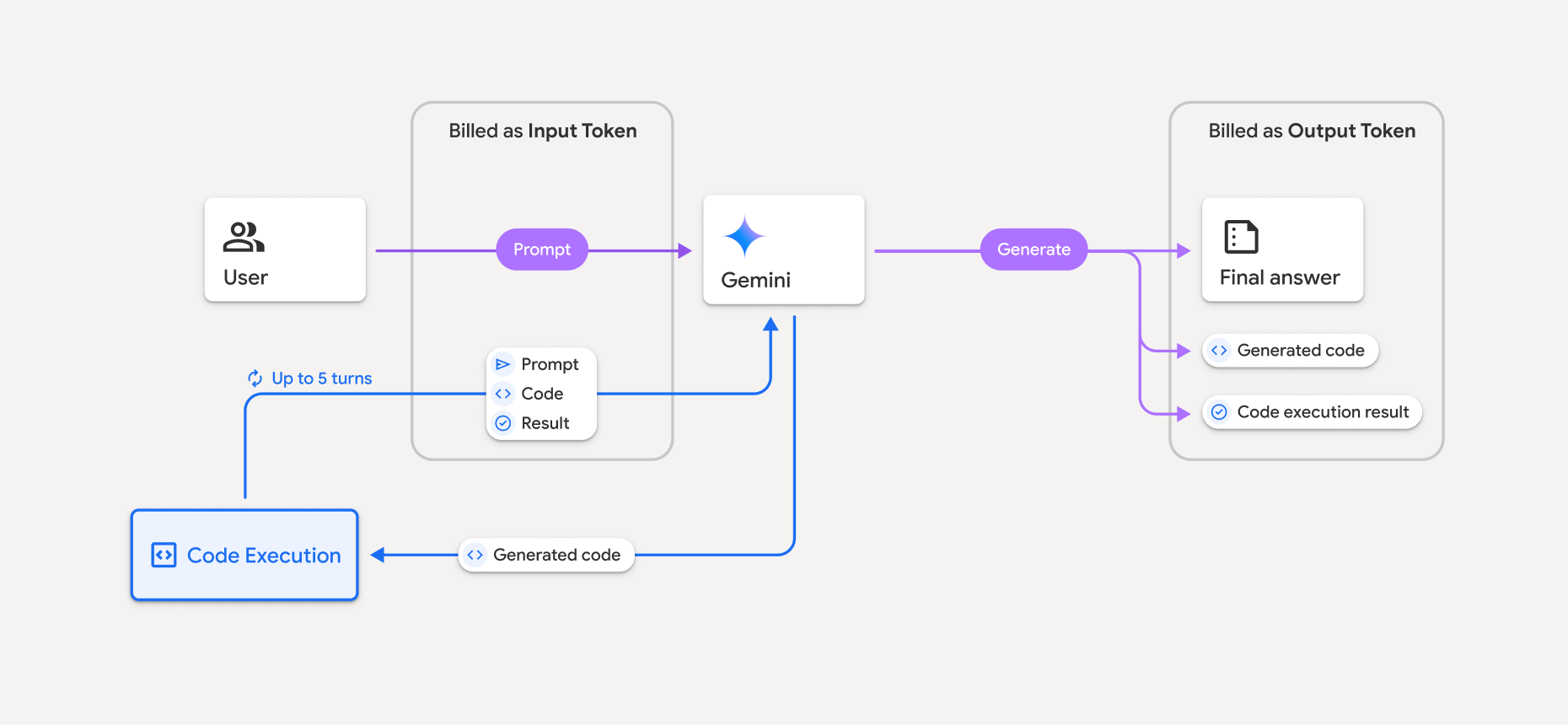
- Opłaty będą naliczane według aktualnej stawki za tokeny wejściowe i wyjściowe na podstawie używanego modelu Gemini.
- Jeśli Gemini używa wykonywania kodu podczas generowania odpowiedzi, oryginalny prompt, wygenerowany kod i wynik wykonania kodu są oznaczane jako tokeny pośrednie i rozliczane jako tokeny wejściowe.
- Następnie Gemini generuje podsumowanie i zwraca wygenerowany kod, wynik wykonania kodu oraz podsumowanie końcowe. Są one rozliczane jako tokeny wyjściowe.
- Interfejs Gemini API zawiera w odpowiedzi API liczbę tokenów pośrednich, dzięki czemu wiesz, dlaczego otrzymujesz dodatkowe tokeny wejściowe poza początkowym promptem.
Ograniczenia
- Model może tylko generować i wykonywać kod. Nie może zwracać innych artefaktów, takich jak pliki multimedialne.
- W niektórych przypadkach włączenie wykonywania kodu może prowadzić do regresji w innych obszarach danych wyjściowych modelu (np. pisania opowieści).
- Różne modele mają różną zdolność do skutecznego wykonywania kodu.
Obsługiwane kombinacje narzędzi
Narzędzie do wykonywania kodu można łączyć z powiązaniem ze źródłami informacji przy użyciu wyszukiwarki Google, aby obsługiwać bardziej złożone przypadki użycia.
Modele Gemini 3 obsługują łączenie wbudowanych narzędzi (takich jak wykonywanie kodu) z narzędziami niestandardowymi (wywoływanie funkcji).
Obsługiwane biblioteki
Środowisko wykonywania kodu zawiera te biblioteki:
- attrs
- szachy
- contourpy
- fpdf
- geopandas
- imageio
- jinja2
- joblib
- jsonschema
- jsonschema-specifications
- lxml
- matplotlib
- mpmath
- numpy
- opencv-python
- openpyxl
- przygotowywanie pakietów
- pandy
- poduszka
- protobuf
- pylatex
- pyparsing
- PyPDF2
- python-dateutil
- python-docx
- python-pptx
- reportlab
- scikit-learn
- scipy
- seaborn
- sześć
- striprtf
- sympy
- tabulate
- tensorflow
- toolz
- xlrd
Nie możesz instalować własnych bibliotek.
Co dalej?
- Wypróbuj przewodnik Krótkie wprowadzenie do interfejsu Interactions API.
- Dowiedz się więcej o innych narzędziach interfejsu Gemini API: