

A API Gemini oferece uma ferramenta de execução de código que permite que o modelo gere e execute código Python. Em seguida, o modelo pode aprender de forma iterativa com os resultados da execução de código até chegar a uma saída final. É possível usar a execução de código para criar aplicativos que se beneficiam do raciocínio baseado em código. Por exemplo, é possível usar a execução de código para resolver equações ou processar texto. Também é possível usar as bibliotecas incluídas no ambiente de execução de código para realizar tarefas mais especializadas.
O Gemini só pode executar código em Python. Ainda é possível pedir ao Gemini para gerar código em outro idioma, mas o modelo não pode usar a ferramenta de execução de código para executá-lo.
Ativar a execução de código
Para ativar a execução de código, configure a ferramenta de execução de código no modelo. Isso permite que o modelo gere e execute código.
Python
from google import genai

client = genai.Client()

interaction = client.interactions.create(
    model="gemini-3.8-flash",
    input="What is the sum of the first 50 prime numbers? "
          "Generate and run code for the calculation, and make sure you get all 50.",
    tools=[{"type": "code_execution"}]
)

for step in interaction.steps:
    if step.type == "model_output":
        for content_block in step.content:
            if content_block.type == "text":
                print(content_block.text)
    elif step.type == "code_execution_call":
        print(step.arguments.code)
    elif step.type == "code_execution_result":
        print(step.result)
JavaScript
import { GoogleGenAI } from "@google/genai";

const client = new GoogleGenAI({});

const interaction = await client.interactions.create({
    model: "gemini-3.8-flash",
    input: "What is the sum of the first 50 prime numbers? " +
           "Generate and run code for the calculation, and make sure you get all 50.",
    tools: [{ type: "code_execution" }]
});

for (const step of interaction.steps) {
    if (step.type === "model_output") {
        for (const contentBlock of step.content) {
            if (contentBlock.type === "text") {
                console.log(contentBlock.text);
            }
        }
    } else if (step.type === "code_execution_call") {
        console.log(step.arguments.code);
    } else if (step.type === "code_execution_result") {
        console.log(step.result);
    }
}
Java
import com.google.genai.Client;
import com.google.genai.gaos.models.interactions.CodeExecution;
import com.google.genai.gaos.models.interactions.CodeExecutionCallStep;
import com.google.genai.gaos.models.interactions.CodeExecutionResultStep;
import com.google.genai.gaos.models.interactions.Content;
import com.google.genai.gaos.models.interactions.CreateModelInteraction;
import com.google.genai.gaos.models.interactions.Interaction;
import com.google.genai.gaos.models.interactions.InteractionsInput;
import com.google.genai.gaos.models.interactions.ModelOutputStep;
import com.google.genai.gaos.models.interactions.Step;
import com.google.genai.gaos.models.interactions.TextContent;
import com.google.genai.gaos.models.operations.CreateInteractionRequestBody;
import java.util.Arrays;
import java.util.Collections;

Client client = new Client();

CreateModelInteraction params =
    CreateModelInteraction.builder()
        .model("gemini-3.8-flash")
        .input(
            InteractionsInput.of(
                "What is the sum of the first 50 prime numbers? "
                    + "Generate and run code for the calculation, and make sure you get all 50."))
        .tools(Arrays.asList(CodeExecution.builder().build()))
        .build();

Interaction interaction =
    client.interactions.create(CreateInteractionRequestBody.of(params)).interaction().get();

for (Step step : interaction.steps().orElse(Collections.emptyList())) {
  if (step instanceof ModelOutputStep) {
    ModelOutputStep outputStep = (ModelOutputStep) step;
    for (Content contentBlock : outputStep.content().orElse(Collections.emptyList())) {
      if (contentBlock instanceof TextContent) {
        System.out.println(((TextContent) contentBlock).text().orElse(""));
      }
    }
  } else if (step instanceof CodeExecutionCallStep) {
    CodeExecutionCallStep callStep = (CodeExecutionCallStep) step;
    callStep.arguments().ifPresent(args -> System.out.println(args.code().orElse("")));
  } else if (step instanceof CodeExecutionResultStep) {
    CodeExecutionResultStep resultStep = (CodeExecutionResultStep) step;
    System.out.println(resultStep.result().orElse(""));
  }
}
Go
package main

import (
    "context"
    "fmt"
    "log"

    "google.golang.org/genai"
    "google.golang.org/genai/interactions/models/interactions"
    "google.golang.org/genai/interactions/models/operations"
)

func main() {
    ctx := context.Background()
    client, err := genai.NewClient(ctx, nil)
    if err != nil {
        log.Fatal(err)
    }

    res, err := client.Interactions.Create(ctx, operations.CreateInteractionRequest{
        Body: operations.NewCreateInteractionRequestBody(interactions.CreateModelInteraction{
            Model: interactions.Model("gemini-3.8-flash"),
            Input: interactions.NewInteractionsInput(
                "What is the sum of the first 50 prime numbers? " +
                    "Generate and run code for the calculation, and make sure you get all 50.",
            ),
            Tools: []interactions.Tool{
                interactions.NewTool(interactions.CodeExecution{}),
            },
        }),
    })
    if err != nil {
        log.Fatal(err)
    }

    for _, step := range res.Interaction.Steps {
        if outStep := step.ModelOutputStep; outStep != nil {
            for _, contentBlock := range outStep.Content {
                if textContent := contentBlock.TextContent; textContent != nil {
                    fmt.Println(textContent.GetText())
                }
            }
        } else if callStep := step.CodeExecutionCallStep; callStep != nil {
            if code := callStep.Arguments.GetCode(); code != nil {
                fmt.Println(*code)
            }
        } else if resultStep := step.CodeExecutionResultStep; resultStep != nil {
            fmt.Println(resultStep.GetResult())
        }
    }
}
REST
curl -X POST "https://generativelanguage.googleapis.com/v1beta/interactions" \
-H "x-goog-api-key: $GEMINI_API_KEY" \
-H 'Content-Type: application/json' \
-d '{
    "model": "gemini-3.8-flash",
    "input": "What is the sum of the first 50 prime numbers? Generate and run code for the calculation, and make sure you get all 50.",
    "tools": [{"type": "code_execution"}]
}'
A saída pode ser semelhante a esta, que foi formatada para facilitar a leitura:
Okay, I need to calculate the sum of the first 50 prime numbers. Here's how I'll
approach this:

1.  **Generate Prime Numbers:** I'll use an iterative method to find prime
    numbers. I'll start with 2 and check if each subsequent number is divisible
    by any number between 2 and its square root. If not, it's a prime.
2.  **Store Primes:** I'll store the prime numbers in a list until I have 50 of
    them.
3.  **Calculate the Sum:**  Finally, I'll sum the prime numbers in the list.

Here's the Python code to do this:

def is_prime(n):
  """Efficiently checks if a number is prime."""
  if n <= 1:
    return False
  if n <= 3:
    return True
  if n % 2 == 0 or n % 3 == 0:
    return False
  i = 5
  while i * i <= n:
    if n % i == 0 or n % (i + 2) == 0:
      return False
    i += 6
  return True

primes = []
num = 2
while len(primes) < 50:
  if is_prime(num):
    primes.append(num)
  num += 1

sum_of_primes = sum(primes)
print(f'{primes=}')
print(f'{sum_of_primes=}')

primes=[2, 3, 5, 7, 11, 13, 17, 19, 23, 29, 31, 37, 41, 43, 47, 53, 59, 61, 67,
71, 73, 79, 83, 89, 97, 101, 103, 107, 109, 113, 127, 131, 137, 139, 149, 151,
157, 163, 167, 173, 179, 181, 191, 193, 197, 199, 211, 223, 227, 229]
sum_of_primes=5117

The sum of the first 50 prime numbers is 5117.
Essa saída combina várias partes de conteúdo que o modelo retorna ao usar a execução de código:
text: texto inline gerado pelo modelocode_execution_call: código gerado pelo modelo que deve ser executadocode_execution_result: resultado do código executável
Execução de código com imagens (Gemini 3)
O modelo Gemini 3 Flash agora pode escrever e executar código Python para manipular e inspecionar imagens ativamente.
Casos de uso
- Zoom e inspeção: o modelo detecta implicitamente quando os detalhes são muito pequenos (por exemplo, ler um medidor distante) e escreve código para cortar e reexaminar a área em resolução mais alta.
- Matemática visual: o modelo pode executar cálculos de várias etapas usando código (por exemplo, somar itens de linha em um recibo).
- Anotação de imagem: o modelo pode anotar imagens para responder a perguntas, como desenhar setas para mostrar relacionamentos.
Ativar a execução de código com imagens
A execução de código com imagens é oficialmente compatível com o Gemini 3 Flash. É possível ativar esse comportamento ativando a execução de código como uma ferramenta e o raciocínio.
Python
from google import genai
import requests
import base64
from PIL import Image
import io

image_path = "https://goo.gle/instrument-img"
image_bytes = requests.get(image_path).content

client = genai.Client()

interaction = client.interactions.create(
    model="gemini-3.8-flash",
    input=[
        {"type": "image", "data": base64.b64encode(image_bytes).decode('utf-8'), "mime_type": "image/jpeg"},
        {"type": "text", "text": "Zoom into the expression pedals and tell me how many pedals are there?"}
    ],
    tools=[{"type": "code_execution"}]
)

for step in interaction.steps:
    if step.type == "model_output":
        for content_block in step.content:
            if content_block.type == "text":
                print(content_block.text)
            elif content_block.type == "image":
                img = Image.open(io.BytesIO(base64.b64decode(content_block.data)))
                img.show()  # or: img.save("output_image.jpg")
    elif step.type == "code_execution_call":
        print(step.arguments.code)
    elif step.type == "code_execution_result":
        print(step.result)
JavaScript
import { GoogleGenAI } from "@google/genai";

async function main() {
  const client = new GoogleGenAI({});

  const imageUrl = "https://goo.gle/instrument-img";
  const response = await fetch(imageUrl);
  const imageArrayBuffer = await response.arrayBuffer();
  const base64ImageData = Buffer.from(imageArrayBuffer).toString('base64');

  const interaction = await client.interactions.create({
    model: "gemini-3.8-flash",
    input: [
      {
        type: "image",
        data: base64ImageData,
        mime_type: "image/jpeg"
      },
      { type: "text", text: "Zoom into the expression pedals and tell me how many pedals are there?" }
    ],
    tools: [{ type: "code_execution" }]
  });

  for (const step of interaction.steps) {
    if (step.type === "model_output") {
      for (const contentBlock of step.content) {
        if (contentBlock.type === "text") {
          console.log("Text:", contentBlock.text);
        }
      }
    } else if (step.type === "code_execution_call") {
      console.log(`\nGenerated Code:\n`, step.arguments.code);
    } else if (step.type === "code_execution_result") {
      console.log(`\nExecution Output:\n`, step.result);
    }
  }
}

main();
Java
import com.google.genai.Client;
import com.google.genai.gaos.models.interactions.CodeExecution;
import com.google.genai.gaos.models.interactions.CodeExecutionCallStep;
import com.google.genai.gaos.models.interactions.CodeExecutionResultStep;
import com.google.genai.gaos.models.interactions.Content;
import com.google.genai.gaos.models.interactions.CreateModelInteraction;
import com.google.genai.gaos.models.interactions.ImageContent;
import com.google.genai.gaos.models.interactions.ImageContentMimeType;
import com.google.genai.gaos.models.interactions.Interaction;
import com.google.genai.gaos.models.interactions.InteractionsInput;
import com.google.genai.gaos.models.interactions.ModelOutputStep;
import com.google.genai.gaos.models.interactions.Step;
import com.google.genai.gaos.models.interactions.TextContent;
import com.google.genai.gaos.models.operations.CreateInteractionRequestBody;
import java.io.InputStream;
import java.net.URI;
import java.nio.file.Files;
import java.nio.file.Paths;
import java.util.Arrays;
import java.util.Base64;
import java.util.Collections;

String imageUrl = "https://goo.gle/instrument-img";
byte[] imageBytes;
try (InputStream in = URI.create(imageUrl).toURL().openStream()) {
  imageBytes = in.readAllBytes();
}
String base64Image = Base64.getEncoder().encodeToString(imageBytes);

Client client = new Client();

CreateModelInteraction params =
    CreateModelInteraction.builder()
        .model("gemini-3.8-flash")
        .input(
            InteractionsInput.ofContent(
                Arrays.asList(
                    ImageContent.builder()
                        .data(base64Image)
                        .mimeType(ImageContentMimeType.IMAGE_JPEG)
                        .build(),
                    TextContent.builder()
                        .text(
                            "Zoom into the expression pedals and tell me how many pedals are there?")
                        .build())))
        .tools(Arrays.asList(CodeExecution.builder().build()))
        .build();

Interaction interaction =
    client.interactions.create(CreateInteractionRequestBody.of(params)).interaction().get();

for (Step step : interaction.steps().orElse(Collections.emptyList())) {
  if (step instanceof ModelOutputStep) {
    ModelOutputStep outputStep = (ModelOutputStep) step;
    for (Content contentBlock : outputStep.content().orElse(Collections.emptyList())) {
      if (contentBlock instanceof TextContent) {
        System.out.println(((TextContent) contentBlock).text().orElse(""));
      } else if (contentBlock instanceof ImageContent) {
        ImageContent imgContent = (ImageContent) contentBlock;
        if (imgContent.data().isPresent()) {
          byte[] decoded = Base64.getDecoder().decode(imgContent.data().get());
          Files.write(Paths.get("output_image.jpg"), decoded);
        }
      }
    }
  } else if (step instanceof CodeExecutionCallStep) {
    CodeExecutionCallStep callStep = (CodeExecutionCallStep) step;
    callStep.arguments().ifPresent(args -> System.out.println(args.code().orElse("")));
  } else if (step instanceof CodeExecutionResultStep) {
    CodeExecutionResultStep resultStep = (CodeExecutionResultStep) step;
    System.out.println(resultStep.result().orElse(""));
  }
}
Go
package main

import (
    "context"
    "encoding/base64"
    "fmt"
    "io"
    "log"
    "net/http"
    "os"

    "google.golang.org/genai"
    "google.golang.org/genai/interactions/models/interactions"
    "google.golang.org/genai/interactions/models/operations"
)

func main() {
    ctx := context.Background()
    client, err := genai.NewClient(ctx, nil)
    if err != nil {
        log.Fatal(err)
    }

    imageURL := "https://goo.gle/instrument-img"
    httpResp, err := http.Get(imageURL)
    if err != nil {
        log.Fatal(err)
    }
    defer httpResp.Body.Close()
    imageBytes, err := io.ReadAll(httpResp.Body)
    if err != nil {
        log.Fatal(err)
    }
    base64Image := base64.StdEncoding.EncodeToString(imageBytes)

    res, err := client.Interactions.Create(ctx, operations.CreateInteractionRequest{
        Body: operations.NewCreateInteractionRequestBody(interactions.CreateModelInteraction{
            Model: interactions.Model("gemini-3.8-flash"),
            Input: interactions.NewInteractionsInput([]interactions.Content{
                interactions.NewContent(interactions.ImageContent{
                    Data:     genai.Ptr(base64Image),
                    MimeType: interactions.ImageContentMimeType("image/jpeg").ToPointer(),
                }),
                interactions.NewContent(interactions.TextContent{
                    Text: "Zoom into the expression pedals and tell me how many pedals are there?",
                }),
            }),
            Tools: []interactions.Tool{
                interactions.NewTool(interactions.CodeExecution{}),
            },
        }),
    })
    if err != nil {
        log.Fatal(err)
    }

    for _, step := range res.Interaction.Steps {
        if outStep := step.ModelOutputStep; outStep != nil {
            for _, contentBlock := range outStep.Content {
                if textContent := contentBlock.TextContent; textContent != nil {
                    fmt.Println(textContent.GetText())
                } else if imgContent := contentBlock.ImageContent; imgContent != nil && imgContent.Data != nil {
                    decoded, err := base64.StdEncoding.DecodeString(*imgContent.Data)
                    if err == nil {
                        _ = os.WriteFile("output_image.jpg", decoded, 0644)
                    }
                }
            }
        } else if callStep := step.CodeExecutionCallStep; callStep != nil {
            if code := callStep.Arguments.GetCode(); code != nil {
                fmt.Println(*code)
            }
        } else if resultStep := step.CodeExecutionResultStep; resultStep != nil {
            fmt.Println(resultStep.GetResult())
        }
    }
}
REST
IMG_URL="https://goo.gle/instrument-img"
MODEL="gemini-3.8-flash"

MIME_TYPE=$(curl -sIL "$IMG_URL" | grep -i '^content-type:' | awk -F ': ' '{print $2}' | sed 's/\r$//' | head -n 1)
if [[ -z "$MIME_TYPE" || ! "$MIME_TYPE" == image/* ]]; then
  MIME_TYPE="image/jpeg"
fi

if [[ "$(uname)" == "Darwin" ]]; then
  IMAGE_B64=$(curl -sL "$IMG_URL" | base64 -b 0)
elif [[ "$(base64 --version 2>&1)" = *"FreeBSD"* ]]; then
  IMAGE_B64=$(curl -sL "$IMG_URL" | base64)
else
  IMAGE_B64=$(curl -sL "$IMG_URL" | base64 -w0)
fi

# Use jq to create the JSON payload to avoid "Argument list too long" error with large base64 strings
echo -n "$IMAGE_B64" > image_b64.txt
jq -n \
  --rawfile b64 image_b64.txt \
  --arg mime "$MIME_TYPE" \
  '{
    model: "gemini-3.8-flash",
    input: [
      {type: "image", data: $b64, mime_type: $mime},
      {type: "text", text: "Zoom into the expression pedals and tell me how many pedals are there?"}
    ],
    tools: [{type: "code_execution"}]
  }' > payload.json

curl -X POST "https://generativelanguage.googleapis.com/v1beta/interactions" \
    -H "x-goog-api-key: $GEMINI_API_KEY" \
    -H 'Content-Type: application/json' \
    -d @payload.json
Usar a execução de código em interações multiturno
Também é possível usar a execução de código como parte de uma conversa multiturno usando previous_interaction_id.
Python
from google import genai

client = genai.Client()

interaction1 = client.interactions.create(
    model="gemini-3.8-flash",
    input="I have a math question for you.",
    tools=[{"type": "code_execution"}]
)
print(interaction1.output_text)

interaction2 = client.interactions.create(
    model="gemini-3.8-flash",
    previous_interaction_id=interaction1.id,
    input="What is the sum of the first 50 prime numbers? "
          "Generate and run code for the calculation, and make sure you get all 50.",
    tools=[{"type": "code_execution"}]
)

for step in interaction2.steps:
    if step.type == "model_output":
        for content_block in step.content:
            if content_block.type == "text":
                print(content_block.text)
    elif step.type == "code_execution_call":
        print(step.arguments.code)
    elif step.type == "code_execution_result":
        print(step.result)
JavaScript
import { GoogleGenAI } from "@google/genai";

const client = new GoogleGenAI({});

const interaction1 = await client.interactions.create({
    model: "gemini-3.8-flash",
    input: "I have a math question for you.",
    tools: [{ type: "code_execution" }]
});
console.log(interaction1.output_text);

const interaction2 = await client.interactions.create({
    model: "gemini-3.8-flash",
    previous_interaction_id: interaction1.id,
    input: "What is the sum of the first 50 prime numbers? " +
           "Generate and run code for the calculation, and make sure you get all 50.",
    tools: [{ type: "code_execution" }]
});

for (const step of interaction2.steps) {
    if (step.type === "model_output") {
        for (const contentBlock of step.content) {
            if (contentBlock.type === "text") {
                console.log(contentBlock.text);
            }
        }
    } else if (step.type === "code_execution_call") {
        console.log(step.arguments.code);
    } else if (step.type === "code_execution_result") {
        console.log(step.result);
    }
}
Java
import com.google.genai.Client;
import com.google.genai.gaos.models.interactions.CodeExecution;
import com.google.genai.gaos.models.interactions.CodeExecutionCallStep;
import com.google.genai.gaos.models.interactions.CodeExecutionResultStep;
import com.google.genai.gaos.models.interactions.Content;
import com.google.genai.gaos.models.interactions.CreateModelInteraction;
import com.google.genai.gaos.models.interactions.Interaction;
import com.google.genai.gaos.models.interactions.InteractionsInput;
import com.google.genai.gaos.models.interactions.ModelOutputStep;
import com.google.genai.gaos.models.interactions.Step;
import com.google.genai.gaos.models.interactions.TextContent;
import com.google.genai.gaos.models.operations.CreateInteractionRequestBody;
import java.util.Arrays;
import java.util.Collections;

Client client = new Client();

CreateModelInteraction params1 =
    CreateModelInteraction.builder()
        .model("gemini-3.8-flash")
        .input(InteractionsInput.of("I have a math question for you."))
        .tools(Arrays.asList(CodeExecution.builder().build()))
        .build();

Interaction interaction1 =
    client.interactions.create(CreateInteractionRequestBody.of(params1)).interaction().get();
System.out.println(interaction1.outputText().orElse(""));

CreateModelInteraction params2 =
    CreateModelInteraction.builder()
        .model("gemini-3.8-flash")
        .previousInteractionId(interaction1.id().get())
        .input(
            InteractionsInput.of(
                "What is the sum of the first 50 prime numbers? "
                    + "Generate and run code for the calculation, and make sure you get all 50."))
        .tools(Arrays.asList(CodeExecution.builder().build()))
        .build();

Interaction interaction2 =
    client.interactions.create(CreateInteractionRequestBody.of(params2)).interaction().get();

for (Step step : interaction2.steps().orElse(Collections.emptyList())) {
  if (step instanceof ModelOutputStep) {
    ModelOutputStep outputStep = (ModelOutputStep) step;
    for (Content contentBlock : outputStep.content().orElse(Collections.emptyList())) {
      if (contentBlock instanceof TextContent) {
        System.out.println(((TextContent) contentBlock).text().orElse(""));
      }
    }
  } else if (step instanceof CodeExecutionCallStep) {
    CodeExecutionCallStep callStep = (CodeExecutionCallStep) step;
    callStep.arguments().ifPresent(args -> System.out.println(args.code().orElse("")));
  } else if (step instanceof CodeExecutionResultStep) {
    CodeExecutionResultStep resultStep = (CodeExecutionResultStep) step;
    System.out.println(resultStep.result().orElse(""));
  }
}
Go
package main

import (
    "context"
    "fmt"
    "log"

    "google.golang.org/genai"
    "google.golang.org/genai/interactions/models/interactions"
    "google.golang.org/genai/interactions/models/operations"
)

func main() {
    ctx := context.Background()
    client, err := genai.NewClient(ctx, nil)
    if err != nil {
        log.Fatal(err)
    }

    res1, err := client.Interactions.Create(ctx, operations.CreateInteractionRequest{
        Body: operations.NewCreateInteractionRequestBody(interactions.CreateModelInteraction{
            Model: interactions.Model("gemini-3.8-flash"),
            Input: interactions.NewInteractionsInput("I have a math question for you."),
            Tools: []interactions.Tool{
                interactions.NewTool(interactions.CodeExecution{}),
            },
        }),
    })
    if err != nil {
        log.Fatal(err)
    }
    if res1.Interaction.OutputText != nil {
        fmt.Println(*res1.Interaction.OutputText)
    }

    res2, err := client.Interactions.Create(ctx, operations.CreateInteractionRequest{
        Body: operations.NewCreateInteractionRequestBody(interactions.CreateModelInteraction{
            Model:                 interactions.Model("gemini-3.8-flash"),
            PreviousInteractionID: res1.Interaction.ID,
            Input: interactions.NewInteractionsInput(
                "What is the sum of the first 50 prime numbers? " +
                    "Generate and run code for the calculation, and make sure you get all 50.",
            ),
            Tools: []interactions.Tool{
                interactions.NewTool(interactions.CodeExecution{}),
            },
        }),
    })
    if err != nil {
        log.Fatal(err)
    }

    for _, step := range res2.Interaction.Steps {
        if outStep := step.ModelOutputStep; outStep != nil {
            for _, contentBlock := range outStep.Content {
                if textContent := contentBlock.TextContent; textContent != nil {
                    fmt.Println(textContent.GetText())
                }
            }
        } else if callStep := step.CodeExecutionCallStep; callStep != nil {
            if code := callStep.Arguments.GetCode(); code != nil {
                fmt.Println(*code)
            }
        } else if resultStep := step.CodeExecutionResultStep; resultStep != nil {
            fmt.Println(resultStep.GetResult())
        }
    }
}
REST
# First turn
RESPONSE1=$(curl -s -X POST "https://generativelanguage.googleapis.com/v1beta/interactions" \
-H "x-goog-api-key: $GEMINI_API_KEY" \
-H 'Content-Type: application/json' \
-d '{
    "model": "gemini-3.8-flash",
    "input": "I have a math question for you.",
    "tools": [{"type": "code_execution"}]
}')

INTERACTION_ID=$(echo $RESPONSE1 | jq -r '.id')

# Second turn with previous_interaction_id
curl -X POST "https://generativelanguage.googleapis.com/v1beta/interactions" \
-H "x-goog-api-key: $GEMINI_API_KEY" \
-H 'Content-Type: application/json' \
-d '{
    "model": "gemini-3.8-flash",
    "previous_interaction_id": "'"$INTERACTION_ID"'",
    "input": "What is the sum of the first 50 prime numbers? Generate and run code for the calculation, and make sure you get all 50.",
    "tools": [{"type": "code_execution"}]
}'
Entrada/Saída (E/S)
Nos modelos atuais do Gemini, como Gemini 3.8 Flash, a execução de código oferece suporte à entrada de arquivos e à saída de gráficos. Usando esses recursos de entrada e saída é possível fazer upload de arquivos CSV e de texto, fazer perguntas sobre os arquivos e gerar gráficos do Matplotlib como parte da resposta. Os arquivos de saída são retornados como imagens inline na resposta.
Preços de E/S
Ao usar a E/S de execução de código, você é cobrado por tokens de entrada e saída:
Tokens de entrada :
- Comando do usuário
Tokens de saída :
- Código gerado pelo modelo
- Saída de execução de código no ambiente de código
- Tokens de raciocínio
- Resumo gerado pelo modelo
Detalhes de E/S
Ao trabalhar com a E/S de execução de código, esteja ciente dos seguintes detalhes técnicos:
- O tempo máximo de execução do ambiente de código é de 30 segundos.
- Se o ambiente de código gerar um erro, o modelo poderá decidir regenerar a saída de código. Isso pode acontecer até cinco vezes.
- O tamanho máximo de entrada de arquivo é limitado pela janela de token do modelo. Se você fizer upload de um arquivo que exceda a janela de contexto máxima do modelo, a API vai retornar um erro.
- A execução de código funciona melhor com arquivos de texto e CSV.
- O arquivo de entrada pode ser transmitido como dados inline ou enviado por upload usando a API Files, e o arquivo de saída é sempre retornado como dados inline.
Faturamento
Não há cobrança adicional para ativar a execução de código na API Gemini. Você será cobrado pela taxa atual de tokens de entrada e saída com base no modelo do Gemini que estiver usando.
Confira outras informações sobre o faturamento da execução de código:
- Você só é cobrado uma vez pelos tokens de entrada transmitidos ao modelo e pelos tokens de saída finais retornados pelo modelo.
- Os tokens que representam o código gerado são contados como tokens de saída. O código gerado pode incluir texto e saída multimodal, como imagens.
- Os resultados da execução de código também são contados como tokens de saída.
O modelo de faturamento é mostrado no diagrama a seguir:
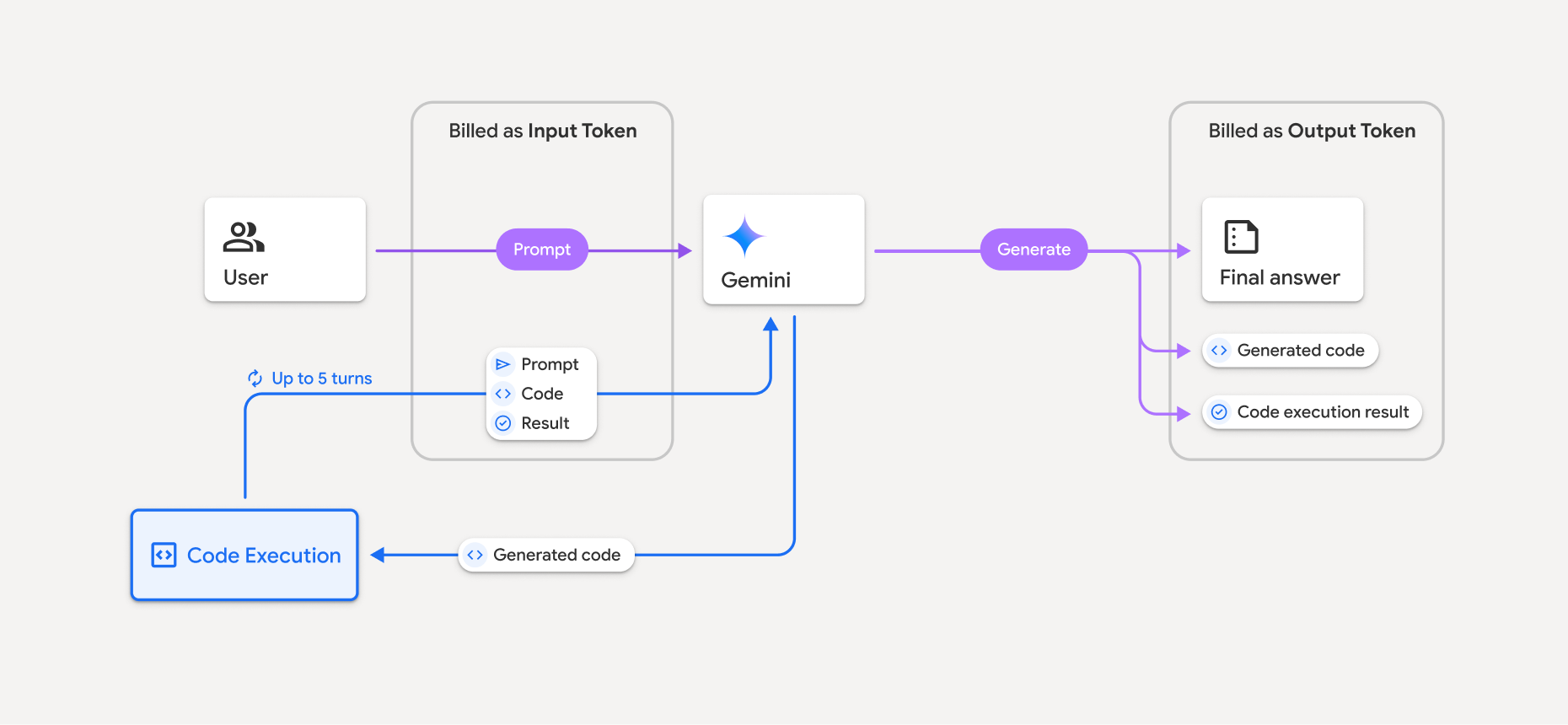
- Você será cobrado pela taxa atual de tokens de entrada e saída com base no modelo do Gemini que estiver usando.
- Se o Gemini usar a execução de código ao gerar sua resposta, o comando original, o código gerado e o resultado do código executado serão rotulados como tokens intermediários e cobrados como tokens de entrada.
- Em seguida, o Gemini gera um resumo e retorna o código gerado, o resultado do código executado e o resumo final. Eles são cobrados como tokens de saída.
- A API Gemini inclui uma contagem de tokens intermediários na resposta da API para que você saiba por que está recebendo tokens de entrada adicionais além do comando inicial.
Limitações
- O modelo só pode gerar e executar código. Ele não pode retornar outros artefatos, como arquivos de mídia.
- Em alguns casos, ativar a execução de código pode levar a regressões em outras áreas da saída do modelo (por exemplo, escrever uma história).
- Há algumas variações na capacidade dos diferentes modelos de usar a execução de código com sucesso.
Combinações de ferramentas compatíveis
A ferramenta de execução de código pode ser combinada com o embasamento com a Pesquisa Google para oferecer casos de uso mais complexos.
Os modelos Gemini 4 e Gemini 3 oferecem suporte à combinação de ferramentas integradas (como a execução de código) com ferramentas personalizadas (chamada de função).
Bibliotecas permitidas
O ambiente de execução de código inclui as seguintes bibliotecas:
- attrs
- xadrez
- contourpy
- fpdf
- geopandas
- imageio
- jinja2
- joblib
- jsonschema
- jsonschema-specifications
- lxml
- matplotlib
- mpmath
- numpy
- opencv-python
- openpyxl
- empacotamento
- pandas
- pillow
- protobuf
- pylatex
- pyparsing
- PyPDF2
- python-dateutil
- python-docx
- python-pptx
- reportlab
- scikit-learn
- scipy
- seaborn
- six
- striprtf
- sympy
- tabulate
- tensorflow
- toolz
- xlrd
Não é possível instalar suas próprias bibliotecas.
A seguir
- Confira o início rápido da API Interactions.
- Saiba mais sobre outras ferramentas da API Gemini: