

LangGraph, स्टेटफ़ुल एलएलएम ऐप्लिकेशन बनाने का एक फ़्रेमवर्क है. इसलिए, यह ReAct (रीज़निंग ऐंड ऐक्टिंग) एजेंट बनाने के लिए एक अच्छा विकल्प है.
ReAct एजेंट, एलएलएम की रीज़निंग को कार्रवाई करने की सुविधा के साथ जोड़ते हैं. ये एजेंट, उपयोगकर्ता के लक्ष्यों को हासिल करने के लिए, बार-बार सोचते हैं, टूल का इस्तेमाल करते हैं, और अपनी टिप्पणियों के आधार पर काम करते हैं. साथ ही, ये अपनी रणनीति को डाइनैमिक तरीके से अडजस्ट करते हैं. साल 2023 में "ReAct: Synergizing Reasoning and Acting in Language Models" में पेश किया गया यह पैटर्न, रिजिड वर्कफ़्लो के बजाय, इंसानों की तरह फ़्लेक्सिबल तरीके से समस्याओं को हल करने की कोशिश करता है.
LangGraph, पहले से बना ReAct एजेंट (
create_react_agent) उपलब्ध कराता है. यह तब काम आता है, जब आपको ReAct को लागू करने के लिए ज़्यादा कंट्रोल और कस्टमाइज़ेशन की ज़रूरत होती है. इस गाइड में, आपको इसका आसान वर्शन दिखाया जाएगा.
LangGraph, एजेंट को ग्राफ़ के तौर पर मॉडल करता है. इसके लिए, तीन मुख्य कॉम्पोनेंट का इस्तेमाल किया जाता है:
State: शेयर किया गया डेटा स्ट्रक्चर (आम तौर परTypedDictयाPydantic BaseModel), जो ऐप्लिकेशन के मौजूदा स्नैपशॉट को दिखाता है.Nodes: आपके एजेंट की लॉजिक को एनकोड करता है. इन्हें इनपुट के तौर पर मौजूदा स्टेट मिलती है. इसके बाद, ये कुछ कंप्यूटेशन या साइड इफ़ेक्ट करते हैं. साथ ही, अपडेट की गई स्टेट दिखाते हैं. जैसे, एलएलएम कॉल या टूल कॉल.Edges: मौजूदाStateके आधार पर, एक्ज़ीक्यूट करने के लिए अगलाNodeतय करते हैं. इससे, शर्तों के आधार पर लॉजिक और फ़िक्स्ड ट्रांज़िशन की अनुमति मिलती है.
अगर आपके पास अब तक एपीआई पासकोड नहीं है, तो इसे Google AI Studio से पाया जा सकता है.
pip install langgraph langchain-google-genai geopy requests
एपीआई पासकोड को, एनवायरमेंट वैरिएबल GEMINI_API_KEY में सेट करें.
import os

# Read your API key from the environment variable or set it manually
api_key = os.getenv("GEMINI_API_KEY")
LangGraph का इस्तेमाल करके, ReAct एजेंट को लागू करने का तरीका बेहतर तरीके से समझने के लिए, इस गाइड में एक व्यावहारिक उदाहरण दिया गया है. इसमें, एक ऐसा एजेंट बनाया जाएगा जिसका लक्ष्य, किसी खास जगह के मौजूदा मौसम की जानकारी पाने के लिए, किसी टूल का इस्तेमाल करना है.
मौसम की जानकारी देने वाले इस एजेंट के लिए, State में बातचीत के इतिहास (मैसेज की सूची के तौर पर) और उठाए गए चरणों की संख्या (इंटीजर के तौर पर) को सेव किया जाएगा. यह सिर्फ़ उदाहरण के तौर पर दिखाया गया है.
LangGraph, स्टेट मैसेज की सूचियों को अपडेट करने के लिए, add_messages नाम का हेल्पर फ़ंक्शन उपलब्ध कराता है. यह रिड्यूसर के तौर पर काम करता है. यह मौजूदा सूची के साथ-साथ, नए मैसेज लेता है और एक साथ मिलाकर सूची दिखाता है. यह मैसेज आईडी के हिसाब से अपडेट करता है. साथ ही, नए और न देखे गए मैसेज के लिए, डिफ़ॉल्ट रूप से "सिर्फ़ जोड़ने" का तरीका अपनाता है.
from typing import Annotated,Sequence, TypedDict

from langchain_core.messages import BaseMessage
from langgraph.graph.message import add_messages  # helper function to add messages to the state

class AgentState(TypedDict):
    """The state of the agent."""
    messages: Annotated[Sequence[BaseMessage], add_messages]
    number_of_steps: int
इसके बाद, मौसम की जानकारी देने वाले टूल को तय करें.
from langchain_core.tools import tool
from geopy.geocoders import Nominatim
from pydantic import BaseModel, Field
import requests

geolocator = Nominatim(user_agent="weather-app")

class SearchInput(BaseModel):
    location:str = Field(description="The city and state, e.g., San Francisco")
    date:str = Field(description="the forecasting date for when to get the weather format (yyyy-mm-dd)")

@tool("get_weather_forecast", args_schema=SearchInput, return_direct=True)
def get_weather_forecast(location: str, date: str):
    """Retrieves the weather using Open-Meteo API.

    Takes a given location (city) and a date (yyyy-mm-dd).

    Returns:
        A dict with the time and temperature for each hour.
    """
    # Note that Colab may experience rate limiting on this service. If this
    # happens, use a machine to which you have exclusive access.
    location = geolocator.geocode(location)
    if location:
        try:
            response = requests.get(f"https://api.open-meteo.com/v1/forecast?latitude={location.latitude}&longitude={location.longitude}&hourly=temperature_2m&start_date={date}&end_date={date}")
            data = response.json()
            return dict(zip(data["hourly"]["time"], data["hourly"]["temperature_2m"]))
        except Exception as e:
            return {"error": str(e)}
    else:
        return {"error": "Location not found"}

tools = [get_weather_forecast]
अब मॉडल को शुरू करें और टूल को मॉडल से बाइंड करें.
from datetime import datetime
from langchain_google_genai import ChatGoogleGenerativeAI

# Create LLM class
llm = ChatGoogleGenerativeAI(
    model= "gemini-3.6-flash",
    temperature=1.0,
    max_retries=2,
    google_api_key=api_key,
)

# Bind tools to the model
model = llm.bind_tools([get_weather_forecast])

# Test the model with tools
res=model.invoke(f"What is the weather in Berlin on {datetime.today()}?")

print(res)
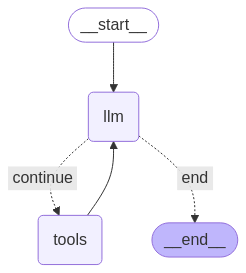
एजेंट को चलाने से पहले, नोड और एज तय करना ज़रूरी है. इस उदाहरण में, दो नोड और एक एज है.
call_toolनोड, जो आपके टूल के तरीके को एक्ज़ीक्यूट करता है. LangGraph में इसके लिए, ToolNode नाम का पहले से बना नोड मौजूद है.call_modelनोड, जो मॉडल को कॉल करने के लिएmodel_with_toolsका इस्तेमाल करता है.should_continueएज, जो यह तय करता है कि टूल को कॉल करना है या मॉडल को.
नोड और एज की संख्या तय नहीं होती. अपने ग्राफ़ में जितने चाहें उतने नोड और एज जोड़े जा सकते हैं. उदाहरण के लिए, स्ट्रक्चर्ड आउटपुट जोड़ने के लिए कोई नोड जोड़ा जा सकता है. इसके अलावा, टूल या मॉडल को कॉल करने से पहले, मॉडल के आउटपुट की जांच करने के लिए, सेल्फ़-वेरिफ़िकेशन/रिफ़्लेक्शन नोड जोड़ा जा सकता है.
from langchain_core.messages import ToolMessage
from langchain_core.runnables import RunnableConfig

tools_by_name = {tool.name: tool for tool in tools}

# Define our tool node
def call_tool(state: AgentState):
    outputs = []
    # Iterate over the tool calls in the last message
    for tool_call in state["messages"][-1].tool_calls:
        # Get the tool by name
        tool_result = tools_by_name[tool_call["name"]].invoke(tool_call["args"])
        outputs.append(
            ToolMessage(
                content=tool_result,
                name=tool_call["name"],
                tool_call_id=tool_call["id"],
            )
        )
    return {"messages": outputs}

def call_model(
    state: AgentState,
    config: RunnableConfig,
):
    # Invoke the model with the system prompt and the messages
    response = model.invoke(state["messages"], config)
    # This returns a list, which combines with the existing messages state
    # using the add_messages reducer.
    return {"messages": [response]}

# Define the conditional edge that determines whether to continue or not
def should_continue(state: AgentState):
    messages = state["messages"]
    # If the last message is not a tool call, then finish
    if not messages[-1].tool_calls:
        return "end"
    # default to continue
    return "continue"
एजेंट के सभी कॉम्पोनेंट तैयार होने के बाद, उन्हें जोड़ा जा सकता है.
from langgraph.graph import StateGraph, END

# Define a new graph with our state
workflow = StateGraph(AgentState)

# 1. Add the nodes
workflow.add_node("llm", call_model)
workflow.add_node("tools",  call_tool)
# 2. Set the entrypoint as `agent`, this is the first node called
workflow.set_entry_point("llm")
# 3. Add a conditional edge after the `llm` node is called.
workflow.add_conditional_edges(
    # Edge is used after the `llm` node is called.
    "llm",
    # The function that will determine which node is called next.
    should_continue,
    # Mapping for where to go next, keys are strings from the function return,
    # and the values are other nodes.
    # END is a special node marking that the graph is finish.
    {
        # If `tools`, then we call the tool node.
        "continue": "tools",
        # Otherwise we finish.
        "end": END,
    },
)
# 4. Add a normal edge after `tools` is called, `llm` node is called next.
workflow.add_edge("tools", "llm")

# Now we can compile and visualize our graph
graph = workflow.compile()
draw_mermaid_png तरीके का इस्तेमाल करके, अपने ग्राफ़ को विज़ुअलाइज़ किया जा सकता है.
from IPython.display import Image, display

display(Image(graph.get_graph().draw_mermaid_png()))
अब एजेंट को चलाएं.
from datetime import datetime
# Create our initial message dictionary
inputs = {"messages": [("user", f"What is the weather in Berlin on {datetime.today()}?")]}

# call our graph with streaming to see the steps
for state in graph.stream(inputs, stream_mode="values"):
    last_message = state["messages"][-1]
    last_message.pretty_print()
अब बातचीत जारी रखी जा सकती है. इसके अलावा, किसी दूसरे शहर के मौसम की जानकारी मांगी जा सकती है या तुलना करने का अनुरोध किया जा सकता है.
state["messages"].append(("user", "Would it be warmer in Munich?"))

for state in graph.stream(state, stream_mode="values"):
    last_message = state["messages"][-1]
    last_message.pretty_print()