

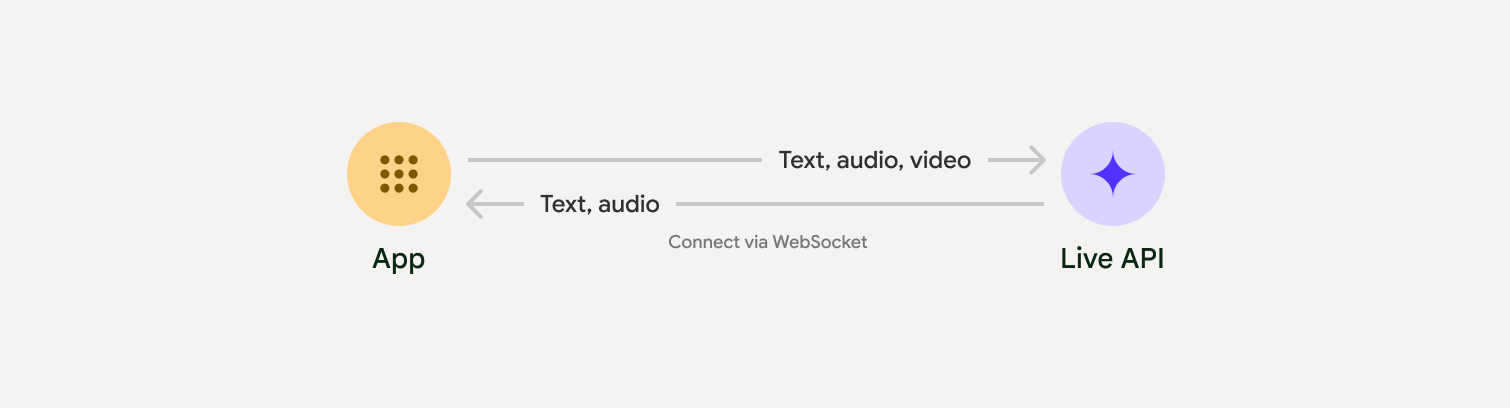
Live API cho phép tương tác bằng giọng nói và hình ảnh theo thời gian thực với độ trễ thấp cùng Gemini. Nó xử lý luồng âm thanh, hình ảnh và văn bản liên tục để đưa ra phản hồi bằng lời nói ngay lập tức, giống như con người, tạo ra trải nghiệm trò chuyện tự nhiên cho người dùng.
Trường hợp sử dụng
Bạn có thể dùng Live API để tạo các tác nhân thoại theo thời gian thực cho nhiều ngành, bao gồm:
- Thương mại điện tử và bán lẻ: Trợ lý mua sắm đưa ra đề xuất phù hợp với từng người dùng và nhân viên hỗ trợ giải quyết vấn đề của khách hàng.
- Trò chơi: Nhân vật không phải người chơi (NPC) có tính tương tác, trợ lý trợ giúp trong trò chơi và bản dịch nội dung trong trò chơi theo thời gian thực.
- Giao diện thế hệ tiếp theo: Trải nghiệm hỗ trợ giọng nói và video trong lĩnh vực robot học, kính thông minh và xe cộ.
- Chăm sóc sức khoẻ: Trợ lý sức khoẻ để hỗ trợ và giáo dục bệnh nhân.
- Dịch vụ tài chính: Cố vấn AI để quản lý tài sản và hướng dẫn đầu tư.
- Giáo dục: Gia sư AI và trợ lý học tập cung cấp hướng dẫn và thông tin phản hồi phù hợp với từng người học.
- Dịch và bản địa hoá: Dịch cuộc trò chuyện bằng lời nói theo thời gian thực với độ trễ thấp, giúp giao tiếp liền mạch bằng nhiều ngôn ngữ.
- Chép lời và tạo phụ đề trực tiếp: Truyền trực tiếp lời nói thành văn bản theo thời gian thực để tạo phụ đề trực tiếp, chép lời cuộc họp, đọc chính tả bằng giọng nói và ghi nhật ký cuộc gọi của khách hàng.
Các tính năng chính
Live API cung cấp một bộ tính năng toàn diện để xây dựng các tác nhân thoại mạnh mẽ:
- Hỗ trợ đa ngôn ngữ: Trò chuyện bằng 70 ngôn ngữ được hỗ trợ.
- Ngắt lời: Người dùng có thể ngắt lời mô hình bất cứ lúc nào để có các lượt tương tác phản hồi.
- Sử dụng công cụ: Tích hợp các công cụ như gọi hàm và Google Tìm kiếm để có các hoạt động tương tác linh hoạt.
- Bản chép lời âm thanh: Cung cấp bản chép lời bằng văn bản cho cả hoạt động đầu vào của người dùng và đầu ra của mô hình.
- Âm thanh chủ động: Cho phép bạn kiểm soát thời điểm và ngữ cảnh mà mô hình phản hồi.
- Hộp thoại tình cảm: Điều chỉnh văn phong và giọng điệu phản hồi cho phù hợp với cách diễn đạt của người dùng.
- Chép lời trực tiếp: Truyền trực tiếp liên tục lời nói sang văn bản theo thời gian thực, có tính năng tự động phát hiện ngôn ngữ và từ vựng tuỳ chỉnh.
- Dịch trực tiếp: Dịch lời nói theo thời gian thực sang hơn 70 ngôn ngữ.
Đặc điểm kỹ thuật
Bảng sau đây trình bày các quy cách kỹ thuật của Live API:
| Danh mục | Thông tin chi tiết |
|---|---|
| Phương thức nhập | Âm thanh (âm thanh PCM 16 bit thô, 16 kHz, little-endian), hình ảnh (JPEG <= 1 khung hình/giây), văn bản |
| Phương thức đầu ra | Âm thanh (âm thanh PCM 16 bit thô, 24 kHz, little-endian) |
| Giao thức | Kết nối WebSocket có trạng thái (WSS) |
Chọn một phương pháp triển khai
Khi tích hợp với Live API, bạn cần chọn một trong các phương pháp triển khai sau:
- Máy chủ với máy chủ: Phần phụ trợ của bạn kết nối với Live API bằng WebSockets. Thông thường, ứng dụng sẽ gửi dữ liệu phát trực tiếp (âm thanh, video, văn bản) đến máy chủ của bạn, sau đó máy chủ sẽ chuyển tiếp dữ liệu đó đến Live API.
- Từ ứng dụng đến máy chủ: Mã giao diện người dùng của bạn kết nối trực tiếp với Live API bằng WebSockets để truyền trực tuyến dữ liệu, bỏ qua phần phụ trợ.
Bắt đầu
Chọn hướng dẫn phù hợp với môi trường phát triển của bạn:
Hướng dẫn về GenAI SDK
Kết nối với Gemini Live API bằng GenAI SDK để tạo một ứng dụng đa phương thức theo thời gian thực bằng một phần phụ trợ Python.
Hướng dẫn về WebSocket
Kết nối với Gemini Live API bằng WebSockets để tạo một ứng dụng đa phương thức theo thời gian thực với giao diện người dùng JavaScript và mã thông báo tạm thời.
Hướng dẫn về ADK
Tạo một tác nhân và sử dụng tính năng Truyền trực tuyến của Bộ công cụ phát triển tác nhân (ADK) để bật tính năng giao tiếp bằng giọng nói và video.
Tích hợp với đối tác
Để đơn giản hoá quá trình phát triển các ứng dụng âm thanh và video theo thời gian thực, bạn có thể sử dụng một dịch vụ tích hợp bên thứ ba hỗ trợ Gemini Live API qua WebRTC hoặc WebSocket.
LiveKit
Sử dụng Gemini Live API với LiveKit Agents.
Pipecat của Daily
Tạo chatbot AI theo thời gian thực bằng Gemini Live và Pipecat.
Fishjam của Software Mansion
Tạo ứng dụng phát trực tiếp video và âm thanh bằng Fishjam.
Tác nhân thị giác theo luồng
Xây dựng các ứng dụng AI bằng giọng nói và video theo thời gian thực bằng Vision Agents.
Voximplant
Kết nối các cuộc gọi đến và đi với Live API bằng Voximplant.
Agora
Xây dựng các ứng dụng AI đàm thoại theo thời gian thực bằng Agora.
Firebase AI SDK
Bắt đầu sử dụng Gemini Live API bằng Firebase AI Logic.