

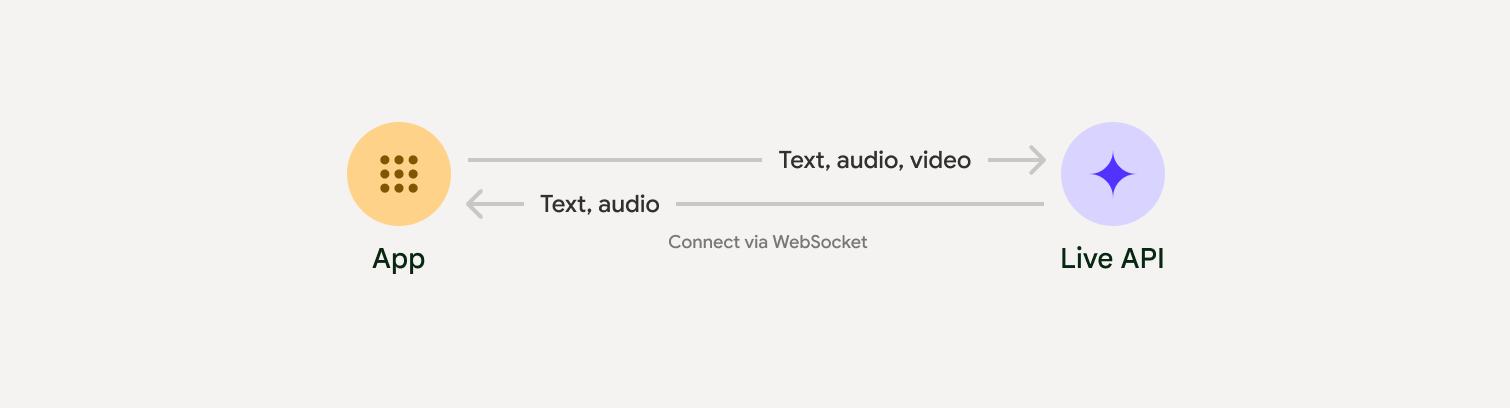
Live API позволяет общаться с Gemini голосом и с помощью изображений в реальном времени с низкой задержкой. Он обрабатывает непрерывные потоки аудио, изображений и текста, чтобы предоставлять мгновенные ответы, похожие на человеческую речь, и создавать естественный разговорный интерфейс для ваших пользователей.
Примеры использования
Live API можно использовать для создания голосовых агентов в реальном времени для разных отраслей, в том числе:
- Электронная торговля и розничная торговля. Помощники по покупкам, которые предлагают персонализированные рекомендации, и агенты службы поддержки, которые решают проблемы клиентов.
- Игры. Интерактивные неигровые персонажи, помощники в игре и перевод игрового контента в реальном времени.
- Интерфейсы нового поколения. Голосовые и видеоинтерфейсы для роботов, умных очков и автомобилей.
- Здравоохранение. Помощники для пациентов, которые могут поддерживать и обучать их.
- Финансовые услуги. ИИ-консультанты по управлению капиталом и инвестициям.
- Образование. ИИ-наставники и помощники, которые предоставляют персонализированные инструкции и отзывы.
- Перевод и локализация. Перевод устной речи в реальном времени с низкой задержкой, позволяющий общаться на разных языках.
- Прямая расшифровка и субтитры. Преобразование речи в текст в реальном времени для создания субтитров, расшифровки встреч, голосового ввода и записи звонков клиентов.
Основные функции
Действующий API предлагает широкий набор функций для создания надежных голосовых агентов:
- Поддержка нескольких языков. Общайтесь на 70 поддерживаемых языках.
- Перебивание. Пользователи могут в любой момент прервать модель, чтобы получить ответ.
- Использование инструментов. Интегрирует такие инструменты, как вызов функций и Google Поиск, для динамического взаимодействия.
- Расшифровка аудио: предоставляет текстовую расшифровку как ввода данных пользователем, так и выходных данных модели.
- Проактивное аудио. Позволяет управлять тем, когда и в каких контекстах модель будет отвечать.
- Эмоциональный диалог. Стиль и тон ответа будут соответствовать выражению, использованному в запросе пользователя.
- Транскрипция в реальном времени: непрерывный поток преобразования речи в текст в реальном времени с автоматическим определением языка и пользовательским словарем.
- Мгновенный перевод – перевод речи на более чем 70 языков в реальном времени.
Технические требования
В таблице ниже приведены технические характеристики Live API.
| Категория | Сведения |
|---|---|
| Способы ввода | Аудио (необработанный 16-битный звук PCM, 16 кГц, little-endian), изображения (JPEG, не более 1 кадра в секунду), текст |
| Выходные модальности | Аудио (необработанный звук PCM 16 бит, 24 кГц, little-endian) |
| Протокол | Подключение WebSocket с сохранением состояния (WSS) |
Как реализовать отслеживание конверсий
При интеграции с Live API вам нужно будет выбрать один из следующих подходов к реализации:
- Сервер-сервер. Ваш сервер подключается к Live API с помощью WebSockets. Как правило, клиент отправляет данные трансляции (аудио, видео, текст) на ваш сервер, который затем пересылает их в Live API.
- Клиент-сервер. Код интерфейса напрямую подключается к Live API с помощью WebSockets для передачи данных, минуя внутренний сервер.
Начать
Выберите руководство, соответствующее вашей среде разработки:
Учебное руководство по GenAI SDK
Подключитесь к Gemini Live API с помощью GenAI SDK, чтобы создать мультимодальное приложение реального времени с бэкэндом на Python.
Учебное руководство по WebSocket
Подключитесь к Gemini Live API с помощью WebSockets, чтобы создать мультимодальное приложение, работающее в реальном времени, с клиентской частью на JavaScript и временными токенами.
Руководство по ADK
Создайте агента и используйте потоковую передачу Agent Development Kit (ADK), чтобы включить голосовую и видеосвязь.
Интеграция с партнерами
Чтобы упростить разработку аудио- и видеоприложений, работающих в реальном времени, можно использовать стороннюю интеграцию, которая поддерживает Gemini Live API через WebRTC или WebSockets.
LiveKit
Используйте Gemini Live API с агентами LiveKit.
Pipecat от Daily
Как создать ИИ-чат-бота в реальном времени с помощью Gemini Live и Pipecat
Fishjam от Software Mansion
Создавайте приложения для потоковой передачи видео и аудио с помощью Fishjam.
Агенты Vision по стриму
Создавайте приложения на основе ИИ для обработки аудио и видео в реальном времени с помощью агентов Vision.
Voximplant
Подключите входящие и исходящие звонки к Live API с помощью Voximplant.
Agora
Создавайте приложения с разговорным ИИ в реальном времени с помощью Agora.
Firebase AI SDK
Начните работу с Gemini Live API, используя Firebase AI Logic.