Live API ช่วยให้โต้ตอบด้วยเสียงและวิดีโอแบบเรียลไทม์ที่มีเวลาในการตอบสนองต่ำกับ Gemini ได้ โดยจะประมวลผลสตรีมเสียง วิดีโอ หรือข้อความอย่างต่อเนื่องเพื่อส่งมอบ คำตอบที่พูดได้ทันทีและเหมือนมนุษย์ ซึ่งจะสร้างประสบการณ์การสนทนาที่เป็นธรรมชาติ สำหรับผู้ใช้
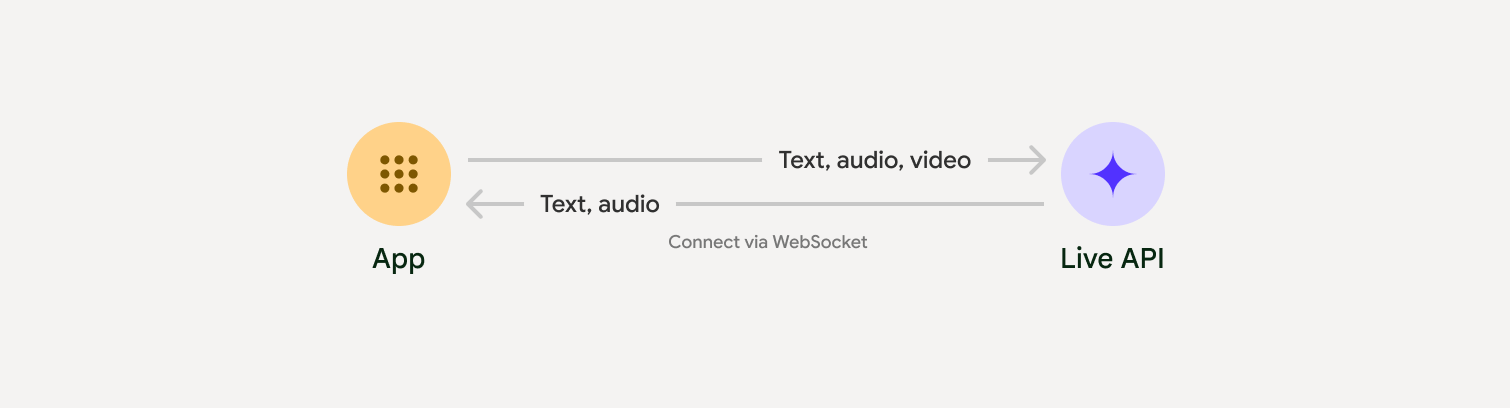
Live API มีชุดฟีเจอร์ที่ครอบคลุม เช่น การตรวจหากิจกรรมเสียง การใช้เครื่องมือและการเรียกฟังก์ชัน การจัดการเซสชัน (สําหรับการจัดการการสนทนาที่ใช้เวลานาน) และโทเค็นชั่วคราว (สําหรับการตรวจสอบสิทธิ์ฝั่งไคลเอ็นต์ที่ปลอดภัย)
หน้านี้จะช่วยให้คุณเริ่มต้นใช้งานได้ด้วยตัวอย่างและตัวอย่างโค้ดพื้นฐาน
ลองใช้ Live API ใน Google AI Studio
เลือกวิธีการติดตั้งใช้งาน
เมื่อผสานรวมกับ Live API คุณจะต้องเลือกแนวทางการติดตั้งใช้งานอย่างใดอย่างหนึ่งต่อไปนี้
- เซิร์ฟเวอร์ต่อเซิร์ฟเวอร์: แบ็กเอนด์จะเชื่อมต่อกับ Live API โดยใช้ WebSockets โดยปกติแล้ว ไคลเอ็นต์จะส่งข้อมูลสตรีม (เสียง วิดีโอ ข้อความ) ไปยังเซิร์ฟเวอร์ของคุณ ซึ่งจะส่งต่อข้อมูลไปยัง Live API
- ไคลเอ็นต์ถึงเซิร์ฟเวอร์: โค้ดส่วนหน้าจะเชื่อมต่อกับ Live API โดยตรง โดยใช้ WebSockets เพื่อสตรีมข้อมูลโดยข้ามแบ็กเอนด์
การผสานรวมพาร์ทเนอร์
หากต้องการเพิ่มประสิทธิภาพการพัฒนาแอปเสียงและวิดีโอแบบเรียลไทม์ คุณสามารถใช้ การผสานรวมของบุคคลที่สามที่รองรับ Gemini Live API ผ่าน WebRTC หรือ WebSockets
เริ่มต้นใช้งาน
ตัวอย่างฝั่งเซิร์ฟเวอร์นี้สตรีมเสียงจากไมโครโฟนและเล่นเสียงที่ ส่งคืน ดูตัวอย่างแบบครบวงจร รวมถึงแอปพลิเคชันไคลเอ็นต์ได้ที่แอปพลิเคชันตัวอย่าง
รูปแบบเสียงอินพุตควรเป็น PCM 16 บิต, 16kHz, รูปแบบโมโน และเสียงที่ได้รับใช้อัตราการสุ่มตัวอย่าง 24kHz
Python
ติดตั้งโปรแกรมช่วยสำหรับการสตรีมเสียง อาจต้องมีทรัพยากร Dependency เพิ่มเติมในระดับระบบ
(เช่น portaudio) ดูขั้นตอนการติดตั้งโดยละเอียดได้ในเอกสารประกอบของ PyAudio
pip install pyaudioimport asyncio
from google import genai
import pyaudio
client = genai.Client()
# --- pyaudio config ---
FORMAT = pyaudio.paInt16
CHANNELS = 1
SEND_SAMPLE_RATE = 16000
RECEIVE_SAMPLE_RATE = 24000
CHUNK_SIZE = 1024
pya = pyaudio.PyAudio()
# --- Live API config ---
MODEL = "gemini-2.5-flash-native-audio-preview-09-2025"
CONFIG = {
"response_modalities": ["AUDIO"],
"system_instruction": "You are a helpful and friendly AI assistant.",
}
audio_queue_output = asyncio.Queue()
audio_queue_mic = asyncio.Queue(maxsize=5)
audio_stream = None
async def listen_audio():
"""Listens for audio and puts it into the mic audio queue."""
global audio_stream
mic_info = pya.get_default_input_device_info()
audio_stream = await asyncio.to_thread(
pya.open,
format=FORMAT,
channels=CHANNELS,
rate=SEND_SAMPLE_RATE,
input=True,
input_device_index=mic_info["index"],
frames_per_buffer=CHUNK_SIZE,
)
kwargs = {"exception_on_overflow": False} if __debug__ else {}
while True:
data = await asyncio.to_thread(audio_stream.read, CHUNK_SIZE, **kwargs)
await audio_queue_mic.put({"data": data, "mime_type": "audio/pcm"})
async def send_realtime(session):
"""Sends audio from the mic audio queue to the GenAI session."""
while True:
msg = await audio_queue_mic.get()
await session.send_realtime_input(audio=msg)
async def receive_audio(session):
"""Receives responses from GenAI and puts audio data into the speaker audio queue."""
while True:
turn = session.receive()
async for response in turn:
if (response.server_content and response.server_content.model_turn):
for part in response.server_content.model_turn.parts:
if part.inline_data and isinstance(part.inline_data.data, bytes):
audio_queue_output.put_nowait(part.inline_data.data)
# Empty the queue on interruption to stop playback
while not audio_queue_output.empty():
audio_queue_output.get_nowait()
async def play_audio():
"""Plays audio from the speaker audio queue."""
stream = await asyncio.to_thread(
pya.open,
format=FORMAT,
channels=CHANNELS,
rate=RECEIVE_SAMPLE_RATE,
output=True,
)
while True:
bytestream = await audio_queue_output.get()
await asyncio.to_thread(stream.write, bytestream)
async def run():
"""Main function to run the audio loop."""
try:
async with client.aio.live.connect(
model=MODEL, config=CONFIG
) as live_session:
print("Connected to Gemini. Start speaking!")
async with asyncio.TaskGroup() as tg:
tg.create_task(send_realtime(live_session))
tg.create_task(listen_audio())
tg.create_task(receive_audio(live_session))
tg.create_task(play_audio())
except asyncio.CancelledError:
pass
finally:
if audio_stream:
audio_stream.close()
pya.terminate()
print("\nConnection closed.")
if __name__ == "__main__":
try:
asyncio.run(run())
except KeyboardInterrupt:
print("Interrupted by user.")
JavaScript
ติดตั้งโปรแกรมช่วยสำหรับการสตรีมเสียง อาจต้องมีทรัพยากร Dependency เพิ่มเติมที่ระดับระบบ (sox สำหรับ Mac/Windows หรือ ALSA สำหรับ Linux) โปรดดูขั้นตอนการติดตั้งโดยละเอียดในเอกสารประกอบเกี่ยวกับลำโพงและไมโครโฟน
npm install mic speakerimport { GoogleGenAI, Modality } from '@google/genai';
import mic from 'mic';
import Speaker from 'speaker';
const ai = new GoogleGenAI({});
// WARNING: Do not use API keys in client-side (browser based) applications
// Consider using Ephemeral Tokens instead
// More information at: https://ai.google.dev/gemini-api/docs/ephemeral-tokens
// --- Live API config ---
const model = 'gemini-2.5-flash-native-audio-preview-09-2025';
const config = {
responseModalities: [Modality.AUDIO],
systemInstruction: "You are a helpful and friendly AI assistant.",
};
async function live() {
const responseQueue = [];
const audioQueue = [];
let speaker;
async function waitMessage() {
while (responseQueue.length === 0) {
await new Promise((resolve) => setImmediate(resolve));
}
return responseQueue.shift();
}
function createSpeaker() {
if (speaker) {
process.stdin.unpipe(speaker);
speaker.end();
}
speaker = new Speaker({
channels: 1,
bitDepth: 16,
sampleRate: 24000,
});
speaker.on('error', (err) => console.error('Speaker error:', err));
process.stdin.pipe(speaker);
}
async function messageLoop() {
// Puts incoming messages in the audio queue.
while (true) {
const message = await waitMessage();
if (message.serverContent && message.serverContent.interrupted) {
// Empty the queue on interruption to stop playback
audioQueue.length = 0;
continue;
}
if (message.serverContent && message.serverContent.modelTurn && message.serverContent.modelTurn.parts) {
for (const part of message.serverContent.modelTurn.parts) {
if (part.inlineData && part.inlineData.data) {
audioQueue.push(Buffer.from(part.inlineData.data, 'base64'));
}
}
}
}
}
async function playbackLoop() {
// Plays audio from the audio queue.
while (true) {
if (audioQueue.length === 0) {
if (speaker) {
// Destroy speaker if no more audio to avoid warnings from speaker library
process.stdin.unpipe(speaker);
speaker.end();
speaker = null;
}
await new Promise((resolve) => setImmediate(resolve));
} else {
if (!speaker) createSpeaker();
const chunk = audioQueue.shift();
await new Promise((resolve) => {
speaker.write(chunk, () => resolve());
});
}
}
}
// Start loops
messageLoop();
playbackLoop();
// Connect to Gemini Live API
const session = await ai.live.connect({
model: model,
config: config,
callbacks: {
onopen: () => console.log('Connected to Gemini Live API'),
onmessage: (message) => responseQueue.push(message),
onerror: (e) => console.error('Error:', e.message),
onclose: (e) => console.log('Closed:', e.reason),
},
});
// Setup Microphone for input
const micInstance = mic({
rate: '16000',
bitwidth: '16',
channels: '1',
});
const micInputStream = micInstance.getAudioStream();
micInputStream.on('data', (data) => {
// API expects base64 encoded PCM data
session.sendRealtimeInput({
audio: {
data: data.toString('base64'),
mimeType: "audio/pcm;rate=16000"
}
});
});
micInputStream.on('error', (err) => {
console.error('Microphone error:', err);
});
micInstance.start();
console.log('Microphone started. Speak now...');
}
live().catch(console.error);
ตัวอย่างการใช้งาน
ดูตัวอย่างแอปพลิเคชันต่อไปนี้ซึ่งแสดงวิธีใช้ Live API สำหรับกรณีการใช้งานแบบครบวงจร
- แอปเริ่มต้นสำหรับเสียงสดใน AI Studio โดยใช้ไลบรารี JavaScript เพื่อเชื่อมต่อกับ Live API และสตรีมเสียงแบบสองทิศทาง ผ่านไมโครโฟนและลำโพง
- ดูตัวอย่างเพิ่มเติมและคู่มือการเริ่มต้นใช้งานได้ที่การผสานรวมกับพาร์ทเนอร์
ขั้นตอนถัดไป
- อ่านคู่มือความสามารถของ Live API ฉบับเต็มเพื่อดูความสามารถและการกำหนดค่าที่สำคัญ รวมถึงการตรวจหากิจกรรมเสียงและฟีเจอร์เสียงดั้งเดิม
- อ่านคำแนะนำการใช้เครื่องมือเพื่อดูวิธีผสานรวม Live API กับเครื่องมือและการเรียกใช้ฟังก์ชัน
- อ่านคู่มือการจัดการเซสชันเพื่อจัดการการสนทนาที่ใช้เวลานาน
- อ่านคู่มือโทเค็นชั่วคราวเพื่อดูการตรวจสอบสิทธิ์ที่ปลอดภัยในแอปพลิเคชันไคลเอ็นต์ต่อเซิร์ฟเวอร์
- ดูข้อมูลเพิ่มเติมเกี่ยวกับ WebSockets API พื้นฐานได้ที่เอกสารอ้างอิง WebSockets API