
Live API는 Gemini와의 지연 시간이 짧은 실시간 음성 및 동영상 상호작용을 지원합니다. 연속적인 오디오, 동영상 또는 텍스트 스트림을 처리하여 즉각적이고 사람과 유사한 음성 대답을 제공하므로 사용자에게 자연스러운 대화형 환경을 제공합니다.
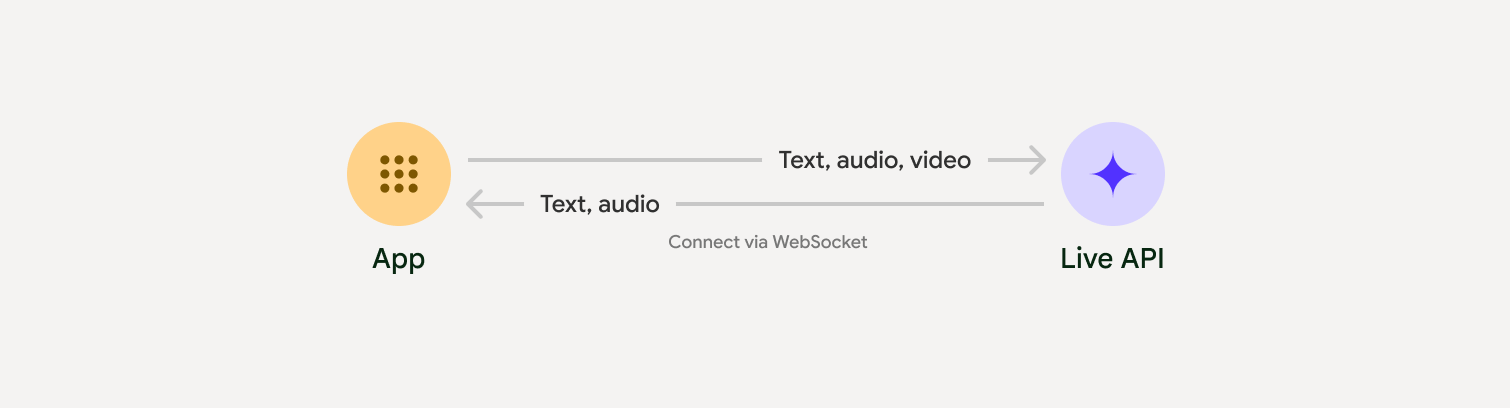
Live API는 음성 활동 감지, 도구 사용 및 함수 호출, 세션 관리 (장기 대화 관리용), 일시적 토큰 (안전한 클라이언트 측 인증용)과 같은 포괄적인 기능을 제공합니다.
이 페이지에서는 예시와 기본 코드 샘플을 통해 시작할 수 있습니다.
Google AI Studio에서 Live API 사용해 보기
구현 접근 방식 선택
Live API와 통합할 때는 다음 구현 접근 방식 중 하나를 선택해야 합니다.
- 서버 간: 백엔드가 WebSockets를 사용하여 Live API에 연결됩니다. 일반적으로 클라이언트는 스트림 데이터 (오디오, 동영상, 텍스트)를 서버로 전송하고 서버는 이를 Live API로 전달합니다.
- 클라이언트-서버: 프런트엔드 코드가 WebSockets을 사용하여 Live API에 직접 연결하여 데이터를 스트리밍하고 백엔드를 우회합니다.
파트너 연동
실시간 오디오 및 동영상 앱의 개발을 간소화하려면 WebRTC 또는 WebSocket을 통해 Gemini Live API를 지원하는 서드 파티 통합을 사용하면 됩니다.
Pipecat by Daily
Gemini Live 및 Pipecat을 사용하여 실시간 AI 챗봇을 만드세요.
LiveKit
LiveKit 에이전트와 함께 Gemini Live API를 사용합니다.
Software Mansion의 Fishjam
Fishjam으로 라이브 동영상 및 오디오 스트리밍 애플리케이션을 만드세요.
에이전트 개발 키트(ADK)
에이전트 개발 키트 (ADK)로 Live API를 구현합니다.
스트림별 Vision 에이전트
Vision Agent로 실시간 음성 및 동영상 AI 애플리케이션을 빌드하세요.
Voximplant
Voximplant를 사용하여 인바운드 및 아웃바운드 통화를 Live API에 연결합니다.
시작하기
이 서버 측 예시에서는 마이크에서 오디오를 스트리밍하고 반환된 오디오를 재생합니다. 클라이언트 애플리케이션을 포함한 전체 엔드 투 엔드 예시는 예시 애플리케이션을 참고하세요.
입력 오디오 형식은 16비트 PCM, 16kHz, 모노 형식이어야 하며 수신된 오디오는 24kHz의 샘플링 레이트를 사용합니다.
Python
오디오 스트리밍 도우미 설치 추가 시스템 수준 종속 항목(예: portaudio)이 필요할 수 있습니다. 자세한 설치 단계는 PyAudio 문서를 참고하세요.
pip install pyaudioimport asyncio
from google import genai
import pyaudio
client = genai.Client()
# --- pyaudio config ---
FORMAT = pyaudio.paInt16
CHANNELS = 1
SEND_SAMPLE_RATE = 16000
RECEIVE_SAMPLE_RATE = 24000
CHUNK_SIZE = 1024
pya = pyaudio.PyAudio()
# --- Live API config ---
MODEL = "gemini-2.5-flash-native-audio-preview-12-2025"
CONFIG = {
"response_modalities": ["AUDIO"],
"system_instruction": "You are a helpful and friendly AI assistant.",
}
audio_queue_output = asyncio.Queue()
audio_queue_mic = asyncio.Queue(maxsize=5)
audio_stream = None
async def listen_audio():
"""Listens for audio and puts it into the mic audio queue."""
global audio_stream
mic_info = pya.get_default_input_device_info()
audio_stream = await asyncio.to_thread(
pya.open,
format=FORMAT,
channels=CHANNELS,
rate=SEND_SAMPLE_RATE,
input=True,
input_device_index=mic_info["index"],
frames_per_buffer=CHUNK_SIZE,
)
kwargs = {"exception_on_overflow": False} if __debug__ else {}
while True:
data = await asyncio.to_thread(audio_stream.read, CHUNK_SIZE, **kwargs)
await audio_queue_mic.put({"data": data, "mime_type": "audio/pcm"})
async def send_realtime(session):
"""Sends audio from the mic audio queue to the GenAI session."""
while True:
msg = await audio_queue_mic.get()
await session.send_realtime_input(audio=msg)
async def receive_audio(session):
"""Receives responses from GenAI and puts audio data into the speaker audio queue."""
while True:
turn = session.receive()
async for response in turn:
if (response.server_content and response.server_content.model_turn):
for part in response.server_content.model_turn.parts:
if part.inline_data and isinstance(part.inline_data.data, bytes):
audio_queue_output.put_nowait(part.inline_data.data)
# Empty the queue on interruption to stop playback
while not audio_queue_output.empty():
audio_queue_output.get_nowait()
async def play_audio():
"""Plays audio from the speaker audio queue."""
stream = await asyncio.to_thread(
pya.open,
format=FORMAT,
channels=CHANNELS,
rate=RECEIVE_SAMPLE_RATE,
output=True,
)
while True:
bytestream = await audio_queue_output.get()
await asyncio.to_thread(stream.write, bytestream)
async def run():
"""Main function to run the audio loop."""
try:
async with client.aio.live.connect(
model=MODEL, config=CONFIG
) as live_session:
print("Connected to Gemini. Start speaking!")
async with asyncio.TaskGroup() as tg:
tg.create_task(send_realtime(live_session))
tg.create_task(listen_audio())
tg.create_task(receive_audio(live_session))
tg.create_task(play_audio())
except asyncio.CancelledError:
pass
finally:
if audio_stream:
audio_stream.close()
pya.terminate()
print("\nConnection closed.")
if __name__ == "__main__":
try:
asyncio.run(run())
except KeyboardInterrupt:
print("Interrupted by user.")
자바스크립트
오디오 스트리밍 도우미 설치 추가 시스템 수준 종속 항목이 필요할 수 있습니다 (Mac/Windows의 경우 sox, Linux의 경우 ALSA). 자세한 설치 단계는 스피커 및 마이크 문서를 참고하세요.
npm install mic speakerimport { GoogleGenAI, Modality } from '@google/genai';
import mic from 'mic';
import Speaker from 'speaker';
const ai = new GoogleGenAI({});
// WARNING: Do not use API keys in client-side (browser based) applications
// Consider using Ephemeral Tokens instead
// More information at: https://ai.google.dev/gemini-api/docs/ephemeral-tokens
// --- Live API config ---
const model = 'gemini-2.5-flash-native-audio-preview-12-2025';
const config = {
responseModalities: [Modality.AUDIO],
systemInstruction: "You are a helpful and friendly AI assistant.",
};
async function live() {
const responseQueue = [];
const audioQueue = [];
let speaker;
async function waitMessage() {
while (responseQueue.length === 0) {
await new Promise((resolve) => setImmediate(resolve));
}
return responseQueue.shift();
}
function createSpeaker() {
if (speaker) {
process.stdin.unpipe(speaker);
speaker.end();
}
speaker = new Speaker({
channels: 1,
bitDepth: 16,
sampleRate: 24000,
});
speaker.on('error', (err) => console.error('Speaker error:', err));
process.stdin.pipe(speaker);
}
async function messageLoop() {
// Puts incoming messages in the audio queue.
while (true) {
const message = await waitMessage();
if (message.serverContent && message.serverContent.interrupted) {
// Empty the queue on interruption to stop playback
audioQueue.length = 0;
continue;
}
if (message.serverContent && message.serverContent.modelTurn && message.serverContent.modelTurn.parts) {
for (const part of message.serverContent.modelTurn.parts) {
if (part.inlineData && part.inlineData.data) {
audioQueue.push(Buffer.from(part.inlineData.data, 'base64'));
}
}
}
}
}
async function playbackLoop() {
// Plays audio from the audio queue.
while (true) {
if (audioQueue.length === 0) {
if (speaker) {
// Destroy speaker if no more audio to avoid warnings from speaker library
process.stdin.unpipe(speaker);
speaker.end();
speaker = null;
}
await new Promise((resolve) => setImmediate(resolve));
} else {
if (!speaker) createSpeaker();
const chunk = audioQueue.shift();
await new Promise((resolve) => {
speaker.write(chunk, () => resolve());
});
}
}
}
// Start loops
messageLoop();
playbackLoop();
// Connect to Gemini Live API
const session = await ai.live.connect({
model: model,
config: config,
callbacks: {
onopen: () => console.log('Connected to Gemini Live API'),
onmessage: (message) => responseQueue.push(message),
onerror: (e) => console.error('Error:', e.message),
onclose: (e) => console.log('Closed:', e.reason),
},
});
// Setup Microphone for input
const micInstance = mic({
rate: '16000',
bitwidth: '16',
channels: '1',
});
const micInputStream = micInstance.getAudioStream();
micInputStream.on('data', (data) => {
// API expects base64 encoded PCM data
session.sendRealtimeInput({
audio: {
data: data.toString('base64'),
mimeType: "audio/pcm;rate=16000"
}
});
});
micInputStream.on('error', (err) => {
console.error('Microphone error:', err);
});
micInstance.start();
console.log('Microphone started. Speak now...');
}
live().catch(console.error);
예시 애플리케이션
포괄적인 사용 사례에 Live API를 사용하는 방법을 보여주는 다음 예시 애플리케이션을 확인하세요.
- JavaScript 라이브러리를 사용하여 Live API에 연결하고 마이크와 스피커를 통해 양방향 오디오를 스트리밍하는 AI Studio의 라이브 오디오 스타터 앱
- 추가 예시와 시작 가이드는 파트너 통합을 참고하세요.