
Live API מאפשר אינטראקציות בזמן אמת עם Gemini באמצעות קול ווידאו עם זמן טעינה נמוך. הוא מעבד זרמים רציפים של אודיו, וידאו או טקסט כדי לספק תשובות מיידיות בדיבור שנשמע טבעי, וכך ליצור חוויה טבעית של שיחה למשתמשים.
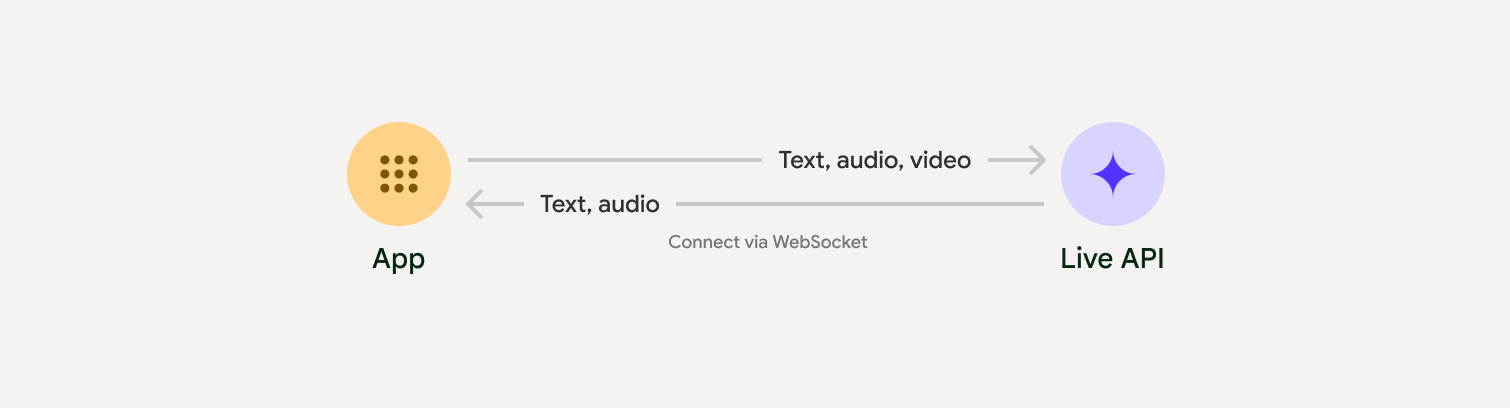
Live API מציע קבוצה מקיפה של תכונות, כמו זיהוי פעילות קולית, שימוש בכלים והפעלת פונקציות, ניהול סשנים (לניהול שיחות ארוכות) וטוקנים זמניים (לאימות מאובטח בצד הלקוח).
בדף הזה מוצגות דוגמאות ודוגמאות קוד בסיסיות שיעזרו לכם להתחיל לעבוד עם ה-API.
אפשר לנסות את Live API ב-Google AI Studio
בחירת גישת הטמעה
כשמשלבים עם Live API, צריך לבחור באחת מגישות ההטמעה הבאות:
- שרת לשרת: הקצה העורפי מתחבר ל-Live API באמצעות WebSockets. בדרך כלל, הלקוח שולח נתוני שידור (אודיו, וידאו, טקסט) לשרת, והשרת מעביר אותם ל-Live API.
- לקוח לשרת: קוד הקצה הקדמי מתחבר ישירות ל-Live API באמצעות WebSockets כדי להזרים נתונים, בלי לעבור דרך הקצה העורפי.
שילובים עם שותפים
כדי לייעל את הפיתוח של אפליקציות אודיו ווידאו בזמן אמת, אפשר להשתמש בשילוב של צד שלישי שתומך ב-API של Gemini Live באמצעות WebRTC או WebSockets.
Pipecat by Daily
איך יוצרים צ'אט בוט מבוסס-AI בזמן אמת באמצעות Gemini Live ו-Pipecat.
LiveKit
שימוש ב-Gemini Live API עם סוכני LiveKit.
Fishjam by Software Mansion
יצירת אפליקציות לסטרימינג של וידאו ואודיו בשידור חי באמצעות Fishjam.
ערכת פיתוח סוכנים (ADK)
הטמעה של Live API באמצעות Agent Development Kit (ADK).
סוכני Vision לפי זרם
פיתוח אפליקציות AI של וידאו וקול בזמן אמת באמצעות Vision Agents.
Voximplant
אפשר לקשר שיחות נכנסות ויוצאות ל-Live API באמצעות Voximplant.
שנתחיל?
בדוגמה הזו בצד השרת מוזרם אודיו מהמיקרופון והאודיו שמוחזר מושמע. דוגמאות מלאות מקצה לקצה, כולל אפליקציית לקוח, זמינות במאמר אפליקציות לדוגמה.
פורמט האודיו של הקלט צריך להיות PCM 16 ביט, 16kHz, מונו, והאודיו שמתקבל משתמש בקצב דגימה של 24kHz.
Python
התקנת כלים לשידור אודיו. יכול להיות שיידרשו יחסי תלות נוספים ברמת המערכת (לדוגמה, portaudio). אפשר לעיין במסמכי PyAudio כדי לקבל הוראות מפורטות להתקנה.
pip install pyaudioimport asyncio
from google import genai
import pyaudio
client = genai.Client()
# --- pyaudio config ---
FORMAT = pyaudio.paInt16
CHANNELS = 1
SEND_SAMPLE_RATE = 16000
RECEIVE_SAMPLE_RATE = 24000
CHUNK_SIZE = 1024
pya = pyaudio.PyAudio()
# --- Live API config ---
MODEL = "gemini-2.5-flash-native-audio-preview-12-2025"
CONFIG = {
"response_modalities": ["AUDIO"],
"system_instruction": "You are a helpful and friendly AI assistant.",
}
audio_queue_output = asyncio.Queue()
audio_queue_mic = asyncio.Queue(maxsize=5)
audio_stream = None
async def listen_audio():
"""Listens for audio and puts it into the mic audio queue."""
global audio_stream
mic_info = pya.get_default_input_device_info()
audio_stream = await asyncio.to_thread(
pya.open,
format=FORMAT,
channels=CHANNELS,
rate=SEND_SAMPLE_RATE,
input=True,
input_device_index=mic_info["index"],
frames_per_buffer=CHUNK_SIZE,
)
kwargs = {"exception_on_overflow": False} if __debug__ else {}
while True:
data = await asyncio.to_thread(audio_stream.read, CHUNK_SIZE, **kwargs)
await audio_queue_mic.put({"data": data, "mime_type": "audio/pcm"})
async def send_realtime(session):
"""Sends audio from the mic audio queue to the GenAI session."""
while True:
msg = await audio_queue_mic.get()
await session.send_realtime_input(audio=msg)
async def receive_audio(session):
"""Receives responses from GenAI and puts audio data into the speaker audio queue."""
while True:
turn = session.receive()
async for response in turn:
if (response.server_content and response.server_content.model_turn):
for part in response.server_content.model_turn.parts:
if part.inline_data and isinstance(part.inline_data.data, bytes):
audio_queue_output.put_nowait(part.inline_data.data)
# Empty the queue on interruption to stop playback
while not audio_queue_output.empty():
audio_queue_output.get_nowait()
async def play_audio():
"""Plays audio from the speaker audio queue."""
stream = await asyncio.to_thread(
pya.open,
format=FORMAT,
channels=CHANNELS,
rate=RECEIVE_SAMPLE_RATE,
output=True,
)
while True:
bytestream = await audio_queue_output.get()
await asyncio.to_thread(stream.write, bytestream)
async def run():
"""Main function to run the audio loop."""
try:
async with client.aio.live.connect(
model=MODEL, config=CONFIG
) as live_session:
print("Connected to Gemini. Start speaking!")
async with asyncio.TaskGroup() as tg:
tg.create_task(send_realtime(live_session))
tg.create_task(listen_audio())
tg.create_task(receive_audio(live_session))
tg.create_task(play_audio())
except asyncio.CancelledError:
pass
finally:
if audio_stream:
audio_stream.close()
pya.terminate()
print("\nConnection closed.")
if __name__ == "__main__":
try:
asyncio.run(run())
except KeyboardInterrupt:
print("Interrupted by user.")
JavaScript
התקנת כלים לשידור אודיו. יכול להיות שיידרשו תלותיות נוספות ברמת המערכת (sox ל-Mac/Windows או ALSA ל-Linux). הוראות מפורטות להתקנה מופיעות במאמרי העזרה בנושא רמקולים ומיקרופונים.
npm install mic speakerimport { GoogleGenAI, Modality } from '@google/genai';
import mic from 'mic';
import Speaker from 'speaker';
const ai = new GoogleGenAI({});
// WARNING: Do not use API keys in client-side (browser based) applications
// Consider using Ephemeral Tokens instead
// More information at: https://ai.google.dev/gemini-api/docs/ephemeral-tokens
// --- Live API config ---
const model = 'gemini-2.5-flash-native-audio-preview-12-2025';
const config = {
responseModalities: [Modality.AUDIO],
systemInstruction: "You are a helpful and friendly AI assistant.",
};
async function live() {
const responseQueue = [];
const audioQueue = [];
let speaker;
async function waitMessage() {
while (responseQueue.length === 0) {
await new Promise((resolve) => setImmediate(resolve));
}
return responseQueue.shift();
}
function createSpeaker() {
if (speaker) {
process.stdin.unpipe(speaker);
speaker.end();
}
speaker = new Speaker({
channels: 1,
bitDepth: 16,
sampleRate: 24000,
});
speaker.on('error', (err) => console.error('Speaker error:', err));
process.stdin.pipe(speaker);
}
async function messageLoop() {
// Puts incoming messages in the audio queue.
while (true) {
const message = await waitMessage();
if (message.serverContent && message.serverContent.interrupted) {
// Empty the queue on interruption to stop playback
audioQueue.length = 0;
continue;
}
if (message.serverContent && message.serverContent.modelTurn && message.serverContent.modelTurn.parts) {
for (const part of message.serverContent.modelTurn.parts) {
if (part.inlineData && part.inlineData.data) {
audioQueue.push(Buffer.from(part.inlineData.data, 'base64'));
}
}
}
}
}
async function playbackLoop() {
// Plays audio from the audio queue.
while (true) {
if (audioQueue.length === 0) {
if (speaker) {
// Destroy speaker if no more audio to avoid warnings from speaker library
process.stdin.unpipe(speaker);
speaker.end();
speaker = null;
}
await new Promise((resolve) => setImmediate(resolve));
} else {
if (!speaker) createSpeaker();
const chunk = audioQueue.shift();
await new Promise((resolve) => {
speaker.write(chunk, () => resolve());
});
}
}
}
// Start loops
messageLoop();
playbackLoop();
// Connect to Gemini Live API
const session = await ai.live.connect({
model: model,
config: config,
callbacks: {
onopen: () => console.log('Connected to Gemini Live API'),
onmessage: (message) => responseQueue.push(message),
onerror: (e) => console.error('Error:', e.message),
onclose: (e) => console.log('Closed:', e.reason),
},
});
// Setup Microphone for input
const micInstance = mic({
rate: '16000',
bitwidth: '16',
channels: '1',
});
const micInputStream = micInstance.getAudioStream();
micInputStream.on('data', (data) => {
// API expects base64 encoded PCM data
session.sendRealtimeInput({
audio: {
data: data.toString('base64'),
mimeType: "audio/pcm;rate=16000"
}
});
});
micInputStream.on('error', (err) => {
console.error('Microphone error:', err);
});
micInstance.start();
console.log('Microphone started. Speak now...');
}
live().catch(console.error);
דוגמאות לאפליקציות
בדוגמאות הבאות לאפליקציות אפשר לראות איך משתמשים ב-Live API בתרחישי שימוש מקצה לקצה:
- אפליקציה להפעלת אודיו בזמן אמת ב-AI Studio, באמצעות ספריות JavaScript כדי להתחבר ל-Live API ולהזרים אודיו דו-כיווני דרך המיקרופון והרמקולים.
- דוגמאות נוספות ומדריכים לתחילת העבודה זמינים במאמר שילובים עם שותפים.
המאמרים הבאים
- במדריך המלא יכולות של Live API מפורטות היכולות וההגדרות העיקריות, כולל זיהוי פעילות קולית ותכונות אודיו מקוריות.
- במדריך שימוש בכלי מוסבר איך לשלב את Live API עם כלים ועם קריאות לפונקציות.
- כדי לנהל שיחות ארוכות, כדאי לקרוא את המדריך בנושא ניהול סשנים.
- קוראים את המדריך בנושא טוקנים זמניים לאימות מאובטח באפליקציות client-to-server.
- מידע נוסף על WebSockets API מופיע במאמרי העזרה של WebSockets API.