

Gemini יכול לנתח קלט אודיו וליצור תשובות טקסט.
Python
from google import genai
import base64

client = genai.Client()

uploaded_file = client.files.upload(file="path/to/sample.mp3")

interaction = client.interactions.create(
    model="gemini-3.8-flash",
    input=[
        {"type": "text", "text": "Describe this audio clip"},
        {
            "type": "audio",
            "uri": uploaded_file.uri,
            "mime_type": uploaded_file.mime_type
        }
    ]
)
print(interaction.output_text)
JavaScript
import { GoogleGenAI } from "@google/genai";

const client = new GoogleGenAI({});

const uploadedFile = await client.files.upload({
    file: "path/to/sample.mp3",
    config: { mime_type: "audio/mp3" }
});

const interaction = await client.interactions.create({
    model: "gemini-3.8-flash",
    input: [
        {type: "text", text: "Describe this audio clip"},
        {
            type: "audio",
            uri: uploadedFile.uri,
            mime_type: uploadedFile.mimeType
        }
    ]
});
console.log(interaction.output_text);
Java
import com.google.genai.Client;
import com.google.genai.gaos.models.interactions.AudioContent;
import com.google.genai.gaos.models.interactions.AudioContentMimeType;
import com.google.genai.gaos.models.interactions.Content;
import com.google.genai.gaos.models.interactions.CreateModelInteraction;
import com.google.genai.gaos.models.interactions.Interaction;
import com.google.genai.gaos.models.interactions.InteractionsInput;
import com.google.genai.gaos.models.interactions.Model;
import com.google.genai.gaos.models.interactions.TextContent;
import com.google.genai.gaos.models.operations.CreateInteractionRequestBody;
import com.google.genai.types.File;
import com.google.genai.types.UploadFileConfig;
import java.util.Arrays;
import java.util.List;

Client client = new Client();

File uploadedFile =
    client.files.upload(
        "path/to/sample.mp3", UploadFileConfig.builder().mimeType("audio/mp3").build());

Content textContent = TextContent.builder().text("Describe this audio clip").build();
Content audioContent =
    AudioContent.builder()
        .uri(uploadedFile.uri().get())
        .mimeType(AudioContentMimeType.of(uploadedFile.mimeType().get()))
        .build();

List<Content> contents = Arrays.asList(textContent, audioContent);

CreateModelInteraction params =
    CreateModelInteraction.builder()
        .model(Model.of("gemini-3.8-flash"))
        .input(InteractionsInput.ofContent(contents))
        .build();

Interaction interaction =
    client.interactions.create(CreateInteractionRequestBody.of(params)).interaction().get();

System.out.println(interaction.outputText().orElse(""));
Go
package main

import (
    "context"
    "fmt"
    "log"

    "google.golang.org/genai"
    "google.golang.org/genai/interactions/models/interactions"
    "google.golang.org/genai/interactions/models/operations"
)

func main() {
    ctx := context.Background()
    client, err := genai.NewClient(ctx, nil)
    if err != nil {
        log.Fatal(err)
    }

    uploadedFile, err := client.Files.UploadFromPath(ctx, "path/to/sample.mp3", &genai.UploadFileConfig{
        MIMEType: "audio/mp3",
    })
    if err != nil {
        log.Fatal(err)
    }

    contents := []interactions.Content{
        interactions.NewContent(interactions.TextContent{
            Text: "Describe this audio clip",
        }),
        interactions.NewContent(interactions.AudioContent{
            URI:      genai.Ptr(uploadedFile.URI),
            MimeType: interactions.AudioContentMimeType(uploadedFile.MIMEType).ToPointer(),
        }),
    }

    res, err := client.Interactions.Create(ctx, operations.CreateInteractionRequest{
        Body: operations.NewCreateInteractionRequestBody(interactions.CreateModelInteraction{
            Model: interactions.Model("gemini-3.8-flash"),
            Input: interactions.NewInteractionsInput(contents),
        }),
    })
    if err != nil {
        log.Fatal(err)
    }

    if res.Interaction.OutputText != nil {
        fmt.Println(*res.Interaction.OutputText)
    }
}
REST
# First upload the file, then use the URI:
curl -X POST "https://generativelanguage.googleapis.com/v1beta/interactions" \
  -H "x-goog-api-key: $GEMINI_API_KEY" \
  -H 'Content-Type: application/json' \
  -d '{
    "model": "gemini-3.8-flash",
    "input": [
      {"type": "text", "text": "Describe this audio clip"},
      {
        "type": "audio",
        "uri": "YOUR_FILE_URI",
        "mime_type": "audio/mp3"
      }
    ]
  }'
סקירה כללית
Gemini יכול לנתח ולהבין קלט אודיו וליצור תשובות בטקסט, מה שמאפשר תרחישי שימוש כמו:
- לתאר, לסכם או לענות על שאלות לגבי תוכן אודיו
- תמלול ותרגום (דיבור לטקסט)
- חלוקת קובץ האודיו לפי דוברים (זיהוי של דוברים שונים)
- זיהוי רגשות בדיבור ובמוזיקה
- ניתוח פלחים ספציפיים עם חותמות זמן
למידע על אינטראקציות בזמן אמת באמצעות קול ווידאו, אפשר לעיין בLive API. כדי להשתמש במודלים ייעודיים של תמלול דיבור לטקסט עם תמיכה בתמלול בזמן אמת, צריך להשתמש ב-Google Cloud Speech-to-Text API.
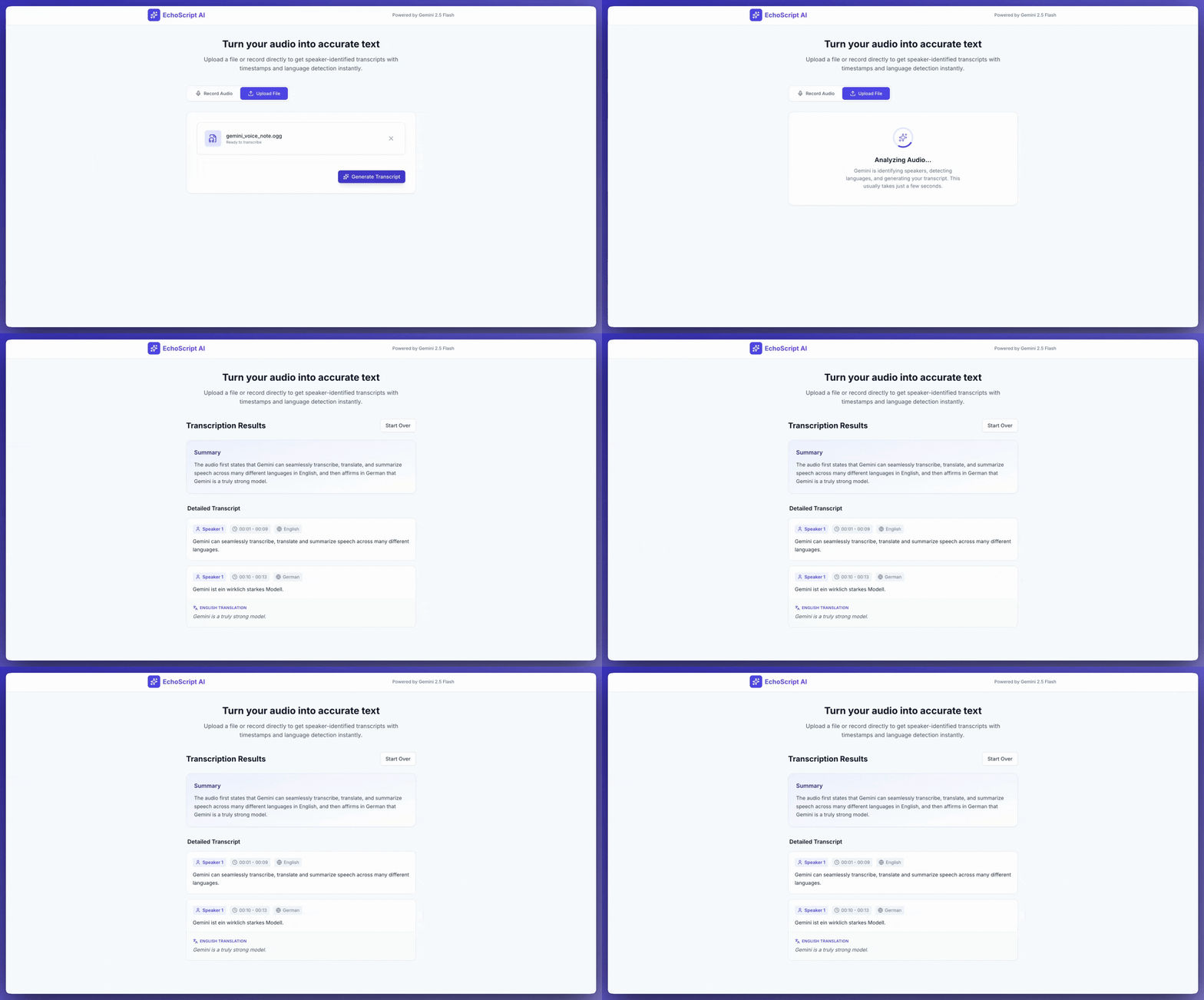
תמלול דיבור לטקסט
בדוגמה הזו מוסבר איך לתמלל, לתרגם ולסכם דיבור עם פלט מובנה של חותמות זמן, זיהוי דוברים וזיהוי רגשות.
Python
from google import genai

client = genai.Client()

YOUTUBE_URL = "https://www.youtube.com/watch?v=ku-N-eS1lgM"

prompt = """
  Process the audio file and generate a detailed transcription.

  Requirements:
  1. Identify distinct speakers (e.g., Speaker 1, Speaker 2).
  2. Provide accurate timestamps for each segment (Format: MM:SS).
  3. Detect the primary language of each segment.
  4. If not English, provide the English translation.
  5. Identify the primary emotion: Happy, Sad, Angry, or Neutral.
  6. Provide a brief summary at the beginning.
"""

response_schema = {
    "type": "object",
    "properties": {
        "summary": {"type": "string"},
        "segments": {
            "type": "array",
            "items": {
                "type": "object",
                "properties": {
                    "speaker": {"type": "string"},
                    "timestamp": {"type": "string"},
                    "content": {"type": "string"},
                    "language": {"type": "string"},
                    "emotion": {
                        "type": "string",
                        "enum": ["happy", "sad", "angry", "neutral"]
                    }
                },
                "required": ["speaker", "timestamp", "content", "emotion"]
            }
        }
    },
    "required": ["summary", "segments"]
}

interaction = client.interactions.create(
    model="gemini-3.8-flash",
    input=[
        {"type": "video", "uri": YOUTUBE_URL, "mime_type": "video/mp4"},
        {"type": "text", "text": prompt}
    ],
    response_format=response_schema,
)

print(interaction.output_text)
JavaScript
import { GoogleGenAI } from "@google/genai";

const client = new GoogleGenAI({});

const YOUTUBE_URL = "https://www.youtube.com/watch?v=ku-N-eS1lgM";

const prompt = `
  Process the audio file and generate a detailed transcription.

  Requirements:
  1. Identify distinct speakers (e.g., Speaker 1, Speaker 2).
  2. Provide accurate timestamps for each segment (Format: MM:SS).
  3. Detect the primary language of each segment.
  4. If not English, provide the English translation.
  5. Identify the primary emotion: Happy, Sad, Angry, or Neutral.
  6. Provide a brief summary at the beginning.
`;

const responseSchema = {
    type: "object",
    properties: {
        summary: { type: "string" },
        segments: {
            type: "array",
            items: {
                type: "object",
                properties: {
                    speaker: { type: "string" },
                    timestamp: { type: "string" },
                    content: { type: "string" },
                    language: { type: "string" },
                    emotion: {
                        type: "string",
                        enum: ["happy", "sad", "angry", "neutral"]
                    }
                },
                required: ["speaker", "timestamp", "content", "emotion"]
            }
        }
    },
    required: ["summary", "segments"]
};

const interaction = await client.interactions.create({
    model: "gemini-3.8-flash",
    input: [
        { type: "video", uri: YOUTUBE_URL, mime_type: "video/mp4" },
        { type: "text", text: prompt }
    ],
    response_format: responseSchema,
});

console.log(JSON.parse(interaction.output_text));
Java
import com.google.genai.Client;
import com.google.genai.gaos.models.interactions.Content;
import com.google.genai.gaos.models.interactions.CreateModelInteraction;
import com.google.genai.gaos.models.interactions.CreateModelInteractionResponseFormat;
import com.google.genai.gaos.models.interactions.Interaction;
import com.google.genai.gaos.models.interactions.InteractionsInput;
import com.google.genai.gaos.models.interactions.Model;
import com.google.genai.gaos.models.interactions.ResponseFormat;
import com.google.genai.gaos.models.interactions.TextContent;
import com.google.genai.gaos.models.interactions.VideoContent;
import com.google.genai.gaos.models.interactions.VideoContentMimeType;
import com.google.genai.gaos.models.operations.CreateInteractionRequestBody;
import java.util.Arrays;
import java.util.List;
import java.util.HashMap;
import java.util.Map;

Client client = new Client();

String youtubeUrl = "https://www.youtube.com/watch?v=ku-N-eS1lgM";

String prompt =
    "Process the audio file and generate a detailed transcription.\n\n"
        + "Requirements:\n"
        + "1. Identify distinct speakers (e.g., Speaker 1, Speaker 2).\n"
        + "2. Provide accurate timestamps for each segment (Format: MM:SS).\n"
        + "3. Detect the primary language of each segment.\n"
        + "4. If not English, provide the English translation.\n"
        + "5. Identify the primary emotion: Happy, Sad, Angry, or Neutral.\n"
        + "6. Provide a brief summary at the beginning.";

Map<String, Object> emotionProp = new HashMap<>();
emotionProp.put("type", "string");
emotionProp.put("enum", Arrays.asList("happy", "sad", "angry", "neutral"));

Map<String, Object> stringType = new HashMap<>();
stringType.put("type", "string");

Map<String, Object> segmentProps = new HashMap<>();
segmentProps.put("speaker", stringType);
segmentProps.put("timestamp", stringType);
segmentProps.put("content", stringType);
segmentProps.put("language", stringType);
segmentProps.put("emotion", emotionProp);

Map<String, Object> segmentItem = new HashMap<>();
segmentItem.put("type", "object");
segmentItem.put("properties", segmentProps);
segmentItem.put("required", Arrays.asList("speaker", "timestamp", "content", "emotion"));

Map<String, Object> segmentsProp = new HashMap<>();
segmentsProp.put("type", "array");
segmentsProp.put("items", segmentItem);

Map<String, Object> properties = new HashMap<>();
properties.put("summary", stringType);
properties.put("segments", segmentsProp);

Map<String, Object> responseSchema = new HashMap<>();
responseSchema.put("type", "object");
responseSchema.put("properties", properties);
responseSchema.put("required", Arrays.asList("summary", "segments"));

Content videoContent =
    VideoContent.builder()
        .uri(youtubeUrl)
        .mimeType(VideoContentMimeType.VIDEO_MP4)
        .build();
Content textContent = TextContent.builder().text(prompt).build();

List<Content> contents = Arrays.asList(videoContent, textContent);

CreateModelInteraction params =
    CreateModelInteraction.builder()
        .model(Model.of("gemini-3.8-flash"))
        .input(InteractionsInput.ofContent(contents))
        .responseFormat(
            CreateModelInteractionResponseFormat.of(ResponseFormat.of(responseSchema)))
        .build();

Interaction interaction =
    client.interactions.create(CreateInteractionRequestBody.of(params)).interaction().get();

System.out.println(interaction.outputText().orElse(""));
Go
package main

import (
    "context"
    "fmt"
    "log"

    "google.golang.org/genai"
    "google.golang.org/genai/interactions/models/interactions"
    "google.golang.org/genai/interactions/models/operations"
)

func main() {
    ctx := context.Background()
    client, err := genai.NewClient(ctx, nil)
    if err != nil {
        log.Fatal(err)
    }

    youtubeURL := "https://www.youtube.com/watch?v=ku-N-eS1lgM"

    prompt := "Process the audio file and generate a detailed transcription.\n\n" +
        "Requirements:\n" +
        "1. Identify distinct speakers (e.g., Speaker 1, Speaker 2).\n" +
        "2. Provide accurate timestamps for each segment (Format: MM:SS).\n" +
        "3. Detect the primary language of each segment.\n" +
        "4. If not English, provide the English translation.\n" +
        "5. Identify the primary emotion: Happy, Sad, Angry, or Neutral.\n" +
        "6. Provide a brief summary at the beginning."

    responseSchema := map[string]any{
        "type": "object",
        "properties": map[string]any{
            "summary": map[string]any{"type": "string"},
            "segments": map[string]any{
                "type": "array",
                "items": map[string]any{
                    "type": "object",
                    "properties": map[string]any{
                        "speaker":   map[string]any{"type": "string"},
                        "timestamp": map[string]any{"type": "string"},
                        "content":   map[string]any{"type": "string"},
                        "language":  map[string]any{"type": "string"},
                        "emotion": map[string]any{
                            "type": "string",
                            "enum": []string{"happy", "sad", "angry", "neutral"},
                        },
                    },
                    "required": []string{"speaker", "timestamp", "content", "emotion"},
                },
            },
        },
        "required": []string{"summary", "segments"},
    }

    contents := []interactions.Content{
        interactions.NewContent(interactions.VideoContent{
            URI:      genai.Ptr(youtubeURL),
            MimeType: interactions.VideoContentMimeTypeVideoMp4.ToPointer(),
        }),
        interactions.NewContent(interactions.TextContent{
            Text: prompt,
        }),
    }

    res, err := client.Interactions.Create(ctx, operations.CreateInteractionRequest{
        Body: operations.NewCreateInteractionRequestBody(interactions.CreateModelInteraction{
            Model: interactions.Model("gemini-3.8-flash"),
            Input: interactions.NewInteractionsInput(contents),
            ResponseFormat: genai.Ptr(interactions.NewCreateModelInteractionResponseFormat(
                interactions.NewResponseFormat(responseSchema),
            )),
        }),
    })
    if err != nil {
        log.Fatal(err)
    }

    if res.Interaction.OutputText != nil {
        fmt.Println(*res.Interaction.OutputText)
    }
}
REST
curl -X POST "https://generativelanguage.googleapis.com/v1beta/interactions" \
  -H "x-goog-api-key: $GEMINI_API_KEY" \
  -H 'Content-Type: application/json' \
  -d '{
    "model": "gemini-3.8-flash",
    "input": [
      {
        "type": "video",
        "uri": "https://www.youtube.com/watch?v=ku-N-eS1lgM",
        "mime_type": "video/mp4"
      },
      {
        "type": "text",
        "text": "Transcribe with speaker diarization and emotion detection."
      }
    ],
    "response_format": {
        "type": "object",
        "properties": {
          "summary": {"type": "string"},
          "segments": {
            "type": "array",
            "items": {
              "type": "object",
              "properties": {
                "speaker": {"type": "string"},
                "timestamp": {"type": "string"},
                "content": {"type": "string"},
                "emotion": {"type": "string", "enum": ["happy", "sad", "angry", "neutral"]}
              }
            }
          }
        }
      }
  }'
קלט אודיו
אפשר לספק נתוני אודיו בדרכים הבאות:
- מעלים קובץ אודיו לפני ששולחים בקשה.
- מעבירים נתוני אודיו מוטבעים עם הבקשה.
העלאה של קובץ אודיו
אם הקובץ גדול מ-20MB, צריך להשתמש ב-Files API.
Python
from google import genai

client = genai.Client()

uploaded_file = client.files.upload(file="path/to/sample.mp3")

interaction = client.interactions.create(
    model="gemini-3.8-flash",
    input=[
        {"type": "text", "text": "Describe this audio clip"},
        {
            "type": "audio",
            "uri": uploaded_file.uri,
            "mime_type": uploaded_file.mime_type
        }
    ]
)
print(interaction.output_text)
JavaScript
import { GoogleGenAI } from "@google/genai";

const client = new GoogleGenAI({});

const uploadedFile = await client.files.upload({
    file: "path/to/sample.mp3",
    config: { mimeType: "audio/mp3" }
});

const interaction = await client.interactions.create({
    model: "gemini-3.8-flash",
    input: [
        {type: "text", text: "Describe this audio clip"},
        {
            type: "audio",
            uri: uploadedFile.uri,
            mime_type: uploadedFile.mimeType
        }
    ]
});
console.log(interaction.output_text);
Java
// Upload an audio file using the Files API (recommended for files > 20 MB)
import com.google.genai.Client;
import com.google.genai.gaos.models.interactions.AudioContent;
import com.google.genai.gaos.models.interactions.AudioContentMimeType;
import com.google.genai.gaos.models.interactions.Content;
import com.google.genai.gaos.models.interactions.CreateModelInteraction;
import com.google.genai.gaos.models.interactions.Interaction;
import com.google.genai.gaos.models.interactions.InteractionsInput;
import com.google.genai.gaos.models.interactions.Model;
import com.google.genai.gaos.models.interactions.TextContent;
import com.google.genai.gaos.models.operations.CreateInteractionRequestBody;
import com.google.genai.types.File;
import com.google.genai.types.UploadFileConfig;
import java.util.Arrays;
import java.util.List;

Client client = new Client();

File uploadedFile =
    client.files.upload(
        "path/to/sample.mp3", UploadFileConfig.builder().mimeType("audio/mp3").build());

Content textContent = TextContent.builder().text("Describe this audio clip").build();
Content audioContent =
    AudioContent.builder()
        .uri(uploadedFile.uri().get())
        .mimeType(AudioContentMimeType.of(uploadedFile.mimeType().get()))
        .build();

List<Content> contents = Arrays.asList(textContent, audioContent);

CreateModelInteraction params =
    CreateModelInteraction.builder()
        .model(Model.of("gemini-3.8-flash"))
        .input(InteractionsInput.ofContent(contents))
        .build();

Interaction interaction =
    client.interactions.create(CreateInteractionRequestBody.of(params)).interaction().get();

System.out.println(interaction.outputText().orElse(""));
Go
// Upload an audio file using the Files API (recommended for files > 20 MB)
package main

import (
    "context"
    "fmt"
    "log"

    "google.golang.org/genai"
    "google.golang.org/genai/interactions/models/interactions"
    "google.golang.org/genai/interactions/models/operations"
)

func main() {
    ctx := context.Background()
    client, err := genai.NewClient(ctx, nil)
    if err != nil {
        log.Fatal(err)
    }

    uploadedFile, err := client.Files.UploadFromPath(ctx, "path/to/sample.mp3", &genai.UploadFileConfig{
        MIMEType: "audio/mp3",
    })
    if err != nil {
        log.Fatal(err)
    }

    contents := []interactions.Content{
        interactions.NewContent(interactions.TextContent{
            Text: "Describe this audio clip",
        }),
        interactions.NewContent(interactions.AudioContent{
            URI:      genai.Ptr(uploadedFile.URI),
            MimeType: interactions.AudioContentMimeType(uploadedFile.MIMEType).ToPointer(),
        }),
    }

    res, err := client.Interactions.Create(ctx, operations.CreateInteractionRequest{
        Body: operations.NewCreateInteractionRequestBody(interactions.CreateModelInteraction{
            Model: interactions.Model("gemini-3.8-flash"),
            Input: interactions.NewInteractionsInput(contents),
        }),
    })
    if err != nil {
        log.Fatal(err)
    }

    if res.Interaction.OutputText != nil {
        fmt.Println(*res.Interaction.OutputText)
    }
}
REST
# First upload the file using the Files API, then use the URI:
curl -X POST "https://generativelanguage.googleapis.com/v1beta/interactions" \
  -H "x-goog-api-key: $GEMINI_API_KEY" \
  -H 'Content-Type: application/json' \
  -d '{
    "model": "gemini-3.8-flash",
    "input": [
      {"type": "text", "text": "Describe this audio clip"},
      {
        "type": "audio",
        "uri": "YOUR_FILE_URI",
        "mime_type": "audio/mp3"
      }
    ]
  }'
העברת נתוני אודיו בתוך השורה
עבור קובצי אודיו קטנים בגודל כולל של עד 20MB:
Python
from google import genai
import base64

client = genai.Client()

with open('path/to/small-sample.mp3', 'rb') as f:
    audio_bytes = f.read()

interaction = client.interactions.create(
    model="gemini-3.8-flash",
    input=[
        {"type": "text", "text": "Describe this audio clip"},
        {
            "type": "audio",
            "data": base64.b64encode(audio_bytes).decode('utf-8'),
            "mime_type": "audio/mp3"
        }
    ]
)
print(interaction.output_text)
JavaScript
import { GoogleGenAI } from "@google/genai";
import * as fs from "node:fs";

const client = new GoogleGenAI({});

const audioData = fs.readFileSync("path/to/small-sample.mp3", {
    encoding: "base64"
});

const interaction = await client.interactions.create({
    model: "gemini-3.8-flash",
    input: [
        {type: "text", text: "Describe this audio clip"},
        {
            type: "audio",
            data: audioData,
            mime_type: "audio/mp3"
        }
    ]
});
console.log(interaction.output_text);
Java
import com.google.genai.Client;
import com.google.genai.gaos.models.interactions.AudioContent;
import com.google.genai.gaos.models.interactions.AudioContentMimeType;
import com.google.genai.gaos.models.interactions.Content;
import com.google.genai.gaos.models.interactions.CreateModelInteraction;
import com.google.genai.gaos.models.interactions.Interaction;
import com.google.genai.gaos.models.interactions.InteractionsInput;
import com.google.genai.gaos.models.interactions.Model;
import com.google.genai.gaos.models.interactions.TextContent;
import com.google.genai.gaos.models.operations.CreateInteractionRequestBody;
import java.nio.file.Files;
import java.nio.file.Paths;
import java.util.Arrays;
import java.util.Base64;
import java.util.List;

Client client = new Client();

byte[] audioBytes = Files.readAllBytes(Paths.get("path/to/small-sample.mp3"));
String base64Audio = Base64.getEncoder().encodeToString(audioBytes);

Content textContent = TextContent.builder().text("Describe this audio clip").build();
Content audioContent =
    AudioContent.builder()
        .data(base64Audio)
        .mimeType(AudioContentMimeType.AUDIO_MP3)
        .build();

List<Content> contents = Arrays.asList(textContent, audioContent);

CreateModelInteraction params =
    CreateModelInteraction.builder()
        .model(Model.of("gemini-3.8-flash"))
        .input(InteractionsInput.ofContent(contents))
        .build();

Interaction interaction =
    client.interactions.create(CreateInteractionRequestBody.of(params)).interaction().get();

System.out.println(interaction.outputText().orElse(""));
Go
package main

import (
    "context"
    "encoding/base64"
    "fmt"
    "log"
    "os"

    "google.golang.org/genai"
    "google.golang.org/genai/interactions/models/interactions"
    "google.golang.org/genai/interactions/models/operations"
)

func main() {
    ctx := context.Background()
    client, err := genai.NewClient(ctx, nil)
    if err != nil {
        log.Fatal(err)
    }

    audioBytes, err := os.ReadFile("path/to/small-sample.mp3")
    if err != nil {
        log.Fatal(err)
    }
    base64Audio := base64.StdEncoding.EncodeToString(audioBytes)

    contents := []interactions.Content{
        interactions.NewContent(interactions.TextContent{
            Text: "Describe this audio clip",
        }),
        interactions.NewContent(interactions.AudioContent{
            Data:     genai.Ptr(base64Audio),
            MimeType: interactions.AudioContentMimeTypeAudioMp3.ToPointer(),
        }),
    }

    res, err := client.Interactions.Create(ctx, operations.CreateInteractionRequest{
        Body: operations.NewCreateInteractionRequestBody(interactions.CreateModelInteraction{
            Model: interactions.Model("gemini-3.8-flash"),
            Input: interactions.NewInteractionsInput(contents),
        }),
    })
    if err != nil {
        log.Fatal(err)
    }

    if res.Interaction.OutputText != nil {
        fmt.Println(*res.Interaction.OutputText)
    }
}
REST
AUDIO_PATH="path/to/sample.mp3"

if [[ "$(base64 --version 2>&1)" = *"FreeBSD"* ]]; then
  B64FLAGS="--input"
else
  B64FLAGS="-w0"
fi

curl -X POST "https://generativelanguage.googleapis.com/v1beta/interactions" \
  -H "x-goog-api-key: $GEMINI_API_KEY" \
  -H 'Content-Type: application/json' \
  -d '{
    "model": "gemini-3.8-flash",
    "input": [
      {"type": "text", "text": "Describe this audio clip"},
      {
        "type": "audio",
        "data": "'$(base64 $B64FLAGS $AUDIO_PATH)'",
        "mime_type": "audio/mp3"
      }
    ]
  }'
הערות לגבי נתוני אודיו מוטבעים: * הגודל המקסימלי של הבקשה הוא 20MB בסך הכול (כולל ההנחיות וכל הקבצים) * כדי לעשות שימוש חוזר בקובץ, מעלים אותו במקום זאת
קבלת תמליל
כדי לקבל תמליל, מבקשים אותו בפרומפט:
Python
interaction = client.interactions.create(
    model="gemini-3.8-flash",
    input=[
        {"type": "text", "text": "Generate a transcript of the speech."},
        {
            "type": "audio",
            "uri": uploaded_file.uri,
            "mime_type": uploaded_file.mime_type
        }
    ]
)
print(interaction.output_text)
JavaScript
const interaction = await client.interactions.create({
    model: "gemini-3.8-flash",
    input: [
        { type: "text", text: "Generate a transcript of the speech." },
        {
            type: "audio",
            uri: uploadedFile.uri,
            mime_type: uploadedFile.mimeType
        }
    ]
});
console.log(interaction.output_text);
Java
import com.google.genai.Client;
import com.google.genai.gaos.models.interactions.AudioContent;
import com.google.genai.gaos.models.interactions.AudioContentMimeType;
import com.google.genai.gaos.models.interactions.Content;
import com.google.genai.gaos.models.interactions.CreateModelInteraction;
import com.google.genai.gaos.models.interactions.Interaction;
import com.google.genai.gaos.models.interactions.InteractionsInput;
import com.google.genai.gaos.models.interactions.Model;
import com.google.genai.gaos.models.interactions.TextContent;
import com.google.genai.gaos.models.operations.CreateInteractionRequestBody;
import com.google.genai.types.File;
import com.google.genai.types.UploadFileConfig;
import java.util.Arrays;
import java.util.List;

Client client = new Client();

File uploadedFile =
    client.files.upload(
        "path/to/sample.mp3", UploadFileConfig.builder().mimeType("audio/mp3").build());

Content textContent = TextContent.builder().text("Generate a transcript of the speech.").build();
Content audioContent =
    AudioContent.builder()
        .uri(uploadedFile.uri().get())
        .mimeType(AudioContentMimeType.of(uploadedFile.mimeType().get()))
        .build();

List<Content> contents = Arrays.asList(textContent, audioContent);

CreateModelInteraction params =
    CreateModelInteraction.builder()
        .model(Model.of("gemini-3.8-flash"))
        .input(InteractionsInput.ofContent(contents))
        .build();

Interaction interaction =
    client.interactions.create(CreateInteractionRequestBody.of(params)).interaction().get();

System.out.println(interaction.outputText().orElse(""));
Go
package main

import (
    "context"
    "fmt"
    "log"

    "google.golang.org/genai"
    "google.golang.org/genai/interactions/models/interactions"
    "google.golang.org/genai/interactions/models/operations"
)

func main() {
    ctx := context.Background()
    client, err := genai.NewClient(ctx, nil)
    if err != nil {
        log.Fatal(err)
    }

    uploadedFile, err := client.Files.UploadFromPath(ctx, "path/to/sample.mp3", &genai.UploadFileConfig{
        MIMEType: "audio/mp3",
    })
    if err != nil {
        log.Fatal(err)
    }

    contents := []interactions.Content{
        interactions.NewContent(interactions.TextContent{
            Text: "Generate a transcript of the speech.",
        }),
        interactions.NewContent(interactions.AudioContent{
            URI:      genai.Ptr(uploadedFile.URI),
            MimeType: interactions.AudioContentMimeType(uploadedFile.MIMEType).ToPointer(),
        }),
    }

    res, err := client.Interactions.Create(ctx, operations.CreateInteractionRequest{
        Body: operations.NewCreateInteractionRequestBody(interactions.CreateModelInteraction{
            Model: interactions.Model("gemini-3.8-flash"),
            Input: interactions.NewInteractionsInput(contents),
        }),
    })
    if err != nil {
        log.Fatal(err)
    }

    if res.Interaction.OutputText != nil {
        fmt.Println(*res.Interaction.OutputText)
    }
}
עיון בחותמות זמן
כדי להפנות לחלקים ספציפיים, משתמשים בפורמט MM:SS:
Python
interaction = client.interactions.create(
    model="gemini-3.8-flash",
    input=[
        {"type": "text", "text": "Provide a transcript from 02:30 to 03:29."},
        {
            "type": "audio",
            "uri": uploaded_file.uri,
            "mime_type": uploaded_file.mime_type
        }
    ]
)
JavaScript
const interaction = await client.interactions.create({
    model: "gemini-3.8-flash",
    input: [
        { type: "text", text: "Provide a transcript from 02:30 to 03:29." },
        { type: "audio", uri: uploadedFile.uri, mime_type: "audio/mp3" }
    ]
});
Java
import com.google.genai.Client;
import com.google.genai.gaos.models.interactions.AudioContent;
import com.google.genai.gaos.models.interactions.AudioContentMimeType;
import com.google.genai.gaos.models.interactions.Content;
import com.google.genai.gaos.models.interactions.CreateModelInteraction;
import com.google.genai.gaos.models.interactions.Interaction;
import com.google.genai.gaos.models.interactions.InteractionsInput;
import com.google.genai.gaos.models.interactions.Model;
import com.google.genai.gaos.models.interactions.TextContent;
import com.google.genai.gaos.models.operations.CreateInteractionRequestBody;
import com.google.genai.types.File;
import com.google.genai.types.UploadFileConfig;
import java.util.Arrays;
import java.util.List;

Client client = new Client();

File uploadedFile =
    client.files.upload(
        "path/to/sample.mp3", UploadFileConfig.builder().mimeType("audio/mp3").build());

Content textContent =
    TextContent.builder().text("Provide a transcript from 02:30 to 03:29.").build();
Content audioContent =
    AudioContent.builder()
        .uri(uploadedFile.uri().get())
        .mimeType(AudioContentMimeType.of(uploadedFile.mimeType().get()))
        .build();

List<Content> contents = Arrays.asList(textContent, audioContent);

CreateModelInteraction params =
    CreateModelInteraction.builder()
        .model(Model.of("gemini-3.8-flash"))
        .input(InteractionsInput.ofContent(contents))
        .build();

Interaction interaction =
    client.interactions.create(CreateInteractionRequestBody.of(params)).interaction().get();

System.out.println(interaction.outputText().orElse(""));
Go
package main

import (
    "context"
    "fmt"
    "log"

    "google.golang.org/genai"
    "google.golang.org/genai/interactions/models/interactions"
    "google.golang.org/genai/interactions/models/operations"
)

func main() {
    ctx := context.Background()
    client, err := genai.NewClient(ctx, nil)
    if err != nil {
        log.Fatal(err)
    }

    uploadedFile, err := client.Files.UploadFromPath(ctx, "path/to/sample.mp3", &genai.UploadFileConfig{
        MIMEType: "audio/mp3",
    })
    if err != nil {
        log.Fatal(err)
    }

    contents := []interactions.Content{
        interactions.NewContent(interactions.TextContent{
            Text: "Provide a transcript from 02:30 to 03:29.",
        }),
        interactions.NewContent(interactions.AudioContent{
            URI:      genai.Ptr(uploadedFile.URI),
            MimeType: interactions.AudioContentMimeType(uploadedFile.MIMEType).ToPointer(),
        }),
    }

    res, err := client.Interactions.Create(ctx, operations.CreateInteractionRequest{
        Body: operations.NewCreateInteractionRequestBody(interactions.CreateModelInteraction{
            Model: interactions.Model("gemini-3.8-flash"),
            Input: interactions.NewInteractionsInput(contents),
        }),
    })
    if err != nil {
        log.Fatal(err)
    }

    if res.Interaction.OutputText != nil {
        fmt.Println(*res.Interaction.OutputText)
    }
}
ספירת טוקנים
ספירת טוקנים בקובץ אודיו:
Python
response = client.models.count_tokens(
    model="gemini-3.8-flash",
    contents=[uploaded_file]
)
print(response)
JavaScript
const response = await client.models.countTokens({
    model: "gemini-3.8-flash",
    contents: [
        { fileData: { fileUri: uploadedFile.uri, mimeType: uploadedFile.mimeType } }
    ]
});
console.log(response.totalTokens);
Java
import com.google.genai.Client;
import com.google.genai.types.Content;
import com.google.genai.types.CountTokensResponse;
import com.google.genai.types.File;
import com.google.genai.types.Part;
import com.google.genai.types.UploadFileConfig;
import java.util.Arrays;

Client client = new Client();

File uploadedFile =
    client.files.upload(
        "path/to/sample.mp3", UploadFileConfig.builder().mimeType("audio/mp3").build());

CountTokensResponse response =
    client.models.countTokens(
        "gemini-3.8-flash",
        Arrays.asList(
            Content.fromParts(
                Part.fromUri(uploadedFile.uri().get(), uploadedFile.mimeType().get()))),
        null);

System.out.println(response);
Go
package main

import (
    "context"
    "fmt"
    "log"

    "google.golang.org/genai"
)

func main() {
    ctx := context.Background()
    client, err := genai.NewClient(ctx, nil)
    if err != nil {
        log.Fatal(err)
    }

    uploadedFile, err := client.Files.UploadFromPath(ctx, "path/to/sample.mp3", &genai.UploadFileConfig{
        MIMEType: "audio/mp3",
    })
    if err != nil {
        log.Fatal(err)
    }

    response, err := client.Models.CountTokens(
        ctx,
        "gemini-3.8-flash",
        []*genai.Content{
            genai.NewContentFromURI(uploadedFile.URI, uploadedFile.MIMEType, genai.RoleUser),
        },
        nil,
    )
    if err != nil {
        log.Fatal(err)
    }

    fmt.Println(response.TotalTokens)
}
פורמטים נתמכים של אודיו
Gemini תומך בסוגי ה-MIME הבאים של פורמטים של אודיו:
- WAV -
audio/wav - MP3 -
audio/mp3 - AIFF -
audio/aiff - AAC –
audio/aac - OGG –
audio/ogg - FLAC –
audio/flac - MPEG -
audio/mpeg - M4A -
audio/m4a - L16 -
audio/l16 - Opus –
audio/opus - ALAW –
audio/alaw - MULAW -
audio/mulaw - WebM –
audio/webm
רשימה מלאה של סוגי MIME וסכימות פרמטרים נתמכים מופיעה בחומר העזר בנושא Interactions API.
פרטים טכניים על אודיו
- טוקנים: 32 טוקנים לכל שנייה של אודיו (דקה אחת = 1,920 טוקנים)
- צלילים שהם לא דיבור: Gemini מבין צלילים שהם לא דיבור (ציוץ ציפורים, סירנות וכו')
- אורך מקסימלי: 9.5 שעות של אודיו לכל הנחיה
- רזולוציה: דגימה חוזרת ל-16Kbps
- ערוצים: שילוב של אודיו מרובה ערוצים לערוץ יחיד
המאמרים הבאים
- Files API: העלאה וניהול של קובצי אודיו
- System instructions: Customize model behavior
- Structured output: קבלת תוצאות תמלול בפורמט JSON