

Gemini può analizzare l'input audio e generare risposte di testo.
Python
from google import genai
import base64

client = genai.Client()

uploaded_file = client.files.upload(file="path/to/sample.mp3")

interaction = client.interactions.create(
    model="gemini-3.8-flash",
    input=[
        {"type": "text", "text": "Describe this audio clip"},
        {
            "type": "audio",
            "uri": uploaded_file.uri,
            "mime_type": uploaded_file.mime_type
        }
    ]
)
print(interaction.output_text)
JavaScript
import { GoogleGenAI } from "@google/genai";

const client = new GoogleGenAI({});

const uploadedFile = await client.files.upload({
    file: "path/to/sample.mp3",
    config: { mime_type: "audio/mp3" }
});

const interaction = await client.interactions.create({
    model: "gemini-3.8-flash",
    input: [
        {type: "text", text: "Describe this audio clip"},
        {
            type: "audio",
            uri: uploadedFile.uri,
            mime_type: uploadedFile.mimeType
        }
    ]
});
console.log(interaction.output_text);
Java
import com.google.genai.Client;
import com.google.genai.gaos.models.interactions.AudioContent;
import com.google.genai.gaos.models.interactions.AudioContentMimeType;
import com.google.genai.gaos.models.interactions.Content;
import com.google.genai.gaos.models.interactions.CreateModelInteraction;
import com.google.genai.gaos.models.interactions.Interaction;
import com.google.genai.gaos.models.interactions.InteractionsInput;
import com.google.genai.gaos.models.interactions.Model;
import com.google.genai.gaos.models.interactions.TextContent;
import com.google.genai.gaos.models.operations.CreateInteractionRequestBody;
import com.google.genai.types.File;
import com.google.genai.types.UploadFileConfig;
import java.util.Arrays;
import java.util.List;

Client client = new Client();

File uploadedFile =
    client.files.upload(
        "path/to/sample.mp3", UploadFileConfig.builder().mimeType("audio/mp3").build());

Content textContent = TextContent.builder().text("Describe this audio clip").build();
Content audioContent =
    AudioContent.builder()
        .uri(uploadedFile.uri().get())
        .mimeType(AudioContentMimeType.of(uploadedFile.mimeType().get()))
        .build();

List<Content> contents = Arrays.asList(textContent, audioContent);

CreateModelInteraction params =
    CreateModelInteraction.builder()
        .model(Model.of("gemini-3.8-flash"))
        .input(InteractionsInput.ofContent(contents))
        .build();

Interaction interaction =
    client.interactions.create(CreateInteractionRequestBody.of(params)).interaction().get();

System.out.println(interaction.outputText().orElse(""));
Go
package main

import (
    "context"
    "fmt"
    "log"

    "google.golang.org/genai"
    "google.golang.org/genai/interactions/models/interactions"
    "google.golang.org/genai/interactions/models/operations"
)

func main() {
    ctx := context.Background()
    client, err := genai.NewClient(ctx, nil)
    if err != nil {
        log.Fatal(err)
    }

    uploadedFile, err := client.Files.UploadFromPath(ctx, "path/to/sample.mp3", &genai.UploadFileConfig{
        MIMEType: "audio/mp3",
    })
    if err != nil {
        log.Fatal(err)
    }

    contents := []interactions.Content{
        interactions.NewContent(interactions.TextContent{
            Text: "Describe this audio clip",
        }),
        interactions.NewContent(interactions.AudioContent{
            URI:      genai.Ptr(uploadedFile.URI),
            MimeType: interactions.AudioContentMimeType(uploadedFile.MIMEType).ToPointer(),
        }),
    }

    res, err := client.Interactions.Create(ctx, operations.CreateInteractionRequest{
        Body: operations.NewCreateInteractionRequestBody(interactions.CreateModelInteraction{
            Model: interactions.Model("gemini-3.8-flash"),
            Input: interactions.NewInteractionsInput(contents),
        }),
    })
    if err != nil {
        log.Fatal(err)
    }

    if res.Interaction.OutputText != nil {
        fmt.Println(*res.Interaction.OutputText)
    }
}
REST
# First upload the file, then use the URI:
curl -X POST "https://generativelanguage.googleapis.com/v1beta/interactions" \
  -H "x-goog-api-key: $GEMINI_API_KEY" \
  -H 'Content-Type: application/json' \
  -d '{
    "model": "gemini-3.8-flash",
    "input": [
      {"type": "text", "text": "Describe this audio clip"},
      {
        "type": "audio",
        "uri": "YOUR_FILE_URI",
        "mime_type": "audio/mp3"
      }
    ]
  }'
Panoramica
Gemini può analizzare e comprendere l'input audio e generare risposte di testo, consentendo casi d'uso come:
- Descrivere, riassumere o rispondere a domande sui contenuti audio
- Trascrizione e traduzione (conversione della voce in testo)
- Diarizzazione degli interlocutori (identificazione di diversi interlocutori)
- Rilevamento delle emozioni nel parlato e nella musica
- Analizzare segmenti specifici con timestamp
Per interazioni vocali e video in tempo reale, consulta l'API Live. Per modelli di sintesi vocale dedicati con supporto per la trascrizione in tempo reale, utilizza l'API Google Cloud Speech-to-Text.
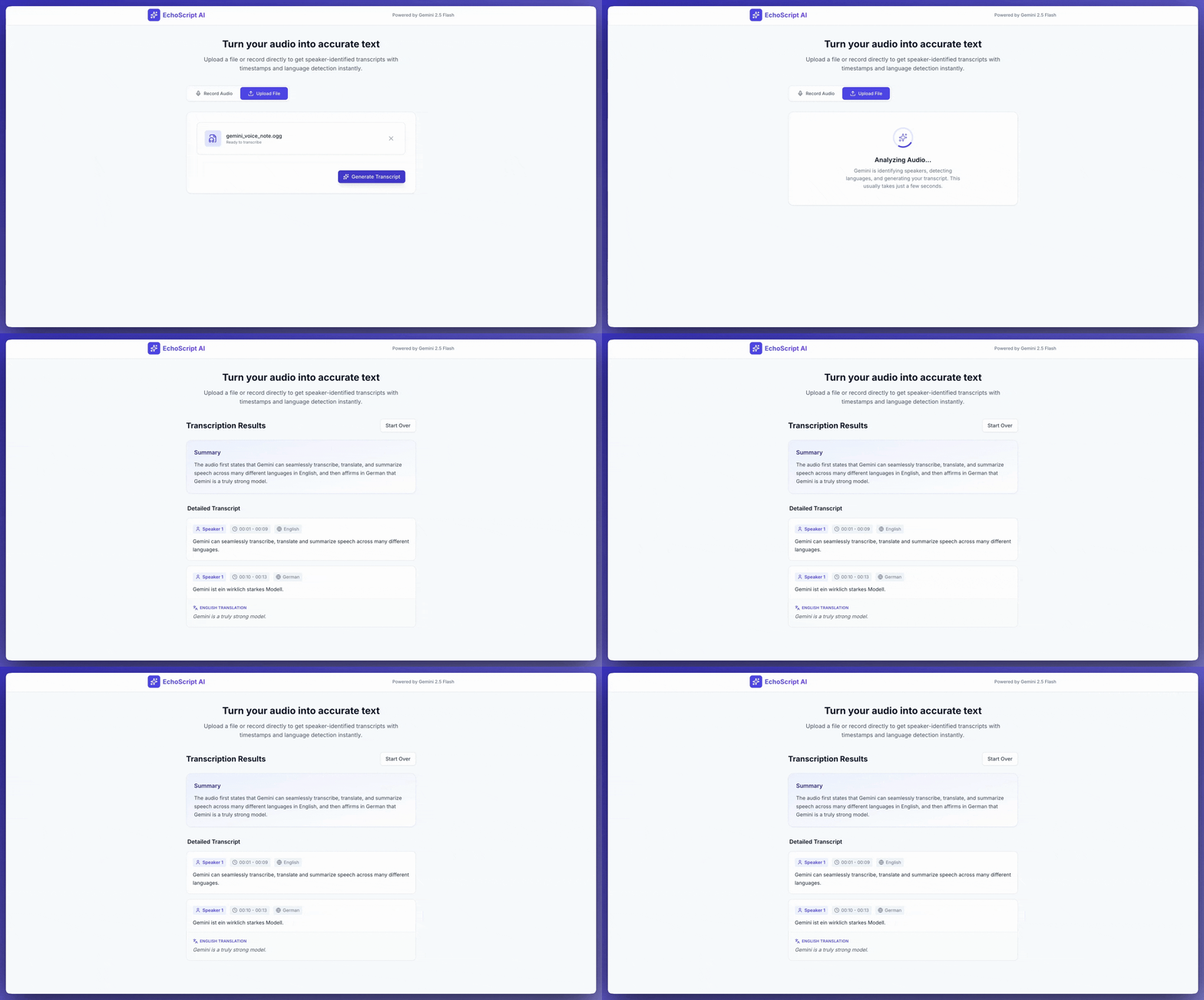
Trascrivere la voce in testo
Questo esempio mostra come trascrivere, tradurre e riassumere un discorso con timestamp, diarizzazione dei parlanti e rilevamento delle emozioni utilizzando output strutturati.
Python
from google import genai

client = genai.Client()

YOUTUBE_URL = "https://www.youtube.com/watch?v=ku-N-eS1lgM"

prompt = """
  Process the audio file and generate a detailed transcription.

  Requirements:
  1. Identify distinct speakers (e.g., Speaker 1, Speaker 2).
  2. Provide accurate timestamps for each segment (Format: MM:SS).
  3. Detect the primary language of each segment.
  4. If not English, provide the English translation.
  5. Identify the primary emotion: Happy, Sad, Angry, or Neutral.
  6. Provide a brief summary at the beginning.
"""

response_schema = {
    "type": "object",
    "properties": {
        "summary": {"type": "string"},
        "segments": {
            "type": "array",
            "items": {
                "type": "object",
                "properties": {
                    "speaker": {"type": "string"},
                    "timestamp": {"type": "string"},
                    "content": {"type": "string"},
                    "language": {"type": "string"},
                    "emotion": {
                        "type": "string",
                        "enum": ["happy", "sad", "angry", "neutral"]
                    }
                },
                "required": ["speaker", "timestamp", "content", "emotion"]
            }
        }
    },
    "required": ["summary", "segments"]
}

interaction = client.interactions.create(
    model="gemini-3.8-flash",
    input=[
        {"type": "video", "uri": YOUTUBE_URL, "mime_type": "video/mp4"},
        {"type": "text", "text": prompt}
    ],
    response_format=response_schema,
)

print(interaction.output_text)
JavaScript
import { GoogleGenAI } from "@google/genai";

const client = new GoogleGenAI({});

const YOUTUBE_URL = "https://www.youtube.com/watch?v=ku-N-eS1lgM";

const prompt = `
  Process the audio file and generate a detailed transcription.

  Requirements:
  1. Identify distinct speakers (e.g., Speaker 1, Speaker 2).
  2. Provide accurate timestamps for each segment (Format: MM:SS).
  3. Detect the primary language of each segment.
  4. If not English, provide the English translation.
  5. Identify the primary emotion: Happy, Sad, Angry, or Neutral.
  6. Provide a brief summary at the beginning.
`;

const responseSchema = {
    type: "object",
    properties: {
        summary: { type: "string" },
        segments: {
            type: "array",
            items: {
                type: "object",
                properties: {
                    speaker: { type: "string" },
                    timestamp: { type: "string" },
                    content: { type: "string" },
                    language: { type: "string" },
                    emotion: {
                        type: "string",
                        enum: ["happy", "sad", "angry", "neutral"]
                    }
                },
                required: ["speaker", "timestamp", "content", "emotion"]
            }
        }
    },
    required: ["summary", "segments"]
};

const interaction = await client.interactions.create({
    model: "gemini-3.8-flash",
    input: [
        { type: "video", uri: YOUTUBE_URL, mime_type: "video/mp4" },
        { type: "text", text: prompt }
    ],
    response_format: responseSchema,
});

console.log(JSON.parse(interaction.output_text));
Java
import com.google.genai.Client;
import com.google.genai.gaos.models.interactions.Content;
import com.google.genai.gaos.models.interactions.CreateModelInteraction;
import com.google.genai.gaos.models.interactions.CreateModelInteractionResponseFormat;
import com.google.genai.gaos.models.interactions.Interaction;
import com.google.genai.gaos.models.interactions.InteractionsInput;
import com.google.genai.gaos.models.interactions.Model;
import com.google.genai.gaos.models.interactions.ResponseFormat;
import com.google.genai.gaos.models.interactions.TextContent;
import com.google.genai.gaos.models.interactions.VideoContent;
import com.google.genai.gaos.models.interactions.VideoContentMimeType;
import com.google.genai.gaos.models.operations.CreateInteractionRequestBody;
import java.util.Arrays;
import java.util.List;
import java.util.HashMap;
import java.util.Map;

Client client = new Client();

String youtubeUrl = "https://www.youtube.com/watch?v=ku-N-eS1lgM";

String prompt =
    "Process the audio file and generate a detailed transcription.\n\n"
        + "Requirements:\n"
        + "1. Identify distinct speakers (e.g., Speaker 1, Speaker 2).\n"
        + "2. Provide accurate timestamps for each segment (Format: MM:SS).\n"
        + "3. Detect the primary language of each segment.\n"
        + "4. If not English, provide the English translation.\n"
        + "5. Identify the primary emotion: Happy, Sad, Angry, or Neutral.\n"
        + "6. Provide a brief summary at the beginning.";

Map<String, Object> emotionProp = new HashMap<>();
emotionProp.put("type", "string");
emotionProp.put("enum", Arrays.asList("happy", "sad", "angry", "neutral"));

Map<String, Object> stringType = new HashMap<>();
stringType.put("type", "string");

Map<String, Object> segmentProps = new HashMap<>();
segmentProps.put("speaker", stringType);
segmentProps.put("timestamp", stringType);
segmentProps.put("content", stringType);
segmentProps.put("language", stringType);
segmentProps.put("emotion", emotionProp);

Map<String, Object> segmentItem = new HashMap<>();
segmentItem.put("type", "object");
segmentItem.put("properties", segmentProps);
segmentItem.put("required", Arrays.asList("speaker", "timestamp", "content", "emotion"));

Map<String, Object> segmentsProp = new HashMap<>();
segmentsProp.put("type", "array");
segmentsProp.put("items", segmentItem);

Map<String, Object> properties = new HashMap<>();
properties.put("summary", stringType);
properties.put("segments", segmentsProp);

Map<String, Object> responseSchema = new HashMap<>();
responseSchema.put("type", "object");
responseSchema.put("properties", properties);
responseSchema.put("required", Arrays.asList("summary", "segments"));

Content videoContent =
    VideoContent.builder()
        .uri(youtubeUrl)
        .mimeType(VideoContentMimeType.VIDEO_MP4)
        .build();
Content textContent = TextContent.builder().text(prompt).build();

List<Content> contents = Arrays.asList(videoContent, textContent);

CreateModelInteraction params =
    CreateModelInteraction.builder()
        .model(Model.of("gemini-3.8-flash"))
        .input(InteractionsInput.ofContent(contents))
        .responseFormat(
            CreateModelInteractionResponseFormat.of(ResponseFormat.of(responseSchema)))
        .build();

Interaction interaction =
    client.interactions.create(CreateInteractionRequestBody.of(params)).interaction().get();

System.out.println(interaction.outputText().orElse(""));
Go
package main

import (
    "context"
    "fmt"
    "log"

    "google.golang.org/genai"
    "google.golang.org/genai/interactions/models/interactions"
    "google.golang.org/genai/interactions/models/operations"
)

func main() {
    ctx := context.Background()
    client, err := genai.NewClient(ctx, nil)
    if err != nil {
        log.Fatal(err)
    }

    youtubeURL := "https://www.youtube.com/watch?v=ku-N-eS1lgM"

    prompt := "Process the audio file and generate a detailed transcription.\n\n" +
        "Requirements:\n" +
        "1. Identify distinct speakers (e.g., Speaker 1, Speaker 2).\n" +
        "2. Provide accurate timestamps for each segment (Format: MM:SS).\n" +
        "3. Detect the primary language of each segment.\n" +
        "4. If not English, provide the English translation.\n" +
        "5. Identify the primary emotion: Happy, Sad, Angry, or Neutral.\n" +
        "6. Provide a brief summary at the beginning."

    responseSchema := map[string]any{
        "type": "object",
        "properties": map[string]any{
            "summary": map[string]any{"type": "string"},
            "segments": map[string]any{
                "type": "array",
                "items": map[string]any{
                    "type": "object",
                    "properties": map[string]any{
                        "speaker":   map[string]any{"type": "string"},
                        "timestamp": map[string]any{"type": "string"},
                        "content":   map[string]any{"type": "string"},
                        "language":  map[string]any{"type": "string"},
                        "emotion": map[string]any{
                            "type": "string",
                            "enum": []string{"happy", "sad", "angry", "neutral"},
                        },
                    },
                    "required": []string{"speaker", "timestamp", "content", "emotion"},
                },
            },
        },
        "required": []string{"summary", "segments"},
    }

    contents := []interactions.Content{
        interactions.NewContent(interactions.VideoContent{
            URI:      genai.Ptr(youtubeURL),
            MimeType: interactions.VideoContentMimeTypeVideoMp4.ToPointer(),
        }),
        interactions.NewContent(interactions.TextContent{
            Text: prompt,
        }),
    }

    res, err := client.Interactions.Create(ctx, operations.CreateInteractionRequest{
        Body: operations.NewCreateInteractionRequestBody(interactions.CreateModelInteraction{
            Model: interactions.Model("gemini-3.8-flash"),
            Input: interactions.NewInteractionsInput(contents),
            ResponseFormat: genai.Ptr(interactions.NewCreateModelInteractionResponseFormat(
                interactions.NewResponseFormat(responseSchema),
            )),
        }),
    })
    if err != nil {
        log.Fatal(err)
    }

    if res.Interaction.OutputText != nil {
        fmt.Println(*res.Interaction.OutputText)
    }
}
REST
curl -X POST "https://generativelanguage.googleapis.com/v1beta/interactions" \
  -H "x-goog-api-key: $GEMINI_API_KEY" \
  -H 'Content-Type: application/json' \
  -d '{
    "model": "gemini-3.8-flash",
    "input": [
      {
        "type": "video",
        "uri": "https://www.youtube.com/watch?v=ku-N-eS1lgM",
        "mime_type": "video/mp4"
      },
      {
        "type": "text",
        "text": "Transcribe with speaker diarization and emotion detection."
      }
    ],
    "response_format": {
        "type": "object",
        "properties": {
          "summary": {"type": "string"},
          "segments": {
            "type": "array",
            "items": {
              "type": "object",
              "properties": {
                "speaker": {"type": "string"},
                "timestamp": {"type": "string"},
                "content": {"type": "string"},
                "emotion": {"type": "string", "enum": ["happy", "sad", "angry", "neutral"]}
              }
            }
          }
        }
      }
  }'
Audio di input
Puoi fornire i dati audio nei seguenti modi:
- Carica un file audio prima di effettuare una richiesta.
- Trasmetti i dati audio incorporati con la richiesta.
Caricare un file audio
Utilizza l'API Files per i file più grandi di 20 MB.
Python
from google import genai

client = genai.Client()

uploaded_file = client.files.upload(file="path/to/sample.mp3")

interaction = client.interactions.create(
    model="gemini-3.8-flash",
    input=[
        {"type": "text", "text": "Describe this audio clip"},
        {
            "type": "audio",
            "uri": uploaded_file.uri,
            "mime_type": uploaded_file.mime_type
        }
    ]
)
print(interaction.output_text)
JavaScript
import { GoogleGenAI } from "@google/genai";

const client = new GoogleGenAI({});

const uploadedFile = await client.files.upload({
    file: "path/to/sample.mp3",
    config: { mimeType: "audio/mp3" }
});

const interaction = await client.interactions.create({
    model: "gemini-3.8-flash",
    input: [
        {type: "text", text: "Describe this audio clip"},
        {
            type: "audio",
            uri: uploadedFile.uri,
            mime_type: uploadedFile.mimeType
        }
    ]
});
console.log(interaction.output_text);
Java
// Upload an audio file using the Files API (recommended for files > 20 MB)
import com.google.genai.Client;
import com.google.genai.gaos.models.interactions.AudioContent;
import com.google.genai.gaos.models.interactions.AudioContentMimeType;
import com.google.genai.gaos.models.interactions.Content;
import com.google.genai.gaos.models.interactions.CreateModelInteraction;
import com.google.genai.gaos.models.interactions.Interaction;
import com.google.genai.gaos.models.interactions.InteractionsInput;
import com.google.genai.gaos.models.interactions.Model;
import com.google.genai.gaos.models.interactions.TextContent;
import com.google.genai.gaos.models.operations.CreateInteractionRequestBody;
import com.google.genai.types.File;
import com.google.genai.types.UploadFileConfig;
import java.util.Arrays;
import java.util.List;

Client client = new Client();

File uploadedFile =
    client.files.upload(
        "path/to/sample.mp3", UploadFileConfig.builder().mimeType("audio/mp3").build());

Content textContent = TextContent.builder().text("Describe this audio clip").build();
Content audioContent =
    AudioContent.builder()
        .uri(uploadedFile.uri().get())
        .mimeType(AudioContentMimeType.of(uploadedFile.mimeType().get()))
        .build();

List<Content> contents = Arrays.asList(textContent, audioContent);

CreateModelInteraction params =
    CreateModelInteraction.builder()
        .model(Model.of("gemini-3.8-flash"))
        .input(InteractionsInput.ofContent(contents))
        .build();

Interaction interaction =
    client.interactions.create(CreateInteractionRequestBody.of(params)).interaction().get();

System.out.println(interaction.outputText().orElse(""));
Go
// Upload an audio file using the Files API (recommended for files > 20 MB)
package main

import (
    "context"
    "fmt"
    "log"

    "google.golang.org/genai"
    "google.golang.org/genai/interactions/models/interactions"
    "google.golang.org/genai/interactions/models/operations"
)

func main() {
    ctx := context.Background()
    client, err := genai.NewClient(ctx, nil)
    if err != nil {
        log.Fatal(err)
    }

    uploadedFile, err := client.Files.UploadFromPath(ctx, "path/to/sample.mp3", &genai.UploadFileConfig{
        MIMEType: "audio/mp3",
    })
    if err != nil {
        log.Fatal(err)
    }

    contents := []interactions.Content{
        interactions.NewContent(interactions.TextContent{
            Text: "Describe this audio clip",
        }),
        interactions.NewContent(interactions.AudioContent{
            URI:      genai.Ptr(uploadedFile.URI),
            MimeType: interactions.AudioContentMimeType(uploadedFile.MIMEType).ToPointer(),
        }),
    }

    res, err := client.Interactions.Create(ctx, operations.CreateInteractionRequest{
        Body: operations.NewCreateInteractionRequestBody(interactions.CreateModelInteraction{
            Model: interactions.Model("gemini-3.8-flash"),
            Input: interactions.NewInteractionsInput(contents),
        }),
    })
    if err != nil {
        log.Fatal(err)
    }

    if res.Interaction.OutputText != nil {
        fmt.Println(*res.Interaction.OutputText)
    }
}
REST
# First upload the file using the Files API, then use the URI:
curl -X POST "https://generativelanguage.googleapis.com/v1beta/interactions" \
  -H "x-goog-api-key: $GEMINI_API_KEY" \
  -H 'Content-Type: application/json' \
  -d '{
    "model": "gemini-3.8-flash",
    "input": [
      {"type": "text", "text": "Describe this audio clip"},
      {
        "type": "audio",
        "uri": "YOUR_FILE_URI",
        "mime_type": "audio/mp3"
      }
    ]
  }'
Trasmettere i dati audio in linea
Per i file audio di piccole dimensioni con una dimensione totale della richiesta inferiore a 20 MB:
Python
from google import genai
import base64

client = genai.Client()

with open('path/to/small-sample.mp3', 'rb') as f:
    audio_bytes = f.read()

interaction = client.interactions.create(
    model="gemini-3.8-flash",
    input=[
        {"type": "text", "text": "Describe this audio clip"},
        {
            "type": "audio",
            "data": base64.b64encode(audio_bytes).decode('utf-8'),
            "mime_type": "audio/mp3"
        }
    ]
)
print(interaction.output_text)
JavaScript
import { GoogleGenAI } from "@google/genai";
import * as fs from "node:fs";

const client = new GoogleGenAI({});

const audioData = fs.readFileSync("path/to/small-sample.mp3", {
    encoding: "base64"
});

const interaction = await client.interactions.create({
    model: "gemini-3.8-flash",
    input: [
        {type: "text", text: "Describe this audio clip"},
        {
            type: "audio",
            data: audioData,
            mime_type: "audio/mp3"
        }
    ]
});
console.log(interaction.output_text);
Java
import com.google.genai.Client;
import com.google.genai.gaos.models.interactions.AudioContent;
import com.google.genai.gaos.models.interactions.AudioContentMimeType;
import com.google.genai.gaos.models.interactions.Content;
import com.google.genai.gaos.models.interactions.CreateModelInteraction;
import com.google.genai.gaos.models.interactions.Interaction;
import com.google.genai.gaos.models.interactions.InteractionsInput;
import com.google.genai.gaos.models.interactions.Model;
import com.google.genai.gaos.models.interactions.TextContent;
import com.google.genai.gaos.models.operations.CreateInteractionRequestBody;
import java.nio.file.Files;
import java.nio.file.Paths;
import java.util.Arrays;
import java.util.Base64;
import java.util.List;

Client client = new Client();

byte[] audioBytes = Files.readAllBytes(Paths.get("path/to/small-sample.mp3"));
String base64Audio = Base64.getEncoder().encodeToString(audioBytes);

Content textContent = TextContent.builder().text("Describe this audio clip").build();
Content audioContent =
    AudioContent.builder()
        .data(base64Audio)
        .mimeType(AudioContentMimeType.AUDIO_MP3)
        .build();

List<Content> contents = Arrays.asList(textContent, audioContent);

CreateModelInteraction params =
    CreateModelInteraction.builder()
        .model(Model.of("gemini-3.8-flash"))
        .input(InteractionsInput.ofContent(contents))
        .build();

Interaction interaction =
    client.interactions.create(CreateInteractionRequestBody.of(params)).interaction().get();

System.out.println(interaction.outputText().orElse(""));
Go
package main

import (
    "context"
    "encoding/base64"
    "fmt"
    "log"
    "os"

    "google.golang.org/genai"
    "google.golang.org/genai/interactions/models/interactions"
    "google.golang.org/genai/interactions/models/operations"
)

func main() {
    ctx := context.Background()
    client, err := genai.NewClient(ctx, nil)
    if err != nil {
        log.Fatal(err)
    }

    audioBytes, err := os.ReadFile("path/to/small-sample.mp3")
    if err != nil {
        log.Fatal(err)
    }
    base64Audio := base64.StdEncoding.EncodeToString(audioBytes)

    contents := []interactions.Content{
        interactions.NewContent(interactions.TextContent{
            Text: "Describe this audio clip",
        }),
        interactions.NewContent(interactions.AudioContent{
            Data:     genai.Ptr(base64Audio),
            MimeType: interactions.AudioContentMimeTypeAudioMp3.ToPointer(),
        }),
    }

    res, err := client.Interactions.Create(ctx, operations.CreateInteractionRequest{
        Body: operations.NewCreateInteractionRequestBody(interactions.CreateModelInteraction{
            Model: interactions.Model("gemini-3.8-flash"),
            Input: interactions.NewInteractionsInput(contents),
        }),
    })
    if err != nil {
        log.Fatal(err)
    }

    if res.Interaction.OutputText != nil {
        fmt.Println(*res.Interaction.OutputText)
    }
}
REST
AUDIO_PATH="path/to/sample.mp3"

if [[ "$(base64 --version 2>&1)" = *"FreeBSD"* ]]; then
  B64FLAGS="--input"
else
  B64FLAGS="-w0"
fi

curl -X POST "https://generativelanguage.googleapis.com/v1beta/interactions" \
  -H "x-goog-api-key: $GEMINI_API_KEY" \
  -H 'Content-Type: application/json' \
  -d '{
    "model": "gemini-3.8-flash",
    "input": [
      {"type": "text", "text": "Describe this audio clip"},
      {
        "type": "audio",
        "data": "'$(base64 $B64FLAGS $AUDIO_PATH)'",
        "mime_type": "audio/mp3"
      }
    ]
  }'
Note sui dati audio in linea: * La dimensione massima della richiesta è 20 MB totali (inclusi i prompt e tutti i file) * Per il riutilizzo, carica il file
Ottenere una trascrizione
Per ottenere una trascrizione, chiedila nel prompt:
Python
interaction = client.interactions.create(
    model="gemini-3.8-flash",
    input=[
        {"type": "text", "text": "Generate a transcript of the speech."},
        {
            "type": "audio",
            "uri": uploaded_file.uri,
            "mime_type": uploaded_file.mime_type
        }
    ]
)
print(interaction.output_text)
JavaScript
const interaction = await client.interactions.create({
    model: "gemini-3.8-flash",
    input: [
        { type: "text", text: "Generate a transcript of the speech." },
        {
            type: "audio",
            uri: uploadedFile.uri,
            mime_type: uploadedFile.mimeType
        }
    ]
});
console.log(interaction.output_text);
Java
import com.google.genai.Client;
import com.google.genai.gaos.models.interactions.AudioContent;
import com.google.genai.gaos.models.interactions.AudioContentMimeType;
import com.google.genai.gaos.models.interactions.Content;
import com.google.genai.gaos.models.interactions.CreateModelInteraction;
import com.google.genai.gaos.models.interactions.Interaction;
import com.google.genai.gaos.models.interactions.InteractionsInput;
import com.google.genai.gaos.models.interactions.Model;
import com.google.genai.gaos.models.interactions.TextContent;
import com.google.genai.gaos.models.operations.CreateInteractionRequestBody;
import com.google.genai.types.File;
import com.google.genai.types.UploadFileConfig;
import java.util.Arrays;
import java.util.List;

Client client = new Client();

File uploadedFile =
    client.files.upload(
        "path/to/sample.mp3", UploadFileConfig.builder().mimeType("audio/mp3").build());

Content textContent = TextContent.builder().text("Generate a transcript of the speech.").build();
Content audioContent =
    AudioContent.builder()
        .uri(uploadedFile.uri().get())
        .mimeType(AudioContentMimeType.of(uploadedFile.mimeType().get()))
        .build();

List<Content> contents = Arrays.asList(textContent, audioContent);

CreateModelInteraction params =
    CreateModelInteraction.builder()
        .model(Model.of("gemini-3.8-flash"))
        .input(InteractionsInput.ofContent(contents))
        .build();

Interaction interaction =
    client.interactions.create(CreateInteractionRequestBody.of(params)).interaction().get();

System.out.println(interaction.outputText().orElse(""));
Go
package main

import (
    "context"
    "fmt"
    "log"

    "google.golang.org/genai"
    "google.golang.org/genai/interactions/models/interactions"
    "google.golang.org/genai/interactions/models/operations"
)

func main() {
    ctx := context.Background()
    client, err := genai.NewClient(ctx, nil)
    if err != nil {
        log.Fatal(err)
    }

    uploadedFile, err := client.Files.UploadFromPath(ctx, "path/to/sample.mp3", &genai.UploadFileConfig{
        MIMEType: "audio/mp3",
    })
    if err != nil {
        log.Fatal(err)
    }

    contents := []interactions.Content{
        interactions.NewContent(interactions.TextContent{
            Text: "Generate a transcript of the speech.",
        }),
        interactions.NewContent(interactions.AudioContent{
            URI:      genai.Ptr(uploadedFile.URI),
            MimeType: interactions.AudioContentMimeType(uploadedFile.MIMEType).ToPointer(),
        }),
    }

    res, err := client.Interactions.Create(ctx, operations.CreateInteractionRequest{
        Body: operations.NewCreateInteractionRequestBody(interactions.CreateModelInteraction{
            Model: interactions.Model("gemini-3.8-flash"),
            Input: interactions.NewInteractionsInput(contents),
        }),
    })
    if err != nil {
        log.Fatal(err)
    }

    if res.Interaction.OutputText != nil {
        fmt.Println(*res.Interaction.OutputText)
    }
}
Fare riferimento ai timestamp
Utilizza il formato MM:SS per fare riferimento a sezioni specifiche:
Python
interaction = client.interactions.create(
    model="gemini-3.8-flash",
    input=[
        {"type": "text", "text": "Provide a transcript from 02:30 to 03:29."},
        {
            "type": "audio",
            "uri": uploaded_file.uri,
            "mime_type": uploaded_file.mime_type
        }
    ]
)
JavaScript
const interaction = await client.interactions.create({
    model: "gemini-3.8-flash",
    input: [
        { type: "text", text: "Provide a transcript from 02:30 to 03:29." },
        { type: "audio", uri: uploadedFile.uri, mime_type: "audio/mp3" }
    ]
});
Java
import com.google.genai.Client;
import com.google.genai.gaos.models.interactions.AudioContent;
import com.google.genai.gaos.models.interactions.AudioContentMimeType;
import com.google.genai.gaos.models.interactions.Content;
import com.google.genai.gaos.models.interactions.CreateModelInteraction;
import com.google.genai.gaos.models.interactions.Interaction;
import com.google.genai.gaos.models.interactions.InteractionsInput;
import com.google.genai.gaos.models.interactions.Model;
import com.google.genai.gaos.models.interactions.TextContent;
import com.google.genai.gaos.models.operations.CreateInteractionRequestBody;
import com.google.genai.types.File;
import com.google.genai.types.UploadFileConfig;
import java.util.Arrays;
import java.util.List;

Client client = new Client();

File uploadedFile =
    client.files.upload(
        "path/to/sample.mp3", UploadFileConfig.builder().mimeType("audio/mp3").build());

Content textContent =
    TextContent.builder().text("Provide a transcript from 02:30 to 03:29.").build();
Content audioContent =
    AudioContent.builder()
        .uri(uploadedFile.uri().get())
        .mimeType(AudioContentMimeType.of(uploadedFile.mimeType().get()))
        .build();

List<Content> contents = Arrays.asList(textContent, audioContent);

CreateModelInteraction params =
    CreateModelInteraction.builder()
        .model(Model.of("gemini-3.8-flash"))
        .input(InteractionsInput.ofContent(contents))
        .build();

Interaction interaction =
    client.interactions.create(CreateInteractionRequestBody.of(params)).interaction().get();

System.out.println(interaction.outputText().orElse(""));
Go
package main

import (
    "context"
    "fmt"
    "log"

    "google.golang.org/genai"
    "google.golang.org/genai/interactions/models/interactions"
    "google.golang.org/genai/interactions/models/operations"
)

func main() {
    ctx := context.Background()
    client, err := genai.NewClient(ctx, nil)
    if err != nil {
        log.Fatal(err)
    }

    uploadedFile, err := client.Files.UploadFromPath(ctx, "path/to/sample.mp3", &genai.UploadFileConfig{
        MIMEType: "audio/mp3",
    })
    if err != nil {
        log.Fatal(err)
    }

    contents := []interactions.Content{
        interactions.NewContent(interactions.TextContent{
            Text: "Provide a transcript from 02:30 to 03:29.",
        }),
        interactions.NewContent(interactions.AudioContent{
            URI:      genai.Ptr(uploadedFile.URI),
            MimeType: interactions.AudioContentMimeType(uploadedFile.MIMEType).ToPointer(),
        }),
    }

    res, err := client.Interactions.Create(ctx, operations.CreateInteractionRequest{
        Body: operations.NewCreateInteractionRequestBody(interactions.CreateModelInteraction{
            Model: interactions.Model("gemini-3.8-flash"),
            Input: interactions.NewInteractionsInput(contents),
        }),
    })
    if err != nil {
        log.Fatal(err)
    }

    if res.Interaction.OutputText != nil {
        fmt.Println(*res.Interaction.OutputText)
    }
}
Contare i token
Per contare i token in un file audio:
Python
response = client.models.count_tokens(
    model="gemini-3.8-flash",
    contents=[uploaded_file]
)
print(response)
JavaScript
const response = await client.models.countTokens({
    model: "gemini-3.8-flash",
    contents: [
        { fileData: { fileUri: uploadedFile.uri, mimeType: uploadedFile.mimeType } }
    ]
});
console.log(response.totalTokens);
Java
import com.google.genai.Client;
import com.google.genai.types.Content;
import com.google.genai.types.CountTokensResponse;
import com.google.genai.types.File;
import com.google.genai.types.Part;
import com.google.genai.types.UploadFileConfig;
import java.util.Arrays;

Client client = new Client();

File uploadedFile =
    client.files.upload(
        "path/to/sample.mp3", UploadFileConfig.builder().mimeType("audio/mp3").build());

CountTokensResponse response =
    client.models.countTokens(
        "gemini-3.8-flash",
        Arrays.asList(
            Content.fromParts(
                Part.fromUri(uploadedFile.uri().get(), uploadedFile.mimeType().get()))),
        null);

System.out.println(response);
Go
package main

import (
    "context"
    "fmt"
    "log"

    "google.golang.org/genai"
)

func main() {
    ctx := context.Background()
    client, err := genai.NewClient(ctx, nil)
    if err != nil {
        log.Fatal(err)
    }

    uploadedFile, err := client.Files.UploadFromPath(ctx, "path/to/sample.mp3", &genai.UploadFileConfig{
        MIMEType: "audio/mp3",
    })
    if err != nil {
        log.Fatal(err)
    }

    response, err := client.Models.CountTokens(
        ctx,
        "gemini-3.8-flash",
        []*genai.Content{
            genai.NewContentFromURI(uploadedFile.URI, uploadedFile.MIMEType, genai.RoleUser),
        },
        nil,
    )
    if err != nil {
        log.Fatal(err)
    }

    fmt.Println(response.TotalTokens)
}
Formati audio supportati
Gemini supporta i seguenti tipi MIME di formati audio:
- WAV -
audio/wav - MP3 -
audio/mp3 - AIFF -
audio/aiff - AAC -
audio/aac - OGG -
audio/ogg - FLAC -
audio/flac - MPEG -
audio/mpeg - M4A -
audio/m4a - L16 -
audio/l16 - Opus -
audio/opus - ALAW -
audio/alaw - MULAW -
audio/mulaw - WebM -
audio/webm
Per l'elenco completo dei tipi MIME e degli schemi dei parametri supportati, consulta il riferimento API Interactions.
Dettagli tecnici sull'audio
- Token: 32 token al secondo di audio (1 minuto = 1920 token)
- Non vocali: Gemini comprende i suoni non vocali (canti di uccelli, sirene e così via).
- Lunghezza massima: 9 ore e 30 minuti di audio per prompt
- Risoluzione: sottocampionata a 16 Kbps
- Canali: audio multicanale combinato a un singolo canale
Passaggi successivi
- API Files: carica e gestisci i file audio
- Istruzioni di sistema: Personalizza il comportamento del modello
- Output strutturato: Ottieni i risultati della trascrizione in formato JSON