

Binjakët mund të analizojnë të dhënat audio dhe të gjenerojnë përgjigje me tekst.
Python
from google import genai

client = genai.Client()

myfile = client.files.upload(file="path/to/sample.mp3")

response = client.models.generate_content(
    model="gemini-3-flash-preview", contents=["Describe this audio clip", myfile]
)

print(response.text)
JavaScript
import {
  GoogleGenAI,
  createUserContent,
  createPartFromUri,
} from "@google/genai";

const ai = new GoogleGenAI({});

async function main() {
  const myfile = await ai.files.upload({
    file: "path/to/sample.mp3",
    config: { mimeType: "audio/mp3" },
  });

  const response = await ai.models.generateContent({
    model: "gemini-3-flash-preview",
    contents: createUserContent([
      createPartFromUri(myfile.uri, myfile.mimeType),
      "Describe this audio clip",
    ]),
  });
  console.log(response.text);
}

await main();
Shko
package main

import (
    "context"
    "fmt"
    "os"
    "google.golang.org/genai"
)

func main() {
    ctx := context.Background()
    client, err := genai.NewClient(ctx, nil)
    if err != nil {
        log.Fatal(err)
    }

    localAudioPath := "/path/to/sample.mp3"
    uploadedFile, _ := client.Files.UploadFromPath(
        ctx,
        localAudioPath,
        nil,
    )

    parts := []*genai.Part{
        genai.NewPartFromText("Describe this audio clip"),
        genai.NewPartFromURI(uploadedFile.URI, uploadedFile.MIMEType),
    }
    contents := []*genai.Content{
        genai.NewContentFromParts(parts, genai.RoleUser),
    }

    result, _ := client.Models.GenerateContent(
        ctx,
        "gemini-3-flash-preview",
        contents,
        nil,
    )

    fmt.Println(result.Text())
}
PUSHTIM
AUDIO_PATH="path/to/sample.mp3"
MIME_TYPE=$(file -b --mime-type "${AUDIO_PATH}")
NUM_BYTES=$(wc -c < "${AUDIO_PATH}")
DISPLAY_NAME=AUDIO

tmp_header_file=upload-header.tmp

# Initial resumable request defining metadata.
# The upload url is in the response headers dump them to a file.
curl "https://generativelanguage.googleapis.com/upload/v1beta/files" \
  -H "x-goog-api-key: $GEMINI_API_KEY" \
  -D upload-header.tmp \
  -H "X-Goog-Upload-Protocol: resumable" \
  -H "X-Goog-Upload-Command: start" \
  -H "X-Goog-Upload-Header-Content-Length: ${NUM_BYTES}" \
  -H "X-Goog-Upload-Header-Content-Type: ${MIME_TYPE}" \
  -H "Content-Type: application/json" \
  -d "{'file': {'display_name': '${DISPLAY_NAME}'}}" 2> /dev/null

upload_url=$(grep -i "x-goog-upload-url: " "${tmp_header_file}" | cut -d" " -f2 | tr -d "\r")
rm "${tmp_header_file}"

# Upload the actual bytes.
curl "${upload_url}" \
  -H "Content-Length: ${NUM_BYTES}" \
  -H "X-Goog-Upload-Offset: 0" \
  -H "X-Goog-Upload-Command: upload, finalize" \
  --data-binary "@${AUDIO_PATH}" 2> /dev/null > file_info.json

file_uri=$(jq ".file.uri" file_info.json)
echo file_uri=$file_uri

# Now generate content using that file
curl "https://generativelanguage.googleapis.com/v1beta/models/gemini-3-flash-preview:generateContent" \
    -H "x-goog-api-key: $GEMINI_API_KEY" \
    -H 'Content-Type: application/json' \
    -X POST \
    -d '{
      "contents": [{
        "parts":[
          {"text": "Describe this audio clip"},
          {"file_data":{"mime_type": "${MIME_TYPE}", "file_uri": '$file_uri'}}]
        }]
      }' 2> /dev/null > response.json

cat response.json
echo

jq ".candidates[].content.parts[].text" response.json
Përmbledhje
Gemini mund të analizojë dhe kuptojë të dhënat audio dhe të gjenerojë përgjigje me tekst ndaj tyre, duke mundësuar raste përdorimi si më poshtë:
- Përshkruani, përmbledhni ose përgjigjuni pyetjeve rreth përmbajtjes audio.
- Jepni një transkriptim dhe përkthim të audios (nga të folurit në tekst).
- Zbuloni dhe etiketoni folës të ndryshëm (diarizimi i folësit).
- Zbuloni emocionet në të folur dhe muzikë.
- Analizoni segmente specifike të audios dhe jepni vula kohore.
Deri më tani, API-ja Gemini nuk mbështet rastet e përdorimit të transkriptimit në kohë reale. Për ndërveprimet me zë dhe video në kohë reale, referojuni API-t Live . Për modelet e dedikuara të të folurit në tekst me mbështetje për transkriptimin në kohë reale, përdorni API-n e të folurit në tekst të Google Cloud .
Transkripto të folurit në tekst
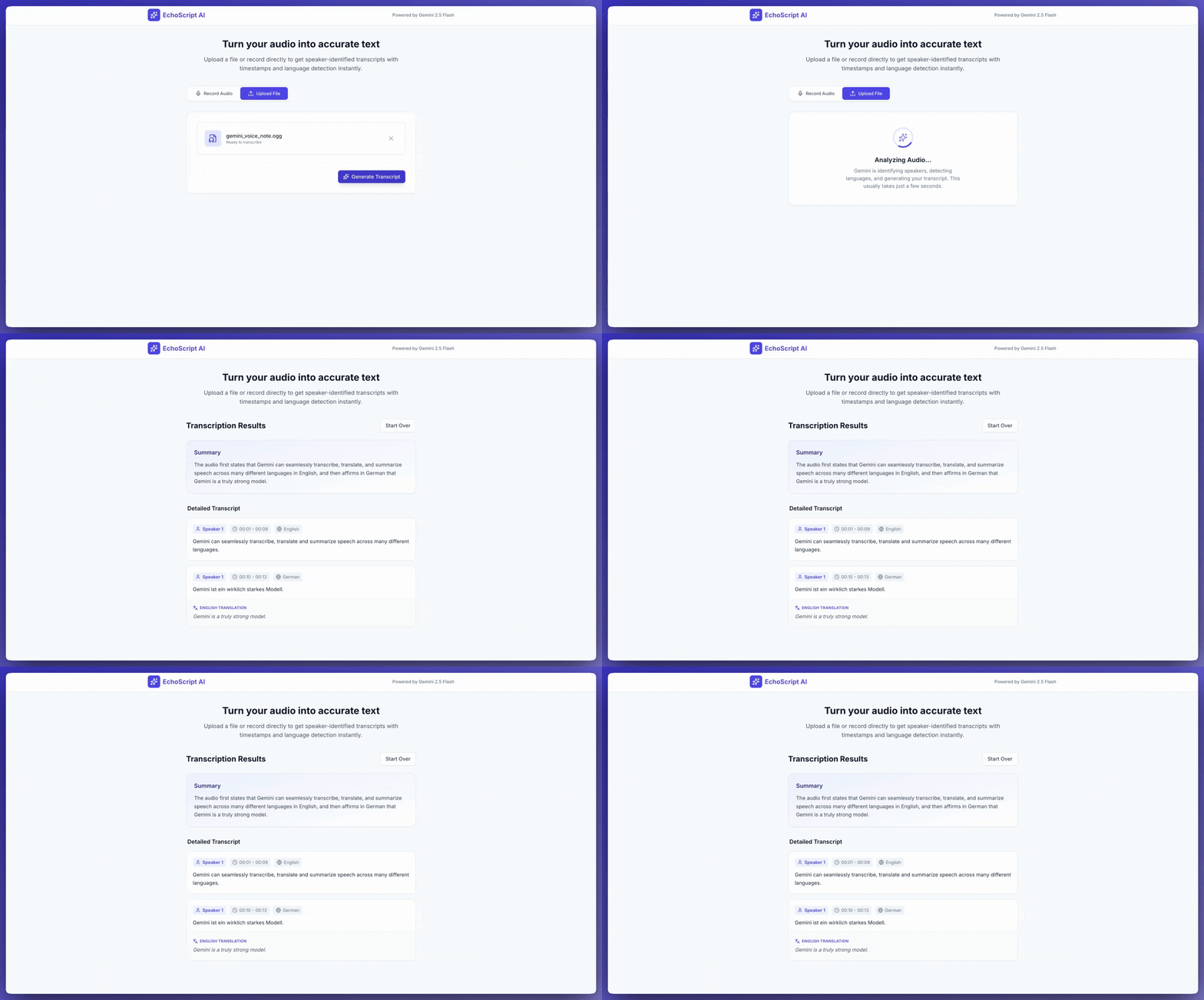
Ky shembull aplikacioni tregon se si të kërkohet nga Gemini API që të transkriptojë, përkthejë dhe përmbledhë të folurit, duke përfshirë vulat kohore, ditarizimin e folësit dhe zbulimin e emocioneve duke përdorur rezultate të strukturuara .
Python
from google import genai
from google.genai import types

client = genai.Client()

YOUTUBE_URL = "https://www.youtube.com/watch?v=ku-N-eS1lgM"

def main():
  prompt = """
    Process the audio file and generate a detailed transcription.

    Requirements:
    1. Identify distinct speakers (e.g., Speaker 1, Speaker 2, or names if context allows).
    2. Provide accurate timestamps for each segment (Format: MM:SS).
    3. Detect the primary language of each segment.
    4. If the segment is in a language different than English, also provide the English translation.
    5. Identify the primary emotion of the speaker in this segment. You MUST choose exactly one of the following: Happy, Sad, Angry, Neutral.
    6. Provide a brief summary of the entire audio at the beginning.
  """

  response = client.models.generate_content(
    model="gemini-3-flash-preview",
    contents=[
      types.Content(
        parts=[
          types.Part(
            file_data=types.FileData(
              file_uri=YOUTUBE_URL
            )
          ),
          types.Part(
            text=prompt
          )
        ]
      )
    ],
    config=types.GenerateContentConfig(
      response_mime_type="application/json",
      response_schema=types.Schema(
        type=types.Type.OBJECT,
        properties={
          "summary": types.Schema(
            type=types.Type.STRING,
            description="A concise summary of the audio content.",
          ),
          "segments": types.Schema(
            type=types.Type.ARRAY,
            description="List of transcribed segments with speaker and timestamp.",
            items=types.Schema(
              type=types.Type.OBJECT,
              properties={
                "speaker": types.Schema(type=types.Type.STRING),
                "timestamp": types.Schema(type=types.Type.STRING),
                "content": types.Schema(type=types.Type.STRING),
                "language": types.Schema(type=types.Type.STRING),
                "language_code": types.Schema(type=types.Type.STRING),
                "translation": types.Schema(type=types.Type.STRING),
                "emotion": types.Schema(
                  type=types.Type.STRING,
                  enum=["happy", "sad", "angry", "neutral"]
                ),
              },
              required=["speaker", "timestamp", "content", "language", "language_code", "emotion"],
            ),
          ),
        },
        required=["summary", "segments"],
      ),
    ),
  )

  print(response.text)

if __name__ == "__main__":
  main()
JavaScript
import {
  GoogleGenAI,
  Type
} from "@google/genai";

const ai = new GoogleGenAI({});

const YOUTUBE_URL = "https://www.youtube.com/watch?v=ku-N-eS1lgM";

async function main() {
  const prompt = `
      Process the audio file and generate a detailed transcription.

      Requirements:
      1. Identify distinct speakers (e.g., Speaker 1, Speaker 2, or names if context allows).
      2. Provide accurate timestamps for each segment (Format: MM:SS).
      3. Detect the primary language of each segment.
      4. If the segment is in a language different than English, also provide the English translation.
      5. Identify the primary emotion of the speaker in this segment. You MUST choose exactly one of the following: Happy, Sad, Angry, Neutral.
      6. Provide a brief summary of the entire audio at the beginning.
    `;

  const Emotion = {
    Happy: 'happy',
    Sad: 'sad',
    Angry: 'angry',
    Neutral: 'neutral'
  };

  const response = await ai.models.generateContent({
    model: "gemini-3-flash-preview",
    contents: {
      parts: [
        {
          fileData: {
            fileUri: YOUTUBE_URL,
          },
        },
        {
          text: prompt,
        },
      ],
    },
    config: {
      responseMimeType: "application/json",
      responseSchema: {
        type: Type.OBJECT,
        properties: {
          summary: {
            type: Type.STRING,
            description: "A concise summary of the audio content.",
          },
          segments: {
            type: Type.ARRAY,
            description: "List of transcribed segments with speaker and timestamp.",
            items: {
              type: Type.OBJECT,
              properties: {
                speaker: { type: Type.STRING },
                timestamp: { type: Type.STRING },
                content: { type: Type.STRING },
                language: { type: Type.STRING },
                language_code: { type: Type.STRING },
                translation: { type: Type.STRING },
                emotion: {
                  type: Type.STRING,
                  enum: Object.values(Emotion)
                },
              },
              required: ["speaker", "timestamp", "content", "language", "language_code", "emotion"],
            },
          },
        },
        required: ["summary", "segments"],
      },
    },
  });
  const json = JSON.parse(response.text);
  console.log(json);
}

await main();
PUSHTIM
curl "https://generativelanguage.googleapis.com/v1beta/models/gemini-3-flash-preview:generateContent" \
    -H "x-goog-api-key: $GEMINI_API_KEY" \
    -H 'Content-Type: application/json' \
    -X POST \
    -d '{
      "contents": [
        {
          "parts": [
            {
              "file_data": {
                "file_uri": "https://www.youtube.com/watch?v=ku-N-eS1lgM",
                "mime_type": "video/mp4"
              }
            },
            {
              "text": "Process the audio file and generate a detailed transcription.\n\nRequirements:\n1. Identify distinct speakers (e.g., Speaker 1, Speaker 2, or names if context allows).\n2. Provide accurate timestamps for each segment (Format: MM:SS).\n3. Detect the primary language of each segment.\n4. If the segment is in a language different than English, also provide the English translation.\n5. Identify the primary emotion of the speaker in this segment. You MUST choose exactly one of the following: Happy, Sad, Angry, Neutral.\n6. Provide a brief summary of the entire audio at the beginning."
            }
          ]
        }
      ],
      "generation_config": {
        "response_mime_type": "application/json",
        "response_schema": {
          "type": "OBJECT",
          "properties": {
            "summary": {
              "type": "STRING",
              "description": "A concise summary of the audio content."
            },
            "segments": {
              "type": "ARRAY",
              "description": "List of transcribed segments with speaker and timestamp.",
              "items": {
                "type": "OBJECT",
                "properties": {
                  "speaker": { "type": "STRING" },
                  "timestamp": { "type": "STRING" },
                  "content": { "type": "STRING" },
                  "language": { "type": "STRING" },
                  "language_code": { "type": "STRING" },
                  "translation": { "type": "STRING" },
                  "emotion": {
                    "type": "STRING",
                    "enum": ["happy", "sad", "angry", "neutral"]
                  }
                },
                "required": ["speaker", "timestamp", "content", "language", "language_code", "emotion"]
              }
            }
          },
          "required": ["summary", "segments"]
        }
      }
    }' 2> /dev/null > response.json

cat response.json
echo

jq ".candidates[].content.parts[].text" response.json
Mund ta nxitësh AI Studio Build të krijojë një aplikacion njësoj si ky shembull aplikacioni transkriptimi , me një klikim të butonit.
Hyrje audioje
Ju mund t'i jepni të dhëna audio Binjakëve në mënyrat e mëposhtme:
- Ngarko një skedar audio përpara se të bësh një kërkesë për
generateContent. - Kaloni të dhënat audio të integruara me kërkesën për
generateContent.
Për të mësuar rreth metodave të tjera të futjes së skedarëve, shihni udhëzuesin e metodave të futjes së skedarëve .
Ngarko një skedar audio
Mund të përdorni API-në e Skedarëve për të ngarkuar një skedar audio. Përdorni gjithmonë API-në e Skedarëve kur madhësia totale e kërkesës (duke përfshirë skedarët, njoftimin me tekst, udhëzimet e sistemit, etj.) është më e madhe se 20 MB.
Kodi i mëposhtëm ngarkon një skedar audio dhe më pas e përdor skedarin në një thirrje për generateContent .
Python
from google import genai

client = genai.Client()

myfile = client.files.upload(file="path/to/sample.mp3")

response = client.models.generate_content(
    model="gemini-3-flash-preview", contents=["Describe this audio clip", myfile]
)

print(response.text)
JavaScript
import {
  GoogleGenAI,
  createUserContent,
  createPartFromUri,
} from "@google/genai";

const ai = new GoogleGenAI({});

async function main() {
  const myfile = await ai.files.upload({
    file: "path/to/sample.mp3",
    config: { mimeType: "audio/mp3" },
  });

  const response = await ai.models.generateContent({
    model: "gemini-3-flash-preview",
    contents: createUserContent([
      createPartFromUri(myfile.uri, myfile.mimeType),
      "Describe this audio clip",
    ]),
  });
  console.log(response.text);
}

await main();
Shko
package main

import (
  "context"
  "fmt"
  "os"
  "google.golang.org/genai"
)

func main() {
  ctx := context.Background()
  client, err := genai.NewClient(ctx, nil)
  if err != nil {
      log.Fatal(err)
  }

  localAudioPath := "/path/to/sample.mp3"
  uploadedFile, _ := client.Files.UploadFromPath(
      ctx,
      localAudioPath,
      nil,
  )

  parts := []*genai.Part{
      genai.NewPartFromText("Describe this audio clip"),
      genai.NewPartFromURI(uploadedFile.URI, uploadedFile.MIMEType),
  }
  contents := []*genai.Content{
      genai.NewContentFromParts(parts, genai.RoleUser),
  }

  result, _ := client.Models.GenerateContent(
      ctx,
      "gemini-3-flash-preview",
      contents,
      nil,
  )

  fmt.Println(result.Text())
}
PUSHTIM
AUDIO_PATH="path/to/sample.mp3"
MIME_TYPE=$(file -b --mime-type "${AUDIO_PATH}")
NUM_BYTES=$(wc -c < "${AUDIO_PATH}")
DISPLAY_NAME=AUDIO

tmp_header_file=upload-header.tmp

# Initial resumable request defining metadata.
# The upload url is in the response headers dump them to a file.
curl "https://generativelanguage.googleapis.com/upload/v1beta/files" \
  -H "x-goog-api-key: $GEMINI_API_KEY" \
  -D upload-header.tmp \
  -H "X-Goog-Upload-Protocol: resumable" \
  -H "X-Goog-Upload-Command: start" \
  -H "X-Goog-Upload-Header-Content-Length: ${NUM_BYTES}" \
  -H "X-Goog-Upload-Header-Content-Type: ${MIME_TYPE}" \
  -H "Content-Type: application/json" \
  -d "{'file': {'display_name': '${DISPLAY_NAME}'}}" 2> /dev/null

upload_url=$(grep -i "x-goog-upload-url: " "${tmp_header_file}" | cut -d" " -f2 | tr -d "\r")
rm "${tmp_header_file}"

# Upload the actual bytes.
curl "${upload_url}" \
  -H "Content-Length: ${NUM_BYTES}" \
  -H "X-Goog-Upload-Offset: 0" \
  -H "X-Goog-Upload-Command: upload, finalize" \
  --data-binary "@${AUDIO_PATH}" 2> /dev/null > file_info.json

file_uri=$(jq ".file.uri" file_info.json)
echo file_uri=$file_uri

# Now generate content using that file
curl "https://generativelanguage.googleapis.com/v1beta/models/gemini-3-flash-preview:generateContent" \
    -H "x-goog-api-key: $GEMINI_API_KEY" \
    -H 'Content-Type: application/json' \
    -X POST \
    -d '{
      "contents": [{
        "parts":[
          {"text": "Describe this audio clip"},
          {"file_data":{"mime_type": "${MIME_TYPE}", "file_uri": '$file_uri'}}]
        }]
      }' 2> /dev/null > response.json

cat response.json
echo

jq ".candidates[].content.parts[].text" response.json
Për të mësuar më shumë rreth punës me skedarët mediatikë, shihni API-n e Skedarëve .
Kaloni të dhënat audio në linjë
Në vend që të ngarkoni një skedar audio, mund të kaloni të dhëna audio të integruara në kërkesën për të generateContent :
Python
from google import genai
from google.genai import types

with open('path/to/small-sample.mp3', 'rb') as f:
    audio_bytes = f.read()

client = genai.Client()
response = client.models.generate_content(
  model='gemini-3-flash-preview',
  contents=[
    'Describe this audio clip',
    types.Part.from_bytes(
      data=audio_bytes,
      mime_type='audio/mp3',
    )
  ]
)

print(response.text)
JavaScript
import { GoogleGenAI } from "@google/genai";
import * as fs from "node:fs";

const ai = new GoogleGenAI({});
const base64AudioFile = fs.readFileSync("path/to/small-sample.mp3", {
  encoding: "base64",
});

const contents = [
  { text: "Please summarize the audio." },
  {
    inlineData: {
      mimeType: "audio/mp3",
      data: base64AudioFile,
    },
  },
];

const response = await ai.models.generateContent({
  model: "gemini-3-flash-preview",
  contents: contents,
});
console.log(response.text);
Shko
package main

import (
  "context"
  "fmt"
  "os"
  "google.golang.org/genai"
)

func main() {
  ctx := context.Background()
  client, err := genai.NewClient(ctx, nil)
  if err != nil {
      log.Fatal(err)
  }

  audioBytes, _ := os.ReadFile("/path/to/small-sample.mp3")

  parts := []*genai.Part{
      genai.NewPartFromText("Describe this audio clip"),
    &genai.Part{
      InlineData: &genai.Blob{
        MIMEType: "audio/mp3",
        Data:     audioBytes,
      },
    },
  }
  contents := []*genai.Content{
      genai.NewContentFromParts(parts, genai.RoleUser),
  }

  result, _ := client.Models.GenerateContent(
      ctx,
      "gemini-3-flash-preview",
      contents,
      nil,
  )

  fmt.Println(result.Text())
}
Disa gjëra që duhen mbajtur mend në lidhje me të dhënat audio të integruara:
- Madhësia maksimale e kërkesës është 20 MB, e cila përfshin udhëzimet me tekst, udhëzimet e sistemit dhe skedarët e dhënë brenda linje. Nëse madhësia e skedarit tuaj do ta bëjë që madhësia totale e kërkesës të kalojë 20 MB, atëherë përdorni API-n e Skedarëve për të ngarkuar një skedar audio për t'u përdorur në kërkesë.
- Nëse po përdorni një mostër audio disa herë, është më efikase të ngarkoni një skedar audio .
Merr një transkript
Për të marrë një transkript të të dhënave audio, thjesht kërkojeni atë në kërkesë:
Python
from google import genai

client = genai.Client()
myfile = client.files.upload(file='path/to/sample.mp3')
prompt = 'Generate a transcript of the speech.'

response = client.models.generate_content(
  model='gemini-3-flash-preview',
  contents=[prompt, myfile]
)

print(response.text)
JavaScript
import {
  GoogleGenAI,
  createUserContent,
  createPartFromUri,
} from "@google/genai";

const ai = new GoogleGenAI({});
const myfile = await ai.files.upload({
  file: "path/to/sample.mp3",
  config: { mimeType: "audio/mpeg" },
});

const result = await ai.models.generateContent({
  model: "gemini-3-flash-preview",
  contents: createUserContent([
    createPartFromUri(myfile.uri, myfile.mimeType),
    "Generate a transcript of the speech.",
  ]),
});
console.log("result.text=", result.text);
Shko
package main

import (
  "context"
  "fmt"
  "os"
  "google.golang.org/genai"
)

func main() {
  ctx := context.Background()
  client, err := genai.NewClient(ctx, nil)
  if err != nil {
      log.Fatal(err)
  }

  localAudioPath := "/path/to/sample.mp3"
  uploadedFile, _ := client.Files.UploadFromPath(
      ctx,
      localAudioPath,
      nil,
  )

  parts := []*genai.Part{
      genai.NewPartFromText("Generate a transcript of the speech."),
      genai.NewPartFromURI(uploadedFile.URI, uploadedFile.MIMEType),
  }
  contents := []*genai.Content{
      genai.NewContentFromParts(parts, genai.RoleUser),
  }

  result, _ := client.Models.GenerateContent(
      ctx,
      "gemini-3-flash-preview",
      contents,
      nil,
  )

  fmt.Println(result.Text())
}
Referojuni vulave kohore
Mund t'i referoheni seksioneve specifike të një skedari audio duke përdorur vula kohore të formës MM:SS . Për shembull, kërkesa e mëposhtme kërkon një transkript që
- Fillon në 2 minuta e 30 sekonda nga fillimi i skedarit.
Mbaron në 3 minuta e 29 sekonda nga fillimi i skedarit.
Python
# Create a prompt containing timestamps.
prompt = "Provide a transcript of the speech from 02:30 to 03:29."
JavaScript
// Create a prompt containing timestamps.
const prompt = "Provide a transcript of the speech from 02:30 to 03:29."
Shko
package main

import (
  "context"
  "fmt"
  "os"
  "google.golang.org/genai"
)

func main() {
  ctx := context.Background()
  client, err := genai.NewClient(ctx, nil)
  if err != nil {
      log.Fatal(err)
  }

  localAudioPath := "/path/to/sample.mp3"
  uploadedFile, _ := client.Files.UploadFromPath(
      ctx,
      localAudioPath,
      nil,
  )

  parts := []*genai.Part{
      genai.NewPartFromText("Provide a transcript of the speech " +
                            "between the timestamps 02:30 and 03:29."),
      genai.NewPartFromURI(uploadedFile.URI, uploadedFile.MIMEType),
  }
  contents := []*genai.Content{
      genai.NewContentFromParts(parts, genai.RoleUser),
  }

  result, _ := client.Models.GenerateContent(
      ctx,
      "gemini-3-flash-preview",
      contents,
      nil,
  )

  fmt.Println(result.Text())
}
Numëroni shenjat
Thirrni metodën countTokens për të marrë një numërim të numrit të tokenëve në një skedar audio. Për shembull:
Python
from google import genai

client = genai.Client()
response = client.models.count_tokens(
  model='gemini-3-flash-preview',
  contents=[myfile]
)

print(response)
JavaScript
import {
  GoogleGenAI,
  createUserContent,
  createPartFromUri,
} from "@google/genai";

const ai = new GoogleGenAI({});
const myfile = await ai.files.upload({
  file: "path/to/sample.mp3",
  config: { mimeType: "audio/mpeg" },
});

const countTokensResponse = await ai.models.countTokens({
  model: "gemini-3-flash-preview",
  contents: createUserContent([
    createPartFromUri(myfile.uri, myfile.mimeType),
  ]),
});
console.log(countTokensResponse.totalTokens);
Shko
package main

import (
  "context"
  "fmt"
  "os"
  "google.golang.org/genai"
)

func main() {
  ctx := context.Background()
  client, err := genai.NewClient(ctx, nil)
  if err != nil {
      log.Fatal(err)
  }

  localAudioPath := "/path/to/sample.mp3"
  uploadedFile, _ := client.Files.UploadFromPath(
      ctx,
      localAudioPath,
      nil,
  )

  parts := []*genai.Part{
      genai.NewPartFromURI(uploadedFile.URI, uploadedFile.MIMEType),
  }
  contents := []*genai.Content{
      genai.NewContentFromParts(parts, genai.RoleUser),
  }

  tokens, _ := client.Models.CountTokens(
      ctx,
      "gemini-3-flash-preview",
      contents,
      nil,
  )

  fmt.Printf("File %s is %d tokens\n", localAudioPath, tokens.TotalTokens)
}
Formatet audio të mbështetura
Gemini mbështet llojet e mëposhtme të formateve audio MIME:
- WAV -
audio/wav - MP3 -
audio/mp3 - AIFF -
audio/aiff - AAC -
audio/aac - OGG Vorbis -
audio/ogg - FLAC -
audio/flac
Detajet teknike rreth audios
- Binjakët përfaqësojnë çdo sekondë të audios si 32 tokena; për shembull, një minutë audio përfaqësohet si 1,920 tokena.
- Binjakët mund të "kuptojnë" komponentët jo-folës, siç janë kënga e zogjve ose sirenat.
- Gjatësia maksimale e mbështetur e të dhënave audio në një kërkesë të vetme është 9.5 orë. Gemini nuk e kufizon numrin e skedarëve audio në një kërkesë të vetme; megjithatë, gjatësia totale e kombinuar e të gjithë skedarëve audio në një kërkesë të vetme nuk mund të kalojë 9.5 orë.
- Gemini zvogëlon samplonat e skedarëve audio në një rezolucion të të dhënave prej 16 Kbps.
- Nëse burimi audio përmban kanale të shumta, Gemini i kombinon ato kanale në një kanal të vetëm.
Çfarë vjen më pas
Ky udhëzues tregon se si të gjeneroni tekst në përgjigje të të dhënave audio. Për të mësuar më shumë, shihni burimet e mëposhtme:
- Strategjitë e nxitjes së skedarëve : API Gemini mbështet nxitjen me të dhëna teksti, imazhi, audio dhe video, të njohura edhe si nxitje multimodale.
- Udhëzimet e sistemit : Udhëzimet e sistemit ju lejojnë të drejtoni sjelljen e modelit bazuar në nevojat dhe rastet tuaja specifike të përdorimit.
- Udhëzime për sigurinë : Ndonjëherë modelet gjeneruese të IA-së prodhojnë rezultate të papritura, të tilla si rezultate që janë të pasakta, të anshme ose fyese. Përpunimi pasues dhe vlerësimi njerëzor janë thelbësorë për të kufizuar rrezikun e dëmtimit nga rezultate të tilla.