

API-ja Live mundëson ndërveprime zanore dhe video me vonesë të ulët, në kohë reale me Gemini. Ai përpunon rrjedha të vazhdueshme audio, video ose teksti për të ofruar përgjigje të menjëhershme, të ngjashme me ato të njerëzve, duke krijuar një përvojë të natyrshme bisedore për përdoruesit tuaj.
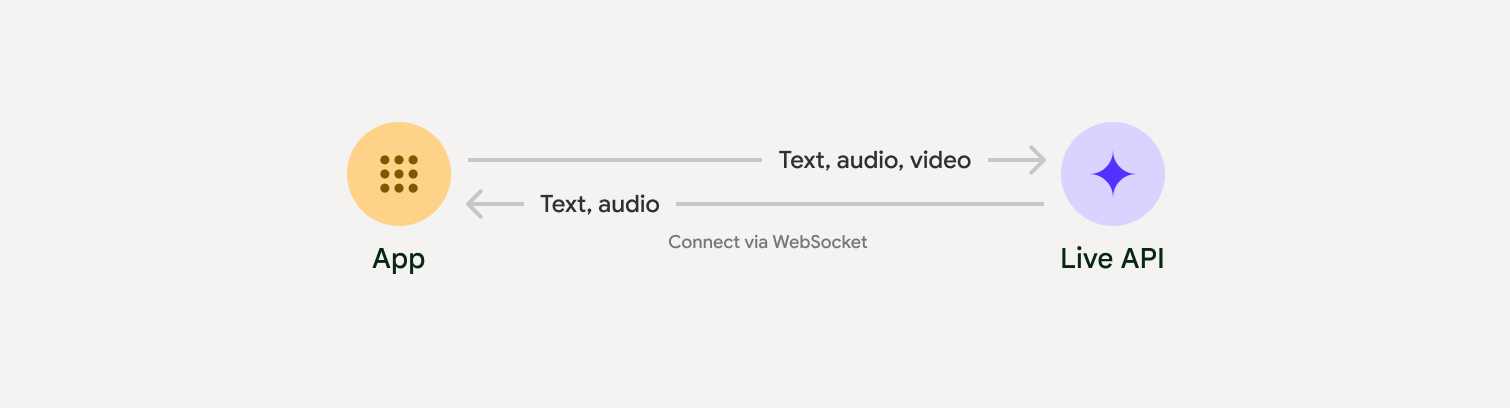
Live API ofron një sërë gjithëpërfshirëse veçorish të tilla si Zbulimi i Aktivitetit Zëror , përdorimi i mjeteve dhe thirrja e funksioneve , menaxhimi i sesioneve (për menaxhimin e bisedave të gjata) dhe tokenët epemeralë (për autentifikim të sigurt nga klienti).
Kjo faqe ju ndihmon të filloni punën me shembuj dhe mostra bazë të kodit.
Provo API-n Live në e Google AI Studio
Zgjidhni një qasje zbatimi
Kur integroheni me Live API, do t'ju duhet të zgjidhni një nga qasjet e mëposhtme të implementimit:
- Server-me-server : Backend-i juaj lidhet me Live API duke përdorur WebSockets . Zakonisht, klienti juaj dërgon të dhëna transmetimi (audio, video, tekst) në serverin tuaj, i cili më pas ia përcjell ato Live API.
- Klient-me-server : Kodi juaj i frontend-it lidhet direkt me Live API-n duke përdorur WebSockets për të transmetuar të dhëna, duke anashkaluar backend-in tuaj.
Integrimet e partnerëve
Për të përmirësuar zhvillimin e aplikacioneve audio dhe video në kohë reale, mund të përdorni një integrim të palës së tretë që mbështet Gemini Live API mbi WebRTC ose WebSockets.
Krijo një chatbot me inteligjencë artificiale në kohë reale duke përdorur Gemini Live dhe Pipecat.
LiveKitPërdorni API-n Gemini Live me agjentët LiveKit.
Fishjam nga Software MansionKrijoni aplikacione transmetimi të drejtpërdrejtë të videos dhe audios me Fishjam.
Kompleti i Zhvillimit të Agjentëve (ADK)Implementoni API-n Live me Agjent Development Kit (ADK).
Agjentët e Vizionit sipas RrjedhësNdërtoni aplikacione të inteligjencës artificiale me zë dhe video në kohë reale me Vision Agents.
VoximplantLidhni thirrjet hyrëse dhe dalëse me Live API me Voximplant.
Filloni
Ky shembull nga ana e serverit transmeton audio nga mikrofoni dhe luan audion e kthyer. Për shembuj të plotë nga fillimi në fund, duke përfshirë një aplikacion klienti, shihni Shembuj aplikacionesh .
Formati i audios hyrëse duhet të jetë në PCM 16-bit, 16kHz, format mono, dhe audioja e marrë përdor një shpejtësi mostrimi prej 24kHz.
Python
Instaloni ndihmës për transmetimin audio. Mund të kërkohen varësi shtesë në nivel sistemi (p.sh. portaudio ). Referojuni dokumenteve të PyAudio për hapat e detajuar të instalimit.
pip install pyaudioimport asyncio
from google import genai
import pyaudio
client = genai.Client()
# --- pyaudio config ---
FORMAT = pyaudio.paInt16
CHANNELS = 1
SEND_SAMPLE_RATE = 16000
RECEIVE_SAMPLE_RATE = 24000
CHUNK_SIZE = 1024
pya = pyaudio.PyAudio()
# --- Live API config ---
MODEL = "gemini-2.5-flash-native-audio-preview-12-2025"
CONFIG = {
"response_modalities": ["AUDIO"],
"system_instruction": "You are a helpful and friendly AI assistant.",
}
audio_queue_output = asyncio.Queue()
audio_queue_mic = asyncio.Queue(maxsize=5)
audio_stream = None
async def listen_audio():
"""Listens for audio and puts it into the mic audio queue."""
global audio_stream
mic_info = pya.get_default_input_device_info()
audio_stream = await asyncio.to_thread(
pya.open,
format=FORMAT,
channels=CHANNELS,
rate=SEND_SAMPLE_RATE,
input=True,
input_device_index=mic_info["index"],
frames_per_buffer=CHUNK_SIZE,
)
kwargs = {"exception_on_overflow": False} if __debug__ else {}
while True:
data = await asyncio.to_thread(audio_stream.read, CHUNK_SIZE, **kwargs)
await audio_queue_mic.put({"data": data, "mime_type": "audio/pcm"})
async def send_realtime(session):
"""Sends audio from the mic audio queue to the GenAI session."""
while True:
msg = await audio_queue_mic.get()
await session.send_realtime_input(audio=msg)
async def receive_audio(session):
"""Receives responses from GenAI and puts audio data into the speaker audio queue."""
while True:
turn = session.receive()
async for response in turn:
if (response.server_content and response.server_content.model_turn):
for part in response.server_content.model_turn.parts:
if part.inline_data and isinstance(part.inline_data.data, bytes):
audio_queue_output.put_nowait(part.inline_data.data)
# Empty the queue on interruption to stop playback
while not audio_queue_output.empty():
audio_queue_output.get_nowait()
async def play_audio():
"""Plays audio from the speaker audio queue."""
stream = await asyncio.to_thread(
pya.open,
format=FORMAT,
channels=CHANNELS,
rate=RECEIVE_SAMPLE_RATE,
output=True,
)
while True:
bytestream = await audio_queue_output.get()
await asyncio.to_thread(stream.write, bytestream)
async def run():
"""Main function to run the audio loop."""
try:
async with client.aio.live.connect(
model=MODEL, config=CONFIG
) as live_session:
print("Connected to Gemini. Start speaking!")
async with asyncio.TaskGroup() as tg:
tg.create_task(send_realtime(live_session))
tg.create_task(listen_audio())
tg.create_task(receive_audio(live_session))
tg.create_task(play_audio())
except asyncio.CancelledError:
pass
finally:
if audio_stream:
audio_stream.close()
pya.terminate()
print("\nConnection closed.")
if __name__ == "__main__":
try:
asyncio.run(run())
except KeyboardInterrupt:
print("Interrupted by user.")
JavaScript
Instaloni ndihmës për transmetimin audio. Mund të kërkohen varësi shtesë në nivel sistemi ( sox për Mac/Windows ose ALSA për Linux). Referojuni dokumenteve të altoparlantit dhe mikrofonit për hapat e detajuar të instalimit.
npm install mic speakerimport { GoogleGenAI, Modality } from '@google/genai';
import mic from 'mic';
import Speaker from 'speaker';
const ai = new GoogleGenAI({});
// WARNING: Do not use API keys in client-side (browser based) applications
// Consider using Ephemeral Tokens instead
// More information at: https://ai.google.dev/gemini-api/docs/ephemeral-tokens
// --- Live API config ---
const model = 'gemini-2.5-flash-native-audio-preview-12-2025';
const config = {
responseModalities: [Modality.AUDIO],
systemInstruction: "You are a helpful and friendly AI assistant.",
};
async function live() {
const responseQueue = [];
const audioQueue = [];
let speaker;
async function waitMessage() {
while (responseQueue.length === 0) {
await new Promise((resolve) => setImmediate(resolve));
}
return responseQueue.shift();
}
function createSpeaker() {
if (speaker) {
process.stdin.unpipe(speaker);
speaker.end();
}
speaker = new Speaker({
channels: 1,
bitDepth: 16,
sampleRate: 24000,
});
speaker.on('error', (err) => console.error('Speaker error:', err));
process.stdin.pipe(speaker);
}
async function messageLoop() {
// Puts incoming messages in the audio queue.
while (true) {
const message = await waitMessage();
if (message.serverContent && message.serverContent.interrupted) {
// Empty the queue on interruption to stop playback
audioQueue.length = 0;
continue;
}
if (message.serverContent && message.serverContent.modelTurn && message.serverContent.modelTurn.parts) {
for (const part of message.serverContent.modelTurn.parts) {
if (part.inlineData && part.inlineData.data) {
audioQueue.push(Buffer.from(part.inlineData.data, 'base64'));
}
}
}
}
}
async function playbackLoop() {
// Plays audio from the audio queue.
while (true) {
if (audioQueue.length === 0) {
if (speaker) {
// Destroy speaker if no more audio to avoid warnings from speaker library
process.stdin.unpipe(speaker);
speaker.end();
speaker = null;
}
await new Promise((resolve) => setImmediate(resolve));
} else {
if (!speaker) createSpeaker();
const chunk = audioQueue.shift();
await new Promise((resolve) => {
speaker.write(chunk, () => resolve());
});
}
}
}
// Start loops
messageLoop();
playbackLoop();
// Connect to Gemini Live API
const session = await ai.live.connect({
model: model,
config: config,
callbacks: {
onopen: () => console.log('Connected to Gemini Live API'),
onmessage: (message) => responseQueue.push(message),
onerror: (e) => console.error('Error:', e.message),
onclose: (e) => console.log('Closed:', e.reason),
},
});
// Setup Microphone for input
const micInstance = mic({
rate: '16000',
bitwidth: '16',
channels: '1',
});
const micInputStream = micInstance.getAudioStream();
micInputStream.on('data', (data) => {
// API expects base64 encoded PCM data
session.sendRealtimeInput({
audio: {
data: data.toString('base64'),
mimeType: "audio/pcm;rate=16000"
}
});
});
micInputStream.on('error', (err) => {
console.error('Microphone error:', err);
});
micInstance.start();
console.log('Microphone started. Speak now...');
}
live().catch(console.error);
Aplikacione shembullore
Shikoni shembujt e mëposhtëm të aplikacioneve që ilustrojnë se si të përdorni Live API për raste përdorimi nga fillimi në fund:
- Aplikacioni fillestar i audios live në AI Studio, duke përdorur bibliotekat JavaScript për t'u lidhur me Live API dhe për të transmetuar audio dypalëshe përmes mikrofonit dhe altoparlantëve tuaj.
- Shihni Integrimet e Partnerëve për shembuj shtesë dhe udhëzues për fillimin.
Çfarë vjen më pas
- Lexoni udhëzuesin e plotë të Aftësive Live API për aftësitë dhe konfigurimet kryesore; duke përfshirë Zbulimin e Aktivitetit të Zërit dhe veçoritë audio vendase.
- Lexoni udhëzuesin e përdorimit të mjetit për të mësuar se si të integroni Live API me mjetet dhe thirrjen e funksioneve.
- Lexoni udhëzuesin e menaxhimit të sesioneve për menaxhimin e bisedave të gjata.
- Lexoni udhëzuesin e tokenëve Ephemeral për autentifikim të sigurt në aplikacionet klient-me-server .
- Për më shumë informacion rreth API-t themelor të WebSockets, shihni referencën e WebSockets API .