Live API ช่วยให้โต้ตอบด้วยเสียงและวิดีโอแบบเรียลไทม์ที่มีเวลาในการตอบสนองต่ำกับ Gemini ได้ โดยจะประมวลผลสตรีมเสียง วิดีโอ หรือข้อความอย่างต่อเนื่องเพื่อส่งมอบ คำตอบที่พูดได้ทันทีและเหมือนมนุษย์ ซึ่งจะสร้างประสบการณ์การสนทนาที่เป็นธรรมชาติ สำหรับผู้ใช้
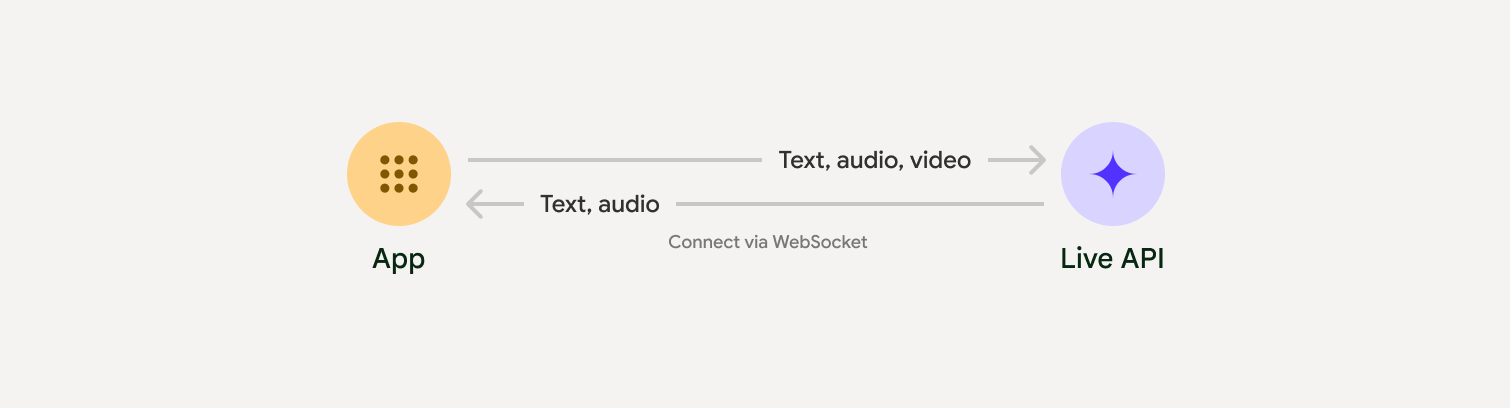
Live API มีชุดฟีเจอร์ที่ครอบคลุม เช่น การตรวจหากิจกรรมเสียง การใช้เครื่องมือและการเรียกฟังก์ชัน การจัดการเซสชัน (สําหรับการจัดการการสนทนาที่ใช้เวลานาน) และโทเค็นชั่วคราว (สําหรับการตรวจสอบสิทธิ์ฝั่งไคลเอ็นต์ที่ปลอดภัย)
หน้านี้จะช่วยให้คุณเริ่มต้นใช้งานได้ด้วยตัวอย่างและตัวอย่างโค้ดพื้นฐาน
ลองใช้ Live API ใน Google AI Studio
เลือกวิธีการติดตั้งใช้งาน
เมื่อผสานรวมกับ Live API คุณจะต้องเลือกแนวทางการติดตั้งใช้งานอย่างใดอย่างหนึ่งต่อไปนี้
- เซิร์ฟเวอร์ต่อเซิร์ฟเวอร์: แบ็กเอนด์จะเชื่อมต่อกับ Live API โดยใช้ WebSockets โดยปกติแล้ว ไคลเอ็นต์จะส่งข้อมูลสตรีม (เสียง วิดีโอ ข้อความ) ไปยังเซิร์ฟเวอร์ของคุณ ซึ่งจะส่งต่อข้อมูลไปยัง Live API
- ไคลเอ็นต์ถึงเซิร์ฟเวอร์: โค้ดส่วนหน้าจะเชื่อมต่อกับ Live API โดยตรง โดยใช้ WebSockets เพื่อสตรีมข้อมูลโดยข้ามแบ็กเอนด์
การผสานรวมพาร์ทเนอร์
หากต้องการเพิ่มประสิทธิภาพการพัฒนาแอปเสียงและวิดีโอแบบเรียลไทม์ คุณสามารถใช้ การผสานรวมของบุคคลที่สามที่รองรับ Gemini Live API ผ่าน WebRTC หรือ WebSockets
Pipecat โดย Daily
สร้างแชทบอท AI แบบเรียลไทม์โดยใช้ Gemini Live และ Pipecat
LiveKit
ใช้ Gemini Live API กับ LiveKit Agents
Fishjam โดย Software Mansion
สร้างแอปพลิเคชันสตรีมมิงวิดีโอและเสียงแบบสดด้วย Fishjam
ชุดพัฒนาเอเจนต์ (ADK)
ใช้ Live API กับ Agent Development Kit (ADK)
Voximplant
เชื่อมต่อการโทรขาเข้าและขาออกกับ Live API ด้วย Voximplant
เริ่มต้นใช้งาน
ตัวอย่างฝั่งเซิร์ฟเวอร์นี้สตรีมเสียงจากไมโครโฟนและเล่นเสียงที่ ส่งคืน ดูตัวอย่างแบบครบวงจร รวมถึงแอปพลิเคชันไคลเอ็นต์ได้ที่แอปพลิเคชันตัวอย่าง
รูปแบบเสียงอินพุตควรเป็น PCM 16 บิต, 16kHz, รูปแบบโมโน และเสียงที่ได้รับใช้อัตราการสุ่มตัวอย่าง 24kHz
Python
ติดตั้งโปรแกรมช่วยสำหรับการสตรีมเสียง อาจต้องมีทรัพยากร Dependency เพิ่มเติมในระดับระบบ
(เช่น portaudio) ดูขั้นตอนการติดตั้งโดยละเอียดได้ในเอกสารประกอบของ PyAudio
pip install pyaudioimport asyncio
from google import genai
import pyaudio
client = genai.Client()
# --- pyaudio config ---
FORMAT = pyaudio.paInt16
CHANNELS = 1
SEND_SAMPLE_RATE = 16000
RECEIVE_SAMPLE_RATE = 24000
CHUNK_SIZE = 1024
pya = pyaudio.PyAudio()
# --- Live API config ---
MODEL = "gemini-2.5-flash-native-audio-preview-12-2025"
CONFIG = {
"response_modalities": ["AUDIO"],
"system_instruction": "You are a helpful and friendly AI assistant.",
}
audio_queue_output = asyncio.Queue()
audio_queue_mic = asyncio.Queue(maxsize=5)
audio_stream = None
async def listen_audio():
"""Listens for audio and puts it into the mic audio queue."""
global audio_stream
mic_info = pya.get_default_input_device_info()
audio_stream = await asyncio.to_thread(
pya.open,
format=FORMAT,
channels=CHANNELS,
rate=SEND_SAMPLE_RATE,
input=True,
input_device_index=mic_info["index"],
frames_per_buffer=CHUNK_SIZE,
)
kwargs = {"exception_on_overflow": False} if __debug__ else {}
while True:
data = await asyncio.to_thread(audio_stream.read, CHUNK_SIZE, **kwargs)
await audio_queue_mic.put({"data": data, "mime_type": "audio/pcm"})
async def send_realtime(session):
"""Sends audio from the mic audio queue to the GenAI session."""
while True:
msg = await audio_queue_mic.get()
await session.send_realtime_input(audio=msg)
async def receive_audio(session):
"""Receives responses from GenAI and puts audio data into the speaker audio queue."""
while True:
turn = session.receive()
async for response in turn:
if (response.server_content and response.server_content.model_turn):
for part in response.server_content.model_turn.parts:
if part.inline_data and isinstance(part.inline_data.data, bytes):
audio_queue_output.put_nowait(part.inline_data.data)
# Empty the queue on interruption to stop playback
while not audio_queue_output.empty():
audio_queue_output.get_nowait()
async def play_audio():
"""Plays audio from the speaker audio queue."""
stream = await asyncio.to_thread(
pya.open,
format=FORMAT,
channels=CHANNELS,
rate=RECEIVE_SAMPLE_RATE,
output=True,
)
while True:
bytestream = await audio_queue_output.get()
await asyncio.to_thread(stream.write, bytestream)
async def run():
"""Main function to run the audio loop."""
try:
async with client.aio.live.connect(
model=MODEL, config=CONFIG
) as live_session:
print("Connected to Gemini. Start speaking!")
async with asyncio.TaskGroup() as tg:
tg.create_task(send_realtime(live_session))
tg.create_task(listen_audio())
tg.create_task(receive_audio(live_session))
tg.create_task(play_audio())
except asyncio.CancelledError:
pass
finally:
if audio_stream:
audio_stream.close()
pya.terminate()
print("\nConnection closed.")
if __name__ == "__main__":
try:
asyncio.run(run())
except KeyboardInterrupt:
print("Interrupted by user.")
JavaScript
ติดตั้งโปรแกรมช่วยสำหรับการสตรีมเสียง อาจต้องมีทรัพยากร Dependency เพิ่มเติมที่ระดับระบบ (sox สำหรับ Mac/Windows หรือ ALSA สำหรับ Linux) โปรดดูขั้นตอนการติดตั้งโดยละเอียดในเอกสารประกอบเกี่ยวกับลำโพงและไมโครโฟน
npm install mic speakerimport { GoogleGenAI, Modality } from '@google/genai';
import mic from 'mic';
import Speaker from 'speaker';
const ai = new GoogleGenAI({});
// WARNING: Do not use API keys in client-side (browser based) applications
// Consider using Ephemeral Tokens instead
// More information at: https://ai.google.dev/gemini-api/docs/ephemeral-tokens
// --- Live API config ---
const model = 'gemini-2.5-flash-native-audio-preview-12-2025';
const config = {
responseModalities: [Modality.AUDIO],
systemInstruction: "You are a helpful and friendly AI assistant.",
};
async function live() {
const responseQueue = [];
const audioQueue = [];
let speaker;
async function waitMessage() {
while (responseQueue.length === 0) {
await new Promise((resolve) => setImmediate(resolve));
}
return responseQueue.shift();
}
function createSpeaker() {
if (speaker) {
process.stdin.unpipe(speaker);
speaker.end();
}
speaker = new Speaker({
channels: 1,
bitDepth: 16,
sampleRate: 24000,
});
speaker.on('error', (err) => console.error('Speaker error:', err));
process.stdin.pipe(speaker);
}
async function messageLoop() {
// Puts incoming messages in the audio queue.
while (true) {
const message = await waitMessage();
if (message.serverContent && message.serverContent.interrupted) {
// Empty the queue on interruption to stop playback
audioQueue.length = 0;
continue;
}
if (message.serverContent && message.serverContent.modelTurn && message.serverContent.modelTurn.parts) {
for (const part of message.serverContent.modelTurn.parts) {
if (part.inlineData && part.inlineData.data) {
audioQueue.push(Buffer.from(part.inlineData.data, 'base64'));
}
}
}
}
}
async function playbackLoop() {
// Plays audio from the audio queue.
while (true) {
if (audioQueue.length === 0) {
if (speaker) {
// Destroy speaker if no more audio to avoid warnings from speaker library
process.stdin.unpipe(speaker);
speaker.end();
speaker = null;
}
await new Promise((resolve) => setImmediate(resolve));
} else {
if (!speaker) createSpeaker();
const chunk = audioQueue.shift();
await new Promise((resolve) => {
speaker.write(chunk, () => resolve());
});
}
}
}
// Start loops
messageLoop();
playbackLoop();
// Connect to Gemini Live API
const session = await ai.live.connect({
model: model,
config: config,
callbacks: {
onopen: () => console.log('Connected to Gemini Live API'),
onmessage: (message) => responseQueue.push(message),
onerror: (e) => console.error('Error:', e.message),
onclose: (e) => console.log('Closed:', e.reason),
},
});
// Setup Microphone for input
const micInstance = mic({
rate: '16000',
bitwidth: '16',
channels: '1',
});
const micInputStream = micInstance.getAudioStream();
micInputStream.on('data', (data) => {
// API expects base64 encoded PCM data
session.sendRealtimeInput({
audio: {
data: data.toString('base64'),
mimeType: "audio/pcm;rate=16000"
}
});
});
micInputStream.on('error', (err) => {
console.error('Microphone error:', err);
});
micInstance.start();
console.log('Microphone started. Speak now...');
}
live().catch(console.error);
ตัวอย่างการใช้งาน
ดูตัวอย่างแอปพลิเคชันต่อไปนี้ซึ่งแสดงวิธีใช้ Live API สำหรับกรณีการใช้งานแบบครบวงจร
- แอปเริ่มต้นสำหรับเสียงสดใน AI Studio โดยใช้ไลบรารี JavaScript เพื่อเชื่อมต่อกับ Live API และสตรีมเสียงแบบสองทิศทาง ผ่านไมโครโฟนและลำโพง
- ดูตัวอย่างเพิ่มเติมและคู่มือการเริ่มต้นใช้งานได้ที่การผสานรวมกับพาร์ทเนอร์
ขั้นตอนถัดไป
- อ่านคู่มือความสามารถของ Live API ฉบับเต็มเพื่อดูความสามารถและการกำหนดค่าที่สำคัญ รวมถึงการตรวจหากิจกรรมเสียงและฟีเจอร์เสียงดั้งเดิม
- อ่านคำแนะนำการใช้เครื่องมือเพื่อดูวิธีผสานรวม Live API กับเครื่องมือและการเรียกใช้ฟังก์ชัน
- อ่านคู่มือการจัดการเซสชันเพื่อจัดการการสนทนาที่ใช้เวลานาน
- อ่านคู่มือโทเค็นชั่วคราวเพื่อดูการตรวจสอบสิทธิ์ที่ปลอดภัยในแอปพลิเคชันไคลเอ็นต์ต่อเซิร์ฟเวอร์
- ดูข้อมูลเพิ่มเติมเกี่ยวกับ WebSockets API พื้นฐานได้ที่เอกสารอ้างอิง WebSockets API