

Gemini API, modelin Python kodu oluşturup çalıştırmasını sağlayan bir kod yürütme aracı sunar. Model, nihai bir çıkışa ulaşana kadar kod yürütme sonuçlarından yinelemeli olarak öğrenebilir. Kod yürütme özelliğini kullanarak kod tabanlı akıl yürütmeden yararlanan uygulamalar oluşturabilirsiniz. Örneğin, denklemleri çözmek veya metinleri işlemek için kod yürütmeyi kullanabilirsiniz. Daha özel görevleri gerçekleştirmek için kod yürütme ortamında yer alan kütüphaneleri de kullanabilirsiniz.
Gemini yalnızca Python'daki kodları çalıştırabilir. Gemini'dan başka bir dilde kod oluşturmasını isteyebilirsiniz ancak model, kodu uygulamak için kod yürütme aracını kullanamaz.
Kod yürütmeyi etkinleştirme
Kod yürütmeyi etkinleştirmek için modelde kod yürütme aracını yapılandırın. Bu, modelin kod oluşturup çalıştırmasına olanak tanır.
Python
from google import genai

client = genai.Client()

interaction = client.interactions.create(
    model="gemini-3.8-flash",
    input="What is the sum of the first 50 prime numbers? "
          "Generate and run code for the calculation, and make sure you get all 50.",
    tools=[{"type": "code_execution"}]
)

for step in interaction.steps:
    if step.type == "model_output":
        for content_block in step.content:
            if content_block.type == "text":
                print(content_block.text)
    elif step.type == "code_execution_call":
        print(step.arguments.code)
    elif step.type == "code_execution_result":
        print(step.result)
JavaScript
import { GoogleGenAI } from "@google/genai";

const client = new GoogleGenAI({});

const interaction = await client.interactions.create({
    model: "gemini-3.8-flash",
    input: "What is the sum of the first 50 prime numbers? " +
           "Generate and run code for the calculation, and make sure you get all 50.",
    tools: [{ type: "code_execution" }]
});

for (const step of interaction.steps) {
    if (step.type === "model_output") {
        for (const contentBlock of step.content) {
            if (contentBlock.type === "text") {
                console.log(contentBlock.text);
            }
        }
    } else if (step.type === "code_execution_call") {
        console.log(step.arguments.code);
    } else if (step.type === "code_execution_result") {
        console.log(step.result);
    }
}
Java
import com.google.genai.Client;
import com.google.genai.gaos.models.interactions.CodeExecution;
import com.google.genai.gaos.models.interactions.CodeExecutionCallStep;
import com.google.genai.gaos.models.interactions.CodeExecutionResultStep;
import com.google.genai.gaos.models.interactions.Content;
import com.google.genai.gaos.models.interactions.CreateModelInteraction;
import com.google.genai.gaos.models.interactions.Interaction;
import com.google.genai.gaos.models.interactions.InteractionsInput;
import com.google.genai.gaos.models.interactions.ModelOutputStep;
import com.google.genai.gaos.models.interactions.Step;
import com.google.genai.gaos.models.interactions.TextContent;
import com.google.genai.gaos.models.operations.CreateInteractionRequestBody;
import java.util.Arrays;
import java.util.Collections;

Client client = new Client();

CreateModelInteraction params =
    CreateModelInteraction.builder()
        .model("gemini-3.8-flash")
        .input(
            InteractionsInput.of(
                "What is the sum of the first 50 prime numbers? "
                    + "Generate and run code for the calculation, and make sure you get all 50."))
        .tools(Arrays.asList(CodeExecution.builder().build()))
        .build();

Interaction interaction =
    client.interactions.create(CreateInteractionRequestBody.of(params)).interaction().get();

for (Step step : interaction.steps().orElse(Collections.emptyList())) {
  if (step instanceof ModelOutputStep) {
    ModelOutputStep outputStep = (ModelOutputStep) step;
    for (Content contentBlock : outputStep.content().orElse(Collections.emptyList())) {
      if (contentBlock instanceof TextContent) {
        System.out.println(((TextContent) contentBlock).text().orElse(""));
      }
    }
  } else if (step instanceof CodeExecutionCallStep) {
    CodeExecutionCallStep callStep = (CodeExecutionCallStep) step;
    callStep.arguments().ifPresent(args -> System.out.println(args.code().orElse("")));
  } else if (step instanceof CodeExecutionResultStep) {
    CodeExecutionResultStep resultStep = (CodeExecutionResultStep) step;
    System.out.println(resultStep.result().orElse(""));
  }
}
Go
package main

import (
    "context"
    "fmt"
    "log"

    "google.golang.org/genai"
    "google.golang.org/genai/interactions/models/interactions"
    "google.golang.org/genai/interactions/models/operations"
)

func main() {
    ctx := context.Background()
    client, err := genai.NewClient(ctx, nil)
    if err != nil {
        log.Fatal(err)
    }

    res, err := client.Interactions.Create(ctx, operations.CreateInteractionRequest{
        Body: operations.NewCreateInteractionRequestBody(interactions.CreateModelInteraction{
            Model: interactions.Model("gemini-3.8-flash"),
            Input: interactions.NewInteractionsInput(
                "What is the sum of the first 50 prime numbers? " +
                    "Generate and run code for the calculation, and make sure you get all 50.",
            ),
            Tools: []interactions.Tool{
                interactions.NewTool(interactions.CodeExecution{}),
            },
        }),
    })
    if err != nil {
        log.Fatal(err)
    }

    for _, step := range res.Interaction.Steps {
        if outStep := step.ModelOutputStep; outStep != nil {
            for _, contentBlock := range outStep.Content {
                if textContent := contentBlock.TextContent; textContent != nil {
                    fmt.Println(textContent.GetText())
                }
            }
        } else if callStep := step.CodeExecutionCallStep; callStep != nil {
            if code := callStep.Arguments.GetCode(); code != nil {
                fmt.Println(*code)
            }
        } else if resultStep := step.CodeExecutionResultStep; resultStep != nil {
            fmt.Println(resultStep.GetResult())
        }
    }
}
REST
curl -X POST "https://generativelanguage.googleapis.com/v1beta/interactions" \
-H "x-goog-api-key: $GEMINI_API_KEY" \
-H 'Content-Type: application/json' \
-d '{
    "model": "gemini-3.8-flash",
    "input": "What is the sum of the first 50 prime numbers? Generate and run code for the calculation, and make sure you get all 50.",
    "tools": [{"type": "code_execution"}]
}'
Çıkış, okunabilirlik için biçimlendirilmiş aşağıdaki gibi görünebilir:
Okay, I need to calculate the sum of the first 50 prime numbers. Here's how I'll
approach this:

1.  **Generate Prime Numbers:** I'll use an iterative method to find prime
    numbers. I'll start with 2 and check if each subsequent number is divisible
    by any number between 2 and its square root. If not, it's a prime.
2.  **Store Primes:** I'll store the prime numbers in a list until I have 50 of
    them.
3.  **Calculate the Sum:**  Finally, I'll sum the prime numbers in the list.

Here's the Python code to do this:

def is_prime(n):
  """Efficiently checks if a number is prime."""
  if n <= 1:
    return False
  if n <= 3:
    return True
  if n % 2 == 0 or n % 3 == 0:
    return False
  i = 5
  while i * i <= n:
    if n % i == 0 or n % (i + 2) == 0:
      return False
    i += 6
  return True

primes = []
num = 2
while len(primes) < 50:
  if is_prime(num):
    primes.append(num)
  num += 1

sum_of_primes = sum(primes)
print(f'{primes=}')
print(f'{sum_of_primes=}')

primes=[2, 3, 5, 7, 11, 13, 17, 19, 23, 29, 31, 37, 41, 43, 47, 53, 59, 61, 67,
71, 73, 79, 83, 89, 97, 101, 103, 107, 109, 113, 127, 131, 137, 139, 149, 151,
157, 163, 167, 173, 179, 181, 191, 193, 197, 199, 211, 223, 227, 229]
sum_of_primes=5117

The sum of the first 50 prime numbers is 5117.
Bu çıkış, kod yürütme kullanılırken modelin döndürdüğü çeşitli içerik bölümlerini birleştirir:
text: Model tarafından oluşturulan satır içi metincode_execution_call: Model tarafından oluşturulan ve yürütülmesi amaçlanan kodcode_execution_result: Yürütülebilir kodun sonucu
Görüntülerle kod yürütme (Gemini 3)
Gemini 3 Flash modeli artık görüntüleri etkin bir şekilde işlemek ve incelemek için Python kodu yazıp çalıştırabiliyor.
Kullanım alanları
- Yakınlaştırma ve inceleme: Model, ayrıntıların çok küçük olduğunu (ör. uzaktaki bir ölçüm cihazını okuma) örtülü olarak algılar ve alanı kırpıp daha yüksek çözünürlükte yeniden incelemek için kod yazar.
- Görsel matematik: Model, kod kullanarak çok adımlı hesaplamalar yapabilir (ör. makbuzdaki satır öğelerini toplama).
- Resim notlandırma: Model, soruları yanıtlamak için resimleri notlandırabilir. Örneğin, ilişkileri göstermek için ok çizebilir.
Resimlerle kod yürütmeyi etkinleştirme
Görüntülerle kod yürütme, Gemini 3 Flash'te resmi olarak desteklenir. Hem "Araç olarak kod yürütme" hem de "Düşünme"yi etkinleştirerek bu davranışı etkinleştirebilirsiniz.
Python
from google import genai
import requests
import base64
from PIL import Image
import io

image_path = "https://goo.gle/instrument-img"
image_bytes = requests.get(image_path).content

client = genai.Client()

interaction = client.interactions.create(
    model="gemini-3.8-flash",
    input=[
        {"type": "image", "data": base64.b64encode(image_bytes).decode('utf-8'), "mime_type": "image/jpeg"},
        {"type": "text", "text": "Zoom into the expression pedals and tell me how many pedals are there?"}
    ],
    tools=[{"type": "code_execution"}]
)

for step in interaction.steps:
    if step.type == "model_output":
        for content_block in step.content:
            if content_block.type == "text":
                print(content_block.text)
            elif content_block.type == "image":
                img = Image.open(io.BytesIO(base64.b64decode(content_block.data)))
                img.show()  # or: img.save("output_image.jpg")
    elif step.type == "code_execution_call":
        print(step.arguments.code)
    elif step.type == "code_execution_result":
        print(step.result)
JavaScript
import { GoogleGenAI } from "@google/genai";

async function main() {
  const client = new GoogleGenAI({});

  const imageUrl = "https://goo.gle/instrument-img";
  const response = await fetch(imageUrl);
  const imageArrayBuffer = await response.arrayBuffer();
  const base64ImageData = Buffer.from(imageArrayBuffer).toString('base64');

  const interaction = await client.interactions.create({
    model: "gemini-3.8-flash",
    input: [
      {
        type: "image",
        data: base64ImageData,
        mime_type: "image/jpeg"
      },
      { type: "text", text: "Zoom into the expression pedals and tell me how many pedals are there?" }
    ],
    tools: [{ type: "code_execution" }]
  });

  for (const step of interaction.steps) {
    if (step.type === "model_output") {
      for (const contentBlock of step.content) {
        if (contentBlock.type === "text") {
          console.log("Text:", contentBlock.text);
        }
      }
    } else if (step.type === "code_execution_call") {
      console.log(`\nGenerated Code:\n`, step.arguments.code);
    } else if (step.type === "code_execution_result") {
      console.log(`\nExecution Output:\n`, step.result);
    }
  }
}

main();
Java
import com.google.genai.Client;
import com.google.genai.gaos.models.interactions.CodeExecution;
import com.google.genai.gaos.models.interactions.CodeExecutionCallStep;
import com.google.genai.gaos.models.interactions.CodeExecutionResultStep;
import com.google.genai.gaos.models.interactions.Content;
import com.google.genai.gaos.models.interactions.CreateModelInteraction;
import com.google.genai.gaos.models.interactions.ImageContent;
import com.google.genai.gaos.models.interactions.ImageContentMimeType;
import com.google.genai.gaos.models.interactions.Interaction;
import com.google.genai.gaos.models.interactions.InteractionsInput;
import com.google.genai.gaos.models.interactions.ModelOutputStep;
import com.google.genai.gaos.models.interactions.Step;
import com.google.genai.gaos.models.interactions.TextContent;
import com.google.genai.gaos.models.operations.CreateInteractionRequestBody;
import java.io.InputStream;
import java.net.URI;
import java.nio.file.Files;
import java.nio.file.Paths;
import java.util.Arrays;
import java.util.Base64;
import java.util.Collections;

String imageUrl = "https://goo.gle/instrument-img";
byte[] imageBytes;
try (InputStream in = URI.create(imageUrl).toURL().openStream()) {
  imageBytes = in.readAllBytes();
}
String base64Image = Base64.getEncoder().encodeToString(imageBytes);

Client client = new Client();

CreateModelInteraction params =
    CreateModelInteraction.builder()
        .model("gemini-3.8-flash")
        .input(
            InteractionsInput.ofContent(
                Arrays.asList(
                    ImageContent.builder()
                        .data(base64Image)
                        .mimeType(ImageContentMimeType.IMAGE_JPEG)
                        .build(),
                    TextContent.builder()
                        .text(
                            "Zoom into the expression pedals and tell me how many pedals are there?")
                        .build())))
        .tools(Arrays.asList(CodeExecution.builder().build()))
        .build();

Interaction interaction =
    client.interactions.create(CreateInteractionRequestBody.of(params)).interaction().get();

for (Step step : interaction.steps().orElse(Collections.emptyList())) {
  if (step instanceof ModelOutputStep) {
    ModelOutputStep outputStep = (ModelOutputStep) step;
    for (Content contentBlock : outputStep.content().orElse(Collections.emptyList())) {
      if (contentBlock instanceof TextContent) {
        System.out.println(((TextContent) contentBlock).text().orElse(""));
      } else if (contentBlock instanceof ImageContent) {
        ImageContent imgContent = (ImageContent) contentBlock;
        if (imgContent.data().isPresent()) {
          byte[] decoded = Base64.getDecoder().decode(imgContent.data().get());
          Files.write(Paths.get("output_image.jpg"), decoded);
        }
      }
    }
  } else if (step instanceof CodeExecutionCallStep) {
    CodeExecutionCallStep callStep = (CodeExecutionCallStep) step;
    callStep.arguments().ifPresent(args -> System.out.println(args.code().orElse("")));
  } else if (step instanceof CodeExecutionResultStep) {
    CodeExecutionResultStep resultStep = (CodeExecutionResultStep) step;
    System.out.println(resultStep.result().orElse(""));
  }
}
Go
package main

import (
    "context"
    "encoding/base64"
    "fmt"
    "io"
    "log"
    "net/http"
    "os"

    "google.golang.org/genai"
    "google.golang.org/genai/interactions/models/interactions"
    "google.golang.org/genai/interactions/models/operations"
)

func main() {
    ctx := context.Background()
    client, err := genai.NewClient(ctx, nil)
    if err != nil {
        log.Fatal(err)
    }

    imageURL := "https://goo.gle/instrument-img"
    httpResp, err := http.Get(imageURL)
    if err != nil {
        log.Fatal(err)
    }
    defer httpResp.Body.Close()
    imageBytes, err := io.ReadAll(httpResp.Body)
    if err != nil {
        log.Fatal(err)
    }
    base64Image := base64.StdEncoding.EncodeToString(imageBytes)

    res, err := client.Interactions.Create(ctx, operations.CreateInteractionRequest{
        Body: operations.NewCreateInteractionRequestBody(interactions.CreateModelInteraction{
            Model: interactions.Model("gemini-3.8-flash"),
            Input: interactions.NewInteractionsInput([]interactions.Content{
                interactions.NewContent(interactions.ImageContent{
                    Data:     genai.Ptr(base64Image),
                    MimeType: interactions.ImageContentMimeType("image/jpeg").ToPointer(),
                }),
                interactions.NewContent(interactions.TextContent{
                    Text: "Zoom into the expression pedals and tell me how many pedals are there?",
                }),
            }),
            Tools: []interactions.Tool{
                interactions.NewTool(interactions.CodeExecution{}),
            },
        }),
    })
    if err != nil {
        log.Fatal(err)
    }

    for _, step := range res.Interaction.Steps {
        if outStep := step.ModelOutputStep; outStep != nil {
            for _, contentBlock := range outStep.Content {
                if textContent := contentBlock.TextContent; textContent != nil {
                    fmt.Println(textContent.GetText())
                } else if imgContent := contentBlock.ImageContent; imgContent != nil && imgContent.Data != nil {
                    decoded, err := base64.StdEncoding.DecodeString(*imgContent.Data)
                    if err == nil {
                        _ = os.WriteFile("output_image.jpg", decoded, 0644)
                    }
                }
            }
        } else if callStep := step.CodeExecutionCallStep; callStep != nil {
            if code := callStep.Arguments.GetCode(); code != nil {
                fmt.Println(*code)
            }
        } else if resultStep := step.CodeExecutionResultStep; resultStep != nil {
            fmt.Println(resultStep.GetResult())
        }
    }
}
REST
IMG_URL="https://goo.gle/instrument-img"
MODEL="gemini-3.8-flash"

MIME_TYPE=$(curl -sIL "$IMG_URL" | grep -i '^content-type:' | awk -F ': ' '{print $2}' | sed 's/\r$//' | head -n 1)
if [[ -z "$MIME_TYPE" || ! "$MIME_TYPE" == image/* ]]; then
  MIME_TYPE="image/jpeg"
fi

if [[ "$(uname)" == "Darwin" ]]; then
  IMAGE_B64=$(curl -sL "$IMG_URL" | base64 -b 0)
elif [[ "$(base64 --version 2>&1)" = *"FreeBSD"* ]]; then
  IMAGE_B64=$(curl -sL "$IMG_URL" | base64)
else
  IMAGE_B64=$(curl -sL "$IMG_URL" | base64 -w0)
fi

# Use jq to create the JSON payload to avoid "Argument list too long" error with large base64 strings
echo -n "$IMAGE_B64" > image_b64.txt
jq -n \
  --rawfile b64 image_b64.txt \
  --arg mime "$MIME_TYPE" \
  '{
    model: "gemini-3.8-flash",
    input: [
      {type: "image", data: $b64, mime_type: $mime},
      {type: "text", text: "Zoom into the expression pedals and tell me how many pedals are there?"}
    ],
    tools: [{type: "code_execution"}]
  }' > payload.json

curl -X POST "https://generativelanguage.googleapis.com/v1beta/interactions" \
    -H "x-goog-api-key: $GEMINI_API_KEY" \
    -H 'Content-Type: application/json' \
    -d @payload.json
Çok aşamalı etkileşimlerde kod yürütmeyi kullanma
previous_interaction_id kullanarak çok aşamalı etkileşimli bir sohbetin parçası olarak kod yürütme özelliğini de kullanabilirsiniz.
Python
from google import genai

client = genai.Client()

interaction1 = client.interactions.create(
    model="gemini-3.8-flash",
    input="I have a math question for you.",
    tools=[{"type": "code_execution"}]
)
print(interaction1.output_text)

interaction2 = client.interactions.create(
    model="gemini-3.8-flash",
    previous_interaction_id=interaction1.id,
    input="What is the sum of the first 50 prime numbers? "
          "Generate and run code for the calculation, and make sure you get all 50.",
    tools=[{"type": "code_execution"}]
)

for step in interaction2.steps:
    if step.type == "model_output":
        for content_block in step.content:
            if content_block.type == "text":
                print(content_block.text)
    elif step.type == "code_execution_call":
        print(step.arguments.code)
    elif step.type == "code_execution_result":
        print(step.result)
JavaScript
import { GoogleGenAI } from "@google/genai";

const client = new GoogleGenAI({});

const interaction1 = await client.interactions.create({
    model: "gemini-3.8-flash",
    input: "I have a math question for you.",
    tools: [{ type: "code_execution" }]
});
console.log(interaction1.output_text);

const interaction2 = await client.interactions.create({
    model: "gemini-3.8-flash",
    previous_interaction_id: interaction1.id,
    input: "What is the sum of the first 50 prime numbers? " +
           "Generate and run code for the calculation, and make sure you get all 50.",
    tools: [{ type: "code_execution" }]
});

for (const step of interaction2.steps) {
    if (step.type === "model_output") {
        for (const contentBlock of step.content) {
            if (contentBlock.type === "text") {
                console.log(contentBlock.text);
            }
        }
    } else if (step.type === "code_execution_call") {
        console.log(step.arguments.code);
    } else if (step.type === "code_execution_result") {
        console.log(step.result);
    }
}
Java
import com.google.genai.Client;
import com.google.genai.gaos.models.interactions.CodeExecution;
import com.google.genai.gaos.models.interactions.CodeExecutionCallStep;
import com.google.genai.gaos.models.interactions.CodeExecutionResultStep;
import com.google.genai.gaos.models.interactions.Content;
import com.google.genai.gaos.models.interactions.CreateModelInteraction;
import com.google.genai.gaos.models.interactions.Interaction;
import com.google.genai.gaos.models.interactions.InteractionsInput;
import com.google.genai.gaos.models.interactions.ModelOutputStep;
import com.google.genai.gaos.models.interactions.Step;
import com.google.genai.gaos.models.interactions.TextContent;
import com.google.genai.gaos.models.operations.CreateInteractionRequestBody;
import java.util.Arrays;
import java.util.Collections;

Client client = new Client();

CreateModelInteraction params1 =
    CreateModelInteraction.builder()
        .model("gemini-3.8-flash")
        .input(InteractionsInput.of("I have a math question for you."))
        .tools(Arrays.asList(CodeExecution.builder().build()))
        .build();

Interaction interaction1 =
    client.interactions.create(CreateInteractionRequestBody.of(params1)).interaction().get();
System.out.println(interaction1.outputText().orElse(""));

CreateModelInteraction params2 =
    CreateModelInteraction.builder()
        .model("gemini-3.8-flash")
        .previousInteractionId(interaction1.id().get())
        .input(
            InteractionsInput.of(
                "What is the sum of the first 50 prime numbers? "
                    + "Generate and run code for the calculation, and make sure you get all 50."))
        .tools(Arrays.asList(CodeExecution.builder().build()))
        .build();

Interaction interaction2 =
    client.interactions.create(CreateInteractionRequestBody.of(params2)).interaction().get();

for (Step step : interaction2.steps().orElse(Collections.emptyList())) {
  if (step instanceof ModelOutputStep) {
    ModelOutputStep outputStep = (ModelOutputStep) step;
    for (Content contentBlock : outputStep.content().orElse(Collections.emptyList())) {
      if (contentBlock instanceof TextContent) {
        System.out.println(((TextContent) contentBlock).text().orElse(""));
      }
    }
  } else if (step instanceof CodeExecutionCallStep) {
    CodeExecutionCallStep callStep = (CodeExecutionCallStep) step;
    callStep.arguments().ifPresent(args -> System.out.println(args.code().orElse("")));
  } else if (step instanceof CodeExecutionResultStep) {
    CodeExecutionResultStep resultStep = (CodeExecutionResultStep) step;
    System.out.println(resultStep.result().orElse(""));
  }
}
Go
package main

import (
    "context"
    "fmt"
    "log"

    "google.golang.org/genai"
    "google.golang.org/genai/interactions/models/interactions"
    "google.golang.org/genai/interactions/models/operations"
)

func main() {
    ctx := context.Background()
    client, err := genai.NewClient(ctx, nil)
    if err != nil {
        log.Fatal(err)
    }

    res1, err := client.Interactions.Create(ctx, operations.CreateInteractionRequest{
        Body: operations.NewCreateInteractionRequestBody(interactions.CreateModelInteraction{
            Model: interactions.Model("gemini-3.8-flash"),
            Input: interactions.NewInteractionsInput("I have a math question for you."),
            Tools: []interactions.Tool{
                interactions.NewTool(interactions.CodeExecution{}),
            },
        }),
    })
    if err != nil {
        log.Fatal(err)
    }
    if res1.Interaction.OutputText != nil {
        fmt.Println(*res1.Interaction.OutputText)
    }

    res2, err := client.Interactions.Create(ctx, operations.CreateInteractionRequest{
        Body: operations.NewCreateInteractionRequestBody(interactions.CreateModelInteraction{
            Model:                 interactions.Model("gemini-3.8-flash"),
            PreviousInteractionID: res1.Interaction.ID,
            Input: interactions.NewInteractionsInput(
                "What is the sum of the first 50 prime numbers? " +
                    "Generate and run code for the calculation, and make sure you get all 50.",
            ),
            Tools: []interactions.Tool{
                interactions.NewTool(interactions.CodeExecution{}),
            },
        }),
    })
    if err != nil {
        log.Fatal(err)
    }

    for _, step := range res2.Interaction.Steps {
        if outStep := step.ModelOutputStep; outStep != nil {
            for _, contentBlock := range outStep.Content {
                if textContent := contentBlock.TextContent; textContent != nil {
                    fmt.Println(textContent.GetText())
                }
            }
        } else if callStep := step.CodeExecutionCallStep; callStep != nil {
            if code := callStep.Arguments.GetCode(); code != nil {
                fmt.Println(*code)
            }
        } else if resultStep := step.CodeExecutionResultStep; resultStep != nil {
            fmt.Println(resultStep.GetResult())
        }
    }
}
REST
# First turn
RESPONSE1=$(curl -s -X POST "https://generativelanguage.googleapis.com/v1beta/interactions" \
-H "x-goog-api-key: $GEMINI_API_KEY" \
-H 'Content-Type: application/json' \
-d '{
    "model": "gemini-3.8-flash",
    "input": "I have a math question for you.",
    "tools": [{"type": "code_execution"}]
}')

INTERACTION_ID=$(echo $RESPONSE1 | jq -r '.id')

# Second turn with previous_interaction_id
curl -X POST "https://generativelanguage.googleapis.com/v1beta/interactions" \
-H "x-goog-api-key: $GEMINI_API_KEY" \
-H 'Content-Type: application/json' \
-d '{
    "model": "gemini-3.8-flash",
    "previous_interaction_id": "'"$INTERACTION_ID"'",
    "input": "What is the sum of the first 50 prime numbers? Generate and run code for the calculation, and make sure you get all 50.",
    "tools": [{"type": "code_execution"}]
}'
Giriş/çıkış (G/Ç)
Gemini 3.5 Flash gibi mevcut Gemini modellerinde kod yürütme, dosya girişi ve grafik çıkışını destekler. Bu giriş ve çıkış özelliklerini kullanarak CSV ve metin dosyalarını yükleyebilir, dosyalarla ilgili sorular sorabilir ve yanıtın bir parçası olarak Matplotlib grafikleri oluşturabilirsiniz. Çıkış dosyaları, yanıttaki satır içi resimler olarak döndürülür.
G/Ç fiyatlandırması
Kod yürütme G/Ç'sini kullanırken giriş jetonları ve çıkış jetonları için ücretlendirilirsiniz:
Giriş jetonu sayısı:
- Kullanıcı istemi
Çıkış jetonu sayısı:
- Model tarafından oluşturulan kod
- Kod ortamında kod yürütme çıkışı
- Düşünme jetonları
- Model tarafından oluşturulan özet
G/Ç ayrıntıları
Kod yürütme G/Ç'siyle çalışırken aşağıdaki teknik ayrıntılara dikkat edin:
- Kod ortamının maksimum çalışma süresi 30 saniyedir.
- Kod ortamı hata oluşturursa model, kod çıkışını yeniden oluşturmaya karar verebilir. Bu işlem en fazla 5 kez yapılabilir.
- Maksimum dosya giriş boyutu, model jetonu penceresiyle sınırlıdır. Modelin maksimum bağlam penceresini aşan bir dosya yüklerseniz API hata döndürür.
- Kod yürütme, metin ve CSV dosyalarıyla en iyi şekilde çalışır.
- Giriş dosyası satır içi veri olarak iletilebilir veya Files API kullanılarak yüklenebilir. Çıkış dosyası ise her zaman satır içi veri olarak döndürülür.
Faturalandırma
Gemini API'den kod yürütmeyi etkinleştirmek için ek ücret alınmaz. Kullandığınız Gemini modeline göre giriş ve çıkış jetonlarının mevcut oranı üzerinden faturalandırılırsınız.
Kod yürütme faturalandırması hakkında bilmeniz gereken diğer bazı noktalar:
- Modele ilettiğiniz giriş jetonları için yalnızca bir kez, modelin size döndürdüğü nihai çıkış jetonları için ise ayrı olarak faturalandırılırsınız.
- Oluşturulan kodu temsil eden jetonlar, çıkış jetonları olarak sayılır. Oluşturulan kod, metin ve görüntü gibi çok formatlı çıkışlar içerebilir.
- Kod yürütme sonuçları da çıkış jetonu olarak sayılır.
Faturalandırma modeli aşağıdaki şemada gösterilmektedir:
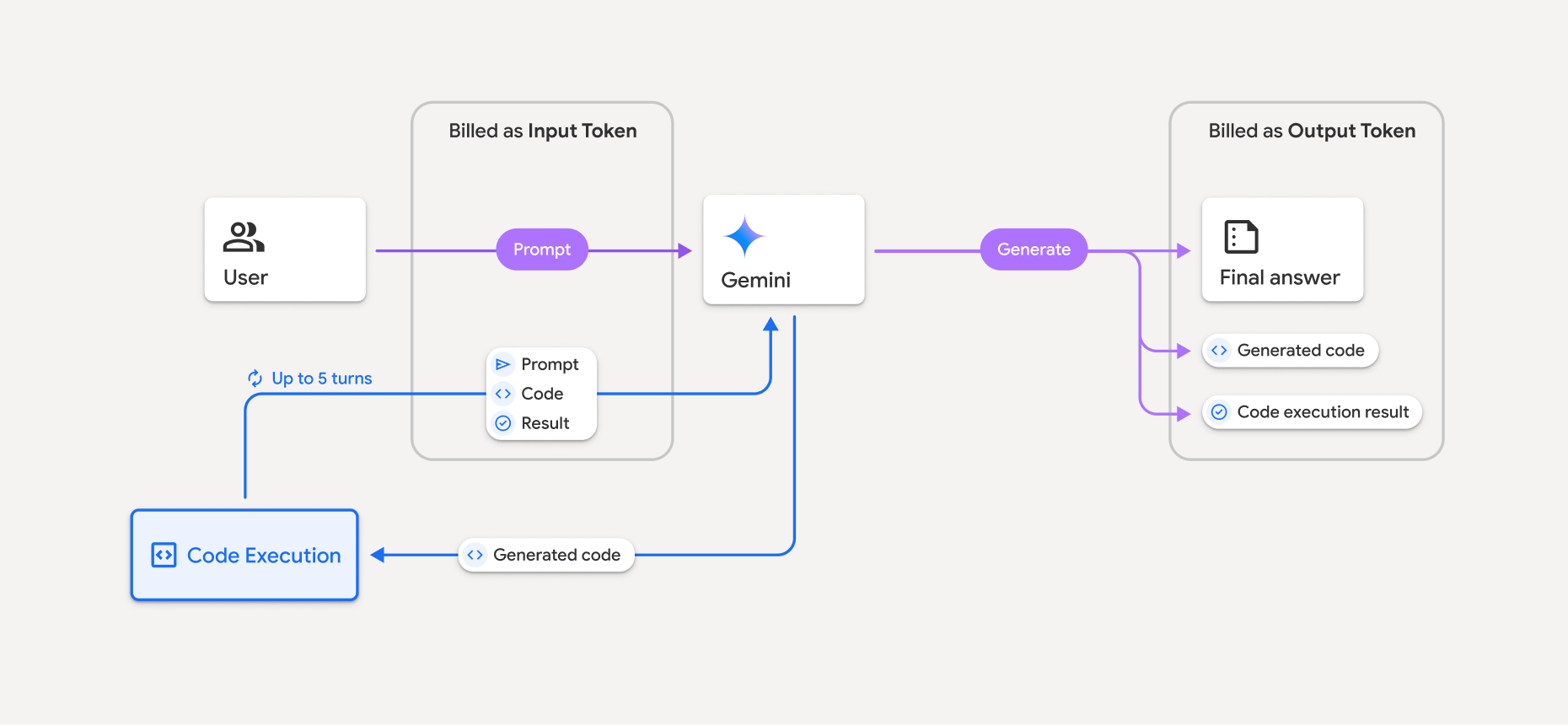
- Kullandığınız Gemini modeline göre giriş ve çıkış jetonlarının mevcut fiyatı üzerinden faturalandırılırsınız.
- Gemini, yanıtınızı oluştururken kod yürütme özelliğini kullanırsa orijinal istem, oluşturulan kod ve yürütülen kodun sonucu ara jetonlar olarak etiketlenir ve giriş jetonları olarak faturalandırılır.
- Ardından Gemini, bir özet oluşturur ve oluşturulan kodu, çalıştırılan kodun sonucunu ve nihai özeti döndürür. Bunlar çıkış jetonları olarak faturalandırılır.
- Gemini API, API yanıtına ara jeton sayısını dahil eder. Böylece, ilk isteminizin ötesinde neden ek giriş jetonları aldığınızı bilirsiniz.
Sınırlamalar
- Model yalnızca kod oluşturabilir ve yürütebilir. Medya dosyaları gibi diğer öğeleri döndüremez.
- Bazı durumlarda, kod yürütmenin etkinleştirilmesi model çıkışının diğer alanlarında (ör. hikaye yazma) gerilemelere yol açabilir.
- Farklı modellerin kod yürütmeyi başarıyla kullanma becerisinde bazı farklılıklar vardır.
Desteklenen araç kombinasyonları
Kod yürütme aracı, daha karmaşık kullanım alanlarını desteklemek için Google Arama ile temellendirme ile birleştirilebilir.
Gemini 3 modelleri, yerleşik araçların (ör. kod yürütme) özel araçlarla (işlev çağrısı) birlikte kullanılmasını destekler.
Desteklenen kitaplıklar
Kod yürütme ortamı aşağıdaki kitaplıkları içerir:
- attrs
- satranç
- contourpy
- fpdf
- geopandas
- imageio
- jinja2
- joblib
- jsonschema
- jsonschema-specifications
- lxml
- matplotlib
- mpmath
- numpy
- opencv-python
- openpyxl
- paketleme
- pandalar
- yastık
- protobuf
- pylatex
- pyparsing
- PyPDF2
- python-dateutil
- python-docx
- python-pptx
- reportlab
- scikit-learn
- scipy
- seaborn
- altı
- striprtf
- sympy
- tablolaştırmak
- tensorflow
- toolz
- xlrd
Kendi kitaplıklarınızı yükleyemezsiniz.
Sırada ne var?
- Interactions API Hızlı Başlangıç kılavuzunu deneyin.
- Diğer Gemini API araçları hakkında bilgi edinin: