

API-ja Gemini mundëson Gjenerimin e Shtuar të Rikthimit ("RAG") përmes mjetit të Kërkimit të Skedarëve. Kërkimi i Skedarëve importon, ndan në copa dhe indekson të dhënat tuaja për të mundësuar rikthimin e shpejtë të informacionit përkatës bazuar në një kërkesë të dhënë. Ky informacion i marrë përdoret më pas si kontekst për modelin, duke i lejuar atij të ofrojë përgjigje më të sakta dhe përkatëse. Kërkimi i skedarëve është gjithashtu në gjendje të ofrojë aftësi multimodale me ngulitje teksti të mbështetura nga gemini-embedding-001 dhe ngulitje imazhi/multimodale të mbështetur nga gemini-embedding-2 .
Ruajtja e skedarëve dhe gjenerimi i ngulitjeve në kohën e pyetjeve është falas, dhe ju do të paguani për krijimin e ngulitjeve vetëm kur indeksoni për herë të parë skedarët tuaj dhe kostoja normale e tokenëve të hyrjes/daljes së modelit Gemini. Kjo paradigmë e re faturimi e bën Mjetin e Kërkimit të Skedarëve më të lehtë dhe më kosto-efektiv për t'u ndërtuar dhe për t'u shkallëzuar. Shihni seksionin e çmimeve për detaje.
Ngarkoje direkt në dyqanin e Kërkimit të Skedarëve
Ky shembull tregon se si të ngarkoni drejtpërdrejt një skedar në dyqanin e kërkimit të skedarëve :
Python
from google import genai
from google.genai import types
import time

client = genai.Client()

file_search_store = client.file_search_stores.create(
    config={
        'display_name': 'your-fileSearchStore-name',
        'embedding_model': 'models/gemini-embedding-2'
    }
)

operation = client.file_search_stores.upload_to_file_search_store(
  file='sample.txt',
  file_search_store_name=file_search_store.name,
  config={
      'display_name' : 'display-file-name',
  }
)

while not operation.done:
    time.sleep(5)
    operation = client.operations.get(operation)

interaction = client.interactions.create(
    model="gemini-3.8-flash",
    input="Can you tell me about [insert question]",
    tools=[{
        "type": "file_search",
        "file_search_store_names": [file_search_store.name]
    }]
)

for step in interaction.steps:
    if step.type == "model_output":
        for content_block in step.content:
            if content_block.type == "text":
                print(content_block.text)
                if content_block.annotations:
                    print("\nSources:")
                    for annotation in content_block.annotations:
                        if annotation.type == "file_citation":
                            print(f"  - {annotation.file_name}: {annotation.source}")
JavaScript
import { GoogleGenAI } from '@google/genai';

const ai = new GoogleGenAI({});

async function run() {
  const fileSearchStore = await ai.fileSearchStores.create({
    config: {
      displayName: 'your-fileSearchStore-name',
      embeddingModel: 'models/gemini-embedding-2'
    }
  });

  let operation = await ai.fileSearchStores.uploadToFileSearchStore({
    file: 'file.txt',
    fileSearchStoreName: fileSearchStore.name,
    config: {
      displayName: 'file-name',
    }
  });

  while (!operation.done) {
    await new Promise(resolve => setTimeout(resolve, 5000));
    operation = await ai.operations.get({ operation });
  }

  const interaction = await ai.interactions.create({
    model: "gemini-3.8-flash",
    input: "Can you tell me about [insert question]",
    tools: [{
      type: "file_search",
      file_search_store_names: [fileSearchStore.name]
    }]
  });

  for (const step of interaction.steps) {
    if (step.type === 'model_output') {
      for (const contentBlock of step.content) {
        if (contentBlock.type === 'text') {
          console.log(contentBlock.text);
          if (contentBlock.annotations) {
            console.log("\nSources:");
            for (const annotation of contentBlock.annotations) {
              if (annotation.type === 'file_citation') {
                console.log(`  - ${annotation.file_name}: ${annotation.source}`);
              }
            }
          }
        }
      }
    }
  }
}

run();
Java
import com.google.genai.Client;
import com.google.genai.gaos.models.interactions.Annotation;
import com.google.genai.gaos.models.interactions.Content;
import com.google.genai.gaos.models.interactions.CreateModelInteraction;
import com.google.genai.gaos.models.interactions.FileCitation;
import com.google.genai.gaos.models.interactions.FileSearch;
import com.google.genai.gaos.models.interactions.Interaction;
import com.google.genai.gaos.models.interactions.InteractionsInput;
import com.google.genai.gaos.models.interactions.Model;
import com.google.genai.gaos.models.interactions.ModelOutputStep;
import com.google.genai.gaos.models.interactions.Step;
import com.google.genai.gaos.models.interactions.TextContent;
import com.google.genai.gaos.models.operations.CreateInteractionRequestBody;
import com.google.genai.types.CreateFileSearchStoreConfig;
import com.google.genai.types.FileSearchStore;
import com.google.genai.types.UploadToFileSearchStoreConfig;
import com.google.genai.types.UploadToFileSearchStoreOperation;
import java.util.Arrays;

Client client = new Client();

FileSearchStore fileSearchStore =
    client.fileSearchStores.create(
        CreateFileSearchStoreConfig.builder()
            .displayName("your-fileSearchStore-name")
            .embeddingModel("models/gemini-embedding-2")
            .build());

UploadToFileSearchStoreOperation operation =
    client.fileSearchStores.uploadToFileSearchStore(
        fileSearchStore.name().get(),
        "sample.txt",
        UploadToFileSearchStoreConfig.builder().displayName("display-file-name").build());

while (!operation.done().orElse(false)) {
  Thread.sleep(5000);
  operation = client.operations.get(operation, null);
}

CreateModelInteraction params =
    CreateModelInteraction.builder()
        .model(Model.of("gemini-3.8-flash"))
        .input(InteractionsInput.of("Can you tell me about [insert question]"))
        .tools(
            Arrays.asList(
                FileSearch.builder()
                    .fileSearchStoreNames(Arrays.asList(fileSearchStore.name().get()))
                    .build()))
        .build();

Interaction interaction =
    client.interactions.create(CreateInteractionRequestBody.of(params)).interaction().get();

if (interaction.steps().isPresent()) {
  for (Step step : interaction.steps().get()) {
    if (step instanceof ModelOutputStep) {
      ModelOutputStep outputStep = (ModelOutputStep) step;
      if (outputStep.content().isPresent()) {
        for (Content contentBlock : outputStep.content().get()) {
          if (contentBlock instanceof TextContent) {
            TextContent textContent = (TextContent) contentBlock;
            System.out.println(textContent.text().orElse(""));
            if (textContent.annotations().isPresent()
                && !textContent.annotations().get().isEmpty()) {
              System.out.println("\nSources:");
              for (Annotation annotation : textContent.annotations().get()) {
                if (annotation instanceof FileCitation) {
                  FileCitation citation = (FileCitation) annotation;
                  System.out.printf(
                      "  - %s: %s%n",
                      citation.fileName().orElse(""), citation.source().orElse(""));
                }
              }
            }
          }
        }
      }
    }
  }
}
Shko
package main

import (
    "context"
    "fmt"
    "log"
    "time"

    "google.golang.org/genai"
    "google.golang.org/genai/interactions/models/interactions"
    "google.golang.org/genai/interactions/models/operations"
)

func main() {
    ctx := context.Background()
    client, err := genai.NewClient(ctx, nil)
    if err != nil {
        log.Fatal(err)
    }

    fileSearchStore, err := client.FileSearchStores.Create(ctx, &genai.CreateFileSearchStoreConfig{
        DisplayName:    "your-fileSearchStore-name",
        EmbeddingModel: "models/gemini-embedding-2",
    })
    if err != nil {
        log.Fatal(err)
    }

    operation, err := client.FileSearchStores.UploadToFileSearchStoreFromPath(
        ctx,
        "sample.txt",
        fileSearchStore.Name,
        &genai.UploadToFileSearchStoreConfig{
            DisplayName: "display-file-name",
        },
    )
    if err != nil {
        log.Fatal(err)
    }

    for !operation.Done {
        time.Sleep(5 * time.Second)
        operation, err = client.Operations.GetUploadToFileSearchStoreOperation(ctx, operation, nil)
        if err != nil {
            log.Fatal(err)
        }
    }

    resp, err := client.Interactions.Create(ctx, operations.CreateInteractionRequest{
        Body: operations.NewCreateInteractionRequestBody(
            interactions.CreateModelInteraction{
                Model: interactions.Model("gemini-3.8-flash"),
                Input: interactions.NewInteractionsInput("Can you tell me about [insert question]"),
                Tools: []interactions.Tool{
                    interactions.NewTool(interactions.FileSearch{
                        FileSearchStoreNames: []string{fileSearchStore.Name},
                    }),
                },
            },
        ),
    })
    if err != nil {
        log.Fatal(err)
    }

    for _, step := range resp.Interaction.Steps {
        if step.ModelOutputStep != nil {
            for _, content := range step.ModelOutputStep.Content {
                if content.TextContent != nil {
                    fmt.Println(content.TextContent.Text)
                    if len(content.TextContent.Annotations) > 0 {
                        fmt.Println("\nSources:")
                        for _, annotation := range content.TextContent.Annotations {
                            if annotation.FileCitation != nil {
                                c := annotation.FileCitation
                                fileName := ""
                                if c.FileName != nil {
                                    fileName = *c.FileName
                                }
                                source := ""
                                if c.Source != nil {
                                    source = *c.Source
                                }
                                fmt.Printf("  - %s: %s\n", fileName, source)
                            }
                        }
                    }
                }
            }
        }
    }
}
PUSHTIM
# 1. Create a File Search store
curl -X POST "https://generativelanguage.googleapis.com/v1beta/fileSearchStores?key=$GEMINI_API_KEY" \
    -H "Content-Type: application/json" \
    -d '{
      "displayName": "your-file-search-store-name",
      "embeddingModel": "models/gemini-embedding-2"
    }' > store_res.json

FILE_SEARCH_STORE_NAME=$(jq -r ".name" store_res.json)

# 2. Upload directly to File Search store using resumable upload
NUM_BYTES=$(wc -c < "sample.txt")
curl "https://generativelanguage.googleapis.com/upload/v1beta/fileSearchStores/$FILE_SEARCH_STORE_NAME:uploadToFileSearchStore?key=$GEMINI_API_KEY" \
    -D upload-header.tmp \
    -H "X-Goog-Upload-Protocol: resumable" \
    -H "X-Goog-Upload-Command: start" \
    -H "X-Goog-Upload-Header-Content-Length: $NUM_BYTES" \
    -H "X-Goog-Upload-Header-Content-Type: text/plain" \
    -H "Content-Type: application/json" \
    -d '{"displayName": "sample.txt"}' 2> /dev/null

upload_url=$(grep -i "x-goog-upload-url: " upload-header.tmp | cut -d" " -f2 | tr -d "\r")
rm upload-header.tmp

curl "${upload_url}" \
    -H "Content-Length: $NUM_BYTES" \
    -H "X-Goog-Upload-Offset: 0" \
    -H "X-Goog-Upload-Command: upload, finalize" \
    --data-binary "@sample.txt" 2> /dev/null > upload_response.json

cat upload_response.json

# 3. Query using the File Search store
curl -X POST "https://generativelanguage.googleapis.com/v1beta/interactions" \
    -H "x-goog-api-key: $GEMINI_API_KEY" \
    -H "Content-Type: application/json" \
    -d '{
      "model": "gemini-3.8-flash",
      "input": "Can you tell me about [insert question]",
      "tools": [{
        "type": "file_search",
        "file_search_store_names": ["'"$FILE_SEARCH_STORE_NAME"'"]
      }]
    }'
Kontrolloni referencën API për uploadToFileSearchStore për më shumë informacion.
Importimi i skedarëve
Si alternativë, mund të ngarkoni një skedar ekzistues dhe ta importoni atë në dyqanin tuaj të kërkimit të skedarëve :
Python
from google import genai
from google.genai import types
import time

client = genai.Client()

sample_file = client.files.upload(file='sample.txt', config={'display_name': 'display_file_name'})

file_search_store = client.file_search_stores.create(
    config={
        'display_name': 'your-fileSearchStore-name',
        'embedding_model': 'models/gemini-embedding-2'
    }
)

operation = client.file_search_stores.import_file(
    file_search_store_name=file_search_store.name,
    file_name=sample_file.name
)

while not operation.done:
    time.sleep(5)
    operation = client.operations.get(operation)

interaction = client.interactions.create(
    model="gemini-3.8-flash",
    input="Can you tell me about [insert question]",
    tools=[{
        "type": "file_search",
        "file_search_store_names": [file_search_store.name]
    }]
)

for step in interaction.steps:
    if step.type == "model_output":
        for content_block in step.content:
            if content_block.type == "text":
                print(content_block.text)
JavaScript
import { GoogleGenAI } from '@google/genai';

const ai = new GoogleGenAI({});

async function run() {
  const sampleFile = await ai.files.upload({
    file: 'sample.txt',
    config: { displayName: 'file-name' }
  });

  const fileSearchStore = await ai.fileSearchStores.create({
    config: {
      displayName: 'your-fileSearchStore-name',
      embeddingModel: 'models/gemini-embedding-2'
    }
  });

  let operation = await ai.fileSearchStores.importFile({
    fileSearchStoreName: fileSearchStore.name,
    fileName: sampleFile.name
  });

  while (!operation.done) {
    await new Promise(resolve => setTimeout(resolve, 5000));
    operation = await ai.operations.get({ operation: operation });
  }

  const interaction = await ai.interactions.create({
    model: "gemini-3.8-flash",
    input: "Can you tell me about [insert question]",
    tools: [{
      type: "file_search",
      file_search_store_names: [fileSearchStore.name]
    }]
  });

  for (const step of interaction.steps) {
    if (step.type === 'model_output') {
      for (const contentBlock of step.content) {
        if (contentBlock.type === 'text') {
          console.log(contentBlock.text);
        }
      }
    }
  }
}

run();
Java
import com.google.genai.Client;
import com.google.genai.gaos.models.interactions.Content;
import com.google.genai.gaos.models.interactions.CreateModelInteraction;
import com.google.genai.gaos.models.interactions.FileSearch;
import com.google.genai.gaos.models.interactions.Interaction;
import com.google.genai.gaos.models.interactions.InteractionsInput;
import com.google.genai.gaos.models.interactions.Model;
import com.google.genai.gaos.models.interactions.ModelOutputStep;
import com.google.genai.gaos.models.interactions.Step;
import com.google.genai.gaos.models.interactions.TextContent;
import com.google.genai.gaos.models.operations.CreateInteractionRequestBody;
import com.google.genai.types.CreateFileSearchStoreConfig;
import com.google.genai.types.File;
import com.google.genai.types.FileSearchStore;
import com.google.genai.types.ImportFileOperation;
import com.google.genai.types.UploadFileConfig;
import java.util.Arrays;

Client client = new Client();

File sampleFile =
    client.files.upload(
        "sample.txt", UploadFileConfig.builder().displayName("display_file_name").build());

FileSearchStore fileSearchStore =
    client.fileSearchStores.create(
        CreateFileSearchStoreConfig.builder()
            .displayName("your-fileSearchStore-name")
            .embeddingModel("models/gemini-embedding-2")
            .build());

ImportFileOperation operation =
    client.fileSearchStores.importFile(
        fileSearchStore.name().get(), sampleFile.name().get(), null);

while (!operation.done().orElse(false)) {
  Thread.sleep(5000);
  operation = client.operations.get(operation, null);
}

CreateModelInteraction params =
    CreateModelInteraction.builder()
        .model(Model.of("gemini-3.8-flash"))
        .input(InteractionsInput.of("Can you tell me about [insert question]"))
        .tools(
            Arrays.asList(
                FileSearch.builder()
                    .fileSearchStoreNames(Arrays.asList(fileSearchStore.name().get()))
                    .build()))
        .build();

Interaction interaction =
    client.interactions.create(CreateInteractionRequestBody.of(params)).interaction().get();

if (interaction.steps().isPresent()) {
  for (Step step : interaction.steps().get()) {
    if (step instanceof ModelOutputStep) {
      ModelOutputStep outputStep = (ModelOutputStep) step;
      if (outputStep.content().isPresent()) {
        for (Content contentBlock : outputStep.content().get()) {
          if (contentBlock instanceof TextContent) {
            TextContent textContent = (TextContent) contentBlock;
            System.out.println(textContent.text().orElse(""));
          }
        }
      }
    }
  }
}
Shko
package main

import (
    "context"
    "fmt"
    "log"
    "time"

    "google.golang.org/genai"
    "google.golang.org/genai/interactions/models/interactions"
    "google.golang.org/genai/interactions/models/operations"
)

func main() {
    ctx := context.Background()
    client, err := genai.NewClient(ctx, nil)
    if err != nil {
        log.Fatal(err)
    }

    sampleFile, err := client.Files.UploadFromPath(ctx, "sample.txt", &genai.UploadFileConfig{
        DisplayName: "display_file_name",
    })
    if err != nil {
        log.Fatal(err)
    }

    fileSearchStore, err := client.FileSearchStores.Create(ctx, &genai.CreateFileSearchStoreConfig{
        DisplayName:    "your-fileSearchStore-name",
        EmbeddingModel: "models/gemini-embedding-2",
    })
    if err != nil {
        log.Fatal(err)
    }

    operation, err := client.FileSearchStores.ImportFile(ctx, fileSearchStore.Name, sampleFile.Name, nil)
    if err != nil {
        log.Fatal(err)
    }

    for !operation.Done {
        time.Sleep(5 * time.Second)
        operation, err = client.Operations.GetImportFileOperation(ctx, operation, nil)
        if err != nil {
            log.Fatal(err)
        }
    }

    resp, err := client.Interactions.Create(ctx, operations.CreateInteractionRequest{
        Body: operations.NewCreateInteractionRequestBody(
            interactions.CreateModelInteraction{
                Model: interactions.Model("gemini-3.8-flash"),
                Input: interactions.NewInteractionsInput("Can you tell me about [insert question]"),
                Tools: []interactions.Tool{
                    interactions.NewTool(interactions.FileSearch{
                        FileSearchStoreNames: []string{fileSearchStore.Name},
                    }),
                },
            },
        ),
    })
    if err != nil {
        log.Fatal(err)
    }

    for _, step := range resp.Interaction.Steps {
        if step.ModelOutputStep != nil {
            for _, content := range step.ModelOutputStep.Content {
                if content.TextContent != nil {
                    fmt.Println(content.TextContent.Text)
                }
            }
        }
    }
}
PUSHTIM
# 1. Upload file using the Files API
NUM_BYTES=$(wc -c < "sample.txt")
curl "https://generativelanguage.googleapis.com/upload/v1beta/files?key=$GEMINI_API_KEY" \
    -D upload-header.tmp \
    -H "X-Goog-Upload-Protocol: resumable" \
    -H "X-Goog-Upload-Command: start" \
    -H "X-Goog-Upload-Header-Content-Length: $NUM_BYTES" \
    -H "X-Goog-Upload-Header-Content-Type: text/plain" \
    -H "Content-Type: application/json" \
    -d '{"file": {"displayName": "sample.txt"}}' 2> /dev/null

upload_url=$(grep -i "x-goog-upload-url: " upload-header.tmp | cut -d" " -f2 | tr -d "\r")
rm upload-header.tmp

curl "${upload_url}" \
    -H "Content-Length: $NUM_BYTES" \
    -H "X-Goog-Upload-Offset: 0" \
    -H "X-Goog-Upload-Command: upload, finalize" \
    --data-binary "@sample.txt" 2> /dev/null > file_info.json

FILE_NAME=$(jq -r ".file.name" file_info.json)

# 2. Create a File Search store
curl -X POST "https://generativelanguage.googleapis.com/v1beta/fileSearchStores?key=$GEMINI_API_KEY" \
    -H "Content-Type: application/json" \
    -d '{
      "displayName": "your-file-search-store-name",
      "embeddingModel": "models/gemini-embedding-2"
    }' > store_res.json

FILE_SEARCH_STORE_NAME=$(jq -r ".name" store_res.json)

# 3. Import the file into the File Search store
curl -X POST "https://generativelanguage.googleapis.com/v1beta/fileSearchStores/$FILE_SEARCH_STORE_NAME:importFile?key=$GEMINI_API_KEY" \
    -H "Content-Type: application/json" \
    -d '{"fileName": "'"$FILE_NAME"'"}'

# 4. Query using the File Search store
curl -X POST "https://generativelanguage.googleapis.com/v1beta/interactions" \
    -H "x-goog-api-key: $GEMINI_API_KEY" \
    -H "Content-Type: application/json" \
    -d '{
      "model": "gemini-3.8-flash",
      "input": "Can you tell me about [insert question]",
      "tools": [{
        "type": "file_search",
        "file_search_store_names": ["'"$FILE_SEARCH_STORE_NAME"'"]
      }]
    }'
Kontrolloni referencën API për importFile për më shumë informacion.
Konfigurimi i ndarjes në grupe
Kur importoni një skedar në një dyqan të Kërkimit të Skedarëve, ai ndahet automatikisht në pjesë, integrohet, indeksohet dhe ngarkohet në dyqanin tuaj të Kërkimit të Skedarëve. Nëse keni nevojë për më shumë kontroll mbi strategjinë e ndarjes së pjesëve, mund të specifikoni një cilësim chunking_config për të vendosur një numër maksimal të tokenëve për pjesë dhe numrin maksimal të tokenëve që mbivendosen.
Python
from google import genai
from google.genai import types
import time

client = genai.Client()

operation = client.file_search_stores.upload_to_file_search_store(
    file_search_store_name=file_search_store.name,
    file='sample.txt',
    config={
        'chunking_config': {
          'white_space_config': {
            'max_tokens_per_chunk': 200,
            'max_overlap_tokens': 20
          }
        }
    }
)

while not operation.done:
    time.sleep(5)
    operation = client.operations.get(operation)

print("Custom chunking complete.")
JavaScript
import { GoogleGenAI } from '@google/genai';

const ai = new GoogleGenAI({});

let operation = await ai.fileSearchStores.uploadToFileSearchStore({
  file: 'file.txt',
  fileSearchStoreName: fileSearchStore.name,
  config: {
    displayName: 'file-name',
    chunkingConfig: {
      whiteSpaceConfig: {
        maxTokensPerChunk: 200,
        maxOverlapTokens: 20
      }
    }
  }
});

while (!operation.done) {
  await new Promise(resolve => setTimeout(resolve, 5000));
  operation = await ai.operations.get({ operation });
}
console.log("Custom chunking complete.");
Java
import com.google.genai.Client;
import com.google.genai.types.ChunkingConfig;
import com.google.genai.types.UploadToFileSearchStoreConfig;
import com.google.genai.types.UploadToFileSearchStoreOperation;
import com.google.genai.types.WhiteSpaceConfig;

Client client = new Client();

UploadToFileSearchStoreOperation operation =
    client.fileSearchStores.uploadToFileSearchStore(
        "fileSearchStores/my-file-search-store",
        "sample.txt",
        UploadToFileSearchStoreConfig.builder()
            .displayName("file-name")
            .chunkingConfig(
                ChunkingConfig.builder()
                    .whiteSpaceConfig(
                        WhiteSpaceConfig.builder()
                            .maxTokensPerChunk(200)
                            .maxOverlapTokens(20)
                            .build())
                    .build())
            .build());

while (!operation.done().orElse(false)) {
  Thread.sleep(5000);
  operation = client.operations.get(operation, null);
}

System.out.println("Custom chunking complete.");
Shko
package main

import (
    "context"
    "fmt"
    "log"
    "time"

    "google.golang.org/genai"
)

func main() {
    ctx := context.Background()
    client, err := genai.NewClient(ctx, nil)
    if err != nil {
        log.Fatal(err)
    }

    operation, err := client.FileSearchStores.UploadToFileSearchStoreFromPath(
        ctx,
        "sample.txt",
        "fileSearchStores/my-file-search-store",
        &genai.UploadToFileSearchStoreConfig{
            DisplayName: "file-name",
            ChunkingConfig: &genai.ChunkingConfig{
                WhiteSpaceConfig: &genai.WhiteSpaceConfig{
                    MaxTokensPerChunk: genai.Ptr(int32(200)),
                    MaxOverlapTokens:  genai.Ptr(int32(20)),
                },
            },
        },
    )
    if err != nil {
        log.Fatal(err)
    }

    for !operation.Done {
        time.Sleep(5 * time.Second)
        operation, err = client.Operations.GetUploadToFileSearchStoreOperation(ctx, operation, nil)
        if err != nil {
            log.Fatal(err)
        }
    }

    fmt.Println("Custom chunking complete.")
}
PUSHTIM
NUM_BYTES=$(wc -c < "sample.txt")
curl "https://generativelanguage.googleapis.com/upload/v1beta/fileSearchStores/$FILE_SEARCH_STORE_NAME:uploadToFileSearchStore?key=$GEMINI_API_KEY" \
    -D upload-header.tmp \
    -H "X-Goog-Upload-Protocol: resumable" \
    -H "X-Goog-Upload-Command: start" \
    -H "X-Goog-Upload-Header-Content-Length: $NUM_BYTES" \
    -H "X-Goog-Upload-Header-Content-Type: text/plain" \
    -H "Content-Type: application/json" \
    -d '{
      "displayName": "sample.txt",
      "chunkingConfig": {
        "whiteSpaceConfig": {
          "maxTokensPerChunk": 200,
          "maxOverlapTokens": 20
        }
      }
    }' 2> /dev/null

upload_url=$(grep -i "x-goog-upload-url: " upload-header.tmp | cut -d" " -f2 | tr -d "\r")
rm upload-header.tmp

curl "${upload_url}" \
    -H "Content-Length: $NUM_BYTES" \
    -H "X-Goog-Upload-Offset: 0" \
    -H "X-Goog-Upload-Command: upload, finalize" \
    --data-binary "@sample.txt" 2> /dev/null > upload_response.json

cat upload_response.json
Për të përdorur dyqanin tuaj të Kërkimit të Skedarëve, kalojeni atë si mjet te metoda interactions.create , siç tregohet në shembujt e Ngarkimit dhe Importimit .
Si funksionon
Kërkimi i Skedarëve përdor një teknikë të quajtur kërkim semantik për të gjetur informacion që lidhet me kërkesën e përdoruesit. Ndryshe nga kërkimi standard i bazuar në fjalë kyçe, kërkimi semantik kupton kuptimin dhe kontekstin e pyetjes suaj.
Kur importoni një skedar, ai konvertohet në përfaqësime numerike të quajtura ngulitje , të cilat kapin kuptimin semantik të përmbajtjes së ngarkuar. Këto ngulitje ruhen në një bazë të dhënash të specializuar të Kërkimit të Skedarëve. Kur bëni një pyetje, edhe ajo konvertohet në një ngulitje. Pastaj sistemi kryen një Kërkim Skedarësh për të gjetur pjesët më të ngjashme dhe më relevante të dokumentit nga dyqani i Kërkimit të Skedarëve.
Nuk ka Kohë për të Jetuar (TTL) për ngulitje; ato vazhdojnë derisa të fshihen manualisht ose kur modeli të jetë i vjetëruar. Megjithatë, skedarët fshihen pas 48 orësh.
Ja një përshkrim i hollësishëm i procesit për përdorimin e File Search uploadToFileSearchStore API:
Krijo një depo të Kërkimit të Skedarëve : Një depo e Kërkimit të Skedarëve përmban të dhënat e përpunuara nga skedarët tuaj. Është kontejneri i përhershëm për ngulitje mbi të cilin do të veprojë kërkimi semantik.
Ngarko një skedar dhe importo në një depo të Kërkimit të Skedarëve : Ngarko njëkohësisht një skedar dhe importo rezultatet në depon tënd të Kërkimit të Skedarëve. Kjo krijon një objekt të përkohshëm
File, i cili është një referencë për dokumentin tënd të papërpunuar. Këto të dhëna më pas ndahen në copa, konvertohen në ngulitje të Kërkimit të Skedarëve dhe indeksohen. ObjektiFilefshihet pas 48 orësh, ndërsa të dhënat e importuara në depon e Kërkimit të Skedarëve do të ruhen për një kohë të pacaktuar derisa të zgjedhësh t'i fshish.Pyetje me File Search : Së fundmi, përdorni mjetin
FileSearchnë një thirrjegenerateContent. Në konfigurimin e mjetit, ju specifikoni njëFileSearchRetrievalResource, i cili tregon teFileSearchStoreqë dëshironi të kërkoni. Kjo i tregon modelit të kryejë një kërkim semantik në atë dyqan specifik të File Search për të gjetur informacionin përkatës për të bazuar përgjigjen e tij.
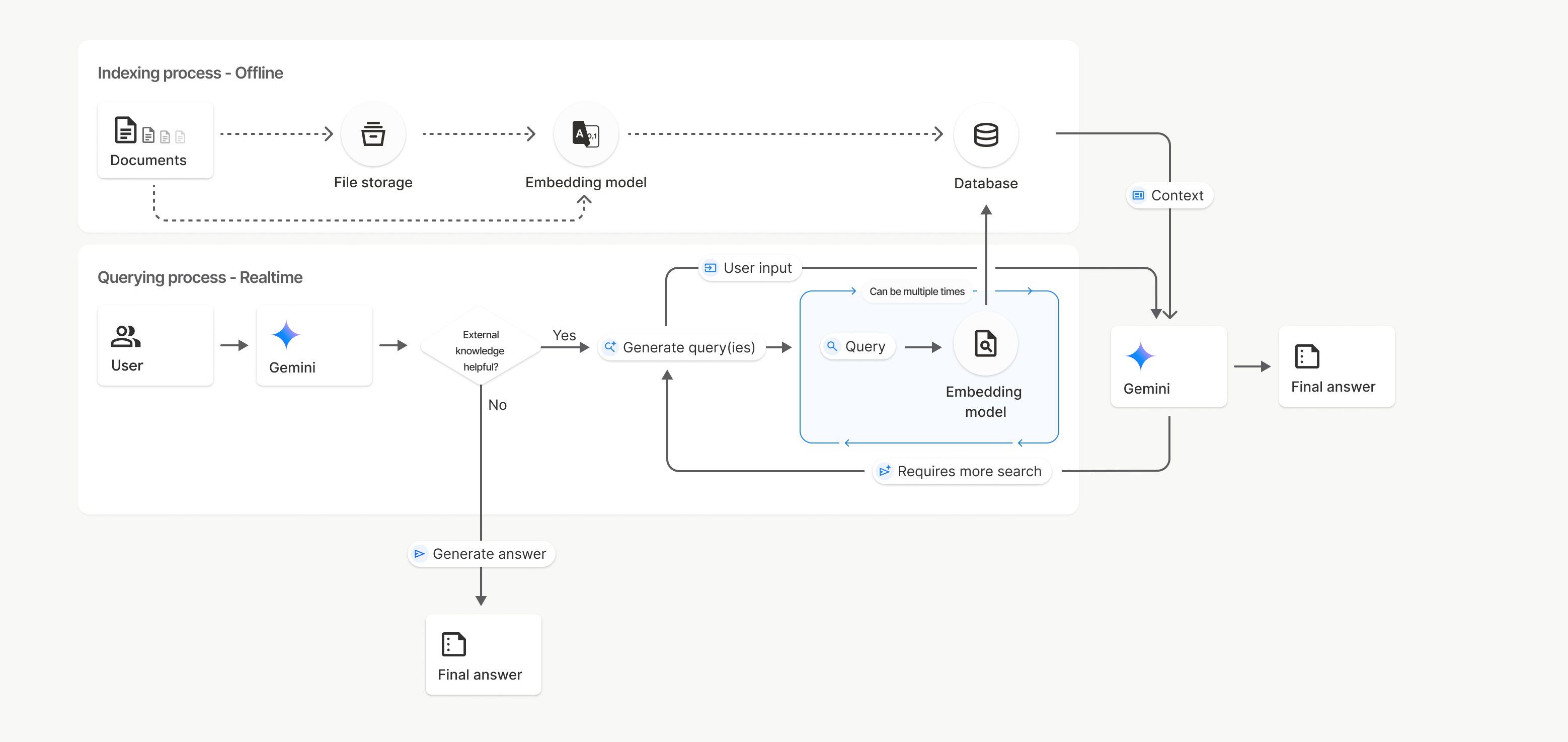
Në këtë diagram, vija me pika nga Dokumentet te modeli i Embedding (duke përdorur gemini-embedding-001 ) përfaqëson API- uploadToFileSearchStore (duke anashkaluar ruajtjen e skedarëve ). Përndryshe, përdorimi i API-së së Skedarëve për të krijuar dhe më pas importuar veçmas skedarë e zhvendos procesin e indeksimit nga Dokumentet te ruajtja e skedarëve dhe më pas te modeli i Embedding .
Dyqanet e Kërkimit të Skedarëve
Një depo File Search është një kontejner për ngulitje dokumentesh. Ndërsa skedarët e papërpunuar të ngarkuar përmes File API fshihen pas 48 orësh, të dhënat e importuara në një depo File Search ruhen për një kohë të pacaktuar derisa t'i fshini manualisht. Mund të krijoni disa depo File Search për të organizuar dokumentet tuaja. FileSearchStore API ju lejon të krijoni, listoni, merrni dhe fshini për të menaxhuar depot e kërkimit të skedarëve. Emrat e depove File Search janë të shtrira globalisht.
Ja disa shembuj se si të menaxhoni dyqanet e Kërkimit të Skedarëve:
Python
file_search_store = client.file_search_stores.create(
    config={
        'display_name': 'myfilesearchstore123',
        'embedding_model': 'models/gemini-embedding-2'
    }
)

for store in client.file_search_stores.list():
    print(store)

my_file_search_store = client.file_search_stores.get(name=file_search_store.name)

client.file_search_stores.delete(name=file_search_store.name, config={'force': True})
JavaScript
const fileSearchStore = await ai.fileSearchStores.create({
  config: {
    displayName: 'myfilesearchstore123',
    embeddingModel: 'models/gemini-embedding-2'
  }
});

const fileSearchStores = await ai.fileSearchStores.list();
for await (const store of fileSearchStores) {
  console.log(store);
}

const myFileSearchStore = await ai.fileSearchStores.get({
  name: fileSearchStore.name
});

await ai.fileSearchStores.delete({
  name: fileSearchStore.name,
  config: { force: true }
});
Java
import com.google.genai.Client;
import com.google.genai.types.CreateFileSearchStoreConfig;
import com.google.genai.types.DeleteFileSearchStoreConfig;
import com.google.genai.types.FileSearchStore;

Client client = new Client();

FileSearchStore fileSearchStore =
    client.fileSearchStores.create(
        CreateFileSearchStoreConfig.builder()
            .displayName("myfilesearchstore123")
            .embeddingModel("models/gemini-embedding-2")
            .build());

for (FileSearchStore store : client.fileSearchStores.list(null)) {
  System.out.println(store);
}

FileSearchStore myFileSearchStore =
    client.fileSearchStores.get(fileSearchStore.name().get(), null);

client.fileSearchStores.delete(
    fileSearchStore.name().get(), DeleteFileSearchStoreConfig.builder().force(true).build());
Shko
package main

import (
    "context"
    "fmt"
    "log"

    "google.golang.org/genai"
)

func main() {
    ctx := context.Background()
    client, err := genai.NewClient(ctx, nil)
    if err != nil {
        log.Fatal(err)
    }

    fileSearchStore, err := client.FileSearchStores.Create(ctx, &genai.CreateFileSearchStoreConfig{
        DisplayName:    "myfilesearchstore123",
        EmbeddingModel: "models/gemini-embedding-2",
    })
    if err != nil {
        log.Fatal(err)
    }

    for store, err := range client.FileSearchStores.All(ctx) {
        if err != nil {
            log.Fatal(err)
        }
        fmt.Println(store)
    }

    myFileSearchStore, err := client.FileSearchStores.Get(ctx, fileSearchStore.Name, nil)
    if err != nil {
        log.Fatal(err)
    }
    _ = myFileSearchStore

    err = client.FileSearchStores.Delete(ctx, fileSearchStore.Name, &genai.DeleteFileSearchStoreConfig{
        Force: genai.Ptr(true),
    })
    if err != nil {
        log.Fatal(err)
    }
}
PUSHTIM
curl -X POST "https://generativelanguage.googleapis.com/v1beta/fileSearchStores?key=${GEMINI_API_KEY}" \
    -H "Content-Type: application/json" \
    -d '{ "displayName": "My Store", "embedding_model": "models/gemini-embedding-2" }'

curl "https://generativelanguage.googleapis.com/v1beta/fileSearchStores?key=${GEMINI_API_KEY}"

curl "https://generativelanguage.googleapis.com/v1beta/fileSearchStores/myfilesearchstore123?key=${GEMINI_API_KEY}"

curl -X DELETE "https://generativelanguage.googleapis.com/v1beta/fileSearchStores/myfilesearchstore123?key=${GEMINI_API_KEY}"
Dokumentet e Kërkimit të Skedarëve
Ju mund të menaxhoni dokumente individuale në depot tuaja të skedarëve me API-n e Dokumenteve të Kërkimit të Skedarëve për list çdo dokument në një depo kërkimi skedarësh, get informacion rreth një dokumenti dhe delete një dokument sipas emrit.
Python
for document_in_store in client.file_search_stores.documents.list(parent='fileSearchStores/myfilesearchstore123'):
  print(document_in_store)

file_search_document = client.file_search_stores.documents.get(name='fileSearchStores/myfilesearchstore123/documents/sampletxt123')
print(file_search_document)

client.file_search_stores.documents.delete(name='fileSearchStores/myfilesearchstore123/documents/sampletxt123', config={'force': True})
JavaScript
const documents = await ai.fileSearchStores.documents.list({
  parent: 'fileSearchStores/myfilesearchstore123'
});
for await (const doc of documents) {
  console.log(doc);
}

const fileSearchDocument = await ai.fileSearchStores.documents.get({
  name: 'fileSearchStores/myfilesearchstore123/documents/sampletxt123'
});

await ai.fileSearchStores.documents.delete({
  name: 'fileSearchStores/myfilesearchstore123/documents/sampletxt123',
  config: { force: true }
});
Java
import com.google.genai.Client;
import com.google.genai.types.DeleteDocumentConfig;
import com.google.genai.types.Document;

Client client = new Client();

for (Document documentInStore :
    client.fileSearchStores.documents.list("fileSearchStores/myfilesearchstore123", null)) {
  System.out.println(documentInStore);
}

Document fileSearchDocument =
    client.fileSearchStores.documents.get(
        "fileSearchStores/myfilesearchstore123/documents/sampletxt123", null);
System.out.println(fileSearchDocument);

client.fileSearchStores.documents.delete(
    "fileSearchStores/myfilesearchstore123/documents/sampletxt123",
    DeleteDocumentConfig.builder().force(true).build());
Shko
package main

import (
    "context"
    "fmt"
    "log"

    "google.golang.org/genai"
)

func main() {
    ctx := context.Background()
    client, err := genai.NewClient(ctx, nil)
    if err != nil {
        log.Fatal(err)
    }

    for documentInStore, err := range client.FileSearchStores.Documents.All(ctx, "fileSearchStores/myfilesearchstore123") {
        if err != nil {
            log.Fatal(err)
        }
        fmt.Println(documentInStore)
    }

    fileSearchDocument, err := client.FileSearchStores.Documents.Get(ctx, "fileSearchStores/myfilesearchstore123/documents/sampletxt123", nil)
    if err != nil {
        log.Fatal(err)
    }
    fmt.Println(fileSearchDocument)

    err = client.FileSearchStores.Documents.Delete(ctx, "fileSearchStores/myfilesearchstore123/documents/sampletxt123", &genai.DeleteDocumentConfig{
        Force: genai.Ptr(true),
    })
    if err != nil {
        log.Fatal(err)
    }
}
PUSHTIM
curl "https://generativelanguage.googleapis.com/v1beta/fileSearchStores/myfilesearchstore123/documents?key=${GEMINI_API_KEY}"

curl "https://generativelanguage.googleapis.com/v1beta/fileSearchStores/myfilesearchstore123/documents/sampletxt123?key=${GEMINI_API_KEY}"

curl -X DELETE "https://generativelanguage.googleapis.com/v1beta/fileSearchStores/myfilesearchstore123/documents/sampletxt123?key=${GEMINI_API_KEY}&force=true"
Metadatat e skedarit
Mund të shtoni meta të dhëna të personalizuara në skedarët tuaj për t'i filtruar ato ose për të ofruar kontekst shtesë. Meta të dhënat janë një grup çiftesh çelës-vlerë.
Python
op = client.file_search_stores.import_file(
    file_search_store_name=file_search_store.name,
    file_name=sample_file.name,
    config={
        'custom_metadata': [
            {"key": "author", "string_value": "Robert Graves"},
            {"key": "year", "numeric_value": 1934}
        ]
    }
)
JavaScript
let operation = await ai.fileSearchStores.importFile({
  fileSearchStoreName: fileSearchStore.name,
  fileName: sampleFile.name,
  config: {
    customMetadata: [
      { key: "author", stringValue: "Robert Graves" },
      { key: "year", numericValue: 1934 }
    ]
  }
});
Java
import com.google.genai.Client;
import com.google.genai.types.CustomMetadata;
import com.google.genai.types.ImportFileConfig;
import com.google.genai.types.ImportFileOperation;
import java.util.Arrays;

Client client = new Client();

ImportFileOperation op =
    client.fileSearchStores.importFile(
        "fileSearchStores/myfilesearchstore123",
        "files/samplefile123",
        ImportFileConfig.builder()
            .customMetadata(
                Arrays.asList(
                    CustomMetadata.builder().key("author").stringValue("Robert Graves").build(),
                    CustomMetadata.builder().key("year").numericValue(1934f).build()))
            .build());
Shko
package main

import (
    "context"
    "log"

    "google.golang.org/genai"
)

func main() {
    ctx := context.Background()
    client, err := genai.NewClient(ctx, nil)
    if err != nil {
        log.Fatal(err)
    }

    op, err := client.FileSearchStores.ImportFile(
        ctx,
        "fileSearchStores/myfilesearchstore123",
        "files/samplefile123",
        &genai.ImportFileConfig{
            CustomMetadata: []*genai.CustomMetadata{
                {Key: "author", StringValue: "Robert Graves"},
                {Key: "year", NumericValue: genai.Ptr(float32(1934))},
            },
        },
    )
    if err != nil {
        log.Fatal(err)
    }
    _ = op
}
Kjo është e dobishme kur keni dokumente të shumta në një dyqan të Kërkimit të Skedarëve dhe dëshironi të kërkoni vetëm në një nëngrup të tyre.
Python
interaction = client.interactions.create(
    model="gemini-3.8-flash",
    input="Tell me about the book 'I, Claudius'",
    tools=[{
        "type": "file_search",
        "file_search_store_names": [file_search_store.name],
        "metadata_filter": 'author="Robert Graves"',
    }]
)

for step in interaction.steps:
    if step.type == "model_output":
        for content_block in step.content:
            if content_block.type == "text":
                print(content_block.text)
JavaScript
const interaction = await ai.interactions.create({
  model: "gemini-3.8-flash",
  input: "Tell me about the book 'I, Claudius'",
  tools: [{
    type: "file_search",
    file_search_store_names: [fileSearchStore.name],
    metadata_filter: 'author="Robert Graves"',
  }]
});

for (const step of interaction.steps) {
  if (step.type === 'model_output') {
    for (const contentBlock of step.content) {
      if (contentBlock.type === 'text') {
        console.log(contentBlock.text);
      }
    }
  }
}
Java
import com.google.genai.Client;
import com.google.genai.gaos.models.interactions.Content;
import com.google.genai.gaos.models.interactions.CreateModelInteraction;
import com.google.genai.gaos.models.interactions.FileSearch;
import com.google.genai.gaos.models.interactions.Interaction;
import com.google.genai.gaos.models.interactions.InteractionsInput;
import com.google.genai.gaos.models.interactions.Model;
import com.google.genai.gaos.models.interactions.ModelOutputStep;
import com.google.genai.gaos.models.interactions.Step;
import com.google.genai.gaos.models.interactions.TextContent;
import com.google.genai.gaos.models.operations.CreateInteractionRequestBody;
import java.util.Arrays;

Client client = new Client();

CreateModelInteraction params =
    CreateModelInteraction.builder()
        .model(Model.of("gemini-3.8-flash"))
        .input(InteractionsInput.of("Tell me about the book 'I, Claudius'"))
        .tools(
            Arrays.asList(
                FileSearch.builder()
                    .fileSearchStoreNames(Arrays.asList("fileSearchStores/myfilesearchstore123"))
                    .metadataFilter("author=\"Robert Graves\"")
                    .build()))
        .build();

Interaction interaction =
    client.interactions.create(CreateInteractionRequestBody.of(params)).interaction().get();

if (interaction.steps().isPresent()) {
  for (Step step : interaction.steps().get()) {
    if (step instanceof ModelOutputStep) {
      ModelOutputStep outputStep = (ModelOutputStep) step;
      if (outputStep.content().isPresent()) {
        for (Content contentBlock : outputStep.content().get()) {
          if (contentBlock instanceof TextContent) {
            TextContent textContent = (TextContent) contentBlock;
            System.out.println(textContent.text().orElse(""));
          }
        }
      }
    }
  }
}
Shko
package main

import (
    "context"
    "fmt"
    "log"

    "google.golang.org/genai"
    "google.golang.org/genai/interactions/models/interactions"
    "google.golang.org/genai/interactions/models/operations"
)

func main() {
    ctx := context.Background()
    client, err := genai.NewClient(ctx, nil)
    if err != nil {
        log.Fatal(err)
    }

    resp, err := client.Interactions.Create(ctx, operations.CreateInteractionRequest{
        Body: operations.NewCreateInteractionRequestBody(
            interactions.CreateModelInteraction{
                Model: interactions.Model("gemini-3.8-flash"),
                Input: interactions.NewInteractionsInput("Tell me about the book 'I, Claudius'"),
                Tools: []interactions.Tool{
                    interactions.NewTool(interactions.FileSearch{
                        FileSearchStoreNames: []string{"fileSearchStores/myfilesearchstore123"},
                        MetadataFilter:       genai.Ptr(`author="Robert Graves"`),
                    }),
                },
            },
        ),
    })
    if err != nil {
        log.Fatal(err)
    }

    for _, step := range resp.Interaction.Steps {
        if step.ModelOutputStep != nil {
            for _, content := range step.ModelOutputStep.Content {
                if content.TextContent != nil {
                    fmt.Println(content.TextContent.Text)
                }
            }
        }
    }
}
PUSHTIM
curl "https://generativelanguage.googleapis.com/v1beta/interactions" \
    -H "x-goog-api-key: $GEMINI_API_KEY" \
    -H 'Content-Type: application/json' \
    -X POST \
    -d '{
            "model": "gemini-3.8-flash",
            "input": [{"type": "text", "text": "Tell me about the book I, Claudius"}],
            "tools": [{
                "type": "file_search",
                "file_search_store_names": ["'$STORE_NAME'"],
                "metadata_filter": "author = \"Robert Graves\""
            }]
        }' 2> /dev/null > response.json

cat response.json
Udhëzime mbi zbatimin e sintaksës së filtrit të listës për metadata_filter mund të gjenden në google.aip.dev/160
Kërkim Multimodal i Skedarëve
Kërkimi Multimodal i Skedarëve ju lejon të ngulisni dhe kërkoni në mënyrë native përmes imazheve, duke mundësuar aplikacione RAG të pasura dhe multimodale.
Konfiguro modelin e ngulitur
Kur krijoni një FileSearchStore , duhet të anashkaloni modelin e parazgjedhur të ngulitjes vetëm me tekst për të përdorur një model multimodal. Përdorni models/gemini-embedding-2 për të përpunuar si tekstin ashtu edhe imazhet.
Python
store = client.file_search_stores.create(
    config={
        "display_name": "Multimodal Catalog",
        "embedding_model": "models/gemini-embedding-2",
    }
)
JavaScript
const fileSearchStore = await ai.fileSearchStores.create({
  config: {
    displayName: "Multimodal Catalog",
    embeddingModel: "models/gemini-embedding-2",
  },
});
Java
import com.google.genai.Client;
import com.google.genai.types.CreateFileSearchStoreConfig;
import com.google.genai.types.FileSearchStore;

Client client = new Client();

FileSearchStore store =
    client.fileSearchStores.create(
        CreateFileSearchStoreConfig.builder()
            .displayName("Multimodal Catalog")
            .embeddingModel("models/gemini-embedding-2")
            .build());
Shko
package main

import (
    "context"
    "log"

    "google.golang.org/genai"
)

func main() {
    ctx := context.Background()
    client, err := genai.NewClient(ctx, nil)
    if err != nil {
        log.Fatal(err)
    }

    store, err := client.FileSearchStores.Create(ctx, &genai.CreateFileSearchStoreConfig{
        DisplayName:    "Multimodal Catalog",
        EmbeddingModel: "models/gemini-embedding-2",
    })
    if err != nil {
        log.Fatal(err)
    }
    _ = store
}
PUSHTIM
curl -X POST "https://generativelanguage.googleapis.com/v1beta/fileSearchStores?key=$GEMINI_API_KEY" \
    -H "Content-Type: application/json" \
    -d '{
      "display_name": "Multimodal Catalog",
      "embedding_model": "models/gemini-embedding-2"
    }'
Ngarko imazhe
Pasi të krijoni dyqanin me një model ngulitjeje multimodale, mund të ngarkoni skedarë imazhesh direkt duke përdorur të njëjtat API të ngarkimit të përshkruara në Ngarkim direkt në dyqanin e Kërkimit të Skedarëve ose Importim skedarësh .
Kërkesat për skedarin e imazhit:
- Skedarët e imazheve duhet të jenë me rezolucion maksimal 4K x 4K piksel.
- Formatet e mbështetura janë PNG, JPEG.
Citime
Kur përdorni Kërkimin e Skedarëve, përgjigjja e modelit mund të përfshijë citime që specifikojnë se cilat pjesë të dokumenteve të ngarkuara janë përdorur për të gjeneruar përgjigjen. Kjo ndihmon me verifikimin dhe verifikimin e fakteve.
Mund të qaseni në informacionin e citimeve përmes atributit të annotations brenda blloqeve content së hapit model_output të përgjigjes.
Python
for step in interaction.steps:
    if step.type == 'model_output':
        for content in step.content:
            if content.type == 'text' and content.annotations:
                print(content.annotations)
JavaScript
for (const step of interaction.steps) {
  if (step.type === 'model_output') {
    for (const contentBlock of step.content) {
      if (contentBlock.type === 'text' && contentBlock.annotations) {
        console.log(JSON.stringify(contentBlock.annotations, null, 2));
      }
    }
  }
}
Java
import com.google.genai.Client;
import com.google.genai.gaos.models.interactions.Content;
import com.google.genai.gaos.models.interactions.CreateModelInteraction;
import com.google.genai.gaos.models.interactions.FileSearch;
import com.google.genai.gaos.models.interactions.Interaction;
import com.google.genai.gaos.models.interactions.InteractionsInput;
import com.google.genai.gaos.models.interactions.Model;
import com.google.genai.gaos.models.interactions.ModelOutputStep;
import com.google.genai.gaos.models.interactions.Step;
import com.google.genai.gaos.models.interactions.TextContent;
import com.google.genai.gaos.models.operations.CreateInteractionRequestBody;
import java.util.Arrays;

Client client = new Client();

CreateModelInteraction params =
    CreateModelInteraction.builder()
        .model(Model.of("gemini-3.8-flash"))
        .input(InteractionsInput.of("Can you tell me about [insert question]"))
        .tools(
            Arrays.asList(
                FileSearch.builder()
                    .fileSearchStoreNames(Arrays.asList("fileSearchStores/myfilesearchstore123"))
                    .build()))
        .build();

Interaction interaction =
    client.interactions.create(CreateInteractionRequestBody.of(params)).interaction().get();

if (interaction.steps().isPresent()) {
  for (Step step : interaction.steps().get()) {
    if (step instanceof ModelOutputStep) {
      ModelOutputStep outputStep = (ModelOutputStep) step;
      if (outputStep.content().isPresent()) {
        for (Content content : outputStep.content().get()) {
          if (content instanceof TextContent) {
            TextContent textContent = (TextContent) content;
            if (textContent.annotations().isPresent()) {
              System.out.println(textContent.annotations().get());
            }
          }
        }
      }
    }
  }
}
Shko
package main

import (
    "context"
    "fmt"
    "log"

    "google.golang.org/genai"
    "google.golang.org/genai/interactions/models/interactions"
    "google.golang.org/genai/interactions/models/operations"
)

func main() {
    ctx := context.Background()
    client, err := genai.NewClient(ctx, nil)
    if err != nil {
        log.Fatal(err)
    }

    resp, err := client.Interactions.Create(ctx, operations.CreateInteractionRequest{
        Body: operations.NewCreateInteractionRequestBody(
            interactions.CreateModelInteraction{
                Model: interactions.Model("gemini-3.8-flash"),
                Input: interactions.NewInteractionsInput("Can you tell me about [insert question]"),
                Tools: []interactions.Tool{
                    interactions.NewTool(interactions.FileSearch{
                        FileSearchStoreNames: []string{"fileSearchStores/myfilesearchstore123"},
                    }),
                },
            },
        ),
    })
    if err != nil {
        log.Fatal(err)
    }

    for _, step := range resp.Interaction.Steps {
        if step.ModelOutputStep != nil {
            for _, content := range step.ModelOutputStep.Content {
                if content.TextContent != nil && len(content.TextContent.Annotations) > 0 {
                    fmt.Println(content.TextContent.Annotations)
                }
            }
        }
    }
}
PUSHTIM
{
  "steps": [
    {
      "type": "model_output",
      "content": [
        {
          "type": "text",
          "text": "...",
          "annotations": [
            {
              "type": "file_citation",
              "file_name": "sample.txt",
              "source": "..."
            }
          ]
        }
      ]
    }
  ]
}
Për informacion të detajuar mbi strukturën e citimeve, shihni referencën API për Ndërveprimet .
Numrat e faqeve
Kur përdorni Kërkimin e Skedarëve me dokumente që kanë faqe (si PDF-të), përgjigjja e modelit mund të përfshijë numrin e faqes ku është gjetur informacioni. Mund t'i qaseni këtij informacioni përmes atributit page_number të një shënimi file_citation .
Python
for step in interaction.steps:
    if step.type == "model_output":
        for content in step.content:
            if content.type == "text" and content.annotations:
                for annotation in content.annotations:
                    if annotation.type == "file_citation" and annotation.page_number:
                        print(f"Cited Page: {annotation.page_number}")
JavaScript
for (const step of interaction.steps) {
  if (step.type === 'model_output') {
    for (const block of step.content) {
      if (block.type === 'text' && block.annotations) {
        for (const annotation of block.annotations) {
          if (annotation.type === 'file_citation' && annotation.pageNumber) {
            console.log(`Cited Page: ${annotation.pageNumber}`);
          }
        }
      }
    }
  }
}
Java
import com.google.genai.Client;
import com.google.genai.gaos.models.interactions.Annotation;
import com.google.genai.gaos.models.interactions.Content;
import com.google.genai.gaos.models.interactions.CreateModelInteraction;
import com.google.genai.gaos.models.interactions.FileCitation;
import com.google.genai.gaos.models.interactions.FileSearch;
import com.google.genai.gaos.models.interactions.Interaction;
import com.google.genai.gaos.models.interactions.InteractionsInput;
import com.google.genai.gaos.models.interactions.Model;
import com.google.genai.gaos.models.interactions.ModelOutputStep;
import com.google.genai.gaos.models.interactions.Step;
import com.google.genai.gaos.models.interactions.TextContent;
import com.google.genai.gaos.models.operations.CreateInteractionRequestBody;
import java.util.Arrays;

Client client = new Client();

CreateModelInteraction params =
    CreateModelInteraction.builder()
        .model(Model.of("gemini-3.8-flash"))
        .input(InteractionsInput.of("Can you tell me about [insert question]"))
        .tools(
            Arrays.asList(
                FileSearch.builder()
                    .fileSearchStoreNames(Arrays.asList("fileSearchStores/myfilesearchstore123"))
                    .build()))
        .build();

Interaction interaction =
    client.interactions.create(CreateInteractionRequestBody.of(params)).interaction().get();

if (interaction.steps().isPresent()) {
  for (Step step : interaction.steps().get()) {
    if (step instanceof ModelOutputStep) {
      ModelOutputStep outputStep = (ModelOutputStep) step;
      if (outputStep.content().isPresent()) {
        for (Content content : outputStep.content().get()) {
          if (content instanceof TextContent) {
            TextContent textContent = (TextContent) content;
            if (textContent.annotations().isPresent()) {
              for (Annotation annotation : textContent.annotations().get()) {
                if (annotation instanceof FileCitation) {
                  FileCitation citation = (FileCitation) annotation;
                  if (citation.pageNumber().isPresent()) {
                    System.out.println("Cited Page: " + citation.pageNumber().get());
                  }
                }
              }
            }
          }
        }
      }
    }
  }
}
Shko
package main

import (
    "context"
    "fmt"
    "log"

    "google.golang.org/genai"
    "google.golang.org/genai/interactions/models/interactions"
    "google.golang.org/genai/interactions/models/operations"
)

func main() {
    ctx := context.Background()
    client, err := genai.NewClient(ctx, nil)
    if err != nil {
        log.Fatal(err)
    }

    resp, err := client.Interactions.Create(ctx, operations.CreateInteractionRequest{
        Body: operations.NewCreateInteractionRequestBody(
            interactions.CreateModelInteraction{
                Model: interactions.Model("gemini-3.8-flash"),
                Input: interactions.NewInteractionsInput("Can you tell me about [insert question]"),
                Tools: []interactions.Tool{
                    interactions.NewTool(interactions.FileSearch{
                        FileSearchStoreNames: []string{"fileSearchStores/myfilesearchstore123"},
                    }),
                },
            },
        ),
    })
    if err != nil {
        log.Fatal(err)
    }

    for _, step := range resp.Interaction.Steps {
        if step.ModelOutputStep != nil {
            for _, content := range step.ModelOutputStep.Content {
                if content.TextContent != nil {
                    for _, annotation := range content.TextContent.Annotations {
                        if annotation.FileCitation != nil && annotation.FileCitation.PageNumber != nil {
                            fmt.Println("Cited Page:", *annotation.FileCitation.PageNumber)
                        }
                    }
                }
            }
        }
    }
}
PUSHTIM
{
  "steps": [
    {
      "type": "model_output",
      "content": [
        {
          "type": "text",
          "text": "...",
          "annotations": [
            {
              "type": "file_citation",
              "file_name": "document.pdf",
              "page_number": 1,
              "source": "..."
            }
          ]
        }
      ]
    }
  ]
}
Citime mediatike
Kur modeli i referohet një pjese të imazhit gjatë gjenerimit, API kthen një shënim të tipit file_citation në shënime që përfshin një media_id . Mund ta përdorni këtë ID për të shkarkuar pjesën e saktë të imazhit që modeli i referohet. Ky media_id është i vazhdueshëm në shumë thirrje kërkimi, gjë që ju lejon të merrni në mënyrë të besueshme të njëjtin imazh ose ta ruani atë në memorien e përkohshme duke përdorur ID-në.
Fragmenti i mëposhtëm është një shembull i një hapi përgjigjeje REST:
{
  "type": "model_output",
  "content": [
    {
      "type": "text",
      "text": "...",
      "annotations": [
        {
          "type": "file_citation",
          "file_name": "product_image",
          "media_id": "fileSearchStores/my-store-123/media/BlobId-456"
        }
      ]
    }
  ]
}
Fragmentet e mëposhtme të kodit tregojnë se si të merrni media_id dhe të shkarkoni median:
Python
for step in interaction.steps:
    if step.type == "model_output":
        for content in step.content:
            if content.type == "text" and content.annotations:
                for annotation in content.annotations:
                    if annotation.type == "file_citation" and annotation.media_id:
                        print(f"Cited Media ID: {annotation.media_id}")
                        blob_content = client.file_search_stores.download_media(
                            media_id=annotation.media_id
                        )
JavaScript
for (const step of interaction.steps) {
  if (step.type === 'model_output') {
    for (const block of step.content) {
      if (block.type === 'text' && block.annotations) {
        for (const annotation of block.annotations) {
          if (annotation.type === 'file_citation' && annotation.mediaId) {
            console.log(`Cited Media ID: ${annotation.mediaId}`);
            const blobContent = await ai.fileSearchStores.downloadMedia(annotation.mediaId);
          }
        }
      }
    }
  }
}
Java
import com.google.genai.Client;
import com.google.genai.gaos.models.interactions.Annotation;
import com.google.genai.gaos.models.interactions.Content;
import com.google.genai.gaos.models.interactions.CreateModelInteraction;
import com.google.genai.gaos.models.interactions.FileCitation;
import com.google.genai.gaos.models.interactions.FileSearch;
import com.google.genai.gaos.models.interactions.Interaction;
import com.google.genai.gaos.models.interactions.InteractionsInput;
import com.google.genai.gaos.models.interactions.Model;
import com.google.genai.gaos.models.interactions.ModelOutputStep;
import com.google.genai.gaos.models.interactions.Step;
import com.google.genai.gaos.models.interactions.TextContent;
import com.google.genai.gaos.models.operations.CreateInteractionRequestBody;
import java.util.Arrays;

Client client = new Client();

CreateModelInteraction params =
    CreateModelInteraction.builder()
        .model(Model.of("gemini-3.8-flash"))
        .input(InteractionsInput.of("Can you tell me about [insert question]"))
        .tools(
            Arrays.asList(
                FileSearch.builder()
                    .fileSearchStoreNames(Arrays.asList("fileSearchStores/myfilesearchstore123"))
                    .build()))
        .build();

Interaction interaction =
    client.interactions.create(CreateInteractionRequestBody.of(params)).interaction().get();

if (interaction.steps().isPresent()) {
  for (Step step : interaction.steps().get()) {
    if (step instanceof ModelOutputStep) {
      ModelOutputStep outputStep = (ModelOutputStep) step;
      if (outputStep.content().isPresent()) {
        for (Content content : outputStep.content().get()) {
          if (content instanceof TextContent) {
            TextContent textContent = (TextContent) content;
            if (textContent.annotations().isPresent()) {
              for (Annotation annotation : textContent.annotations().get()) {
                if (annotation instanceof FileCitation) {
                  FileCitation citation = (FileCitation) annotation;
                  if (citation.mediaId().isPresent()) {
                    System.out.println("Cited Media ID: " + citation.mediaId().get());
                    byte[] blobContent =
                        client.fileSearchStores.downloadMedia(citation.mediaId().get(), null);
                  }
                }
              }
            }
          }
        }
      }
    }
  }
}
Shko
package main

import (
    "context"
    "fmt"
    "log"

    "google.golang.org/genai"
    "google.golang.org/genai/interactions/models/interactions"
    "google.golang.org/genai/interactions/models/operations"
)

func main() {
    ctx := context.Background()
    client, err := genai.NewClient(ctx, nil)
    if err != nil {
        log.Fatal(err)
    }

    resp, err := client.Interactions.Create(ctx, operations.CreateInteractionRequest{
        Body: operations.NewCreateInteractionRequestBody(
            interactions.CreateModelInteraction{
                Model: interactions.Model("gemini-3.8-flash"),
                Input: interactions.NewInteractionsInput("Can you tell me about [insert question]"),
                Tools: []interactions.Tool{
                    interactions.NewTool(interactions.FileSearch{
                        FileSearchStoreNames: []string{"fileSearchStores/myfilesearchstore123"},
                    }),
                },
            },
        ),
    })
    if err != nil {
        log.Fatal(err)
    }

    for _, step := range resp.Interaction.Steps {
        if step.ModelOutputStep != nil {
            for _, content := range step.ModelOutputStep.Content {
                if content.TextContent != nil {
                    for _, annotation := range content.TextContent.Annotations {
                        if annotation.FileCitation != nil && annotation.FileCitation.MediaID != nil {
                            fmt.Println("Cited Media ID:", *annotation.FileCitation.MediaID)
                            blobContent, err := client.FileSearchStores.DownloadMedia(ctx, *annotation.FileCitation.MediaID, nil)
                            if err != nil {
                                log.Fatal(err)
                            }
                            _ = blobContent
                        }
                    }
                }
            }
        }
    }
}
PUSHTIM
curl -X GET "https://generativelanguage.googleapis.com/v1/fileSearchStores/my-store-123/media/BlobId-456" \
  -H "x-goog-api-key: $GEMINI_API_KEY"
Meta të dhëna të personalizuara
Nëse keni shtuar meta të dhëna të personalizuara në skedarët tuaj, mund t'i qaseni ato në shënimet e përgjigjes së modelit. Kjo është e dobishme për kalimin e kontekstit shtesë (si URL-të, numrat e faqeve ose autorët) nga dokumentet tuaja burimore në logjikën e aplikacionit tuaj. Çdo shënim citimi i tipit file_citation përmban këto meta të dhëna të personalizuara.
Python
interaction = client.interactions.create(
    model="gemini-3.8-flash",
    input="Tell me about [insert question]",
    tools=[{
        "type": "file_search",
        "file_search_store_names": [file_search_store.name]
    }]
)

for step in interaction.steps:
    if step.type == "model_output":
        for content_block in step.content:
            if content_block.annotations:
                for annotation in content_block.annotations:
                    print(annotation)
JavaScript
const interaction = await ai.interactions.create({
  model: "gemini-3.8-flash",
  input: "Tell me about [insert question]",
  tools: [{
    type: "file_search",
    file_search_store_names: [fileSearchStore.name]
  }]
});

for (const step of interaction.steps) {
  if (step.type === 'model_output') {
    for (const contentBlock of step.content) {
      if (contentBlock.annotations) {
        contentBlock.annotations.forEach((annotation) => {
          console.log(annotation);
        });
      }
    }
  }
}
Java
import com.google.genai.Client;
import com.google.genai.gaos.models.interactions.Annotation;
import com.google.genai.gaos.models.interactions.Content;
import com.google.genai.gaos.models.interactions.CreateModelInteraction;
import com.google.genai.gaos.models.interactions.FileSearch;
import com.google.genai.gaos.models.interactions.Interaction;
import com.google.genai.gaos.models.interactions.InteractionsInput;
import com.google.genai.gaos.models.interactions.Model;
import com.google.genai.gaos.models.interactions.ModelOutputStep;
import com.google.genai.gaos.models.interactions.Step;
import com.google.genai.gaos.models.interactions.TextContent;
import com.google.genai.gaos.models.operations.CreateInteractionRequestBody;
import java.util.Arrays;

Client client = new Client();

CreateModelInteraction params =
    CreateModelInteraction.builder()
        .model(Model.of("gemini-3.8-flash"))
        .input(InteractionsInput.of("Tell me about [insert question]"))
        .tools(
            Arrays.asList(
                FileSearch.builder()
                    .fileSearchStoreNames(Arrays.asList("fileSearchStores/myfilesearchstore123"))
                    .build()))
        .build();

Interaction interaction =
    client.interactions.create(CreateInteractionRequestBody.of(params)).interaction().get();

if (interaction.steps().isPresent()) {
  for (Step step : interaction.steps().get()) {
    if (step instanceof ModelOutputStep) {
      ModelOutputStep outputStep = (ModelOutputStep) step;
      if (outputStep.content().isPresent()) {
        for (Content contentBlock : outputStep.content().get()) {
          if (contentBlock instanceof TextContent) {
            TextContent textContent = (TextContent) contentBlock;
            if (textContent.annotations().isPresent()) {
              for (Annotation annotation : textContent.annotations().get()) {
                System.out.println(annotation);
              }
            }
          }
        }
      }
    }
  }
}
Shko
package main

import (
    "context"
    "fmt"
    "log"

    "google.golang.org/genai"
    "google.golang.org/genai/interactions/models/interactions"
    "google.golang.org/genai/interactions/models/operations"
)

func main() {
    ctx := context.Background()
    client, err := genai.NewClient(ctx, nil)
    if err != nil {
        log.Fatal(err)
    }

    resp, err := client.Interactions.Create(ctx, operations.CreateInteractionRequest{
        Body: operations.NewCreateInteractionRequestBody(
            interactions.CreateModelInteraction{
                Model: interactions.Model("gemini-3.8-flash"),
                Input: interactions.NewInteractionsInput("Tell me about [insert question]"),
                Tools: []interactions.Tool{
                    interactions.NewTool(interactions.FileSearch{
                        FileSearchStoreNames: []string{"fileSearchStores/myfilesearchstore123"},
                    }),
                },
            },
        ),
    })
    if err != nil {
        log.Fatal(err)
    }

    for _, step := range resp.Interaction.Steps {
        if step.ModelOutputStep != nil {
            for _, content := range step.ModelOutputStep.Content {
                if content.TextContent != nil {
                    for _, annotation := range content.TextContent.Annotations {
                        fmt.Println(annotation)
                    }
                }
            }
        }
    }
}
PUSHTIM
{
  "steps": [
    {
      "type": "model_output",
      "content": [
        {
          "type": "text",
          "text": "...",
          "annotations": [
            {
              "file_name": "...",
              "source": "...",
              "custom_metadata": [
                {
                  "key": "author",
                  "string_value": "Robert Graves"
                },
                {
                  "key": "year",
                  "numeric_value": 1934
                }
              ]
            }
          ]
        }
      ]
    }
  ]
}
Prodhim i strukturuar
Duke filluar me modelet Gemini 3, mund të kombinoni mjetin e kërkimit të skedarëve me rezultatet e strukturuara .
Python
from pydantic import BaseModel, Field

class Money(BaseModel):
    amount: str = Field(description="The numerical part of the amount.")
    currency: str = Field(description="The currency of amount.")

interaction = client.interactions.create(
    model="gemini-3.8-flash",
    input="What is the minimum hourly wage in Tokyo right now?",
    tools=[{
        "type": "file_search",
        "file_search_store_names": [file_search_store.name]
    }],
    response_format={
        "type": "text",
        "mime_type": "application/json",
        "schema": Money.model_json_schema()
    },
)
result = Money.model_validate_json(interaction.output_text)
print(result)
JavaScript
import { z } from "zod";

const moneyJsonSchema = {
  type: "object",
  properties: {
    amount: { type: "string", description: "The numerical part of the amount." },
    currency: { type: "string", description: "The currency of amount." }
  },
  required: ["amount", "currency"]
};

const moneySchema = z.fromJSONSchema(moneyJsonSchema);

async function run() {
  const interaction = await ai.interactions.create({
    model: "gemini-3.8-flash",
    input: "What is the minimum hourly wage in Tokyo right now?",
    tools: [{
      type: "file_search",
      file_search_store_names: [fileSearchStore.name],
    }],
    response_format: {
      type: 'text',
      mime_type: 'application/json',
      schema: moneyJsonSchema
    },
  });

  const result = moneySchema.parse(JSON.parse(interaction.output_text));
  console.log(result);
}

run();
Java
import com.google.genai.Client;
import com.google.genai.gaos.models.interactions.CreateModelInteraction;
import com.google.genai.gaos.models.interactions.CreateModelInteractionResponseFormat;
import com.google.genai.gaos.models.interactions.FileSearch;
import com.google.genai.gaos.models.interactions.Interaction;
import com.google.genai.gaos.models.interactions.InteractionsInput;
import com.google.genai.gaos.models.interactions.Model;
import com.google.genai.gaos.models.interactions.ResponseFormat;
import com.google.genai.gaos.models.interactions.TextResponseFormat;
import com.google.genai.gaos.models.interactions.TextResponseFormatMimeType;
import com.google.genai.gaos.models.operations.CreateInteractionRequestBody;
import java.util.Arrays;
import java.util.HashMap;
import java.util.Map;

Client client = new Client();

Map<String, Object> properties = new HashMap<>();

Map<String, Object> amountProp = new HashMap<>();
amountProp.put("type", "string");
amountProp.put("description", "The numerical part of the amount.");
properties.put("amount", amountProp);

Map<String, Object> currencyProp = new HashMap<>();
currencyProp.put("type", "string");
currencyProp.put("description", "The currency of amount.");
properties.put("currency", currencyProp);

Map<String, Object> moneyJsonSchema = new HashMap<>();
moneyJsonSchema.put("type", "object");
moneyJsonSchema.put("properties", properties);
moneyJsonSchema.put("required", Arrays.asList("amount", "currency"));

CreateModelInteractionResponseFormat format =
    CreateModelInteractionResponseFormat.of(
        ResponseFormat.of(
            TextResponseFormat.builder()
                .mimeType(TextResponseFormatMimeType.APPLICATION_JSON)
                .schema(moneyJsonSchema)
                .build()));

CreateModelInteraction params =
    CreateModelInteraction.builder()
        .model(Model.of("gemini-3.8-flash"))
        .input(InteractionsInput.of("What is the minimum hourly wage in Tokyo right now?"))
        .tools(
            Arrays.asList(
                FileSearch.builder()
                    .fileSearchStoreNames(Arrays.asList("fileSearchStores/myfilesearchstore123"))
                    .build()))
        .responseFormat(format)
        .build();

Interaction interaction =
    client.interactions.create(CreateInteractionRequestBody.of(params)).interaction().get();

System.out.println(interaction.outputText().orElse(""));
Shko
package main

import (
    "context"
    "fmt"
    "log"

    "google.golang.org/genai"
    "google.golang.org/genai/interactions/models/interactions"
    "google.golang.org/genai/interactions/models/operations"
)

func main() {
    ctx := context.Background()
    client, err := genai.NewClient(ctx, nil)
    if err != nil {
        log.Fatal(err)
    }

    moneyJsonSchema := map[string]any{
        "type": "object",
        "properties": map[string]any{
            "amount": map[string]any{
                "type":        "string",
                "description": "The numerical part of the amount.",
            },
            "currency": map[string]any{
                "type":        "string",
                "description": "The currency of amount.",
            },
        },
        "required": []string{"amount", "currency"},
    }

    format := interactions.NewCreateModelInteractionResponseFormat(
        interactions.NewResponseFormat(interactions.TextResponseFormat{
            MimeType: interactions.TextResponseFormatMimeTypeApplicationJSON.ToPointer(),
            Schema:   moneyJsonSchema,
        }),
    )

    resp, err := client.Interactions.Create(ctx, operations.CreateInteractionRequest{
        Body: operations.NewCreateInteractionRequestBody(
            interactions.CreateModelInteraction{
                Model: interactions.Model("gemini-3.8-flash"),
                Input: interactions.NewInteractionsInput("What is the minimum hourly wage in Tokyo right now?"),
                Tools: []interactions.Tool{
                    interactions.NewTool(interactions.FileSearch{
                        FileSearchStoreNames: []string{"fileSearchStores/myfilesearchstore123"},
                    }),
                },
                ResponseFormat: &format,
            },
        ),
    })
    if err != nil {
        log.Fatal(err)
    }

    fmt.Println(resp.Interaction.GetOutputText())
}
PUSHTIM
curl "https://generativelanguage.googleapis.com/v1beta/interactions" \
  -H "x-goog-api-key: $GEMINI_API_KEY" \
  -H 'Content-Type: application/json' \
  -X POST \
  -d '{
    "model": "gemini-3.8-flash",
    "input": "What is the minimum hourly wage in Tokyo right now?",
    "tools": [{
      "type": "file_search",
      "file_search_store_names": ["$FILE_SEARCH_STORE_NAME"]
    }],
    "response_format": {
      "type": "text",
      "mime_type": "application/json",
      "schema": {
        "type": "object",
        "properties": {
          "amount": {"type": "string", "description": "The numerical part of the amount."},
          "currency": {"type": "string", "description": "The currency of amount."}
        },
        "required": ["amount", "currency"]
      }
    }
  }'
Modelet e mbështetura
Modelet e mëposhtme mbështesin Kërkimin e Skedarëve:
| Model | Kërkimi i skedarëve |
|---|---|
| Binjakët 3.8 Flash | ✔️ |
| Binjakët 3.7 Flash | ✔️ |
| Binjakët 3.6 Flash | ✔️ |
| Gemini 3.5 Flash-Lite | ✔️ |
| Binjakët 3.5 Flash | ✔️ |
| Pamje paraprake e Gemini 3.1 Pro | ✔️ |
| Gemini 3.1 Flash-Lite | ✔️ |
| Pamje paraprake e shpejtë e Gemini 3 | ✔️ |
Llojet e skedarëve të mbështetur
Kërkimi i skedarëve mbështet një gamë të gjerë formatesh skedarësh, të listuara në seksionet vijuese.
Llojet e skedarëve të aplikacionit
-
application/dart -
application/ecmascript -
application/json -
application/ms-java -
application/msword -
application/pdf -
application/sql -
application/typescript -
application/vnd.curl -
application/vnd.dart -
application/vnd.ibm.secure-container -
application/vnd.jupyter -
application/vnd.ms-excel -
application/vnd.oasis.opendocument.text -
application/vnd.openxmlformats-officedocument.presentationml.presentation -
application/vnd.openxmlformats-officedocument.spreadsheetml.sheet -
application/vnd.openxmlformats-officedocument.wordprocessingml.document -
application/vnd.openxmlformats-officedocument.wordprocessingml.template -
application/x-csh -
application/x-hwp -
application/x-hwp-v5 -
application/x-latex -
application/x-php -
application/x-powershell -
application/x-sh -
application/x-shellscript -
application/x-tex -
application/x-zsh -
application/xml -
application/zip
Llojet e skedarëve të tekstit
-
text/1d-interleaved-parityfec -
text/RED -
text/SGML -
text/cache-manifest -
text/calendar -
text/cql -
text/cql-extension -
text/cql-identifier -
text/css -
text/csv -
text/csv-schema -
text/dns -
text/encaprtp -
text/enriched -
text/example -
text/fhirpath -
text/flexfec -
text/fwdred -
text/gff3 -
text/grammar-ref-list -
text/hl7v2 -
text/html -
text/javascript -
text/jcr-cnd -
text/jsx -
text/markdown -
text/mizar -
text/n3 -
text/parameters -
text/parityfec -
text/php -
text/plain -
text/provenance-notation -
text/prs.fallenstein.rst -
text/prs.lines.tag -
text/prs.prop.logic -
text/raptorfec -
text/rfc822-headers -
text/rtf -
text/rtp-enc-aescm128 -
text/rtploopback -
text/rtx -
text/sgml -
text/shaclc -
text/shex -
text/spdx -
text/strings -
text/t140 -
text/tab-separated-values -
text/texmacs -
text/troff -
text/tsv -
text/tsx -
text/turtle -
text/ulpfec -
text/uri-list -
text/vcard -
text/vnd.DMClientScript -
text/vnd.IPTC.NITF -
text/vnd.IPTC.NewsML -
text/vnd.a -
text/vnd.abc -
text/vnd.ascii-art -
text/vnd.curl -
text/vnd.debian.copyright -
text/vnd.dvb.subtitle -
text/vnd.esmertec.theme-descriptor -
text/vnd.exchangeable -
text/vnd.familysearch.gedcom -
text/vnd.ficlab.flt -
text/vnd.fly -
text/vnd.fmi.flexstor -
text/vnd.gml -
text/vnd.graphviz -
text/vnd.hans -
text/vnd.hgl -
text/vnd.in3d.3dml -
text/vnd.in3d.spot -
text/vnd.latex-z -
text/vnd.motorola.reflex -
text/vnd.ms-mediapackage -
text/vnd.net2phone.commcenter.command -
text/vnd.radisys.msml-basic-layout -
text/vnd.senx.warpscript -
text/vnd.sosi -
text/vnd.sun.j2me.app-descriptor -
text/vnd.trolltech.linguist -
text/vnd.wap.si -
text/vnd.wap.sl -
text/vnd.wap.wml -
text/vnd.wap.wmlscript -
text/vtt -
text/wgsl -
text/x-asm -
text/x-bibtex -
text/x-boo -
text/xc -
text/x-c++hdr -
text/x-c++src -
text/x-cassandra -
text/x-chdr -
text/x-coffeescript -
text/x-component -
text/x-csh -
text/x-csharp -
text/x-csrc -
text/x-cuda -
text/xd -
text/x-diff -
text/x-dsrc -
text/x-emacs-lisp -
text/x-erlang -
text/x-gff3 -
text/x-go -
text/x-haskell -
text/x-java -
text/x-java-properties -
text/x-java-source -
text/x-kotlin -
text/x-lilypond -
text/x-lisp -
text/x-literate-haskell -
text/x-lua -
text/x-moc -
text/x-objcsrc -
text/x-pascal -
text/x-pcs-gcd -
text/x-perl -
text/x-perl-script -
text/x-python -
text/x-python-script -
text/xr-markdown -
text/x-rsrc -
text/x-rst -
text/x-ruby-script -
text/x-rust -
text/x-sass -
text/x-scala -
text/x-scheme -
text/x-script.python -
text/x-scss -
text/x-setext -
text/x-sfv -
text/x-sh -
text/x-siesta -
text/x-sos -
text/x-sql -
text/x-swift -
text/x-tcl -
text/x-tex -
text/x-vbasic -
text/x-vcalendar -
text/xml -
text/xml-dtd -
text/xml-external-parsed-entity -
text/yaml
Kufizime
- API Live: Kërkimi i skedarëve nuk mbështetet në API-n Live .
- Papajtueshmëria e mjeteve: Mjetet e integruara të tokëzimit nuk mund të kombinohen me njëra-tjetrën; për shembull, Kërkimi i skedarëve nuk mund të përdoret njëkohësisht me Tokëzimin me Kërkimin në Google ose Kontekstin e URL-së në të njëjtën kërkesë.
Limitet e tarifave
API-ja e Kërkimit të Skedarëve ka kufizimet e mëposhtme për të zbatuar stabilitetin e shërbimit:
- Madhësia maksimale e skedarit / limiti për dokument : 100 MB
- Madhësia totale e ruajtjeve të Kërkimit të Skedarëve të projektit (bazuar në nivelin e përdoruesit):
- Falas : 1 GB
- Niveli 1 : 10 GB
- Niveli 2 : 100 GB
- Niveli 3 : 1 TB
- Rekomandim : Kufizoni madhësinë e secilës hapësirë ruajtjeje të Kërkimit të Skedarëve në nën 20 GB për të siguruar vonesa optimale të rikuperimit.
Çmimet
- Ju faturoheni për integrimet në kohën e indeksimit bazuar në çmimet ekzistuese të integrimeve .
- Magazinimi është falas.
- Integrimet në kohën e pyetjeve janë pa pagesë.
- Tokenët e dokumentit të marrë tarifohen si tokenë të rregullt konteksti .
Çfarë vjen më pas
- Vizitoni referencën API për Depozitat e Kërkimit të Skedarëve dhe Dokumentet e Kërkimit të Skedarëve.