Get started with Live API

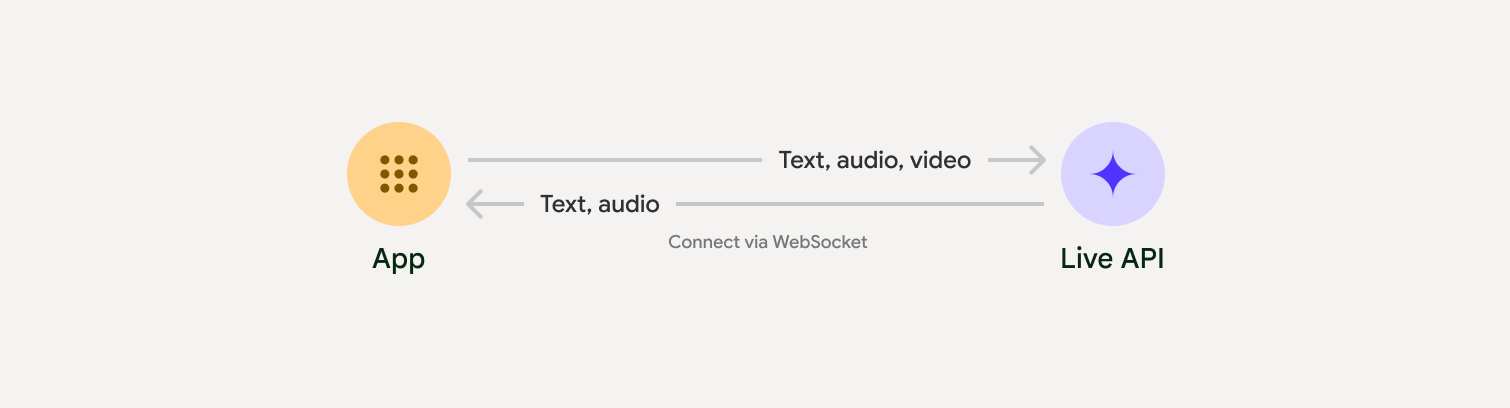
透過 Live API,您可以與 Gemini 進行低延遲的即時語音和視訊互動。這項技術會處理連續的音訊、影片或文字串流,立即提供擬真的口語回應,為使用者打造自然的對話體驗。

Live API 總覽

Live API 提供一系列完整功能,例如語音活動偵測工具使用和函式呼叫工作階段管理 (用於管理長時間對話) 和暫時性權杖 (用於安全用戶端驗證)。

本頁提供範例和基本程式碼範例,協助您快速上手。

在 Google AI Studio 中試用 Live API

選擇導入方式

整合 Live API 時,您需要選擇下列其中一種實作方式:

  • 伺服器對伺服器:後端會使用 WebSockets 連線至 Live API。一般來說,用戶端會將串流資料 (音訊、影片、文字) 傳送至伺服器,然後伺服器會將資料轉送至 Live API。
  • 用戶端到伺服器:前端程式碼會使用 WebSockets 直接連線至 Live API,以串流資料,略過後端。

與合作夥伴整合

如要簡化即時音訊和視訊應用程式的開發作業,您可以透過 WebRTC 或 WebSocket 使用支援 Gemini Live API 的第三方整合服務。

開始使用

這個伺服器端範例會串流傳輸麥克風的音訊,並播放傳回的音訊。如需完整的端對端範例 (包括用戶端應用程式),請參閱「範例應用程式」。

輸入音訊格式應為 16 位元 PCM、16kHz、單聲道格式,而接收到的音訊取樣率為 24kHz。

Python

安裝音訊串流輔助程式。可能需要額外的系統層級依附元件 (例如 portaudio)。如需詳細安裝步驟,請參閱 PyAudio 說明文件

pip install pyaudio
import asyncio
from google import genai
import pyaudio

client = genai.Client()

# --- pyaudio config ---
FORMAT = pyaudio.paInt16
CHANNELS = 1
SEND_SAMPLE_RATE = 16000
RECEIVE_SAMPLE_RATE = 24000
CHUNK_SIZE = 1024

pya = pyaudio.PyAudio()

# --- Live API config ---
MODEL = "gemini-2.5-flash-native-audio-preview-09-2025"
CONFIG = {
    "response_modalities": ["AUDIO"],
    "system_instruction": "You are a helpful and friendly AI assistant.",
}

audio_queue_output = asyncio.Queue()
audio_queue_mic = asyncio.Queue(maxsize=5)
audio_stream = None

async def listen_audio():
    """Listens for audio and puts it into the mic audio queue."""
    global audio_stream
    mic_info = pya.get_default_input_device_info()
    audio_stream = await asyncio.to_thread(
        pya.open,
        format=FORMAT,
        channels=CHANNELS,
        rate=SEND_SAMPLE_RATE,
        input=True,
        input_device_index=mic_info["index"],
        frames_per_buffer=CHUNK_SIZE,
    )
    kwargs = {"exception_on_overflow": False} if __debug__ else {}
    while True:
        data = await asyncio.to_thread(audio_stream.read, CHUNK_SIZE, **kwargs)
        await audio_queue_mic.put({"data": data, "mime_type": "audio/pcm"})

async def send_realtime(session):
    """Sends audio from the mic audio queue to the GenAI session."""
    while True:
        msg = await audio_queue_mic.get()
        await session.send_realtime_input(audio=msg)

async def receive_audio(session):
    """Receives responses from GenAI and puts audio data into the speaker audio queue."""
    while True:
        turn = session.receive()
        async for response in turn:
            if (response.server_content and response.server_content.model_turn):
                for part in response.server_content.model_turn.parts:
                    if part.inline_data and isinstance(part.inline_data.data, bytes):
                        audio_queue_output.put_nowait(part.inline_data.data)

        # Empty the queue on interruption to stop playback
        while not audio_queue_output.empty():
            audio_queue_output.get_nowait()

async def play_audio():
    """Plays audio from the speaker audio queue."""
    stream = await asyncio.to_thread(
        pya.open,
        format=FORMAT,
        channels=CHANNELS,
        rate=RECEIVE_SAMPLE_RATE,
        output=True,
    )
    while True:
        bytestream = await audio_queue_output.get()
        await asyncio.to_thread(stream.write, bytestream)

async def run():
    """Main function to run the audio loop."""
    try:
        async with client.aio.live.connect(
            model=MODEL, config=CONFIG
        ) as live_session:
            print("Connected to Gemini. Start speaking!")
            async with asyncio.TaskGroup() as tg:
                tg.create_task(send_realtime(live_session))
                tg.create_task(listen_audio())
                tg.create_task(receive_audio(live_session))
                tg.create_task(play_audio())
    except asyncio.CancelledError:
        pass
    finally:
        if audio_stream:
            audio_stream.close()
        pya.terminate()
        print("\nConnection closed.")

if __name__ == "__main__":
    try:
        asyncio.run(run())
    except KeyboardInterrupt:
        print("Interrupted by user.")

JavaScript

安裝音訊串流輔助程式。可能需要其他系統層級的依附元件 (Mac/Windows 為 sox,Linux 為 ALSA)。如需詳細安裝步驟,請參閱揚聲器麥克風文件。

npm install mic speaker
import { GoogleGenAI, Modality } from '@google/genai';
import mic from 'mic';
import Speaker from 'speaker';

const ai = new GoogleGenAI({});
// WARNING: Do not use API keys in client-side (browser based) applications
// Consider using Ephemeral Tokens instead
// More information at: https://ai.google.dev/gemini-api/docs/ephemeral-tokens

// --- Live API config ---
const model = 'gemini-2.5-flash-native-audio-preview-09-2025';
const config = {
  responseModalities: [Modality.AUDIO],
  systemInstruction: "You are a helpful and friendly AI assistant.",
};

async function live() {
  const responseQueue = [];
  const audioQueue = [];
  let speaker;

  async function waitMessage() {
    while (responseQueue.length === 0) {
      await new Promise((resolve) => setImmediate(resolve));
    }
    return responseQueue.shift();
  }

  function createSpeaker() {
    if (speaker) {
      process.stdin.unpipe(speaker);
      speaker.end();
    }
    speaker = new Speaker({
      channels: 1,
      bitDepth: 16,
      sampleRate: 24000,
    });
    speaker.on('error', (err) => console.error('Speaker error:', err));
    process.stdin.pipe(speaker);
  }

  async function messageLoop() {
    // Puts incoming messages in the audio queue.
    while (true) {
      const message = await waitMessage();
      if (message.serverContent && message.serverContent.interrupted) {
        // Empty the queue on interruption to stop playback
        audioQueue.length = 0;
        continue;
      }
      if (message.serverContent && message.serverContent.modelTurn && message.serverContent.modelTurn.parts) {
        for (const part of message.serverContent.modelTurn.parts) {
          if (part.inlineData && part.inlineData.data) {
            audioQueue.push(Buffer.from(part.inlineData.data, 'base64'));
          }
        }
      }
    }
  }

  async function playbackLoop() {
    // Plays audio from the audio queue.
    while (true) {
      if (audioQueue.length === 0) {
        if (speaker) {
          // Destroy speaker if no more audio to avoid warnings from speaker library
          process.stdin.unpipe(speaker);
          speaker.end();
          speaker = null;
        }
        await new Promise((resolve) => setImmediate(resolve));
      } else {
        if (!speaker) createSpeaker();
        const chunk = audioQueue.shift();
        await new Promise((resolve) => {
          speaker.write(chunk, () => resolve());
        });
      }
    }
  }

  // Start loops
  messageLoop();
  playbackLoop();

  // Connect to Gemini Live API
  const session = await ai.live.connect({
    model: model,
    config: config,
    callbacks: {
      onopen: () => console.log('Connected to Gemini Live API'),
      onmessage: (message) => responseQueue.push(message),
      onerror: (e) => console.error('Error:', e.message),
      onclose: (e) => console.log('Closed:', e.reason),
    },
  });

  // Setup Microphone for input
  const micInstance = mic({
    rate: '16000',
    bitwidth: '16',
    channels: '1',
  });
  const micInputStream = micInstance.getAudioStream();

  micInputStream.on('data', (data) => {
    // API expects base64 encoded PCM data
    session.sendRealtimeInput({
      audio: {
        data: data.toString('base64'),
        mimeType: "audio/pcm;rate=16000"
      }
    });
  });

  micInputStream.on('error', (err) => {
    console.error('Microphone error:', err);
  });

  micInstance.start();
  console.log('Microphone started. Speak now...');
}

live().catch(console.error);

範例應用程式

請參閱下列範例應用程式,瞭解如何將 Live API 用於端對端用途:

後續步驟

  • 如要瞭解重要功能和設定,包括語音活動偵測和原生音訊功能,請參閱完整的 Live API 功能指南。
  • 詳閱工具使用指南,瞭解如何將 Live API 與工具和函式呼叫整合。
  • 如要管理長時間進行的對話,請參閱工作階段管理指南。
  • 請參閱臨時權杖指南,瞭解如何在用戶端對伺服器應用程式中安全地進行驗證。
  • 如要進一步瞭解基礎 WebSockets API,請參閱 WebSockets API 參考資料