

有了「以 Google 搜尋強化事實基礎」,Gemini 模型就能取得即時網路內容。這項功能支援所有可用語言,可讓 Gemini 提供更準確的回覆,並引用知識截點以外的可驗證來源。
透過基礎化,您可以建構下列應用程式:
- 提高事實查核準確度:以真實世界資訊為依據生成回覆,減少模型幻覺。
- 取得即時資訊:回答近期事件和主題相關問題。
提供引文:顯示模型聲明的來源,贏得使用者信任。
Python
from google import genai

client = genai.Client()

interaction = client.interactions.create(
    model="gemini-3.8-flash",
    input="Who won the euro 2024?",
    tools=[{"type": "google_search"}]
)

print(interaction.output_text)
JavaScript
import { GoogleGenAI } from "@google/genai";

const client = new GoogleGenAI({});

const interaction = await client.interactions.create({
    model: "gemini-3.8-flash",
    input: "Who won the euro 2024?",
    tools: [{ type: "google_search" }]
});

console.log(interaction.output_text);
Java
import com.google.genai.Client;
import com.google.genai.gaos.models.interactions.CreateModelInteraction;
import com.google.genai.gaos.models.interactions.GoogleSearch;
import com.google.genai.gaos.models.interactions.Interaction;
import com.google.genai.gaos.models.interactions.InteractionsInput;
import com.google.genai.gaos.models.interactions.Model;
import com.google.genai.gaos.models.operations.CreateInteractionRequestBody;
import java.util.Arrays;

Client client = new Client();

CreateModelInteraction params =
    CreateModelInteraction.builder()
        .model(Model.of("gemini-3.8-flash"))
        .input(InteractionsInput.of("Who won the euro 2024?"))
        .tools(Arrays.asList(GoogleSearch.builder().build()))
        .build();

Interaction interaction =
    client.interactions.create(CreateInteractionRequestBody.of(params)).interaction().get();

System.out.println(interaction.outputText().orElse(""));
REST
curl -X POST "https://generativelanguage.googleapis.com/v1beta/interactions" \
  -H "x-goog-api-key: $GEMINI_API_KEY" \
  -H "Content-Type: application/json" \
  -d '{
    "model": "gemini-3.8-flash",
    "input": "Who won the euro 2024?",
    "tools": [{"type": "google_search"}]
  }'
如何運用 Google 搜尋建立基準
啟用 google_search 工具後,模型會自動處理搜尋、處理及引用資訊的整個工作流程。
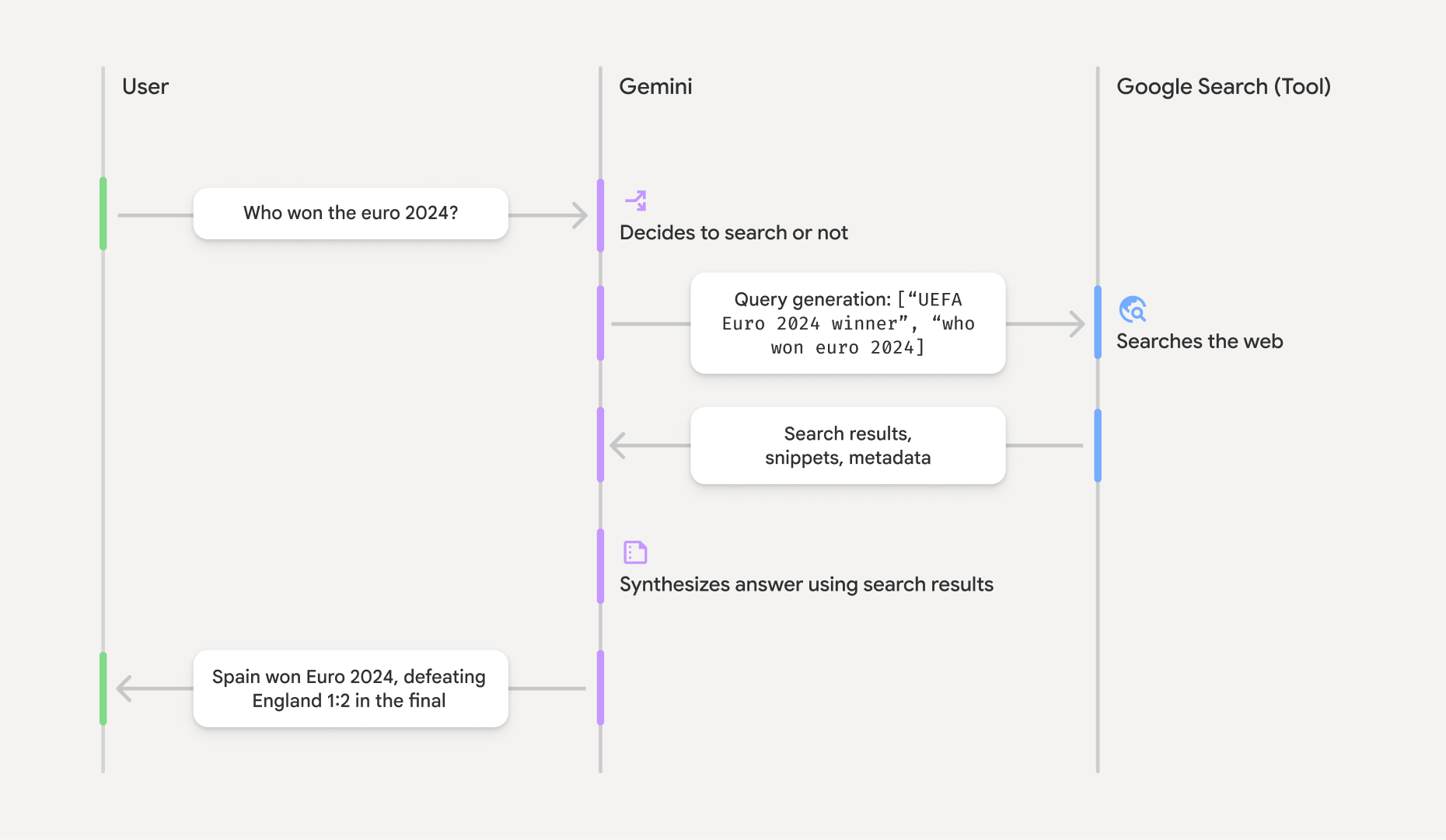
- 使用者提示:應用程式會將使用者提示傳送至 Gemini API,並啟用
google_search工具。 - 提示分析:模型會分析提示,判斷 Google 搜尋是否能提供更完善的答案。
- Google 搜尋:如有需要,模型會自動生成一或多個搜尋查詢並執行。
- 處理搜尋結果:模型會處理搜尋結果、整合資訊並生成回覆。
- 根據搜尋結果生成的回覆:API 會根據搜尋結果,傳回最終的易讀回覆。這項回覆包含模型提供的文字答案,以及內含引文的
annotations,還有google_search_call和google_search_result步驟,其中包含搜尋查詢和搜尋建議。
瞭解基礎回應
如果模型成功根據資訊來源生成回覆,文字輸出內容會直接在文字內容區塊中加入 annotations。這些註解會提供引用資訊,將回覆內容的各個部分連結至來源。
{
  "steps": [
    {
      "type": "thought",
      "summary": [
        {
          "type": "text",
          "text": "The user is asking for the winner of Euro 2024. I need to search for the result of the Euro 2024 final."
        }
      ],
      "signature": "CoMDAXLI2nynRYojJIy6B1Jh9os2crpWLfB0..."
    },
    {
      "type": "google_search_call",
      "arguments": {
        "queries": ["UEFA Euro 2024 winner"]
      }
    },
    {
      "type": "google_search_result",
      "call_id": "search_001",
      "result": [
        {
          "search_suggestions": "<!-- HTML and CSS for the search widget -->"
        }
      ]
    },
    {
      "type": "model_output",
      "content": [
        {
          "type": "text",
          "text": "Spain won Euro 2024, defeating England 2-1 in the final. This victory marks Spain's record fourth European Championship title.",
          "annotations": [
            {
              "type": "url_citation",
              "url": "https://www.aljazeera.com/sports/euro-2024-final",
              "title": "aljazeera.com",
              "start_index": 0,
              "end_index": 56
            },
            {
              "type": "url_citation",
              "url": "https://www.uefa.com/euro2024/news/spain-wins-euro-2024",
              "title": "uefa.com",
              "start_index": 57,
              "end_index": 124
            }
          ]
        }
      ]
    }
  ]
}
回應中的主要欄位:
google_search_call:包含模型執行的搜尋queries。google_search_result:包含search_suggestions,這是用於在 UI 中算繪搜尋建議的 HTML 片段。完整使用規定詳見《服務條款》。text:模型合成的答案,內含引文。annotations每個url_citation註解都會將文字區段 (由start_index和end_index定義) 連結至來源網址。這是建立內文引文的關鍵。
您也可以搭配網址內容工具使用以 Google 搜尋強化事實基礎,以公開網路資料和您提供的特定網址做為回覆的基準。
使用內嵌引文註明出處
API 會在文字內容區塊中傳回內嵌url_citation註解,讓您完全掌控如何在使用者介面中顯示來源。每則註解都會包含 start_index 和 end_index,指出註解引用的文字部分。以下說明如何擷取及顯示這些資料。
Python
for step in interaction.steps:
    if step.type == "model_output":
        for content_block in step.content:
            if content_block.type == "text":
                print(content_block.text)
                if content_block.annotations:
                    print("\nCitations:")
                    for annotation in content_block.annotations:
                        if annotation.type == "url_citation":
                            cited_text = content_block.text[annotation.start_index:annotation.end_index]
                            print(f"  [{annotation.title}]({annotation.url})")
                            print(f"    Cited text: \"{cited_text}\"")
JavaScript
for (const step of interaction.steps) {
  if (step.type === 'model_output') {
    for (const contentBlock of step.content) {
      if (contentBlock.type === 'text') {
        console.log(contentBlock.text);
        if (contentBlock.annotations) {
          console.log("\nCitations:");
          for (const annotation of contentBlock.annotations) {
            if (annotation.type === 'url_citation') {
              const citedText = contentBlock.text.slice(annotation.startIndex, annotation.endIndex);
              console.log(`  [${annotation.title}](${annotation.url})`);
              console.log(`    Cited text: "${citedText}"`);
            }
          }
        }
      }
    }
  }
}
Java
import com.google.genai.Client;
import com.google.genai.gaos.models.interactions.Annotation;
import com.google.genai.gaos.models.interactions.Content;
import com.google.genai.gaos.models.interactions.CreateModelInteraction;
import com.google.genai.gaos.models.interactions.GoogleSearch;
import com.google.genai.gaos.models.interactions.Interaction;
import com.google.genai.gaos.models.interactions.InteractionsInput;
import com.google.genai.gaos.models.interactions.Model;
import com.google.genai.gaos.models.interactions.ModelOutputStep;
import com.google.genai.gaos.models.interactions.Step;
import com.google.genai.gaos.models.interactions.TextContent;
import com.google.genai.gaos.models.interactions.URLCitation;
import com.google.genai.gaos.models.operations.CreateInteractionRequestBody;
import java.util.Arrays;

Client client = new Client();

CreateModelInteraction params =
    CreateModelInteraction.builder()
        .model(Model.of("gemini-3.8-flash"))
        .input(InteractionsInput.of("Who won the euro 2024?"))
        .tools(Arrays.asList(GoogleSearch.builder().build()))
        .build();

Interaction interaction =
    client.interactions.create(CreateInteractionRequestBody.of(params)).interaction().get();

if (interaction.steps().isPresent()) {
  for (Step step : interaction.steps().get()) {
    if (step instanceof ModelOutputStep) {
      ModelOutputStep outputStep = (ModelOutputStep) step;
      if (outputStep.content().isPresent()) {
        for (Content contentBlock : outputStep.content().get()) {
          if (contentBlock instanceof TextContent) {
            TextContent textContent = (TextContent) contentBlock;
            String text = textContent.text().orElse("");
            System.out.println(text);
            if (textContent.annotations().isPresent()
                && !textContent.annotations().get().isEmpty()) {
              System.out.println("\nCitations:");
              for (Annotation annotation : textContent.annotations().get()) {
                if (annotation instanceof URLCitation) {
                  URLCitation citation = (URLCitation) annotation;
                  int start = citation.startIndex().orElse(0);
                  int end = citation.endIndex().orElse(0);
                  String citedText =
                      (start >= 0 && end <= text.length() && start <= end)
                          ? text.substring(start, end)
                          : "";
                  System.out.printf(
                      "  [%s](%s)%n", citation.title().orElse(""), citation.url().orElse(""));
                  System.out.printf("    Cited text: \"%s\"%n", citedText);
                }
              }
            }
          }
        }
      }
    }
  }
}
輸出內容會顯示文字及其引文:
Spain won Euro 2024, defeating England 2-1 in the final. This victory marks Spain's record fourth European Championship title.

Citations:
  [aljazeera.com](https://www.aljazeera.com/sports/euro-2024-final)
    Cited text: "Spain won Euro 2024, defeating England 2-1 in the final."
  [uefa.com](https://www.uefa.com/euro2024/news/spain-wins-euro-2024)
    Cited text: "This victory marks Spain's record fourth European Championship title."
定價
使用 Gemini 3 搭配「以 Google 搜尋強化事實基礎」功能時,系統會針對模型執行的每項搜尋查詢向專案收費。如果模型決定執行多個搜尋查詢來回答單一提示 (例如在同一個 API 呼叫中搜尋 "UEFA Euro 2024 winner" 和 "Spain vs England Euro 2024 final
score"),則該要求會計為兩次工具使用次數。為計費起見,計算不重複查詢時,我們會忽略空白的網路搜尋查詢。這項計費模式僅適用於 Gemini 3 模型;如果您使用 Gemini 2.5 或更舊版本的模型進行搜尋基礎作業,系統會依提示次數向您的專案收費。
如需詳細的定價資訊,請參閱 Gemini API 定價頁面。
支援的模型
如要查看完整功能,請前往模型總覽頁面。
| 模型 | 以 Google 搜尋建立基準 |
|---|---|
| Gemini 3.8 Flash | ✔️ |
| Gemini 3.7 Flash | ✔️ |
| Gemini 3.6 Flash | ✔️ |
| Gemini 3.5 Flash-Lite | ✔️ |
| Gemini 3.5 Flash | ✔️ |
| Gemini 3.1 Flash Image 預先發布版 | ✔️ |
| Gemini 3.1 Pro 預先發布版 | ✔️ |
| Gemini 3 Pro Image 預先發布版 | ✔️ |
| Gemini 3 Flash 預先發布版 | ✔️ |
| Gemini 2.5 Pro | ✔️ |
| Gemini 2.5 Flash | ✔️ |
| Gemini 2.5 Flash-Lite | ✔️ |
| Gemini 2.0 Flash | ✔️ |
支援的工具組合
您可以將「以 Google 搜尋強化事實基礎」功能與其他工具搭配使用,例如執行程式碼、網址背景資訊,以及利用 Google 地圖建立基準 (Gemini 3.5 Flash 和後續版本支援),以處理更複雜的用途。Gemini 3 模型也支援將這些內建工具與自訂工具 (函式呼叫) 結合使用。詳情請參閱「工具組合」頁面。