

Gemini có thể phân tích thông tin đầu vào bằng âm thanh và tạo câu trả lời bằng văn bản.
Python
from google import genai
import base64

client = genai.Client()

uploaded_file = client.files.upload(file="path/to/sample.mp3")

interaction = client.interactions.create(
    model="gemini-3.8-flash",
    input=[
        {"type": "text", "text": "Describe this audio clip"},
        {
            "type": "audio",
            "uri": uploaded_file.uri,
            "mime_type": uploaded_file.mime_type
        }
    ]
)
print(interaction.output_text)
JavaScript
import { GoogleGenAI } from "@google/genai";

const client = new GoogleGenAI({});

const uploadedFile = await client.files.upload({
    file: "path/to/sample.mp3",
    config: { mime_type: "audio/mp3" }
});

const interaction = await client.interactions.create({
    model: "gemini-3.8-flash",
    input: [
        {type: "text", text: "Describe this audio clip"},
        {
            type: "audio",
            uri: uploadedFile.uri,
            mime_type: uploadedFile.mimeType
        }
    ]
});
console.log(interaction.output_text);
Java
import com.google.genai.Client;
import com.google.genai.gaos.models.interactions.AudioContent;
import com.google.genai.gaos.models.interactions.AudioContentMimeType;
import com.google.genai.gaos.models.interactions.Content;
import com.google.genai.gaos.models.interactions.CreateModelInteraction;
import com.google.genai.gaos.models.interactions.Interaction;
import com.google.genai.gaos.models.interactions.InteractionsInput;
import com.google.genai.gaos.models.interactions.Model;
import com.google.genai.gaos.models.interactions.TextContent;
import com.google.genai.gaos.models.operations.CreateInteractionRequestBody;
import com.google.genai.types.File;
import com.google.genai.types.UploadFileConfig;
import java.util.Arrays;
import java.util.List;

Client client = new Client();

File uploadedFile =
    client.files.upload(
        "path/to/sample.mp3", UploadFileConfig.builder().mimeType("audio/mp3").build());

Content textContent = TextContent.builder().text("Describe this audio clip").build();
Content audioContent =
    AudioContent.builder()
        .uri(uploadedFile.uri().get())
        .mimeType(AudioContentMimeType.of(uploadedFile.mimeType().get()))
        .build();

List<Content> contents = Arrays.asList(textContent, audioContent);

CreateModelInteraction params =
    CreateModelInteraction.builder()
        .model(Model.of("gemini-3.8-flash"))
        .input(InteractionsInput.ofContent(contents))
        .build();

Interaction interaction =
    client.interactions.create(CreateInteractionRequestBody.of(params)).interaction().get();

System.out.println(interaction.outputText().orElse(""));
Go
package main

import (
    "context"
    "fmt"
    "log"

    "google.golang.org/genai"
    "google.golang.org/genai/interactions/models/interactions"
    "google.golang.org/genai/interactions/models/operations"
)

func main() {
    ctx := context.Background()
    client, err := genai.NewClient(ctx, nil)
    if err != nil {
        log.Fatal(err)
    }

    uploadedFile, err := client.Files.UploadFromPath(ctx, "path/to/sample.mp3", &genai.UploadFileConfig{
        MIMEType: "audio/mp3",
    })
    if err != nil {
        log.Fatal(err)
    }

    contents := []interactions.Content{
        interactions.NewContent(interactions.TextContent{
            Text: "Describe this audio clip",
        }),
        interactions.NewContent(interactions.AudioContent{
            URI:      genai.Ptr(uploadedFile.URI),
            MimeType: interactions.AudioContentMimeType(uploadedFile.MIMEType).ToPointer(),
        }),
    }

    res, err := client.Interactions.Create(ctx, operations.CreateInteractionRequest{
        Body: operations.NewCreateInteractionRequestBody(interactions.CreateModelInteraction{
            Model: interactions.Model("gemini-3.8-flash"),
            Input: interactions.NewInteractionsInput(contents),
        }),
    })
    if err != nil {
        log.Fatal(err)
    }

    if res.Interaction.OutputText != nil {
        fmt.Println(*res.Interaction.OutputText)
    }
}
REST
# First upload the file, then use the URI:
curl -X POST "https://generativelanguage.googleapis.com/v1beta/interactions" \
  -H "x-goog-api-key: $GEMINI_API_KEY" \
  -H 'Content-Type: application/json' \
  -d '{
    "model": "gemini-3.8-flash",
    "input": [
      {"type": "text", "text": "Describe this audio clip"},
      {
        "type": "audio",
        "uri": "YOUR_FILE_URI",
        "mime_type": "audio/mp3"
      }
    ]
  }'
Tổng quan
Gemini có thể phân tích và hiểu dữ liệu đầu vào là âm thanh, đồng thời tạo ra câu trả lời bằng văn bản, từ đó hỗ trợ các trường hợp sử dụng như:
- Mô tả, tóm tắt hoặc trả lời câu hỏi về nội dung âm thanh
- Chép lời và dịch (lời nói thành văn bản)
- Phân tách người nói (xác định những người nói khác nhau)
- Phát hiện cảm xúc trong lời nói và âm nhạc
- Phân tích các phân đoạn cụ thể bằng dấu thời gian
Để biết thông tin về các hoạt động tương tác bằng giọng nói và video theo thời gian thực, hãy xem Live API. Đối với các mô hình chuyển lời nói thành văn bản chuyên dụng có hỗ trợ phiên âm theo thời gian thực, hãy sử dụng Google Cloud Speech-to-Text API.
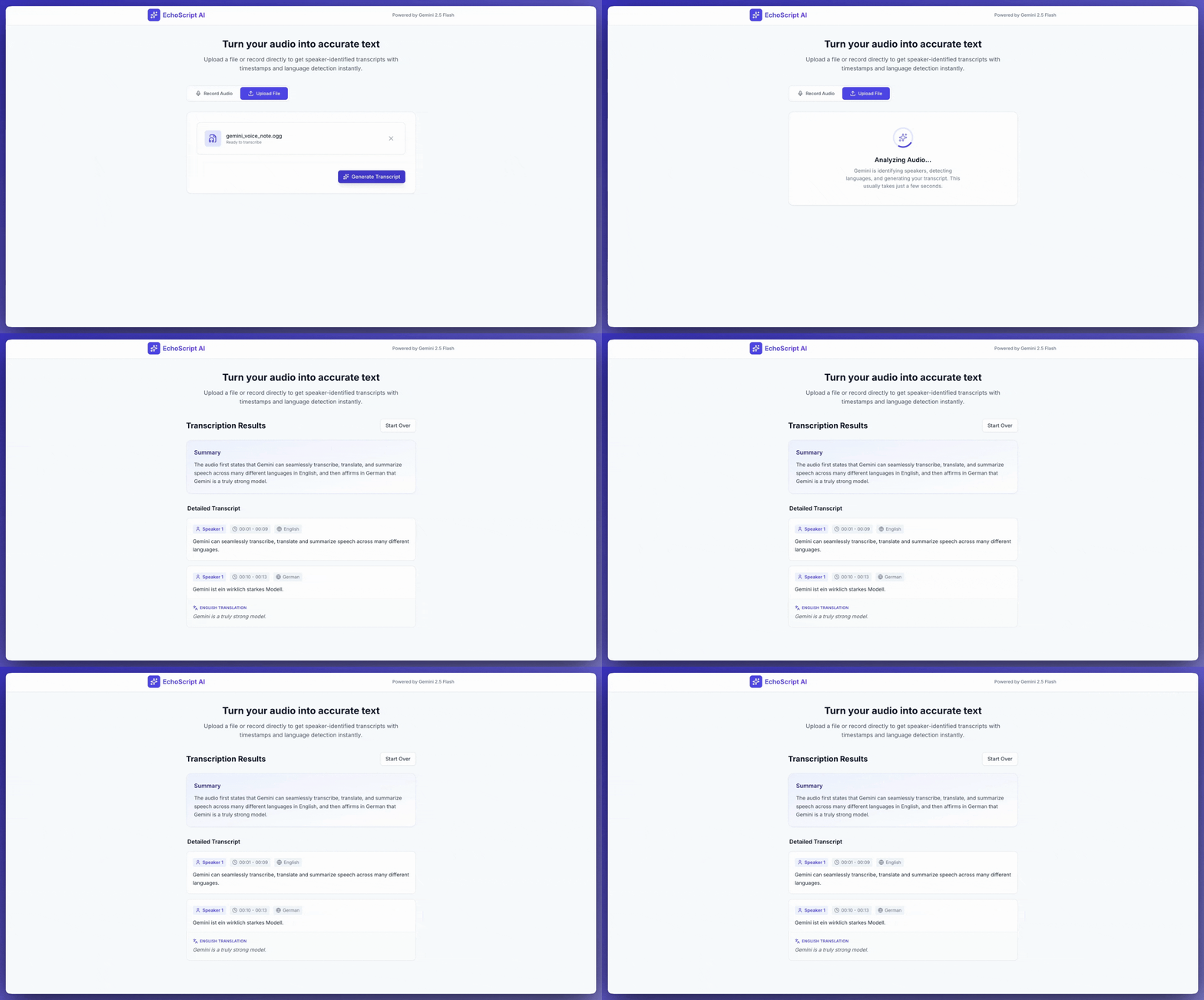
Chuyển lời nói thành văn bản
Ví dụ này cho thấy cách chép lời, dịch và tóm tắt lời nói có dấu thời gian, phân biệt người nói và phát hiện cảm xúc bằng đầu ra có cấu trúc.
Python
from google import genai

client = genai.Client()

YOUTUBE_URL = "https://www.youtube.com/watch?v=ku-N-eS1lgM"

prompt = """
  Process the audio file and generate a detailed transcription.

  Requirements:
  1. Identify distinct speakers (e.g., Speaker 1, Speaker 2).
  2. Provide accurate timestamps for each segment (Format: MM:SS).
  3. Detect the primary language of each segment.
  4. If not English, provide the English translation.
  5. Identify the primary emotion: Happy, Sad, Angry, or Neutral.
  6. Provide a brief summary at the beginning.
"""

response_schema = {
    "type": "object",
    "properties": {
        "summary": {"type": "string"},
        "segments": {
            "type": "array",
            "items": {
                "type": "object",
                "properties": {
                    "speaker": {"type": "string"},
                    "timestamp": {"type": "string"},
                    "content": {"type": "string"},
                    "language": {"type": "string"},
                    "emotion": {
                        "type": "string",
                        "enum": ["happy", "sad", "angry", "neutral"]
                    }
                },
                "required": ["speaker", "timestamp", "content", "emotion"]
            }
        }
    },
    "required": ["summary", "segments"]
}

interaction = client.interactions.create(
    model="gemini-3.8-flash",
    input=[
        {"type": "video", "uri": YOUTUBE_URL, "mime_type": "video/mp4"},
        {"type": "text", "text": prompt}
    ],
    response_format=response_schema,
)

print(interaction.output_text)
JavaScript
import { GoogleGenAI } from "@google/genai";

const client = new GoogleGenAI({});

const YOUTUBE_URL = "https://www.youtube.com/watch?v=ku-N-eS1lgM";

const prompt = `
  Process the audio file and generate a detailed transcription.

  Requirements:
  1. Identify distinct speakers (e.g., Speaker 1, Speaker 2).
  2. Provide accurate timestamps for each segment (Format: MM:SS).
  3. Detect the primary language of each segment.
  4. If not English, provide the English translation.
  5. Identify the primary emotion: Happy, Sad, Angry, or Neutral.
  6. Provide a brief summary at the beginning.
`;

const responseSchema = {
    type: "object",
    properties: {
        summary: { type: "string" },
        segments: {
            type: "array",
            items: {
                type: "object",
                properties: {
                    speaker: { type: "string" },
                    timestamp: { type: "string" },
                    content: { type: "string" },
                    language: { type: "string" },
                    emotion: {
                        type: "string",
                        enum: ["happy", "sad", "angry", "neutral"]
                    }
                },
                required: ["speaker", "timestamp", "content", "emotion"]
            }
        }
    },
    required: ["summary", "segments"]
};

const interaction = await client.interactions.create({
    model: "gemini-3.8-flash",
    input: [
        { type: "video", uri: YOUTUBE_URL, mime_type: "video/mp4" },
        { type: "text", text: prompt }
    ],
    response_format: responseSchema,
});

console.log(JSON.parse(interaction.output_text));
Java
import com.google.genai.Client;
import com.google.genai.gaos.models.interactions.Content;
import com.google.genai.gaos.models.interactions.CreateModelInteraction;
import com.google.genai.gaos.models.interactions.CreateModelInteractionResponseFormat;
import com.google.genai.gaos.models.interactions.Interaction;
import com.google.genai.gaos.models.interactions.InteractionsInput;
import com.google.genai.gaos.models.interactions.Model;
import com.google.genai.gaos.models.interactions.ResponseFormat;
import com.google.genai.gaos.models.interactions.TextContent;
import com.google.genai.gaos.models.interactions.VideoContent;
import com.google.genai.gaos.models.interactions.VideoContentMimeType;
import com.google.genai.gaos.models.operations.CreateInteractionRequestBody;
import java.util.Arrays;
import java.util.List;
import java.util.HashMap;
import java.util.Map;

Client client = new Client();

String youtubeUrl = "https://www.youtube.com/watch?v=ku-N-eS1lgM";

String prompt =
    "Process the audio file and generate a detailed transcription.\n\n"
        + "Requirements:\n"
        + "1. Identify distinct speakers (e.g., Speaker 1, Speaker 2).\n"
        + "2. Provide accurate timestamps for each segment (Format: MM:SS).\n"
        + "3. Detect the primary language of each segment.\n"
        + "4. If not English, provide the English translation.\n"
        + "5. Identify the primary emotion: Happy, Sad, Angry, or Neutral.\n"
        + "6. Provide a brief summary at the beginning.";

Map<String, Object> emotionProp = new HashMap<>();
emotionProp.put("type", "string");
emotionProp.put("enum", Arrays.asList("happy", "sad", "angry", "neutral"));

Map<String, Object> stringType = new HashMap<>();
stringType.put("type", "string");

Map<String, Object> segmentProps = new HashMap<>();
segmentProps.put("speaker", stringType);
segmentProps.put("timestamp", stringType);
segmentProps.put("content", stringType);
segmentProps.put("language", stringType);
segmentProps.put("emotion", emotionProp);

Map<String, Object> segmentItem = new HashMap<>();
segmentItem.put("type", "object");
segmentItem.put("properties", segmentProps);
segmentItem.put("required", Arrays.asList("speaker", "timestamp", "content", "emotion"));

Map<String, Object> segmentsProp = new HashMap<>();
segmentsProp.put("type", "array");
segmentsProp.put("items", segmentItem);

Map<String, Object> properties = new HashMap<>();
properties.put("summary", stringType);
properties.put("segments", segmentsProp);

Map<String, Object> responseSchema = new HashMap<>();
responseSchema.put("type", "object");
responseSchema.put("properties", properties);
responseSchema.put("required", Arrays.asList("summary", "segments"));

Content videoContent =
    VideoContent.builder()
        .uri(youtubeUrl)
        .mimeType(VideoContentMimeType.VIDEO_MP4)
        .build();
Content textContent = TextContent.builder().text(prompt).build();

List<Content> contents = Arrays.asList(videoContent, textContent);

CreateModelInteraction params =
    CreateModelInteraction.builder()
        .model(Model.of("gemini-3.8-flash"))
        .input(InteractionsInput.ofContent(contents))
        .responseFormat(
            CreateModelInteractionResponseFormat.of(ResponseFormat.of(responseSchema)))
        .build();

Interaction interaction =
    client.interactions.create(CreateInteractionRequestBody.of(params)).interaction().get();

System.out.println(interaction.outputText().orElse(""));
Go
package main

import (
    "context"
    "fmt"
    "log"

    "google.golang.org/genai"
    "google.golang.org/genai/interactions/models/interactions"
    "google.golang.org/genai/interactions/models/operations"
)

func main() {
    ctx := context.Background()
    client, err := genai.NewClient(ctx, nil)
    if err != nil {
        log.Fatal(err)
    }

    youtubeURL := "https://www.youtube.com/watch?v=ku-N-eS1lgM"

    prompt := "Process the audio file and generate a detailed transcription.\n\n" +
        "Requirements:\n" +
        "1. Identify distinct speakers (e.g., Speaker 1, Speaker 2).\n" +
        "2. Provide accurate timestamps for each segment (Format: MM:SS).\n" +
        "3. Detect the primary language of each segment.\n" +
        "4. If not English, provide the English translation.\n" +
        "5. Identify the primary emotion: Happy, Sad, Angry, or Neutral.\n" +
        "6. Provide a brief summary at the beginning."

    responseSchema := map[string]any{
        "type": "object",
        "properties": map[string]any{
            "summary": map[string]any{"type": "string"},
            "segments": map[string]any{
                "type": "array",
                "items": map[string]any{
                    "type": "object",
                    "properties": map[string]any{
                        "speaker":   map[string]any{"type": "string"},
                        "timestamp": map[string]any{"type": "string"},
                        "content":   map[string]any{"type": "string"},
                        "language":  map[string]any{"type": "string"},
                        "emotion": map[string]any{
                            "type": "string",
                            "enum": []string{"happy", "sad", "angry", "neutral"},
                        },
                    },
                    "required": []string{"speaker", "timestamp", "content", "emotion"},
                },
            },
        },
        "required": []string{"summary", "segments"},
    }

    contents := []interactions.Content{
        interactions.NewContent(interactions.VideoContent{
            URI:      genai.Ptr(youtubeURL),
            MimeType: interactions.VideoContentMimeTypeVideoMp4.ToPointer(),
        }),
        interactions.NewContent(interactions.TextContent{
            Text: prompt,
        }),
    }

    res, err := client.Interactions.Create(ctx, operations.CreateInteractionRequest{
        Body: operations.NewCreateInteractionRequestBody(interactions.CreateModelInteraction{
            Model: interactions.Model("gemini-3.8-flash"),
            Input: interactions.NewInteractionsInput(contents),
            ResponseFormat: genai.Ptr(interactions.NewCreateModelInteractionResponseFormat(
                interactions.NewResponseFormat(responseSchema),
            )),
        }),
    })
    if err != nil {
        log.Fatal(err)
    }

    if res.Interaction.OutputText != nil {
        fmt.Println(*res.Interaction.OutputText)
    }
}
REST
curl -X POST "https://generativelanguage.googleapis.com/v1beta/interactions" \
  -H "x-goog-api-key: $GEMINI_API_KEY" \
  -H 'Content-Type: application/json' \
  -d '{
    "model": "gemini-3.8-flash",
    "input": [
      {
        "type": "video",
        "uri": "https://www.youtube.com/watch?v=ku-N-eS1lgM",
        "mime_type": "video/mp4"
      },
      {
        "type": "text",
        "text": "Transcribe with speaker diarization and emotion detection."
      }
    ],
    "response_format": {
        "type": "object",
        "properties": {
          "summary": {"type": "string"},
          "segments": {
            "type": "array",
            "items": {
              "type": "object",
              "properties": {
                "speaker": {"type": "string"},
                "timestamp": {"type": "string"},
                "content": {"type": "string"},
                "emotion": {"type": "string", "enum": ["happy", "sad", "angry", "neutral"]}
              }
            }
          }
        }
      }
  }'
Âm thanh đầu vào
Bạn có thể cung cấp dữ liệu âm thanh theo những cách sau:
- Tải tệp âm thanh lên trước khi đưa ra yêu cầu.
- Truyền dữ liệu âm thanh nội tuyến bằng yêu cầu.
Tải tệp âm thanh lên
Sử dụng Files API cho các tệp lớn hơn 20 MB.
Python
from google import genai

client = genai.Client()

uploaded_file = client.files.upload(file="path/to/sample.mp3")

interaction = client.interactions.create(
    model="gemini-3.8-flash",
    input=[
        {"type": "text", "text": "Describe this audio clip"},
        {
            "type": "audio",
            "uri": uploaded_file.uri,
            "mime_type": uploaded_file.mime_type
        }
    ]
)
print(interaction.output_text)
JavaScript
import { GoogleGenAI } from "@google/genai";

const client = new GoogleGenAI({});

const uploadedFile = await client.files.upload({
    file: "path/to/sample.mp3",
    config: { mimeType: "audio/mp3" }
});

const interaction = await client.interactions.create({
    model: "gemini-3.8-flash",
    input: [
        {type: "text", text: "Describe this audio clip"},
        {
            type: "audio",
            uri: uploadedFile.uri,
            mime_type: uploadedFile.mimeType
        }
    ]
});
console.log(interaction.output_text);
Java
// Upload an audio file using the Files API (recommended for files > 20 MB)
import com.google.genai.Client;
import com.google.genai.gaos.models.interactions.AudioContent;
import com.google.genai.gaos.models.interactions.AudioContentMimeType;
import com.google.genai.gaos.models.interactions.Content;
import com.google.genai.gaos.models.interactions.CreateModelInteraction;
import com.google.genai.gaos.models.interactions.Interaction;
import com.google.genai.gaos.models.interactions.InteractionsInput;
import com.google.genai.gaos.models.interactions.Model;
import com.google.genai.gaos.models.interactions.TextContent;
import com.google.genai.gaos.models.operations.CreateInteractionRequestBody;
import com.google.genai.types.File;
import com.google.genai.types.UploadFileConfig;
import java.util.Arrays;
import java.util.List;

Client client = new Client();

File uploadedFile =
    client.files.upload(
        "path/to/sample.mp3", UploadFileConfig.builder().mimeType("audio/mp3").build());

Content textContent = TextContent.builder().text("Describe this audio clip").build();
Content audioContent =
    AudioContent.builder()
        .uri(uploadedFile.uri().get())
        .mimeType(AudioContentMimeType.of(uploadedFile.mimeType().get()))
        .build();

List<Content> contents = Arrays.asList(textContent, audioContent);

CreateModelInteraction params =
    CreateModelInteraction.builder()
        .model(Model.of("gemini-3.8-flash"))
        .input(InteractionsInput.ofContent(contents))
        .build();

Interaction interaction =
    client.interactions.create(CreateInteractionRequestBody.of(params)).interaction().get();

System.out.println(interaction.outputText().orElse(""));
Go
// Upload an audio file using the Files API (recommended for files > 20 MB)
package main

import (
    "context"
    "fmt"
    "log"

    "google.golang.org/genai"
    "google.golang.org/genai/interactions/models/interactions"
    "google.golang.org/genai/interactions/models/operations"
)

func main() {
    ctx := context.Background()
    client, err := genai.NewClient(ctx, nil)
    if err != nil {
        log.Fatal(err)
    }

    uploadedFile, err := client.Files.UploadFromPath(ctx, "path/to/sample.mp3", &genai.UploadFileConfig{
        MIMEType: "audio/mp3",
    })
    if err != nil {
        log.Fatal(err)
    }

    contents := []interactions.Content{
        interactions.NewContent(interactions.TextContent{
            Text: "Describe this audio clip",
        }),
        interactions.NewContent(interactions.AudioContent{
            URI:      genai.Ptr(uploadedFile.URI),
            MimeType: interactions.AudioContentMimeType(uploadedFile.MIMEType).ToPointer(),
        }),
    }

    res, err := client.Interactions.Create(ctx, operations.CreateInteractionRequest{
        Body: operations.NewCreateInteractionRequestBody(interactions.CreateModelInteraction{
            Model: interactions.Model("gemini-3.8-flash"),
            Input: interactions.NewInteractionsInput(contents),
        }),
    })
    if err != nil {
        log.Fatal(err)
    }

    if res.Interaction.OutputText != nil {
        fmt.Println(*res.Interaction.OutputText)
    }
}
REST
# First upload the file using the Files API, then use the URI:
curl -X POST "https://generativelanguage.googleapis.com/v1beta/interactions" \
  -H "x-goog-api-key: $GEMINI_API_KEY" \
  -H 'Content-Type: application/json' \
  -d '{
    "model": "gemini-3.8-flash",
    "input": [
      {"type": "text", "text": "Describe this audio clip"},
      {
        "type": "audio",
        "uri": "YOUR_FILE_URI",
        "mime_type": "audio/mp3"
      }
    ]
  }'
Truyền dữ liệu âm thanh cùng dòng
Đối với các tệp âm thanh nhỏ có tổng kích thước yêu cầu dưới 20 MB:
Python
from google import genai
import base64

client = genai.Client()

with open('path/to/small-sample.mp3', 'rb') as f:
    audio_bytes = f.read()

interaction = client.interactions.create(
    model="gemini-3.8-flash",
    input=[
        {"type": "text", "text": "Describe this audio clip"},
        {
            "type": "audio",
            "data": base64.b64encode(audio_bytes).decode('utf-8'),
            "mime_type": "audio/mp3"
        }
    ]
)
print(interaction.output_text)
JavaScript
import { GoogleGenAI } from "@google/genai";
import * as fs from "node:fs";

const client = new GoogleGenAI({});

const audioData = fs.readFileSync("path/to/small-sample.mp3", {
    encoding: "base64"
});

const interaction = await client.interactions.create({
    model: "gemini-3.8-flash",
    input: [
        {type: "text", text: "Describe this audio clip"},
        {
            type: "audio",
            data: audioData,
            mime_type: "audio/mp3"
        }
    ]
});
console.log(interaction.output_text);
Java
import com.google.genai.Client;
import com.google.genai.gaos.models.interactions.AudioContent;
import com.google.genai.gaos.models.interactions.AudioContentMimeType;
import com.google.genai.gaos.models.interactions.Content;
import com.google.genai.gaos.models.interactions.CreateModelInteraction;
import com.google.genai.gaos.models.interactions.Interaction;
import com.google.genai.gaos.models.interactions.InteractionsInput;
import com.google.genai.gaos.models.interactions.Model;
import com.google.genai.gaos.models.interactions.TextContent;
import com.google.genai.gaos.models.operations.CreateInteractionRequestBody;
import java.nio.file.Files;
import java.nio.file.Paths;
import java.util.Arrays;
import java.util.Base64;
import java.util.List;

Client client = new Client();

byte[] audioBytes = Files.readAllBytes(Paths.get("path/to/small-sample.mp3"));
String base64Audio = Base64.getEncoder().encodeToString(audioBytes);

Content textContent = TextContent.builder().text("Describe this audio clip").build();
Content audioContent =
    AudioContent.builder()
        .data(base64Audio)
        .mimeType(AudioContentMimeType.AUDIO_MP3)
        .build();

List<Content> contents = Arrays.asList(textContent, audioContent);

CreateModelInteraction params =
    CreateModelInteraction.builder()
        .model(Model.of("gemini-3.8-flash"))
        .input(InteractionsInput.ofContent(contents))
        .build();

Interaction interaction =
    client.interactions.create(CreateInteractionRequestBody.of(params)).interaction().get();

System.out.println(interaction.outputText().orElse(""));
Go
package main

import (
    "context"
    "encoding/base64"
    "fmt"
    "log"
    "os"

    "google.golang.org/genai"
    "google.golang.org/genai/interactions/models/interactions"
    "google.golang.org/genai/interactions/models/operations"
)

func main() {
    ctx := context.Background()
    client, err := genai.NewClient(ctx, nil)
    if err != nil {
        log.Fatal(err)
    }

    audioBytes, err := os.ReadFile("path/to/small-sample.mp3")
    if err != nil {
        log.Fatal(err)
    }
    base64Audio := base64.StdEncoding.EncodeToString(audioBytes)

    contents := []interactions.Content{
        interactions.NewContent(interactions.TextContent{
            Text: "Describe this audio clip",
        }),
        interactions.NewContent(interactions.AudioContent{
            Data:     genai.Ptr(base64Audio),
            MimeType: interactions.AudioContentMimeTypeAudioMp3.ToPointer(),
        }),
    }

    res, err := client.Interactions.Create(ctx, operations.CreateInteractionRequest{
        Body: operations.NewCreateInteractionRequestBody(interactions.CreateModelInteraction{
            Model: interactions.Model("gemini-3.8-flash"),
            Input: interactions.NewInteractionsInput(contents),
        }),
    })
    if err != nil {
        log.Fatal(err)
    }

    if res.Interaction.OutputText != nil {
        fmt.Println(*res.Interaction.OutputText)
    }
}
REST
AUDIO_PATH="path/to/sample.mp3"

if [[ "$(base64 --version 2>&1)" = *"FreeBSD"* ]]; then
  B64FLAGS="--input"
else
  B64FLAGS="-w0"
fi

curl -X POST "https://generativelanguage.googleapis.com/v1beta/interactions" \
  -H "x-goog-api-key: $GEMINI_API_KEY" \
  -H 'Content-Type: application/json' \
  -d '{
    "model": "gemini-3.8-flash",
    "input": [
      {"type": "text", "text": "Describe this audio clip"},
      {
        "type": "audio",
        "data": "'$(base64 $B64FLAGS $AUDIO_PATH)'",
        "mime_type": "audio/mp3"
      }
    ]
  }'
Lưu ý về dữ liệu âm thanh nội tuyến: * Tổng kích thước yêu cầu tối đa là 20 MB (bao gồm cả câu lệnh và tất cả các tệp) * Để sử dụng lại, hãy tải tệp lên thay vì sử dụng dữ liệu âm thanh nội tuyến
Lấy bản chép lời
Để nhận bản chép lời, hãy yêu cầu bản chép lời trong câu lệnh:
Python
interaction = client.interactions.create(
    model="gemini-3.8-flash",
    input=[
        {"type": "text", "text": "Generate a transcript of the speech."},
        {
            "type": "audio",
            "uri": uploaded_file.uri,
            "mime_type": uploaded_file.mime_type
        }
    ]
)
print(interaction.output_text)
JavaScript
const interaction = await client.interactions.create({
    model: "gemini-3.8-flash",
    input: [
        { type: "text", text: "Generate a transcript of the speech." },
        {
            type: "audio",
            uri: uploadedFile.uri,
            mime_type: uploadedFile.mimeType
        }
    ]
});
console.log(interaction.output_text);
Java
import com.google.genai.Client;
import com.google.genai.gaos.models.interactions.AudioContent;
import com.google.genai.gaos.models.interactions.AudioContentMimeType;
import com.google.genai.gaos.models.interactions.Content;
import com.google.genai.gaos.models.interactions.CreateModelInteraction;
import com.google.genai.gaos.models.interactions.Interaction;
import com.google.genai.gaos.models.interactions.InteractionsInput;
import com.google.genai.gaos.models.interactions.Model;
import com.google.genai.gaos.models.interactions.TextContent;
import com.google.genai.gaos.models.operations.CreateInteractionRequestBody;
import com.google.genai.types.File;
import com.google.genai.types.UploadFileConfig;
import java.util.Arrays;
import java.util.List;

Client client = new Client();

File uploadedFile =
    client.files.upload(
        "path/to/sample.mp3", UploadFileConfig.builder().mimeType("audio/mp3").build());

Content textContent = TextContent.builder().text("Generate a transcript of the speech.").build();
Content audioContent =
    AudioContent.builder()
        .uri(uploadedFile.uri().get())
        .mimeType(AudioContentMimeType.of(uploadedFile.mimeType().get()))
        .build();

List<Content> contents = Arrays.asList(textContent, audioContent);

CreateModelInteraction params =
    CreateModelInteraction.builder()
        .model(Model.of("gemini-3.8-flash"))
        .input(InteractionsInput.ofContent(contents))
        .build();

Interaction interaction =
    client.interactions.create(CreateInteractionRequestBody.of(params)).interaction().get();

System.out.println(interaction.outputText().orElse(""));
Go
package main

import (
    "context"
    "fmt"
    "log"

    "google.golang.org/genai"
    "google.golang.org/genai/interactions/models/interactions"
    "google.golang.org/genai/interactions/models/operations"
)

func main() {
    ctx := context.Background()
    client, err := genai.NewClient(ctx, nil)
    if err != nil {
        log.Fatal(err)
    }

    uploadedFile, err := client.Files.UploadFromPath(ctx, "path/to/sample.mp3", &genai.UploadFileConfig{
        MIMEType: "audio/mp3",
    })
    if err != nil {
        log.Fatal(err)
    }

    contents := []interactions.Content{
        interactions.NewContent(interactions.TextContent{
            Text: "Generate a transcript of the speech.",
        }),
        interactions.NewContent(interactions.AudioContent{
            URI:      genai.Ptr(uploadedFile.URI),
            MimeType: interactions.AudioContentMimeType(uploadedFile.MIMEType).ToPointer(),
        }),
    }

    res, err := client.Interactions.Create(ctx, operations.CreateInteractionRequest{
        Body: operations.NewCreateInteractionRequestBody(interactions.CreateModelInteraction{
            Model: interactions.Model("gemini-3.8-flash"),
            Input: interactions.NewInteractionsInput(contents),
        }),
    })
    if err != nil {
        log.Fatal(err)
    }

    if res.Interaction.OutputText != nil {
        fmt.Println(*res.Interaction.OutputText)
    }
}
Tham khảo dấu thời gian
Sử dụng định dạng MM:SS để tham chiếu các phần cụ thể:
Python
interaction = client.interactions.create(
    model="gemini-3.8-flash",
    input=[
        {"type": "text", "text": "Provide a transcript from 02:30 to 03:29."},
        {
            "type": "audio",
            "uri": uploaded_file.uri,
            "mime_type": uploaded_file.mime_type
        }
    ]
)
JavaScript
const interaction = await client.interactions.create({
    model: "gemini-3.8-flash",
    input: [
        { type: "text", text: "Provide a transcript from 02:30 to 03:29." },
        { type: "audio", uri: uploadedFile.uri, mime_type: "audio/mp3" }
    ]
});
Java
import com.google.genai.Client;
import com.google.genai.gaos.models.interactions.AudioContent;
import com.google.genai.gaos.models.interactions.AudioContentMimeType;
import com.google.genai.gaos.models.interactions.Content;
import com.google.genai.gaos.models.interactions.CreateModelInteraction;
import com.google.genai.gaos.models.interactions.Interaction;
import com.google.genai.gaos.models.interactions.InteractionsInput;
import com.google.genai.gaos.models.interactions.Model;
import com.google.genai.gaos.models.interactions.TextContent;
import com.google.genai.gaos.models.operations.CreateInteractionRequestBody;
import com.google.genai.types.File;
import com.google.genai.types.UploadFileConfig;
import java.util.Arrays;
import java.util.List;

Client client = new Client();

File uploadedFile =
    client.files.upload(
        "path/to/sample.mp3", UploadFileConfig.builder().mimeType("audio/mp3").build());

Content textContent =
    TextContent.builder().text("Provide a transcript from 02:30 to 03:29.").build();
Content audioContent =
    AudioContent.builder()
        .uri(uploadedFile.uri().get())
        .mimeType(AudioContentMimeType.of(uploadedFile.mimeType().get()))
        .build();

List<Content> contents = Arrays.asList(textContent, audioContent);

CreateModelInteraction params =
    CreateModelInteraction.builder()
        .model(Model.of("gemini-3.8-flash"))
        .input(InteractionsInput.ofContent(contents))
        .build();

Interaction interaction =
    client.interactions.create(CreateInteractionRequestBody.of(params)).interaction().get();

System.out.println(interaction.outputText().orElse(""));
Go
package main

import (
    "context"
    "fmt"
    "log"

    "google.golang.org/genai"
    "google.golang.org/genai/interactions/models/interactions"
    "google.golang.org/genai/interactions/models/operations"
)

func main() {
    ctx := context.Background()
    client, err := genai.NewClient(ctx, nil)
    if err != nil {
        log.Fatal(err)
    }

    uploadedFile, err := client.Files.UploadFromPath(ctx, "path/to/sample.mp3", &genai.UploadFileConfig{
        MIMEType: "audio/mp3",
    })
    if err != nil {
        log.Fatal(err)
    }

    contents := []interactions.Content{
        interactions.NewContent(interactions.TextContent{
            Text: "Provide a transcript from 02:30 to 03:29.",
        }),
        interactions.NewContent(interactions.AudioContent{
            URI:      genai.Ptr(uploadedFile.URI),
            MimeType: interactions.AudioContentMimeType(uploadedFile.MIMEType).ToPointer(),
        }),
    }

    res, err := client.Interactions.Create(ctx, operations.CreateInteractionRequest{
        Body: operations.NewCreateInteractionRequestBody(interactions.CreateModelInteraction{
            Model: interactions.Model("gemini-3.8-flash"),
            Input: interactions.NewInteractionsInput(contents),
        }),
    })
    if err != nil {
        log.Fatal(err)
    }

    if res.Interaction.OutputText != nil {
        fmt.Println(*res.Interaction.OutputText)
    }
}
Đếm số lượng mã thông báo
Đếm số mã thông báo trong một tệp âm thanh:
Python
response = client.models.count_tokens(
    model="gemini-3.8-flash",
    contents=[uploaded_file]
)
print(response)
JavaScript
const response = await client.models.countTokens({
    model: "gemini-3.8-flash",
    contents: [
        { fileData: { fileUri: uploadedFile.uri, mimeType: uploadedFile.mimeType } }
    ]
});
console.log(response.totalTokens);
Java
import com.google.genai.Client;
import com.google.genai.types.Content;
import com.google.genai.types.CountTokensResponse;
import com.google.genai.types.File;
import com.google.genai.types.Part;
import com.google.genai.types.UploadFileConfig;
import java.util.Arrays;

Client client = new Client();

File uploadedFile =
    client.files.upload(
        "path/to/sample.mp3", UploadFileConfig.builder().mimeType("audio/mp3").build());

CountTokensResponse response =
    client.models.countTokens(
        "gemini-3.8-flash",
        Arrays.asList(
            Content.fromParts(
                Part.fromUri(uploadedFile.uri().get(), uploadedFile.mimeType().get()))),
        null);

System.out.println(response);
Go
package main

import (
    "context"
    "fmt"
    "log"

    "google.golang.org/genai"
)

func main() {
    ctx := context.Background()
    client, err := genai.NewClient(ctx, nil)
    if err != nil {
        log.Fatal(err)
    }

    uploadedFile, err := client.Files.UploadFromPath(ctx, "path/to/sample.mp3", &genai.UploadFileConfig{
        MIMEType: "audio/mp3",
    })
    if err != nil {
        log.Fatal(err)
    }

    response, err := client.Models.CountTokens(
        ctx,
        "gemini-3.8-flash",
        []*genai.Content{
            genai.NewContentFromURI(uploadedFile.URI, uploadedFile.MIMEType, genai.RoleUser),
        },
        nil,
    )
    if err != nil {
        log.Fatal(err)
    }

    fmt.Println(response.TotalTokens)
}
Định dạng âm thanh được hỗ trợ
Gemini hỗ trợ các loại MIME định dạng âm thanh sau:
- WAV –
audio/wav - MP3 –
audio/mp3 - AIFF –
audio/aiff - AAC –
audio/aac - OGG –
audio/ogg - FLAC –
audio/flac - MPEG –
audio/mpeg - M4A –
audio/m4a - L16 –
audio/l16 - Opus –
audio/opus - ALAW –
audio/alaw - MULAW –
audio/mulaw - WebM –
audio/webm
Để xem danh sách đầy đủ các loại MIME và giản đồ tham số được hỗ trợ, hãy xem Tài liệu tham khảo về Interactions API.
Thông tin kỹ thuật về âm thanh
- Mã thông báo: 32 mã thông báo cho mỗi giây âm thanh (1 phút = 1.920 mã thông báo)
- Âm thanh không phải lời nói: Gemini hiểu được âm thanh không phải lời nói (tiếng chim hót, tiếng còi báo động, v.v.)
- Độ dài tối đa: 9,5 giờ âm thanh cho mỗi câu lệnh
- Độ phân giải: Giảm xuống còn 16 Kbps
- Kênh: Âm thanh nhiều kênh kết hợp thành một kênh
Bước tiếp theo
- Files API: Tải lên và quản lý tệp âm thanh
- Hướng dẫn của hệ thống: Tuỳ chỉnh hành vi của mô hình
- Đầu ra có cấu trúc: Nhận kết quả phiên âm ở định dạng JSON