

جستجوی فایل
رابط برنامهنویسی نرمافزار Gemini، بازیابی افزوده نسل ("RAG") را از طریق ابزار جستجوی فایل فعال میکند. جستجوی فایل، دادههای شما را وارد، تکهبندی و فهرستبندی میکند تا بازیابی سریع اطلاعات مرتبط را بر اساس یک درخواست ارائه شده امکانپذیر سازد. سپس این اطلاعات بازیابی شده به عنوان زمینه برای مدل استفاده میشود و به آن امکان میدهد پاسخهای دقیقتر و مرتبطتری ارائه دهد. جستجوی فایل همچنین قادر است قابلیتهای چندوجهی را با تعبیه متن پشتیبانی شده توسط gemini-embedding-001 و تعبیه تصویر/چندوجهی پشتیبانی شده توسط gemini-embedding-2 ارائه دهد.
ذخیرهسازی فایل و تولید جاسازی در زمان جستجو رایگان است و شما فقط برای ایجاد جاسازیها هنگام فهرستبندی اولیه فایلهای خود هزینه پرداخت خواهید کرد و توکنهای ورودی/خروجی مدل معمولی Gemini هزینه دارند. این الگوی جدید صورتحساب، ساخت و مقیاسپذیری ابزار جستجوی فایل را آسانتر و مقرونبهصرفهتر میکند. برای جزئیات بیشتر به بخش قیمتگذاری مراجعه کنید.
مستقیماً در فروشگاه جستجوی فایل بارگذاری کنید
این مثال نحوه آپلود مستقیم یک فایل به فروشگاه جستجوی فایل را نشان میدهد:
پایتون
from google import genai
from google.genai import types
import time

client = genai.Client()

# File name will be visible in citations
file_search_store = client.file_search_stores.create(
    config={
        'display_name': 'your-fileSearchStore-name',
        'embedding_model': 'models/gemini-embedding-2'
    }
)

operation = client.file_search_stores.upload_to_file_search_store(
  file='sample.txt',
  file_search_store_name=file_search_store.name,
  config={
      'display_name' : 'display-file-name',
  }
)

while not operation.done:
    time.sleep(5)
    operation = client.operations.get(operation)

response = client.models.generate_content(
    model="gemini-3.5-flash",
    contents="""Can you tell me about [insert question]""",
    config=types.GenerateContentConfig(
        tools=[
            types.Tool(
                file_search=types.FileSearch(
                    file_search_store_names=[file_search_store.name]
                )
            )
        ]
    )
)

print(response.text)
جاوا اسکریپت
const { GoogleGenAI } = require('@google/genai');

const ai = new GoogleGenAI({});

async function run() {
  // File name will be visible in citations
  const fileSearchStore = await ai.fileSearchStores.create({
    config: {
      displayName: 'your-fileSearchStore-name',
      embeddingModel: 'models/gemini-embedding-2'
    }
  });

  let operation = await ai.fileSearchStores.uploadToFileSearchStore({
    file: 'file.txt',
    fileSearchStoreName: fileSearchStore.name,
    config: {
      displayName: 'file-name',
    }
  });

  while (!operation.done) {
    await new Promise(resolve => setTimeout(resolve, 5000));
    operation = await ai.operations.get({ operation });
  }

  const response = await ai.models.generateContent({
    model: "gemini-3.5-flash",
    contents: "Can you tell me about [insert question]",
    config: {
      tools: [
        {
          fileSearch: {
            fileSearchStoreNames: [fileSearchStore.name]
          }
        }
      ]
    }
  });

  console.log(response.text);
}

run();
برای اطلاعات بیشتر، مرجع API مربوط به uploadToFileSearchStore را بررسی کنید.
وارد کردن فایلها
از طرف دیگر، میتوانید یک فایل موجود را آپلود کرده و آن را به فروشگاه جستجوی فایل خود وارد کنید :
پایتون
from google import genai
from google.genai import types
import time

client = genai.Client()

# File name will be visible in citations
sample_file = client.files.upload(file='sample.txt', config={'name': 'display_file_name'})

file_search_store = client.file_search_stores.create(
    config={
        'display_name': 'your-fileSearchStore-name',
        'embedding_model': 'models/gemini-embedding-2'
    }
)

operation = client.file_search_stores.import_file(
    file_search_store_name=file_search_store.name,
    file_name=sample_file.name
)

while not operation.done:
    time.sleep(5)
    operation = client.operations.get(operation)

response = client.models.generate_content(
    model="gemini-3.5-flash",
    contents="""Can you tell me about [insert question]""",
    config=types.GenerateContentConfig(
        tools=[
            types.Tool(
                file_search=types.FileSearch(
                    file_search_store_names=[file_search_store.name]
                )
            )
        ]
    )
)

print(response.text)
جاوا اسکریپت
const { GoogleGenAI } = require('@google/genai');

const ai = new GoogleGenAI({});

async function run() {
  // File name will be visible in citations
  const sampleFile = await ai.files.upload({
    file: 'sample.txt',
    config: { name: 'file-name' }
  });

  const fileSearchStore = await ai.fileSearchStores.create({
    config: {
      displayName: 'your-fileSearchStore-name',
      embeddingModel: 'models/gemini-embedding-2'
    }
  });

  let operation = await ai.fileSearchStores.importFile({
    fileSearchStoreName: fileSearchStore.name,
    fileName: sampleFile.name
  });

  while (!operation.done) {
    await new Promise(resolve => setTimeout(resolve, 5000));
    operation = await ai.operations.get({ operation: operation });
  }

  const response = await ai.models.generateContent({
    model: "gemini-3.5-flash",
    contents: "Can you tell me about [insert question]",
    config: {
      tools: [
        {
          fileSearch: {
            fileSearchStoreNames: [fileSearchStore.name]
          }
        }
      ]
    }
  });

  console.log(response.text);
}

run();
برای اطلاعات بیشتر، مرجع API برای importFile را بررسی کنید.
پیکربندی قطعهبندی
وقتی فایلی را به یک فروشگاه جستجوی فایل وارد میکنید، به طور خودکار به تکههایی تقسیم میشود، جاسازی میشود، فهرستبندی میشود و در فروشگاه جستجوی فایل شما آپلود میشود. اگر به کنترل بیشتری بر استراتژی قطعهبندی نیاز دارید، میتوانید تنظیم chunking_config را برای تنظیم حداکثر تعداد توکنها در هر قطعه و حداکثر تعداد توکنهای همپوشانی مشخص کنید.
پایتون
from google import genai
from google.genai import types
import time

client = genai.Client()

operation = client.file_search_stores.upload_to_file_search_store(
    file_search_store_name=file_search_store.name,
    file_name=sample_file.name,
    config={
        'chunking_config': {
          'white_space_config': {
            'max_tokens_per_chunk': 200,
            'max_overlap_tokens': 20
          }
        }
    }
)

while not operation.done:
    time.sleep(5)
    operation = client.operations.get(operation)

print("Custom chunking complete.")
جاوا اسکریپت
const { GoogleGenAI } = require('@google/genai');

const ai = new GoogleGenAI({});

let operation = await ai.fileSearchStores.uploadToFileSearchStore({
  file: 'file.txt',
  fileSearchStoreName: fileSearchStore.name,
  config: {
    displayName: 'file-name',
    chunkingConfig: {
      whiteSpaceConfig: {
        maxTokensPerChunk: 200,
        maxOverlapTokens: 20
      }
    }
  }
});

while (!operation.done) {
  await new Promise(resolve => setTimeout(resolve, 5000));
  operation = await ai.operations.get({ operation });
}
console.log("Custom chunking complete.");
برای استفاده از مخزن جستجوی فایل خود، آن را به عنوان ابزاری به متد generateContent ارسال کنید، همانطور که در مثالهای آپلود و وارد کردن نشان داده شده است.
چگونه کار میکند؟
جستجوی فایل از تکنیکی به نام جستجوی معنایی برای یافتن اطلاعات مرتبط با درخواست کاربر استفاده میکند. برخلاف جستجوی استاندارد مبتنی بر کلمات کلیدی، جستجوی معنایی معنا و زمینهی عبارت مورد نظر شما را درک میکند.
وقتی فایلی را وارد میکنید، به نمایشهای عددی به نام جاسازی تبدیل میشود که معنای معنایی محتوای آپلود شده را ثبت میکنند. این جاسازیها در یک پایگاه داده تخصصی جستجوی فایل ذخیره میشوند. وقتی یک پرسوجو انجام میدهید، آن نیز به یک جاسازی تبدیل میشود. سپس سیستم یک جستجوی فایل انجام میدهد تا شبیهترین و مرتبطترین تکههای سند را از فروشگاه جستجوی فایل پیدا کند.
هیچ زمان ماندگاری (TTL) برای جاسازیها وجود ندارد؛ آنها تا زمانی که به صورت دستی حذف شوند یا زمانی که مدل منسوخ شود، باقی میمانند. با این حال، فایلها پس از ۴۸ ساعت حذف میشوند.
در اینجا خلاصهای از فرآیند استفاده از API جستجوی فایل uploadToFileSearchStore آمده است:
ایجاد یک مخزن جستجوی فایل : یک مخزن جستجوی فایل شامل دادههای پردازششده از فایلهای شما است. این مخزن، محفظهای دائمی برای جاسازیهایی است که جستجوی معنایی روی آنها عمل خواهد کرد.
آپلود فایل و وارد کردن آن به فروشگاه جستجوی فایل : همزمان یک فایل را آپلود کنید و نتایج را به فروشگاه جستجوی فایل خود وارد کنید. این کار یک شیء موقت
Fileایجاد میکند که مرجعی برای سند خام شما است. سپس این دادهها تکهتکه میشوند، به جاسازیهای جستجوی فایل تبدیل میشوند و فهرستبندی میشوند. شیءFileپس از ۴۸ ساعت حذف میشود، در حالی که دادههای وارد شده به فروشگاه جستجوی فایل تا زمانی که تصمیم به حذف آن بگیرید، به طور نامحدود ذخیره میشوند.پرسوجو با جستجوی فایل : در نهایت، شما از ابزار
FileSearchدر فراخوانیgenerateContentاستفاده میکنید. در پیکربندی ابزار، یکFileSearchRetrievalResourceمشخص میکنید که بهFileSearchStoreمورد نظر برای جستجو اشاره میکند. این به مدل میگوید که یک جستجوی معنایی در آن فروشگاه جستجوی فایل خاص انجام دهد تا اطلاعات مرتبط را برای پایهگذاری پاسخ خود پیدا کند.
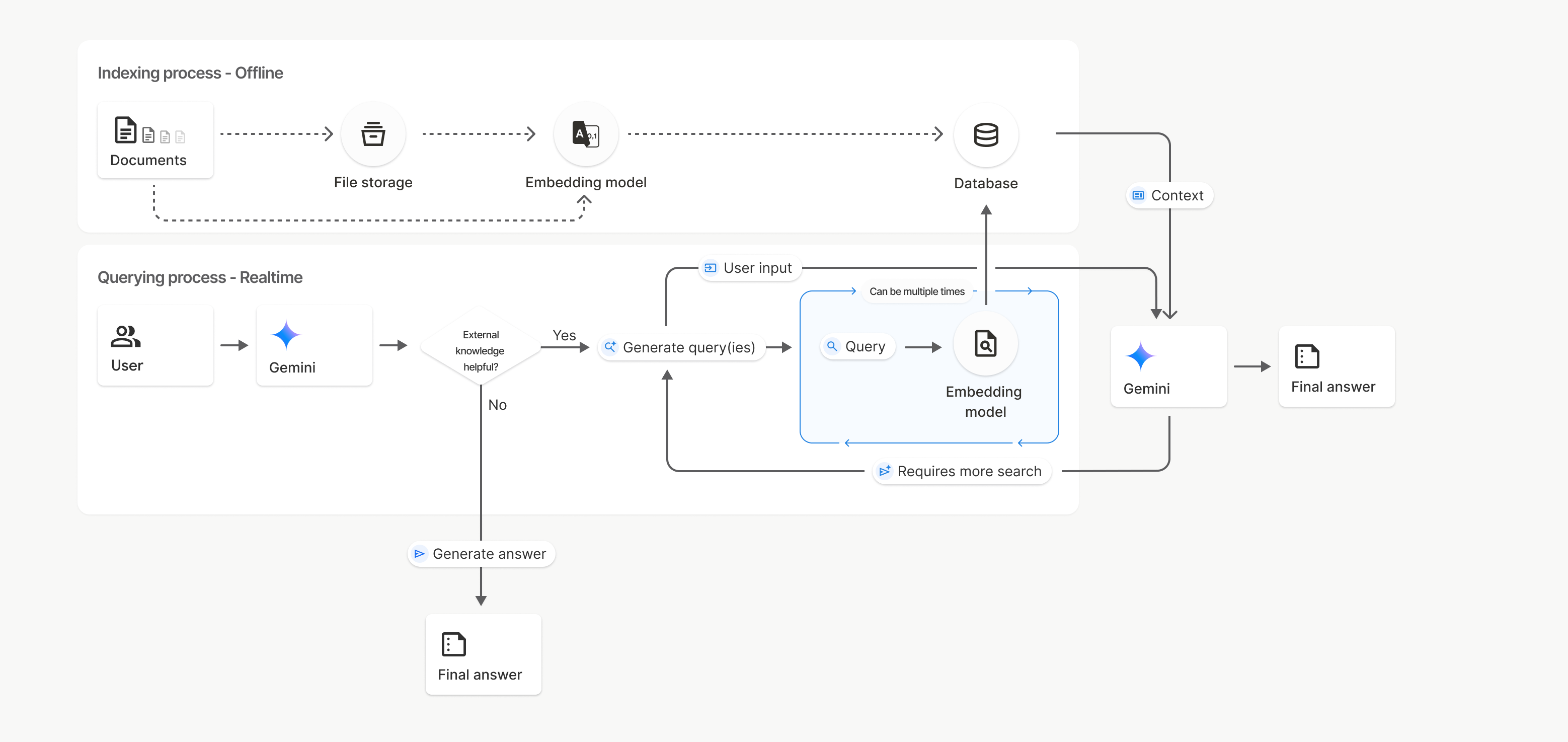
در این نمودار، خط چین از مدل Documents به Embedding (با استفاده از gemini-embedding-001 ) نشان دهنده API مربوط به uploadToFileSearchStore (با صرف نظر از File storage ) است. در غیر این صورت، استفاده از Files API برای ایجاد و سپس وارد کردن جداگانه فایلها، فرآیند ایندکس گذاری را از Documents به File storage و سپس به Embedding model منتقل میکند.
جستجوی فایل فروشگاهها
یک مخزن جستجوی فایل، محفظهای برای جاسازی اسناد شماست. در حالی که فایلهای خام آپلود شده از طریق API فایل پس از ۴۸ ساعت حذف میشوند، دادههای وارد شده به یک مخزن جستجوی فایل به طور نامحدود ذخیره میشوند تا زمانی که آن را به صورت دستی حذف کنید. میتوانید چندین مخزن جستجوی فایل برای سازماندهی اسناد خود ایجاد کنید. API FileSearchStore به شما امکان میدهد تا مخازن جستجوی فایل خود را ایجاد، فهرست، دریافت و حذف کنید تا مدیریت شوند. نامهای مخزن جستجوی فایل به صورت سراسری (global scoped) هستند.
در اینجا چند نمونه از نحوه مدیریت فروشگاههای جستجوی فایل شما آورده شده است:
پایتون
file_search_store = client.file_search_stores.create(
    config={
        'display_name': 'my-file_search-store-123',
        'embedding_model': 'models/gemini-embedding-2'
    }
)

for file_search_store in client.file_search_stores.list():
    print(file_search_store)

my_file_search_store = client.file_search_stores.get(name='fileSearchStores/my-file_search-store-123')

client.file_search_stores.delete(name='fileSearchStores/my-file_search-store-123', config={'force': True})
جاوا اسکریپت
const fileSearchStore = await ai.fileSearchStores.create({
  config: {
    displayName: 'my-file_search-store-123',
    embeddingModel: 'models/gemini-embedding-2'
  }
});

const fileSearchStores = await ai.fileSearchStores.list();
for await (const store of fileSearchStores) {
  console.log(store);
}

const myFileSearchStore = await ai.fileSearchStores.get({
  name: 'fileSearchStores/my-file_search-store-123'
});

await ai.fileSearchStores.delete({
  name: 'fileSearchStores/my-file_search-store-123',
  config: { force: true }
});
استراحت
curl -X POST "https://generativelanguage.googleapis.com/v1beta/fileSearchStores?key=${GEMINI_API_KEY}" \
    -H "Content-Type: application/json" \
    -d '{ "displayName": "My Store", "embedding_model": "models/gemini-embedding-2" }'

curl "https://generativelanguage.googleapis.com/v1beta/fileSearchStores?key=${GEMINI_API_KEY}" \

curl "https://generativelanguage.googleapis.com/v1beta/fileSearchStores/my-file_search-store-123?key=${GEMINI_API_KEY}"

curl -X DELETE "https://generativelanguage.googleapis.com/v1beta/fileSearchStores/my-file_search-store-123?key=${GEMINI_API_KEY}"
جستجوی فایل اسناد
شما میتوانید اسناد تکی را در انبارههای فایل خود با استفاده از API جستجوی فایل مدیریت کنید تا هر سند را در یک انباره جستجوی فایل list ، اطلاعات مربوط به یک سند را get و یک سند را بر اساس نام delete .
پایتون
for document_in_store in client.file_search_stores.documents.list(parent='fileSearchStores/my-file_search-store-123'):
  print(document_in_store)

file_search_document = client.file_search_stores.documents.get(name='fileSearchStores/my-file_search-store-123/documents/my_doc')
print(file_search_document)

client.file_search_stores.documents.delete(name='fileSearchStores/my-file_search-store-123/documents/my_doc')
جاوا اسکریپت
const documents = await ai.fileSearchStores.documents.list({
  parent: 'fileSearchStores/my-file_search-store-123'
});
for await (const doc of documents) {
  console.log(doc);
}

const fileSearchDocument = await ai.fileSearchStores.documents.get({
  name: 'fileSearchStores/my-file_search-store-123/documents/my_doc',
});

await ai.fileSearchStores.documents.delete({
  name: 'fileSearchStores/my-file_search-store-123/documents/my_doc'
});
استراحت
curl "https://generativelanguage.googleapis.com/v1beta/fileSearchStores/my-file_search-store-123/documents?key=${GEMINI_API_KEY}"

curl "https://generativelanguage.googleapis.com/v1beta/fileSearchStores/my-file_search-store-123/documents/my_doc?key=${GEMINI_API_KEY}"

curl -X DELETE "https://generativelanguage.googleapis.com/v1beta/fileSearchStores/my-file_search-store-123/documents/my_doc?key=${GEMINI_API_KEY}"
فراداده فایل
شما میتوانید فرادادههای سفارشی را به فایلهای خود اضافه کنید تا به فیلتر کردن آنها یا ارائه زمینههای اضافی کمک کنید. فراداده مجموعهای از جفتهای کلید-مقدار است.
پایتون
op = client.file_search_stores.import_file(
    file_search_store_name=file_search_store.name,
    file_name=sample_file.name,
    custom_metadata=[
        {"key": "author", "string_value": "Robert Graves"},
        {"key": "year", "numeric_value": 1934}
    ]
)
جاوا اسکریپت
let operation = await ai.fileSearchStores.importFile({
  fileSearchStoreName: fileSearchStore.name,
  fileName: sampleFile.name,
  config: {
    customMetadata: [
      { key: "author", stringValue: "Robert Graves" },
      { key: "year", numericValue: 1934 }
    ]
  }
});
این قابلیت زمانی مفید است که چندین سند در یک مخزن جستجوی فایل داشته باشید و بخواهید فقط زیرمجموعهای از آنها را جستجو کنید.
پایتون
response = client.models.generate_content(
    model="gemini-3.5-flash",
    contents="Tell me about the book 'I, Claudius'",
    config=types.GenerateContentConfig(
        tools=[
            types.Tool(
                file_search=types.FileSearch(
                    file_search_store_names=[file_search_store.name],
                    metadata_filter="author=Robert Graves",
                )
            )
        ]
    )
)

print(response.text)
جاوا اسکریپت
const response = await ai.models.generateContent({
  model: "gemini-3.5-flash",
  contents: "Tell me about the book 'I, Claudius'",
  config: {
    tools: [
      {
        fileSearch: {
          fileSearchStoreNames: [fileSearchStore.name],
          metadataFilter: 'author="Robert Graves"',
        }
      }
    ]
  }
});

console.log(response.text);
استراحت
curl "https://generativelanguage.googleapis.com/v1beta/models/gemini-3.5-flash:generateContent?key=${GEMINI_API_KEY}" \
    -H 'Content-Type: application/json' \
    -X POST \
    -d '{
            "contents": [{
                "parts":[{"text": "Tell me about the book I, Claudius"}]
            }],
            "tools": [{
                "file_search": {
                    "file_search_store_names":["'$STORE_NAME'"],
                    "metadata_filter": "author = \"Robert Graves\""
                }
            }]
        }' 2> /dev/null > response.json

cat response.json
راهنمایی در مورد پیادهسازی سینتکس فیلتر لیست برای metadata_filter را میتوانید در google.aip.dev/160 بیابید.
جستجوی فایل چندوجهی
جستجوی فایل چندوجهی به شما امکان میدهد تصاویر را به صورت بومی جاسازی و جستجو کنید و برنامههای RAG چندوجهی و غنی را فعال کنید.
پیکربندی مدل جاسازی
وقتی یک FileSearchStore ایجاد میکنید، باید مدل جاسازی فقط متنی پیشفرض را برای استفاده از یک مدل چندوجهی لغو کنید. برای پردازش متن و تصاویر models/gemini-embedding-2 استفاده کنید.
پایتون
store = client.file_search_stores.create(
    config={
        "display_name": "Multimodal Catalog",
        "embedding_model": "models/gemini-embedding-2",
    }
)
جاوا اسکریپت
const fileSearchStore = await ai.fileSearchStores.create({
  config: {
    displayName: "Multimodal Catalog",
    embeddingModel: "models/gemini-embedding-2",
  },
});
استراحت
curl -X POST "https://generativelanguage.googleapis.com/v1beta/fileSearchStores?key=$GEMINI_API_KEY" \
    -H "Content-Type: application/json" \
    -d '{
      "display_name": "Multimodal Catalog",
      "embedding_model": "models/gemini-embedding-2"
    }'
بارگذاری تصاویر
پس از ایجاد فروشگاه با مدل جاسازی چندوجهی، میتوانید فایلهای تصویر را مستقیماً با استفاده از همان APIهای آپلود شرح داده شده در «آپلود مستقیم به فروشگاه جستجوی فایل» یا «وارد کردن فایلها» آپلود کنید.
الزامات فایل تصویر:
- فایلهای تصویری باید حداکثر وضوح تصویر ۴K در ۴K پیکسل داشته باشند.
- فرمتهای پشتیبانی شده PNG، JPEG هستند.
نقل قولها
وقتی از جستجوی فایل استفاده میکنید، پاسخ مدل ممکن است شامل استنادهایی باشد که مشخص میکند کدام بخشهای اسناد آپلود شده شما برای تولید پاسخ استفاده شدهاند. این به بررسی و تأیید صحت اطلاعات کمک میکند.
شما میتوانید از طریق ویژگی grounding_metadata پاسخ، به اطلاعات استناد دسترسی پیدا کنید.
پایتون
print(response.candidates[0].grounding_metadata)
جاوا اسکریپت
console.log(JSON.stringify(response.candidates?.[0]?.groundingMetadata, null, 2));
برای اطلاعات دقیق در مورد ساختار فرادادههای پایه، به مثالهای موجود در کتاب آشپزی جستجوی فایل یا بخش پایه در مستندات Grounding with Google Search مراجعه کنید.
شماره صفحات
وقتی از جستجوی فایل با اسنادی که دارای صفحه هستند (مانند PDF) استفاده میکنید، پاسخ مدل ممکن است شامل شماره صفحهای باشد که اطلاعات در آن یافت شده است. میتوانید از طریق ویژگی page_number از retrieved_context به این اطلاعات دسترسی پیدا کنید.
پایتون
# Iterate through citations and check for page numbers
for chunk in response.grounding_metadata.grounding_chunks:
   if chunk.retrieved_context and chunk.retrieved_context.page_number:
       print(f"Cited Page: {chunk.retrieved_context.page_number}")
جاوا اسکریپت
const groundingMetadata = response.candidates[0].groundingMetadata;
for (const chunk of groundingMetadata.groundingChunks) {
  if (chunk.retrievedContext && chunk.retrievedContext.pageNumber) {
    console.log(`Cited Page: ${chunk.retrievedContext.pageNumber}`);
  }
}
استنادهای رسانهای
وقتی مدل در طول تولید به یک تکه تصویر ارجاع میدهد، API یک ارجاع در متادیتای پایه برمیگرداند که شامل یک media_id است. میتوانید از این شناسه برای دانلود دقیق تکه تصویری که مدل به آن ارجاع داده است استفاده کنید. این media_id در چندین فراخوانی جستجو پایدار است، که به شما امکان میدهد با استفاده از شناسه، تصویر مشابه را به طور قابل اعتمادی بازیابی کنید یا آن را ذخیره کنید.
قطعه کد زیر نمونهای از یک پاسخ REST است:
"groundingMetadata": {
  "groundingChunks": [
    {
      "retrievedContext": {
        "title": "product_image",
        "fileSearchStore": "fileSearchStores/my-store-123",
        "media_id": "fileSearchStores/my-store-123/media/BlobId-456"
      }
    }
  ]
}
قطعه کد زیر نحوه بازیابی media_id و دانلود رسانه را نشان میدهد:
پایتون
# Iterate through citations and download media if present
for chunk in response.grounding_metadata.grounding_chunks:
   if chunk.retrieved_context and chunk.retrieved_context.media_id:
       print(f"Cited Media ID: {chunk.retrieved_context.media_id}")
       # Download the blob using the SDK
       blob_content = client.file_search_stores.download_media(
           media_id=chunk.retrieved_context.media_id
       )
       # Save blob_content to file...
جاوا اسکریپت
const groundingMetadata = response.candidates[0].groundingMetadata;
for (const chunk of groundingMetadata.groundingChunks) {
  if (chunk.retrievedContext && chunk.retrievedContext.mediaId) {
    console.log(`Cited Media ID: ${chunk.retrievedContext.mediaId}`);
    const blobContent = await ai.fileSearchStores.downloadMedia(chunk.retrievedContext.mediaId);
    // Save blobContent to file...
  }
}
استراحت
curl -X GET "https://generativelanguage.googleapis.com/v1/fileSearchStores/my-store-123/media/BlobId-456" \
  -H "x-goog-api-key: $GEMINI_API_KEY"
فرادادههای سفارشی در دادههای زمینی
اگر فرادادههای سفارشی به فایلهای خود اضافه کردهاید، میتوانید به آنها در فرادادههای پایه پاسخ مدل دسترسی داشته باشید. این برای ارسال زمینههای اضافی (مانند URLها، شماره صفحات یا نویسندگان) از اسناد منبع شما به منطق برنامهتان مفید است. هر grounding_chunk در retrieved_context حاوی این فرادادههای سفارشی است.
پایتون
response = client.models.generate_content(
    model="gemini-3.5-flash",
    contents="Tell me about [insert question]",
    config=types.GenerateContentConfig(
        tools=[
            types.Tool(
                file_search=types.FileSearch(
                    file_search_store_names=[file_search_store.name]
                )
            )
        ]
    )
)

for chunk in response.candidates[0].grounding_metadata.grounding_chunks:
    if chunk.retrieved_context:
        print(f"Text: {chunk.retrieved_context.text}")
        if chunk.retrieved_context.custom_metadata:
            for metadata in chunk.retrieved_context.custom_metadata:
                print(f"Metadata Key: {metadata.key}")
                print(f"Value: {metadata.string_value or metadata.numeric_value}")
جاوا اسکریپت
const response = await ai.models.generateContent({
  model: "gemini-3.5-flash",
  contents: "Tell me about [insert question]",
  config: {
    tools: [
      {
        fileSearch: {
          fileSearchStoreNames: [fileSearchStore.name]
        }
      }
    ]
  }
});

const groundingMetadata = response.candidates[0].groundingMetadata;
groundingMetadata.groundingChunks.forEach((chunk) => {
  if (chunk.retrievedContext) {
    console.log(`Text: ${chunk.retrievedContext.text}`);
    if (chunk.retrievedContext.customMetadata) {
      chunk.retrievedContext.customMetadata.forEach((metadata) => {
        console.log(`Metadata Key: ${metadata.key}`);
        console.log(`Value: ${metadata.stringValue || metadata.numericValue}`);
      });
    }
  }
});
استراحت
{
  "candidates": [
    {
      "content": { ... },
      "grounding_metadata": {
        "grounding_chunks": [
          {
            "retrieved_context": {
              "text": "...",
              "title": "...",
              "uri": "...",
              "custom_metadata": [
                {
                  "key": "author",
                  "string_value": "Robert Graves"
                },
                {
                  "key": "year",
                  "numeric_value": 1934
                }
              ]
            }
          }
        ],
        "grounding_supports": [ ... ]
      }
    }
  ]
}
خروجی ساختاریافته
با شروع از مدلهای Gemini 3، میتوانید ابزار جستجوی فایل را با خروجیهای ساختاریافته ترکیب کنید.
پایتون
from pydantic import BaseModel, Field

class Money(BaseModel):
    amount: str = Field(description="The numerical part of the amount.")
    currency: str = Field(description="The currency of amount.")

response = client.models.generate_content(
    model="gemini-3.5-flash",
    contents="What is the minimum hourly wage in Tokyo right now?",
    config=types.GenerateContentConfig(
                tools=[
                    types.Tool(
                        file_search=types.FileSearch(
                            file_search_store_names=[file_search_store.name]
                        )
                    )
                ],
                response_format={"text": {"mime_type": "application/json", "schema": Money.model_json_schema()}}
      )
)
result = Money.model_validate_json(response.text)
print(result)
جاوا اسکریپت
import { z } from "zod";

const moneySchema = z.object({
  amount: z.string().describe("The numerical part of the amount."),
  currency: z.string().describe("The currency of amount."),
});

async function run() {
  const response = await ai.models.generateContent({
    model: "gemini-3.5-flash",
    contents: "What is the minimum hourly wage in Tokyo right now?",
    config: {
      tools: [
        {
          fileSearch: {
            fileSearchStoreNames: [file_search_store.name],
          },
        },
      ],
      responseFormat: { text: { mimeType: "application/json", schema: z.toJSONSchema(moneySchema) } },
    },
  });

  const result = moneySchema.parse(JSON.parse(response.text));
  console.log(result);
}

run();
استراحت
curl "https://generativelanguage.googleapis.com/v1beta/models/gemini-3.5-flash:generateContent" \
  -H "x-goog-api-key: $GEMINI_API_KEY" \
  -H 'Content-Type: application/json' \
  -X POST \
  -d '{
    "contents": [{
      "parts": [{"text": "What is the minimum hourly wage in Tokyo right now?"}]
    }],
    "tools": [
      {
        "fileSearch": {
          "fileSearchStoreNames": ["$FILE_SEARCH_STORE_NAME"]
        }
      }
    ],
    "generationConfig": {
"responseFormat": {
  "text": {
    "mimeType": "application/json",
    "schema": {
            "type": "object",
            "properties": {
                "amount": {"type": "string", "description": "The numerical part of the amount."},
                "currency": {"type": "string", "description": "The currency of amount."}
  }
}
},
            "required": ["amount", "currency"]
        }
    }
  }'
مدلهای پشتیبانیشده
مدلهای زیر از جستجوی فایل پشتیبانی میکنند:
| مدل | جستجوی فایل |
|---|---|
| فلش جمینی ۳.۵ | ✔️ |
| پیشنمایش Gemini 3.1 Pro | ✔️ |
| جمینی ۳.۱ فلش-لایت | ✔️ |
| پیشنمایش فلش جمینی ۳ | ✔️ |
| جمینی ۲.۵ پرو | ✔️ |
| جمینی ۲.۵ فلش-لایت | ✔️ |
ترکیب ابزارهای پشتیبانیشده
مدلهای Gemini 3 از ترکیب ابزارهای داخلی (مانند جستجوی فایل) با ابزارهای سفارشی (فراخوانی تابع) پشتیبانی میکنند. برای اطلاعات بیشتر به صفحه ترکیب ابزارها مراجعه کنید.
انواع فایلهای پشتیبانیشده
جستجوی فایل از طیف گستردهای از فرمتهای فایل پشتیبانی میکند که در بخشهای زیر فهرست شدهاند.
انواع فایلهای کاربردی
-
application/dart -
application/ecmascript -
application/json -
application/ms-java -
application/msword -
application/pdf -
application/sql -
application/typescript -
application/vnd.curl -
application/vnd.dart -
application/vnd.ibm.secure-container -
application/vnd.jupyter -
application/vnd.ms-excel -
application/vnd.oasis.opendocument.text -
application/vnd.openxmlformats-officedocument.presentationml.presentation -
application/vnd.openxmlformats-officedocument.spreadsheetml.sheet -
application/vnd.openxmlformats-officedocument.wordprocessingml.document -
application/vnd.openxmlformats-officedocument.wordprocessingml.template -
application/x-csh -
application/x-hwp -
application/x-hwp-v5 -
application/x-latex -
application/x-php -
application/x-powershell -
application/x-sh -
application/x-shellscript -
application/x-tex -
application/x-zsh -
application/xml -
application/zip
انواع فایلهای متنی
-
text/1d-interleaved-parityfec -
text/RED -
text/SGML -
text/cache-manifest -
text/calendar -
text/cql -
text/cql-extension -
text/cql-identifier -
text/css -
text/csv -
text/csv-schema -
text/dns -
text/encaprtp -
text/enriched -
text/example -
text/fhirpath -
text/flexfec -
text/fwdred -
text/gff3 -
text/grammar-ref-list -
text/hl7v2 -
text/html -
text/javascript -
text/jcr-cnd -
text/jsx -
text/markdown -
text/mizar -
text/n3 -
text/parameters -
text/parityfec -
text/php -
text/plain -
text/provenance-notation -
text/prs.fallenstein.rst -
text/prs.lines.tag -
text/prs.prop.logic -
text/raptorfec -
text/rfc822-headers -
text/rtf -
text/rtp-enc-aescm128 -
text/rtploopback -
text/rtx -
text/sgml -
text/shaclc -
text/shex -
text/spdx -
text/strings -
text/t140 -
text/tab-separated-values -
text/texmacs -
text/troff -
text/tsv -
text/tsx -
text/turtle -
text/ulpfec -
text/uri-list -
text/vcard -
text/vnd.DMClientScript -
text/vnd.IPTC.NITF -
text/vnd.IPTC.NewsML -
text/vnd.a -
text/vnd.abc -
text/vnd.ascii-art -
text/vnd.curl -
text/vnd.debian.copyright -
text/vnd.dvb.subtitle -
text/vnd.esmertec.theme-descriptor -
text/vnd.exchangeable -
text/vnd.familysearch.gedcom -
text/vnd.ficlab.flt -
text/vnd.fly -
text/vnd.fmi.flexstor -
text/vnd.gml -
text/vnd.graphviz -
text/vnd.hans -
text/vnd.hgl -
text/vnd.in3d.3dml -
text/vnd.in3d.spot -
text/vnd.latex-z -
text/vnd.motorola.reflex -
text/vnd.ms-mediapackage -
text/vnd.net2phone.commcenter.command -
text/vnd.radisys.msml-basic-layout -
text/vnd.senx.warpscript -
text/vnd.sosi -
text/vnd.sun.j2me.app-descriptor -
text/vnd.trolltech.linguist -
text/vnd.wap.si -
text/vnd.wap.sl -
text/vnd.wap.wml -
text/vnd.wap.wmlscript -
text/vtt -
text/wgsl -
text/x-asm -
text/x-bibtex -
text/x-boo -
text/xc -
text/x-c++hdr -
text/x-c++src -
text/x-cassandra -
text/x-chdr -
text/x-coffeescript -
text/x-component -
text/x-csh -
text/x-csharp -
text/x-csrc -
text/x-cuda -
text/xd -
text/x-diff -
text/x-dsrc -
text/x-emacs-lisp -
text/x-erlang -
text/x-gff3 -
text/x-go -
text/x-haskell -
text/x-java -
text/x-java-properties -
text/x-java-source -
text/x-kotlin -
text/x-lilypond -
text/x-lisp -
text/x-literate-haskell -
text/x-lua -
text/x-moc -
text/x-objcsrc -
text/x-pascal -
text/x-pcs-gcd -
text/x-perl -
text/x-perl-script -
text/x-python -
text/x-python-script -
text/xr-markdown -
text/x-rsrc -
text/x-rst -
text/x-ruby-script -
text/x-rust -
text/x-sass -
text/x-scala -
text/x-scheme -
text/x-script.python -
text/x-scss -
text/x-setext -
text/x-sfv -
text/x-sh -
text/x-siesta -
text/x-sos -
text/x-sql -
text/x-swift -
text/x-tcl -
text/x-tex -
text/x-vbasic -
text/x-vcalendar -
text/xml -
text/xml-dtd -
text/xml-external-parsed-entity -
text/yaml
محدودیتها
- API زنده: جستجوی فایل در API زنده پشتیبانی نمیشود.
- ناسازگاری ابزار: جستجوی فایل در حال حاضر نمیتواند با ابزارهای دیگری مانند Grounding with Google Search ، URL Context و غیره ترکیب شود.
محدودیتهای نرخ
API جستجوی فایل برای افزایش پایداری سرویس، محدودیتهای زیر را دارد:
- حداکثر اندازه فایل / به ازای هر سند : ۱۰۰ مگابایت
- اندازه کل فروشگاههای جستجوی فایل پروژه (بر اساس سطح کاربری):
- رایگان : ۱ گیگابایت
- سطح ۱ : ۱۰ گیگابایت
- ردیف ۲ : ۱۰۰ گیگابایت
- ردیف ۳ : ۱ ترابایت
- توصیه : اندازه هر مخزن جستجوی فایل را به کمتر از 20 گیگابایت محدود کنید تا از تأخیر بهینه در بازیابی اطمینان حاصل شود.
قیمتگذاری
- هزینه جاسازیها در زمان فهرستبندی بر اساس قیمتگذاری موجود برای جاسازیها از شما دریافت میشود.
- انبارداری رایگان است.
- جاسازیهای زمان پرسوجو رایگان هستند.
- توکنهای سند بازیابیشده به عنوان توکنهای زمینهای معمولی محاسبه میشوند.
قدم بعدی چیست؟
- برای «ذخیرههای جستجوی فایل» و « اسناد جستجوی فایل» به مرجع API مراجعه کنید.