

জেমিনি ৩ হলো আমাদের এখন পর্যন্ত সবচেয়ে বুদ্ধিমান মডেল পরিবার, যা অত্যাধুনিক যুক্তির ভিত্তির ওপর নির্মিত। এটি এজেন্টিক ওয়ার্কফ্লো, স্বায়ত্তশাসিত কোডিং এবং জটিল মাল্টিমোডাল কাজ আয়ত্ত করার মাধ্যমে যেকোনো ধারণাকে বাস্তবে রূপ দেওয়ার জন্য ডিজাইন করা হয়েছে। এই নির্দেশিকায় জেমিনি ৩ মডেল পরিবারের মূল বৈশিষ্ট্য এবং এর থেকে কীভাবে সর্বাধিক সুবিধা পাওয়া যায় তা আলোচনা করা হয়েছে।
মডেলটি কীভাবে উন্নত যুক্তি, স্বয়ংক্রিয় কোডিং এবং জটিল মাল্টিমোডাল কাজগুলো সামলায়, তা দেখতে আমাদের জেমিনি ৩ অ্যাপের সংগ্রহটি ঘুরে দেখুন।
কয়েকটি কোড লাইন দিয়েই শুরু করুন:
পাইথন
from google import genai

client = genai.Client()

interaction = client.interactions.create(
    model="gemini-3.1-pro-preview",
    input="Find the race condition in this multi-threaded C++ snippet: [code here]",
)

print(interaction.output_text)
জাভাস্ক্রিপ্ট
import { GoogleGenAI } from "@google/genai";

const client = new GoogleGenAI({});

async function run() {
  const interaction = await client.interactions.create({
    model: "gemini-3.1-pro-preview",
    input: "Find the race condition in this multi-threaded C++ snippet: [code here]",
  });

  console.log(interaction.output_text);
}

run();
জাভা
import com.google.genai.Client;
import com.google.genai.gaos.models.interactions.CreateModelInteraction;
import com.google.genai.gaos.models.interactions.Interaction;
import com.google.genai.gaos.models.interactions.InteractionsInput;
import com.google.genai.gaos.models.interactions.Model;
import com.google.genai.gaos.models.operations.CreateInteractionRequestBody;

Client client = new Client();

CreateModelInteraction request =
    CreateModelInteraction.builder()
        .model(Model.of("gemini-3.1-pro-preview"))
        .input(
            InteractionsInput.of(
                "Find the race condition in this multi-threaded C++ snippet: [code here]"))
        .build();

Interaction interaction =
    client.interactions.create(CreateInteractionRequestBody.of(request)).interaction().get();

System.out.println(interaction.outputText().orElse(""));
যান
package main

import (
    "context"
    "fmt"
    "log"

    "google.golang.org/genai"
    "google.golang.org/genai/interactions/models/interactions"
    "google.golang.org/genai/interactions/models/operations"
)

func main() {
    ctx := context.Background()
    client, err := genai.NewClient(ctx, nil)
    if err != nil {
        log.Fatal(err)
    }

    res, err := client.Interactions.Create(ctx, operations.CreateInteractionRequest{
        Body: operations.NewCreateInteractionRequestBody(interactions.CreateModelInteraction{
            Model: interactions.Model("gemini-3.1-pro-preview"),
            Input: interactions.NewInteractionsInput("Find the race condition in this multi-threaded C++ snippet: [code here]"),
        }),
    })
    if err != nil {
        log.Fatal(err)
    }
    if res.Interaction.OutputText != nil {
        fmt.Println(*res.Interaction.OutputText)
    }
}
বিশ্রাম
curl -X POST "https://generativelanguage.googleapis.com/v1beta/interactions" \
  -H "x-goog-api-key: $GEMINI_API_KEY" \
  -H 'Content-Type: application/json' \
  -d '{
    "model": "gemini-3.1-pro-preview",
    "input": "Find the race condition in this multi-threaded C++ snippet: [code here]"
  }'
জেমিনি ৩ সিরিজের সাথে পরিচিত হন
জেমিনি ৩.১ প্রো এমন জটিল কাজের জন্য সর্বোত্তম, যেগুলোর জন্য ব্যাপক বিশ্ব জ্ঞান এবং বিভিন্ন মাধ্যমে উন্নত যুক্তিবোধের প্রয়োজন হয়।
জেমিনি ৩ ফ্ল্যাশ হলো আমাদের ৩-সিরিজের সর্বশেষ মডেল, যা ফ্ল্যাশের গতি ও মূল্যে প্রো-লেভেলের ইন্টেলিজেন্স প্রদান করে।
ন্যানো ব্যানানা প্রো (জেমিনি ৩ প্রো ইমেজ নামেও পরিচিত) হলো আমাদের সর্বোচ্চ মানের ইমেজ তৈরির মডেল, এবং ন্যানো ব্যানানা ২ (জেমিনি ৩.১ ফ্ল্যাশ ইমেজ নামেও পরিচিত) হলো এর অধিক ধারণক্ষমতা, উচ্চ দক্ষতা ও কম দামের সমতুল্য মডেল।
জেমিনি ৩.১ ফ্ল্যাশ-লাইট হলো আমাদের সবচেয়ে নির্ভরযোগ্য মডেল, যা খরচ-সাশ্রয়ী এবং অধিক পরিমাণে কাজ করার জন্য নির্মিত।
সকল জেমিনি ৩ মডেল বর্তমানে প্রিভিউ পর্যায়ে রয়েছে।
| মডেল আইডি | প্রসঙ্গ উইন্ডো (প্রবেশ / প্রস্থান) | জ্ঞানের সীমাবদ্ধতা | মূল্য নির্ধারণ (ইনপুট / আউটপুট)* |
|---|---|---|---|
| জেমিনি-৩.১-ফ্ল্যাশ-লাইট | ১এম / ৬৪কে | জানুয়ারী ২০২৫ | $০.২৫ (লেখা, ছবি, ভিডিও), $০.৫০ (অডিও) / $১.৫০ |
| জেমিনি-৩.১-ফ্ল্যাশ-ইমেজ-প্রিভিউ | ১২৮ হাজার / ৩২ হাজার | জানুয়ারী ২০২৫ | $০.২৫ (টেক্সট ইনপুট) / $০.০৬৭ (ইমেজ আউটপুট) |
| জেমিনি-৩.১-প্রো-প্রিভিউ | ১এম / ৬৪কে | জানুয়ারী ২০২৫ | $২ / $১২ (<২০০ হাজার টোকেন) $৪ / $১৮ (>২ লক্ষ টোকেন) |
| জেমিনি-৩-ফ্ল্যাশ-প্রিভিউ | ১এম / ৬৪কে | জানুয়ারী ২০২৫ | $০.৫০ / $৩ |
| জেমিনি-৩-প্রো-ইমেজ-প্রিভিউ | ৬৫ হাজার / ৩২ হাজার | জানুয়ারী ২০২৫ | $২ (টেক্সট ইনপুট) / $০.১৩৪ (ইমেজ আউটপুট)** |
* অন্যথায় উল্লেখ না থাকলে, মূল্য প্রতি ১০ লক্ষ টোকেনের জন্য প্রযোজ্য। ** ছবির মূল্য রেজোলিউশন অনুযায়ী পরিবর্তিত হয়। বিস্তারিত জানতে মূল্য তালিকা দেখুন।
বিস্তারিত সীমা, মূল্য এবং অতিরিক্ত তথ্যের জন্য মডেল পৃষ্ঠাটি দেখুন।
জেমিনি ৩-এর নতুন এপিআই বৈশিষ্ট্য
জেমিনি ৩-এ নতুন কিছু প্যারামিটার যুক্ত করা হয়েছে, যা ডেভেলপারদের ল্যাটেন্সি, কস্ট এবং মাল্টিমোডাল ফিডেলিটির ওপর আরও বেশি নিয়ন্ত্রণ দেবে।
চিন্তার স্তর
জেমিনি ৩ সিরিজের মডেলগুলো প্রম্পটের মাধ্যমে যুক্তি দিয়ে চিন্তা করার জন্য ডিফল্টরূপে ডাইনামিক থিংকিং ব্যবহার করে। আপনি thinking_level প্যারামিটারটি ব্যবহার করতে পারেন, যা একটি প্রতিক্রিয়া তৈরি করার আগে মডেলটির অভ্যন্তরীণ যুক্তি প্রক্রিয়ার সর্বোচ্চ গভীরতা নিয়ন্ত্রণ করে। জেমিনি ৩ এই স্তরগুলোকে কঠোর টোকেন গ্যারান্টি হিসেবে না দেখে, চিন্তার জন্য আপেক্ষিক সুযোগ হিসেবে বিবেচনা করে।
যদি thinking_level নির্দিষ্ট করা না থাকে, তাহলে Gemini 3 ডিফল্টরূপে high থাকবে। যখন জটিল যুক্তির প্রয়োজন হয় না, তখন দ্রুততর এবং কম-বিলম্বের প্রতিক্রিয়ার জন্য, আপনি মডেলটির thinking level-কে low তে সীমাবদ্ধ করতে পারেন।
| চিন্তার স্তর | জেমিনি ৩.১ প্রো | জেমিনি ৩.১ ফ্ল্যাশ-লাইট | জেমিনি ৩ ফ্ল্যাশ | বর্ণনা |
|---|---|---|---|---|
minimal | সমর্থিত নয় | সমর্থিত (ডিফল্ট) | সমর্থিত | বেশিরভাগ কোয়েরির জন্য এটি 'চিন্তাহীন' সেটিংয়ের সাথে মেলে। জটিল কোডিং কাজের জন্য মডেলটি খুব কম চিন্তা করতে পারে। চ্যাট বা উচ্চ থ্রুপুট অ্যাপ্লিকেশনগুলির জন্য এটি ল্যাটেন্সি কমিয়ে আনে। উল্লেখ্য, minimal মানেই যে চিন্তা পুরোপুরি বন্ধ থাকবে, তা নয়। |
low | সমর্থিত | সমর্থিত | সমর্থিত | লেটেন্সি ও খরচ কমায়। সাধারণ নির্দেশনা অনুসরণ, চ্যাট বা উচ্চ-ক্ষমতাসম্পন্ন অ্যাপ্লিকেশনের জন্য সর্বোত্তম। |
medium | সমর্থিত | সমর্থিত | সমর্থিত | অধিকাংশ কাজের জন্য ভারসাম্যপূর্ণ চিন্তাভাবনা। |
high | সমর্থিত (ডিফল্ট, ডাইনামিক) | সমর্থিত (গতিশীল) | সমর্থিত (ডিফল্ট, ডাইনামিক) | যুক্তির গভীরতা সর্বাধিক করে। মডেলটির প্রথম (চিন্তাবিহীন) আউটপুট টোকেনে পৌঁছাতে উল্লেখযোগ্যভাবে বেশি সময় লাগতে পারে, কিন্তু আউটপুটটি আরও সতর্কভাবে যুক্তিযুক্ত হবে। |
পাইথন
from google import genai

client = genai.Client()

interaction = client.interactions.create(
    model="gemini-3.1-pro-preview",
    input="How does AI work?",
    generation_config={"thinking_level": "low"},
)

print(interaction.output_text)
জাভাস্ক্রিপ্ট
import { GoogleGenAI } from "@google/genai";

const client = new GoogleGenAI({});

const interaction = await client.interactions.create({
    model: "gemini-3.1-pro-preview",
    input: "How does AI work?",
    generation_config: {
      thinking_level: "low",
    },
  });

console.log(interaction.output_text);
জাভা
import com.google.genai.Client;
import com.google.genai.gaos.models.interactions.CreateModelInteraction;
import com.google.genai.gaos.models.interactions.GenerationConfig;
import com.google.genai.gaos.models.interactions.Interaction;
import com.google.genai.gaos.models.interactions.InteractionsInput;
import com.google.genai.gaos.models.interactions.Model;
import com.google.genai.gaos.models.interactions.ThinkingLevel;
import com.google.genai.gaos.models.operations.CreateInteractionRequestBody;

Client client = new Client();

CreateModelInteraction request =
    CreateModelInteraction.builder()
        .model(Model.of("gemini-3.1-pro-preview"))
        .input(InteractionsInput.of("How does AI work?"))
        .generationConfig(
            GenerationConfig.builder()
                .thinkingLevel(ThinkingLevel.LOW)
                .build())
        .build();

Interaction interaction =
    client.interactions.create(CreateInteractionRequestBody.of(request)).interaction().get();

System.out.println(interaction.outputText().orElse(""));
যান
package main

import (
    "context"
    "fmt"
    "log"

    "google.golang.org/genai"
    "google.golang.org/genai/interactions/models/interactions"
    "google.golang.org/genai/interactions/models/operations"
)

func main() {
    ctx := context.Background()
    client, err := genai.NewClient(ctx, nil)
    if err != nil {
        log.Fatal(err)
    }

    res, err := client.Interactions.Create(ctx, operations.CreateInteractionRequest{
        Body: operations.NewCreateInteractionRequestBody(interactions.CreateModelInteraction{
            Model: interactions.Model("gemini-3.1-pro-preview"),
            Input: interactions.NewInteractionsInput("How does AI work?"),
            GenerationConfig: &interactions.GenerationConfig{
                ThinkingLevel: interactions.ThinkingLevelLow.ToPointer(),
            },
        }),
    })
    if err != nil {
        log.Fatal(err)
    }
    if res.Interaction.OutputText != nil {
        fmt.Println(*res.Interaction.OutputText)
    }
}
বিশ্রাম
curl -X POST "https://generativelanguage.googleapis.com/v1beta/interactions" \
  -H "x-goog-api-key: $GEMINI_API_KEY" \
  -H 'Content-Type: application/json' \
  -d '{
    "model": "gemini-3.1-pro-preview",
    "input": "How does AI work?",
    "generation_config": {
      "thinking_level": "low"
    }
  }'
তাপমাত্রা
সকল জেমিনি ৩ মডেলের জন্য, আমরা তাপমাত্রা প্যারামিটারটি এর ডিফল্ট মান 1.0 এ রাখার জন্য দৃঢ়ভাবে সুপারিশ করছি।
পূর্ববর্তী মডেলগুলিতে সৃজনশীলতা বনাম নিয়তিবাদের মধ্যে ভারসাম্য রক্ষার জন্য টেম্পারেচার টিউনিংয়ের মাধ্যমে প্রায়শই সুবিধা পাওয়া গেলেও, জেমিনি ৩-এর যুক্তিনির্ভর ক্ষমতা ডিফল্ট সেটিংয়ের জন্যই অপ্টিমাইজ করা হয়েছে। টেম্পারেচার পরিবর্তন করলে (১.০-এর নিচে সেট করলে) অপ্রত্যাশিত আচরণ দেখা দিতে পারে, যেমন লুপ তৈরি হওয়া বা পারফরম্যান্সের অবনতি, বিশেষ করে জটিল গাণিতিক বা যুক্তিনির্ভর কাজগুলিতে।
চিন্তার স্বাক্ষর
জেমিনি ৩ মডেলগুলো এপিআই কল জুড়ে যুক্তির প্রেক্ষাপট বজায় রাখতে থট সিগনেচার ব্যবহার করে। এই সিগনেচারগুলো হলো মডেলটির অভ্যন্তরীণ চিন্তন প্রক্রিয়ার এনক্রিপ্টেড উপস্থাপনা।
- স্টেটফুল মোড (প্রস্তাবিত) : স্টেটফুল মোডে ইন্টারঅ্যাকশনস এপিআই ব্যবহার করার সময় (
previous_interaction_idপ্রদান করে), সার্ভার স্বয়ংক্রিয়ভাবে কথোপকথনের ইতিহাস এবং চিন্তার ধরন পরিচালনা করে। - স্টেটলেস মোড : আপনি যদি কথোপকথনের ইতিহাস ম্যানুয়ালি পরিচালনা করেন, তবে সত্যতা যাচাই করার জন্য পরবর্তী অনুরোধগুলিতে আপনাকে অবশ্যই স্বাক্ষরসহ চিন্তার অংশগুলো অন্তর্ভুক্ত করতে হবে।
বিস্তারিত তথ্যের জন্য, ‘থট সিগনেচারস ’ পৃষ্ঠাটি দেখুন।
সরঞ্জাম সহ কাঠামোগত আউটপুট
জেমিনি ৩ মডেলগুলো আপনাকে স্ট্রাকচার্ড আউটপুট-এর সাথে বিল্ট-ইন টুলসমূহ, যেমন— গ্রাউন্ডিং উইথ গুগল সার্চ , ইউআরএল কনটেক্সট , কোড এক্সিকিউশন এবং ফাংশন কলিং, একত্রিত করার সুযোগ দেয়।
পাইথন
from google import genai
from pydantic import BaseModel, Field
from typing import List

class MatchResult(BaseModel):
    winner: str = Field(description="The name of the winner.")
    final_match_score: str = Field(description="The final match score.")
    scorers: List[str] = Field(description="The name of the scorer.")

client = genai.Client()

interaction = client.interactions.create(
    model="gemini-3.1-pro-preview",
    input="Search for all details for the latest Euro.",
    tools=[
        {"type": "google_search"},
        {"type": "url_context"}
    ],
    response_format={
        "type": "text",
        "mime_type": "application/json",
        "schema": MatchResult.model_json_schema()
    },
)

result = MatchResult.model_validate_json(interaction.output_text)
print(result)
জাভাস্ক্রিপ্ট
import { GoogleGenAI } from "@google/genai";
import * as z from "zod";

const matchJsonSchema = {
  type: "object",
  properties: {
    winner: { type: "string", description: "The name of the winner." },
    final_match_score: { type: "string", description: "The final score." },
    scorers: {
      type: "array",
      items: { type: "string" },
      description: "The name of the scorer."
    }
  },
  required: ["winner", "final_match_score", "scorers"]
};

const matchSchema = z.fromJSONSchema(matchJsonSchema);

const client = new GoogleGenAI({});

async function run() {
  const interaction = await client.interactions.create({
    model: "gemini-3.1-pro-preview",
    input: "Search for all details for the latest Euro.",
    tools: [
      { type: "google_search" },
      { type: "url_context" }
    ],
    response_format: {
        type: "text",
        mime_type: "application/json",
        schema: matchJsonSchema
    },
  });

  const match = matchSchema.parse(JSON.parse(interaction.output_text));
  console.log(match);
}

run();
জাভা
import com.google.genai.Client;
import com.google.genai.gaos.models.interactions.CreateModelInteraction;
import com.google.genai.gaos.models.interactions.CreateModelInteractionResponseFormat;
import com.google.genai.gaos.models.interactions.GoogleSearch;
import com.google.genai.gaos.models.interactions.Interaction;
import com.google.genai.gaos.models.interactions.InteractionsInput;
import com.google.genai.gaos.models.interactions.Model;
import com.google.genai.gaos.models.interactions.ResponseFormat;
import com.google.genai.gaos.models.interactions.TextResponseFormat;
import com.google.genai.gaos.models.interactions.TextResponseFormatMimeType;
import com.google.genai.gaos.models.interactions.URLContext;
import com.google.genai.gaos.models.operations.CreateInteractionRequestBody;
import java.util.Arrays;
import java.util.HashMap;
import java.util.Map;

Client client = new Client();

Map<String, Object> properties = new HashMap<>();
properties.put("winner", Map.of("type", "string", "description", "The name of the winner."));
properties.put(
    "final_match_score", Map.of("type", "string", "description", "The final match score."));
properties.put(
    "scorers",
    Map.of(
        "type", "array",
        "items", Map.of("type", "string"),
        "description", "The name of the scorer."));

Map<String, Object> schema = new HashMap<>();
schema.put("type", "object");
schema.put("properties", properties);
schema.put("required", Arrays.asList("winner", "final_match_score", "scorers"));

CreateModelInteraction request =
    CreateModelInteraction.builder()
        .model(Model.of("gemini-3.1-pro-preview"))
        .input(InteractionsInput.of("Search for all details for the latest Euro."))
        .tools(Arrays.asList(GoogleSearch.builder().build(), URLContext.builder().build()))
        .responseFormat(
            CreateModelInteractionResponseFormat.of(
                ResponseFormat.of(
                    TextResponseFormat.builder()
                        .mimeType(TextResponseFormatMimeType.APPLICATION_JSON)
                        .schema(schema)
                        .build())))
        .build();

Interaction interaction =
    client.interactions.create(CreateInteractionRequestBody.of(request)).interaction().get();

System.out.println(interaction.outputText().orElse(""));
যান
package main

import (
    "context"
    "fmt"
    "log"

    "google.golang.org/genai"
    "google.golang.org/genai/interactions/models/interactions"
    "google.golang.org/genai/interactions/models/operations"
)

func main() {
    ctx := context.Background()
    client, err := genai.NewClient(ctx, nil)
    if err != nil {
        log.Fatal(err)
    }

    schema := map[string]any{
        "type": "object",
        "properties": map[string]any{
            "winner": map[string]any{
                "type":        "string",
                "description": "The name of the winner.",
            },
            "final_match_score": map[string]any{
                "type":        "string",
                "description": "The final match score.",
            },
            "scorers": map[string]any{
                "type":        "array",
                "items":       map[string]any{"type": "string"},
                "description": "The name of the scorer.",
            },
        },
        "required": []string{"winner", "final_match_score", "scorers"},
    }

    res, err := client.Interactions.Create(ctx, operations.CreateInteractionRequest{
        Body: operations.NewCreateInteractionRequestBody(interactions.CreateModelInteraction{
            Model: interactions.Model("gemini-3.1-pro-preview"),
            Input: interactions.NewInteractionsInput("Search for all details for the latest Euro."),
            Tools: []interactions.Tool{
                interactions.NewTool(interactions.GoogleSearch{}),
                interactions.NewTool(interactions.URLContext{}),
            },
            ResponseFormat: genai.Ptr(interactions.NewCreateModelInteractionResponseFormat(
                interactions.NewResponseFormat(interactions.TextResponseFormat{
                    MimeType: interactions.TextResponseFormatMimeType("application/json").ToPointer(),
                    Schema:   schema,
                }),
            )),
        }),
    })
    if err != nil {
        log.Fatal(err)
    }
    if res.Interaction.OutputText != nil {
        fmt.Println(*res.Interaction.OutputText)
    }
}
বিশ্রাম
curl -X POST "https://generativelanguage.googleapis.com/v1beta/interactions" \
  -H "x-goog-api-key: $GEMINI_API_KEY" \
  -H 'Content-Type: application/json' \
  -d '{
    "model": "gemini-3.1-pro-preview",
    "input": "Search for all details for the latest Euro.",
    "tools": [
      {"type": "google_search"},
      {"type": "url_context"}
    ],
    "response_format": {
        "type": "text",
        "mime_type": "application/json",
        "schema": {
            "type": "object",
            "properties": {
                "winner": {"type": "string", "description": "The name of the winner."},
                "final_match_score": {"type": "string", "description": "The final score."},
                "scorers": {
                    "type": "array",
                    "items": {"type": "string"},
                    "description": "The name of the scorer."
                }
            },
            "required": ["winner", "final_match_score", "scorers"]
        }
    }
  }'
চিত্র তৈরি
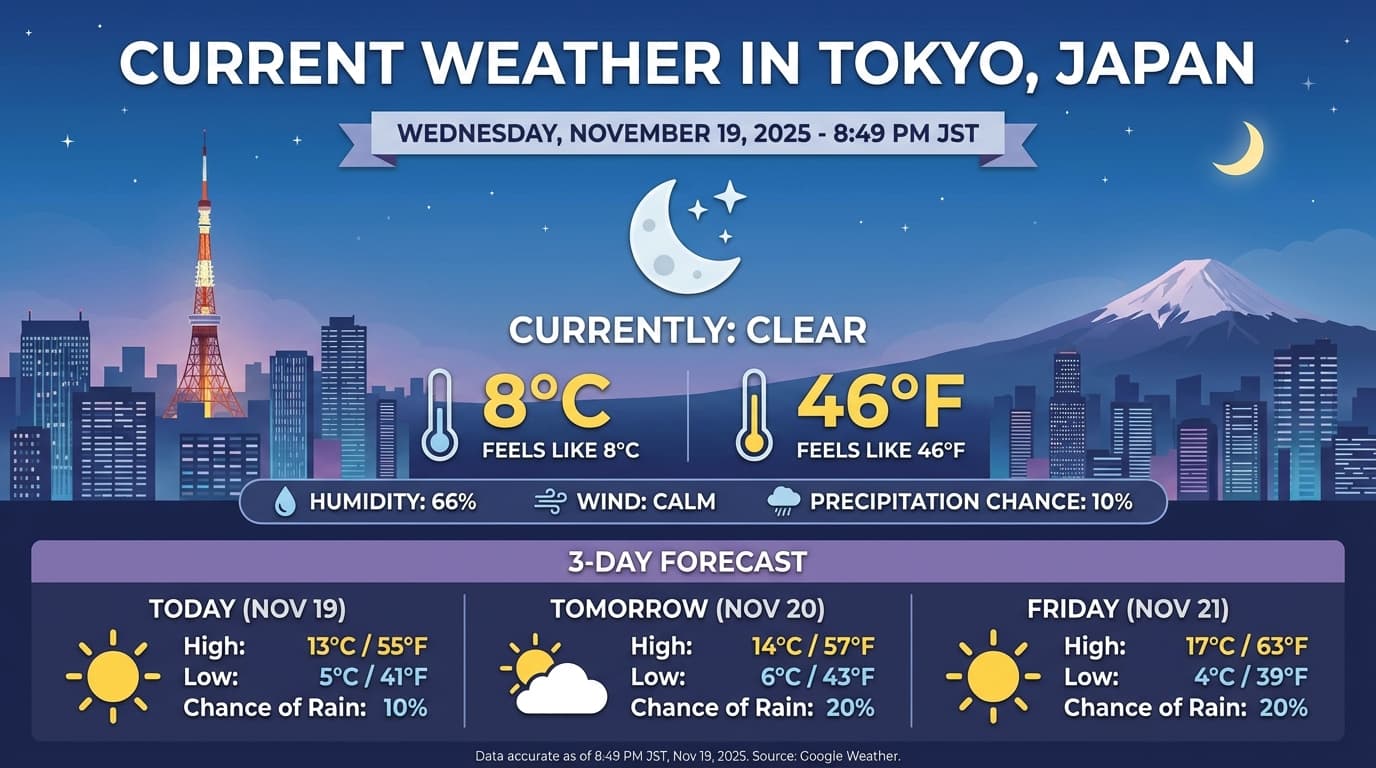
জেমিনি ৩.১ ফ্ল্যাশ ইমেজ এবং জেমিনি ৩ প্রো ইমেজ আপনাকে টেক্সট প্রম্পট থেকে ছবি তৈরি ও সম্পাদনা করতে দেয়। এটি যুক্তির মাধ্যমে একটি প্রম্পট নিয়ে 'চিন্তা' করে এবং উচ্চ-মানের ছবি তৈরি করার আগে গুগল সার্চের উপর ভিত্তি করে রিয়েল-টাইম ডেটা—যেমন আবহাওয়ার পূর্বাভাস বা স্টক চার্ট—সংগ্রহ করতে পারে।
নতুন ও উন্নত সক্ষমতা:
- 4K ও টেক্সট রেন্ডারিং: 2K এবং 4K পর্যন্ত রেজোলিউশনে স্পষ্ট ও পাঠযোগ্য টেক্সট এবং ডায়াগ্রাম তৈরি করুন।
- বাস্তবভিত্তিক নির্মাণ: তথ্য যাচাই করতে এবং বাস্তব জগতের তথ্যের উপর ভিত্তি করে চিত্র তৈরি করতে
google_searchটুল ব্যবহার করুন। জেমিনি ৩.১ ফ্ল্যাশ ইমেজের জন্য গুগল ইমেজ সার্চের মাধ্যমে বাস্তবভিত্তিক নির্মাণ উপলব্ধ। - কথোপকথনমূলক সম্পাদনা: শুধুমাত্র পরিবর্তনের অনুরোধ করার মাধ্যমে একাধিকবার ছবি সম্পাদনা করা (যেমন, "পটভূমিটিকে সূর্যাস্তের মতো করে দিন")। এই কর্মপ্রক্রিয়াটি বিভিন্ন টার্নের মধ্যে দৃশ্যগত প্রেক্ষাপট বজায় রাখতে 'থট সিগনেচার'-এর উপর নির্ভর করে।
অ্যাস্পেক্ট রেশিও, এডিটিং ওয়ার্কফ্লো এবং কনফিগারেশন অপশন সম্পর্কে সম্পূর্ণ বিবরণের জন্য, ইমেজ জেনারেশন গাইডটি দেখুন।
পাইথন
from google import genai
import base64

client = genai.Client()

interaction = client.interactions.create(
    model="gemini-3-pro-image-preview",
    input="Generate an infographic of the current weather in Tokyo.",
    tools=[{"type": "google_search"}],
    response_format={
        "type": "image",
        "aspect_ratio": "16:9",
        "image_size": "4K"
    }
)

from PIL import Image
import io

generated_image = interaction.output_image
if generated_image:
    image_data = base64.b64decode(generated_image.data)
    image = Image.open(io.BytesIO(image_data))
    image.save('weather_tokyo.png')
    image.show()
জাভাস্ক্রিপ্ট
import { GoogleGenAI } from "@google/genai";
import * as fs from "node:fs";

const client = new GoogleGenAI({});

async function run() {
  const interaction = await client.interactions.create({
    model: "gemini-3-pro-image-preview",
    input: "Generate a visualization of the current weather in Tokyo.",
    tools: [{ type: "google_search" }],
    response_format: {
      type: "image",
      aspect_ratio: "16:9",
      image_size: "4K"
    }
  });

  const buffer = Buffer.from(interaction.output_image.data, 'base64');

  fs.writeFileSync('weather_tokyo.png', buffer);
}

run();
জাভা
import com.google.genai.Client;
import com.google.genai.gaos.models.interactions.CreateModelInteraction;
import com.google.genai.gaos.models.interactions.CreateModelInteractionResponseFormat;
import com.google.genai.gaos.models.interactions.GoogleSearch;
import com.google.genai.gaos.models.interactions.ImageContent;
import com.google.genai.gaos.models.interactions.ImageResponseFormat;
import com.google.genai.gaos.models.interactions.ImageResponseFormatAspectRatio;
import com.google.genai.gaos.models.interactions.ImageResponseFormatImageSize;
import com.google.genai.gaos.models.interactions.Interaction;
import com.google.genai.gaos.models.interactions.InteractionsInput;
import com.google.genai.gaos.models.interactions.Model;
import com.google.genai.gaos.models.interactions.ResponseFormat;
import com.google.genai.gaos.models.operations.CreateInteractionRequestBody;
import java.nio.file.Files;
import java.nio.file.Paths;
import java.util.Arrays;
import java.util.Base64;
import java.util.Optional;

Client client = new Client();

CreateModelInteraction request =
    CreateModelInteraction.builder()
        .model(Model.of("gemini-3-pro-image-preview"))
        .input(InteractionsInput.of("Generate an infographic of the current weather in Tokyo."))
        .tools(Arrays.asList(GoogleSearch.builder().build()))
        .responseFormat(
            CreateModelInteractionResponseFormat.of(
                ResponseFormat.of(
                    ImageResponseFormat.builder()
                        .aspectRatio(ImageResponseFormatAspectRatio.ONE_HUNDRED_AND_SIXTY_NINE)
                        .imageSize(ImageResponseFormatImageSize.FOUR_K)
                        .build())))
        .build();

Interaction interaction =
    client.interactions.create(CreateInteractionRequestBody.of(request)).interaction().get();

Optional<ImageContent> generatedImage = interaction.outputImage();
if (generatedImage.isPresent() && generatedImage.get().data().isPresent()) {
  byte[] imageBytes = Base64.getDecoder().decode(generatedImage.get().data().get());
  Files.write(Paths.get("weather_tokyo.png"), imageBytes);
}
যান
package main

import (
    "context"
    "encoding/base64"
    "log"
    "os"

    "google.golang.org/genai"
    "google.golang.org/genai/interactions/models/interactions"
    "google.golang.org/genai/interactions/models/operations"
)

func main() {
    ctx := context.Background()
    client, err := genai.NewClient(ctx, nil)
    if err != nil {
        log.Fatal(err)
    }

    res, err := client.Interactions.Create(ctx, operations.CreateInteractionRequest{
        Body: operations.NewCreateInteractionRequestBody(interactions.CreateModelInteraction{
            Model: interactions.Model("gemini-3-pro-image-preview"),
            Input: interactions.NewInteractionsInput("Generate an infographic of the current weather in Tokyo."),
            Tools: []interactions.Tool{
                interactions.NewTool(interactions.GoogleSearch{}),
            },
            ResponseFormat: genai.Ptr(interactions.NewCreateModelInteractionResponseFormat(
                interactions.NewResponseFormat(interactions.ImageResponseFormat{
                    AspectRatio: interactions.ImageResponseFormatAspectRatioOneHundredAndSixtyNine.ToPointer(),
                    ImageSize:   interactions.ImageResponseFormatImageSize("4K").ToPointer(),
                }),
            )),
        }),
    })
    if err != nil {
        log.Fatal(err)
    }

    if generatedImage := res.Interaction.GetOutputImage(); generatedImage != nil && generatedImage.Data != nil {
        imageBytes, err := base64.StdEncoding.DecodeString(*generatedImage.Data)
        if err != nil {
            log.Fatal(err)
        }
        if err := os.WriteFile("weather_tokyo.png", imageBytes, 0644); err != nil {
            log.Fatal(err)
        }
    }
}
বিশ্রাম
curl -X POST "https://generativelanguage.googleapis.com/v1beta/interactions" \
  -H "x-goog-api-key: $GEMINI_API_KEY" \
  -H 'Content-Type: application/json' \
  -d '{
    "model": "gemini-3-pro-image-preview",
    "input": "Generate a visualization of the current weather in Tokyo.",
    "tools": [{"type": "google_search"}],
    "response_format": {
        "type": "image",
        "aspect_ratio": "16:9",
        "image_size": "4K"
    }
  }'
উদাহরণ প্রতিক্রিয়া
ছবি সহ কোড এক্সিকিউশন
জেমিনি ৩ ফ্ল্যাশ দৃষ্টিকে কেবল একটি স্থির দৃষ্টিপাত হিসেবে নয়, বরং একটি সক্রিয় অনুসন্ধান হিসেবে বিবেচনা করতে পারে। যুক্তি ও কোড সম্পাদনের সমন্বয়ে, মডেলটি একটি পরিকল্পনা তৈরি করে, এবং তারপর তার উত্তরগুলোকে দৃশ্যগতভাবে প্রতিষ্ঠিত করার জন্য ধাপে ধাপে ছবি জুম ইন, ক্রপ, টীকা যোগ বা অন্যভাবে পরিবর্তন করতে পাইথন কোড লেখে ও চালায়।
ব্যবহারের ক্ষেত্রসমূহ:
- জুম এবং পরিদর্শন: মডেলটি স্বয়ংক্রিয়ভাবে শনাক্ত করে যখন কোনো বিবরণ খুব ছোট হয় (যেমন, দূরবর্তী কোনো গেজ বা সিরিয়াল নম্বর পড়া), এবং সেই অংশটি ক্রপ করে উচ্চতর রেজোলিউশনে পুনরায় পরীক্ষা করার জন্য কোড লেখে।
- দৃশ্যমান গণিত ও প্লটিং: মডেলটি কোড ব্যবহার করে বহু-ধাপের গণনা চালাতে পারে (যেমন, একটি রসিদের প্রতিটি আইটেমের যোগফল বের করা, অথবা সংগৃহীত ডেটা থেকে একটি ম্যাটপ্লটলিব চার্ট তৈরি করা)।
- চিত্র টীকা: "এই জিনিসটি কোথায় রাখা উচিত?"-এর মতো স্থানিক প্রশ্নের উত্তর দেওয়ার জন্য মডেলটি সরাসরি ছবির উপর তীরচিহ্ন, বাউন্ডিং বক্স বা অন্যান্য টীকা আঁকতে পারে।
ভিজ্যুয়াল থিঙ্কিং সক্ষম করতে, কোড এক্সিকিউশনকে একটি টুল হিসেবে কনফিগার করুন। মডেলটি প্রয়োজনে স্বয়ংক্রিয়ভাবে কোড ব্যবহার করে ছবি পরিবর্তন করবে।
পাইথন
from google import genai
from google.genai import types
import requests
from PIL import Image
import io
import base64

image_path = "https://goo.gle/instrument-img"
image_bytes = requests.get(image_path).content
image = types.Part.from_bytes(data=image_bytes, mime_type="image/jpeg")

client = genai.Client()

interaction = client.interactions.create(
    model="gemini-3-flash-preview",
    input=[
        image,
        "Zoom into the expression pedals and tell me how many pedals are there?"
    ],
    tools=[{"type": "code_execution"}],
)

from IPython.display import display
from PIL import Image
import io

for step in interaction.steps:
    if step.type == "model_output":
        for content_block in step.content:
            if content_block.type == "text":
                print(content_block.text)
            elif content_block.type == "image":
                 display(Image.open(io.BytesIO(base64.b64decode(content_block.data))))
    elif step.type == "code_execution_call":
        print(step.code)
    elif step.type == "code_execution_result":
        print(step.output)
জাভাস্ক্রিপ্ট
import { GoogleGenAI } from "@google/genai";

const client = new GoogleGenAI({});

async function main() {
  const imageUrl = "https://goo.gle/instrument-img";
  const response = await fetch(imageUrl);
  const imageArrayBuffer = await response.arrayBuffer();
  const base64ImageData = Buffer.from(imageArrayBuffer).toString("base64");

  const interaction = await client.interactions.create({
    model: "gemini-3-flash-preview",
    input: [
      {
        type: "image",
        mime_type: "image/jpeg",
        data: base64ImageData,
      },
      {
        type: "text",
        text: "Zoom into the expression pedals and tell me how many pedals are there?",
      },
    ],
    tools: [{ type: "code_execution" }],
  });

  for (const step of interaction.steps) {
    if (step.type === "model_output") {
      for (const contentBlock of step.content) {
        if (contentBlock.type === "text") {
          console.log("Text:", contentBlock.text);
        }
      }
    } else if (step.type === "code_execution_call") {
      console.log("Code:", step.code);
    } else if (step.type === "code_execution_result") {
      console.log("Output:", step.output);
    }
  }
}

main();
জাভা
import com.google.genai.Client;
import com.google.genai.gaos.models.interactions.CodeExecution;
import com.google.genai.gaos.models.interactions.CodeExecutionCallStep;
import com.google.genai.gaos.models.interactions.CodeExecutionResultStep;
import com.google.genai.gaos.models.interactions.Content;
import com.google.genai.gaos.models.interactions.CreateModelInteraction;
import com.google.genai.gaos.models.interactions.ImageContent;
import com.google.genai.gaos.models.interactions.ImageContentMimeType;
import com.google.genai.gaos.models.interactions.Interaction;
import com.google.genai.gaos.models.interactions.InteractionsInput;
import com.google.genai.gaos.models.interactions.Model;
import com.google.genai.gaos.models.interactions.ModelOutputStep;
import com.google.genai.gaos.models.interactions.Step;
import com.google.genai.gaos.models.interactions.TextContent;
import com.google.genai.gaos.models.operations.CreateInteractionRequestBody;
import java.io.InputStream;
import java.net.URL;
import java.util.Arrays;
import java.util.Base64;
import java.util.Collections;

Client client = new Client();

URL url = new URL("https://goo.gle/instrument-img");
byte[] imageBytes;
try (InputStream is = url.openStream()) {
  imageBytes = is.readAllBytes();
}
String base64ImageData = Base64.getEncoder().encodeToString(imageBytes);

CreateModelInteraction request =
    CreateModelInteraction.builder()
        .model(Model.of("gemini-3-flash-preview"))
        .input(
            InteractionsInput.ofContent(
                Arrays.asList(
                    ImageContent.builder()
                        .mimeType(ImageContentMimeType.IMAGE_JPEG)
                        .data(base64ImageData)
                        .build(),
                    TextContent.builder()
                        .text("Zoom into the expression pedals and tell me how many pedals are there?")
                        .build())))
        .tools(Arrays.asList(CodeExecution.builder().build()))
        .build();

Interaction interaction =
    client.interactions.create(CreateInteractionRequestBody.of(request)).interaction().get();

for (Step step : interaction.steps().orElse(Collections.emptyList())) {
  if (step instanceof ModelOutputStep) {
    ModelOutputStep modelOutput = (ModelOutputStep) step;
    for (Content contentBlock : modelOutput.content().orElse(Collections.emptyList())) {
      if (contentBlock instanceof TextContent) {
        System.out.println("Text: " + ((TextContent) contentBlock).text().orElse(""));
      }
    }
  } else if (step instanceof CodeExecutionCallStep) {
    CodeExecutionCallStep callStep = (CodeExecutionCallStep) step;
    callStep.arguments().flatMap(args -> args.code()).ifPresent(code -> System.out.println("Code: " + code));
  } else if (step instanceof CodeExecutionResultStep) {
    CodeExecutionResultStep resultStep = (CodeExecutionResultStep) step;
    System.out.println("Output: " + resultStep.result().orElse(""));
  }
}
যান
package main

import (
    "context"
    "encoding/base64"
    "fmt"
    "io"
    "log"
    "net/http"

    "google.golang.org/genai"
    "google.golang.org/genai/interactions/models/interactions"
    "google.golang.org/genai/interactions/models/operations"
)

func main() {
    ctx := context.Background()
    client, err := genai.NewClient(ctx, nil)
    if err != nil {
        log.Fatal(err)
    }

    httpRes, err := http.Get("https://goo.gle/instrument-img")
    if err != nil {
        log.Fatal(err)
    }
    defer httpRes.Body.Close()
    imageBytes, err := io.ReadAll(httpRes.Body)
    if err != nil {
        log.Fatal(err)
    }
    base64ImageData := base64.StdEncoding.EncodeToString(imageBytes)

    res, err := client.Interactions.Create(ctx, operations.CreateInteractionRequest{
        Body: operations.NewCreateInteractionRequestBody(interactions.CreateModelInteraction{
            Model: interactions.Model("gemini-3-flash-preview"),
            Input: interactions.NewInteractionsInput([]interactions.Content{
                interactions.NewContent(interactions.ImageContent{
                    MimeType: interactions.ImageContentMimeType("image/jpeg").ToPointer(),
                    Data:     genai.Ptr(base64ImageData),
                }),
                interactions.NewContent(interactions.TextContent{
                    Text: "Zoom into the expression pedals and tell me how many pedals are there?",
                }),
            }),
            Tools: []interactions.Tool{
                interactions.NewTool(interactions.CodeExecution{}),
            },
        }),
    })
    if err != nil {
        log.Fatal(err)
    }

    for _, step := range res.Interaction.Steps {
        if modelOutput := step.ModelOutputStep; modelOutput != nil {
            for _, contentBlock := range modelOutput.Content {
                if textContent := contentBlock.TextContent; textContent != nil {
                    fmt.Println("Text:", textContent.Text)
                }
            }
        } else if callStep := step.CodeExecutionCallStep; callStep != nil {
            if callStep.Arguments.Code != nil {
                fmt.Println("Code:", *callStep.Arguments.Code)
            }
        } else if resultStep := step.CodeExecutionResultStep; resultStep != nil {
            fmt.Println("Output:", resultStep.Result)
        }
    }
}
বিশ্রাম
IMG_URL="https://goo.gle/instrument-img"
MODEL="gemini-3-flash-preview"

MIME_TYPE=$(curl -sIL "$IMG_URL" | grep -i '^content-type:' | awk -F ': ' '{print $2}' | sed 's/\r$//' | head -n 1)
if [[ -z "$MIME_TYPE" || ! "$MIME_TYPE" == image/* ]]; then
  MIME_TYPE="image/jpeg"
fi

if [[ "$(uname)" == "Darwin" ]]; then
  IMAGE_B64=$(curl -sL "$IMG_URL" | base64 -b 0)
elif [[ "$(base64 --version 2>&1)" = *"FreeBSD"* ]]; then
  IMAGE_B64=$(curl -sL "$IMG_URL" | base64)
else
  IMAGE_B64=$(curl -sL "$IMG_URL" | base64 -w0)
fi

curl -X POST "https://generativelanguage.googleapis.com/v1beta/interactions" \
    -H "x-goog-api-key: $GEMINI_API_KEY" \
    -H 'Content-Type: application/json' \
    -d '{
      "model": "'$MODEL'",
      "input": [
            {
              "type": "image",
              "mime_type":"'"$MIME_TYPE"'",
              "data": "'"$IMAGE_B64"'"
            },
            {"type": "text", "text": "Zoom into the expression pedals and tell me how many pedals are there?"}
      ],
      "tools": [{"type": "code_execution"}]
    }'
ছবি সহ কোড এক্সিকিউশন সম্পর্কে আরও বিস্তারিত জানতে, কোড এক্সিকিউশন দেখুন।
মাল্টিমোডাল ফাংশন প্রতিক্রিয়া
মাল্টিমোডাল ফাংশন কলিং ব্যবহারকারীদের মাল্টিমোডাল অবজেক্ট সম্বলিত ফাংশন রেসপন্স দেওয়ার সুযোগ দেয়, যা মডেলের ফাংশন কলিং সক্ষমতার উন্নততর ব্যবহার নিশ্চিত করে। স্ট্যান্ডার্ড ফাংশন কলিং শুধুমাত্র টেক্সট-ভিত্তিক ফাংশন রেসপন্স সমর্থন করে:
পাইথন
# This will only work for SDK newer than 2.0.0
from google import genai
import requests
import base64

client = genai.Client()

# 1. Define the tool
get_image_tool = {
    "type": "function",
    "name": "get_image",
    "description": "Retrieves the image file reference for a specific order item.",
    "parameters": {
        "type": "object",
        "properties": {
            "item_name": {
                "type": "string",
                "description": "The name or description of the item ordered (e.g., 'instrument')."
            }
        },
        "required": ["item_name"],
    },
}

# 2. Send the request with tools
interaction_1 = client.interactions.create(
    model="gemini-3-flash-preview",
    input="Show me the instrument I ordered last month.",
    tools=[get_image_tool],
)

# 3. Find the function call step
fc_step = next(s for s in interaction_1.steps if s.type == "function_call")
print(f"Tool Call: {fc_step.name}({fc_step.arguments})")

# Execute tool (fetch image)
image_path = "https://goo.gle/instrument-img"
image_bytes = requests.get(image_path).content
image_b64 = base64.b64encode(image_bytes).decode("utf-8")

# 4. Send multimodal function result back
interaction_2 = client.interactions.create(
    model="gemini-3-flash-preview",
    previous_interaction_id=interaction_1.id,
    input=[{
        "type": "function_result",
        "name": fc_step.name,
        "call_id": fc_step.id,
        "result": [
            {"type": "text", "text": "instrument.jpg"},
            {
                "type": "image",
                "mime_type": "image/jpeg",
                "data": image_b64,
            }
        ]
    }],
    tools=[get_image_tool]
)

print(f"\nFinal model response: {interaction_2.output_text}")
জাভাস্ক্রিপ্ট
import { GoogleGenAI } from '@google/genai';

const client = new GoogleGenAI({});

const getImageTool = {
    type: 'function',
    name: 'get_image',
    description: 'Retrieves the image file reference for a specific order item.',
    parameters: {
        type: 'object',
        properties: {
            item_name: {
                type: 'string',
                description: "The name or description of the item ordered (e.g., 'instrument').",
            },
        },
        required: ['item_name'],
    },
};

const interaction1 = await client.interactions.create({
    model: 'gemini-3-flash-preview',
    input: 'Use the get_image tool to show me the instrument I ordered last month.',
    tools: [getImageTool],
});

const fcStep = interaction1.steps.find(s => s.type === 'function_call');
console.log(`Tool Call: ${fcStep.name}(${JSON.stringify(fcStep.arguments)})`);

const imageUrl = 'https://goo.gle/instrument-img';
const response = await fetch(imageUrl);
const imageArrayBuffer = await response.arrayBuffer();
const base64ImageData = Buffer.from(imageArrayBuffer).toString('base64');

const interaction2 = await client.interactions.create({
    model: 'gemini-3-flash-preview',
    previous_interaction_id: interaction1.id,
    input: [{
        type: 'function_result',
        name: fcStep.name,
        call_id: fcStep.id,
        result: [
            { type: 'text', text: 'instrument.jpg' },
            {
                type: 'image',
                mime_type: 'image/jpeg',
                data: base64ImageData,
            }
        ]
    }],
    tools: [getImageTool]
});

console.log(`\nFinal model response: ${interaction2.output_text}`);
জাভা
import com.google.genai.Client;
import com.google.genai.gaos.models.interactions.CreateModelInteraction;
import com.google.genai.gaos.models.interactions.Function;
import com.google.genai.gaos.models.interactions.FunctionCallStep;
import com.google.genai.gaos.models.interactions.FunctionResultStep;
import com.google.genai.gaos.models.interactions.FunctionResultStepResultUnion;
import com.google.genai.gaos.models.interactions.FunctionResultSubcontent;
import com.google.genai.gaos.models.interactions.ImageContent;
import com.google.genai.gaos.models.interactions.ImageContentMimeType;
import com.google.genai.gaos.models.interactions.Interaction;
import com.google.genai.gaos.models.interactions.InteractionsInput;
import com.google.genai.gaos.models.interactions.Model;
import com.google.genai.gaos.models.interactions.Step;
import com.google.genai.gaos.models.interactions.TextContent;
import com.google.genai.gaos.models.operations.CreateInteractionRequestBody;
import java.io.InputStream;
import java.net.URL;
import java.util.ArrayList;
import java.util.Arrays;
import java.util.Base64;
import java.util.Collections;
import java.util.HashMap;
import java.util.List;
import java.util.Map;

Client client = new Client();

Map<String, Object> itemProp = new HashMap<>();
itemProp.put("type", "string");
itemProp.put("description", "The name or description of the item ordered (e.g., 'instrument').");

Map<String, Object> properties = new HashMap<>();
properties.put("item_name", itemProp);

Map<String, Object> parameters = new HashMap<>();
parameters.put("type", "object");
parameters.put("properties", properties);
parameters.put("required", Arrays.asList("item_name"));

Function getImageTool =
    Function.builder()
        .name("get_image")
        .description("Retrieves the image file reference for a specific order item.")
        .parameters(parameters)
        .build();

CreateModelInteraction req1 =
    CreateModelInteraction.builder()
        .model(Model.of("gemini-3-flash-preview"))
        .input(
            InteractionsInput.of(
                "Use the get_image tool to show me the instrument I ordered last month."))
        .tools(Arrays.asList(getImageTool))
        .build();

Interaction interaction1 =
    client.interactions.create(CreateInteractionRequestBody.of(req1)).interaction().get();

FunctionCallStep fcStep = null;
for (Step step : interaction1.steps().orElse(Collections.emptyList())) {
  if (step instanceof FunctionCallStep) {
    fcStep = (FunctionCallStep) step;
    break;
  }
}

if (fcStep != null) {
  System.out.println("Tool Call: " + fcStep.name().orElse(""));

  URL url = new URL("https://goo.gle/instrument-img");
  byte[] imageBytes;
  try (InputStream is = url.openStream()) {
    imageBytes = is.readAllBytes();
  }
  String base64ImageData = Base64.getEncoder().encodeToString(imageBytes);

  List<FunctionResultSubcontent> subcontents = new ArrayList<>();
  subcontents.add(TextContent.builder().text("instrument.jpg").build());
  subcontents.add(
      ImageContent.builder()
          .mimeType(ImageContentMimeType.IMAGE_JPEG)
          .data(base64ImageData)
          .build());

  FunctionResultStep funcResult =
      FunctionResultStep.builder()
          .name(fcStep.name().orElse(""))
          .callId(fcStep.id().orElse(""))
          .result(FunctionResultStepResultUnion.of(subcontents))
          .build();

  CreateModelInteraction req2 =
      CreateModelInteraction.builder()
          .model(Model.of("gemini-3-flash-preview"))
          .input(InteractionsInput.ofStep(Arrays.asList(funcResult)))
          .tools(Arrays.asList(getImageTool))
          .previousInteractionId(interaction1.id().orElse(""))
          .build();

  Interaction interaction2 =
      client.interactions.create(CreateInteractionRequestBody.of(req2)).interaction().get();
  System.out.println("Final model response: " + interaction2.outputText().orElse(""));
}
যান
package main

import (
    "context"
    "encoding/base64"
    "fmt"
    "io"
    "log"
    "net/http"

    "google.golang.org/genai"
    "google.golang.org/genai/interactions/models/interactions"
    "google.golang.org/genai/interactions/models/operations"
)

func main() {
    ctx := context.Background()
    client, err := genai.NewClient(ctx, nil)
    if err != nil {
        log.Fatal(err)
    }

    getImageTool := interactions.NewTool(interactions.Function{
        Name:        genai.Ptr("get_image"),
        Description: genai.Ptr("Retrieves the image file reference for a specific order item."),
        Parameters: map[string]any{
            "type": "object",
            "properties": map[string]any{
                "item_name": map[string]any{
                    "type":        "string",
                    "description": "The name or description of the item ordered (e.g., 'instrument').",
                },
            },
            "required": []string{"item_name"},
        },
    })

    res1, err := client.Interactions.Create(ctx, operations.CreateInteractionRequest{
        Body: operations.NewCreateInteractionRequestBody(interactions.CreateModelInteraction{
            Model: interactions.Model("gemini-3-flash-preview"),
            Input: interactions.NewInteractionsInput("Use the get_image tool to show me the instrument I ordered last month."),
            Tools: []interactions.Tool{getImageTool},
        }),
    })
    if err != nil {
        log.Fatal(err)
    }

    for _, step := range res1.Interaction.Steps {
        if fcStep := step.FunctionCallStep; fcStep != nil {
            fmt.Println("Tool Call:", fcStep.Name)

            httpRes, err := http.Get("https://goo.gle/instrument-img")
            if err != nil {
                log.Fatal(err)
            }
            defer httpRes.Body.Close()
            imageBytes, err := io.ReadAll(httpRes.Body)
            if err != nil {
                log.Fatal(err)
            }
            base64ImageData := base64.StdEncoding.EncodeToString(imageBytes)

            funcResult := interactions.NewStep(interactions.FunctionResultStep{
                Name:   genai.Ptr(fcStep.Name),
                CallID: fcStep.ID,
                Result: interactions.NewFunctionResultStepResultUnion([]interactions.FunctionResultSubcontent{
                    interactions.NewFunctionResultSubcontent(interactions.TextContent{
                        Text: "instrument.jpg",
                    }),
                    interactions.NewFunctionResultSubcontent(interactions.ImageContent{
                        MimeType: interactions.ImageContentMimeType("image/jpeg").ToPointer(),
                        Data:     genai.Ptr(base64ImageData),
                    }),
                }),
            })

            res2, err := client.Interactions.Create(ctx, operations.CreateInteractionRequest{
                Body: operations.NewCreateInteractionRequestBody(interactions.CreateModelInteraction{
                    Model:                 interactions.Model("gemini-3-flash-preview"),
                    PreviousInteractionID: res1.Interaction.ID,
                    Tools:                 []interactions.Tool{getImageTool},
                    Input:                 interactions.NewInteractionsInput([]interactions.Step{funcResult}),
                }),
            })
            if err != nil {
                log.Fatal(err)
            }
            if res2.Interaction.OutputText != nil {
                fmt.Println("Final model response:", *res2.Interaction.OutputText)
            }
            break
        }
    }
}
বিশ্রাম
IMG_URL="https://goo.gle/instrument-img"

MIME_TYPE=$(curl -sIL "$IMG_URL" | grep -i '^content-type:' | awk -F ': ' '{print $2}' | sed 's/\r$//' | head -n 1)
if [[ -z "$MIME_TYPE" || ! "$MIME_TYPE" == image/* ]]; then
  MIME_TYPE="image/jpeg"
fi

# Check for macOS
if [[ "$(uname)" == "Darwin" ]]; then
  IMAGE_B64=$(curl -sL "$IMG_URL" | base64 -b 0)
elif [[ "$(base64 --version 2>&1)" = *"FreeBSD"* ]]; then
  IMAGE_B64=$(curl -sL "$IMG_URL" | base64)
else
  IMAGE_B64=$(curl -sL "$IMG_URL" | base64 -w0)
fi

# 1. First interaction (triggers function call)
# curl -X POST "https://generativelanguage.googleapis.com/v1beta/interactions" \
#   -H "x-goog-api-key: $GEMINI_API_KEY" \
#   -H 'Content-Type: application/json' \
#   -d '{ "model": "gemini-3-flash-preview", "input": "Show me the instrument I ordered last month.", "tools": [...] }'

# 2. Send multimodal function result back (Replace INTERACTION_ID and CALL_ID)
curl -X POST "https://generativelanguage.googleapis.com/v1beta/interactions" \
  -H "x-goog-api-key: $GEMINI_API_KEY" \
  -H 'Content-Type: application/json' \
  -d '{
    "model": "gemini-3-flash-preview",
    "previous_interaction_id": "INTERACTION_ID",
    "input": [{
      "type": "function_result",
      "name": "get_image",
      "call_id": "CALL_ID",
      "result": [
        { "type": "text", "text": "instrument.jpg" },
        {
          "type": "image",
          "mime_type": "'"$MIME_TYPE"'",
          "data": "'"$IMAGE_B64"'"
        }
      ]
    }]
  }'
অন্তর্নির্মিত সরঞ্জাম এবং ফাংশন কলিং একত্রিত করুন
জেমিনি ৩ একই এপিআই কলে বিল্ট-ইন টুল (যেমন গুগল সার্চ, ইউআরএল কনটেক্সট, এবং আরও অনেক কিছু ) এবং কাস্টম ফাংশন কলিং টুল ব্যবহারের সুযোগ দেয়, যা আরও জটিল ওয়ার্কফ্লো তৈরি করতে সাহায্য করে।
পাইথন
from google import genai
from google.genai import types

client = genai.Client()

getWeather = {
    "type": "function",
    "name": "getWeather",
    "description": "Gets the weather for a requested city.",
    "parameters": {
        "type": "object",
        "properties": {
            "city": {
                "type": "string",
                "description": "The city and state, e.g. Utqiaġvik, Alaska",
            },
        },
        "required": ["city"],
    },
}

interaction = client.interactions.create(
    model="gemini-3-flash-preview",
    input="What is the northernmost city in the United States? What's the weather like there today?",
    tools=[
        {"type": "google_search"},
        getWeather
    ],
)

fc_step = next((s for s in interaction.steps if s.type == "function_call"), None)

if fc_step:
    result = {"response": "Very cold. 22 degrees Fahrenheit."}

    final_interaction = client.interactions.create(
        model="gemini-3-flash-preview",
        input=[
            {"type": "function_result", "name": fc_step.name, "call_id": fc_step.id, "result": result}
        ],
        tools=[
            {"type": "google_search"},
            getWeather
        ],
        previous_interaction_id=interaction.id,
    )

    print(final_interaction.output_text)
জাভাস্ক্রিপ্ট
import { GoogleGenAI, Type } from '@google/genai';

const client = new GoogleGenAI({});

const getWeatherDeclaration = {
  type: 'function',
  name: 'getWeather',
  description: 'Gets the weather for a requested city.',
  parameters: {
    type: Type.OBJECT,
    properties: {
      city: {
        type: Type.STRING,
        description: 'The city and state, e.g. Utqiaġvik, Alaska',
      },
    },
    required: ['city'],
  },
};

const interaction = await client.interactions.create({
  model: 'gemini-3-flash-preview',
  input: "What is the northernmost city in the United States? What's the weather like there today?",
  tools: [
    { type: "google_search" },
    getWeatherDeclaration
  ],
});

const fcStep = interaction.steps.find(s => s.type === 'function_call');

if (fcStep) {
  const result = { response: "Very cold. 22 degrees Fahrenheit." };

  const finalInteraction = await client.interactions.create({
    model: 'gemini-3-flash-preview',
    input: [
      { type: 'function_result', name: fcStep.name, call_id: fcStep.id, result: result }
    ],
    tools: [
      { type: "google_search" },
      getWeatherDeclaration
    ],
    previous_interaction_id: interaction.id,
  });

  console.log(finalInteraction.output_text);
}
জাভা
import com.google.genai.Client;
import com.google.genai.gaos.models.interactions.CreateModelInteraction;
import com.google.genai.gaos.models.interactions.Function;
import com.google.genai.gaos.models.interactions.FunctionCallStep;
import com.google.genai.gaos.models.interactions.FunctionResultStep;
import com.google.genai.gaos.models.interactions.FunctionResultStepResultUnion;
import com.google.genai.gaos.models.interactions.GoogleSearch;
import com.google.genai.gaos.models.interactions.Interaction;
import com.google.genai.gaos.models.interactions.InteractionsInput;
import com.google.genai.gaos.models.interactions.Model;
import com.google.genai.gaos.models.interactions.Step;
import com.google.genai.gaos.models.operations.CreateInteractionRequestBody;
import java.util.Arrays;
import java.util.Collections;
import java.util.HashMap;
import java.util.Map;

Client client = new Client();

Map<String, Object> cityProp = new HashMap<>();
cityProp.put("type", "string");
cityProp.put("description", "The city and state, e.g. Utqiaġvik, Alaska");

Map<String, Object> properties = new HashMap<>();
properties.put("city", cityProp);

Map<String, Object> parameters = new HashMap<>();
parameters.put("type", "object");
parameters.put("properties", properties);
parameters.put("required", Arrays.asList("city"));

Function getWeather =
    Function.builder()
        .name("getWeather")
        .description("Gets the weather for a requested city.")
        .parameters(parameters)
        .build();

CreateModelInteraction request =
    CreateModelInteraction.builder()
        .model(Model.of("gemini-3-flash-preview"))
        .input(
            InteractionsInput.of(
                "What is the northernmost city in the United States? What's the weather like there today?"))
        .tools(Arrays.asList(GoogleSearch.builder().build(), getWeather))
        .build();

Interaction interaction =
    client.interactions.create(CreateInteractionRequestBody.of(request)).interaction().get();

FunctionCallStep fcStep = null;
for (Step step : interaction.steps().orElse(Collections.emptyList())) {
  if (step instanceof FunctionCallStep) {
    fcStep = (FunctionCallStep) step;
    break;
  }
}

if (fcStep != null) {
  FunctionResultStep funcResult =
      FunctionResultStep.builder()
          .name(fcStep.name().orElse(""))
          .callId(fcStep.id().orElse(""))
          .result(
              FunctionResultStepResultUnion.of(
                  "{\"response\": \"Very cold. 22 degrees Fahrenheit.\"}"))
          .build();

  CreateModelInteraction finalRequest =
      CreateModelInteraction.builder()
          .model(Model.of("gemini-3-flash-preview"))
          .input(InteractionsInput.ofStep(Arrays.asList(funcResult)))
          .tools(Arrays.asList(GoogleSearch.builder().build(), getWeather))
          .previousInteractionId(interaction.id().orElse(""))
          .build();

  Interaction finalInteraction =
      client.interactions.create(CreateInteractionRequestBody.of(finalRequest)).interaction().get();
  System.out.println(finalInteraction.outputText().orElse(""));
}
যান
package main

import (
    "context"
    "fmt"
    "log"

    "google.golang.org/genai"
    "google.golang.org/genai/interactions/models/interactions"
    "google.golang.org/genai/interactions/models/operations"
)

func main() {
    ctx := context.Background()
    client, err := genai.NewClient(ctx, nil)
    if err != nil {
        log.Fatal(err)
    }

    getWeather := interactions.NewTool(interactions.Function{
        Name:        genai.Ptr("getWeather"),
        Description: genai.Ptr("Gets the weather for a requested city."),
        Parameters: map[string]any{
            "type": "object",
            "properties": map[string]any{
                "city": map[string]any{
                    "type":        "string",
                    "description": "The city and state, e.g. Utqiaġvik, Alaska",
                },
            },
            "required": []string{"city"},
        },
    })

    tools := []interactions.Tool{
        interactions.NewTool(interactions.GoogleSearch{}),
        getWeather,
    }

    res, err := client.Interactions.Create(ctx, operations.CreateInteractionRequest{
        Body: operations.NewCreateInteractionRequestBody(interactions.CreateModelInteraction{
            Model: interactions.Model("gemini-3-flash-preview"),
            Input: interactions.NewInteractionsInput("What is the northernmost city in the United States? What's the weather like there today?"),
            Tools: tools,
        }),
    })
    if err != nil {
        log.Fatal(err)
    }

    for _, step := range res.Interaction.Steps {
        if fcStep := step.FunctionCallStep; fcStep != nil {
            funcResult := interactions.NewStep(interactions.FunctionResultStep{
                Name:   genai.Ptr(fcStep.Name),
                CallID: fcStep.ID,
                Result: interactions.NewFunctionResultStepResultUnion(`{"response": "Very cold. 22 degrees Fahrenheit."}`),
            })

            finalRes, err := client.Interactions.Create(ctx, operations.CreateInteractionRequest{
                Body: operations.NewCreateInteractionRequestBody(interactions.CreateModelInteraction{
                    Model:                 interactions.Model("gemini-3-flash-preview"),
                    PreviousInteractionID: res.Interaction.ID,
                    Tools:                 tools,
                    Input:                 interactions.NewInteractionsInput([]interactions.Step{funcResult}),
                }),
            })
            if err != nil {
                log.Fatal(err)
            }
            if finalRes.Interaction.OutputText != nil {
                fmt.Println(*finalRes.Interaction.OutputText)
            }
            break
        }
    }
}
মিথুন রাশি থেকে স্থানান্তর ২.৫
জেমিনি ৩ এখন পর্যন্ত আমাদের সবচেয়ে সক্ষম মডেল পরিবার এবং এটি জেমিনি ২.৫-এর তুলনায় পর্যায়ক্রমিক উন্নতি প্রদান করে। স্থানান্তরের সময় নিম্নলিখিত বিষয়গুলো বিবেচনা করুন:
- চিন্তাভাবনা: আপনি যদি আগে জেমিনি ২.৫-কে যুক্তি দিয়ে ভাবতে বাধ্য করার জন্য জটিল প্রম্পট ইঞ্জিনিয়ারিং (যেমন চিন্তার শৃঙ্খল) ব্যবহার করে থাকেন,
thinking_level: "high"এবং সরলীকৃত প্রম্পট সহ জেমিনি ৩ ব্যবহার করে দেখুন। - তাপমাত্রা সেটিংস: যদি আপনার বিদ্যমান কোড স্পষ্টভাবে তাপমাত্রা নির্ধারণ করে (বিশেষ করে সুনির্দিষ্ট আউটপুটের জন্য কম মানে), তাহলে আমরা এই প্যারামিটারটি সরিয়ে ফেলার এবং জটিল কাজগুলিতে সম্ভাব্য লুপিং সমস্যা বা পারফরম্যান্সের অবনতি এড়াতে জেমিনি ৩-এর ডিফল্ট মান ১.০ ব্যবহার করার পরামর্শ দিই।
- পিডিএফ ও ডকুমেন্ট বোঝা: যদি আপনি জটিল ডকুমেন্ট পার্সিংয়ের জন্য কোনো নির্দিষ্ট পদ্ধতির ওপর নির্ভর করে থাকেন, তাহলে ধারাবাহিক নির্ভুলতা নিশ্চিত করতে নতুন
media_resolution_highসেটিংটি পরীক্ষা করুন। - টোকেন ব্যবহার: জেমিনি ৩-এর ডিফল্ট সেটিংসে ফিরে গেলে পিডিএফ-এর জন্য টোকেন ব্যবহার বাড়তে পারে, কিন্তু ভিডিওর জন্য তা কমতে পারে । ডিফল্ট রেজোলিউশন বেশি হওয়ার কারণে যদি রিকোয়েস্টগুলো এখন কনটেক্সট উইন্ডো অতিক্রম করে, তাহলে আমরা মিডিয়ার রেজোলিউশন স্পষ্টভাবে কমিয়ে আনার পরামর্শ দিই।
- ইমেজ সেগমেন্টেশন: Gemini 3 Pro বা Gemini 3 Flash-এ ইমেজ সেগমেন্টেশন ক্ষমতা (অবজেক্টের জন্য পিক্সেল-স্তরের মাস্ক প্রদান করা) সমর্থিত নয়। যেসব ওয়ার্কলোডের জন্য বিল্ট-ইন ইমেজ সেগমেন্টেশন প্রয়োজন, সেগুলোর ক্ষেত্রে আমরা থিঙ্কিং বন্ধ রেখে Gemini 2.5 Flash ব্যবহার চালিয়ে যাওয়ার পরামর্শ দিই।
- কম্পিউটার ইউজ: জেমিনি ৩ প্রো এবং জেমিনি ৩ ফ্ল্যাশ কম্পিউটার ইউজ সমর্থন করে। ২.৫ সিরিজের মতো, কম্পিউটার ইউজ টুলটি অ্যাক্সেস করার জন্য আপনাকে কোনো আলাদা মডেল ব্যবহার করতে হবে না।
- টুল সাপোর্ট : জেমিনি ৩ মডেলগুলিতে এখন বিল্ট-ইন টুলের সাথে ফাংশন কলিং একত্রিত করার সুবিধা রয়েছে। জেমিনি ৩ মডেলগুলিতে এখন ম্যাপস গ্রাউন্ডিং-এর সুবিধাও রয়েছে।
ওপেনএআই সামঞ্জস্যতা
যেসব ব্যবহারকারী OpenAI কম্প্যাটিবিলিটি লেয়ার ব্যবহার করেন, তাদের জন্য স্ট্যান্ডার্ড প্যারামিটার (OpenAI-এর reasoning_effort ) স্বয়ংক্রিয়ভাবে Gemini ( thinking_level )-এর সমতুল্য মানে ম্যাপ করা হয়।
সর্বোত্তম অনুশীলনকে উৎসাহিত করা
জেমিনি ৩ একটি যুক্তিমূলক মডেল, যা আপনার প্রশ্ন করার পদ্ধতি পরিবর্তন করে দেয়।
- সুনির্দিষ্ট নির্দেশাবলী: আপনার ইনপুট প্রম্পটে সংক্ষিপ্ত থাকুন। জেমিনি ৩ সরাসরি, স্পষ্ট নির্দেশাবলীতে সবচেয়ে ভালোভাবে সাড়া দেয়। এটি পুরোনো মডেলগুলোর জন্য ব্যবহৃত বিশদ বা অতিরিক্ত জটিল প্রম্পট ইঞ্জিনিয়ারিং কৌশলগুলোকে অতিরিক্ত বিশ্লেষণ করতে পারে।
- আউটপুটের বিশদ বিবরণ: ডিফল্টরূপে, জেমিনি ৩ কম বিশদ বিবরণ দেয় এবং সরাসরি, কার্যকর উত্তর দিতে পছন্দ করে। যদি আপনার ব্যবহারের ক্ষেত্রে আরও কথোপকথনমূলক বা "আড্ডাবাজ" ব্যক্তিত্বের প্রয়োজন হয়, তবে আপনাকে অবশ্যই প্রম্পটে মডেলটিকে স্পষ্টভাবে নির্দেশ দিতে হবে (যেমন, "এটি একজন বন্ধুত্বপূর্ণ, কথা বলা সহকারী হিসাবে ব্যাখ্যা করুন")।
- প্রসঙ্গ ব্যবস্থাপনা: বড় ডেটাসেট (যেমন, পুরো বই, কোডবেস বা দীর্ঘ ভিডিও) নিয়ে কাজ করার সময়, আপনার নির্দিষ্ট নির্দেশনা বা প্রশ্নগুলো প্রম্পটের শেষে, ডেটার প্রসঙ্গের পরে রাখুন। "পূর্ববর্তী তথ্যের উপর ভিত্তি করে..."-এর মতো কোনো বাক্য দিয়ে আপনার প্রশ্ন শুরু করে মডেলের যুক্তিকে প্রদত্ত ডেটার সাথে যুক্ত করুন।
প্রম্পট ডিজাইন কৌশল সম্পর্কে আরও জানতে প্রম্পট ইঞ্জিনিয়ারিং গাইডটি পড়ুন।
প্রায়শই জিজ্ঞাসিত প্রশ্নাবলী
জেমিনি ৩-এর জন্য জ্ঞানের কাটঅফ কত? জেমিনি ৩ মডেলগুলোর জন্য জ্ঞানের কাটঅফ হলো জানুয়ারি ২০২৫। আরও সাম্প্রতিক তথ্যের জন্য, সার্চ গ্রাউন্ডিং টুলটি ব্যবহার করুন।
কন্টেক্সট উইন্ডোর সীমা কত? জেমিনি ৩ মডেলগুলো ১০ লক্ষ টোকেনের ইনপুট কন্টেক্সট উইন্ডো এবং সর্বোচ্চ ৬৪ হাজার টোকেনের আউটপুট সমর্থন করে।
জেমিনি ৩-এর জন্য কি কোনো ফ্রি টিয়ার আছে? জেমিনি এপিআই-তে
gemini-3-flash-previewএর একটি ফ্রি টিয়ার রয়েছে। আপনি গুগল এআই স্টুডিও-তে বিনামূল্যে জেমিনি ৩.১ প্রো এবং ৩ ফ্ল্যাশ ব্যবহার করে দেখতে পারেন, কিন্তু জেমিনি এপিআই-তেgemini-3.1-pro-previewএর জন্য কোনো ফ্রি টিয়ার উপলব্ধ নেই।আমার পুরোনো
thinking_budgetকোড কি এখনও কাজ করবে? হ্যাঁ, ব্যাকওয়ার্ড কম্প্যাটিবিলিটির জন্যthinking_budgetএখনও সমর্থিত, কিন্তু আরও অনুমানযোগ্য পারফরম্যান্সের জন্য আমরাthinking_levelএ স্থানান্তরিত হওয়ার পরামর্শ দিই। একই অনুরোধে উভয়ই ব্যবহার করবেন না।জেমিনি ৩ কি ব্যাচ এপিআই সমর্থন করে? হ্যাঁ, জেমিনি ৩ ব্যাচ এপিআই সমর্থন করে।
কনটেক্সট ক্যাশিং কি সমর্থিত? হ্যাঁ, জেমিনি ৩-এর জন্য কনটেক্সট ক্যাশিং সমর্থিত।
জেমিনি ৩-এ কোন কোন টুল সমর্থিত? জেমিনি ৩ গুগল সার্চ , গুগল ম্যাপস-এর সাহায্যে গ্রাউন্ডিং , ফাইল সার্চ , কোড এক্সিকিউশন এবং ইউআরএল কনটেক্সট সমর্থন করে। এটি আপনার নিজস্ব কাস্টম টুলের জন্য এবং বিল্ট-ইন টুলগুলোর সাথে একত্রে স্ট্যান্ডার্ড ফাংশন কলিংও সমর্থন করে।
gemini-3.1-pro-preview-customtoolsকী? আপনি যদিgemini-3.1-pro-previewব্যবহার করেন এবং মডেলটি ব্যাশ কমান্ডের পক্ষে আপনার কাস্টম টুলগুলিকে উপেক্ষা করে, তাহলে এর পরিবর্তেgemini-3.1-pro-preview-customtoolsমডেলটি ব্যবহার করে দেখুন। আরও তথ্য [এখানে][customtools-model]।