

Gemini میتواند ورودی صوتی را تجزیهوتحلیل کند و پاسخهای نوشتاری تولید کند.
Python
from google import genai

client = genai.Client()

myfile = client.files.upload(file="path/to/sample.mp3")

response = client.models.generate_content(
    model="gemini-3.8-flash", contents=["Describe this audio clip", myfile]
)

print(response.text)
JavaScript
import {
  GoogleGenAI,
  createUserContent,
  createPartFromUri,
} from "@google/genai";

const ai = new GoogleGenAI({});

async function main() {
  const myfile = await ai.files.upload({
    file: "path/to/sample.mp3",
    config: { mimeType: "audio/mp3" },
  });

  const response = await ai.models.generateContent({
    model: "gemini-3.8-flash",
    contents: createUserContent([
      createPartFromUri(myfile.uri, myfile.mimeType),
      "Describe this audio clip",
    ]),
  });
  console.log(response.text);
}

await main();
رفتن
package main

import (
    "context"
    "fmt"
    "os"
    "google.golang.org/genai"
)

func main() {
    ctx := context.Background()
    client, err := genai.NewClient(ctx, nil)
    if err != nil {
        log.Fatal(err)
    }

    localAudioPath := "/path/to/sample.mp3"
    uploadedFile, _ := client.Files.UploadFromPath(
        ctx,
        localAudioPath,
        nil,
    )

    parts := []*genai.Part{
        genai.NewPartFromText("Describe this audio clip"),
        genai.NewPartFromURI(uploadedFile.URI, uploadedFile.MIMEType),
    }
    contents := []*genai.Content{
        genai.NewContentFromParts(parts, genai.RoleUser),
    }

    result, _ := client.Models.GenerateContent(
        ctx,
        "gemini-3.8-flash",
        contents,
        nil,
    )

    fmt.Println(result.Text())
}
استراحت
AUDIO_PATH="path/to/sample.mp3"
MIME_TYPE=$(file -b --mime-type "${AUDIO_PATH}")
NUM_BYTES=$(wc -c < "${AUDIO_PATH}")
DISPLAY_NAME=AUDIO

tmp_header_file=upload-header.tmp

# Initial resumable request defining metadata.
# The upload url is in the response headers dump them to a file.
curl "https://generativelanguage.googleapis.com/upload/v1beta/files" \
  -H "x-goog-api-key: $GEMINI_API_KEY" \
  -D upload-header.tmp \
  -H "X-Goog-Upload-Protocol: resumable" \
  -H "X-Goog-Upload-Command: start" \
  -H "X-Goog-Upload-Header-Content-Length: ${NUM_BYTES}" \
  -H "X-Goog-Upload-Header-Content-Type: ${MIME_TYPE}" \
  -H "Content-Type: application/json" \
  -d "{'file': {'display_name': '${DISPLAY_NAME}'}}" 2> /dev/null

upload_url=$(grep -i "x-goog-upload-url: " "${tmp_header_file}" | cut -d" " -f2 | tr -d "\r")
rm "${tmp_header_file}"

# Upload the actual bytes.
curl "${upload_url}" \
  -H "Content-Length: ${NUM_BYTES}" \
  -H "X-Goog-Upload-Offset: 0" \
  -H "X-Goog-Upload-Command: upload, finalize" \
  --data-binary "@${AUDIO_PATH}" 2> /dev/null > file_info.json

file_uri=$(jq ".file.uri" file_info.json)
echo file_uri=$file_uri

# Now generate content using that file
curl "https://generativelanguage.googleapis.com/v1beta/models/gemini-3.8-flash:generateContent" \
    -H "x-goog-api-key: $GEMINI_API_KEY" \
    -H 'Content-Type: application/json' \
    -X POST \
    -d '{
      "contents": [{
        "parts":[
          {"text": "Describe this audio clip"},
          {"file_data":{"mime_type": "${MIME_TYPE}", "file_uri": '$file_uri'}}]
        }]
      }' 2> /dev/null > response.json

cat response.json
echo

jq ".candidates[].content.parts[].text" response.json
نمای کلی
Gemini میتواند ورودی صوتی را تجزیهوتحلیل و درک کند و پاسخهای نوشتاری برای آن تولید کند، که امکان استفاده از موارد زیر را فراهم میکند:
- توصیف، خلاصه کردن، یا پاسخ دادن به سؤالات درباره محتوای صوتی.
- ترانویسی و ترجمه صدا (گفتار به نوشتار) را ارائه دهید.
- احساسات را در گفتار و موسیقی تشخیص دهید.
- بخشهای خاصی از صدا را تجزیهوتحلیل کن و مُهرهای زمان را ارائه بده.
درحالحاضر Gemini API از موارد استفاده ترانویسی همزمان پشتیبانی نمیکند. برای تعاملهای صوتی و ویدیویی همزمان، به Live API مراجعه کنید. برای مدلهای اختصاصی گفتار به نوشتار با پشتیبانی از ترانویسی همزمان، از Google Cloud Speech-to-Text API استفاده کنید.
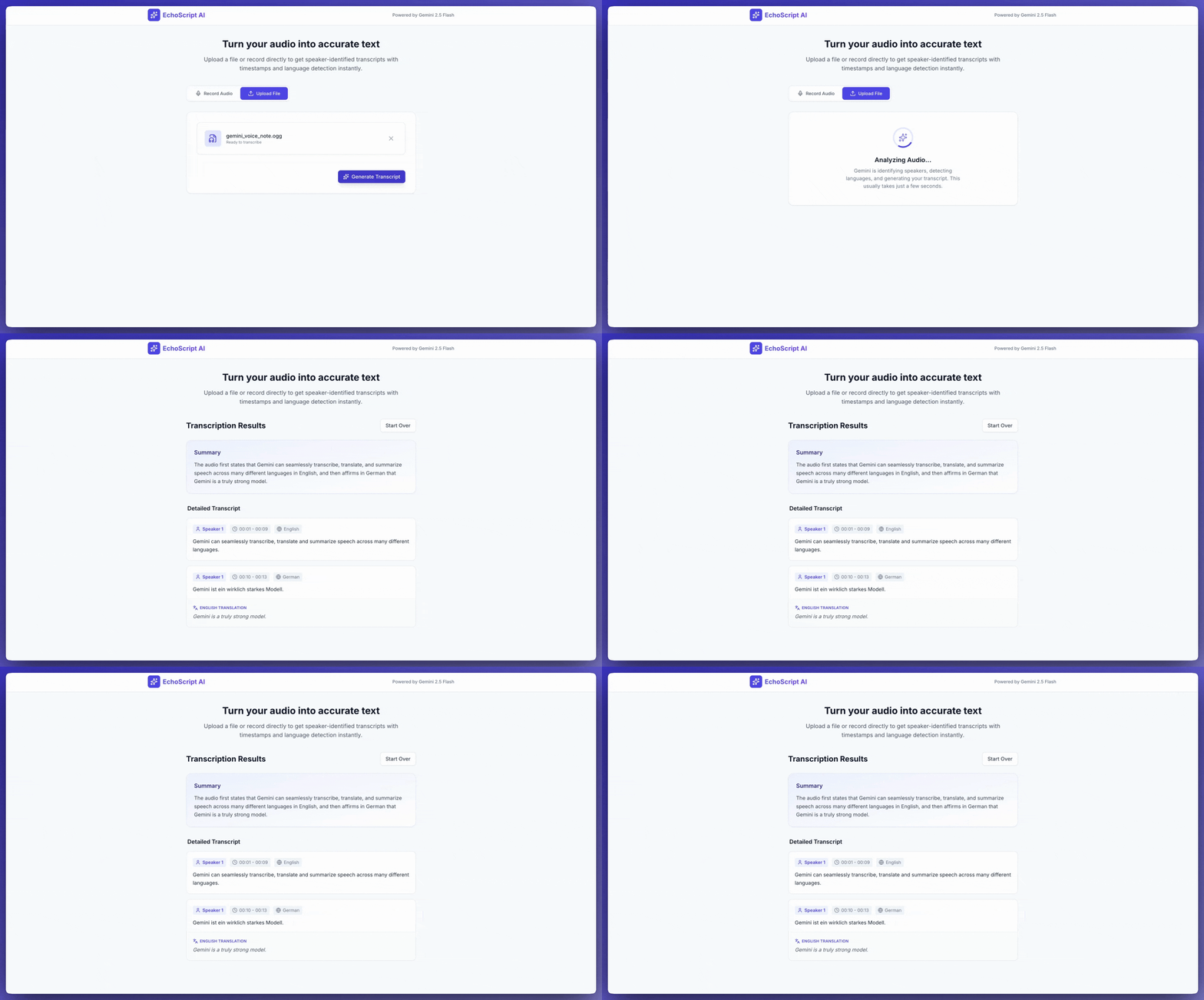
آوانویسی گفتار به نوشتار
این برنامه نمونه نشان میدهد که چگونه بااستفاده از بروندادهای ساختاریافته، به Gemini API پیامواره بدهید تا گفتار را ترانویسی، ترجمه، و خلاصه کند، ازجمله مُهرهای زمان و تشخیص احساسات.
Python
from google import genai
from google.genai import types

client = genai.Client()

YOUTUBE_URL = "https://www.youtube.com/watch?v=ku-N-eS1lgM"

def main():
  prompt = """
    Process the audio file and generate a detailed transcription.

    Requirements:
    1. Provide accurate timestamps for each segment (Format: MM:SS).
    2. Detect the primary language of each segment.
    3. If the segment is in a language different than English, also provide the English translation.
    4. Identify the primary emotion of the speaker in this segment. You MUST choose exactly one of the following: Happy, Sad, Angry, Neutral.
    5. Provide a brief summary of the entire audio at the beginning.
  """

  response = client.models.generate_content(
    model="gemini-3.8-flash",
    contents=[
      types.Content(
        parts=[
          types.Part(
            file_data=types.FileData(
              file_uri=YOUTUBE_URL
            )
          ),
          types.Part(
            text=prompt
          )
        ]
      )
    ],
    config=types.GenerateContentConfig(
      response_mime_type="application/json",
      response_schema=types.Schema(
        type=types.Type.OBJECT,
        properties={
          "summary": types.Schema(
            type=types.Type.STRING,
            description="A concise summary of the audio content.",
          ),
          "segments": types.Schema(
            type=types.Type.ARRAY,
            description="List of transcribed segments with timestamp.",
            items=types.Schema(
              type=types.Type.OBJECT,
              properties={
                "timestamp": types.Schema(type=types.Type.STRING),
                "content": types.Schema(type=types.Type.STRING),
                "language": types.Schema(type=types.Type.STRING),
                "language_code": types.Schema(type=types.Type.STRING),
                "translation": types.Schema(type=types.Type.STRING),
                "emotion": types.Schema(
                  type=types.Type.STRING,
                  enum=["happy", "sad", "angry", "neutral"]
                ),
              },
              required=["timestamp", "content", "language", "language_code", "emotion"],
            ),
          ),
        },
        required=["summary", "segments"],
      ),
    ),
  )

  print(response.text)

if __name__ == "__main__":
  main()
JavaScript
import {
  GoogleGenAI,
  Type
} from "@google/genai";

const ai = new GoogleGenAI({});

const YOUTUBE_URL = "https://www.youtube.com/watch?v=ku-N-eS1lgM";

async function main() {
  const prompt = `
      Process the audio file and generate a detailed transcription.

      Requirements:
      1. Provide accurate timestamps for each segment (Format: MM:SS).
      2. Detect the primary language of each segment.
      3. If the segment is in a language different than English, also provide the English translation.
      4. Identify the primary emotion of the speaker in this segment. You MUST choose exactly one of the following: Happy, Sad, Angry, Neutral.
      5. Provide a brief summary of the entire audio at the beginning.
    `;

  const Emotion = {
    Happy: 'happy',
    Sad: 'sad',
    Angry: 'angry',
    Neutral: 'neutral'
  };

  const response = await ai.models.generateContent({
    model: "gemini-3.8-flash",
    contents: {
      parts: [
        {
          fileData: {
            fileUri: YOUTUBE_URL,
          },
        },
        {
          text: prompt,
        },
      ],
    },
    config: {
      responseMimeType: "application/json",
      responseSchema: {
        type: Type.OBJECT,
        properties: {
          summary: {
            type: Type.STRING,
            description: "A concise summary of the audio content.",
          },
          segments: {
            type: Type.ARRAY,
            description: "List of transcribed segments with timestamp.",
            items: {
              type: Type.OBJECT,
              properties: {
                timestamp: { type: Type.STRING },
                content: { type: Type.STRING },
                language: { type: Type.STRING },
                language_code: { type: Type.STRING },
                translation: { type: Type.STRING },
                emotion: {
                  type: Type.STRING,
                  enum: Object.values(Emotion)
                },
              },
              required: ["timestamp", "content", "language", "language_code", "emotion"],
            },
          },
        },
        required: ["summary", "segments"],
      },
    },
  });
  const json = JSON.parse(response.text);
  console.log(json);
}

await main();
استراحت
curl "https://generativelanguage.googleapis.com/v1beta/models/gemini-3.8-flash:generateContent" \
    -H "x-goog-api-key: $GEMINI_API_KEY" \
    -H 'Content-Type: application/json' \
    -X POST \
    -d '{
      "contents": [
        {
          "parts": [
            {
              "file_data": {
                "file_uri": "https://www.youtube.com/watch?v=ku-N-eS1lgM",
                "mime_type": "video/mp4"
              }
            },
            {
              "text": "Process the audio file and generate a detailed transcription.\n\nRequirements:\n1. Provide accurate timestamps for each segment (Format: MM:SS).\n2. Detect the primary language of each segment.\n3. If the segment is in a language different than English, also provide the English translation.\n4. Identify the primary emotion of the speaker in this segment. You MUST choose exactly one of the following: Happy, Sad, Angry, Neutral.\n5. Provide a brief summary of the entire audio at the beginning."
            }
          ]
        }
      ],
      "generation_config": {
        "response_mime_type": "application/json",
        "response_schema": {
          "type": "OBJECT",
          "properties": {
            "summary": {
              "type": "STRING",
              "description": "A concise summary of the audio content."
            },
            "segments": {
              "type": "ARRAY",
              "description": "List of transcribed segments with timestamp.",
              "items": {
                "type": "OBJECT",
                "properties": {
                  "timestamp": { "type": "STRING" },
                  "content": { "type": "STRING" },
                  "language": { "type": "STRING" },
                  "language_code": { "type": "STRING" },
                  "translation": { "type": "STRING" },
                  "emotion": {
                    "type": "STRING",
                    "enum": ["happy", "sad", "angry", "neutral"]
                  }
                },
                "required": ["timestamp", "content", "language", "language_code", "emotion"]
              }
            }
          },
          "required": ["summary", "segments"]
        }
      }
    }' 2> /dev/null > response.json

cat response.json
echo

jq ".candidates[].content.parts[].text" response.json
میتوانید با یک کلیک به AI Studio Build پیامواره بدهید تا برنامهای درست مثل این برنامه نمونه ترانویسی بسازد.
صدای ورودی
میتوانید دادههای صوتی را به روشهای زیر به Gemini ارائه دهید:
- پیشاز درخواست به
generateContent، فایل صوتی بارگذاری کنید. - دادههای صوتی درونخطی را با درخواست به
generateContentارسال کنید.
برای آشنایی با دیگر روشهای ورودی فایل، به راهنمای روشهای ورودی فایل مراجعه کنید.
بارگذاری کردن فایل صوتی
میتوانید از Files API برای بارگذاری فایل صوتی استفاده کنید. وقتی اندازه کل درخواست (شامل فایلها، پیامواره نوشتاری، دستورالعملهای سیستم، و غیره) بزرگتر از ۲۰ مگابایت است، همیشه از Files API استفاده کنید.
کد زیر یک فایل صوتی را بارگذاری میکند و سپس از آن فایل در تماسی با
generateContent استفاده میکند.
Python
from google import genai

client = genai.Client()

myfile = client.files.upload(file="path/to/sample.mp3")

response = client.models.generate_content(
    model="gemini-3.8-flash", contents=["Describe this audio clip", myfile]
)

print(response.text)
JavaScript
import {
  GoogleGenAI,
  createUserContent,
  createPartFromUri,
} from "@google/genai";

const ai = new GoogleGenAI({});

async function main() {
  const myfile = await ai.files.upload({
    file: "path/to/sample.mp3",
    config: { mimeType: "audio/mp3" },
  });

  const response = await ai.models.generateContent({
    model: "gemini-3.8-flash",
    contents: createUserContent([
      createPartFromUri(myfile.uri, myfile.mimeType),
      "Describe this audio clip",
    ]),
  });
  console.log(response.text);
}

await main();
رفتن
package main

import (
  "context"
  "fmt"
  "os"
  "google.golang.org/genai"
)

func main() {
  ctx := context.Background()
  client, err := genai.NewClient(ctx, nil)
  if err != nil {
      log.Fatal(err)
  }

  localAudioPath := "/path/to/sample.mp3"
  uploadedFile, _ := client.Files.UploadFromPath(
      ctx,
      localAudioPath,
      nil,
  )

  parts := []*genai.Part{
      genai.NewPartFromText("Describe this audio clip"),
      genai.NewPartFromURI(uploadedFile.URI, uploadedFile.MIMEType),
  }
  contents := []*genai.Content{
      genai.NewContentFromParts(parts, genai.RoleUser),
  }

  result, _ := client.Models.GenerateContent(
      ctx,
      "gemini-3.8-flash",
      contents,
      nil,
  )

  fmt.Println(result.Text())
}
استراحت
AUDIO_PATH="path/to/sample.mp3"
MIME_TYPE=$(file -b --mime-type "${AUDIO_PATH}")
NUM_BYTES=$(wc -c < "${AUDIO_PATH}")
DISPLAY_NAME=AUDIO

tmp_header_file=upload-header.tmp

# Initial resumable request defining metadata.
# The upload url is in the response headers dump them to a file.
curl "https://generativelanguage.googleapis.com/upload/v1beta/files" \
  -H "x-goog-api-key: $GEMINI_API_KEY" \
  -D upload-header.tmp \
  -H "X-Goog-Upload-Protocol: resumable" \
  -H "X-Goog-Upload-Command: start" \
  -H "X-Goog-Upload-Header-Content-Length: ${NUM_BYTES}" \
  -H "X-Goog-Upload-Header-Content-Type: ${MIME_TYPE}" \
  -H "Content-Type: application/json" \
  -d "{'file': {'display_name': '${DISPLAY_NAME}'}}" 2> /dev/null

upload_url=$(grep -i "x-goog-upload-url: " "${tmp_header_file}" | cut -d" " -f2 | tr -d "\r")
rm "${tmp_header_file}"

# Upload the actual bytes.
curl "${upload_url}" \
  -H "Content-Length: ${NUM_BYTES}" \
  -H "X-Goog-Upload-Offset: 0" \
  -H "X-Goog-Upload-Command: upload, finalize" \
  --data-binary "@${AUDIO_PATH}" 2> /dev/null > file_info.json

file_uri=$(jq ".file.uri" file_info.json)
echo file_uri=$file_uri

# Now generate content using that file
curl "https://generativelanguage.googleapis.com/v1beta/models/gemini-3.8-flash:generateContent" \
    -H "x-goog-api-key: $GEMINI_API_KEY" \
    -H 'Content-Type: application/json' \
    -X POST \
    -d '{
      "contents": [{
        "parts":[
          {"text": "Describe this audio clip"},
          {"file_data":{"mime_type": "${MIME_TYPE}", "file_uri": '$file_uri'}}]
        }]
      }' 2> /dev/null > response.json

cat response.json
echo

jq ".candidates[].content.parts[].text" response.json
برای کسب اطلاعات بیشتر درباره کار با فایلهای رسانهای، Files API را ببینید.
ارسال دادههای صوتی بهصورت درونخطی
بهجای بارگذاری فایل صوتی، میتوانید دادههای صوتی درونخطی را در درخواست به generateContent ارسال کنید:
Python
from google import genai
from google.genai import types

with open('path/to/small-sample.mp3', 'rb') as f:
    audio_bytes = f.read()

client = genai.Client()
response = client.models.generate_content(
  model='gemini-3.8-flash',
  contents=[
    'Describe this audio clip',
    types.Part.from_bytes(
      data=audio_bytes,
      mime_type='audio/mp3',
    )
  ]
)

print(response.text)
JavaScript
import { GoogleGenAI } from "@google/genai";
import * as fs from "node:fs";

const ai = new GoogleGenAI({});
const base64AudioFile = fs.readFileSync("path/to/small-sample.mp3", {
  encoding: "base64",
});

const contents = [
  { text: "Please summarize the audio." },
  {
    inlineData: {
      mimeType: "audio/mp3",
      data: base64AudioFile,
    },
  },
];

const response = await ai.models.generateContent({
  model: "gemini-3.8-flash",
  contents: contents,
});
console.log(response.text);
رفتن
package main

import (
  "context"
  "fmt"
  "os"
  "google.golang.org/genai"
)

func main() {
  ctx := context.Background()
  client, err := genai.NewClient(ctx, nil)
  if err != nil {
      log.Fatal(err)
  }

  audioBytes, _ := os.ReadFile("/path/to/small-sample.mp3")

  parts := []*genai.Part{
      genai.NewPartFromText("Describe this audio clip"),
    &genai.Part{
      InlineData: &genai.Blob{
        MIMEType: "audio/mp3",
        Data:     audioBytes,
      },
    },
  }
  contents := []*genai.Content{
      genai.NewContentFromParts(parts, genai.RoleUser),
  }

  result, _ := client.Models.GenerateContent(
      ctx,
      "gemini-3.8-flash",
      contents,
      nil,
  )

  fmt.Println(result.Text())
}
چند نکته که باید درباره دادههای صوتی درونخطی بهخاطر داشته باشید:
- حداکثر اندازه درخواست ۲۰ مگابایت است که شامل پیاموارههای نوشتاری، دستورالعملهای سیستم، و فایلهای ارائهشده بهصورت درونخطی میشود. اگر اندازه فایل شما باعث شود اندازه کل درخواست از ۲۰ مگابایت بیشتر شود، از Files API برای بارگذاری فایل صوتی جهت استفاده در درخواست استفاده کنید.
- اگر از یک نمونه صوتی چندین بار استفاده میکنید، کارآمدتر است که یک فایل صوتی بارگذاری کنید.
دریافت ترانویسی
برای دریافت ترانویسی دادههای صوتی، کافی است آن را در پیامواره درخواست کنید:
Python
from google import genai

client = genai.Client()
myfile = client.files.upload(file='path/to/sample.mp3')
prompt = 'Generate a transcript of the speech.'

response = client.models.generate_content(
  model='gemini-3.8-flash',
  contents=[prompt, myfile]
)

print(response.text)
JavaScript
import {
  GoogleGenAI,
  createUserContent,
  createPartFromUri,
} from "@google/genai";

const ai = new GoogleGenAI({});
const myfile = await ai.files.upload({
  file: "path/to/sample.mp3",
  config: { mimeType: "audio/mpeg" },
});

const result = await ai.models.generateContent({
  model: "gemini-3.8-flash",
  contents: createUserContent([
    createPartFromUri(myfile.uri, myfile.mimeType),
    "Generate a transcript of the speech.",
  ]),
});
console.log("result.text=", result.text);
رفتن
package main

import (
  "context"
  "fmt"
  "os"
  "google.golang.org/genai"
)

func main() {
  ctx := context.Background()
  client, err := genai.NewClient(ctx, nil)
  if err != nil {
      log.Fatal(err)
  }

  localAudioPath := "/path/to/sample.mp3"
  uploadedFile, _ := client.Files.UploadFromPath(
      ctx,
      localAudioPath,
      nil,
  )

  parts := []*genai.Part{
      genai.NewPartFromText("Generate a transcript of the speech."),
      genai.NewPartFromURI(uploadedFile.URI, uploadedFile.MIMEType),
  }
  contents := []*genai.Content{
      genai.NewContentFromParts(parts, genai.RoleUser),
  }

  result, _ := client.Models.GenerateContent(
      ctx,
      "gemini-3.8-flash",
      contents,
      nil,
  )

  fmt.Println(result.Text())
}
به مُهرهای زمان مراجعه کنید
میتوانید بااستفاده از مُهرهای زمان به فرم MM:SS به بخشهای خاصی از فایل صوتی ارجاع دهید. برای مثال، پیامواره زیر ترانویسیای را درخواست میکند که
- از ۲ دقیقه و ۳۰ ثانیه از ابتدای فایل شروع میشود.
در دقیقه ۳ و ثانیه ۲۹ از ابتدای فایل بهپایان میرسد.
Python
# Create a prompt containing timestamps.
prompt = "Provide a transcript of the speech from 02:30 to 03:29."
JavaScript
// Create a prompt containing timestamps.
const prompt = "Provide a transcript of the speech from 02:30 to 03:29."
رفتن
package main

import (
  "context"
  "fmt"
  "os"
  "google.golang.org/genai"
)

func main() {
  ctx := context.Background()
  client, err := genai.NewClient(ctx, nil)
  if err != nil {
      log.Fatal(err)
  }

  localAudioPath := "/path/to/sample.mp3"
  uploadedFile, _ := client.Files.UploadFromPath(
      ctx,
      localAudioPath,
      nil,
  )

  parts := []*genai.Part{
      genai.NewPartFromText("Provide a transcript of the speech " +
                            "between the timestamps 02:30 and 03:29."),
      genai.NewPartFromURI(uploadedFile.URI, uploadedFile.MIMEType),
  }
  contents := []*genai.Content{
      genai.NewContentFromParts(parts, genai.RoleUser),
  }

  result, _ := client.Models.GenerateContent(
      ctx,
      "gemini-3.8-flash",
      contents,
      nil,
  )

  fmt.Println(result.Text())
}
شمارش دادهواحدها
برای دریافت تعداد نشانوارهها در فایل صوتی، روش countTokens را فراخوانی کنید. برای مثال:
Python
from google import genai

client = genai.Client()
response = client.models.count_tokens(
  model='gemini-3.8-flash',
  contents=[myfile]
)

print(response)
JavaScript
import {
  GoogleGenAI,
  createUserContent,
  createPartFromUri,
} from "@google/genai";

const ai = new GoogleGenAI({});
const myfile = await ai.files.upload({
  file: "path/to/sample.mp3",
  config: { mimeType: "audio/mpeg" },
});

const countTokensResponse = await ai.models.countTokens({
  model: "gemini-3.8-flash",
  contents: createUserContent([
    createPartFromUri(myfile.uri, myfile.mimeType),
  ]),
});
console.log(countTokensResponse.totalTokens);
رفتن
package main

import (
  "context"
  "fmt"
  "os"
  "google.golang.org/genai"
)

func main() {
  ctx := context.Background()
  client, err := genai.NewClient(ctx, nil)
  if err != nil {
      log.Fatal(err)
  }

  localAudioPath := "/path/to/sample.mp3"
  uploadedFile, _ := client.Files.UploadFromPath(
      ctx,
      localAudioPath,
      nil,
  )

  parts := []*genai.Part{
      genai.NewPartFromURI(uploadedFile.URI, uploadedFile.MIMEType),
  }
  contents := []*genai.Content{
      genai.NewContentFromParts(parts, genai.RoleUser),
  }

  tokens, _ := client.Models.CountTokens(
      ctx,
      "gemini-3.8-flash",
      contents,
      nil,
  )

  fmt.Printf("File %s is %d tokens\n", localAudioPath, tokens.TotalTokens)
}
قالبهای صوتی پشتیبانیشده
Gemini از انواع MIME قالب صوتی زیر پشتیبانی میکند:
- WAV -
audio/wav - MP3 -
audio/mp3 - AIFF -
audio/aiff - AAC -
audio/aac - OGG -
audio/ogg - FLAC -
audio/flac - MPEG -
audio/mpeg - M4A -
audio/m4a - L16 -
audio/l16 - Opus -
audio/opus - ALAW -
audio/alaw - MULAW -
audio/mulaw - WebM -
audio/webm
برای مشاهده فهرست کامل انواع MIME و طرحوارههای پارامتر پشتیبانیشده، به مرجع Interactions API مراجعه کنید.
جزئیات فنی درباره صدا
- Gemini هر ثانیه از صدا را بهعنوان ۳۲ نشانه نمایش میدهد؛ برای مثال، یک دقیقه صدا بهعنوان ۱٬۹۲۰ نشانه نمایش داده میشود.
- Gemini میتواند مؤلفههای غیرگفتاری، مانند آواز پرندگان یا آژیر را «درک کند».
- حداکثر طول پشتیبانیشده برای دادههای صوتی در یک پیامواره ۹٫۵ ساعت است. Gemini تعداد فایلهای صوتی را در یک پیامواره محدود نمیکند؛ اما مجموع طول همه فایلهای صوتی در یک پیامواره نمیتواند از ۹٫۵ ساعت بیشتر باشد.
- Gemini فایلهای صوتی را به وضوح داده ۱۶ کیلوبیت در ثانیه کاهش میدهد.
- اگر منبع صوتی حاوی چندین کانال باشد، Gemini آن کانالها را در یک کانال واحد ترکیب میکند.
قدم بعدی چیست
این راهنما نشان میدهد چگونه در پاسخ به دادههای صوتی، نوشتار تولید کنید. برای اطلاعات بیشتر، منابع زیر را ببینید:
- راهبردهای پیاموارهدهی فایل: Gemini API از پیاموارهدهی با دادههای نوشتاری، تصویری، صوتی، و ویدیویی پشتیبانی میکند که به آن پیاموارهدهی چندحالته نیز میگویند.
- دستورالعملهای سیستم: دستورالعملهای سیستم به شما امکان میدهد رفتار مدل را براساس نیازها و موارد استفاده خاص خود هدایت کنید.
- راهنمای ایمنی: گاهیاوقات مدلهای هوش مصنوعی زایا بروندادهای غیرمنتظرهای تولید میکنند، مثلاً بروندادهایی که نادرست، سوگیرانه، یا توهینآمیز هستند. پسپردازش و ارزیابی انسانی برای محدود کردن خطر آسیب ناشی از چنین بروندادهایی ضروری است.