
Gemini Robotics ER (embodied reasoning) models are vision-language models (VLMs) that let robots perceive and interact with the physical world. They interpret visual data, perform spatial and temporal reasoning, plan multi-step tasks, and orchestrate robots and tools.
Models
The Gemini Robotics ER 2 model is the latest model in Gemini Robotics. It is our updated reasoning model that enable robots to understand their environments precisely. It specializes in embodied reasoning capabilities, such as agentic orchestration of robots (e.g. using VLAs), robot video understanding including progress understanding and success detection, instrument reading, pointing, and spatial reasoning.
The Gemini Robotics ER 2 model introduces two model endpoints:
gemini-robotics-er-2-preview: The standard ER 2 model. Builds on Gemini 3.5 Flash with improved spatial reasoning, video moment finding, video progress classification, multi-robot orchestration, and multi-step tool use.gemini-robotics-er-2-streaming-preview: Optimized for real-time streaming via the Live API. Use this model for low-latency robot agents that process continuous audio and video input.
If you are using Gemini Robotics ER 1.6, upgrade to Gemini Robotics ER 2 by replacing
model="gemini-robotics-er-1.6-preview" with
model="gemini-robotics-er-2-preview" or
model="gemini-robotics-er-2-streaming-preview" in your API calls. Note that
the Gemini Robotics ER 1.6 model will be shut down at the
end of August.
Try Gemini Robotics ER 2 in Google AI Studio
Robotics capabilities
Gemini Robotics ER supports a range of embodied reasoning capabilities. Select a capability to learn more:
| Capability | Description | Guide |
|---|---|---|
| Spatial reasoning | Point to objects, track them in video, detect with bounding boxes, plan trajectories. | Spatial reasoning |
| Agentic vision | Use code execution to enhance other capabilities by leveraging image manipulation tools. | Agentic vision |
| Task orchestration | Combine spatial reasoning with custom robot APIs to complete long-horizon tasks. | Task orchestration |
| Streaming (Gemini Robotics ER 2 Streaming endpoint only) | Bidirectional streaming for real-time robot agents with low-latency function calling. | Streaming for robotics |
| Video progress (Gemini Robotics ER 2 only) | Moment finding and progress classification from continuous video feeds. | Video understanding |
Getting started
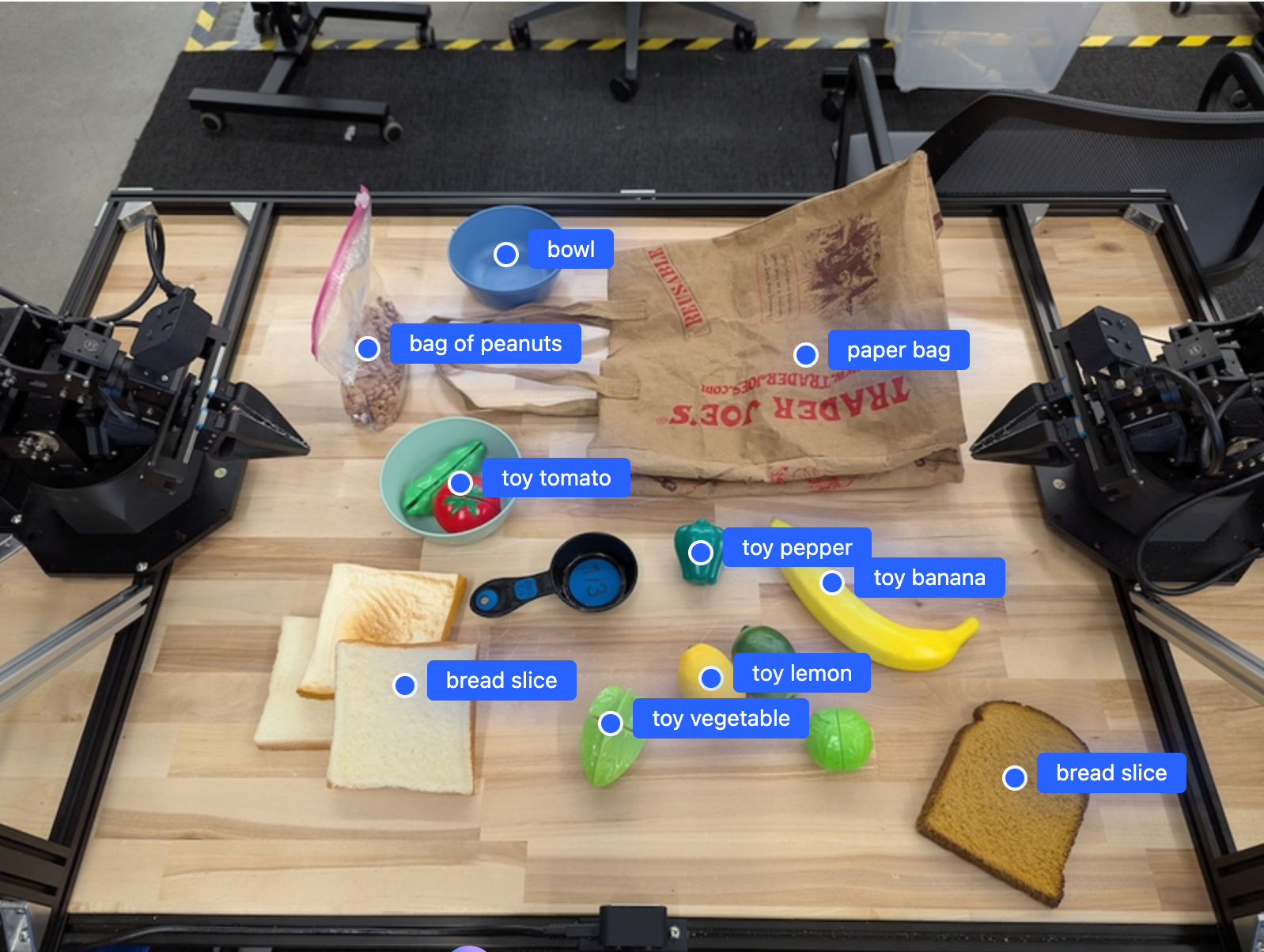
The following example finds objects in an image and returns their normalized 2D coordinates and labels. You can pass this output directly to a robotics API or a VLA model to generate robot actions.
Python
from google import genai
from google.genai import types

PROMPT = """
          Point to no more than 10 items in the image. The label returned
          should be an identifying name for the object detected.
          The answer should follow the json format: [{"point": <point>,
          "label": <label1>}, ...]. The points are in [y, x] format
          normalized to 0-1000.
        """
client = genai.Client()

uploaded_file = client.files.upload(file="my-image.png")

response = client.models.generate_content(
    model="gemini-robotics-er-2-preview",
    contents=[
        types.Part.from_uri(
            file_uri=uploaded_file.uri,
            mime_type=uploaded_file.mime_type
        ),
        PROMPT
    ],
    config=types.GenerateContentConfig(
        thinking_config=types.ThinkingConfig(thinking_level="high")
    ),
)

print(response.text)
REST
# First, ensure you have the image file locally.
# Encode the image to base64
IMAGE_BASE64=$(base64 -w 0 my-image.png)

curl -X POST \
  "https://generativelanguage.googleapis.com/v1beta/models/gemini-robotics-er-2-preview:generateContent" \
  -H "x-goog-api-key: $GEMINI_API_KEY" \
  -H "Content-Type: application/json" \
  -d '{
    "contents": [
      {
        "parts": [
          {
            "inlineData": {
              "mimeType": "image/png",
              "data": "'"${IMAGE_BASE64}"'"
            }
          },
          {
            "text": "Point to no more than 10 items in the image. The label returned should be an identifying name for the object detected. The answer should follow the json format: [{\"point\": [y, x], \"label\": <label1>}, ...]. The points are in [y, x] format normalized to 0-1000."
          }
        ]
      }
    ],
    "generationConfig": {
      "thinkingConfig": {
        "thinkingLevel": "high"
      }
    }
  }'
The output will be a JSON array containing objects, each with a point
(normalized [y, x] coordinates) and a label identifying the object.
JSON
[
  {"point": [376, 508], "label": "small banana"},
  {"point": [287, 609], "label": "larger banana"},
  {"point": [223, 303], "label": "pink starfruit"},
  {"point": [435, 172], "label": "paper bag"},
  {"point": [270, 786], "label": "green plastic bowl"},
  {"point": [488, 775], "label": "metal measuring cup"},
  {"point": [673, 580], "label": "dark blue bowl"},
  {"point": [471, 353], "label": "light blue bowl"},
  {"point": [492, 497], "label": "bread"},
  {"point": [525, 429], "label": "lime"}
]
The following image is an example of how these points can be displayed:
How it works
Gemini Robotics ER takes image, video, or audio input with natural language prompts. It identifies objects, reasons about scene context and spatial relationships, and returns structured output like coordinates or bounding boxes.
Gemini Robotics ER is also agentic: it breaks complex tasks into sub-tasks and executes them by calling your robot functions or running generated code. For example, "put the apple in the bowl" becomes a sequence of locate, grasp, and place steps.
See Function calling for details on how Gemini executes tool calls.
Safety
While Gemini Robotics ER was built with safety in mind, it is your responsibility to maintain a safe environment around the robot. Generative AI models can make mistakes, and physical robots can cause damage. To learn more, visit the Google DeepMind robotics safety page.
Best practices
Use plain, natural language. Describe what you want the robot to do as you would to a person. If a term isn't working, try a common synonym.
Optimize visual input. Crop or zoom into small or unclear objects before sending the image. Lighting and low color contrast can affect detection.
Break complex tasks into steps. Send each step as a separate prompt to keep the model focused and improve accuracy.
Query multiple times and average results for high-precision tasks. This consensus approach reduces variance on spatial outputs.
Limitations
Consider the following limitations when developing with Gemini Robotics ER:
- API key restrictions: The Gemini API does not accept requests from
unrestricted API keys and returns a
403 Forbiddenerror. Secure your API key by adding restrictions in AI Studio. See Secure unrestricted API keys for details. - Latency vs performance: Complex queries, high-resolution inputs or high thinking levels can lead to increased processing times. For thinking level use medium for a good balance between latency and performance.
- Hallucinations: Like all large language models, Gemini Robotics ER models can occasionally "hallucinate" or provide incorrect information, especially for ambiguous prompts or out-of-distribution inputs.
- Dependence on prompt quality: Output quality depends on the clarity of the input prompt. Use specific, well-structured prompts.
- Computational cost: Running the model, especially with video inputs or
high
thinking_budget, consumes computational resources and incurs costs. See the Thinking page for more details. - Input types: See the following topics for details on limitations for each mode.
Privacy Notice
You acknowledge that the models referenced in this document (the "Robotics Models") leverage video and audio data in order to operate and move your hardware in accordance with your instructions. You therefore may operate the Robotics Models such that data from identifiable persons, such as voice, imagery, and likeness data ("Personal Data"), will be collected by the Robotics Models. If you elect to operate the Robotics Models in a manner that collects Personal Data, you agree that you will not permit any identifiable persons to interact with, or be present in the area surrounding, the Robotics Models, unless and until such identifiable persons have been sufficiently notified of and consented to the fact that their Personal Data may be provided to and used by Google as outlined in the Gemini API Additional Terms of Service found at https://ai.google.dev/gemini-api/terms (the "Terms"), including in accordance with the section entitled "How Google Uses Your Data". You will ensure that such notice permits the collection and use of Personal Data as outlined in the Terms, and you will use commercially reasonable efforts to minimize the collection and distribution of Personal Data by using techniques such as face blurring and operating the Robotics Models in areas not containing identifiable persons to the extent practicable.
Pricing
For detailed information on pricing and available regions, refer to the pricing page.
Model endpoints
Gemini Robotics ER 2 Preview
| Property | Description |
|---|---|
| Model code | gemini-robotics-er-2-preview |
| Supported data types |
Inputs Text, images, video, audio Output Text |
| Token limits[*] |
Input token limit 131,072 Output token limit 65,536 |
| Capabilities | Not supported Supported Supported Supported Supported Supported Supported Not supported Not supported Supported Supported Supported Supported |
| Consumption options |
Supported Not supported Not supported |
| Versions |
|
| Latest update | July 2026 |
| Model card | Model card |
Gemini Robotics ER 2 Streaming Preview
| Property | Description |
|---|---|
| Model code | gemini-robotics-er-2-streaming-preview |
| Supported data types |
Inputs Text, images, video, audio Output Text |
| Token limits[*] |
Input token limit 131,072 Output token limit 65,536 |
| Capabilities | Not supported Not supported Not supported Not supported Not supported Supported Not supported Not supported Supported Supported Not supported Supported Not supported |
| Consumption options |
Not supported Not supported Not supported |
| Versions |
|
| Latest update | July 2026 |
| Model card | Model card |
Gemini Robotics ER 1.6 Preview
| Property | Description |
|---|---|
| Model code | gemini-robotics-er-1.6-preview |
| Supported data types |
Inputs Text, images, video, audio Output Text |
| Token limits[*] |
Input token limit 131,072 Output token limit 65,536 |
| Capabilities | Not supported Supported Supported Supported Supported Supported Supported Not supported Not supported Supported Supported Supported Supported |
| Consumption options |
Supported Not supported Not supported |
| Versions |
|
| Latest update | December 2025 |
| Knowledge cutoff | January 2025 |
What's next
- Spatial reasoning — pointing, tracking, bounding boxes, trajectories.
- Agentic capabilities — code execution, instrument reading, image annotation.
- Task orchestration — long-horizon tasks with custom robot APIs.
- Robotics with streaming — real-time bidirectional streaming (Gemini Robotics ER 2 only).
- Video understanding — moment finding and progress classification (Gemini Robotics ER 2 only).
- Google DeepMind robotics safety — safety research behind the model family.