

การเชื่อมต่อแหล่งข้อมูลกับ Google Maps จะผสานรวมความสามารถในการสร้างเนื้อหาของ Gemini กับข้อมูลที่สมบูรณ์ แม่นยำ และเป็นปัจจุบันของ Google Maps ฟีเจอร์นี้ช่วยให้นักพัฒนาแอปสามารถผสานรวมฟังก์ชันการทำงานที่รับรู้ตำแหน่งลงในแอปพลิเคชันได้อย่างง่ายดาย เมื่อคำค้นหาของผู้ใช้มีบริบทที่เกี่ยวข้องกับข้อมูล Maps โมเดล Gemini จะใช้ประโยชน์จาก Google Maps เพื่อให้คำตอบที่แม่นยำตามข้อเท็จจริงและเป็นปัจจุบันซึ่งเกี่ยวข้องกับสถานที่ที่ผู้ใช้ระบุหรือพื้นที่ทั่วไป
- คำตอบที่แม่นยำและรับรู้ตำแหน่ง: ใช้ประโยชน์จากข้อมูลที่ครอบคลุมและเป็นปัจจุบันของ Google Maps สำหรับคำค้นหาที่เฉพาะเจาะจงทางภูมิศาสตร์
- การปรับเปลี่ยนในแบบของผู้ใช้ที่ดียิ่งขึ้น: ปรับแต่งคำแนะนำและข้อมูลตามสถานที่ที่ผู้ใช้ระบุ
เริ่มต้นใช้งาน
ตัวอย่างนี้แสดงวิธีผสานรวมการเชื่อมต่อแหล่งข้อมูลกับ Google Maps เข้ากับแอปพลิเคชันเพื่อให้คำตอบที่แม่นยำและรับรู้ตำแหน่งสำหรับคำค้นหาของผู้ใช้ พรอมต์จะขอคำแนะนำในพื้นที่พร้อมสถานที่ของผู้ใช้ (ไม่บังคับ) ซึ่งช่วยให้โมเดล Gemini ใช้ข้อมูล Google Maps ได้
Python
from google import genai
from google.genai import types

client = genai.Client()

prompt = "What are the best Italian restaurants within a 15-minute walk from here?"

response = client.models.generate_content(
    model='gemini-3.5-flash',
    contents=prompt,
    config=types.GenerateContentConfig(
        # Turn on grounding with Google Maps
        tools=[types.Tool(google_maps=types.GoogleMaps())],
        # Optionally provide the relevant location context (this is in Los Angeles)
        tool_config=types.ToolConfig(retrieval_config=types.RetrievalConfig(
            lat_lng=types.LatLng(
                latitude=34.050481, longitude=-118.248526))),
    ),
)

print("Generated Response:")
print(response.text)

if grounding := response.candidates[0].grounding_metadata:
  if grounding.grounding_chunks:
    print('-' * 40)
    print("Sources:")
    for chunk in grounding.grounding_chunks:
      print(f'- [{chunk.maps.title}]({chunk.maps.uri})')
JavaScript
import { GoogleGenAI } from "@google/genai";

const ai = new GoogleGenAI({});

async function generateContentWithMapsGrounding() {
  const response = await ai.models.generateContent({
    model: "gemini-3.5-flash",
    contents: "What are the best Italian restaurants within a 15-minute walk from here?",
    config: {
      // Turn on grounding with Google Maps
      tools: [{ googleMaps: {} }],
      toolConfig: {
        retrievalConfig: {
          // Optionally provide the relevant location context (this is in Los Angeles)
          latLng: {
            latitude: 34.050481,
            longitude: -118.248526,
          },
        },
      },
    },
  });

  console.log("Generated Response:");
  console.log(response.text);

  const grounding = response.candidates[0]?.groundingMetadata;
  if (grounding?.groundingChunks) {
    console.log("-".repeat(40));
    console.log("Sources:");
    for (const chunk of grounding.groundingChunks) {
      if (chunk.maps) {
        console.log(`- [${chunk.maps.title}](${chunk.maps.uri})`);
      }
    }
  }
}

generateContentWithMapsGrounding();
REST
curl -X POST 'https://generativelanguage.googleapis.com/v1beta/models/gemini-3.5-flash:generateContent' \
  -H 'Content-Type: application/json' \
  -H "x-goog-api-key: ${GEMINI_API_KEY}" \
  -d '{
  "contents": [{
    "role": "user",
    "parts": [{
      "text": "What are the best Italian restaurants within a 15-minute walk from here?"
    }]
  }],
  "tools": [{"googleMaps": {}}],
  "toolConfig": {
    "retrievalConfig": {
      "latLng": {"latitude": 34.050481, "longitude": -118.248526}
    }
  }
}'
วิธีการทำงานของการเชื่อมต่อแหล่งข้อมูลกับ Google Maps
การเชื่อมต่อแหล่งข้อมูลกับ Google Maps จะผสานรวม Gemini API กับระบบนิเวศทางภูมิศาสตร์ของ Google โดยใช้ Maps API เป็นแหล่งข้อมูล เมื่อคำค้นหาของผู้ใช้มีบริบททางภูมิศาสตร์ โมเดล Gemini จะเรียกใช้เครื่องมือการเชื่อมต่อแหล่งข้อมูลกับ Google Maps ได้ จากนั้นโมเดลจะสร้างคำตอบโดยอิงตามข้อมูล Google Maps ที่เกี่ยวข้องกับสถานที่ที่ระบุ
โดยปกติกระบวนการจะมีลักษณะดังนี้
- คำค้นหาของผู้ใช้: ผู้ใช้ส่งคำค้นหาไปยังแอปพลิเคชันของคุณ ซึ่งอาจมีบริบททางภูมิศาสตร์ (เช่น "ร้านกาแฟใกล้ฉัน" "พิพิธภัณฑ์ในซานฟรานซิสโก")
- การเรียกใช้เครื่องมือ: โมเดล Gemini จะเรียกใช้เครื่องมือการเชื่อมต่อแหล่งข้อมูลกับ Google Maps เมื่อรับรู้ถึงความตั้งใจทางภูมิศาสตร์ คุณจะระบุ
latitudeและlongitudeของผู้ใช้ให้กับเครื่องมือนี้หรือไม่ก็ได้ เครื่องมือนี้เป็นเครื่องมือค้นหาข้อความและทำงานคล้ายกับการค้นหาใน Maps โดยคำค้นหาในพื้นที่ ("ใกล้ฉัน") จะใช้พิกัด ส่วนคำค้นหาที่เฉพาะเจาะจงหรือไม่ใช่ในพื้นที่นั้นมีแนวโน้มที่จะไม่ได้รับผลกระทบจากสถานที่ที่ระบุ - การดึงข้อมูล: บริการการเชื่อมต่อแหล่งข้อมูลกับ Google Maps จะค้นหาข้อมูลที่เกี่ยวข้องจาก Google Maps (เช่น สถานที่ รีวิว รูปภาพ ที่อยู่ เวลาทำการ)
- การสร้างเนื้อหาโดยอิงตามแหล่งข้อมูล: ระบบจะใช้ข้อมูล Maps ที่ดึงมาเพื่อแจ้งคำตอบของโมเดล Gemini ซึ่งจะช่วยให้มั่นใจได้ถึงความถูกต้องตามข้อเท็จจริงและความเกี่ยวข้อง
- คำตอบ: โมเดลจะแสดงคำตอบเป็นข้อความ ซึ่งรวมถึงการอ้างอิงแหล่งที่มาของ Google Maps
เหตุผลและเวลาที่ควรใช้การเชื่อมต่อแหล่งข้อมูลกับ Google Maps
การเชื่อมต่อแหล่งข้อมูลกับ Google Maps เหมาะอย่างยิ่งสำหรับแอปพลิเคชันที่ต้องใช้ข้อมูลที่แม่นยำ เป็นปัจจุบัน และเฉพาะเจาะจงสถานที่ ฟีเจอร์นี้ช่วยยกระดับประสบการณ์ของผู้ใช้ด้วยการแสดงเนื้อหาที่เกี่ยวข้องและปรับเปลี่ยนในแบบของผู้ใช้ ซึ่งได้รับการสนับสนุนจากฐานข้อมูลที่ครอบคลุมของ Google Maps ที่มีสถานที่มากกว่า 250 ล้านแห่งทั่วโลก
คุณควรใช้การเชื่อมต่อแหล่งข้อมูลกับ Google Maps เมื่อแอปพลิเคชันต้องทำสิ่งต่อไปนี้
- ให้คำตอบที่สมบูรณ์และแม่นยำสำหรับคำถามที่เฉพาะเจาะจงทางภูมิศาสตร์
- สร้างเครื่องมือวางแผนการเดินทางและไกด์นำเที่ยวในพื้นที่แบบสนทนา
- แนะนำจุดที่น่าสนใจตามสถานที่และความต้องการของผู้ใช้ เช่น ร้านอาหารหรือร้านค้า
- สร้างประสบการณ์ที่รับรู้ตำแหน่งสำหรับบริการโซเชียลมีเดีย บริการค้าปลีก หรือบริการจัดส่งอาหาร
การเชื่อมต่อแหล่งข้อมูลกับ Google Maps เหมาะอย่างยิ่งสำหรับกรณีการใช้งานที่ระยะทางและข้อมูลข้อเท็จจริงปัจจุบันมีความสำคัญอย่างยิ่ง เช่น การค้นหา "ร้านกาแฟที่ดีที่สุดใกล้ฉัน" หรือการดูเส้นทาง
เมธอดและพารามิเตอร์ของ API
การเชื่อมต่อแหล่งข้อมูลกับ Google Maps จะแสดงผ่าน Gemini API เป็นเครื่องมือภายใน
เมธอด generateContent คุณเปิดใช้และกำหนดค่า
การเชื่อมต่อแหล่งข้อมูลกับ Google Maps ได้โดยการใส่
googleMaps ออบเจ็กต์ในพารามิเตอร์ tools ของคำขอ
JSON
{
  "contents": [{
    "parts": [
      {"text": "Restaurants near Times Square."}
    ]
  }],
  "tools":  { "googleMaps": {} }
}
นอกจากนี้ เครื่องมือยังรองรับการส่งสถานที่ตามบริบทเป็น toolConfig ด้วย
JSON
{
  "contents": [{
    "parts": [
      {"text": "Restaurants near here."}
    ]
  }],
  "tools":  { "googleMaps": {} },
  "toolConfig":  {
    "retrievalConfig": {
      "latLng": {
        "latitude": 40.758896,
        "longitude": -73.985130
      }
    }
  }
}
ทำความเข้าใจคำตอบการเชื่อมต่อแหล่งข้อมูล
เมื่อคำตอบเชื่อมต่อแหล่งข้อมูลกับข้อมูล Google Maps ได้สำเร็จ คำตอบจะมีฟิลด์ groundingMetadata
ข้อมูลที่มีโครงสร้างนี้มีความสำคัญอย่างยิ่งต่อการยืนยันการกล่าวอ้างและการสร้างประสบการณ์การอ้างอิงที่สมบูรณ์ในแอปพลิเคชัน รวมถึงการปฏิบัติตามข้อกำหนดในการใช้งานบริการ
JSON
{
  "candidates": [
    {
      "content": {
        "parts": [
          {
            "text": "CanteenM is an American restaurant with..."
          }
        ],
        "role": "model"
      },
      "groundingMetadata": {
        "groundingChunks": [
          {
            "maps": {
              "uri": "https://maps.google.com/?cid=13100894621228039586",
              "title": "Heaven on 7th Marketplace",
              "placeId": "places/ChIJ0-zA1vBZwokRon0fGj-6z7U"
            },
            // repeated ...
          }
        ],
        "groundingSupports": [
          {
            "segment": {
              "startIndex": 0,
              "endIndex": 79,
              "text": "CanteenM is an American restaurant with a 4.6-star rating and is open 24 hours."
            },
            "groundingChunkIndices": [0]
          },
          // repeated ...
        ],
        "webSearchQueries": [
          "restaurants near me"
        ]
      }
    }
  ]
}
Gemini API จะแสดงข้อมูลต่อไปนี้พร้อมกับ
groundingMetadata
groundingChunks: อาร์เรย์ของออบเจ็กต์ที่มีแหล่งที่มาmaps(uri,placeIdและtitle)groundingSupports: อาร์เรย์ของ Chunk เพื่อเชื่อมต่อข้อความคำตอบของโมเดลกับแหล่งที่มาในgroundingChunksChunk แต่ละรายการจะลิงก์ช่วงข้อความ (กำหนดโดยstartIndexและendIndex) กับgroundingChunkIndicesอย่างน้อย 1 รายการ ซึ่งเป็นกุญแจสำคัญในการสร้างการอ้างอิงแบบอินไลน์
กรณีการใช้งาน
การเชื่อมต่อแหล่งข้อมูลกับ Google Maps รองรับกรณีการใช้งานที่รับรู้ตำแหน่งได้หลากหลาย ตัวอย่างต่อไปนี้แสดงให้เห็นว่าพรอมต์และพารามิเตอร์ต่างๆ สามารถใช้ประโยชน์จากการเชื่อมต่อแหล่งข้อมูลกับ Google Maps ได้อย่างไร ข้อมูลในผลการค้นหาที่เชื่อมต่อแหล่งข้อมูลกับ Google Maps อาจแตกต่างจากสภาพจริง
การจัดการคำถามที่เฉพาะเจาะจงสถานที่
ถามคำถามโดยละเอียดเกี่ยวกับสถานที่ที่เฉพาะเจาะจงเพื่อรับคำตอบโดยอิงตามรีวิวของผู้ใช้ Google และข้อมูล Maps อื่นๆ
Python
from google import genai
from google.genai import types

client = genai.Client()

prompt = "Is there a cafe near the corner of 1st and Main that has outdoor seating?"

response = client.models.generate_content(
    model='gemini-3.5-flash',
    contents=prompt,
    config=types.GenerateContentConfig(
        # Turn on the Maps tool
        tools=[types.Tool(google_maps=types.GoogleMaps())],

        # Provide the relevant location context (this is in Los Angeles)
        tool_config=types.ToolConfig(retrieval_config=types.RetrievalConfig(
            lat_lng=types.LatLng(
                latitude=34.050481, longitude=-118.248526))),
    ),
)

print("Generated Response:")
print(response.text)

if grounding := response.candidates[0].grounding_metadata:
  if chunks := grounding.grounding_chunks:
    print('-' * 40)
    print("Sources:")
    for chunk in chunks:
      print(f'- [{chunk.maps.title}]({chunk.maps.uri})')
  ```
Javascript
import { GoogleGenAI } from '@google/genai';

const ai = new GoogleGenAI({});

async function run() {
  const prompt = "Is there a cafe near the corner of 1st and Main that has outdoor seating?";

  const response = await ai.models.generateContent({
    model: 'gemini-3.5-flash',
    contents: prompt,
    config: {
      // Turn on the Maps tool
      tools: [{googleMaps: {}}],
      // Provide the relevant location context (this is in Los Angeles)
      toolConfig: {
        retrievalConfig: {
          latLng: {
            latitude: 34.050481,
            longitude: -118.248526
          }
        }
      }
    },
  });

  console.log("Generated Response:");
  console.log(response.text);

  const chunks = response.candidates[0].groundingMetadata?.groundingChunks;
  if (chunks) {
    console.log('-'.repeat(40));
    console.log("Sources:");
    for (const chunk of chunks) {
      if (chunk.maps) {
        console.log(`- [${chunk.maps.title}](${chunk.maps.uri})`);
      }
    }
  }
}

run();
REST
curl -X POST 'https://generativelanguage.googleapis.com/v1beta/models/gemini-3.5-flash:generateContent' \
  -H 'Content-Type: application/json' \
  -H "x-goog-api-key: ${GEMINI_API_KEY}" \
  -d '{
  "contents": [{
    "role": "user",
    "parts": [{
      "text": "Is there a cafe near the corner of 1st and Main that has outdoor seating?"
    }]
  }],
  "tools": [{"googleMaps": {}}],
  "toolConfig": {
    "retrievalConfig": {
      "latLng": {"latitude": 34.050481, "longitude": -118.248526}
    }
  }
}'
การปรับเปลี่ยนในแบบของผู้ใช้ตามสถานที่
รับคำแนะนำที่ปรับให้เหมาะกับความต้องการของผู้ใช้และพื้นที่ทางภูมิศาสตร์ที่เฉพาะเจาะจง
Python
from google import genai
from google.genai import types

client = genai.Client()

prompt = "Which family-friendly restaurants near here have the best playground reviews?"

response = client.models.generate_content(
    model='gemini-3.5-flash',
    contents=prompt,
    config=types.GenerateContentConfig(
      tools=[types.Tool(google_maps=types.GoogleMaps())],
      tool_config=types.ToolConfig(retrieval_config=types.RetrievalConfig(
          # Provide the location as context; this is Austin, TX.
          lat_lng=types.LatLng(
              latitude=30.2672, longitude=-97.7431))),
    ),
)

print("Generated Response:")
print(response.text)

if grounding := response.candidates[0].grounding_metadata:
  if chunks := grounding.grounding_chunks:
    print('-' * 40)
    print("Sources:")
    for chunk in chunks:
      print(f'- [{chunk.maps.title}]({chunk.maps.uri})')
Javascript
import { GoogleGenAI } from '@google/genai';

const ai = new GoogleGenAI({});

async function run() {
  const prompt = "Which family-friendly restaurants near here have the best playground reviews?";

  const response = await ai.models.generateContent({
    model: 'gemini-3.5-flash',
    contents: prompt,
    config: {
      tools: [{googleMaps: {}}],
      toolConfig: {
        retrievalConfig: {
          // Provide the location as context; this is Austin, TX.
          latLng: {
            latitude: 30.2672,
            longitude: -97.7431
          }
        }
      }
    },
  });

  console.log("Generated Response:");
  console.log(response.text);

  const chunks = response.candidates[0].groundingMetadata?.groundingChunks;
  if (chunks) {
    console.log('-'.repeat(40));
    console.log("Sources:");
    for (const chunk of chunks) {
      if (chunk.maps) {
        console.log(`- [${chunk.maps.title}](${chunk.maps.uri})`);
      }
    }
  }
}

run();
REST
curl -X POST 'https://generativelanguage.googleapis.com/v1beta/models/gemini-3.5-flash:generateContent' \
  -H 'Content-Type: application/json' \
  -H "x-goog-api-key: ${GEMINI_API_KEY}" \
  -d '{
  "contents": [{
    "role": "user",
    "parts": [{
      "text": "Which family-friendly restaurants near here have the best playground reviews?"
    }],
  }],
  "tools": [{"googleMaps": {}}],
  "toolConfig": {
    "retrievalConfig": {
      "latLng": {"latitude": 30.2672, "longitude": -97.7431}
    }
  }
}'
การช่วยเหลือในการวางแผนการเดินทาง
สร้างแผนการเดินทางหลายวันพร้อมเส้นทางและข้อมูลเกี่ยวกับสถานที่ต่างๆ ซึ่งเหมาะสำหรับแอปพลิเคชันการเดินทาง
Python
from google import genai
from google.genai import types

client = genai.Client()

prompt = "Plan a day in San Francisco for me. I want to see the Golden Gate Bridge, visit a museum, and have a nice dinner."

response = client.models.generate_content(
    model='gemini-3.5-flash',
    contents=prompt,
    config=types.GenerateContentConfig(
      tools=[types.Tool(google_maps=types.GoogleMaps())],
      tool_config=types.ToolConfig(retrieval_config=types.RetrievalConfig(
          # Provide the location as context, this is in San Francisco.
          lat_lng=types.LatLng(
              latitude=37.78193, longitude=-122.40476))),
    ),
)

print("Generated Response:")
print(response.text)

if grounding := response.candidates[0].grounding_metadata:
  if grounding.grounding_chunks:
    print('-' * 40)
    print("Sources:")
    for chunk in grounding.grounding_chunks:
      print(f'- [{chunk.maps.title}]({chunk.maps.uri})')
Javascript
import { GoogleGenAI } from '@google/genai';

const ai = new GoogleGenAI({});

async function run() {
  const prompt = "Plan a day in San Francisco for me. I want to see the Golden Gate Bridge, visit a museum, and have a nice dinner.";

  const response = await ai.models.generateContent({
    model: 'gemini-3.5-flash',
    contents: prompt,
    config: {
      tools: [{googleMaps: {}}],
      toolConfig: {
        retrievalConfig: {
          // Provide the location as context, this is in San Francisco.
          latLng: {
            latitude: 37.78193,
            longitude: -122.40476
          }
        }
      }
    },
  });

  console.log("Generated Response:");
  console.log(response.text);

  const groundingMetadata = response.candidates[0]?.groundingMetadata;
  if (groundingMetadata) {
    if (groundingMetadata.groundingChunks) {
      console.log('-'.repeat(40));
      console.log("Sources:");
      for (const chunk of groundingMetadata.groundingChunks) {
        if (chunk.maps) {
          console.log(`- [${chunk.maps.title}](${chunk.maps.uri})`);
        }
      }
    }
  }
}

run();
REST
curl -X POST 'https://generativelanguage.googleapis.com/v1beta/models/gemini-3.5-flash:generateContent' \
  -H 'Content-Type: application/json' \
  -H "x-goog-api-key: ${GEMINI_API_KEY}" \
  -d '{
  "contents": [{
    "role": "user",
    "parts": [{
      "text": "Plan a day in San Francisco for me. I want to see the Golden Gate Bridge, visit a museum, and have a nice dinner."
    }]
  }],
  "tools": [{"googleMaps": {}}],
  "toolConfig": {
    "retrievalConfig": {
    "latLng": {"latitude": 37.78193, "longitude": -122.40476}
  }
  }
}'
ข้อกำหนดในการใช้งานบริการ
ส่วนนี้อธิบายข้อกำหนดในการใช้งานบริการสำหรับการเชื่อมต่อแหล่งข้อมูลกับ Google Maps
แจ้งให้ผู้ใช้ทราบเกี่ยวกับการใช้แหล่งที่มาของ Google Maps
ผลการค้นหาที่เชื่อมต่อแหล่งข้อมูลกับ Google Maps แต่ละรายการจะมีแหล่งที่มาใน groundingChunks ที่สนับสนุนคำตอบแต่ละรายการ ระบบจะแสดงข้อมูลเมตาต่อไปนี้ด้วย
- URI ต้นทาง
- title
- รหัส
เมื่อแสดงผลการค้นหาจากการเชื่อมต่อแหล่งข้อมูลกับ Google Maps คุณต้องระบุแหล่งที่มาของ Google Maps ที่เกี่ยวข้องและแจ้งให้ผู้ใช้ทราบถึงสิ่งต่อไปนี้
- แหล่งที่มาของ Google Maps ต้องอยู่ต่อจากเนื้อหาที่สร้างขึ้นซึ่งแหล่งที่มาสนับสนุนทันที เนื้อหาที่สร้างขึ้นนี้เรียกอีกอย่างว่าผลการค้นหาที่เชื่อมต่อแหล่งข้อมูลกับ Google Maps
- แหล่งที่มาของ Google Maps ต้องดูได้ภายใน 1 การโต้ตอบของผู้ใช้
แสดงแหล่งที่มาของ Google Maps พร้อมลิงก์ Google Maps
สำหรับแหล่งที่มาแต่ละรายการใน groundingChunks และใน grounding_chunks.maps.placeAnswerSources.reviewSnippets คุณต้องสร้างการแสดงตัวอย่างลิงก์ตามข้อกำหนดต่อไปนี้
- ระบุแหล่งที่มาแต่ละรายการเป็น Google Maps ตามหลักเกณฑ์การระบุแหล่งที่มาด้วยข้อความของ Google Maps
- แสดงชื่อแหล่งที่มาที่ระบุไว้ในคำตอบ
- ลิงก์ไปยังแหล่งที่มาโดยใช้
uriหรือgoogleMapsUriจากคำตอบ
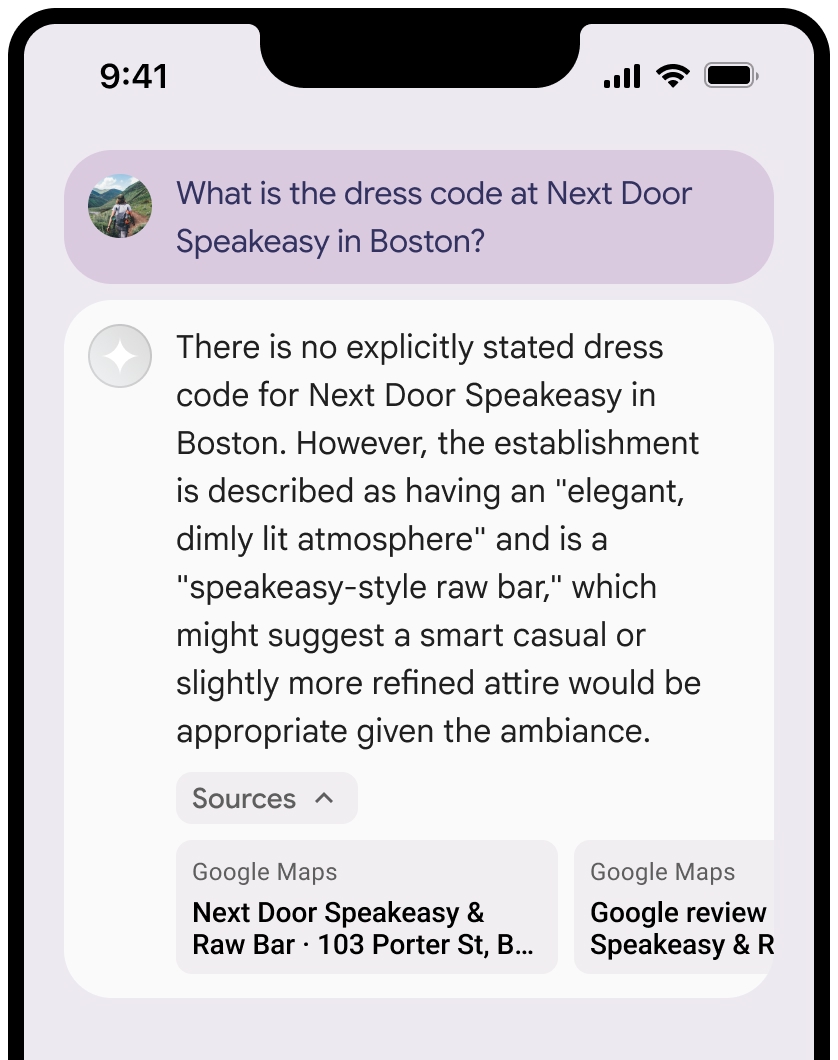
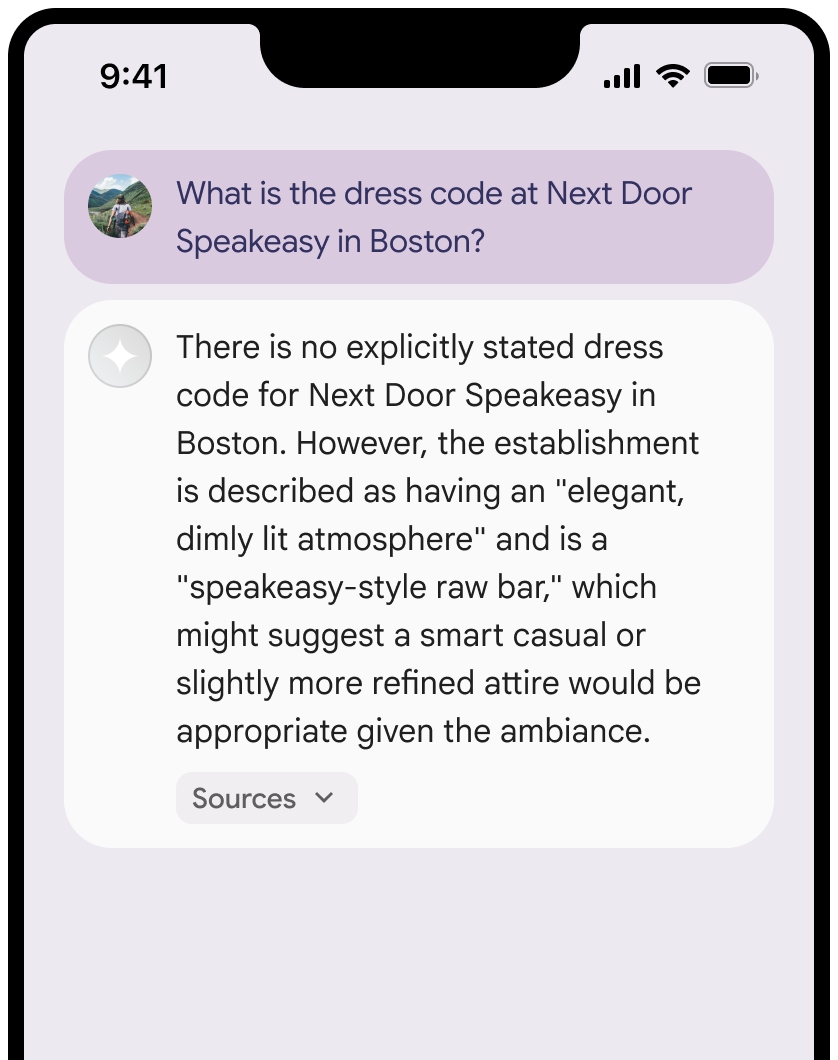
รูปภาพต่อไปนี้แสดงข้อกำหนดขั้นต่ำสำหรับการแสดงแหล่งที่มาและลิงก์ Google Maps
คุณสามารถยุบมุมมองของแหล่งที่มาได้
ไม่บังคับ: ปรับปรุงการแสดงตัวอย่างลิงก์ด้วยเนื้อหาเพิ่มเติม เช่น
- แทรก Favicon ของ Google Maps ไว้ก่อนการระบุแหล่งที่มาด้วยข้อความของ Google Maps
- รูปภาพจาก URL แหล่งที่มา (
og:image)
ดูข้อมูลเพิ่มเติมเกี่ยวกับผู้ให้บริการข้อมูล Google Maps บางรายและ ข้อกำหนดด้านใบอนุญาตได้ที่ ประกาศทางกฎหมายของ Google Maps และ Google Earth
หลักเกณฑ์การระบุแหล่งที่มาด้วยข้อความของ Google Maps
เมื่อระบุแหล่งที่มาเป็น Google Maps ในข้อความ ให้ทำตามหลักเกณฑ์ต่อไปนี้
- อย่าแก้ไขข้อความ Google Maps ในลักษณะใดก็ตาม ดังนี้
- อย่าเปลี่ยนตัวพิมพ์ใหญ่ตัวพิมพ์เล็กของ Google Maps
- อย่าขึ้นบรรทัดใหม่สำหรับ Google Maps
- อย่าแปล Google Maps เป็นภาษาอื่น
- ป้องกันไม่ให้เบราว์เซอร์แปล Google Maps โดยใช้แอตทริบิวต์ HTML translate="no"
- จัดรูปแบบข้อความ Google Maps ตามที่อธิบายไว้ในตารางต่อไปนี้
| พร็อพเพอร์ตี้ | รูปแบบ |
|---|---|
Font family |
Roboto คุณจะโหลดแบบอักษรหรือไม่ก็ได้ |
Fallback font family |
แบบอักษรเนื้อหาแบบ Sans Serif ที่ใช้ในผลิตภัณฑ์อยู่แล้ว หรือ "Sans-Serif" เพื่อเรียกใช้แบบอักษรเริ่มต้นของระบบ |
Font style |
ปกติ |
Font weight |
400 |
Font color |
สีขาว สีดำ (#1F1F1F) หรือสีเทา (#5E5E5E) รักษาระดับความแตกต่างที่เข้าถึงได้ (4.5:1) กับพื้นหลัง |
Font size |
|
Spacing |
ปกติ |
ตัวอย่าง CSS
CSS ต่อไปนี้จะแสดง Google Maps ด้วยรูปแบบตัวอักษรและสีที่เหมาะสมบนพื้นหลังสีขาวหรือสีอ่อน
CSS
@import url('https://fonts.googleapis.com/css2?family=Roboto&display=swap');

.GMP-attribution {

font-family: Roboto, Sans-Serif;
font-style: normal;
font-weight: 400;
font-size: 1rem;
letter-spacing: normal;
white-space: nowrap;
color: #5e5e5e;
}
รหัสสถานที่และรหัสรีวิว
ข้อมูล Google Maps มีรหัสสถานที่และรหัสรีวิว คุณอาจแคช จัดเก็บ และส่งออกข้อมูลคำตอบต่อไปนี้
placeIdreviewId
ข้อจำกัดในการแคชในข้อกำหนดการเชื่อมต่อแหล่งข้อมูลกับ Google Maps จะไม่มีผลบังคับใช้
กิจกรรมและอาณาเขตที่ไม่อนุญาต
การเชื่อมต่อแหล่งข้อมูลกับ Google Maps มีข้อจำกัดเพิ่มเติมสำหรับเนื้อหาและกิจกรรมบางอย่างเพื่อรักษาแพลตฟอร์มให้ปลอดภัยและเชื่อถือได้ นอกเหนือจากข้อจำกัดในการใช้งาน ที่ระบุไว้ใน ข้อกำหนดแล้ว:
- คุณจะไม่ใช้การเชื่อมต่อแหล่งข้อมูลกับ Google Maps สำหรับกิจกรรมที่มีความเสี่ยงสูง ซึ่งรวมถึงบริการตอบสนองต่อเหตุฉุกเฉิน
- คุณจะไม่เผยแพร่หรือทำการตลาดแอปพลิเคชันที่ให้บริการการเชื่อมต่อแหล่งข้อมูลกับ Google Maps ในอาณาเขตที่ไม่อนุญาต ดูข้อมูลเพิ่มเติมได้ที่ อาณาเขตที่ไม่อนุญาตของ Google Maps Platform รายการอาณาเขตที่ไม่อนุญาตอาจมีการอัปเดตเป็นครั้งคราว
แนวทางปฏิบัติแนะนำ
- ระบุสถานที่ของผู้ใช้: เพื่อให้ได้คำตอบที่เกี่ยวข้องและปรับเปลี่ยนในแบบของผู้ใช้มากที่สุด ให้ใส่
user_location(ละติจูดและลองจิจูด) ในการกำหนดค่าgoogleMapsGroundingเสมอเมื่อทราบสถานที่ของผู้ใช้ - แจ้งผู้ใช้ปลายทาง: แจ้งให้ผู้ใช้ปลายทางทราบอย่างชัดเจนว่าระบบใช้ข้อมูล Google Maps เพื่อตอบคำค้นหาของผู้ใช้ โดยเฉพาะอย่างยิ่งเมื่อเปิดใช้เครื่องมือ
- ตรวจสอบเวลาในการตอบสนอง: สำหรับแอปพลิเคชันแบบสนทนา ให้ตรวจสอบว่าเวลาในการตอบสนอง P95 สำหรับคำตอบที่เชื่อมต่อแหล่งข้อมูลยังคงอยู่ในเกณฑ์ที่ยอมรับได้เพื่อรักษาประสบการณ์การใช้งานที่ราบรื่น
- ปิดใช้เมื่อไม่จำเป็น: การเชื่อมต่อแหล่งข้อมูลกับ Google Maps จะปิดอยู่โดยค่าเริ่มต้น ให้เปิดใช้ (
"tools": [{"googleMaps": {}}]) เฉพาะเมื่อคำค้นหามี บริบททางภูมิศาสตร์ที่ชัดเจน เพื่อเพิ่มประสิทธิภาพและลดต้นทุน
ข้อจำกัด
- ขอบเขตทางภูมิศาสตร์: การเชื่อมต่อแหล่งข้อมูลกับ Google Maps พร้อมให้บริการทั่วโลก
- การรองรับโมเดล: ดูส่วน โมเดลที่รองรับ
- อินพุต/เอาต์พุตมัลติโมดัล: ปัจจุบันการเชื่อมต่อแหล่งข้อมูลกับ Google Maps ไม่รองรับอินพุตหรือเอาต์พุตมัลติโมดัลนอกเหนือจากข้อความ
- สถานะเริ่มต้น: เครื่องมือการเชื่อมต่อแหล่งข้อมูลกับ Google Maps จะปิดอยู่โดยค่าเริ่มต้น คุณต้องเปิดใช้เครื่องมือนี้อย่างชัดเจนในคำขอ API
การกำหนดราคาและขีดจำกัดอัตรา
การกำหนดราคาการเชื่อมต่อแหล่งข้อมูลกับ Google Maps จะอิงตามคำค้นหา อัตราปัจจุบันคือ $25 / 1,000 พรอมต์ที่เชื่อมต่อแหล่งข้อมูล นอกจากนี้ ระดับฟรียังมีคำขอสูงสุด 500 รายการต่อวัน ระบบจะนับคำขอรวมกับโควต้าก็ต่อเมื่อพรอมต์แสดงผลการค้นหาที่เชื่อมต่อแหล่งข้อมูลกับ Google Maps อย่างน้อย 1 รายการได้สำเร็จ (เช่น ผลการค้นหาที่มีแหล่งที่มาของ Google Maps อย่างน้อย 1 รายการ) หากส่งคำค้นหาหลายรายการไปยัง Google Maps จากคำขอเดียว ระบบจะนับเป็น 1 คำขอรวมกับขีดจำกัดอัตรา
ดูข้อมูลการกำหนดราคารายละเอียดได้ที่หน้าการกำหนดราคา Gemini API
โมเดลที่รองรับ
โมเดลต่อไปนี้รองรับการเชื่อมต่อแหล่งข้อมูลกับ Google Maps
| รุ่น | การเชื่อมต่อแหล่งข้อมูลกับ Google Maps |
|---|---|
| Gemini 3.5 Flash | ✔️ |
| Gemini 3.1 Pro เวอร์ชันพรีวิว | ✔️ |
| Gemini 3.1 Flash-Lite | ✔️ |
| Gemini 3 Flash เวอร์ชันพรีวิว | ✔️ |
| Gemini 2.5 Pro | ✔️ |
| Gemini 2.5 Flash | ✔️ |
| Gemini 2.5 Flash-Lite | ✔️ |
ชุดค่าผสมของเครื่องมือที่รองรับ
โมเดล Gemini 3 รองรับการรวมเครื่องมือในตัว (เช่น การเชื่อมต่อแหล่งข้อมูลกับ Google Maps) กับเครื่องมือที่กำหนดเอง (การเรียกใช้ฟังก์ชัน) ดูข้อมูลเพิ่มเติมได้ที่หน้า ชุดค่าผสมของเครื่องมือ
ขั้นตอนถัดไป
- ลองใช้การเชื่อมต่อแหล่งข้อมูลกับ Google Search ใน Gemini API สูตรการแก้ปัญหา
- ดูข้อมูลเกี่ยวกับเครื่องมืออื่นๆ ที่มี
- ดูข้อมูลเพิ่มเติมเกี่ยวกับแนวทางปฏิบัติแนะนำด้าน AI ที่มีความรับผิดชอบและตัวกรองความปลอดภัยของ Gemini API ได้ในคู่มือการตั้งค่าความปลอดภัย