

يمكن لنماذج Gemini Robotics ER كتابة رموز Python البرمجية وتنفيذها لمعالجة الصور وتطبيق المنطق قبل تقديم الإجابة. تتناول هذه الصفحة أمثلة على تطبيق الرموز البرمجية: رصد العناصر باستخدام التكبير والتصغير والقص، وقراءة الأجهزة، وقياس السوائل، وقراءة لوحات الدوائر، والتعليق التوضيحي على الصور.
لتكييف هذه الأمثلة مع حالة الاستخدام الخاصة بكم، استبدِلوا نص الطلب وملف الصورة الذي تم تحميله بنصكم وصورتكم. يمكنكم أيضًا تعديل مخطط JSON المطلوب في الطلب ليطابق بنية الإخراج التي يحتاجها تطبيقكم، أو إضافة system_instruction لفرض تنسيق الإخراج ودقته.
للاطّلاع على الرمز البرمجي الكامل القابل للتنفيذ، يُرجى الرجوع إلى دليل Robotics.
مستوى التفكير
يمكنكم التحكّم في مستوى التفكير للموازنة بين وقت الاستجابة والدقة. تحقّق المهام المكانية، مثل رصد العناصر، أداءً جيدًا عند استخدام مستوى تفكير منخفض. تستفيد المهام المعقّدة، مثل العدّ أو تقدير الوزن، من مستوى تفكير أعلى.
يضبط المثال التالي مستوى التفكير على high لمهمة عدّ معقّدة:
Python
from google import genai
from google.genai import types

client = genai.Client()

with open('scene.jpeg', 'rb') as f:
    image_bytes = f.read()

response = client.models.generate_content(
    model="gemini-robotics-er-2-preview",
    contents=[
        types.Part.from_bytes(
            data=image_bytes,
            mime_type='image/jpeg',
        ),
        "Identify and count all objects on the table."
    ],
    config=types.GenerateContentConfig(
        thinking_config=types.ThinkingConfig(thinking_level="high")
    )
)

print(response.text)
لمزيد من التفاصيل، يُرجى الاطّلاع على التفكير.
رصد العناصر (التكبير والتصغير والاقتصاص)
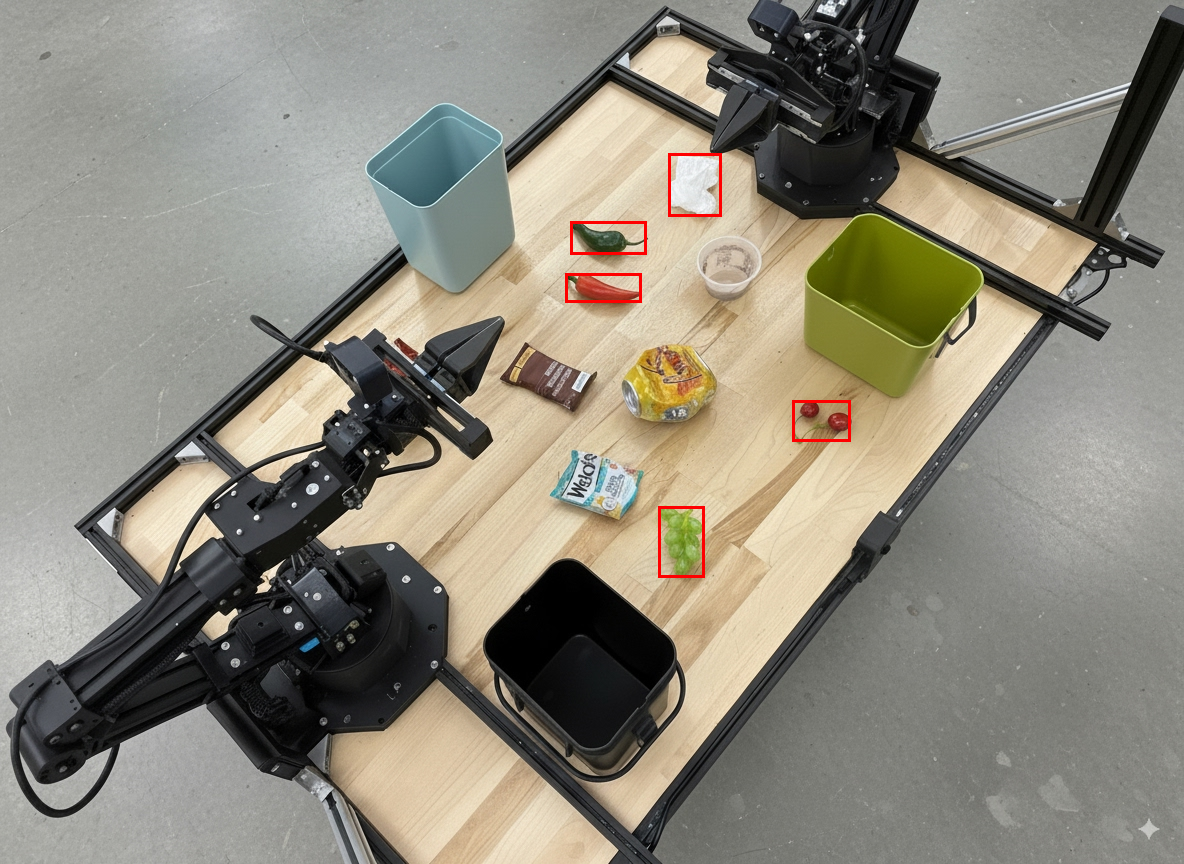
يوضّح المثال التالي كيفية استخدام تنفيذ الرموز البرمجية لتكبير صورة وقصّها للحصول على عرض أوضح عند رصد الأجسام وعرض مربّعات الإحاطة.
Python
from google import genai
from google.genai import types

client = genai.Client()

# Load your image
with open('sorting.jpeg', 'rb') as f:
    image_bytes = f.read()

prompt = """
Return JSON in the format {label: val, y: val, x: val, y2: val, x2: val} for
the compostable objects in this scene. Please Zoom and crop the image for a
clearer view. Return an annotated image of the final result with the bounding
boxes drawn on it to the API caller as a part of your process.
"""

response = client.models.generate_content(
    model="gemini-robotics-er-2-preview",
    contents=[
        types.Part.from_bytes(
            data=image_bytes,
            mime_type='image/jpeg',
        ),
        prompt
    ],
    config = types.GenerateContentConfig(
        tools=[types.Tool(code_execution=types.ToolCodeExecution)],
    )
)

print(response.text)
سيكون إخراج النموذج مشابهًا لاستجابة JSON التالية:
[
  {"label": "compostable", "y": 256, "x": 482, "y2": 295, "x2": 546},
  {"label": "compostable", "y": 317, "x": 478, "y2": 350, "x2": 542},
  {"label": "compostable", "y": 586, "x": 556, "y2": 668, "x2": 595},
  {"label": "compostable", "y": 463, "x": 669, "y2": 511, "x2": 718},
  {"label": "compostable", "y": 178, "x": 565, "y2": 250, "x2": 609}
]
تعرض الصورة التالية المربّعات التي يعرضها النموذج.
قراءة مقياس تناظري وتطبيق المنطق
يوضّح المثال التالي كيفية استخدام النموذج لقراءة مقياس تناظري وإجراء عمليات حسابية للوقت. ويستخدم تعليمات النظام لفرض إخراج JSON.
Python
from google import genai
from google.genai import types

client = genai.Client()

with open('gauge.jpeg', 'rb') as f:
    image_bytes = f.read()

system_instruction = "Be precise. When JSON is requested, reply with ONLY that JSON (no preface, no code block)."

response = client.models.generate_content(
    model="gemini-robotics-er-2-preview",
    contents=[
        types.Part.from_bytes(
            data=image_bytes,
            mime_type='image/jpeg',
        ),
        """Read the current value from this gauge. Then, calculate how long
        it will take at the current rate for the value to reach maximum.
        Reply in JSON: {"current_value": val, "max_value": val,
        "time_to_max_minutes": val}"""
    ],
    config = types.GenerateContentConfig(
        system_instruction=system_instruction,
        tools=[types.Tool(code_execution=types.ToolCodeExecution)],
    )
)

print(response.text)
قياس السائل في حاوية
يوضّح المثال التالي كيفية استخدام تنفيذ الرموز البرمجية لقياس مستوى السائل في حاوية.
Python
from google import genai
from google.genai import types

client = genai.Client()

with open('fluid.jpeg', 'rb') as f:
    image_bytes = f.read()

system_instruction = "Be precise. When JSON is requested, reply with ONLY that JSON (no preface, no code block)."

response = client.models.generate_content(
    model="gemini-robotics-er-2-preview",
    contents=[
        types.Part.from_bytes(
            data=image_bytes,
            mime_type='image/jpeg',
        ),
        """Measure the amount of fluid in the container. Reply in JSON:
        {"fluid_level_ml": val, "container_capacity_ml": val,
        "percentage_full": val}"""
    ],
    config = types.GenerateContentConfig(
        system_instruction=system_instruction,
        tools=[types.Tool(code_execution=types.ToolCodeExecution)],
    )
)

print(response.text)
قراءة العلامات على لوحة دوائر
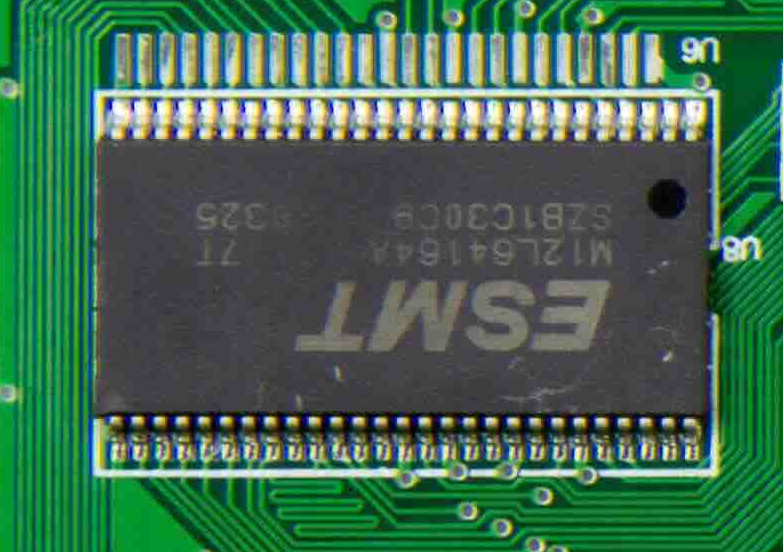
يوضّح المثال التالي كيفية استخدام تنفيذ الرموز البرمجية لقراءة العلامات على لوحة دوائر.
Python
from google import genai
from google.genai import types

client = genai.Client()

with open('circuit_board.jpeg', 'rb') as f:
    image_bytes = f.read()

system_instruction = "Be precise. When JSON is requested, reply with ONLY that JSON (no preface, no code block)."

response = client.models.generate_content(
    model="gemini-robotics-er-2-preview",
    contents=[
        types.Part.from_bytes(
            data=image_bytes,
            mime_type='image/jpeg',
        ),
        """Read all visible component labels and markings on this circuit
        board. Reply in JSON: {"components": [{"label": val,
        "location": [y, x]}]}"""
    ],
    config = types.GenerateContentConfig(
        system_instruction=system_instruction,
        tools=[types.Tool(code_execution=types.ToolCodeExecution)],
    )
)

print(response.text)
التعليق التوضيحي على الصور
يوضّح المثال التالي كيفية استخدام تنفيذ الرموز البرمجية لإضافة تعليق توضيحي على صورة (مثل رسم أسهم لتعليمات التخلّص منها) وعرض الصورة المعدَّلة.
Python
from google import genai
from google.genai import types

client = genai.Client()

# Load your image
with open('sorting.jpeg', 'rb') as f:
    image_bytes = f.read()

prompt = """
Look at this image and return it as an annotated version using arrows of
different colors to represent which items should go in which bins for
disposal. You must return the final image to the API caller.
"""

response = client.models.generate_content(
    model="gemini-robotics-er-2-preview",
    contents=[
        types.Part.from_bytes(
            data=image_bytes,
            mime_type='image/jpeg',
        ),
        prompt
    ],
    config = types.GenerateContentConfig(
        tools=[types.Tool(code_execution=types.ToolCodeExecution)],
    )
)

print(response.text)
في ما يلي مثال على صورة تم إدخالها:
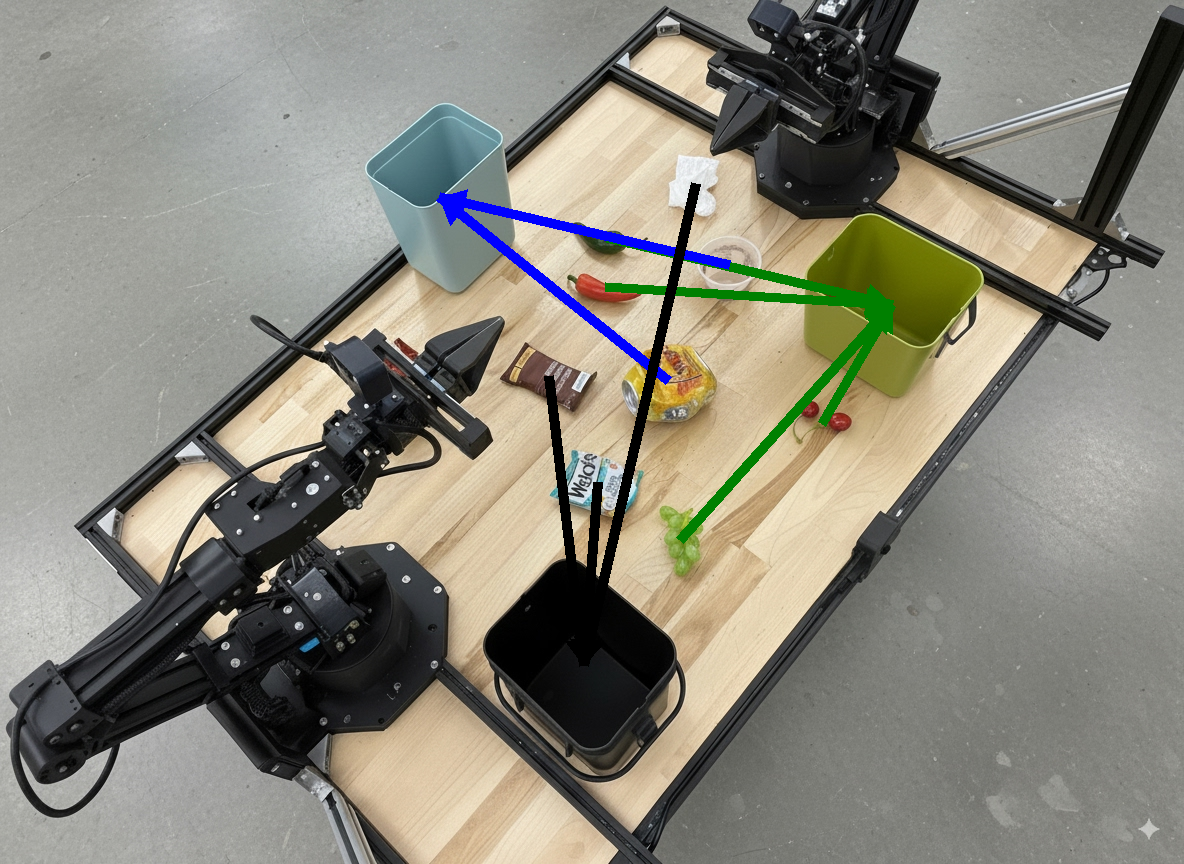
سيكون إخراج النموذج مشابهًا لما يلي:
  The annotated image shows the suggested disposal locations for the items on the table:
  - **Green bin (Compost/Organic)**: Green chili, red chili, grapes, and cherries.
  - **Blue bin (Recycling)**: Yellow crushed can and plastic container.
  - **Black bin (Trash)**: Chocolate bar wrapper, Welch's packet, and white tissue.
الخطوات التالية
- تنسيق المهام: مهام طويلة الأجل باستخدام واجهات برمجة تطبيقات مخصّصة للروبوتات
- الروبوتات مع البث: بث ثنائي الاتجاه في الوقت الفعلي (Gemini Robotics ER 2 فقط)
- فهم الفيديوهات: العثور على اللحظات وتصنيف مستوى التقدّم (Gemini Robotics ER 2 فقط)