

Model Gemini Robotics ER dapat merencanakan tugas dan melakukan penalaran tentang ruang, menyimpulkan tindakan yang harus diambil dan objek yang harus dipindahkan untuk menyelesaikan tujuan. Halaman ini menunjukkan contoh untuk menggerakkan operasi ambil dan tempatkan melalui API robot kustom untuk mengatur tugas menempatkan item ke dalam mangkuk.
Untuk kode yang dapat dijalankan sepenuhnya, lihat Cookbook Robotics.
Menggunakan API robot kustom
Contoh ini menunjukkan pengaturan tugas dengan API robot kustom. Contoh ini memperkenalkan API tiruan yang dirancang untuk operasi ambil dan tempatkan. Tugasnya adalah mengambil blok biru dan menempatkannya di mangkuk oranye:
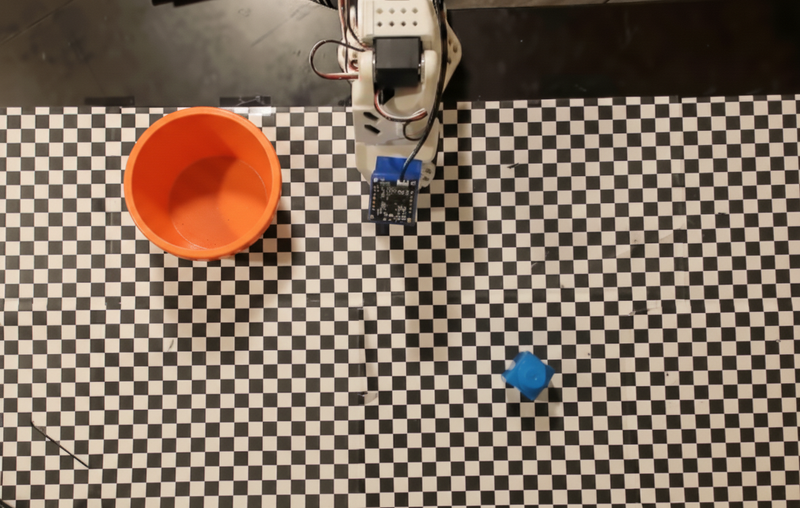
Contoh ini menggunakan definisi alat dan API robot tiruan berikut:
Python
from google import genai
from google.genai import types

client = genai.Client()

def move(x, y, high):
    print(f"Mock Robot: Moving to coordinates: {x}, {y}, {'high above table' if high else 'down at table level'}")

def setGripperState(opened):
    print(f"Mock Robot: {'Opening gripper' if opened else 'Closing gripper'}")

robot_origin_y = 300
robot_origin_x = 500

move_declaration = types.FunctionDeclaration(
    name="move",
    description="Moves the arm to the given coordinates.",
    parameters=types.Schema(
        type=types.Type.OBJECT,
        properties={
            "x": types.Schema(type=types.Type.INTEGER, description="X coordinate relative to the origin"),
            "y": types.Schema(type=types.Type.INTEGER, description="Y coordinate relative to the origin"),
            "high": types.Schema(type=types.Type.BOOLEAN, description="Set to True to lift the robot arm above the scene. Set to False to place the gripper on the surface."),
        },
        required=["x", "y", "high"],
    ),
)

set_gripper_state_declaration = types.FunctionDeclaration(
    name="setGripperState",
    description="Opens or closes the robot's gripper.",
    parameters=types.Schema(
        type=types.Type.OBJECT,
        properties={
            "opened": types.Schema(type=types.Type.BOOLEAN, description="True opens the gripper, False closes the gripper."),
        },
        required=["opened"],
    ),
)

robot_tools = types.Tool(function_declarations=[move_declaration, set_gripper_state_declaration])
Contoh berikut mengirimkan perintah dan gambar ke model dengan definisi alat. Kemudian, contoh ini menjalankan loop agentik: setelah setiap respons model, contoh ini menjalankan panggilan fungsi yang diminta (move, setGripperState), menampilkan hasilnya kembali ke model, dan berulang hingga model berhenti memanggil fungsi atau batas langkah tercapai.
Python
with open("robot-api-example.png", "rb") as f:
    img_bytes = f.read()

prompt = (
    "You are a robotic arm with six degrees-of-freedom. "
    f"The origin point for calculating the moves is at normalized point y={robot_origin_y}, x={robot_origin_x}. "
    "Use this as the new (0,0) for calculating moves, allowing x and y to be negative.\n\n"
    "Find the blue block and the orange bowl. Calculate their coordinates relative to the origin.\n"
    "Perform a pick and place operation where you pick up the blue block and place it into the orange bowl. "
    "Call the appropriate sequence of functions to complete this operation."
)

contents = [
    types.Content(role="user", parts=[
        types.Part.from_bytes(data=img_bytes, mime_type="image/png"),
        types.Part(text=prompt),
    ])
]

print("\n--- Executing Orchestrated Plan ---")

max_steps = 15  # Safety limit to prevent infinite loops
step_count = 0

# The Agentic Loop
while step_count < max_steps:
    step_count += 1

    response = client.models.generate_content(
        model="gemini-robotics-er-2-preview",
        contents=contents,
        config=types.GenerateContentConfig(
            tools=[robot_tools],
            thinking_config=types.ThinkingConfig(thinking_level="low"),
        ),
    )

    # Add model response to conversation history
    contents.append(response.candidates[0].content)

    # Check for function calls
    function_calls = [part for part in response.candidates[0].content.parts if part.function_call]

    if not function_calls:
        # Model is done calling functions
        print("Sequence complete.")
        print(f"Model Summary: {response.text}")
        break

    # Execute function calls and collect results
    function_response_parts = []
    for part in function_calls:
        fc = part.function_call
        if fc.name == "move":
            move(**fc.args)
        elif fc.name == "setGripperState":
            setGripperState(**fc.args)

        function_response_parts.append(
            types.Part.from_function_response(
                name=fc.name,
                response={"status": "success"},
            )
        )

    # Send function results back to model
    contents.append(types.Content(role="user", parts=function_response_parts))
Berikut adalah kemungkinan output model berdasarkan perintah dan API robot tiruan. Output mencakup output panggilan fungsi robot yang diurutkan oleh model.
--- Executing Orchestrated Plan ---
Mock Robot: Opening gripper
Mock Robot: Moving to coordinates: 160, 440, high above table
Mock Robot: Moving to coordinates: 160, 440, down at table level
Mock Robot: Closing gripper
Mock Robot: Moving to coordinates: 160, 440, high above table
Mock Robot: Moving to coordinates: -250, 60, high above table
Mock Robot: Moving to coordinates: -250, 60, down at table level
Mock Robot: Opening gripper
Mock Robot: Moving to coordinates: -250, 60, high above table
Sequence complete.
Model Summary: I have completed the task of picking up the blue block and placing it into the orange bowl.
Langkah berikutnya
- Robotics dengan streaming — streaming real-time dengan panggilan fungsi (khusus Gemini Robotics ER 2).
- Pemahaman video — melacak progres tugas dari video (khusus ER 2).
- Penalaran spasial — contoh kotak pembatas, pelacakan, dan penunjuk.