

Gemini Robotics ER 모델은 작업을 계획하고 공간에 대해 추론하여 목표를 달성하기 위해 취해야 할 작업과 이동할 객체를 추론할 수 있습니다. 이 페이지 에서는 맞춤 로봇 API를 통해 집어 들고 놓는 작업을 실행하여 항목을 그릇에 넣는 작업을 오케스트레이션하는 예를 보여줍니다.
실행 가능한 전체 코드는 로봇공학 Cookbook을 참고하세요.
맞춤 로봇 API 사용
이 예에서는 맞춤 로봇 API를 사용한 작업 오케스트레이션을 보여줍니다. 집어 들고 놓는 작업을 위해 설계된 모의 API를 소개합니다. 작업은 파란색 블록을 집어 주황색 그릇에 놓는 것입니다.
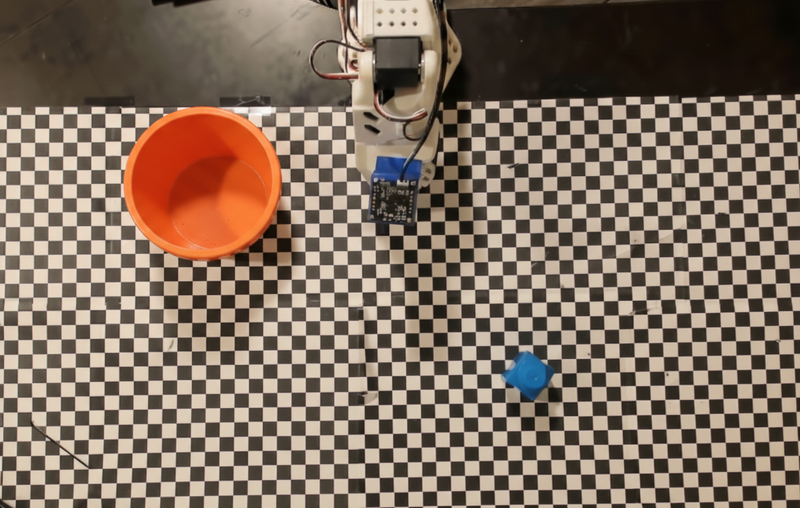
이 예에서는 다음 모의 로봇 API 및 도구 정의를 사용합니다.
Python
from google import genai
from google.genai import types

client = genai.Client()

def move(x, y, high):
    print(f"Mock Robot: Moving to coordinates: {x}, {y}, {'high above table' if high else 'down at table level'}")

def setGripperState(opened):
    print(f"Mock Robot: {'Opening gripper' if opened else 'Closing gripper'}")

robot_origin_y = 300
robot_origin_x = 500

move_declaration = types.FunctionDeclaration(
    name="move",
    description="Moves the arm to the given coordinates.",
    parameters=types.Schema(
        type=types.Type.OBJECT,
        properties={
            "x": types.Schema(type=types.Type.INTEGER, description="X coordinate relative to the origin"),
            "y": types.Schema(type=types.Type.INTEGER, description="Y coordinate relative to the origin"),
            "high": types.Schema(type=types.Type.BOOLEAN, description="Set to True to lift the robot arm above the scene. Set to False to place the gripper on the surface."),
        },
        required=["x", "y", "high"],
    ),
)

set_gripper_state_declaration = types.FunctionDeclaration(
    name="setGripperState",
    description="Opens or closes the robot's gripper.",
    parameters=types.Schema(
        type=types.Type.OBJECT,
        properties={
            "opened": types.Schema(type=types.Type.BOOLEAN, description="True opens the gripper, False closes the gripper."),
        },
        required=["opened"],
    ),
)

robot_tools = types.Tool(function_declarations=[move_declaration, set_gripper_state_declaration])
다음 예에서는 도구 정의와 함께 프롬프트와 이미지를 모델에 전송합니다. 그런 다음 에이전트 루프를 실행합니다. 각 모델 응답 후 요청된 함수 호출 (move, setGripperState)을 실행하고 결과를 모델에 다시 반환하며 모델이 함수 호출을 중지하거나 단계 제한에 도달할 때까지 반복합니다.
Python
with open("robot-api-example.png", "rb") as f:
    img_bytes = f.read()

prompt = (
    "You are a robotic arm with six degrees-of-freedom. "
    f"The origin point for calculating the moves is at normalized point y={robot_origin_y}, x={robot_origin_x}. "
    "Use this as the new (0,0) for calculating moves, allowing x and y to be negative.\n\n"
    "Find the blue block and the orange bowl. Calculate their coordinates relative to the origin.\n"
    "Perform a pick and place operation where you pick up the blue block and place it into the orange bowl. "
    "Call the appropriate sequence of functions to complete this operation."
)

contents = [
    types.Content(role="user", parts=[
        types.Part.from_bytes(data=img_bytes, mime_type="image/png"),
        types.Part(text=prompt),
    ])
]

print("\n--- Executing Orchestrated Plan ---")

max_steps = 15  # Safety limit to prevent infinite loops
step_count = 0

# The Agentic Loop
while step_count < max_steps:
    step_count += 1

    response = client.models.generate_content(
        model="gemini-robotics-er-2-preview",
        contents=contents,
        config=types.GenerateContentConfig(
            tools=[robot_tools],
            thinking_config=types.ThinkingConfig(thinking_level="low"),
        ),
    )

    # Add model response to conversation history
    contents.append(response.candidates[0].content)

    # Check for function calls
    function_calls = [part for part in response.candidates[0].content.parts if part.function_call]

    if not function_calls:
        # Model is done calling functions
        print("Sequence complete.")
        print(f"Model Summary: {response.text}")
        break

    # Execute function calls and collect results
    function_response_parts = []
    for part in function_calls:
        fc = part.function_call
        if fc.name == "move":
            move(**fc.args)
        elif fc.name == "setGripperState":
            setGripperState(**fc.args)

        function_response_parts.append(
            types.Part.from_function_response(
                name=fc.name,
                response={"status": "success"},
            )
        )

    # Send function results back to model
    contents.append(types.Content(role="user", parts=function_response_parts))
다음은 프롬프트와 모의 로봇 API를 기반으로 모델의 가능한 출력을 보여줍니다. 출력에는 모델이 함께 시퀀싱한 로봇 함수 호출의 출력이 포함됩니다.
--- Executing Orchestrated Plan ---
Mock Robot: Opening gripper
Mock Robot: Moving to coordinates: 160, 440, high above table
Mock Robot: Moving to coordinates: 160, 440, down at table level
Mock Robot: Closing gripper
Mock Robot: Moving to coordinates: 160, 440, high above table
Mock Robot: Moving to coordinates: -250, 60, high above table
Mock Robot: Moving to coordinates: -250, 60, down at table level
Mock Robot: Opening gripper
Mock Robot: Moving to coordinates: -250, 60, high above table
Sequence complete.
Model Summary: I have completed the task of picking up the blue block and placing it into the orange bowl.
다음 단계
- 스트리밍을 통한 로봇공학: 함수 호출을 통한 실시간 스트리밍 (Gemini Robotics ER 2만 해당)
- 동영상 이해: 동영상에서 작업 진행 상황 추적 (ER 2만 해당)
- 공간 추론: 가리키기, 추적, 경계 상자 예