

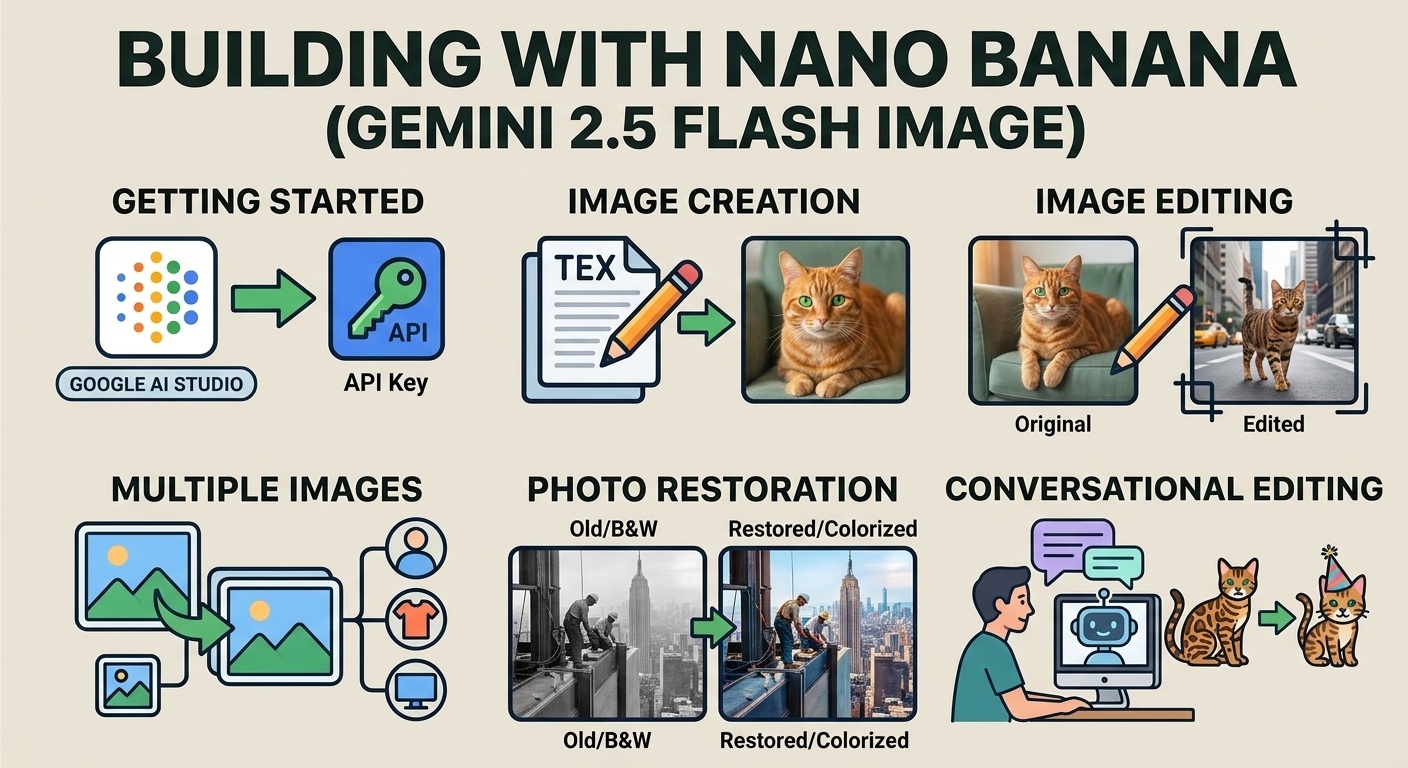
יצירת תמונות באמצעות Nano Banana
- או ליצור תרחיש משלכם בעזרת הנחיות:
-






-
נוצר על ידי Nano Banana 2 הנחיה: "תמונה של שער מבריק של מגזין. השער הכחול המינימליסטי כולל את המילים Nano Banana בגדול ובאותיות מודגשות. הטקסט מוצג בגופן עם תגים וממלא את התצוגה. בלי טקסט אחר. לפני הטקסט יש דיוקן של אדם בשמלה אלגנטית ומינימלית. היא מחזיקה בצורה שובבה את המספר 2, שהוא נקודת המיקוד.
ממקמים את מספר הגיליון ואת התאריך 'פברואר 2026' בפינה, יחד עם ברקוד. המגזין מונח על מדף בחנות מעצבים, על רקע קיר כתום עם טיח." -
נוצרה על ידי Nano Banana Pro הנחיה: "תיצור סצנת קריקטורה תלת-ממדית, מיניאטורית, ברורה ואיזומטרית של לונדון, במבט על מזווית של 45 מעלות, שתכלול את ציוני הדרך והאלמנטים האדריכליים הכי אייקוניים שלה. תשתמשו במרקמים רכים ומעודנים עם חומרים ריאליסטיים של PBR ותאורה וצללים עדינים שנראים כמו במציאות. תשלב את תנאי מזג האוויר הנוכחיים ישירות בסביבה העירונית כדי ליצור אווירה סוחפת. השתמשו בקומפוזיציה נקייה ומינימליסטית עם רקע רך בצבע אחיד. במרכז העליון, מציבים את הכותרת 'לונדון' בטקסט מודגש גדול, מתחתיה סמל מזג אוויר בולט, ואז את התאריך (טקסט קטן) ואת הטמפרטורה (טקסט בינוני). כל הטקסט צריך להיות מיושר למרכז עם ריווח עקבי, ויכול להיות שהוא יחפוף מעט את החלק העליון של הבניינים". -
נוצר על ידי Nano Banana 2 פרומפט: "השתמשו בחיפוש תמונות כדי למצוא תמונות מדויקות של ציפור קצאל מפוארת. צור טפט יפהפה ביחס רוחב-גובה של 3:2 של הציפור הזו, עם מעבר צבע טבעי מלמעלה למטה וקומפוזיציה מינימלית". -

נוצרה על ידי Nano Banana Pro הנחיה: "תציב את הלוגו הזה במודעה יוקרתית לבושם בניחוח בננה. הלוגו משולב בצורה מושלמת בבקבוק". -
נוצרה על ידי Nano Banana Pro הנחיה: "תמונה של סצנה יומיומית בבית קפה הומה שמוגשת בו ארוחת בוקר. בחזית התמונה, גבר אנימה עם שיער כחול. אחד מהאנשים הוא סקיצה בעיפרון, ואדם אחר הוא דמות בסטופ-מושן" -
נוצרה על ידי Nano Banana Pro פרומפט: "תשתמש בחיפוש כדי לגלות איך התקבלה ההשקה של Gemini 3 Flash. תשתמש במידע הזה כדי לכתוב מאמר קצר בנושא (עם כותרות). תחזיר תמונה של המאמר כפי שהוא הופיע במגזין מבריק עם עיצוב מוקפד. זו תמונה של דף אחד מקופל, שמוצג בו מאמר על Gemini 3 Flash. תמונה ראשית אחת. כותרת בגופן סריף". -
נוצר על ידי Nano Banana Pro הנחיה: "סמל שמייצג כלב חמוד. הר רקע לבן. תיצור סמלים בסגנון תלת-ממדי צבעוני ומוחשי. אין טקסט". -
נוצר על ידי Nano Banana 2 הנחיה: "צור תמונה איזומטרית מושלמת. זו לא תמונה ממוזערת, אלא תמונה שצולמה במקרה בצורה איזומטרית מושלמת. זו תמונה של גן מודרני יפהפה. יש בריכה גדולה בצורת הספרה 2 והמילים: Nano Banana 2."
Nano Banana הוא השם של יכולות יצירת התמונות המובנות של Gemini. Gemini יכול ליצור ולעבד תמונות בשיחה באמצעות טקסט, תמונות או שילוב של שניהם. כך תוכלו ליצור ולערוך רכיבים חזותיים ולשפר אותם, עם שליטה חסרת תקדים.
Nano Banana מתייחס לארבעה מודלים שונים שזמינים ב-Gemini API:
- Nano Banana 2 Lite (Gemini 3.1 Flash Lite Image)
(
gemini-3.1-flash-lite-image): מודל Gemini ליצירת תמונות הכי מהיר והכי זול שלנו, שנועד לתת מענה לצרכים של מהירות וקנה מידה, כשמהירות ועלות הן המגבלות התפעוליות העיקריות. התכונה לא מותאמת להזנת כמה תמונות לדוגמה או לעריכה רציפה רב-שלבית. - Nano Banana 2 (Gemini 3.1 Flash Image)
(
gemini-3.1-flash-image): המודל הכי רב-תכליתי, מודל כללי לכל המשימות. הוא משלב בין מהירות ליצירה של תמונות באיכות 4K המתקדמת ביותר, ידע רחב על העולם ועיבוד טקסט אמין. יכולת מצוינת לעבד תמונות לדוגמה מרובות ולשמור על עקביות. - Nano Banana Pro (Gemini 3 Pro Image)
(
gemini-3-pro-image): הבחירה המובחרת למשימות ויזואליות מורכבות ביותר, עם רמת הידע הכי גבוהה בעולם, לוקליזציה מתקדמת, עקביות מדויקת של המותג ושליטה מדויקת ביצירתיות. - Nano Banana (Gemini 2.5 Flash Image)
(
gemini-2.5-flash-image): הגרסה הקודמת של Nano Banana. המודל הזה היה אמין ושימושי, אבל אנחנו ממליצים ללקוחות לעבור ל-Nano Banana 2 Lite כדי ליהנות מאיכות משופרת, ממהירויות יצירה גבוהות יותר וממחירים נמוכים יותר של API.
כל התמונות שנוצרו כוללות סימן מים של SynthID.
יצירת תמונות לפי טקסט
Python
from google import genai
from PIL import Image
import base64

client = genai.Client()

interaction = client.interactions.create(
    model="gemini-3.1-flash-image",
    input="Create a picture of a nano banana dish in a fancy restaurant with a Gemini theme",
)

with open("generated_image.png", "wb") as f:

    f.write(base64.b64decode(interaction.output_image.data))
JavaScript
import { GoogleGenAI } from "@google/genai";
import * as fs from "node:fs";

async function main() {

  const ai = new GoogleGenAI({});

  const prompt =
    "Create a picture of a nano banana dish in a fancy restaurant with a Gemini theme";

  const interaction = await ai.interactions.create({
    model: "gemini-3.1-flash-image",
    input: prompt,
  });
  const generatedImage = interaction.output_image;
  if (generatedImage) {
    const buffer = Buffer.from(generatedImage.data, "base64");
    fs.writeFileSync("gemini-native-image.png", buffer);
    console.log("Image saved as gemini-native-image.png");
  }
}

main();
REST
curl -s -X POST \
  "https://generativelanguage.googleapis.com/v1beta/interactions" \
  -H "x-goog-api-key: $GEMINI_API_KEY" \
  -H "Content-Type: application/json" \
  -d '{
    "model": "gemini-3.1-flash-image",
    "input": [
      {"type": "text", "text": "Create a picture of a nano banana dish in a fancy restaurant with a Gemini theme"}
    ]
  }'
אפשר לאחזר נתונים של תמונות שנוצרו באמצעות המאפיין interaction.output_image, שמחזיר את בלוק התמונות האחרון שנוצר. פרטים על מאפייני נוחות מופיעים במאמר סקירה כללית על אינטראקציות.
עריכת תמונות (יצירת תמונה לפי טקסט ותמונה)
תזכורת: לפני העלאת תמונה חשוב לוודא שיש לכם את הזכויות הנדרשות לשימוש בה. אסור ליצור תוכן שמפר את הזכויות של אנשים אחרים, כולל תמונות או סרטונים מטעים, מטרידים או פוגעים. השימוש שלך בשירות הזה של AI גנרטיבי כפוף למדיניות שלנו בנושא שימוש אסור.
מספקים תמונה ומשתמשים בהנחיות טקסט כדי להוסיף, להסיר או לשנות רכיבים, לשנות את הסגנון או להתאים את דירוג הצבעים.
בדוגמה הבאה מוצגת העלאה של תמונות מקודדות בפורמט base64.
למידע על כמה תמונות, מטען ייעודי גדול יותר וסוגי MIME נתמכים, אפשר לעיין בדף הבנת תמונות.
Python
from google import genai
from PIL import Image
import base64

client = genai.Client()

with open("/path/to/cat_image.png", "rb") as f:
    image_bytes = f.read()

interaction = client.interactions.create(
    model="gemini-3.1-flash-image",
    input=[
        {
          "type": "text",
          "text": "Create a picture of a nano banana dish in a fancy restaurant with a Gemini theme"
        },
        {
            "type": "image",
            "data": base64.b64encode(image_bytes).decode('utf-8'),
            "mime_type": "image/png"
        }
    ],
)

with open("generated_image.png", "wb") as f:

    f.write(base64.b64decode(interaction.output_image.data))
JavaScript
import { GoogleGenAI } from "@google/genai";
import * as fs from "node:fs";

async function main() {

  const ai = new GoogleGenAI({});

  const imagePath = "path/to/cat_image.png";
  const imageData = fs.readFileSync(imagePath);
  const base64Image = imageData.toString("base64");

  const prompt = [
    { type: "text", text: "Create a picture of my cat eating a nano-banana in a" +
            "fancy restaurant under the Gemini constellation" },
    {
      type: "image",
      mime_type: "image/png",
      data: base64Image
    },
  ];

  const interaction = await ai.interactions.create({
    model: "gemini-3.1-flash-image",
    input: prompt,
  });
  const generatedImage = interaction.output_image;
  if (generatedImage) {
    const buffer = Buffer.from(generatedImage.data, "base64");
    fs.writeFileSync("gemini-native-image.png", buffer);
    console.log("Image saved as gemini-native-image.png");
  }
}

main();
REST
curl -s -X POST \
  "https://generativelanguage.googleapis.com/v1beta/interactions" \
    -H "x-goog-api-key: $GEMINI_API_KEY" \
    -H 'Content-Type: application/json' \
    -d "{
      \"model\": \"gemini-3.1-flash-image\",
      \"input\": [
        {\"type\": \"text\", \"text\": \"Create a picture of my cat eating a nano-banana in a fancy restaurant under the Gemini constellation\"},
        {
          \"type\": \"image\",
          \"mime_type\": \"image/jpeg\",
          \"data\": \"<BASE64_IMAGE_DATA>\"
        }
      ]
    }"
עריכת תמונות רב-שלבית
ממשיכים ליצור ולערוך תמונות בשיחה. הדרך המומלצת לשפר את התמונות היא באמצעות שיחה רב-שלבית. בדוגמה הבאה מוצג פרומפט ליצירת אינפוגרפיקה בנושא פוטוסינתזה.
Python
from google import genai
import base64

client = genai.Client()

interaction = client.interactions.create(
    model="gemini-3.1-flash-image",
    input="Create a vibrant infographic that explains photosynthesis as if it were a recipe for a plant's favorite food. Show the \"ingredients\" (sunlight, water, CO2) and the \"finished dish\" (sugar/energy). The style should be like a page from a colorful kids' cookbook, suitable for a 4th grader.",
    tools=[{"type": "google_search"}],
)

with open("photosynthesis.png", "wb") as f:

    f.write(base64.b64decode(interaction.output_image.data))
JavaScript
import { GoogleGenAI } from "@google/genai";
import * as fs from "node:fs";

const ai = new GoogleGenAI({});

async function main() {
  const interaction = await ai.interactions.create({
    model: "gemini-3.1-flash-image",
    input: "Create a vibrant infographic that explains photosynthesis as if it were a recipe for a plant's favorite food. Show the \"ingredients\" (sunlight, water, CO2) and the \"finished dish\" (sugar/energy). The style should be like a page from a colorful kids' cookbook, suitable for a 4th grader.",
    tools: [{"type": "google_search"}],
  });

  const generatedImage = interaction.output_image;
  if (generatedImage) {
    const buffer = Buffer.from(generatedImage.data, "base64");
    fs.writeFileSync("photosynthesis.png", buffer);
    console.log("Image saved as photosynthesis.png");
  }
}

await main();
REST
curl -s -X POST \
  "https://generativelanguage.googleapis.com/v1beta/interactions" \
  -H "x-goog-api-key: $GEMINI_API_KEY" \
  -H "Content-Type: application/json" \
  -d '{
    "model": "gemini-3.1-flash-image",
    "input": [
      {"type": "text", "text": "Create a vibrant infographic that explains photosynthesis as if it were a recipe for a plants favorite food. Show the \"ingredients\" (sunlight, water, CO2) and the \"finished dish\" (sugar/energy). The style should be like a page from a colorful kids cookbook, suitable for a 4th grader."}
    ],
    "tools": [{"type": "google_search"}]
  }'
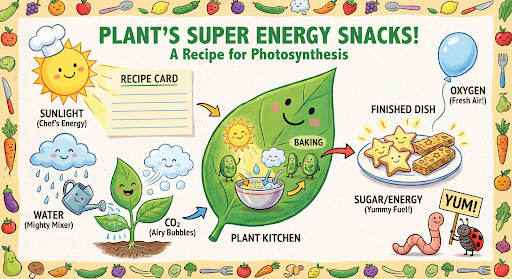
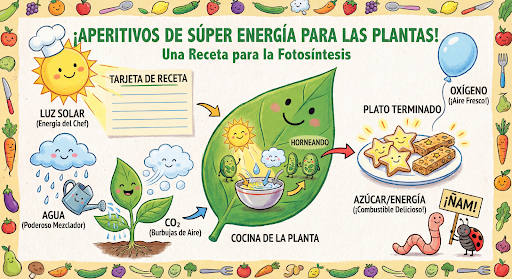
אחר כך אפשר להשתמש בprevious_interaction_id כדי לשנות את השפה בגרפיקה לספרדית.
Python
interaction_2 = client.interactions.create(
    model="gemini-3.1-flash-image",
    input="Update this infographic to be in Spanish. Do not change any other elements of the image.",
    previous_interaction_id=interaction.id,
    response_format={
        "type": "image",
        "mime_type": "image/jpeg",
        "aspect_ratio": "16:9",
        "image_size": "2K"
    },
)

generated_image = interaction_2.output_image
if generated_image:
    with open("photosynthesis_spanish.png", "wb") as f:
        f.write(base64.b64decode(generated_image.data))
JavaScript
const interaction2 = await ai.interactions.create({
  model: "gemini-3.1-flash-image",
  input: "Update this infographic to be in Spanish. Do not change any other elements of the image.",
  previous_interaction_id: interaction.id,
  response_format: {
    type: "image",
    mime_type: "image/png",
    aspect_ratio: "16:9",
    image_size: "2K"
  },
});

const generatedImage = interaction2.output_image;
if (generatedImage) {
  const buffer = Buffer.from(generatedImage.data, "base64");
  fs.writeFileSync("photosynthesis_spanish.png", buffer);
}
REST
curl -s -X POST \
  "https://generativelanguage.googleapis.com/v1beta/interactions" \
  -H "x-goog-api-key: $GEMINI_API_KEY" \
  -H 'Content-Type: application/json' \
  -d '{
    "model": "gemini-3.1-flash-image",
    "input": "Update this infographic to be in Spanish. Do not change any other elements of the image.",
    "previous_interaction_id": "<PREVIOUS_INTERACTION_ID>",
    "response_format": {
      "type": "image",
      "mime_type": "image/jpeg",
      "aspect_ratio": "16:9",
      "image_size": "2K"
    }
  }'
חדש במודלים של Gemini 3 ליצירת תמונות
Gemini 3 מציע מודלים המתקדמים ביותר (SOTA) ליצירה ולעריכה של תמונות. Gemini 3.1 Flash Image מותאם למהירות ולתרחישי שימוש בכמויות גדולות, ו-Gemini 3 Pro Image מותאם ליצירת נכסים מקצועיים. הם נועדו להתמודד עם תהליכי העבודה המאתגרים ביותר באמצעות חשיבה רציונלית משופרת, והם מצטיינים במשימות מורכבות של יצירה ושינוי רב-שלביות.
- פלט ברזולוציה גבוהה: יכולות מובנות ליצירת תמונות ברזולוציות של 1K, 2K ו-4K.
- Gemini 3.1 Flash Image מוסיף את הרזולוציה הקטנה יותר של 512 פיקסלים (0.5K).
- תמונה של Gemini 3.1 Flash Lite תומכת רק ברזולוציה של 1K.
- רינדור מתקדם של טקסט: המערכת יכולה ליצור טקסט קריא ומעוצב לאינפוגרפיקות, לתפריטים, לדיאגרמות ולנכסי שיווק.
- עיגון באמצעות חיפוש Google: המודל יכול להשתמש בחיפוש Google ככלי לאימות עובדות וליצירת תמונות על סמך נתונים בזמן אמת (למשל, מפות מזג אוויר עדכניות, תרשימי מניות, אירועים מהזמן האחרון).
- לא נתמך על ידי מודל התמונות Gemini 3.1 Flash Lite.
- Gemini 3.1 Flash Image מוסיף את השילוב של Grounding בחיפוש תמונות של Google לצד חיפוש באינטרנט.
- Thinking mode: המודל משתמש בתהליך של 'חשיבה' כדי להסיק מסקנות מהנחיות מורכבות. הוא יוצר 'תמונות ביניים של מחשבות' (שגלויות בקצה העורפי אבל לא מחויבות) כדי לשפר את הקומפוזיציה לפני שהוא יוצר את הפלט הסופי האיכותי.
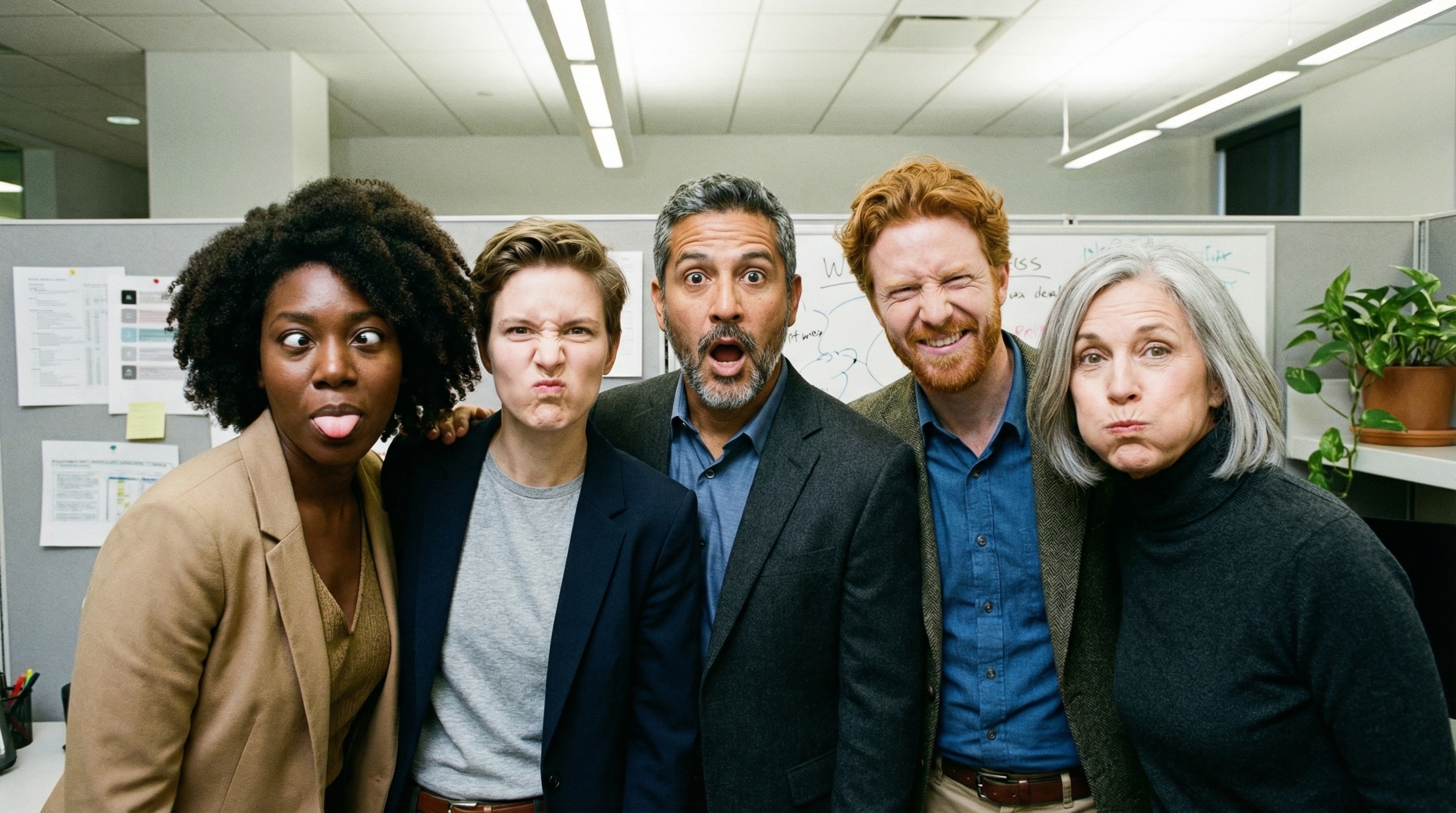
- עד 14 תמונות לדוגמה: עכשיו אפשר לשלב עד 14 תמונות לדוגמה כדי ליצור את התמונה הסופית.
- יחסי גובה-רוחב חדשים: מודל Gemini 3.1 Flash Lite Image מוסיף
1:1,3:2,2:3,3:4,4:3,4:5,5:4,9:16,16:9,21:9יחסי גובה-רוחב.
אפשר להשתמש בעד 14 תמונות לדוגמה
מודלים של תמונות ב-Gemini 3 מאפשרים לכם לערבב עד 14 תמונות לדוגמה. 14 התמונות האלה יכולות לכלול:
| תמונה של Gemini 3.1 Flash Lite | תמונה של Gemini 3.1 Flash | Gemini 3 Pro Image |
|---|---|---|
| עד 14 תמונות של אובייקטים ברמת דיוק גבוהה שייכללו בתמונה הסופית | עד 10 תמונות של אובייקטים עם רמת דיוק גבוהה שייכללו בתמונה הסופית | עד 6 תמונות של אובייקטים ברמת דיוק גבוהה שייכללו בתמונה הסופית |
| לא רלוונטי | עד 4 תמונות של דמויות כדי לשמור על עקביות הדמויות | עד 5 תמונות של דמויות כדי לשמור על עקביות הדמויות |
| לא רלוונטי | לא רלוונטי | עד 3 תמונות שישמשו כדוגמאות לסגנון |
Python
from google import genai
from google.genai import types
from PIL import Image
import base64

prompt = "An office group photo of these people, they are making funny faces."

client = genai.Client()

interaction = client.interactions.create(
    model="gemini-3.1-flash-image",
    input=[
        {
            "type": "text",
            "text": prompt,
        },
        {
            "type": "image",
            "data": base64.b64encode(image_bytes).decode('utf-8'),
            "mime_type": "image/png"
        },
        {
            "type": "image",
            "data": base64.b64encode(image_bytes).decode('utf-8'),
            "mime_type": "image/png"
        },
        {
            "type": "image",
            "data": base64.b64encode(image_bytes).decode('utf-8'),
            "mime_type": "image/png"
        },
        {
            "type": "image",
            "data": base64.b64encode(image_bytes).decode('utf-8'),
            "mime_type": "image/png"
        },
        {
            "type": "image",
            "data": base64.b64encode(image_bytes).decode('utf-8'),
            "mime_type": "image/png"
        },
    ],
    response_format={
        "type": "image",
        "aspect_ratio": "5:4",
        "image_size": "2K"
    },
)

with open("office.png", "wb") as f:

    f.write(base64.b64decode(interaction.output_image.data))
JavaScript
import { GoogleGenAI } from "@google/genai";
import * as fs from "node:fs";

async function main() {
  const ai = new GoogleGenAI({});

  const input = [
    {
      type: "text",
      text: "An office group photo of these people, they are making funny faces.",
    },
    { type: "image", mime_type: "image/jpeg", data: base64ImageFile1 },
    { type: "image", mime_type: "image/jpeg", data: base64ImageFile2 },
    { type: "image", mime_type: "image/jpeg", data: base64ImageFile3 },
    { type: "image", mime_type: "image/jpeg", data: base64ImageFile4 },
    { type: "image", mime_type: "image/jpeg", data: base64ImageFile5 },
  ];

  const interaction = await ai.interactions.create({
    model: "gemini-3.1-flash-image",
    input: input,
    response_format: {
      type: "image",
      aspect_ratio: "5:4",
      image_size: "2K",
    },
  });

  const buffer = Buffer.from(interaction.output_image.data, 'base64');

  fs.writeFileSync('office.png', buffer);
}

main();
REST
curl -s -X POST \
  "https://generativelanguage.googleapis.com/v1beta/interactions" \
    -H "x-goog-api-key: $GEMINI_API_KEY" \
    -H 'Content-Type: application/json' \
    -d "{
      \"model\": \"gemini-3.1-flash-image\",
      \"input\": [
        {\"type\": \"text\", \"text\": \"An office group photo of these people, they are making funny faces.\"},
        {\"type\": \"image\", \"mime_type\": \"image/png\", \"data\": \"<BASE64_DATA_IMG_1>\"},
        {\"type\": \"image\", \"mime_type\": \"image/png\", \"data\": \"<BASE64_DATA_IMG_2>\"},
        {\"type\": \"image\", \"mime_type\": \"image/png\", \"data\": \"<BASE64_DATA_IMG_3>\"},
        {\"type\": \"image\", \"mime_type\": \"image/png\", \"data\": \"<BASE64_DATA_IMG_4>\"},
        {\"type\": \"image\", \"mime_type\": \"image/png\", \"data\": \"<BASE64_DATA_IMG_5>\"}
      ],
      \"response_format\": {
        \"type\": \"image\",
        \"aspect_ratio\": \"5:4\",
        \"image_size\": \"2K\"
      }
    }"
עיגון באמצעות חיפוש Google
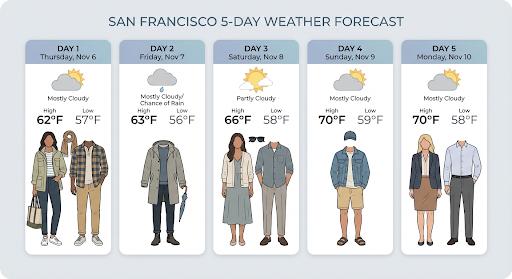
אתם יכולים להשתמש בכלי חיפוש Google כדי ליצור תמונות על סמך מידע בזמן אמת, כמו תחזיות מזג אוויר, תרשימי מניות או אירועים מהזמן האחרון.
שימו לב: כשמשתמשים בעיגון באמצעות חיפוש Google עם יצירת תמונות, תוצאות חיפוש מבוססות-תמונות לא מועברות למודל היצירה ומוחרגות מהתשובה (ראו עיגון באמצעות חיפוש תמונות ב-Google)
Python
from google import genai
from google.genai import types
import base64
prompt = "Visualize the current weather forecast for the next 5 days in San Francisco as a clean, modern weather chart. Add a visual on what I should wear each day"

client = genai.Client()

interaction = client.interactions.create(
    model="gemini-3.1-flash-image",
    input=prompt,
    tools=[{"type": "google_search"}],
    response_format={
        "type": "image",
        "mime_type": "image/jpeg",
        "aspect_ratio": "16:9"
    },
)

with open("weather.png", "wb") as f:

    f.write(base64.b64decode(interaction.output_image.data))
JavaScript
import { GoogleGenAI } from "@google/genai";
import * as fs from "node:fs";

async function main() {
  const ai = new GoogleGenAI({});

  const interaction = await ai.interactions.create({
    model: "gemini-3.1-flash-image",
    input: "Visualize the current weather forecast for the next 5 days in San Francisco as a clean, modern weather chart. Add a visual on what I should wear each day",
    tools: [{"type": "google_search"}],
    response_format: {
      type: "image",
      mime_type: "image/png",
      aspect_ratio: "16:9",
      image_size: "2K"
    },
  });

  const buffer = Buffer.from(interaction.output_image.data, 'base64');

  fs.writeFileSync('weather.png', buffer);
}

main();
REST
curl -s -X POST \
  "https://generativelanguage.googleapis.com/v1beta/interactions" \
  -H "x-goog-api-key: $GEMINI_API_KEY" \
  -H "Content-Type: application/json" \
  -d '{
    "model": "gemini-3.1-flash-image",
    "input": [
      {"type": "text", "text": "Visualize the current weather forecast for the next 5 days in San Francisco as a clean, modern weather chart. Add a visual on what I should wear each day"}
    ],
    "tools": [{"type": "google_search"}],
    "response_format": {
      "type": "image",
      "mime_type": "image/jpeg",
      "aspect_ratio": "16:9"
    }
  }'
התשובה כוללת שלבים google_search_call ו-google_search_result,
יחד עם הערות url_citation בתוך הטקסט של השלב:
-
google_search_result: מכיל אתsearch_suggestions, קטע HTML להצגת הצעות לחיפוש בממשק המשתמש. url_citationהערות: ציטוטים מוטבעים בשלב הטקסט שמקשרים בין חלקי התשובה לבין מקורות האינטרנט שלהם.
עיגון באמצעות חיפוש Google לתמונות (3.1 Flash)
ההארקה באמצעות חיפוש תמונות ב-Google מאפשרת למודלים להשתמש בתמונות מהאינטרנט שאוחזרו באמצעות חיפוש תמונות ב-Google כהקשר חזותי ליצירת תמונות. חיפוש תמונות הוא סוג חיפוש חדש בכלי הקיים 'עיגון באמצעות חיפוש Google', והוא פועל לצד חיפוש Google.
כדי להפעיל את חיפוש התמונות, צריך להגדיר את הכלי google_search בבקשת ה-API ולציין את image_search במערך search_types. אפשר להשתמש בחיפוש תמונות בנפרד או יחד עם חיפוש באינטרנט.
Python
from google import genai

client = genai.Client()

interaction = client.interactions.create(
    model="gemini-3.1-flash-image",
    input="A detailed painting of a Timareta butterfly resting on a flower",
    tools=[{
      "type": "google_search",
      "search_types": ["web_search", "image_search"]
    }]
)
JavaScript
import { GoogleGenAI } from "@google/genai";

async function main() {
  const ai = new GoogleGenAI({});

  const interaction = await ai.interactions.create({
    model: "gemini-3.1-flash-image",
    input: "A detailed painting of a Timareta butterfly resting on a flower",
    tools: [{
      "type": "google_search",
      "search_types": ["web_search", "image_search"]
    }]
  });
}

main();
REST
curl -s -X POST \
  "https://generativelanguage.googleapis.com/v1beta/interactions" \
  -H "x-goog-api-key: $GEMINI_API_KEY" \
  -H "Content-Type: application/json" \
  -d '{
    "model": "gemini-3.1-flash-image",
    "input": "A detailed painting of a Timareta butterfly resting on a flower",
    "tools": [{"type": "google_search", "search_types": ["web_search", "image_search"]}]
  }'
דרישות להצגה
כשמשתמשים בחיפוש תמונות במסגרת עיגון באמצעות חיפוש Google, צריך להציג את search_suggestions מהשלב google_search_result. דרישות השימוש המלאות מפורטות בתנאים ובהגבלות.
תשובה
בתשובות מבוססות-קרקע שמתקבלות מחיפוש תמונות, ה-API מחזיר ציטוטים מוטמעים ומטא-נתונים של שיוך כחלק משלבי התגובה:
url_citationהערות: ציטוטים בתוך בלוק התוכן הטקסטואלי ב-model_output, שמקשרים את התוכן שנוצר למקור שלו.
google_search_result: מכיל אתsearch_suggestions, קטע HTML להצגת הצעות לחיפוש בממשק המשתמש.
יצירת תמונות מסרטונים (3.1 Flash)
יצירת תמונות מסרטונים מאפשרת ליצור תמונות חדשות באמצעות ההקשר של סרטון כהפניה מרובת-אופנים. התכונה הזו שימושית ליצירת תמונות ממוזערות באיכות גבוהה לסרטונים, פוסטרים בסגנון קולנועי, אינפוגרפיקות סיכום או יצירות אומנות חדשות בהשראת סצנה מסרטון.
במהלך היצירה, המודל מנתח את מסגרות הסרטון בהקשר כדי לחלץ נושאים חזותיים ואירועים מרכזיים, ואז משתמש בהם לצד פרומפט טקסטואלי כדי ליצור את תמונת הפלט.
אפשר להעביר כתובות URL ציבוריות של סרטונים ב-YouTube ישירות בבקשת ה-API או להעלות קובצי וידאו מקומיים באמצעות Files API.
Python
from google import genai
from google.genai import types
import base64

client = genai.Client()

interaction = client.interactions.create(
    model="gemini-3.1-flash-image",
    input=[
        {
            "type": "video",
            "uri": "https://www.youtube.com/watch?v=UTdfxFyOQTI",
            "mime_type": "video/mp4"
        },
        {"type": "text", "text": "Generate a poster image that captures the key themes of this video."}
    ],
    response_format={"type": "image", "aspect_ratio": "16:9"}
)

# Save the generated image part
for step in interaction.steps:
    if step.type == "model_output":
        for content_block in step.content:
            if content_block.type == "text":
                print(content_block.text)
            elif content_block.type == "image":
                with open("video_poster.png", "wb") as f:
                    f.write(base64.b64decode(content_block.data))
                print("Image saved as video_poster.png")
JavaScript
import { GoogleGenAI } from "@google/genai";
import * as fs from "node:fs";

async function main() {
  const ai = new GoogleGenAI({});

  const interaction = await ai.interactions.create({
    model: "gemini-3.1-flash-image",
    input: [
      {
        type: "video",
        uri: "https://www.youtube.com/watch?v=UTdfxFyOQTI",
        mime_type: "video/mp4"
      },
      { type: "text", text: "Generate a poster image that captures the key themes of this video." }
    ],
    response_format: {
      type: "image",
      aspect_ratio: "16:9"
    }
  });

  for (const step of interaction.steps) {
    if (step.type === "model_output") {
      for (const contentBlock of step.content) {
        if (contentBlock.type === "text") {
          console.log(contentBlock.text);
        } else if (contentBlock.type === "image") {
          const buffer = Buffer.from(contentBlock.data, "base64");
          fs.writeFileSync("video_poster.png", buffer);
          console.log("Image saved as video_poster.png");
        }
      }
    }
  }
}

main();
REST
curl -s -X POST \
  "https://generativelanguage.googleapis.com/v1beta/interactions" \
  -H "x-goog-api-key: $GEMINI_API_KEY" \
  -H 'Content-Type: application/json' \
  -d '{
    "model": "gemini-3.1-flash-image",
    "input": [
      {
        "type": "video",
        "uri": "https://www.youtube.com/watch?v=UTdfxFyOQTI",
        "mime_type": "video/mp4"
      },
      {
        "type": "text",
        "text": "Generate a poster image that captures the key themes of this video."
      }
    ],
    "response_format": {
      "type": "image",
      "aspect_ratio": "16:9"
    }
  }'
יצירת תמונות ברזולוציה של עד 4K
מודלים של Gemini 3 ליצירת תמונות יוצרים כברירת מחדל 1,000 תמונות, אבל יכולים גם ליצור תמונות באיכות 2K, 4K ו-512px (05.K) (Gemini 3.1 Flash Image בלבד). כדי ליצור נכסים ברזולוציה גבוהה יותר, מציינים את image_size ב-response_format.
חובה להשתמש באות 'K' גדולה (לדוגמה: 512px (05.K), 1K, 2K, 4K). פרמטרים באותיות קטנות (למשל, 1k) יידחו.
Python
from google import genai
from google.genai import types
import base64

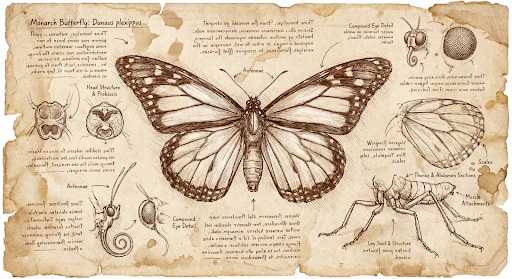
prompt = "Da Vinci style anatomical sketch of a dissected Monarch butterfly. Detailed drawings of the head, wings, and legs on textured parchment with notes in English."

client = genai.Client()

interaction = client.interactions.create(
    model="gemini-3.1-flash-image",
    input=prompt,
    response_format={
        "type": "image",
        "mime_type": "image/jpeg",
        "aspect_ratio": "1:1",
        "image_size": "1K"
    },
)

print(interaction.output_text)

with open("butterfly.png", "wb") as f:

    f.write(base64.b64decode(interaction.output_image.data))
JavaScript
import { GoogleGenAI } from "@google/genai";
import * as fs from "node:fs";

async function main() {
  const ai = new GoogleGenAI({});

  const interaction = await ai.interactions.create({
    model: "gemini-3.1-flash-image",
    input: "Da Vinci style anatomical sketch of a dissected Monarch butterfly. Detailed drawings of the head, wings, and legs on textured parchment with notes in English.",
    response_format: {
      type: "image",
      mime_type: "image/png",
      aspect_ratio: "1:1",
      image_size: "1K",
    },
  });

  console.log(interaction.output_text);

  const buffer = Buffer.from(interaction.output_image.data, 'base64');

  fs.writeFileSync('butterfly.png', buffer);
}

main();
REST
curl -s -X POST \
  "https://generativelanguage.googleapis.com/v1beta/interactions" \
  -H "x-goog-api-key: $GEMINI_API_KEY" \
  -H "Content-Type: application/json" \
  -d '{
    "model": "gemini-3.1-flash-image",
    "input": "Da Vinci style anatomical sketch of a dissected Monarch butterfly. Detailed drawings of the head, wings, and legs on textured parchment with notes in English.",
    "response_format": {
      "type": "image",
      "mime_type": "image/jpeg",
      "aspect_ratio": "1:1",
      "image_size": "1K"
    }
  }'
זוהי תמונה לדוגמה שנוצרה מההנחיה הזו:
תהליך החשיבה
מודלים של Gemini 3 ליצירת תמונות הם מודלים עם יכולות מתקדמות שמשתמשים בתהליך חשיבה רציונלית ("Thinking") כדי לענות על פרומפטים מורכבים. התכונה הזו מופעלת כברירת מחדל ואי אפשר להשבית אותה ב-API. מידע נוסף על תהליך החשיבה זמין במדריך תהליך החשיבה של Gemini.
המודל יוצר עד שתי תמונות ביניים כדי לבדוק את הקומפוזיציה והלוגיקה. התמונה האחרונה בתהליך החשיבה היא גם התמונה הסופית שעברה רינדור.
אתם יכולים לבדוק את המחשבות שהובילו ליצירת התמונה הסופית.
Python
for step in interaction.steps:
    if step.type == "thought":
        for content_block in step.summary:
            if content_block.type == "text":
                print(content_block.text)
            elif content_block.type == "image":
                image = Image.open(io.BytesIO(base64.b64decode(content_block.data)))
                image.show()
JavaScript
for (const step of interaction.steps) {
  if (step.type === "thought") {
    for (const contentBlock of step.summary) {
      if (contentBlock.type === "text") {
        console.log(contentBlock.text);
      } else if (contentBlock.type === "image") {
        const buffer = Buffer.from(contentBlock.data, 'base64');
        fs.writeFileSync('thought_image.png', buffer);
      }
    }
  }
}
טקסט ותמונות משולבים
מודלים רגילים ליצירת תמונות יוצרים רק תמונות, אבל חלק מהמודלים המתקדמים של Gemini 3 (כמו gemini-3-pro-image) יכולים ליצור תוכן משולב – כמו סיפורים או מדריכים שמכילים גם בלוקים של טקסט וגם איורים באותה תשובה.
מכיוון שהפלט מורכב ומשולב, מאפייני נוחות כמו .output_image או .output_text לא יציגו את הרצף המלא. כדי לגשת לתוכן משולב ולשמור אותו, צריך לבצע איטרציה ידנית על steps:
Python
interaction = client.interactions.create(
    model="gemini-3-pro-image",
    input="Write the story of the lifecycle of a monarch butterfly, interleave illustrations",
)

image_counter = 1
for step in interaction.steps:
    if step.type == "model_output":
        for content_block in step.content:
            if content_block.type == "text":
                print(content_block.text)
            elif content_block.type == "image":
                filename = f"butterfly_lifecycle_{image_counter}.png"
                with open(filename, "wb") as f:
                    f.write(base64.b64decode(content_block.data))
                print(f"\n[Saved illustration: {filename}]\n")
                image_counter += 1
JavaScript
const interaction = await ai.interactions.create({
    model: "gemini-3-pro-image",
    input: "Write the story of the lifecycle of a monarch butterfly, interleave illustrations",
});

let imageCounter = 1;
for (const step of interaction.steps) {
  if (step.type === "model_output") {
    for (const contentBlock of step.content) {
      if (contentBlock.type === "text") {
        console.log(contentBlock.text);
      } else if (contentBlock.type === "image") {
        const buffer = Buffer.from(contentBlock.data, "base64");
        const filename = `butterfly_lifecycle_${imageCounter}.png`;
        fs.writeFileSync(filename, buffer);
        console.log(`\n[Saved illustration: ${filename}]\n`);
        imageCounter++;
      }
    }
  }
}
שליטה ברמות החשיבה
עם Gemini 3.1 Flash Image, אתם יכולים לשלוט בכמות החשיבה שהמודל משתמש בה כדי לאזן בין איכות לבין זמן האחזור. ערך ברירת המחדל thinking_level הוא minimal, והרמות הנתמכות הן minimal ו-high.
Python
from google import genai
from PIL import Image
import base64
import io

client = genai.Client()

interaction = client.interactions.create(
    model="gemini-3.1-flash-image",
    input="A futuristic city built inside a giant glass bottle floating in space",
    generation_config={"thinking_level": "high"},
)

print(interaction.output_text)

image = Image.open(io.BytesIO(base64.b64decode(interaction.output_image.data)))

image.show()
JavaScript
import { GoogleGenAI } from "@google/genai";
import * as fs from "node:fs";

async function main() {
  const ai = new GoogleGenAI({});

  const interaction = await ai.interactions.create({
    model: "gemini-3.1-flash-image",
    input: "A futuristic city built inside a giant glass bottle floating in space",
    generation_config: { thinking_level: "high" },
  });

  console.log(interaction.output_text);

  const buffer = Buffer.from(interaction.output_image.data, 'base64');

  fs.writeFileSync('image.png', buffer);
}
main();
REST
curl -s -X POST \
  "https://generativelanguage.googleapis.com/v1beta/interactions" \
  -H "x-goog-api-key: $GEMINI_API_KEY" \
  -H "Content-Type: application/json" \
  -d '{
    "model": "gemini-3.1-flash-image",
    "input": "A futuristic city built inside a giant glass bottle floating in space",
    "generation_config": {
      "thinking_level": "high"
    }
  }'
שימו לב: כברירת מחדל, כשמשתמשים במודלים של חשיבה, המערכת מחייבת על טוקנים של חשיבה, כי תהליך החשיבה תמיד מתבצע כברירת מחדל, גם אם אתם רואים את התהליך וגם אם לא.
מצבים אחרים ליצירת תמונות
למרות שמודלים ליצירת תמונות של Nano Banana מומלצים לרוב תרחישי השימוש, אתם יכולים גם לנסות מודלים ייעודיים ליצירת תמונות:
- Imagen: מודלים של Google ליצירת תמונות לפי טקסט, שעברו אופטימיזציה ליצירת תמונות באיכות גבוהה.
- Veo: מודל ליצירת וידאו של Google.
יצירה של קבוצת תמונות
אפשר להריץ את כל היכולות של יצירת תמונות שמתוארות בדף הזה גם כעבודות אצווה באמצעות Batch API. זה אידיאלי אם אתם צריכים ליצור הרבה תמונות. בתמורה לזמן תגובה של עד 24 שעות, תקבלו מכסות גבוהות יותר.
מדריך לכתיבת פרומפטים ואסטרטגיות
בקטע הזה מפורטות דוגמאות להנחיות ולתבניות לתהליכי עבודה נפוצים של יצירת תמונות ועריכת תמונות. כל דוגמה כוללת תבנית לשימוש חוזר והנחיה לדוגמה ל-Interactions API.
פרומפטים ליצירת תמונות
בדוגמאות הבאות אפשר לראות איך משתמשים בהנחיות טקסט כדי ליצור סוגים שונים של תמונות.
1. סצנות פוטוריאליסטיות
מתארים סצנה בפירוט רב. ככל שהתיאור יהיה ספציפי יותר, כך תהיה לכם יותר שליטה על התוצאות.
תבנית
A photorealistic [type of shot] of a [subject description] in a [setting
description]. [Description of the light]. Shot from a [camera angle]
with a [lens type].
פרומפט
A photorealistic wide-angle shot of a vibrant coral reef teeming with tropical fish. Crystal-clear turquoise water with sunbeams filtering down from the surface, illuminating a sea turtle gliding gracefully over the coral. Shot from a low perspective with a wide-angle lens. Aspect ratio 16:9.
Python
from google import genai
from google.genai import types
import base64

client = genai.Client()

interaction = client.interactions.create(
    model="gemini-3.1-flash-image",
    input="A photorealistic wide-angle shot of a vibrant coral reef teeming with tropical fish. Crystal-clear turquoise water with sunbeams filtering down from the surface, illuminating a sea turtle gliding gracefully over the coral. Shot from a low perspective with a wide-angle lens. Aspect ratio 16:9.",
    response_format=[
        {
            "type": "image",
            "mime_type": "image/jpeg",
            "aspect_ratio": "16:9",
        }
    ],
)

print(interaction.output_text)

with open("coral_reef.png", "wb") as f:

    f.write(base64.b64decode(interaction.output_image.data))
JavaScript
import { GoogleGenAI } from "@google/genai";
import * as fs from "node:fs";

async function main() {
  const ai = new GoogleGenAI({});

  const interaction = await ai.interactions.create({
    model: "gemini-3.1-flash-image",
    input: "A photorealistic wide-angle shot of a vibrant coral reef teeming with tropical fish. Crystal-clear turquoise water with sunbeams filtering down from the surface, illuminating a sea turtle gliding gracefully over the coral. Shot from a low perspective with a wide-angle lens. Aspect ratio 16:9.",
    response_format: [
      {
        type: "image",
        mime_type: "image/jpeg",
        aspect_ratio: "16:9",
      }
    ],
  });
  console.log(interaction.output_text);

  const buffer = Buffer.from(interaction.output_image.data, 'base64');

  fs.writeFileSync('coral_reef.png', buffer);
}

main();
REST
curl -s -X POST \
  "https://generativelanguage.googleapis.com/v1beta/interactions" \
  -H "x-goog-api-key: $GEMINI_API_KEY" \
  -H "Content-Type: application/json" \
  -d '{
    "model": "gemini-3.1-flash-image",
    "input": "A photorealistic wide-angle shot of a vibrant coral reef teeming with tropical fish. Crystal-clear turquoise water with sunbeams filtering down from the surface, illuminating a sea turtle gliding gracefully over the coral. Shot from a low perspective with a wide-angle lens. Aspect ratio 16:9.",
    "response_format": {
      "type": "image",
      "mime_type": "image/png",
      "aspect_ratio": "16:9"
    }
  }'
2. איורים וסטיקרים מעוצבים
תארו את הסגנון האומנותי, הנושא והמדיום. כדי לקבל תוצאות עקביות, חשוב להיות ספציפיים לגבי הפרטים החזותיים (קווים מודגשים, צבעים וכו').
תבנית
A [style] of a [subject, with details about accessories or actions]
doing [activity]. The design features [visual qualities, e.g., bold outlines,
cel-shading, etc.] and [color/background preference].
פרומפט
A kawaii-style sticker of a happy red panda wearing a tiny bamboo hat. It's munching on a green bamboo leaf. The design features bold, clean outlines, simple cel-shading, and a vibrant color palette. The background must be white.
Python
from google import genai
import base64

client = genai.Client()

interaction = client.interactions.create(
    model="gemini-3.1-flash-image",
    input="A kawaii-style sticker of a happy red panda wearing a tiny bamboo hat. It's munching on a green bamboo leaf. The design features bold, clean outlines, simple cel-shading, and a vibrant color palette. The background must be white.",
)

for step in interaction.steps:
    if step.type == "model_output":
        for content_block in step.content:
            if content_block.type == "text":
                print(content_block.text)
            elif content_block.type == "image":
                with open("red_panda_sticker.png", "wb") as f:
                    f.write(base64.b64decode(content_block.data))
JavaScript
import { GoogleGenAI } from "@google/genai";
import * as fs from "node:fs";

async function main() {
  const ai = new GoogleGenAI({});

  const interaction = await ai.interactions.create({
    model: "gemini-3.1-flash-image",
    input: "A kawaii-style sticker of a happy red panda wearing a tiny bamboo hat. It's munching on a green bamboo leaf. The design features bold, clean outlines, simple cel-shading, and a vibrant color palette. The background must be white.",
  });
  for (const step of interaction.steps) {
    if (step.type === "model_output") {
      for (const contentBlock of step.content) {
        if (contentBlock.type === "text") {
          console.log(contentBlock.text);
        } else if (contentBlock.type === "image") {
          const buffer = Buffer.from(contentBlock.data, "base64");
          fs.writeFileSync("red_panda_sticker.png", buffer);
        }
      }
    }
  }
}

main();
REST
curl -s -X POST \
  "https://generativelanguage.googleapis.com/v1beta/interactions" \
  -H "x-goog-api-key: $GEMINI_API_KEY" \
  -H "Content-Type: application/json" \
  -d '{
    "model": "gemini-3.1-flash-image",
    "input": "A kawaii-style sticker of a happy red panda wearing a tiny bamboo hat. It is munching on a green bamboo leaf. The design features bold, clean outlines, simple cel-shading, and a vibrant color palette. The background must be white."
  }'

3. טקסט מדויק בתמונות
Gemini מצטיין ברינדור טקסט. חשוב לתת הנחיות ברורות לגבי הטקסט, סגנון הגופן (תיאורית) והעיצוב הכללי. שימוש ב-Gemini 3 Pro Image ליצירת נכסים מקצועיים.
תבנית
Create a [image type] for [brand/concept] with the text "[text to render]"
in a [font style]. The design should be [style description], with a
[color scheme].
פרומפט
Create a modern, minimalist logo for a coffee shop called 'The Daily Grind'. The text should be in a clean, bold, sans-serif font. The color scheme is black and white. Put the logo in a circle. Use a coffee bean in a clever way.
Python
from google import genai
import base64

client = genai.Client()

interaction = client.interactions.create(
    model="gemini-3.1-flash-image",
    input="Create a modern, minimalist logo for a coffee shop called 'The Daily Grind'. The text should be in a clean, bold, sans-serif font. The color scheme is black and white. Put the logo in a circle. Use a coffee bean in a clever way.",
    response_format={"type": "image", "aspect_ratio": "1:1"},
)

for step in interaction.steps:
    if step.type == "model_output":
        for content_block in step.content:
            if content_block.type == "text":
                print(content_block.text)
            elif content_block.type == "image":
                with open("logo_example.jpg", "wb") as f:
                    f.write(base64.b64decode(content_block.data))
JavaScript
import { GoogleGenAI } from "@google/genai";
import * as fs from "node:fs";

async function main() {
  const ai = new GoogleGenAI({});

  const interaction = await ai.interactions.create({
    model: "gemini-3.1-flash-image",
    input: "Create a modern, minimalist logo for a coffee shop called 'The Daily Grind'. The text should be in a clean, bold, sans-serif font. The color scheme is black and white. Put the logo in a circle. Use a coffee bean in a clever way.",
    response_format: { type: "image", aspect_ratio: "1:1" },
  });
  for (const step of interaction.steps) {
    if (step.type === "model_output") {
      for (const contentBlock of step.content) {
        if (contentBlock.type === "text") {
          console.log(contentBlock.text);
        } else if (contentBlock.type === "image") {
          const buffer = Buffer.from(contentBlock.data, "base64");
          fs.writeFileSync("logo_example.jpg", buffer);
        }
      }
    }
  }
}

main();
REST
curl -s -X POST \
  "https://generativelanguage.googleapis.com/v1beta/interactions" \
  -H "x-goog-api-key: $GEMINI_API_KEY" \
  -H "Content-Type: application/json" \
  -d '{
    "model": "gemini-3.1-flash-image",
    "input": "Create a modern, minimalist logo for a coffee shop called The Daily Grind. The text should be in a clean, bold, sans-serif font. The color scheme is black and white. Put the logo in a circle. Use a coffee bean in a clever way.",
    "response_format": {
      "type": "image",
      "aspect_ratio": "1:1"
    }
  }'

4. מוקאפים של מוצרים וצילום מסחרי
מושלם ליצירת צילומי מוצר נקיים ומקצועיים למסחר אלקטרוני, לפרסום או למיתוג.
תבנית
A high-resolution, studio-lit product photograph of a [product description]
on a [background surface/description]. The lighting is a [lighting setup,
e.g., three-point softbox setup] to [lighting purpose]. The camera angle is
a [angle type] to showcase [specific feature]. Ultra-realistic, with sharp
focus on [key detail]. [Aspect ratio].
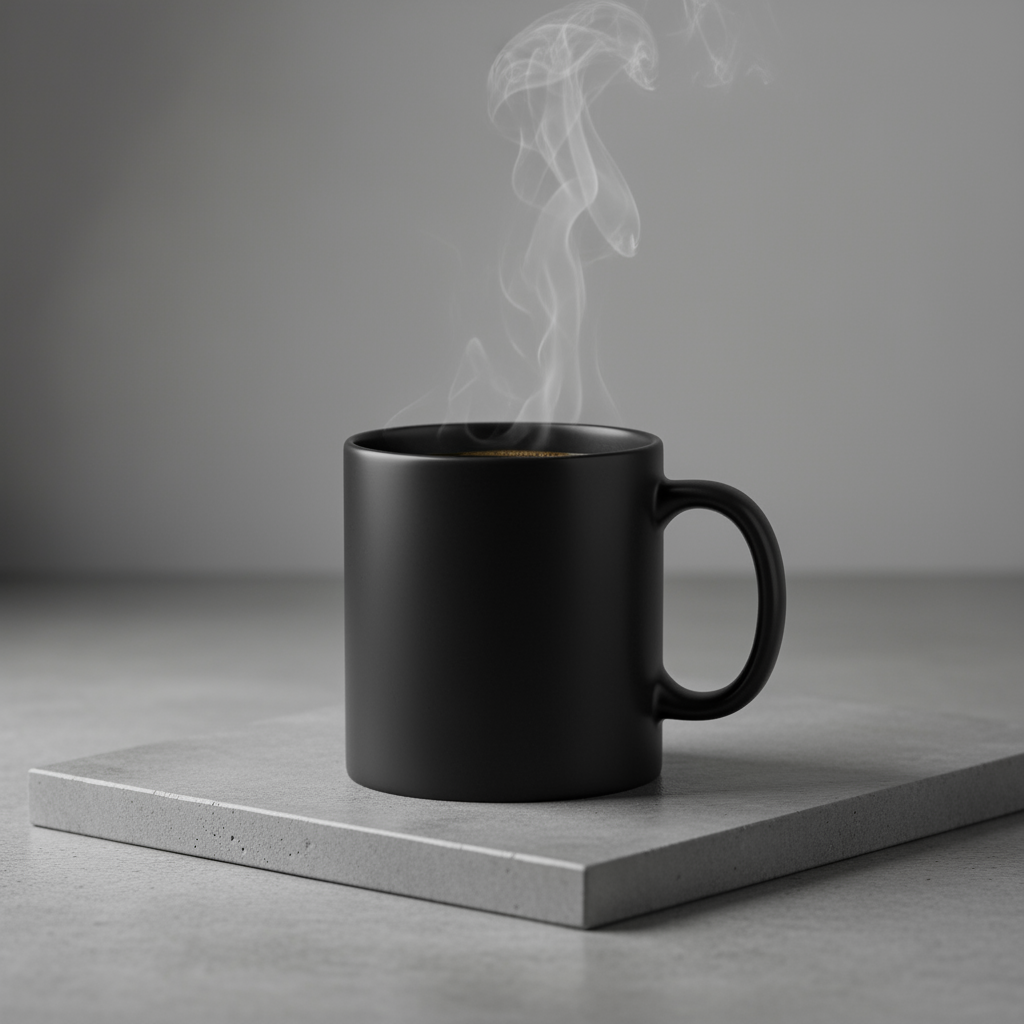
פרומפט
A high-resolution, studio-lit product photograph of a minimalist ceramic
coffee mug in matte black, presented on a polished concrete surface. The
lighting is a three-point softbox setup designed to create soft, diffused
highlights and eliminate harsh shadows. The camera angle is a slightly
elevated 45-degree shot to showcase its clean lines. Ultra-realistic, with
sharp focus on the steam rising from the coffee. Square image.
Python
from google import genai
import base64

client = genai.Client()

interaction = client.interactions.create(
    model="gemini-3.1-flash-image",
    input="A high-resolution, studio-lit product photograph of a minimalist ceramic coffee mug in matte black, presented on a polished concrete surface. The lighting is a three-point softbox setup designed to create soft, diffused highlights and eliminate harsh shadows. The camera angle is a slightly elevated 45-degree shot to showcase its clean lines. Ultra-realistic, with sharp focus on the steam rising from the coffee. Square image.",
)

for step in interaction.steps:
    if step.type == "model_output":
        for content_block in step.content:
            if content_block.type == "text":
                print(content_block.text)
            elif content_block.type == "image":
                with open("product_mockup.png", "wb") as f:
                    f.write(base64.b64decode(content_block.data))
JavaScript
import { GoogleGenAI } from "@google/genai";
import * as fs from "node:fs";

async function main() {
  const ai = new GoogleGenAI({});

  const interaction = await ai.interactions.create({
    model: "gemini-3.1-flash-image",
    input: "A high-resolution, studio-lit product photograph of a minimalist ceramic coffee mug in matte black, presented on a polished concrete surface. The lighting is a three-point softbox setup designed to create soft, diffused highlights and eliminate harsh shadows. The camera angle is a slightly elevated 45-degree shot to showcase its clean lines. Ultra-realistic, with sharp focus on the steam rising from the coffee. Square image.",
  });
  for (const step of interaction.steps) {
    if (step.type === "model_output") {
      for (const contentBlock of step.content) {
        if (contentBlock.type === "text") {
          console.log(contentBlock.text);
        } else if (contentBlock.type === "image") {
          const buffer = Buffer.from(contentBlock.data, "base64");
          fs.writeFileSync("product_mockup.png", buffer);
        }
      }
    }
  }
}

main();
REST
curl -s -X POST \
  "https://generativelanguage.googleapis.com/v1beta/interactions" \
  -H "x-goog-api-key: $GEMINI_API_KEY" \
  -H "Content-Type: application/json" \
  -d '{
    "model": "gemini-3.1-flash-image",
    "input": "A high-resolution, studio-lit product photograph of a minimalist ceramic coffee mug in matte black, presented on a polished concrete surface. The lighting is a three-point softbox setup designed to create soft, diffused highlights and eliminate harsh shadows. The camera angle is a slightly elevated 45-degree shot to showcase its clean lines. Ultra-realistic, with sharp focus on the steam rising from the coffee. Square image."
  }'
5. עיצוב מינימליסטי עם שטח ריק
אפשר ליצור איתה רקעים מצוינים לאתרים, למצגות או לחומרי שיווק שיוצג עליהם טקסט.
תבנית
A minimalist composition featuring a single [subject] positioned in the
[bottom-right/top-left/etc.] of the frame. The background is a vast, empty
[color] canvas, creating significant negative space. Soft, subtle lighting.
[Aspect ratio].
פרומפט
A minimalist composition featuring a single, delicate red maple leaf
positioned in the bottom-right of the frame. The background is a vast, empty
off-white canvas, creating significant negative space for text. Soft,
diffused lighting from the top left. Square image.
Python
from google import genai
import base64

client = genai.Client()

interaction = client.interactions.create(
    model="gemini-3.1-flash-image",
    input="A minimalist composition featuring a single, delicate red maple leaf positioned in the bottom-right of the frame. The background is a vast, empty off-white canvas, creating significant negative space for text. Soft, diffused lighting from the top left. Square image.",
)

for step in interaction.steps:
    if step.type == "model_output":
        for content_block in step.content:
            if content_block.type == "text":
                print(content_block.text)
            elif content_block.type == "image":
                with open("minimalist_design.png", "wb") as f:
                    f.write(base64.b64decode(content_block.data))
JavaScript
import { GoogleGenAI } from "@google/genai";
import * as fs from "node:fs";

async function main() {
  const ai = new GoogleGenAI({});

  const interaction = await ai.interactions.create({
    model: "gemini-3.1-flash-image",
    input: "A minimalist composition featuring a single, delicate red maple leaf positioned in the bottom-right of the frame. The background is a vast, empty off-white canvas, creating significant negative space for text. Soft, diffused lighting from the top left. Square image.",
  });
  for (const step of interaction.steps) {
    if (step.type === "model_output") {
      for (const contentBlock of step.content) {
        if (contentBlock.type === "text") {
          console.log(contentBlock.text);
        } else if (contentBlock.type === "image") {
          const buffer = Buffer.from(contentBlock.data, "base64");
          fs.writeFileSync("minimalist_design.png", buffer);
        }
      }
    }
  }
}

main();
REST
curl -s -X POST \
  "https://generativelanguage.googleapis.com/v1beta/interactions" \
  -H "x-goog-api-key: $GEMINI_API_KEY" \
  -H "Content-Type: application/json" \
  -d '{
    "model": "gemini-3.1-flash-image",
    "input": "A minimalist composition featuring a single, delicate red maple leaf positioned in the bottom-right of the frame. The background is a vast, empty off-white canvas, creating significant negative space for text. Soft, diffused lighting from the top left. Square image."
  }'

6. אומנות רציפה (פאנל קומיקס / סטוריבורד)
הוא מתבסס על עקביות הדמויות ותיאור הסצנה כדי ליצור חלוניות לסיפור חזותי. כדי לקבל תוצאות מדויקות של טקסט וסיפורים, ההנחיות האלה פועלות הכי טוב עם Gemini 3 Pro ו-Gemini 3.1 Flash Image.
תבנית
Make a 3 panel comic in a [style]. Put the character in a [type of scene].
פרומפט
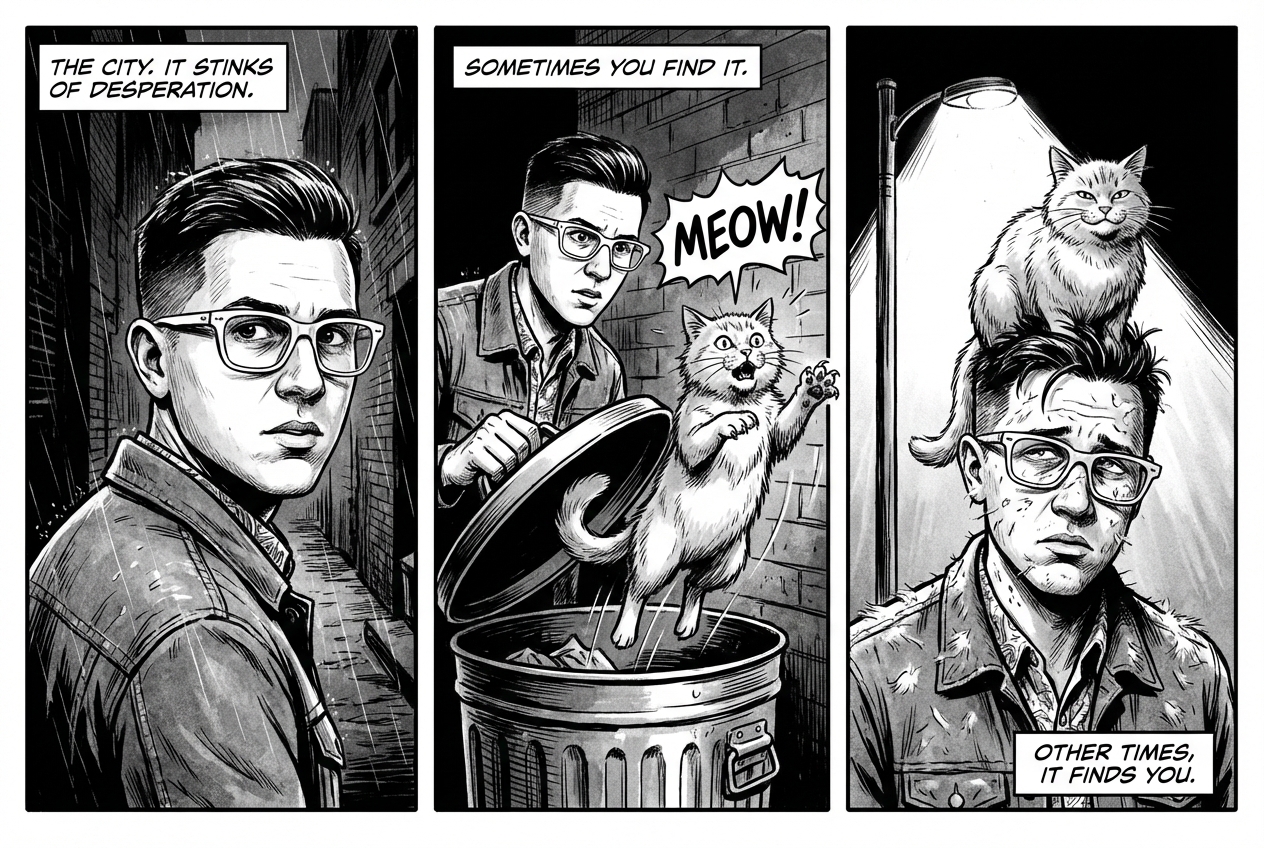
Make a 3 panel comic in a gritty, noir art style with high-contrast black and white inks. Put the character in a humurous scene.
Python
from google import genai
from PIL import Image
import base64

client = genai.Client()

with open('/path/to/your/man_in_white_glasses.jpg', 'rb') as f:
    image_bytes = f.read()
text_input = "Make a 3 panel comic in a gritty, noir art style with high-contrast black and white inks. Put the character in a humurous scene."

interaction = client.interactions.create(
    model="gemini-3.1-flash-image",
    input=[
        {"type": "text", "text": text_input},
        {
            "type": "image",
            "data": base64.b64encode(image_bytes).decode('utf-8'),
            "mime_type": "image/jpeg"
        }
    ],
)

for step in interaction.steps:
    if step.type == "model_output":
        for content_block in step.content:
            if content_block.type == "text":
                print(content_block.text)
            elif content_block.type == "image":
                with open("comic_panel.jpg", "wb") as f:
                    f.write(base64.b64decode(content_block.data))
JavaScript
import { GoogleGenAI } from "@google/genai";
import * as fs from "node:fs";

async function main() {
  const ai = new GoogleGenAI({});

  const imagePath = "/path/to/your/man_in_white_glasses.jpg";
  const imageData = fs.readFileSync(imagePath);
  const base64Image = imageData.toString("base64");

  const input = [
    { type: "text", text: "Make a 3 panel comic in a gritty, noir art style with high-contrast black and white inks. Put the character in a humurous scene." },
    {
      type: "image",
      mime_type: "image/jpeg",
      data: base64Image
    },
  ];

  const interaction = await ai.interactions.create({
    model: "gemini-3.1-flash-image",
    input: input,
  });
  for (const step of interaction.steps) {
    if (step.type === "model_output") {
      for (const contentBlock of step.content) {
        if (contentBlock.type === "text") {
          console.log(contentBlock.text);
        } else if (contentBlock.type === "image") {
          const buffer = Buffer.from(contentBlock.data, "base64");
          fs.writeFileSync("comic_panel.jpg", buffer);
        }
      }
    }
  }
}

main();
REST
curl -s -X POST \
  "https://generativelanguage.googleapis.com/v1beta/interactions" \
  -H "x-goog-api-key: $GEMINI_API_KEY" \
  -H "Content-Type: application/json" \
  -d '{
    "model": "gemini-3.1-flash-image",
    "input": [
      {"type": "text", "text": "Make a 3 panel comic in a gritty, noir art style with high-contrast black and white inks. Put the character in a humurous scene."},
      {"type": "image", "data": "<BASE64_IMAGE_DATA>", "mime_type": "image/jpeg"}
    ]
  }'
קלט |
פלט |

|
|
7. עיגון באמצעות חיפוש Google
אפשר להשתמש בחיפוש Google כדי ליצור תמונות על סמך מידע עדכני או מידע בזמן אמת. האפשרות הזו שימושית לחדשות, למזג האוויר ולנושאים אחרים שרלוונטיים לזמן מסוים.
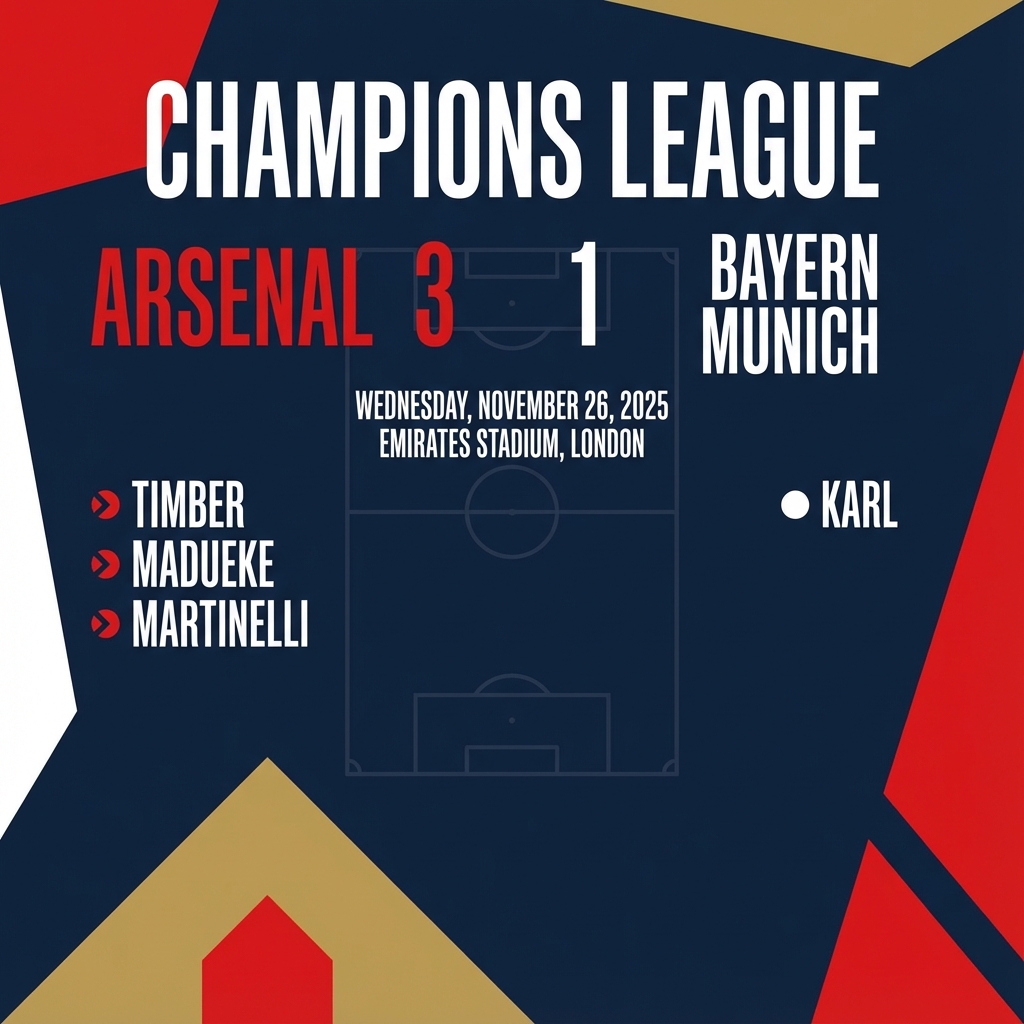
פרומפט
Make a simple but stylish graphic of last night's Arsenal game in the Champion's League
Python
from google import genai
from google.genai import types
import base64

client = genai.Client()

interaction = client.interactions.create(
    model="gemini-3.1-flash-image",
    input="Make a simple but stylish graphic of last night's Arsenal game in the Champion's League",
    tools=[{"type": "google_search"}],
    response_format={"type": "image", "aspect_ratio": "16:9"},
)

for step in interaction.steps:
    if step.type == "model_output":
        for content_block in step.content:
            if content_block.type == "text":
                print(content_block.text)
            elif content_block.type == "image":
                with open("football-score.jpg", "wb") as f:
                    f.write(base64.b64decode(content_block.data))
JavaScript
import { GoogleGenAI } from "@google/genai";
import * as fs from "node:fs";

async function main() {
  const ai = new GoogleGenAI({});

  const interaction = await ai.interactions.create({
    model: "gemini-3.1-flash-image",
    input: "Make a simple but stylish graphic of last night's Arsenal game in the Champion's League",
    tools: [{ type: "google_search" }],
    response_format: { type: "image", aspect_ratio: "16:9", image_size: "2K" },
  });

  for (const step of interaction.steps) {
    if (step.type === "model_output") {
      for (const contentBlock of step.content) {
        if (contentBlock.type === "text") {
          console.log(contentBlock.text);
        } else if (contentBlock.type === "image") {
          const buffer = Buffer.from(contentBlock.data, "base64");
          fs.writeFileSync("football-score.jpg", buffer);
        }
      }
    }
  }
}

main();
REST
curl -s -X POST \
  "https://generativelanguage.googleapis.com/v1beta/interactions" \
  -H "x-goog-api-key: $GEMINI_API_KEY" \
  -H "Content-Type: application/json" \
  -d '{
    "model": "gemini-3.1-flash-image",
    "input": "Make a simple but stylish graphic of last nights Arsenal game in the Champions League",
    "tools": [{"type": "google_search"}],
    "response_format": {
      "type": "image",
      "aspect_ratio": "16:9"
    }
  }'
הנחיות לעריכת תמונות
בדוגמאות האלה מוסבר איך להוסיף תמונות לצד הנחיות טקסט כדי לערוך תמונות, לשנות את הקומפוזיציה שלהן ולהעביר סגנונות.
1. הוספה והסרה של רכיבים
מספקים תמונה ומתארים את השינוי. המודל יתאים את הסגנון, התאורה והפרספקטיבה של התמונה המקורית.
תבנית
Using the provided image of [subject], please [add/remove/modify] [element]
to/from the scene. Ensure the change is [description of how the change should
integrate].
פרומפט
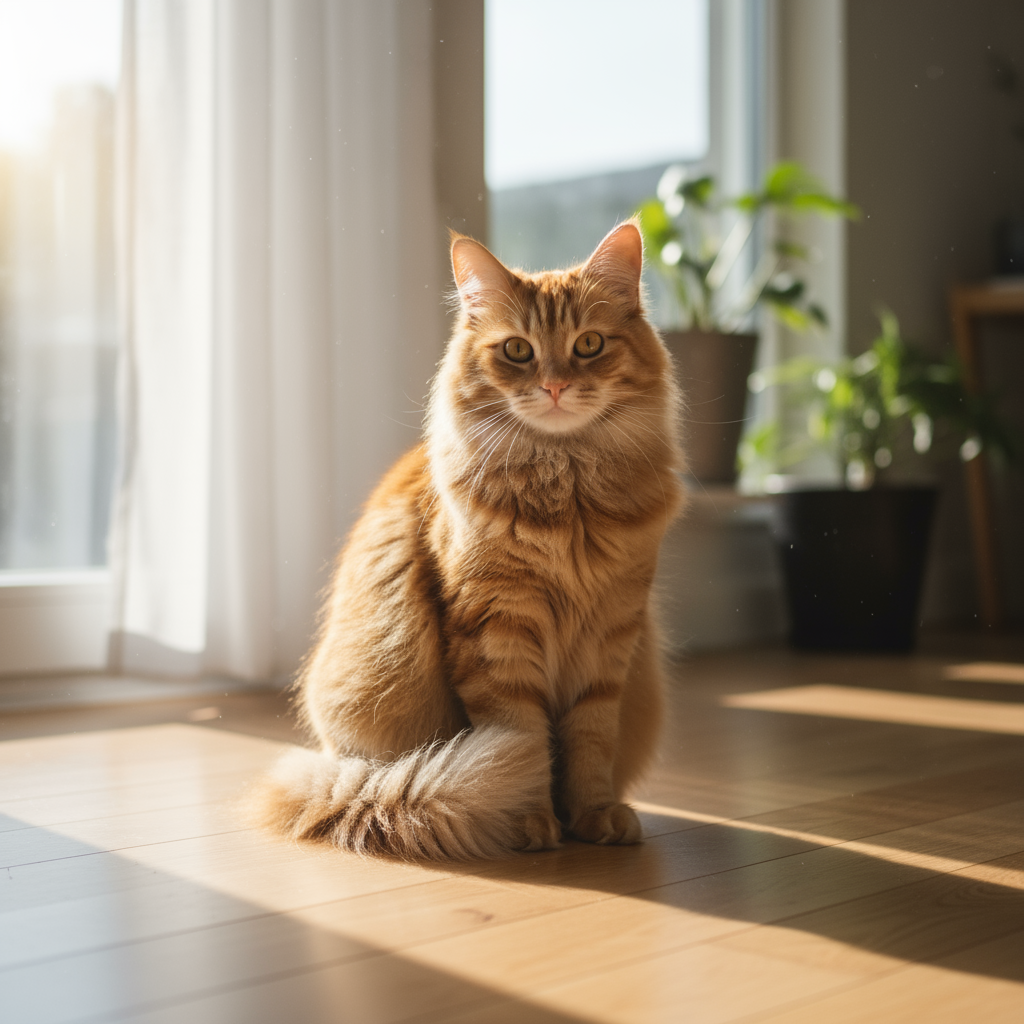
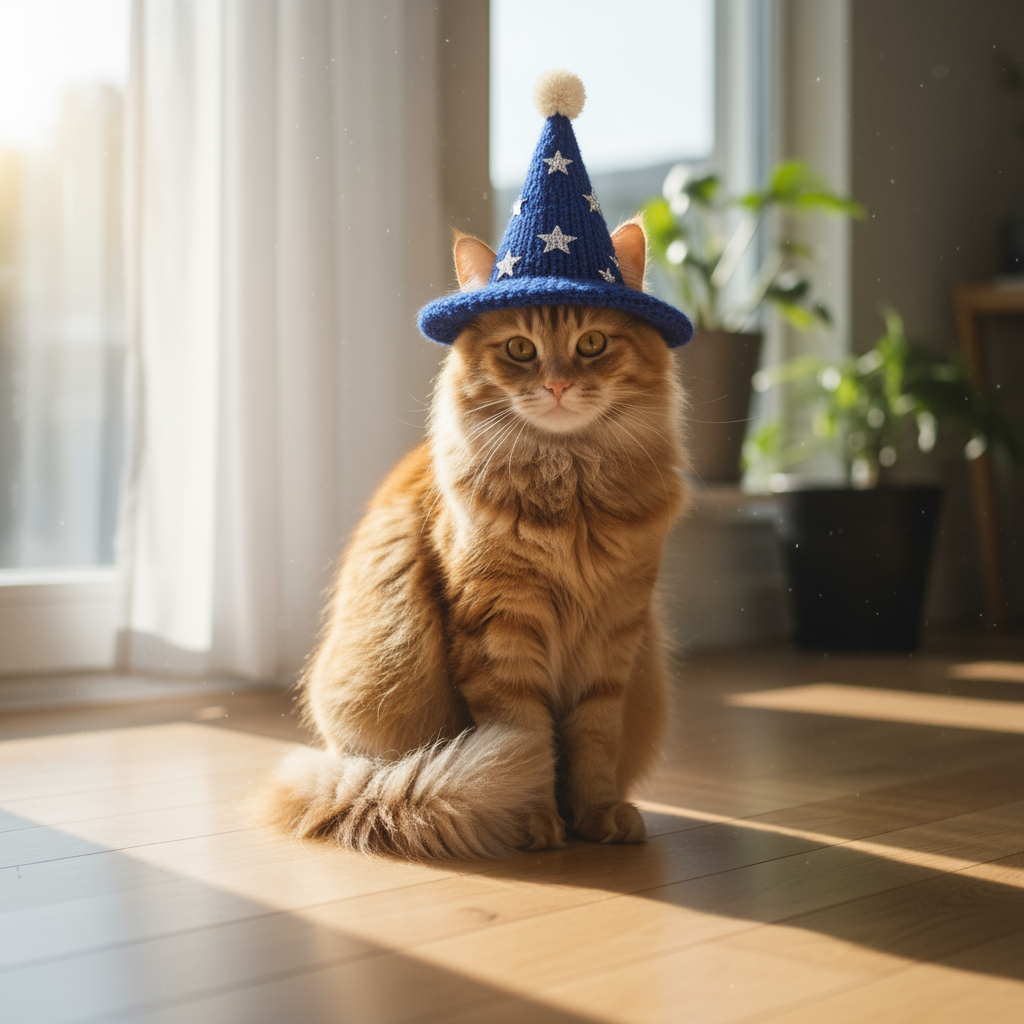
"Using the provided image of my cat, please add a small, knitted wizard hat
on its head. Make it look like it's sitting comfortably and matches the soft
lighting of the photo."
Python
from google import genai
from PIL import Image
import base64

client = genai.Client()

with open('/path/to/your/cat_photo.png', 'rb') as f:
    image_bytes = f.read()
text_input = """Using the provided image of my cat, please add a small, knitted wizard hat on its head. Make it look like it's sitting comfortably and not falling off."""

interaction = client.interactions.create(
    model="gemini-3.1-flash-image",
    input=[
        {"type": "text", "text": text_input},
        {
            "type": "image",
            "data": base64.b64encode(image_bytes).decode('utf-8'),
            "mime_type": "image/png"
        }
    ],
)

for step in interaction.steps:
    if step.type == "model_output":
        for content_block in step.content:
            if content_block.type == "text":
                print(content_block.text)
            elif content_block.type == "image":
                with open("cat_with_hat.png", "wb") as f:
                    f.write(base64.b64decode(content_block.data))
JavaScript
import { GoogleGenAI } from "@google/genai";
import * as fs from "node:fs";

async function main() {
  const ai = new GoogleGenAI({});

  const imagePath = "/path/to/your/cat_photo.png";
  const imageData = fs.readFileSync(imagePath);
  const base64Image = imageData.toString("base64");

  const input = [
    { type: "text", text: "Using the provided image of my cat, please add a small, knitted wizard hat on its head. Make it look like it's sitting comfortably and not falling off." },
    {
      type: "image",
      mime_type: "image/png",
      data: base64Image
    },
  ];

  const interaction = await ai.interactions.create({
    model: "gemini-3.1-flash-image",
    input: input,
  });
  for (const step of interaction.steps) {
    if (step.type === "model_output") {
      for (const contentBlock of step.content) {
        if (contentBlock.type === "text") {
          console.log(contentBlock.text);
        } else if (contentBlock.type === "image") {
          const buffer = Buffer.from(contentBlock.data, "base64");
          fs.writeFileSync("cat_with_hat.png", buffer);
        }
      }
    }
  }
}

main();
REST
curl -s -X POST \
  "https://generativelanguage.googleapis.com/v1beta/interactions" \
    -H "x-goog-api-key: $GEMINI_API_KEY" \
    -H 'Content-Type: application/json' \
    -d "{
      \"model\": \"gemini-3.1-flash-image\",
      \"input\": [
            {\"type\": \"text\", \"text\": \"Using the provided image of my cat, please add a small, knitted wizard hat on its head. Make it look like it's sitting comfortably and not falling off.\"},
            {\"type\": \"image\", \"mime_type\":\"image/png\", \"data\": \"<BASE64_IMAGE_DATA>\"}
        ]
    }"
קלט |
פלט |
|
|
2. ציור ומחיקה (מיסוך סמנטי)
אפשר להגדיר 'מסכה' בשיחה כדי לערוך חלק ספציפי בתמונה בלי לשנות את שאר התמונה.
תבנית
Using the provided image, change only the [specific element] to [new
element/description]. Keep everything else in the image exactly the same,
preserving the original style, lighting, and composition.
פרומפט
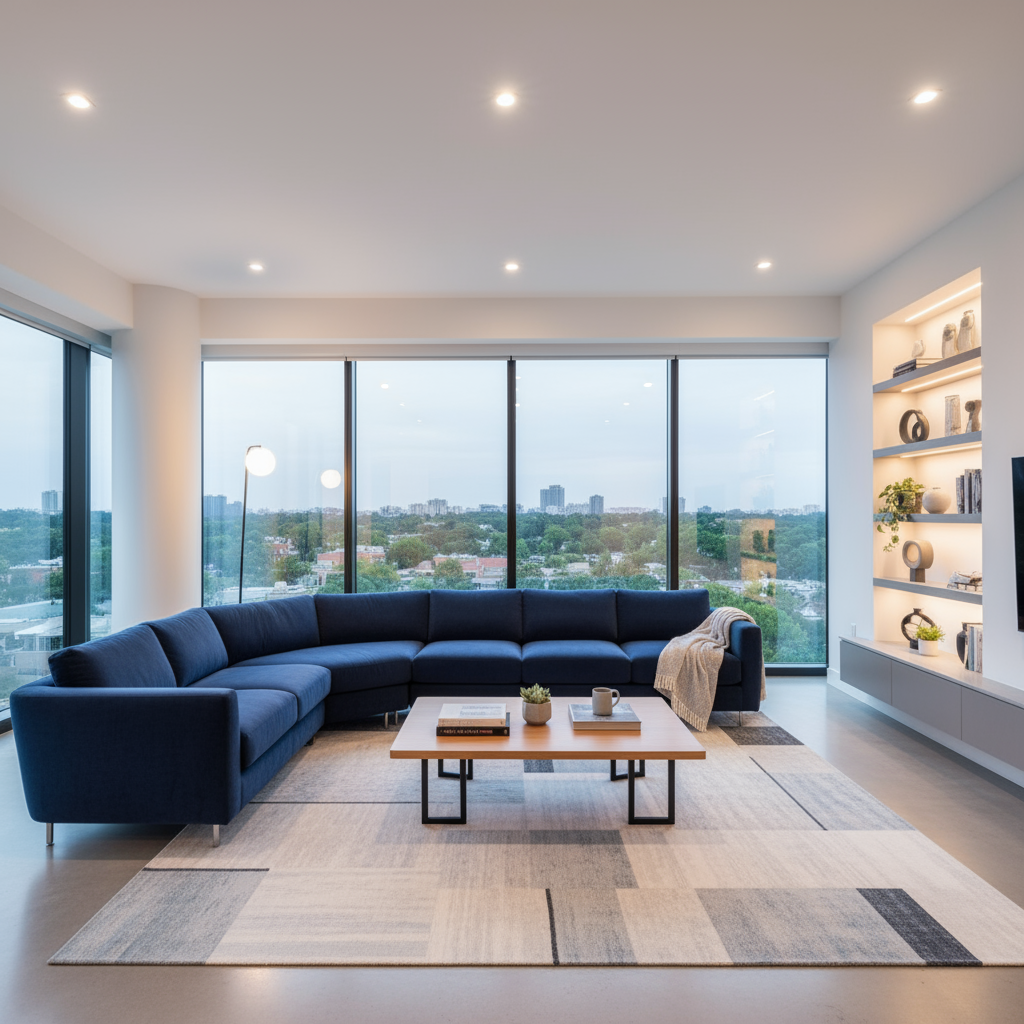
"Using the provided image of a living room, change only the blue sofa to be
a vintage, brown leather chesterfield sofa. Keep the rest of the room,
including the pillows on the sofa and the lighting, unchanged."
Python
from google import genai
from PIL import Image
import base64

client = genai.Client()

with open('/path/to/your/living_room.png', 'rb') as f:
    image_bytes = f.read()
text_input = """Using the provided image of a living room, change only the blue sofa to be a vintage, brown leather chesterfield sofa. Keep the rest of the room, including the pillows on the sofa and the lighting, unchanged."""

interaction = client.interactions.create(
    model="gemini-3.1-flash-image",
    input=[
        {
            "type": "image",
            "data": base64.b64encode(image_bytes).decode('utf-8'),
            "mime_type": "image/png"
        },
        {"type": "text", "text": text_input}
    ],
)

for step in interaction.steps:
    if step.type == "model_output":
        for content_block in step.content:
            if content_block.type == "text":
                print(content_block.text)
            elif content_block.type == "image":
                with open("living_room_edited.png", "wb") as f:
                    f.write(base64.b64decode(content_block.data))
JavaScript
import { GoogleGenAI } from "@google/genai";
import * as fs from "node:fs";

async function main() {
  const ai = new GoogleGenAI({});

  const imagePath = "/path/to/your/living_room.png";
  const imageData = fs.readFileSync(imagePath);
  const base64Image = imageData.toString("base64");

  const input = [
    {
      type: "image",
      mime_type: "image/png",
      data: base64Image
    },
    { type: "text", text: "Using the provided image of a living room, change only the blue sofa to be a vintage, brown leather chesterfield sofa. Keep the rest of the room, including the pillows on the sofa and the lighting, unchanged." },
  ];

  const interaction = await ai.interactions.create({
    model: "gemini-3.1-flash-image",
    input: input,
  });
  for (const step of interaction.steps) {
    if (step.type === "model_output") {
      for (const contentBlock of step.content) {
        if (contentBlock.type === "text") {
          console.log(contentBlock.text);
        } else if (contentBlock.type === "image") {
          const buffer = Buffer.from(contentBlock.data, "base64");
          fs.writeFileSync("living_room_edited.png", buffer);
        }
      }
    }
  }
}

main();
REST
curl -s -X POST \
  "https://generativelanguage.googleapis.com/v1beta/interactions" \
    -H "x-goog-api-key: $GEMINI_API_KEY" \
    -H 'Content-Type: application/json' \
    -d "{
      \"model\": \"gemini-3.1-flash-image\",
      \"input\": [
        {\"type\": \"image\", \"mime_type\":\"image/png\", \"data\": \"<BASE64_IMAGE_DATA>\"},
        {\"type\": \"text\", \"text\": \"Using the provided image of a living room, change only the blue sofa to be a vintage, brown leather chesterfield sofa. Keep the rest of the room, including the pillows on the sofa and the lighting, unchanged.\"}
      ]
    }"
קלט |
פלט |
|

|
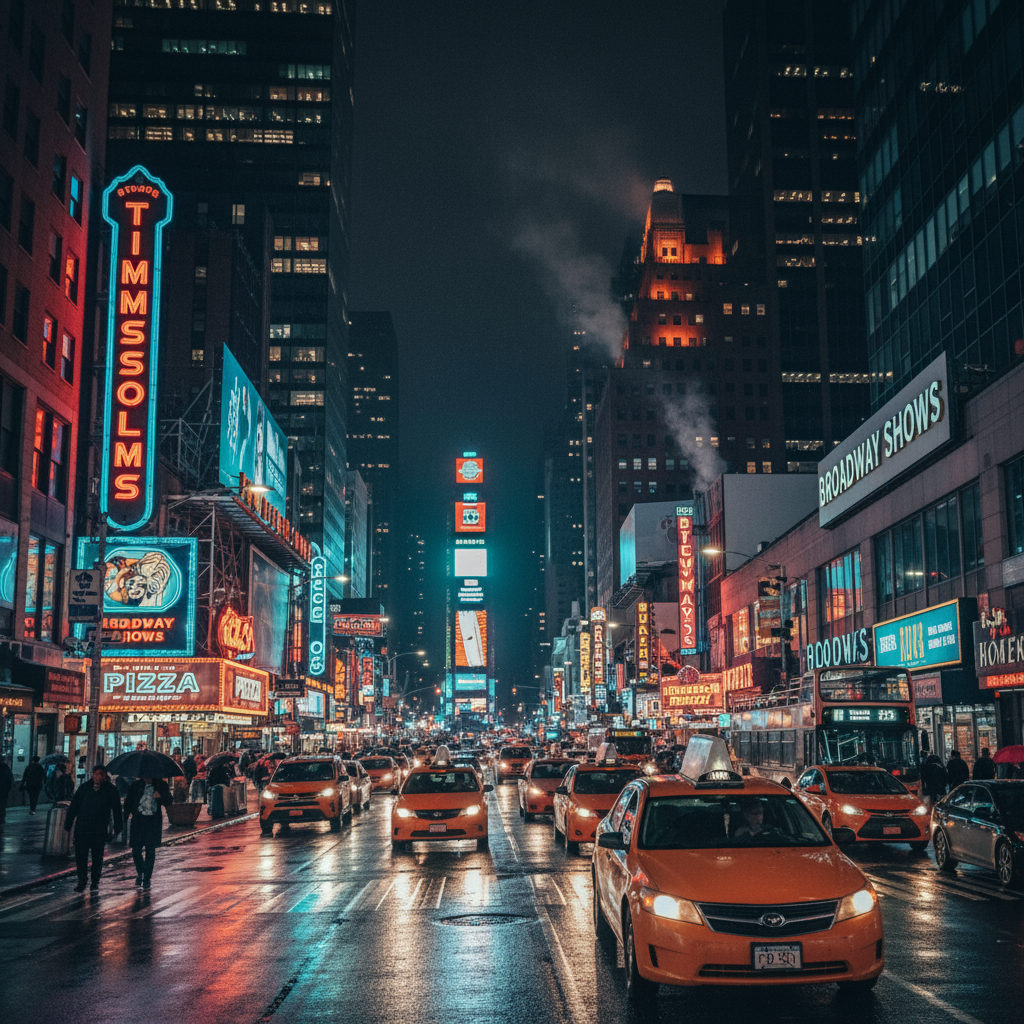
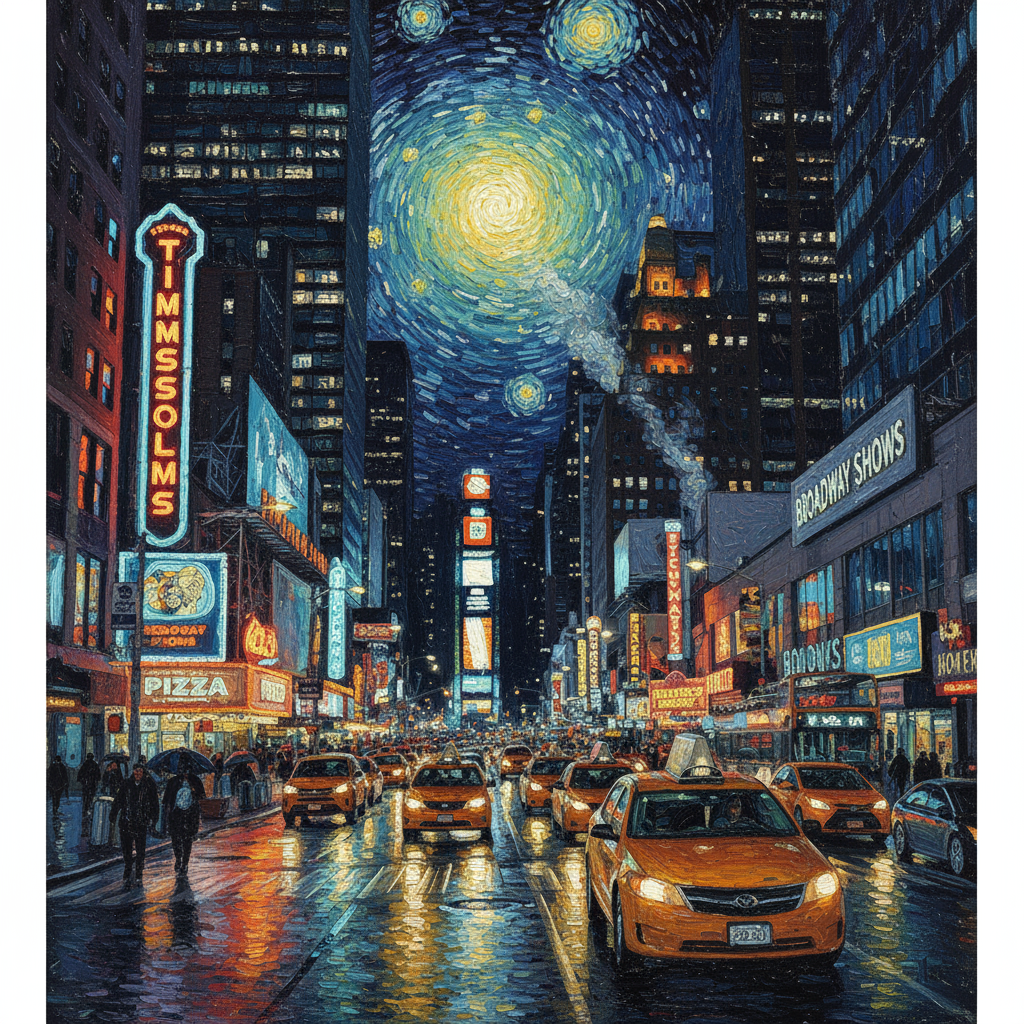
3. העברת סגנון
מספקים תמונה ומבקשים מהמודל ליצור מחדש את התוכן שלה בסגנון אמנותי אחר.
תבנית
Transform the provided photograph of [subject] into the artistic style of [artist/art style]. Preserve the original composition but render it with [description of stylistic elements].
פרומפט
"Transform the provided photograph of a modern city street at night into the artistic style of Vincent van Gogh's 'Starry Night'. Preserve the original composition of buildings and cars, but render all elements with swirling, impasto brushstrokes and a dramatic palette of deep blues and bright yellows."
Python
from google import genai
from PIL import Image
import base64

client = genai.Client()

with open('/path/to/your/city.png', 'rb') as f:
    image_bytes = f.read()
text_input = """Transform the provided photograph of a modern city street at night into the artistic style of Vincent van Gogh's 'Starry Night'. Preserve the original composition of buildings and cars, but render all elements with swirling, impasto brushstrokes and a dramatic palette of deep blues and bright yellows."""

interaction = client.interactions.create(
    model="gemini-3.1-flash-image",
    input=[
        {
            "type": "image",
            "data": base64.b64encode(image_bytes).decode('utf-8'),
            "mime_type": "image/png"
        },
        {"type": "text", "text": text_input}
    ],
)

for step in interaction.steps:
    if step.type == "model_output":
        for content_block in step.content:
            if content_block.type == "text":
                print(content_block.text)
            elif content_block.type == "image":
                with open("city_style_transfer.png", "wb") as f:
                    f.write(base64.b64decode(content_block.data))
JavaScript
import { GoogleGenAI } from "@google/genai";
import * as fs from "node:fs";

async function main() {
  const ai = new GoogleGenAI({});
  const imageData = fs.readFileSync("/path/to/your/city.png");
  const base64Image = imageData.toString("base64");

  const interaction = await ai.interactions.create({
    model: "gemini-3.1-flash-image",
    input: [
      {
        type: "image",
        mime_type: "image/png",
        data: base64Image
      },
      { type: "text", text: "Transform the provided photograph of a modern city street at night into the artistic style of Vincent van Gogh's 'Starry Night'. Preserve the original composition of buildings and cars, but render all elements with swirling, impasto brushstrokes and a dramatic palette of deep blues and bright yellows." },
    ],
  });
  for (const step of interaction.steps) {
    if (step.type === "model_output") {
      for (const contentBlock of step.content) {
        if (contentBlock.type === "text") {
          console.log(contentBlock.text);
        } else if (contentBlock.type === "image") {
          const buffer = Buffer.from(contentBlock.data, "base64");
          fs.writeFileSync("city_style_transfer.png", buffer);
        }
      }
    }
  }
}

main();
REST
curl -s -X POST \
  "https://generativelanguage.googleapis.com/v1beta/interactions" \
    -H "x-goog-api-key: $GEMINI_API_KEY" \
    -H 'Content-Type: application/json' \
    -d "{
      \"model\": \"gemini-3.1-flash-image\",
      \"input\": [
        {\"type\": \"image\", \"mime_type\":\"image/png\", \"data\": \"<BASE64_IMAGE_DATA>\"},
        {\"type\": \"text\", \"text\": \"Transform the provided photograph of a modern city street at night into the artistic style of Vincent van Gogh's 'Starry Night'. Preserve the original composition of buildings and cars, but render all elements with swirling, impasto brushstrokes and a dramatic palette of deep blues and bright yellows.\"}
      ]
    }"
קלט |
פלט |
|
|
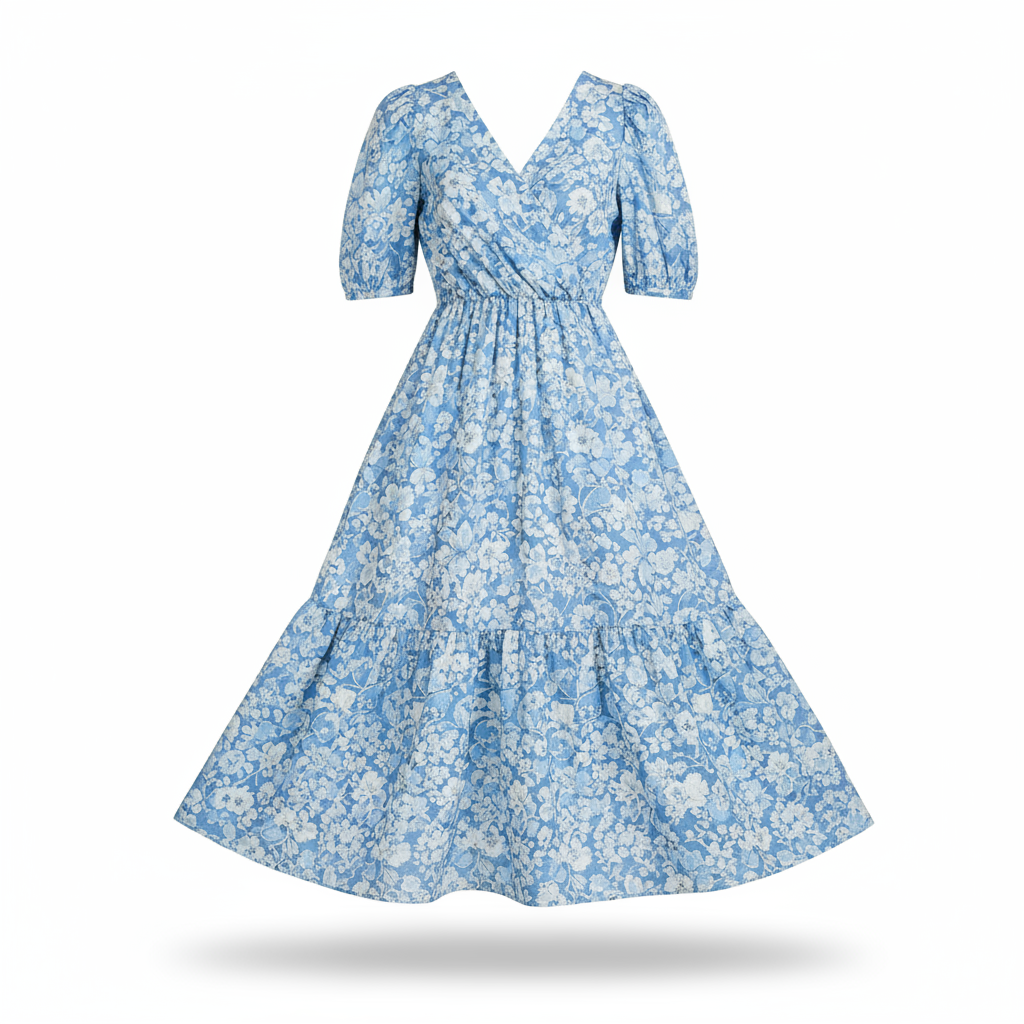
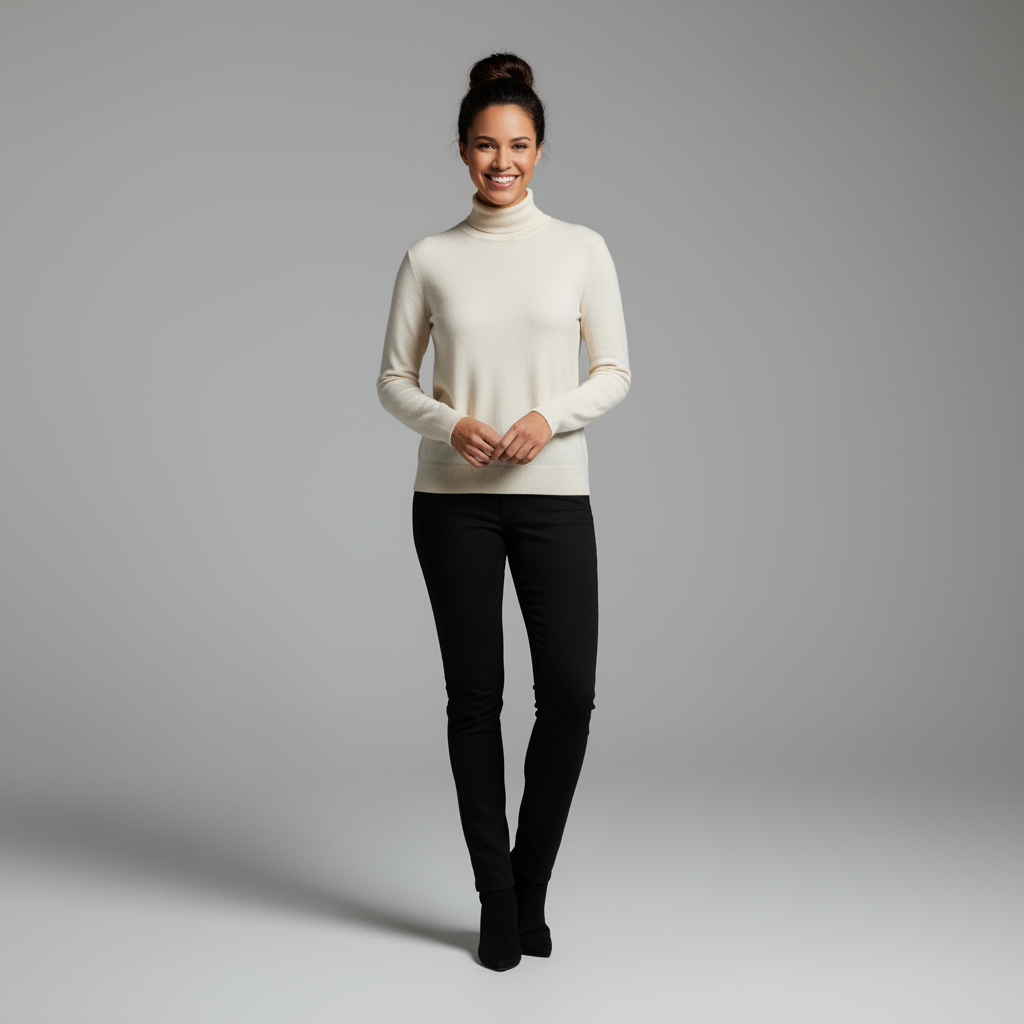
4. קומפוזיציה מתקדמת: שילוב של כמה תמונות
אתם יכולים לספק כמה תמונות כהקשר כדי ליצור סצנה מורכבת חדשה. האפשרות הזו מושלמת ליצירת מוקאפים של מוצרים או קולאז'ים קריאייטיביים.
תבנית
Create a new image by combining the elements from the provided images. Take
the [element from image 1] and place it with/on the [element from image 2].
The final image should be a [description of the final scene].
פרומפט
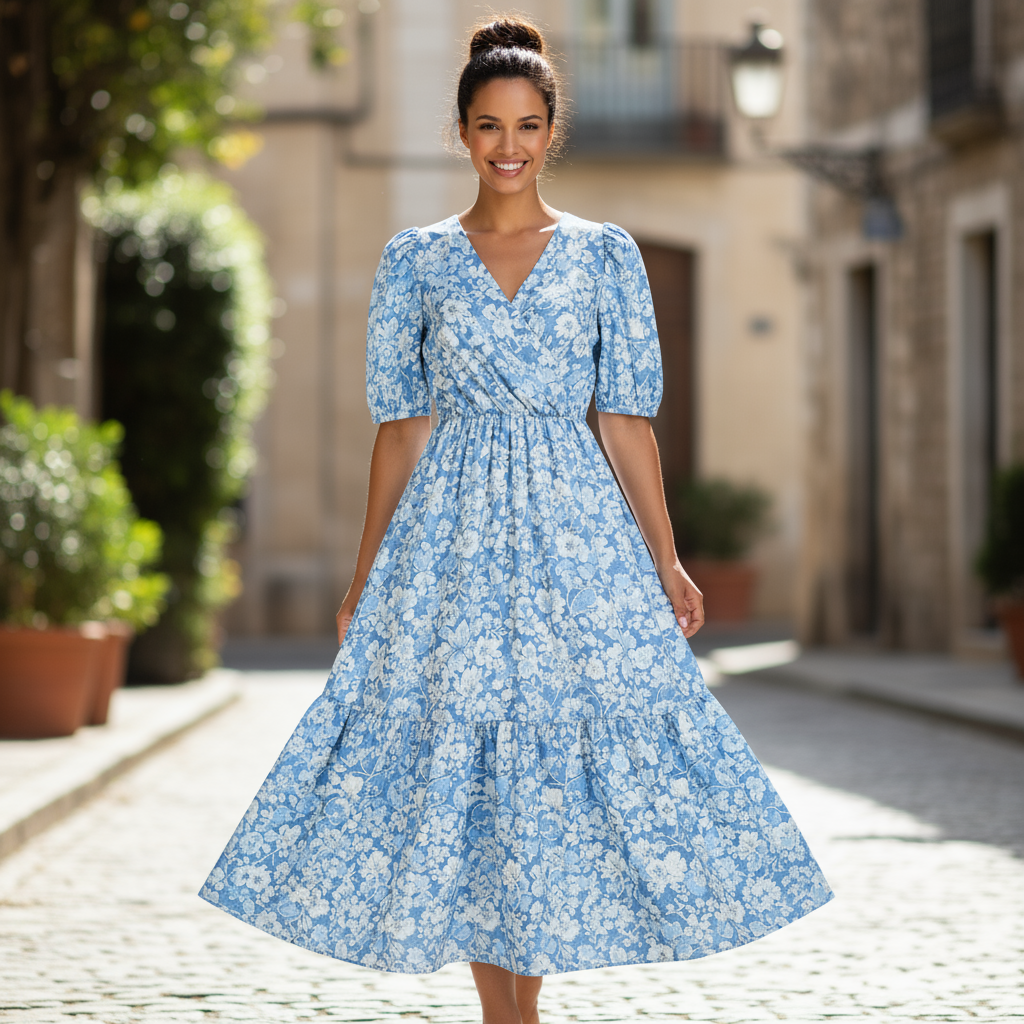
"Create a professional e-commerce fashion photo. Take the blue floral dress
from the first image and let the woman from the second image wear it.
Generate a realistic, full-body shot of the woman wearing the dress, with
the lighting and shadows adjusted to match the outdoor environment."
Python
from google import genai
from PIL import Image
import base64

client = genai.Client()

with open('/path/to/your/dress.png', 'rb') as f:
    dress_bytes = f.read()
with open('/path/to/your/model.png', 'rb') as f:
    model_bytes = f.read()
text_input = """Create a professional e-commerce fashion photo. Take the blue floral dress from the first image and let the woman from the second image wear it. Generate a realistic, full-body shot of the woman wearing the dress, with the lighting and shadows adjusted to match the outdoor environment."""

interaction = client.interactions.create(
    model="gemini-3.1-flash-image",
    input=[
        {
            "type": "image",
            "data": base64.b64encode(dress_bytes).decode('utf-8'),
            "mime_type": "image/png"
        },
        {
            "type": "image",
            "data": base64.b64encode(model_bytes).decode('utf-8'),
            "mime_type": "image/png"
        },
        {"type": "text", "text": text_input}
    ],
)

for step in interaction.steps:
    if step.type == "model_output":
        for content_block in step.content:
            if content_block.type == "text":
                print(content_block.text)
            elif content_block.type == "image":
                with open("fashion_ecommerce_shot.png", "wb") as f:
                    f.write(base64.b64decode(content_block.data))
JavaScript
import { GoogleGenAI } from "@google/genai";
import * as fs from "node:fs";

async function main() {
  const ai = new GoogleGenAI({});

  const imagePath1 = "/path/to/your/dress.png";
  const imageData1 = fs.readFileSync(imagePath1);
  const base64Image1 = imageData1.toString("base64");
  const imagePath2 = "/path/to/your/model.png";
  const imageData2 = fs.readFileSync(imagePath2);
  const base64Image2 = imageData2.toString("base64");

  const input = [
    {
      type: "image",
      mime_type: "image/png",
      data: base64Image1
    },
    {
      type: "image",
      mime_type: "image/png",
      data: base64Image2
    },
    { type: "text", text: "Create a professional e-commerce fashion photo. Take the blue floral dress from the first image and let the woman from the second image wear it. Generate a realistic, full-body shot of the woman wearing the dress, with the lighting and shadows adjusted to match the outdoor environment." },
  ];

  const interaction = await ai.interactions.create({
    model: "gemini-3.1-flash-image",
    input: input,
  });
  for (const step of interaction.steps) {
    if (step.type === "model_output") {
      for (const contentBlock of step.content) {
        if (contentBlock.type === "text") {
          console.log(contentBlock.text);
        } else if (contentBlock.type === "image") {
          const buffer = Buffer.from(contentBlock.data, "base64");
          fs.writeFileSync("fashion_ecommerce_shot.png", buffer);
        }
      }
    }
  }
}

main();
REST
curl -s -X POST \
  "https://generativelanguage.googleapis.com/v1beta/interactions" \
    -H "x-goog-api-key: $GEMINI_API_KEY" \
    -H 'Content-Type: application/json' \
    -d "{
      \"model\": \"gemini-3.1-flash-image\",
      \"input\": [
            {\"type\": \"image\", \"mime_type\":\"image/png\", \"data\": \"<BASE64_IMAGE_DATA_1>\"},
            {\"type\": \"image\", \"mime_type\":\"image/png\", \"data\": \"<BASE64_IMAGE_DATA_2>\"},
            {\"type\": \"text\", \"text\": \"Create a professional e-commerce fashion photo. Take the blue floral dress from the first image and let the woman from the second image wear it. Generate a realistic, full-body shot of the woman wearing the dress, with the lighting and shadows adjusted to match the outdoor environment.\"}
      }]
    }"
קלט 1 |
קלט 2 |
פלט |
|
|
|
5. שמירה על פרטים ברמת דיוק גבוהה
כדי לוודא שפרטים חשובים (כמו פנים או לוגו) יישמרו במהלך העריכה, כדאי לתאר אותם בפירוט רב יחד עם בקשת העריכה.
תבנית
Using the provided images, place [element from image 2] onto [element from
image 1]. Ensure that the features of [element from image 1] remain
completely unchanged. The added element should [description of how the
element should integrate].
פרומפט
"Take the first image of the woman with brown hair, blue eyes, and a neutral
expression. Add the logo from the second image onto her black t-shirt.
Ensure the woman's face and features remain completely unchanged. The logo
should look like it's naturally printed on the fabric, following the folds
of the shirt."
Python
from google import genai
from PIL import Image
import base64

client = genai.Client()

with open('/path/to/your/woman.png', 'rb') as f:
    woman_bytes = f.read()
with open('/path/to/your/logo.png', 'rb') as f:
    logo_bytes = f.read()
text_input = """Take the first image of the woman with brown hair, blue eyes, and a neutral expression. Add the logo from the second image onto her black t-shirt. Ensure the woman's face and features remain completely unchanged. The logo should look like it's naturally printed on the fabric, following the folds of the shirt."""

interaction = client.interactions.create(
    model="gemini-3.1-flash-image",
    input=[
      {"type": "image", "mime_type":"image/png", "data": base64.b64encode(woman_bytes).decode('utf-8')},
      {"type": "image", "mime_type":"image/png", "data": base64.b64encode(logo_bytes).decode('utf-8')},
      {"type": "text", "text": text_input}
    ],
)

for step in interaction.steps:
    if step.type == "model_output":
        for content_block in step.content:
            if content_block.type == "text":
                print(content_block.text)
            elif content_block.type == "image":
                with open("woman_with_logo.png", "wb") as f:
                    f.write(base64.b64decode(content_block.data))
JavaScript
import { GoogleGenAI } from "@google/genai";
import * as fs from "node:fs";

async function main() {
  const ai = new GoogleGenAI({});

  const imagePath1 = "/path/to/your/woman.png";
  const imageData1 = fs.readFileSync(imagePath1);
  const base64Image1 = imageData1.toString("base64");
  const imagePath2 = "/path/to/your/logo.png";
  const imageData2 = fs.readFileSync(imagePath2);
  const base64Image2 = imageData2.toString("base64");

  const input = [
    {"type": "image", "mime_type":"image/png", "data": base64Image1},
    {"type": "image", "mime_type":"image/png", "data": base64Image2},
    {"type": "text", "text": "Take the first image of the woman with brown hair, blue eyes, and a neutral expression. Add the logo from the second image onto her black t-shirt. Ensure the woman's face and features remain completely unchanged. The logo should look like it's naturally printed on the fabric, following the folds of the shirt."},
  ];

  const interaction = await ai.interactions.create({
    model: "gemini-3.1-flash-image",
    input: input,
  });
  for (const step of interaction.steps) {
    if (step.type === "model_output") {
      for (const contentBlock of step.content) {
        if (contentBlock.type === "text") {
          console.log(contentBlock.text);
        } else if (contentBlock.type === "image") {
          const buffer = Buffer.from(contentBlock.data, "base64");
          fs.writeFileSync("woman_with_logo.png", buffer);
        }
      }
    }
  }
}

main();
REST
curl -s -X POST \
  "https://generativelanguage.googleapis.com/v1beta/interactions" \
    -H "x-goog-api-key: $GEMINI_API_KEY" \
    -H 'Content-Type: application/json' \
    -d "{
      \"model\": \"gemini-3.1-flash-image\",
      \"input\": [
        {\"type\": \"image\", \"mime_type\":\"image/png\", \"data\": \"<BASE64_IMAGE_DATA_1>\"},
        {\"type\": \"image\", \"mime_type\":\"image/png\", \"data\": \"<BASE64_IMAGE_DATA_2>\"},
        {\"type\": \"text\", \"text\": \"Take the first image of the woman with brown hair, blue eyes, and a neutral expression. Add the logo from the second image onto her black t-shirt. Ensure the woman's face and features remain completely unchanged. The logo should look like it's naturally printed on the fabric, following the folds of the shirt.\"}
      ]
    }"
קלט 1 |
קלט 2 |
פלט |

|

|

|
6. להפיח חיים במשהו
מעלים סקיצה או ציור ומבקשים מהמודל לשפר אותם לתמונה סופית.
תבנית
Turn this rough [medium] sketch of a [subject] into a [style description]
photo. Keep the [specific features] from the sketch but add [new details/materials].
פרומפט
"Turn this rough pencil sketch of a futuristic car into a polished photo of the finished concept car in a showroom. Keep the sleek lines and low profile from the sketch but add metallic blue paint and neon rim lighting."
Python
from google import genai
from PIL import Image
import base64

client = genai.Client()

with open('/path/to/your/car_sketch.png', 'rb') as f:
    sketch_bytes = f.read()
text_input = """Turn this rough pencil sketch of a futuristic car into a polished photo of the finished concept car in a showroom. Keep the sleek lines and low profile from the sketch but add metallic blue paint and neon rim lighting."""

interaction = client.interactions.create(
    model="gemini-3.1-flash-image",
    input=[
      {"type": "image", "mime_type":"image/png", "data": base64.b64encode(sketch_bytes).decode('utf-8')},
      {"type": "text", "text": text_input}
    ],
)

for step in interaction.steps:
    if step.type == "model_output":
        for content_block in step.content:
            if content_block.type == "text":
                print(content_block.text)
            elif content_block.type == "image":
                with open("car_photo.png", "wb") as f:
                    f.write(base64.b64decode(content_block.data))
JavaScript
import { GoogleGenAI } from "@google/genai";
import * as fs from "node:fs";

async function main() {
  const ai = new GoogleGenAI({});

  const imagePath = "/path/to/your/car_sketch.png";
  const imageData = fs.readFileSync(imagePath);
  const base64Image = imageData.toString("base64");

  const input = [
    {"type": "image", "mime_type":"image/png", "data": base64Image},
    {"type": "text", "text": "Turn this rough pencil sketch of a futuristic car into a polished photo of the finished concept car in a showroom. Keep the sleek lines and low profile from the sketch but add metallic blue paint and neon rim lighting."},
  ];

  const interaction = await ai.interactions.create({
    model: "gemini-3.1-flash-image",
    input: input,
  });
  for (const step of interaction.steps) {
    if (step.type === "model_output") {
      for (const contentBlock of step.content) {
        if (contentBlock.type === "text") {
          console.log(contentBlock.text);
        } else if (contentBlock.type === "image") {
          const buffer = Buffer.from(contentBlock.data, "base64");
          fs.writeFileSync("car_photo.png", buffer);
        }
      }
    }
  }
}

main();
REST
curl -s -X POST \
  "https://generativelanguage.googleapis.com/v1beta/interactions" \
    -H "x-goog-api-key: $GEMINI_API_KEY" \
    -H 'Content-Type: application/json' \
    -d "{
      \"model\": \"gemini-3.1-flash-image\",
      \"input\": [
        {\"type\": \"image\", \"mime_type\":\"image/png\", \"data\": \"<BASE64_IMAGE_DATA>\"},
        {\"type\": \"text\", \"text\": \"Turn this rough pencil sketch of a futuristic car into a polished photo of the finished concept car in a showroom. Keep the sleek lines and low profile from the sketch but add metallic blue paint and neon rim lighting.\"}
      ]
    }"
קלט |
פלט |
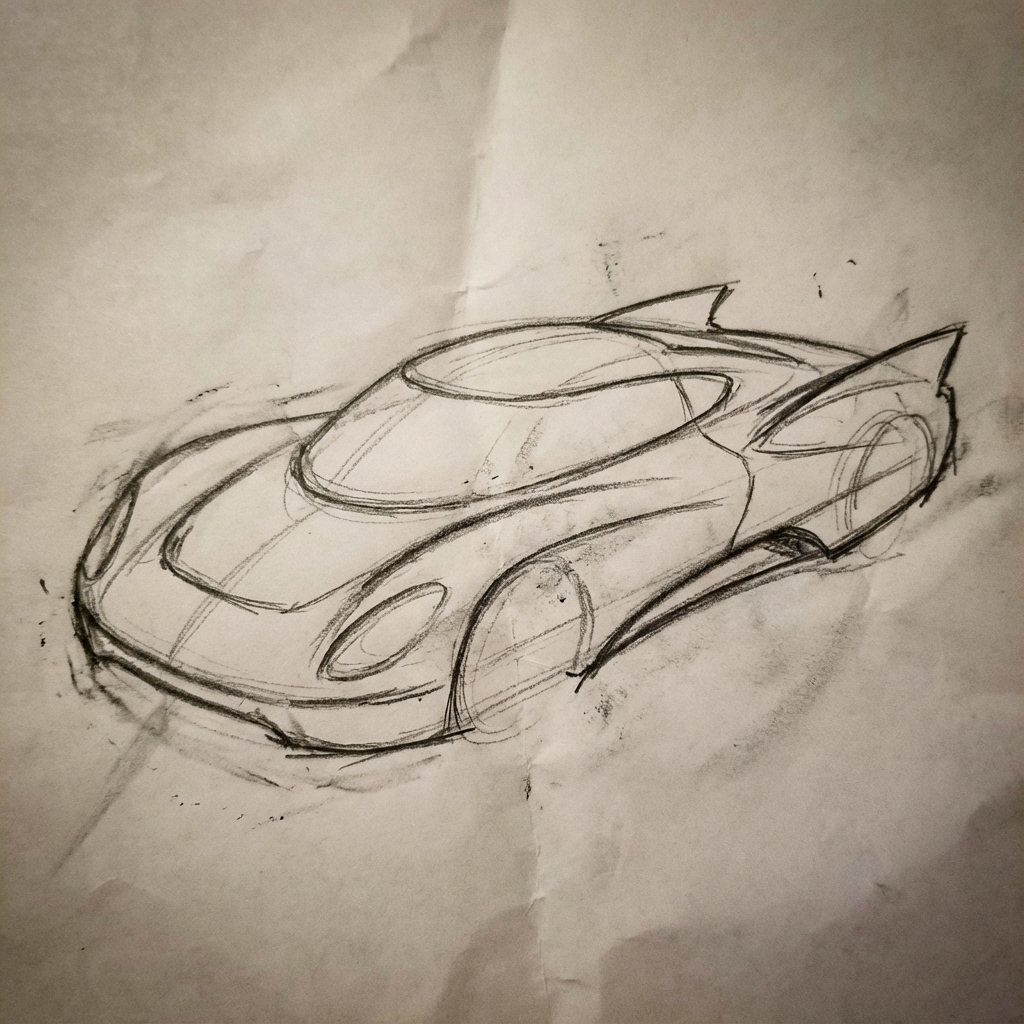
|
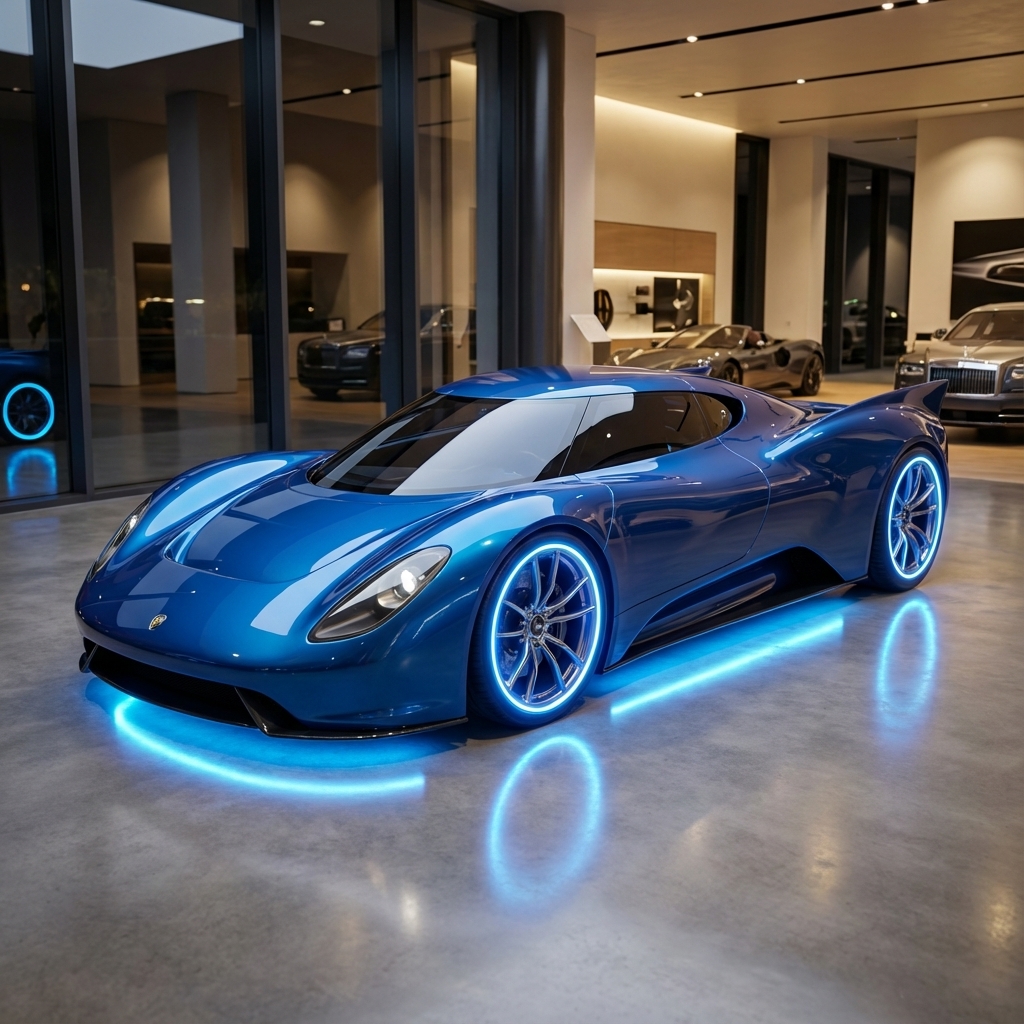
|
7. עקביות הדמויות: תצוגת 360
אתם יכולים ליצור תצוגות של דמות ב-360 מעלות על ידי הזנת הנחיות חוזרות לזוויות שונות. כדי לקבל את התוצאות הטובות ביותר, כדאי לכלול בהנחיות הבאות תמונות שנוצרו קודם כדי לשמור על עקביות. לתנוחות מורכבות, כדאי לצרף תמונה לדוגמה של התנוחה שנבחרה.
תבנית
A studio portrait of [person] against [background], [looking forward/in profile looking right/etc.]
פרומפט
A studio portrait of this man against white, in profile looking right
Python
from google import genai
from PIL import Image
import base64

client = genai.Client()

with open('/path/to/your/man_in_white_glasses.jpg', 'rb') as f:
    image_bytes = f.read()
text_input = """A studio portrait of this man against white, in profile looking right"""

interaction = client.interactions.create(
    model="gemini-3.1-flash-image",
    input={
      {"type": "text", "text": text_input},
      {"type": "image", "mime_type":"image/png", "data": base64.b64encode(image_bytes).decode('utf-8')}
    },
)

for step in interaction.steps:
    if step.type == "model_output":
        for content_block in step.content:
            if content_block.type == "text":
                print(content_block.text)
            elif content_block.type == "image":
                with open("man_right_profile.png", "wb") as f:
                    f.write(base64.b64decode(content_block.data))
קלט |
פלט 1 |
פלט 2 |
|
|
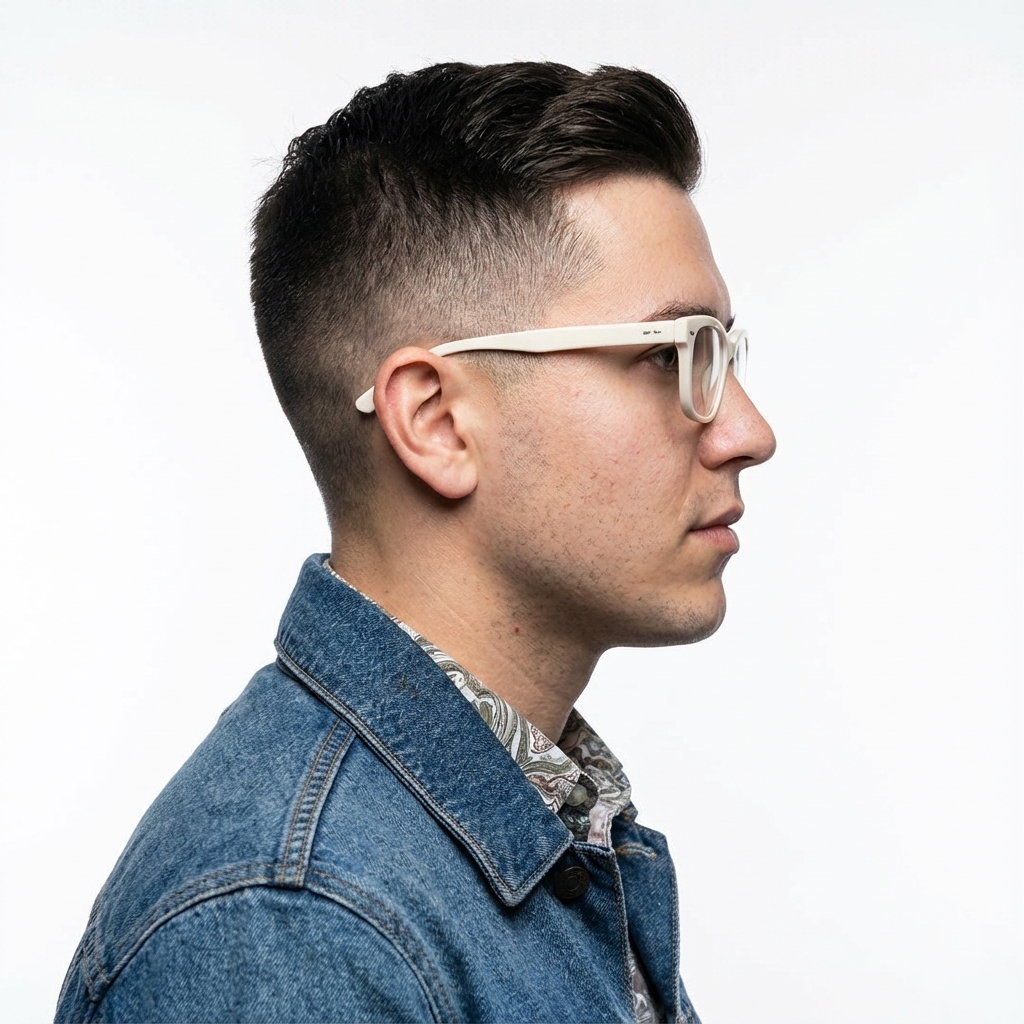
|

|
שיטות מומלצות
כדי לשפר את התוצאות שלכם מרמה טובה לרמה מצוינת, כדאי לשלב את האסטרטגיות המקצועיות האלה בתהליך העבודה.
- היו ספציפיים מאוד: ככל שתספקו יותר פרטים, כך תהיה לכם יותר שליטה. במקום "שריון פנטזיה", תאר אותו: "שריון לוחות אלפי מעוטר, עם דוגמאות של עלי כסף חרוטים, צווארון גבוה ומגני כתפיים בצורת כנפי בז".
- מספקים הקשר וכוונות: מסבירים את המטרה של התמונה. ההבנה של המודל לגבי ההקשר תשפיע על הפלט הסופי. לדוגמה, התוצאות של ההנחיה "צור לוגו למותג טיפוח עור יוקרתי ומינימליסטי" יהיו טובות יותר מהתוצאות של ההנחיה "צור לוגו".
- חזרה על הפעולה ושיפור: אל תצפו לקבל תמונה מושלמת בניסיון הראשון. אפשר להשתמש במודל כדי לבצע שינויים קטנים בשיחה. אפשר להוסיף הנחיות כמו "זה נהדר, אבל אפשר להפוך את התאורה לקצת יותר חמה?" או "תשאיר הכול כמו שזה, אבל תשנה את הבעת הפנים של הדמות כך שתיראה יותר רצינית".
- שימוש בהוראות מפורטות: בסצנות מורכבות עם הרבה אלמנטים, כדאי לחלק את ההנחיה לשלבים. "קודם, תיצור רקע של יער שקט ומעורפל עם שחר. אחר כך, בחזית, תוסיף מזבח עתיק מאבן שמכוסה בטחב. לבסוף, מניחים חרב אחת זוהרת על המזבח".
- משתמשים בהנחיות שליליות סמנטיות: במקום לכתוב "אין מכוניות", מתארים את הסצנה הרצויה בצורה חיובית: "רחוב ריק ושומם ללא סימני תנועה".
- שליטה במצלמה: שימוש בשפה צילומית וקולנועית כדי לשלוט בקומפוזיציה. מונחים כמו
wide-angle shot,macro shot,low-angle perspective.
מגבלות
- כדי לקבל את הביצועים הכי טובים, מומלץ להשתמש בשפות הבאות: EN, ar-EG, de-DE, es-MX, fr-FR, hi-IN, id-ID, it-IT, ja-JP, ko-KR, pt-BR, ru-RU, ua-UA, vi-VN, zh-CN.
- יצירת תמונות לא תומכת בקלט אודיו. יש תמיכה בהזנת סרטונים רק ב-Gemini 3.1 Flash Image.
- המודל לא תמיד יפעל לפי המספר המדויק של תמונות הפלט שהמשתמש ביקש במפורש.
gemini-2.5-flash-imageעובד הכי טוב עם עד 3 תמונות כקלט, ואילוgemini-3-pro-imageתומך ב-5 תמונות באיכות גבוהה, ועד 14 תמונות בסך הכול.gemini-3.1-flash-imageתומך בדמיון של עד 4 תווים ובדיוק של עד 10 אובייקטים בתהליך עבודה יחיד.- כשמבקשים מ-Gemini ליצור טקסט לתמונה, מומלץ קודם ליצור את הטקסט ואז לבקש תמונה עם הטקסט.
gemini-3.1-flash-imageבשלב הזה, העיגון באמצעות חיפוש Google לא תומך בשימוש בתמונות של אנשים מהעולם האמיתי מחיפוש באינטרנט.- כל התמונות שנוצרו כוללות סימן מים של SynthID.
הגדרות אופציונליות
אפשר גם להגדיר את פורמט הפלט, יחס הגובה-רוחב וגודל התמונה באמצעות הפרמטר response_format.
פורמט הפלט
מודל ברירת המחדל מחזיר תשובות של טקסט ותמונה. כדי להגדיר שהתשובה תכלול רק את התמונות שנוצרו (בלי הטקסט של השיחה), צריך לציין פורמט תמונה בפרמטר response_format.
כדי לבקש כמה אופנים (לדוגמה, גם טקסט וגם התמונה שנוצרה), מעבירים מערך של רשומות פורמט אל response_format.
Python
interaction = client.interactions.create(
    model="gemini-3.1-flash-image",
    input="Write a short poem about a starry night and generate an image of it.",
    response_format=[
        {"type": "text"},
        {"type": "image"},
    ],
)
JavaScript
const interaction = await ai.interactions.create({
  model: "gemini-3.1-flash-image",
  input: "Write a short poem about a starry night and generate an image of it.",
  response_format: [
    { type: "text" },
    { type: "image" },
  ],
});
REST
curl -s -X POST \
  "https://generativelanguage.googleapis.com/v1beta/interactions" \
  -H "x-goog-api-key: $GEMINI_API_KEY" \
  -H 'Content-Type: application/json' \
  -d '{
    "model": "gemini-3.1-flash-image",
    "input": "Write a short poem about a starry night and generate an image of it.",
    "response_format": [
      { "type": "text" },
      { "type": "image" }
    ]
  }'
יחסי גובה-רוחב וגודל תמונה
כברירת מחדל, המודל מתאים את גודל תמונת הפלט לגודל תמונת הקלט, או יוצר ריבועים ביחס של 1:1. אתם יכולים לשלוט ביחס הגובה-רוחב ובגודל של תמונת הפלט באמצעות השדות aspect_ratio ו-image_size בקטע response_format כש-type מוגדר ל-"image".
Python
interaction = client.interactions.create(
    model="gemini-3.1-flash-image",
    input=prompt,
    response_format={
        "type": "image",
        "aspect_ratio": "16:9",
        "image_size": "2K",
    },
)
JavaScript
const interaction = await ai.interactions.create({
    model: "gemini-3.1-flash-image",
    input: prompt,
    response_format: {
      type: "image",
      aspect_ratio: "16:9",
      image_size: "2K",
    },
  });
REST
curl -s -X POST \
  "https://generativelanguage.googleapis.com/v1beta/interactions" \
  -H "x-goog-api-key: $GEMINI_API_KEY" \
  -H 'Content-Type: application/json' \
  -d '{
    "model": "gemini-3.1-flash-image",
    "input": "Create a picture of a nano banana dish in a fancy restaurant with a Gemini theme",
    "response_format": {
      "type": "image",
      "aspect_ratio": "16:9",
      "image_size": "2K"
    }
  }'
בטבלאות הבאות מפורטים היחסים השונים שזמינים וגודל התמונה שנוצרת:
3.1 Flash Image
| יחס גובה-רוחב | רזולוציה של 512px | 0.5K טוקנים | רזולוציית 1K | 1K טוקנים | רזולוציית 2K | 2,000 טוקנים | רזולוציה של 4K | 4K טוקנים |
|---|---|---|---|---|---|---|---|---|
| 1:1 | 512x512 | 747 | 1024x1024 | 1120 | 2048x2048 | 1120 | 4096x4096 | 2000 |
| 1:4 | 256x1024 | 747 | 512x2048 | 1120 | 1024x4096 | 1120 | 2048x8192 | 2000 |
| 1:8 | 192x1536 | 747 | 384x3072 | 1120 | 768x6144 | 1120 | 1536x12288 | 2000 |
| 2:3 | 424x632 | 747 | 848x1264 | 1120 | 1696x2528 | 1120 | 3392x5056 | 2000 |
| 3:2 | 632x424 | 747 | 1264x848 | 1120 | 2528x1696 | 1120 | 5056x3392 | 2000 |
| 3:4 | 448x600 | 747 | 896x1200 | 1120 | 1792x2400 | 1120 | 3584x4800 | 2000 |
| 4:1 | 1024x256 | 747 | 2048x512 | 1120 | 4096x1024 | 1120 | 8192x2048 | 2000 |
| 4:3 | 600x448 | 747 | 1,200x896 | 1120 | 2400x1792 | 1120 | 4800x3584 | 2000 |
| 4:5 | 464x576 | 747 | 928x1152 | 1120 | 1856x2304 | 1120 | 3712x4608 | 2000 |
| 5:4 | 576x464 | 747 | 1152x928 | 1120 | 2304x1856 | 1120 | 4608x3712 | 2000 |
| 8:1 | 1536x192 | 747 | 3072x384 | 1120 | 6,144x768 | 1120 | 12288x1536 | 2000 |
| 9:16 | 384x688 | 747 | 768x1376 | 1120 | 1536x2752 | 1120 | 3072x5504 | 2000 |
| 16:9 | 688x384 | 747 | 1,376x768 | 1120 | 2752x1536 | 1120 | 5504x3072 | 2000 |
| 21:9 | 792x168 | 747 | 1584x672 | 1120 | 3,168x1,344 | 1120 | 6336x2688 | 2000 |
3.1 Pro Image
| יחס גובה-רוחב | רזולוציית 1K | 1K טוקנים | רזולוציית 2K | 2,000 טוקנים | רזולוציה של 4K | 4K טוקנים |
|---|---|---|---|---|---|---|
| 1:1 | 1024x1024 | 1120 | 2048x2048 | 1120 | 4096x4096 | 2000 |
| 2:3 | 848x1264 | 1120 | 1696x2528 | 1120 | 3392x5056 | 2000 |
| 3:2 | 1264x848 | 1120 | 2528x1696 | 1120 | 5056x3392 | 2000 |
| 3:4 | 896x1200 | 1120 | 1792x2400 | 1120 | 3584x4800 | 2000 |
| 4:3 | 1,200x896 | 1120 | 2400x1792 | 1120 | 4800x3584 | 2000 |
| 4:5 | 928x1152 | 1120 | 1856x2304 | 1120 | 3712x4608 | 2000 |
| 5:4 | 1152x928 | 1120 | 2304x1856 | 1120 | 4608x3712 | 2000 |
| 9:16 | 768x1376 | 1120 | 1536x2752 | 1120 | 3072x5504 | 2000 |
| 16:9 | 1,376x768 | 1120 | 2752x1536 | 1120 | 5504x3072 | 2000 |
| 21:9 | 1584x672 | 1120 | 3,168x1,344 | 1120 | 6336x2688 | 2000 |
Gemini 2.5 Flash Image
| יחס גובה-רוחב | רזולוציה | טוקנים |
|---|---|---|
| 1:1 | 1024x1024 | 1290 |
| 2:3 | 832x1248 | 1290 |
| 3:2 | 1248x832 | 1290 |
| 3:4 | 864x1184 | 1290 |
| 4:3 | 1184x864 | 1290 |
| 4:5 | 896x1152 | 1290 |
| 5:4 | 1152x896 | 1290 |
| 9:16 | 768x1344 | 1290 |
| 16:9 | 1,344x768 | 1290 |
| 21:9 | 1536x672 | 1290 |
בחירת מודל
בוחרים את המודל שהכי מתאים לתרחיש השימוש הספציפי שלכם.
Gemini 3.1 Flash Image (Nano Banana 2) הוא מודל יצירת התמונות המומלץ ביותר, כי הוא מציע את הביצועים הכי טובים ואת האיזון הכי טוב בין עלות לזמן אחזור. פרטים נוספים זמינים בדף המחירים והיכולות של המודל.
Gemini 3.1 Flash Lite Image (Nano Banana 2 Lite) הוא המודל הכי יעיל במשפחת מודלים ליצירת תמונות. הוא מציע יצירה ועריכה של תמונות עם זמן טעינה קצר במיוחד ועלות משתלמת. פרטים נוספים זמינים בדף המחירים והיכולות של המודל.
Gemini 3 Pro Image (Nano Banana Pro) מיועד ליצירת נכסים מקצועיים ולהוראות מורכבות. המודל הזה כולל עיגון בעולם האמיתי באמצעות חיפוש Google, תהליך ברירת מחדל של 'חשיבה' שמשפר את הקומפוזיציה לפני היצירה, ויכול ליצור תמונות ברזולוציה של עד 4K. פרטים נוספים זמינים בדף המחירים והיכולות של המודל.
Gemini 2.5 Flash Image (Nano Banana) מיועד למהירות ויעילות. המודל הזה מותאם למשימות שדורשות נפח גדול של נתונים וזמן טעינה קצר, והוא יוצר תמונות ברזולוציה של 1,024 פיקסלים. פרטים נוספים זמינים בדף המחירים והיכולות של המודל.
מתי כדאי להשתמש ב-Imagen
בנוסף לשימוש ביכולות המובנות של Gemini ליצירת תמונות, אפשר גם לגשת אל Imagen, המודל הייעודי שלנו ליצירת תמונות, דרך Gemini API. כדאי לתכנן את ההעברה לפני תאריך הסגירה.
המאמרים הבאים
- במדריך ל-Veo מוסבר איך ליצור סרטונים באמצעות Gemini API.
- מידע נוסף על מודלים של Gemini זמין במאמר מודלים של Gemini.