

AI SDK của Vercel là một thư viện nguồn mở mạnh mẽ để xây dựng các ứng dụng, giao diện người dùng và tác nhân dựa trên AI bằng TypeScript.
Hướng dẫn này sẽ hướng dẫn bạn cách tạo một ứng dụng Node.js bằng TypeScript sử dụng AI SDK để kết nối với Gemini API thông qua Nhà cung cấp AI tạo sinh của Google và thực hiện phân tích xu hướng thị trường tự động. Ứng dụng cuối cùng sẽ:
- Sử dụng Gemini với Google Tìm kiếm để nghiên cứu các xu hướng thị trường hiện tại.
- Trích xuất dữ liệu có cấu trúc từ nghiên cứu để tạo biểu đồ.
- Kết hợp thông tin nghiên cứu và biểu đồ thành một báo cáo HTML chuyên nghiệp rồi lưu báo cáo đó dưới dạng PDF.
Điều kiện tiên quyết
Để hoàn tất hướng dẫn này, bạn cần:
- Khoá Gemini API. Bạn có thể tạo một khoá API miễn phí trong Google AI Studio.
- Node.js phiên bản 18 trở lên.
- Một trình quản lý gói, chẳng hạn như
npm,pnpmhoặcyarn.
Thiết lập ứng dụng
Trước tiên, hãy tạo một thư mục mới cho dự án của bạn và khởi động thư mục đó.
npm
mkdir market-trend-appcd market-trend-appnpm init -y
pnpm
mkdir market-trend-appcd market-trend-apppnpm init
chỉ len
mkdir market-trend-appcd market-trend-appyarn init -y
Cài đặt các phần phụ thuộc
Tiếp theo, hãy cài đặt AI SDK, nhà cung cấp AI tạo sinh của Google và các phần phụ thuộc cần thiết khác.
npm
npm install ai @ai-sdk/google zodnpm install -D @types/node tsx typescript && npx tsc --init
Để ngăn lỗi trình biên dịch TypeScript, hãy thêm chú thích vào dòng sau trong tsconfig.json đã tạo:
//"verbatimModuleSyntax": true,
pnpm
pnpm add ai @ai-sdk/google zodpnpm add -D @types/node tsx typescript
chỉ len
yarn add ai @ai-sdk/google zodyarn add -D @types/node tsx typescript && yarn tsc --init
Để ngăn lỗi trình biên dịch TypeScript, hãy thêm chú thích vào dòng sau trong tsconfig.json đã tạo:
//"verbatimModuleSyntax": true,
Ứng dụng này cũng sẽ sử dụng các gói của bên thứ ba là Puppeteer và Chart.js để hiển thị biểu đồ và tạo tệp PDF:
npm
npm install puppeteer chart.jsnpm install -D @types/chart.js
pnpm
pnpm add puppeteer chart.jspnpm add -D @types/chart.js
chỉ len
yarn add puppeteer chart.jsyarn add -D @types/chart.js
Gói puppeteer yêu cầu chạy một tập lệnh để tải trình duyệt Chromium xuống. Trình quản lý gói có thể yêu cầu bạn phê duyệt, vì vậy, hãy nhớ phê duyệt tập lệnh khi được nhắc.
Định cấu hình khoá API
Đặt biến môi trường GOOGLE_GENERATIVE_AI_API_KEY bằng khoá Gemini API của bạn. Trình cung cấp AI tạo sinh của Google sẽ tự động tìm khoá API của bạn trong biến môi trường này.
MacOS/Linux
export GOOGLE_GENERATIVE_AI_API_KEY="YOUR_API_KEY_HERE"Powershell
setx GOOGLE_GENERATIVE_AI_API_KEY "YOUR_API_KEY_HERE"Tạo ứng dụng
Bây giờ, hãy tạo tệp chính cho ứng dụng của chúng ta. Tạo một tệp mới có tên là main.ts trong thư mục dự án của bạn. Bạn sẽ xây dựng logic trong tệp này từng bước.
Để kiểm tra nhanh và đảm bảo mọi thứ được thiết lập đúng cách, hãy thêm mã sau vào main.ts. Ví dụ cơ bản này sử dụng generateText để nhận được câu trả lời đơn giản từ Gemini.
import { google } from "@ai-sdk/google";
import { generateText } from "ai";

async function main() {
  const { text } = await generateText({
    model: google("gemini-3.6-flash"),
    prompt: 'What is plant-based milk?',
  });

  console.log(text);
}

main().catch(console.error);
Trước khi thêm độ phức tạp, hãy chạy tập lệnh này để xác minh rằng môi trường của bạn được định cấu hình đúng cách. Chạy lệnh sau trong cửa sổ dòng lệnh:
npm
npx tsc && node main.jspnpm
pnpm tsx main.tschỉ len
yarn tsc && node main.jsNếu thiết lập đúng mọi thứ, bạn sẽ thấy câu trả lời của Gemini được in ra bảng điều khiển.
Tiến hành nghiên cứu thị trường bằng Google Tìm kiếm
Để nhận thông tin mới nhất, bạn có thể bật công cụ Google Tìm kiếm cho Gemini. Khi công cụ này hoạt động, mô hình có thể tìm kiếm trên web để trả lời câu lệnh và sẽ trả về các nguồn mà mô hình đã sử dụng.
Thay thế nội dung của main.ts bằng đoạn mã sau để thực hiện bước đầu tiên trong quy trình phân tích.
import { google } from "@ai-sdk/google";
import { generateText } from "ai";

async function main() {
  // Step 1: Search market trends
  const { text: marketTrends, sources } = await generateText({
    model: google("gemini-3.6-flash"),
    tools: {
      google_search: google.tools.googleSearch({}),
    },
    prompt: `Search the web for market trends for plant-based milk in North America for 2024-2025.
          I need to know the market size, key players and their market share, and primary consumer drivers.
          `,
  });

  console.log("Market trends found:\n", marketTrends);
  // To see the sources, uncomment the following line:
  // console.log("Sources:\n", sources);
}

main().catch(console.error);
Trích xuất dữ liệu biểu đồ
Tiếp theo, hãy xử lý văn bản nghiên cứu để trích xuất dữ liệu có cấu trúc phù hợp với biểu đồ. Sử dụng hàm generateObject của AI SDK cùng với một giản đồ zod để xác định cấu trúc dữ liệu chính xác.
Đồng thời, hãy tạo một hàm trợ giúp để chuyển đổi dữ liệu có cấu trúc này thành một cấu hình mà Chart.js có thể hiểu được.
Thêm mã sau vào main.ts. Lưu ý các nội dung nhập mới và "Bước 2" đã thêm.
import { google } from "@ai-sdk/google";
import { generateText, generateObject } from "ai";
import { z } from "zod/v4";
import { ChartConfiguration } from "chart.js";

// Helper function to create Chart.js configurations
function createChartConfig({labels, data, label, type, colors,}: {
  labels: string[];
  data: number[];
  label: string;
  type: "bar" | "line";
  colors: string[];
}): ChartConfiguration {
  return {
    type: type,
    data: {
      labels: labels,
      datasets: [
        {
          label: label,
          data: data,
          borderWidth: 1,
          ...(type === "bar" && { backgroundColor: colors }),
          ...(type === "line" && colors.length > 0 && { borderColor: colors[0] }),
        },
      ],
    },
    options: {
      animation: { duration: 0 }, // Disable animations for static PDF rendering
    },
  };
}

async function main() {
  // Step 1: Search market trends
  const { text: marketTrends, sources } = await generateText({
    model: google("gemini-3.6-flash"),
    tools: {
      google_search: google.tools.googleSearch({}),
    },
    prompt: `Search the web for market trends for plant-based milk in North America for 2024-2025.
          I need to know the market size, key players and their market share, and primary consumer drivers.
          `,
  });

  console.log("Market trends found.");

  // Step 2: Extract chart data
  const { object: chartData } = await generateObject({
    model: google("gemini-3.6-flash"),
    schema: z.object({
      chartConfigurations: z
        .array(
          z.object({
            type: z.enum(["bar", "line"]).describe('The type of chart to generate. Either "bar" or "line"',),
            labels: z.array(z.string()).describe("A list of chart labels"),
            data: z.array(z.number()).describe("A list of the chart data"),
            label: z.string().describe("A label for the chart"),
            colors: z.array(z.string()).describe('A list of colors to use for the chart, e.g. "rgba(255, 99, 132, 0.8)"',),
          }),
        )
        .describe("A list of chart configurations"),
    }),
    prompt: `Given the following market trends text, come up with a list of 1-3 meaningful bar or line charts
    and generate chart data.

Market Trends:
${marketTrends}
`,
  });

  const chartConfigs = chartData.chartConfigurations.map(createChartConfig);

  console.log("Chart configurations generated.");
}

main().catch(console.error);
Tạo báo cáo cuối cùng
Trong bước cuối cùng, hãy hướng dẫn Gemini đóng vai trò là một chuyên gia viết báo cáo. Cung cấp cho Gemini thông tin nghiên cứu thị trường, cấu hình biểu đồ và một bộ hướng dẫn rõ ràng để tạo báo cáo HTML. Sau đó, hãy dùng Puppeteer để kết xuất HTML này và lưu dưới dạng PDF.
Thêm nội dung nhập puppeteer cuối cùng và "Bước 3" vào tệp main.ts.
// ... (imports from previous step)
import puppeteer from "puppeteer";

// ... (createChartConfig helper function from previous step)

async function main() {
  // ... (Step 1 and 2 from previous step)

  // Step 3: Generate the final HTML report and save it as a PDF
  const { text: htmlReport } = await generateText({
    model: google("gemini-3.6-flash"),
    prompt: `You are an expert financial analyst and report writer.
    Your task is to generate a comprehensive market analysis report in HTML format.

    **Instructions:**
    1.  Write a full HTML document.
    2.  Use the provided "Market Trends" text to write the main body of the report. Structure it with clear headings and paragraphs.
    3.  Incorporate the provided "Chart Configurations" to visualize the data. For each chart, you MUST create a unique <canvas> element and a corresponding <script> block to render it using Chart.js.
    4.  Reference the "Sources" at the end of the report.
    5.  Do not include any placeholder data; use only the information provided.
    6.  Return only the raw HTML code.

    **Chart Rendering Snippet:**
    Include this script in the head of the HTML: <script src="https://cdn.jsdelivr.net/npm/chart.js"></script>
    For each chart, use a structure like below, ensuring the canvas 'id' is unique for each chart, and apply the correspinding config:

    ---
    <div style="width: 800px; height: 600px;">
      <canvas id="chart1"></canvas>
    </div>
    <script>
      new Chart(document.getElementById('chart1'), config);
    </script>
    ---
    (For the second chart, use 'chart2' and the corresponding config, and so on.)

    **Data:**
    - Market Trends: ${marketTrends}
    - Chart Configurations: ${JSON.stringify(chartConfigs)}
    - Sources: ${JSON.stringify(sources)}
    `,
  });

  // LLMs may wrap the HTML in a markdown code block, so strip it.
  const finalHtml = htmlReport.replace(/^```html\n/, "").replace(/\n```$/, "");

  const browser = await puppeteer.launch();
  const page = await browser.newPage();
  await page.setContent(finalHtml);
  await page.pdf({ path: "report.pdf", format: "A4" });
  await browser.close();

  console.log("\nReport generated successfully: report.pdf");
}

main().catch(console.error);
Chạy ứng dụng
Giờ đây, bạn đã sẵn sàng chạy ứng dụng. Thực thi lệnh sau trong thiết bị đầu cuối:
npm
npx tsc && node main.jspnpm
pnpm tsx main.tschỉ len
yarn tsc && node main.jsBạn sẽ thấy nhật ký trong thiết bị đầu cuối khi tập lệnh thực hiện từng bước.
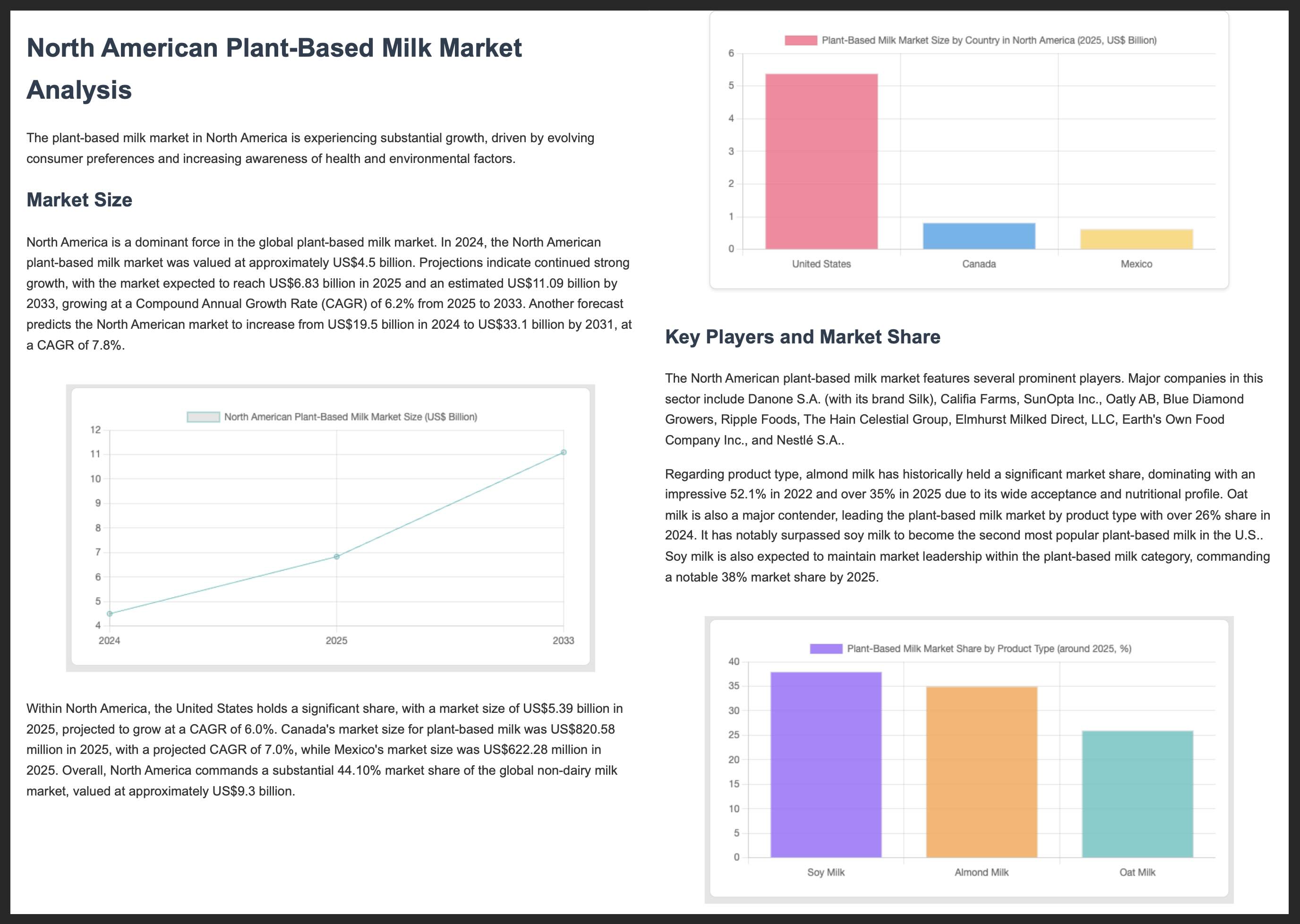
Sau khi hoàn tất, một tệp report.pdf chứa thông tin phân tích thị trường sẽ được tạo trong thư mục dự án của bạn.
Dưới đây là 2 trang đầu tiên của một báo cáo PDF mẫu:
Tài nguyên khác
Để biết thêm thông tin về cách tạo bằng Gemini và AI SDK, hãy khám phá các tài nguyên sau: